archify
Turn any idea, plan, or codebase into a beautiful interactive diagram. An agent skill for Claude Code, Codex, and more.
- 99k
- JavaScript
- Apache-2.0
- 3 h ago
A tiny svg flowchart javascript lib.
Repo TimRChen/flowchart.js, read from GitHub 22 min ago. TimRChen has not joined Take My Repo.
TimRChen/flowchart.js is a public repo on GitHub by TimRChen. A tiny svg flowchart javascript lib. It declares the MIT license on GitHub. It is written mainly in JavaScript, has 2 stars and last changed on 2023-01-07. Nobody has reviewed it on Take My Repo yet, which says nothing about its quality. Read from GitHub on 2026-11-21.


A tiny svg javascript lib, Ability to quickly draw flowchart and topology graph.
Two configurable modes: link-mode and render-mode.
link-mode: quickly start flowchart config.
render-mode: quickly drawing topological relationships.
$ npm install flowchart-core
$ yarn flowchart-core
// create topology graph, just use one statement.
import { RSGraph } from 'flowchart-core';
const nodes = [
    {
        id: 'root',
        children: ['node1', 'node2'],
        title: 'start',
        desc: '1',
        parent: null,
    },
    {
        id: 'node1',
        children: [],
        title: 'doing',
        desc: '2',
        parent: 'root',
    },
    {
        id: 'node2',
        children: [],
        title: 'end',
        desc: '3',
        parent: 'root',
    },
];

// create node div dom element. this just a case.
nodes.forEach(node => {
    const { title, desc } = node;
    const body = document.querySelector('body');
    const div = document.createElement('div');
    div.setAttribute('data-rsgraph-id', node.id);
    div.setAttribute('class', 'item');
    div.innerHTML = `<div class="desc">${desc}</div><div class="title">${title}</div>`;
    body.appendChild(div);
});

const config = {
    data: nodes,
    zoom: true, // default is false
    direction: 'x-axis', // x-axis || y-axis. default value is 'y-axis'
    coreOptions: {
        style: {
            borderTop: '1px dashed #000',
            overflow: 'scroll',
        },
        line: {
            style: {
                stroke: 'deepskyblue',
            },
            arrow: {
                style: {
                    fill: '#888',
                },
                viewBox: '0 0 18 18',
            },
        },
        linkDot: {
            display: 'none', // default is display: none
        },
        mode: 'link-mode', // set link-mode will not work.
    },
};

const graph = new RSGraph('#svg-container', config);
[warning] Add data-rsgraph-id attribute to the DOM element of node before using it.
<!-- html -->
<svg id="svg-container"></svg>
import { Core, Node } from 'flowchart-core';
// initial Core.
const core = new Core('#svg-container', {
    style: {
        width: 1000,
        height: 600,
        border: '1px dashed #000',
    },
    mode: 'link-mode',
});
// define node container width & height.
const width = 140;
const height = 70;
// initial Node.
const node = new Node({
    position: {
        x: 100,
        y: 50,
    },
    style: {
        width,
        height,
        strokeWidth: 2,
        stroke: 'black',
        cursor: 'grab',
        rx: 10,
    },
});

// zoom graph
core.zoom();

// add node to container
core.addNode(node);
| prop | type | desc | must |
|---|---|---|---|
| selectors | CSS selectors | Svg DOM selector name | 1 |
| options | coreOptions | core config options | 1 |
| prop | type | desc | must |
|---|---|---|---|
| style | stylesheet | css style | 1 |
| line | lineObject | link path config | 0 |
| linkDot | linkDotObject | link dot config | 0 |
| mode | String | link-mode. render-mode. | 1 |
link line props.
| prop | type | desc | must |
|---|---|---|---|
| style | stylesheet | css style | 0 |
| arrow | arrowObject | line arrow config | 0 |
Onlythe following table styles can be used.
| prop | type | desc | must |
|---|---|---|---|
| r | radius | <circle> attr r radius |
0 |
| fill | fill color | color | 0 |
| stroke | stroke color | color | 0 |
| strokeWidth | stroke width | px | 0 |
| display | css display | display value | 0 |
| prop | type | desc | must |
|---|---|---|---|
| style | stylesheet |
css style | 0 |
| viewBox | String |
svg viewBox | 0 |
const options = {
    style: {
        width: '100vw',
        height: '100vh',
        border: '1px dashed #000',
    },
    line: {
        style: {
            stroke: 'deepskyblue',
        },
        arrow: {
            style: {
                fill: 'deepskyblue',
            },
            viewBox: '0 0 18 18',
            d: 'M1,2 L8,6 L1,10 Z',
        },
    },
    linkDot: {
        r: 2,
        fill: 'deepskyblue',
        stroke: 'deepskyblue',
        strokeWidth: 2,
    },
};
| prop | type | desc | must |
|---|---|---|---|
| config | nodeConfig | node config |
1 |
| prop | type | desc | must |
|---|---|---|---|
| style | stylesheet | css style | 1 |
| position | positionObject | node position in svg | 1 |
| html | htmlObject | 1 | 1 |
| prop | type | desc | must |
|---|---|---|---|
| x | x axis |
MouseEvent.clientX | 1 |
| y | y axis |
MouseEvent.clientY | 1 |
| prop | type | desc | must |
|---|---|---|---|
| meta | DomInstance |
Dom element | 1 |
const config = {
    position: {
        // node position in svg.
        x: 100,
        y: 150,
    },
    style: {
        width: 140,
        height: 70,
    },
    html: {
        meta: '<div>...</div>', // html template.
    },
};
| prop | type | desc | must |
|---|---|---|---|
| config | edgeConfig | edge config |
0 |
| prop | type | desc | must |
|---|---|---|---|
| style | stylesheet |
css style | 1 |
const config = {
    style: {
        stroke: 'deepskyblue',
    },
};
| prop | type | desc | must |
|---|---|---|---|
| selectors | CSS selectors | css selectors | 1 |
| config | rsGraphConfig | rsgraph config | 0 |
| prop | type | desc | must |
|---|---|---|---|
| data | Array |
node relation data | 1 |
| zoom | Boolean |
zoom in or zoom out | 0 |
| direction | String |
change the direction of topological | 0 |
| coreOptions | coreOptions | core config options | 0 |
const config = {
    data: nodes,
    zoom: true,
    direction: 'x-axis', // x-axis || y-axis. default value is 'y-axis'
    coreOptions: {
        style: {
            borderTop: '1px dashed #000',
            overflow: 'scroll',
        },
        linkDot: {
            display: 'none', // default is display: none
        },
        mode: 'link-mode', // set link-mode will not work.
    },
};
| prop | type | desc |
|---|---|---|
| addNode(node) | Function |
add node to svg container |
| addEdge(edge, config) | Function |
add a path to svg container to describe the relationship between nodes, just use in render mode, config: { source, target, dotLink, dotEndLink } |
| deleteNode(node) | Function |
delete node data and remove node from svg container |
| deleteEdge(edge) | Function |
delete edge data and remove edge from svg container |
| showSvgElement(svgElement, type) | Function |
show a svg element. enum value is 'node' or 'edge' |
| hiddenSvgElement(svgElement, type) | Function |
hidden a svg element. enum value is 'node' or 'edge' |
| zoom() | Function |
make graph zoom in or zoom out. drag-and-drop are not supported after called zoom() |
| zoomClose() | Function |
close zoom,Core.mode value back to Core.options.mode value |
// eg. how to appendChild a edge in core instance.
const coreInstance = new Core('#svg-container', { ... });
const edgeInstance = new Edge({ ... });
coreInstance.addEdge(edgeInstance, {
    source: sourceNode.id,
    target: targetNode.id,
    dotLink: 'bottom',
    dotEndLink: 'top'
});
| prop | type | desc |
|---|---|---|
| changePosition(position) | Function |
change node position, attribute is a positionObject |
// eg. how to change the position attribute.
const coreInstance = new Core('#svg-container', { ... });
const nodeInstance = new Node({ ... });
nodeInstance.changePosition({
    x: 130,
    y: 100,
});
More
complex effectscan be achieved through these exposure methods.
Core| prop | type | desc |
|---|---|---|
| container | SvgElement<svg> |
Svg Dom |
| nodes | Array<Object> |
node dom list |
| edges | Array<Object> |
edge dom list |
| nodeG | SvgElement<g> |
<g> tag. nodes container |
| edgeG | SvgElement<g> |
<g> tag. edges container |
Node| prop | type | desc |
|---|---|---|
| id | Number |
unique node id |
| node | SvgElement<g> |
node container <g>. As real node to use. Accessible to all DOM attribute values on it |
| html | String |
html element embed in node inside |
| style | stylesheet |
node style |
// eg. how to make a node instance visible or hidden.
const coreInstance = new Core('#svg-container', { ... });
const nodeInstance = new Node({
    position: {
        x: 100,
        y: 100,
    },
    style: {
        width,
        height,
    },
});
const operatorType = 'node';
// hidden.
coreInstance.hiddenSvgElement(nodeInstance, operatorType);
// visible.
coreInstance.showSvgElement(nodeInstance, operatorType);
Edge| prop | type | desc |
|---|---|---|
| id | Number |
unique edge id |
| edge | SvgElement<g> |
edge container <g> |
| source | Number |
source node id |
| target | Number |
target node id |
| dotLink | String |
node start link dot's position: top | bottom| left | right |
| dotEndLink | String |
node end link dot's position: top | bottom | left | right |
| lineData | String |
link path data. <path> prop d |
// eg. create edge instance & append child on svg
const coreInstance = new Core('#svg-container', { ... })
const edgeInstance = new Edge({
    style: {
        stroke: 'deepskyblue',
    },
});
// key step.
coreInstance.addEdge(edgeInstance, {
    source: sourceNode.id,
    target: targetNode.id,
    dotLink: 'bottom',
    dotEndLink: 'top'
});
how to embed self define div node)

TimRChen/flowchart.js is a public repo on GitHub by TimRChen. A tiny svg flowchart javascript lib.
It declares the MIT license on GitHub.
Its maker has not tagged a system, so it is unknown here. Its README says what it needs.
Open "Take it" on its page: Take My Repo writes an install plan for your machine and hands it to your AI agent (Claude Code, Codex or Cursor), which asks you before each step. Take My Repo has not tested it on any machine.
Its last change on GitHub was on 2023-01-07. Take My Repo does not judge from that whether it is maintained.
Nobody has reviewed it on Take My Repo yet, which says nothing about its quality.
Turn any idea, plan, or codebase into a beautiful interactive diagram. An agent skill for Claude Code, Codex, and more.
js2flowchart - a visualization library to convert any JavaScript code into beautiful SVG flowchart. Learn other’s code. Design your code. Refactor code. Document code. Explain code.
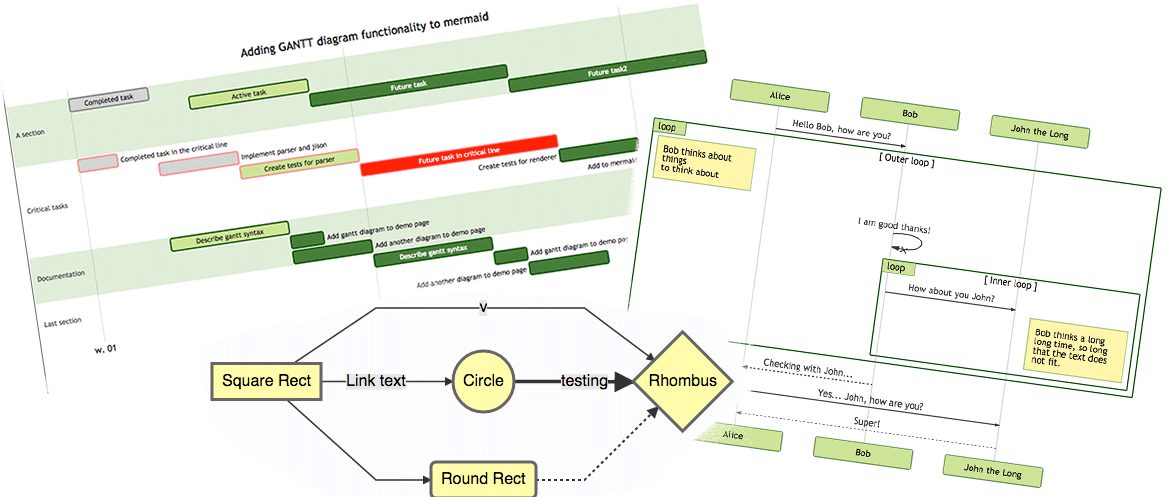
Generation of diagrams like flowcharts or sequence diagrams from text in a similar manner as markdown
Bring data to life with SVG, Canvas and HTML. :bar_chart::chart_with_upwards_trend::tada:
OpenWrt router-mode port of atameric/ps5-portal-high-bitrate (high-bitrate relay for PS Portal)