
pixelgate
Self-hosted visual regression gate: Playwright capture, pixelmatch/SSIM diff, static review page, CI + agent-friendly exit codes. Vite and Vitest adapters. MIT.
- 1
- MIT
- 3 d ago
Repo 2233admin/pixelgate, read from GitHub 1 min ago. 2233admin has not joined Take My Repo.
In short
2233admin/pixelgate is a public repo on GitHub by 2233admin. Self-hosted visual regression gate: Playwright capture, pixelmatch/SSIM diff, static review page, CI + agent-friendly exit codes. Vite and Vitest adapters. MIT. It declares the MIT license on GitHub. It is written mainly in Rust, has 1 stars and last changed on 2026-11-18. Nobody has reviewed it on Take My Repo yet, which says nothing about its quality. Read from GitHub on 2026-11-21.
pixelgate
English · 中文

Self-hosted visual regression testing. MIT licensed, no SaaS, no account.
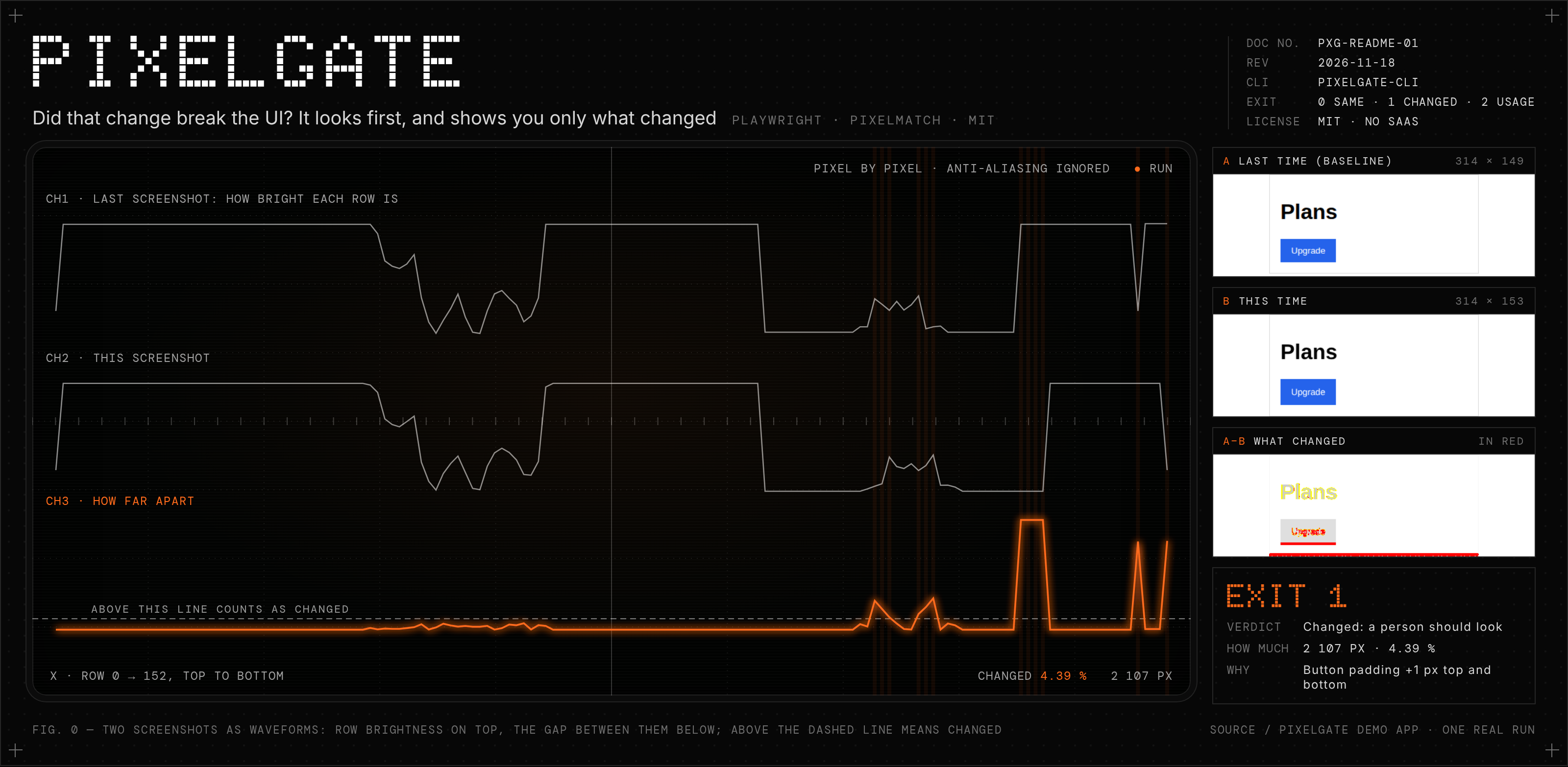
pixelgate renders your pages or Storybook stories in real browsers (Playwright), diffs them pixel by pixel against a committed baseline, writes a static review page, and exits non-zero when something changed. That exit code is the gate: for CI, for a pre-push hook, or for a coding agent checking its own UI work.
Why
Frontend review is slow because a human has to look at every screen after every change. pixelgate does the looking. People (or agents) only review the snapshots that actually changed, side by side, with the changed pixels marked.
Hosted services such as Happo do this well, but the rendering farm, the diff engine and the review UI are closed. pixelgate keeps all of it local: baselines live in your repo, the report is a folder of PNGs plus one HTML file.

Install
pnpm add -D pixelgate-cli playwright
pnpm exec playwright install chromium   # plus firefox / webkit if you target them
The npm package is pixelgate-cli (pixelgate is too close to an existing
package name); the command it installs is pixelgate.
playwright is a peer dependency: pixelgate drives your project's Playwright,
so playwright install always fetches the browser build that version expects.
vite and vitest are optional peers, used only by the adapters below.
Node 22.18+ or 23.6+ (so pixelgate.config.ts loads without a build step).
The config can be an ES module even in a "type": "commonjs" package (what
npm init -y writes): pixelgate loads a .ts / .js config with ES module
syntax, and the project files it imports, as ES modules. Files imported later,
from inside a callback such as beforeCapture, keep Node's rules: import them
at the top of the config, or name them .mts / .mjs.
Configure
pixelgate.config.ts in the project root:
import { defineConfig } from 'pixelgate-cli';

export default defineConfig({
  targets: {
    desktop: { browser: 'chromium', viewport: '1280x720' },
    dark: { viewport: '1280x720', colorScheme: 'dark' },
    // Playwright's device list: viewport, scale, user agent, touch, browser.
    phone: { device: 'Pixel 7' },
    // firefox: { browser: 'firefox', viewport: '1280x720' },
  },
  // Plain URLs from a running dev server or preview build...
  pages: [
    { name: 'home', url: 'http://localhost:5173/' },
    { name: 'settings-form', url: 'http://localhost:5173/settings', selector: 'form' },
  ],
  // ...and/or every story of a running Storybook (7+ index.json, 6.x stories.json).
  storybook: { url: 'http://localhost:6006', exclude: ['*--playground'] },

  threshold: 0.1,          // per-pixel colour tolerance (0..1)
  maxDiffPixelRatio: 0,    // share of changed pixels still counted as unchanged
  failOn: ['changed', 'error'],
  stabilize: {
    css: '.clock, .ad { visibility: hidden }',
    fixedTime: '2026-01-01T00:00:00Z',
  },
});
.js, .mjs and .json configs work too.
Interactions
A page entry captures the page as loaded. To capture a state the user reaches
by interacting (an open menu, a selected row, a filled form), give it a
beforeCapture hook. It gets the Playwright Page after load and waitFor,
before the stability loop:
pages: [
  { name: 'graph', url: '/', waitFor: '.node >> nth=2' },
  {
    name: 'graph-selected',
    url: '/',
    waitFor: '.node >> nth=2',
    beforeCapture: (page) => page.locator('.node').nth(1).click(),
  },
],
A hook that throws (say, a selector that no longer exists) makes that snapshot
an error, not a crashed run. Hooks are functions, so they need a .ts,
.js or .mjs config.
Use
pixelgate run          # capture + diff + report; exit 1 if the gate fails
pixelgate run -u       # also overwrite baselines that changed (accept everything)
pixelgate run --ci     # CI mode: write no baselines, fail on missing ones (automatic when CI is set)
pixelgate approve      # accept changed/added snapshots from the last run as the new baseline
pixelgate approve --only 'button--*'
pixelgate approve --prune   # also delete baselines whose page/story is gone
pixelgate approve --from <dir>  # accept from another run's out dir, e.g. a downloaded CI artifact
pixelgate summary      # the last report as Markdown (PR comment, CI job summary)
pixelgate run --json   # report JSON on stdout, for scripts and agents
pixelgate skill        # the agent skill; `skill install` writes it for Claude Code
pixelgate --version
Exit codes: 0 pass, 1 a status or check finding listed in failOn is present, 2 usage or config error.
Snapshot statuses:
| status | meaning |
|---|---|
unchanged |
matches baseline |
changed |
pixels differ beyond tolerance, or size changed |
added |
no baseline yet (see baseline modes) |
updated |
baseline overwritten by -u |
removed |
baseline exists but the page/story is gone |
error |
page failed to load, timed out, or never held still |
Baseline modes
Same three modes as Vitest's updateSnapshot (update in the config, or the flags):
| mode | when | missing baseline | mismatch |
|---|---|---|---|
new |
local default | written to baseline/, status added, passes |
changed, fails |
none |
CI set, or --ci |
screenshot to current/, status added, fails |
changed, fails |
all |
-u |
written to baseline/ |
baseline overwritten, updated, passes |
So a new page or story can't slip through CI without a reviewed baseline.
Per-platform baselines
Font rasterisation differs between Windows, macOS and Linux, so baselines live
in <target>-<platform>/ (e.g. desktop-linux/), as Vitest does in its file
names. A Linux CI run never compares against baselines made on Windows: it
reports them as missing instead of failing with noise. Create the CI
platform's baselines from a CI run (--ci leaves them in current/, then
pixelgate approve). Set platformSpecific: false to share one set.
Files
.pixelgate/
  baseline/<target>-<platform>/<name>.png   # commit this
  baseline/<target>-<platform>/<name>.aria.yml  # with `ariaSnapshot`: commit this too
  current/<target>-<platform>/<name>.png    # last run, git-ignored
  diff/<target>-<platform>/<name>.png       # red = changed pixels, git-ignored
  report/index.html              # open in a browser: side by side, diff, slider
  report/report.json             # machine-readable result
Add to .gitignore:
.pixelgate/current/
.pixelgate/diff/
.pixelgate/report/
Comparators and formats
Comparison is pluggable the way Vitest's toMatchScreenshot is: a comparator
gets two decoded RGBA images and returns { pass, diffPixels, diffRatio, sizeChanged, diff, message }.
comparator |
judges | tolerance |
|---|---|---|
pixelmatch (default) |
each pixel's colour; ignores detected anti-aliasing | threshold, maxDiffPixelRatio, maxDiffPixels |
ssim |
each local window's luminance/contrast/structure, per R/G/B channel | minSimilarity (per window, default 0.8), maxDiffPixelRatio |
ssim fails on any window below minSimilarity, not on the mean score, so a
small change in a large page can't average away. It also runs per colour
channel, because luma-only SSIM can't see a blue to green change of similar
brightness. Measured on the calibration scenes in test/unit.test.ts:
scattered ±20 noise and a +16 brightness shift pass, a 1px element shift, a
hue change or a moved box fail. The failure message names the share of the
image, the worst window and the mean.
export default defineConfig({
  comparator: { name: 'ssim', options: { minSimilarity: 0.7 } },
  // or your own, same contract:
  comparators: { myDiff: (reference, actual, { createDiff }) => ({ pass, diffPixels, diffRatio, sizeChanged, diff, message }) },
  format: 'jpeg',          // baseline/current files: 'png' (default) | 'jpeg' | a key of `codecs`
  codecs: { /* name: { extension, decode, encode, screenshot? } */ },
});
JPEG (quality 90) makes baselines several times smaller; Playwright captures
it natively. Custom codecs (e.g. WebP via sharp) get a PNG capture
re-encoded. Diff images are always PNG.
Vite
Let pixelgate start your Vite app for the run; page URLs become relative:
export default defineConfig({
  vite: { mode: 'dev' },          // or 'preview' (runs `vite build` first unless build: false)
  pages: [
    { name: 'home', url: '/' },
    { name: 'settings', url: '/settings', selector: 'main' },
  ],
});
pixelgate loads the project's own vite (5 or later), starts the server on
127.0.0.1 (HMR off), resolves relative URLs against it (your base, e.g.
/app/, is kept), and closes it when the run ends. Options: root,
configFile, port, build. Not on Vite? Run your server yourself and set
baseUrl: 'http://localhost:3000'.
Vitest browser mode
Already writing component tests with Vitest browser mode and
toMatchScreenshot? Keep them. pixelgate only routes the files into its
layout and writes the review page, so pixelgate approve and the HTML report
work the same for both:
// vitest.config.ts
import { playwright } from '@vitest/browser-playwright';
import { PixelgateReporter, pixelgateScreenshots } from 'pixelgate-cli/vitest';
import { defineConfig } from 'vitest/config';

export default defineConfig({
  test: {
    reporters: ['default', new PixelgateReporter()],
    browser: {
      enabled: true,
      provider: playwright(),
      instances: [{ browser: 'chromium' }],
      expect: { toMatchScreenshot: pixelgateScreenshots() },
    },
  },
});
// Button.browser.test.ts
import { expect, test } from 'vitest';
import { page } from 'vitest/browser';

test('primary button', async () => {
  render(<Button variant="primary">Save</Button>);
  await expect(page.getByRole('button')).toMatchScreenshot('primary');
});
- Reference:
.pixelgate/baseline/<browser>-<platform>/<test-file>_<name>.png(pixelgateScreenshots({ platformSpecific: false })drops the platform) - On a mismatch Vitest fails the test; the new screenshot goes to
.pixelgate/current/, the diff to.pixelgate/diff/. - After each run the reporter writes
.pixelgate/report/, with the changed share and pixel count of each mismatch (measured by pixelgate with pixelmatch at threshold 0.1; Vitest's own comparator still decides pass/fail). Review it, thenpixelgate approve(no pixelgate config needed;--out-dirif you moved it), orvitest -uto accept everything.
Vitest also copies failure images into its own attachments directory
(.vitest/ by default); git-ignore it next to the .pixelgate/ entries.
Comparison, retries and thresholds stay Vitest's (comparatorName,
comparatorOptions in the same toMatchScreenshot block).
Playwright Test
Take pixelgate snapshots inside your Playwright tests, after the test has put
the page in the state you want (Happo: happoScreenshot). They run pixelgate's
own capture on the test's page: the stability loop, hide and mask, the
comparator and format, checks and ARIA snapshots.
// playwright.config.ts
import { defineConfig, devices } from '@playwright/test';
import type { PixelgateOptions } from 'pixelgate-cli/playwright';

export default defineConfig<{ pixelgateOptions: PixelgateOptions }>({
  reporter: [['list'], ['pixelgate-cli/playwright-reporter']], // required
  use: { pixelgateOptions: { ariaSnapshot: true, checks: { a11y: true } } },
  projects: [
    { name: 'desktop', use: { browserName: 'chromium' } },
    { name: 'phone', use: { ...devices['Pixel 7'] } },
  ],
});
// card.spec.ts
import { expect, test } from 'pixelgate-cli/playwright'; // Playwright's test + expect, plus `pixelgate`

test('card', async ({ page, pixelgate }) => {
  await page.goto('/cards');
  await page.getByRole('button', { name: 'More' }).click();
  await pixelgate.screenshot('card/expanded', { locator: page.locator('.card').first() });
  await pixelgate.screenshot('cards page', { mask: [page.locator('.clock')] });
});
pixelgate.screenshot(name, { locator, fullPage, mask, maxHeight, maxWidth, includeOutlinesAndShadows, ariaSnapshot })compares with.pixelgate/baseline/<project>-<platform>/<name>.pngand returns the result. The project's name is the target;namemust be unique per project.- A change does not fail the test: the reporter writes the review page
and fails the run per
failOn, likepixelgate run. It also attaches expected / actual / diff images to the test, so Playwright's HTML report shows them. Without the reporter the fixture refuses to run, since nothing would gate. A capture error does fail the test. - Baseline mode:
pixelgateOptions.updateif set; else--update-snapshots(all/changedoverwrite,missingwrites new,nonewrites nothing), else pixelgate's rule (nothing written in CI).pixelgate approveandapprove --fromwork on the result as on any other run. pixelgateOptionstakes the comparison, capture and check options of the config file (threshold,comparator,format,stabilize,hideBehavior,mask,checks,ariaSnapshot,maxHeight,applyPseudoClasses,failOn,outDir, ...). Navigation, emulation and network belong to Playwright: set the clock withpage.clockand block hosts withpage.route.- Not yet:
removeddetection (a filtered run cannot tell a deleted test from a skipped one) and merging sharded runs. Keep the Playwright TestoutDirapart from apixelgate runone whose target has the same name, orrun --prunewould see the other's baselines as removed.
Stable screenshots
Before every capture pixelgate:
- waits for
load, then up to 5 s for network idle, thendocument.fonts.readyand pending image decodes; - injects CSS that zeroes animations and transitions and hides the caret, and uses Playwright's
animations: 'disabled'; - runs with
locale: en-US,timezoneId: UTCand, unless the target says otherwise,reducedMotion: 'reduce'and a light colour scheme; - optionally freezes
Date.now()(stabilize.fixedTime); - then captures until the page holds still, like Vitest's
toMatchScreenshot: if the first screenshot matches the baseline it's done (one capture, no decode when the bytes are identical); otherwise it keeps capturing until two consecutive screenshots match. Captures are spacedstabilize.stableIntervalMsapart (default 100): a screenshot can take ~15 ms, faster than a 30 ms JS ticker, and back-to-back shots would catch the same frame. A page still moving afterstabilize.stableTimeoutMs(default 5000,0= single shot) is reported as anerrorwith its last frame incurrent/, instead of a flakychanged.
CSS can stop animations but not JavaScript timers (tickers, carousels, data arriving late); the stability loop is what covers those.
Targets
| target option | default | |
|---|---|---|
browser |
the device's, else chromium |
chromium, firefox, webkit |
device |
a name from Playwright's device list ('iPhone 15', 'Pixel 7', 'iPad Pro 11'): viewport, scale factor, user agent, touch, mobile mode |
|
viewport |
the device's, else 1280x720 |
wins over the device's |
deviceScaleFactor |
the device's, else 1 |
|
colorScheme |
light |
dark, no-preference |
reducedMotion |
reduce |
no-preference |
extraHTTPHeaders |
sent with every request | |
hideBehavior |
the top-level one | see below |
Firefox has no mobile emulation, so a mobile device on browser: 'firefox'
is a config error.
Hiding, masking and blocking
Content that changes on its own (a visitor counter, a clock, an ad) does not belong in a baseline. Mark it:
<span data-pixelgate-hide>1,289 visitors</span>
hideBehavior |
effect |
|---|---|
hide (default) |
visibility: hidden while the screenshot is taken; the element keeps its space |
ignore |
the element stays visible in the page but is painted over with a solid box, so it never makes a diff |
For content you cannot mark (third-party widgets), list selectors to paint over, in every snapshot or per page / Storybook source:
export default defineConfig({
  mask: ['.intercom-launcher'],
  maskColor: '#FF00FF', // default
  pages: [{ name: 'home', url: '/', mask: ['.live-price'] }],
});
Masked boxes are part of the screenshot, so adding a mask changes the baseline once.
Blocking requests. Anything loaded from a third party (fonts, scripts,
images, analytics) changes when that third party does and fails when it is
down. allowedHostnames blocks every request and WebSocket to a hostname that
matches none of its globs before it leaves the browser:
export default defineConfig({
  allowedHostnames: [], // only the snapshot URLs' own hosts
  // allowedHostnames: ['fonts.gstatic.com', '*.cdn.example.com'],
});
The hosts of the snapshot URLs themselves (the Vite server, baseUrl,
Storybook) are always allowed. Each snapshot reports the hostnames it blocked
(blocked in report.json, and on the review page), so a missing font is
easy to trace. Unset (the default), nothing is blocked and the HTTP cache
stays on.
In Vitest browser mode, Vitest takes the screenshots, so these options do not
apply there. With the Playwright provider, toMatchScreenshot's
screenshotOptions take Playwright's own mask and style.
Size caps, outlines and pseudo-classes
export default defineConfig({
  maxHeight: 5000, // default; 0 = no cap. Also maxWidth. Per target and per page too.
  includeOutlinesAndShadows: true, // selector crops keep focus rings and box-shadows
  applyPseudoClasses: true, // data-pixelgate-hover / -focus / -focus-visible / -active
});
-
maxHeight/maxWidth(Happo's, default 5000px tall, no width cap): a longer page or element is cut off at the cap, and the result says how big it was (capped, shown in the report, the comment and the CLI). Screenshots under the cap are taken exactly as before. A viewport screenshot (fullPage: false) is never cut. -
includeOutlinesAndShadows: aselectorcrop normally stops at the element's border box and cuts off its focus ring or shadow. With this on it grows to cover the outlines and outer box-shadows of the element and its descendants (e.g. a button inside#storybook-root), scaled with their CSS transforms. Global, per Storybook source, per page.filter: drop-shadowis not measured. -
applyPseudoClasses: mark elements to show a state without moving the mouse, several at once:<button data-pixelgate-hover>Save</button> <a href="#" data-pixelgate-focus-visible>Docs</a>
pixelgate rewrites every CSS rule that uses
:hover,:focus,:focus-visibleor:active::hoverbecomes:is(:hover, [data-pixelgate-hover]), with the same specificity, so:not(:hover)rules and nested rules follow too (inside@media,@supports,@layer, nesting,@importand open shadow roots as well). It works in every browser. Stylesheets from another origin cannot be read; they are listed in the result (unreadableStylesheets). The browser's own default focus ring is not a CSS rule: for that, focus the element inbeforeCapture.
Grown crops and capped screenshots are clips of the full page: unlike a plain element screenshot they do not scroll the element into view first, so sticky headers and lazy content render as they do at the top of the page.
Checks: accessibility, overflow, errors
Some problems need no baseline to be problems. pixelgate can check every
snapshot for them, right after its screenshot (Happo: accessibility targets,
detectHorizontalOverflow, render errors; Bombadil's default properties:
console errors, HTTP errors):
export default defineConfig({
  checks: {
    a11y: true, // axe-core, WCAG 2.0 + 2.1 A/AA
    // a11y: { tags: ['wcag22aa'], disableRules: ['color-contrast'], minImpact: 'serious' },
    consoleErrors: true,
    httpErrors: { ignore: ['/analytics/'] }, // leave out URLs containing these
  },
  targets: {
    desktop: { viewport: '1280x720' },
    phone: { device: 'Pixel 7', checks: { overflow: true } }, // per target
  },
  failOn: ['changed', 'error', 'a11y'], // make a check gate
});
| check | finds | in the result |
|---|---|---|
a11y |
axe-core rule violations; for a selector snapshot, in the element the screenshot captured |
a11y: rule id, impact, help link, element count, first selectors |
overflow |
a page wider than the viewport, i.e. one that scrolls sideways | overflowPx: how far past the right edge |
| page errors | uncaught exceptions and unhandled promise rejections while rendering (always collected) | pageErrors |
consoleErrors |
console.error and other error-level console messages while rendering |
consoleErrors: message and the URL that logged it |
httpErrors |
responses with status 400 or more, and requests that got no response (net::ERR_*), while rendering |
httpErrors: status or failure, method, URL, resource type |
consoleErrors and httpErrors take true or { ignore: [...] }: findings
containing one of those strings (the message, or the request URL) are left
out. Each keeps at most 20 distinct findings per snapshot and counts the rest.
httpErrors leaves out requests the page cancelled itself, requests
allowedHostnames blocked (reported as blocked), and a missing
/favicon.ico. With httpErrors on, Chromium's own "Failed to load
resource" console lines are left to it, so a 404 counts once.
Findings are counted in the summary (summary.a11y, summary.overflow,
summary.pageErrors, summary.consoleErrors, summary.httpErrors) and shown
on the review page (filter "Checks"), in the CLI output and in the
pull-request comment. They fail the run only when failOn lists them
('a11y', 'overflow', 'pageErrors', 'consoleErrors',
'httpErrors'), so you can turn
a check on, look at what it finds, and then make it gate. approve accepts
pixels, not findings: an approved snapshot that still has a gating finding
keeps the run failing until the page is fixed.
Explore (property-based testing)
Checks above look at pages you listed. pixelgate explore finds states you did
not think of: an engine clicks, types and scrolls through the page at random and
checks properties (LTL formulas) after every step, by default "no uncaught
exceptions" and the like. pixelgate starts Chromium with Playwright, so its
config applies, and the engine attaches to that page. The engine is
Bombadil, vendored in engine/ and
built per engine/README.md.
The engine is downloaded on first use from the GitHub release matching the
installed pixelgate version, verified against the sha256 pinned in the package
(engine-manifest.json), and cached in <cache>/pixelgate/engine/<version>/
(%LOCALAPPDATA% on Windows, else $XDG_CACHE_HOME or ~/.cache). Run
pixelgate engine install to fetch it ahead of time (CI), pixelgate engine path
to print where it is. Platforms: Windows x64 and arm64 (runs the x64 build),
Linux x64 and arm64 with glibc, macOS arm64; elsewhere build it and set
PIXELGATE_ENGINE.
| Variable | |
|---|---|
PIXELGATE_ENGINE |
Use this binary; nothing is downloaded. |
PIXELGATE_ENGINE_MIRROR |
Base URL instead of https://github.com/2233admin/pixelgate/releases/download (<base>/v<version>/<file>). The pinned hash keeps any mirror safe. |
PIXELGATE_ENGINE_OFFLINE=1 |
Never download; fail if the cache is empty. |
PIXELGATE_CACHE_DIR |
Cache root. |
PIXELGATE_ENGINE_TIMEOUT_MS |
Download timeout, default 120000. |
NODE_USE_ENV_PROXY=1 |
Make the download honour HTTP(S)_PROXY (Node 22.21+ or 24+; older Node ignores it, so download the engine yourself and set PIXELGATE_ENGINE). |
Verifying the engine: npm provenance covers the package, whose
engine-manifest.json pins each binary's sha256. The release also carries
SHA256SUMS, and gh attestation verify <file> --repo 2233admin/pixelgate
checks the build provenance of a binary.
pixelgate explore http://localhost:3000 --engine path/to/bombadil --time-limit 2m
pixelgate explore http://localhost:3000 my-spec.ts # own properties; PIXELGATE_ENGINE instead of --engine| Flag | |
|---|---|
--engine <path> |
Engine binary; else PIXELGATE_ENGINE, else the downloaded one. Missing: exit 2. |
--time-limit <dur> |
60s default; a number with s/m/h/d. |
--keep-going |
Keep exploring after a violation (default stops at the first). |
--headed |
Show the browser. |
--width, --height, --device-scale-factor |
Viewport, default 1280x720 at 1. No --device mobile emulation. |
--allow-url <pattern> |
Exploration boundary as a Chrome match pattern, repeatable. Not derived from allowedHostnames. |
From the pixelgate config (if there is one) it uses outDir, extraHTTPHeaders
(first Chromium target) and allowedHostnames, all applied by Playwright; headers
never reach the engine's command line. The programmatic explore(options) takes
the same options.
Output in <outDir>/explore/: explore.html (violations first, with the
screenshot of their state and what the property saw, then every state),
explore.json, states/ (screenshots), trace.bin (replay it with the
engine's --reproduce) and engine.log.
Exit code: 0 no violations, 1 violations in the trace, 2 engine, usage or trace problem (the engine's own exit code is not used for violations).
Specs are Bombadil-compatible: see its documentation for writing properties and custom actions.
Caveats: Chromium only. The explored page's scripts are instrumented for
coverage, so its timings and screenshots are not comparable to captures.
Exploration clicks every button and submits every form it finds, including
destructive ones: run it against local or throwaway environments (pixelgate warns
for any origin that is not localhost, 127.0.0.1, [::1], *.localhost or
file:).
ARIA snapshots
A screenshot shows what the page looks like. An ARIA snapshot records what a
screen reader gets from it: roles, accessible names, states and text, as YAML
(Playwright's ariaSnapshot()). Turn it on and every snapshot keeps a
<name>.aria.yml baseline next to its screenshot (Happo: ARIA snapshots):
export default defineConfig({
  ariaSnapshot: true,
  targets: {
    desktop: { viewport: '1280x720' },
    firefox: { browser: 'firefox', ariaSnapshot: false }, // per target
  },
  pages: [{ name: 'home', url: '/', ariaSnapshot: false }], // per page; the most specific wins
});
# .pixelgate/baseline/desktop-linux/home.aria.yml
- heading "Title" [level=1]
- button "Close": x
- paragraph: Now
- The tree is compared as text, exactly: no thresholds, no partial or regex
matching. A changed tree marks the snapshot
changedeven when its pixels are identical (a renamed button, a lost label, a different heading level). - It follows the baseline modes of the screenshots:
addedwithout a baseline,updatedwith-u, nothing written in CI. Turning it on for an existing suite therefore fails CI asaddeduntil the.aria.ymlfiles are approved (locally, or withapprove --fromand the CI artifact). - The review page, the pull-request comment and the CLI show the unified diff
(cut at about 200 lines; the whole tree is in the
.aria.yml). approveaccepts the screenshot and its ARIA snapshot together. A.aria.ymlwith no ARIA snapshot in a run (turned off, or the snapshot is gone) is reported asremoved;approve --prunedeletes it.- A
selectorsnapshot records the element the screenshot captured (the first match).data-pixelgate-hideand masked elements are left out of the tree, as they are left out of the pixels.
pixelgate writes LF and ignores CRLF when it compares, so a Windows checkout
with core.autocrlf still matches. To keep the files LF in the working tree
too, add to .gitattributes:
*.aria.yml text eol=lf
For coding agents
skills/pixelgate/SKILL.md is an agent skill: how to check only what changed with --only, read the report, and approve baselines one by one. It ships in the package, so it always matches the installed CLI:
pixelgate skill                 # print it
pixelgate skill install         # write .claude/skills/pixelgate/SKILL.md (Claude Code)
pixelgate skill install --dir .agents/skills   # another agent's skills folder
Re-run skill install after upgrading pixelgate. npx skills add 2233admin/pixelgate also finds it, since it sits in skills/.
CI and pull requests
This repository is also a GitHub Action. On a pull request it runs the gate, uploads the review report as an artifact, writes a job summary and keeps one comment on the pull request up to date:
# .github/workflows/visual.yml
name: visual
on: pull_request
permissions:
  contents: write # only for images-branch
  pull-requests: write # the comment
jobs:
  visual:
    runs-on: ubuntu-latest
    steps:
      - uses: actions/checkout@v7
      - uses: actions/setup-node@v7
        with:
          node-version: lts/*
      - run: npm ci
      - run: npx playwright install --with-deps chromium-headless-shell
      # Pin the same commit as the pixelgate you installed.
      - uses: 2233admin/pixelgate@<sha>
        with:
          images-branch: pixelgate-images # optional: screenshots in the comment
The comment lists every changed, added, removed and failed snapshot, links the
report artifact and the run, and prints the command that accepts the change.
With images-branch it also shows baseline, current and diff images.
| input | default | |
|---|---|---|
working-directory |
. |
where the pixelgate config is |
command |
npx --no pixelgate |
how to call the CLI there |
args |
extra pixelgate run arguments, e.g. --only 'button--*' |
|
out-dir |
.pixelgate |
the config's outDir |
artifact-name |
pixelgate |
one per job; also keeps the jobs' comments apart |
comment |
true |
a passing run with no earlier comment posts nothing |
images-branch |
branch for the comment's screenshots; empty = no images | |
fail |
true |
fail the step when the gate fails |
github-token |
github.token |
Outputs: result (pass, fail, error) and artifact-url.
Accepting a change. CI renders on Linux; your machine may not. The comment prints a command like this one, to run in the project:
d=$(mktemp -d) && gh run download <run-id> -R <owner>/<repo> -n pixelgate -D "$d" \
  && npx --no pixelgate approve --from "$d"
It downloads the artifact and copies its screenshots into
.pixelgate/baseline/<target>-linux/. Commit and push; the next run passes.
The first run on a platform works the same way: every snapshot is added, the
gate fails, and you accept from the comment.
- Images in the comment come from
raw.githubusercontent.com, so they render for public repositories only. Private repositories still get the table and the report artifact. The images branch only grows; delete it any time. - Pull requests from forks get a read-only token: no comment and no images (both are warnings), the gate itself still runs.
- Other CI:
pixelgate run --ci, keep.pixelgateas an artifact, andpixelgate summaryprints the same Markdown for any comment API.
This repository gates test/fixtures/vite-app with its own action:
.github/workflows/visual.yml.
Programmatic API
import { loadConfig, run, approve } from 'pixelgate-cli';

const cfg = await loadConfig(process.cwd());
const report = await run(cfg, { only: ['home'] });
if (report.failed) console.log(report.results.filter((r) => r.status === 'changed'));
Development
pnpm install
pnpm exec playwright install chromium-headless-shell
pnpm test            # builds dist first; e2e runs real Chromium, a Vite app and a Vitest browser project
pnpm deps:check      # exits non-zero if any dependency is behind latest
pnpm deps:latest     # move everything to latest
Dependency policy: always on the latest release of every dependency. Dependabot
opens the bumps weekly; deps:check must be clean before a release.
Contributions: CONTRIBUTING.md and the Generative AI policy.
Releasing
Releases go out through .github/workflows/release.yml
with npm trusted publishing: no npm token is stored anywhere.
One-time setup, on npmjs.com under pixelgate-cli → Settings → Trusted publishers, GitHub
Actions:
| Field | Value |
|---|---|
| Organization or user | 2233admin |
| Repository | pixelgate |
| Workflow filename | release.yml |
| Environment name | npm |
| Allowed actions | stage publish only |
npm checks these fields only at publish time, and a new trusted publisher expires unless its first publish succeeds within 2 days: create it when a release is ready. Renaming the workflow file or the environment needs a new trusted publisher.
Each release:
- Bump
versioninpackage.jsononmain(a normal PR). Pre-release versions (1.2.0-rc.1) are not supported yet. - Tag that commit of
mainv<version>and push the tag. - The workflow builds the explore engine for each platform (cold, no build cache), checks
the tag against
package.jsonandmain, runs typecheck and tests (the explore e2e on the Linux engine it just built), writesengine-manifest.jsonwith each binary's sha256 into the package, stages the tarball on npm (npm stage publish, with provenance) from a job that installs nothing, attests the engine binaries, and drafts the GitHub release with the binaries,SHA256SUMSandTHIRD_PARTY_LICENSES.htmlattached. - Publish the draft release first:
pixelgate exploredownloads the engine from it. - Then approve the staged version on npmjs.com (Staged Packages, or
npm stage approve <id>), which asks for their 2FA. Only then is it installable. - Run the
engine-checkworkflow with the version: it installs the published package on Windows, Linux and macOS and runspixelgate engine install, which downloads and verifies the release's engine.
Roadmap
Happo parity status and the next slices: docs/happo-parity.md.
- DOM-snapshot capture inside Playwright/Cypress tests, rendered in several browsers
- remote render workers for a browser x viewport matrix
- MCP server so agents can run, read and approve without parsing files
Prior art
Happo (its MIT client inspired the config model and
DOM-snapshot approach), Playwright toHaveScreenshot, Lost Pixel, Argos,
reg-suit, BackstopJS. Bombadil's
default properties inspired the console and HTTP error checks. Diffing uses pixelmatch.
License
MIT
Questions
What is pixelgate?
2233admin/pixelgate is a public repo on GitHub by 2233admin. Self-hosted visual regression gate: Playwright capture, pixelmatch/SSIM diff, static review page, CI + agent-friendly exit codes. Vite and Vitest adapters. MIT.
Is pixelgate open source?
It declares the MIT license on GitHub.
Does pixelgate run on macOS, Windows or Linux?
Its maker has not tagged a system, so it is unknown here. Its README says what it needs.
How do I install pixelgate?
Open "Take it" on its page: Take My Repo writes an install plan for your machine and hands it to your AI agent (Claude Code, Codex or Cursor), which asks you before each step. Take My Repo has not tested it on any machine.
Is pixelgate still maintained?
Its last change on GitHub was on 2026-11-18. Take My Repo does not judge from that whether it is maintained.
What do people who ran pixelgate say?
Nobody has reviewed it on Take My Repo yet, which says nothing about its quality.