
FastCut
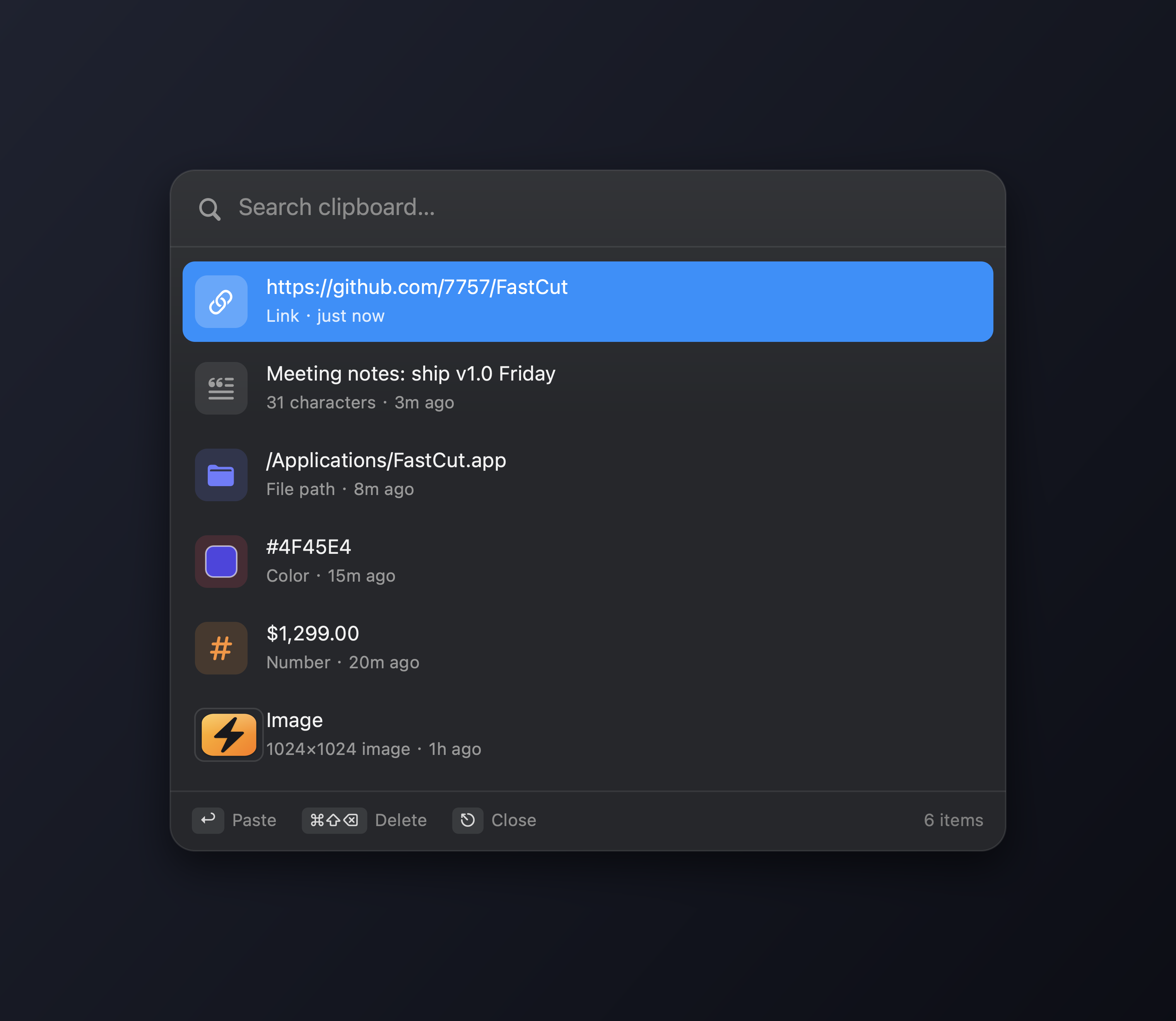
A lightweight native macOS menu-bar clipboard-history manager — global hotkey, searchable history, auto-paste. Plain Swift, no dependencies.
- 0
- MIT
- 2 mo ago
Repo 7757/FastCut, read from GitHub 15 min ago. 7757 has not joined Take My Repo.
In short
7757/FastCut is a public repo on GitHub by 7757. A lightweight native macOS menu-bar clipboard-history manager — global hotkey, searchable history, auto-paste. Plain Swift, no dependencies. It declares the MIT license on GitHub. It is written mainly in Swift, has 0 stars and last changed on 2026-09-17. Nobody has reviewed it on Take My Repo yet, which says nothing about its quality. Read from GitHub on 2026-11-24.
Similar repos
Maccy
Lightweight clipboard manager for macOS



FastCut
A lightweight native macOS clipboard-history manager — a small, no-frills alternative to tools like Maccy / Flycut. Lives in the menu bar, remembers what you copy, and brings the history back with a global hotkey.
⚡ Installation
One-line install — downloads the latest release, installs it to /Applications, and launches it:
curl -fsSL https://7757.github.io/FastCut/install.sh | bash
Homebrew:
brew install --cask 7757/fastcut/fastcut
Manual — grab the latest .app from Releases, move it to /Applications, then right-click → Open on first launch (the app is self-signed, not notarized).
From source — see Build below.
Features
- Clipboard history for text, images, and copied file paths
- Global hotkey (default ⌘⇧V) to open a searchable history popup — fully configurable via a shortcut recorder in Preferences
- Keyboard-driven: type to search,
↑/↓to move,↩to paste,⌘⌫to delete,⎋to close - Auto-paste straight into the app you were using (needs Accessibility permission)
- Menu-bar quick access to the 8 most recent items
- Privacy: entries marked concealed/transient by password managers are ignored automatically
- Persistent across launches; configurable history size; optional launch at login
- Menu-bar only (no Dock icon), self-contained, zero third-party dependencies
Requirements
- macOS 14 or newer (built/tested on macOS 26, Apple Silicon)
- Xcode Command Line Tools (
xcode-select --install) — no full Xcode needed
Build
./build.sh
This compiles the Swift sources with swiftc, assembles FastCut.app, and code-signs it.
Tip — keep Accessibility permission across rebuilds. By default the build is ad-hoc signed, whose identity changes every build, so macOS makes you re-grant Accessibility after each rebuild. Run
Assets/setup-signing.shonce to create a stable self-signed identity;build.shthen signs with it automatically and the Accessibility grant sticks. (The cert is local-only and has no security value.)
Run
open FastCut.app
Or drag FastCut.app into /Applications and launch it there (recommended so macOS remembers
its Accessibility permission across rebuilds).
A clipboard icon appears in the menu bar. Press ⌘⇧V (or your own shortcut) anywhere to open the history.
Permissions
- Clipboard reading and the global hotkey work with no permissions.
- Auto-paste simulates ⌘V, which requires Accessibility permission: System Settings → Privacy & Security → Accessibility → enable FastCut. Until then, selecting an item just copies it to the clipboard so you can paste manually. (The menu bar shows an "Enable Auto-Paste…" shortcut when permission is missing.)
How it works
| File | Responsibility |
|---|---|
main.swift |
Entry point; runs as an accessory (menu-bar) app |
AppDelegate.swift |
Coordinator: status-bar menu, hotkey registration, paste flow |
ClipboardMonitor.swift |
Polls NSPasteboard and records new copies |
HistoryStore.swift |
Ordered history model + JSON/image persistence |
Input.swift |
Carbon global hotkey, CGEvent paste, login item, shortcut formatting |
Popup.swift |
Floating panel, keyboard navigation, show/hide flow |
Views.swift |
SwiftUI history view + Preferences + shortcut recorder |
Settings.swift |
Preferences persisted in UserDefaults |
History and cached images are stored under
~/Library/Application Support/FastCut/.
Uninstall
Quit from the menu bar, delete FastCut.app, and remove
~/Library/Application Support/FastCut/.
Contributing
Issues and pull requests are welcome. The whole app is plain Swift compiled with
swiftc — no Xcode project, no dependencies — so ./build.sh is all you need.
License
MIT © 2026 musk
Questions
What is FastCut?
7757/FastCut is a public repo on GitHub by 7757. A lightweight native macOS menu-bar clipboard-history manager — global hotkey, searchable history, auto-paste. Plain Swift, no dependencies.
Is FastCut open source?
It declares the MIT license on GitHub.
Does FastCut run on macOS, Windows or Linux?
Its maker tagged it for macOS. That is declared by the maker; Take My Repo has not tested it.
How do I install FastCut?
Open "Take it" on its page: Take My Repo writes an install plan for your machine and hands it to your AI agent (Claude Code, Codex or Cursor), which asks you before each step. Take My Repo has not tested it on any machine.




