
fakefilter
reliable fake and temp email filter solution for site operators
- 359
- TypeScript
- BSD-3-Clause
- 2 d ago
aptly cli tool for fast deployment
Repo 7c/aptbase, read from GitHub 1 min ago. 7c has not joined Take My Repo.
7c/aptbase is a public repo on GitHub by 7c. aptly cli tool for fast deployment. It declares the MIT license on GitHub. It is written mainly in Go, has 0 stars and last changed on 2026-08-27. Nobody has reviewed it on Take My Repo yet, which says nothing about its quality. Read from GitHub on 2026-11-21.
In the maintainer's words. Shown from GitHub; Take My Repo does not keep a copy.
A human-friendly command-line client for the aptly
REST API. aptbase drives one or more remote aptly servers over HTTP so you
can manage Debian/Ubuntu package repositories from your terminal — upload and
publish packages, inspect what is live, and run day-to-day operations — with
colored output, aligned tables, live task progress, and a config file so you are
not retyping URLs and credentials.
It is a friendly adapter, not a reimplementation: every command maps onto aptly's
own API. The flagship command, aptbase deploy, takes a .deb from your
disk to live-and-verified in a single step.
go install (recommended)Requires Go 1.25+.
go install github.com/7c/aptbase@latest
This builds and installs the aptbase binary into your Go bin directory. Make
sure it is on your PATH:
export PATH="$PATH:$(go env GOPATH)/bin" # add to ~/.zshrc or ~/.bashrc
Verify:
aptbase --version
To install a specific release:
go install github.com/7c/aptbase@v1.0.0
git clone https://github.com/7c/aptbase.git
cd aptbase
make build        # produces ./bin/aptbase
# or:
make install      # installs into $GOBIN via `go install` with version metadata
make build injects the version, git commit, and build date via -ldflags.
go install builds without the Makefile but still reports the module version and
VCS commit embedded by Go.
# 1. Point aptbase at your aptly API and check connectivity
aptbase --api http://localhost:8080 ping

# 2. Scaffold a config file so you stop retyping flags
aptbase config new --path ~/aptbase.ini
$EDITOR ~/aptbase.ini

# 3. See what aptbase resolved (and where each value came from)
aptbase config list

# 4. Release a package end to end
aptbase deploy app-stable ./app_1.2.3_amd64.deb -d noble
aptbase reads settings from layered sources. Later layers override earlier
ones (last value wins):
built-in defaults
  → /etc/aptbase.ini
  → ~/aptbase.ini
  → APTBASE_* environment variables
  → command-line flags
When --config <path> (or APTBASE_CONFIG) names an explicit file, only that
file is read instead of the two well-known locations.
Inspect the fully resolved configuration at any time, including the source of each value and its built-in default:
aptbase config list
SETTING        VALUE                          SOURCE                   DEFAULT
─────────────  ─────────────────────────────  ───────────────────────  ───────────────
api            http://localhost:8080          ~/aptbase.ini            (none)
distributions  noble jammy focal              ~/aptbase.ini            (none)
prefix         .                              default                  .
timeout        1m0s                           default                  1m0s
...
Generate an annotated starter file:
aptbase config new                                   # writes /etc/aptbase.ini (needs sudo)
aptbase config new --path ./aptbase.ini              # write anywhere
aptbase config new --path ~/aptbase.ini --force
Example config.ini:
[default]
# One or more aptly API base URLs. Commands fan out to all of them unless
# narrowed with --api or --server. Whitespace- or comma-separated.
api           = http://prod:8080 http://replica:8080

# Basic-auth username and password (both optional — see Authentication).
user          = deploy
# password    = s3cr3t        ; if set here, chmod 600 this file

# Default distributions used when -d/--distribution is omitted.
distributions = noble jammy focal

# Default local repos used when the <repo> argument is omitted.
repos         = app-stable

# Default publish prefix, TLS, timeout, output.
prefix        = .
insecure      = false
timeout       = 60s
json          = false
no-color      = false

# A named server, selected with: aptbase --server staging ...
[server:staging]
api           = http://staging:8080
distributions = noble
List several URLs under api (or pass --api repeatedly) and commands run
against all of them, with a per-server status line and an aggregate exit
code:
aptbase --api http://prod:8080 --api http://replica:8080 deploy app-stable ./app.deb -d noble
Use [server:NAME] sections plus --server NAME to switch between named
environments.
Every setting has an APTBASE_* counterpart:
| Variable | Setting |
|---|---|
APTBASE_API |
api (space/comma list) |
APTBASE_USER |
user |
APTBASE_PASSWORD |
password |
APTBASE_DISTRIBUTIONS |
distributions |
APTBASE_REPOS |
repos |
APTBASE_PREFIX |
prefix |
APTBASE_INSECURE |
insecure |
APTBASE_TIMEOUT |
timeout |
APTBASE_JSON |
json |
APTBASE_NO_COLOR |
no-color |
APTBASE_YES |
yes |
APTBASE_CONFIG |
explicit config file path |
| Flag | Description |
|---|---|
--api (repeatable) |
aptly API base URL; fans out to all |
--server |
named [server:NAME] config section |
--user |
HTTP Basic auth username |
--password |
HTTP Basic auth password (prompted on 401 if omitted) |
--config |
explicit config file path |
-d, --distributions (repeatable) |
target distribution |
--prefix |
publish prefix (default .) |
--json |
machine-readable JSON output |
--no-color |
disable colored output |
--insecure |
skip TLS certificate verification |
--timeout |
per-request timeout (default 1m0s) |
--yes |
assume yes; skip destructive-action confirmations |
HTTP Basic auth is optional and server-triggered:
401.password in config.ini, APTBASE_PASSWORD, or --password.# Interactive: prompts for the password only if the server challenges aptbase --api https://apt.example.com --user deploy ping # Non-interactive: credentials supplied up front aptbase --api https://apt.example.com --user deploy --password "$APT_PW" ping
If you store the password in a config file, restrict it:
chmod 600. On a shared machine, preferAPTBASE_PASSWORDor the interactive prompt.
Run aptbase <command> --help for full, example-rich help on any command.
aptbase ping             # reach every configured server, print its aptly version
aptbase version          # local build info + remote aptly versions
aptbase --version        # just the version string
aptbase discover         # detailed overview of each server (see below)
discover probes each configured server and prints a rich overview: aptly
version and auth status, a summary count of repositories, mirrors, snapshots,
publications and tasks, and detailed tables for each. By default it counts
packages per local repository and previews the top few from each (newest
version first); --no-counts skips the package query entirely, and --top N
controls how many to preview (0 disables it, a negative value shows all).
aptbase --api http://aptbase:8080 discover
aptbase --api http://aptbase:8080 discover --top 10
aptbase --api http://aptbase:8080 discover --no-counts
aptbase --api http://aptbase:8080 discover --json | jq '.[].repos'
http://aptbase:8080
aptly 1.5.0  •  auth: none

Summary
repositories  2
mirrors       0
snapshots     0
publications  6
tasks         0

Local repositories
NAME    DIST   COMPONENT  PACKAGES  COMMENT
──────  ─────  ─────────  ────────  ───────
app     noble  main       8

Packages (top 5 per repo)
app
NAME   VERSION   ARCH
─────  ────────  ─────
nginx  1.20.1-1  amd64
...
aptbase config new [--path FILE] [--force]   # scaffold an annotated config.ini
aptbase config print                         # resolved config as config.ini to stdout (pipeable)
aptbase config list [--json]                 # resolved settings, sources, defaults

# Capture an ad-hoc invocation as a system config file:
aptbase --api http://aptbase:8080 -d noble config print | sudo tee /etc/aptbase.ini
aptbase repo list                            # all local repos (per server)
aptbase repo show app-stable                 # repo details
aptbase repo create app-stable --distribution noble --component main
aptbase repo edit app-stable --comment "stable channel"
aptbase repo drop app-edge [--force] [--yes] # delete (asks to confirm unless --yes)
aptbase repo packages app-stable -q 'nginx (>= 1.20)'
Upload one or more .deb files and add them to a repo. Runs as an async aptly
task whose progress is streamed live; the temporary upload directory is cleaned
up afterward.
aptbase repo add app-stable ./app_1.2.3_amd64.deb
aptbase repo add ./a_1_amd64.deb ./b_1_amd64.deb # repo(s) from config defaultsdeploy is the one-command release workflow. For each target server it:
.deb file(s),Verification identifies the package by the Package/Version/Architecture
fields in its control file, not by its filename, so packages whose filenames do
not follow the name_version_arch.deb convention verify correctly. If a .deb
cannot be read, aptbase falls back to guessing from the filename and reports a
miss as a warning rather than failing the deploy.
Repos come from the positional argument, --repo (repeatable), or the
configured repos. By default every distribution the repo is published to is
refreshed; narrow that with -d/--distribution. It fans out across every
configured server.
# Repo published under a non-root prefix — prefix is auto-detected
aptbase deploy ./app_1.2.3_amd64.deb --repo 99835

# Single repo, narrow to two distributions
aptbase deploy app-stable ./app_1.2.3_amd64.deb -d noble -d jammy

# Use config defaults for repo / distributions / servers
aptbase deploy ./app_1.2.3_amd64.deb

# Signed publish
aptbase deploy app-stable ./app.deb -d noble --gpg-key DEADBEEF --batch

# Unsigned (lab) publish, no confirmation prompts
aptbase deploy app-stable ./app.deb -d noble --skip-signing --yes
Deploy and publish accept signing flags: --gpg-key, --keyring,
--passphrase, --batch, --skip-signing, and --force-overwrite. Deploy also
takes --no-verify to skip the post-publish check.
aptbase publish list                         # all publications (per server)
aptbase publish update noble                 # re-publish a distribution
aptbase publish update                       # re-publish configured distributions
aptbase publish update noble jammy --gpg-key DEADBEEF --batch
aptbase package list                         # all packages, NAME/VERSION/ARCH table
aptbase package list --latest                # newest version of each package only
aptbase package list --details --repo app    # full records: version, arch, size, maintainer
aptbase package list --arch amd64 --limit 20 # filter by arch, cap output
aptbase package list --keys                  # raw aptly package keys
aptbase package search 'nginx (>= 1.20)'     # same options, query required
aptbase package show 'Pamd64 nginx 1.20.1-1 abc123'
Both list and search query each target repo (--repo, else the configured
repos); aptly has no global package index. list lists everything (an
optional query narrows it); search requires a query.
Queries are passed straight through to aptly's
query syntax. The most common
surprise: a bare word is an exact package-name match, not a substring search.
So squid finds squid but not squid-common — use a pattern for that.
# Exact package name (matches all versions of that package)
aptbase package search 'squid'                       # squid

# Glob pattern with %  — the usual way to do a "starts with" search
aptbase package search 'Name (% squid*)'             # squid, squid-common

# Regular expression with ~
aptbase package search 'Name (~ ^squid)'             # squid, squid-common

# Version constraint (Debian relation operators: >=, <=, =, >>, <<)
aptbase package search 'squid (>= 16.0)'
aptbase package search 'squid (>= 16.0), squid (<< 17.0)'    # a version range

# Match on any package field with $Field
aptbase package search '$Architecture (= all)'       # squid-common
aptbase package search '$Version (% 16.14*)'

# Combine: ',' is AND, '|' is OR, '!' is NOT
aptbase package search 'squid | squid-common'                # either
aptbase package search 'Name (% squid*), $Architecture (= all)'  # squid-common
aptbase package search '!squid, Name (% squid*)'             # everything squid* except squid
Queries compose with the shared options below — e.g. show only the newest amd64 build of each matching package:
aptbase package search 'Name (% squid*)' --latest --arch amd64Shared options:
| Flag | Effect |
|---|---|
--repo (repeatable) |
repos to query (default: configured repos) |
--latest |
only the newest version of each package (client-side) |
--details |
full records as a wider table (version, arch, size, maintainer) |
--arch (repeatable) |
filter by architecture |
--limit N |
cap results per repo |
--sort name|version |
sort order (default name) |
--keys |
print raw aptly keys instead of the parsed table |
Output defaults to a parsed NAME / VERSION / ARCH table grouped by repo;
--json emits structured results. --latest and version sorting use Debian
version comparison, so 0.0.9 precedes 0.0.10.
aptbase uses aptly's asynchronous task API for long operations and streams output live. You can also inspect tasks directly:
aptbase task list                            # tasks on a server
aptbase task show 7                          # a task's state
aptbase task wait 7                          # block until done, streaming output
aptbase task output 7                        # print accumulated output
Task IDs are server-local; with multiple servers configured, task subcommands act
on the first one (narrow with --api/--server).
--json on any command emits machine-readable JSON for scripting.NO_COLOR is set; force it off with
--no-color.aptbase --json publish list | jq '.[].Distribution'
--debug is available on every command and prints debug-level diagnostics to
stderr (so it never pollutes --json on stdout): config resolution (files
read, resolved values + sources), every HTTP request/response with status and
timing, request/error bodies, and async task polling.
aptbase --debug discover                       # trace to the terminal
aptbase --debug deploy ./app.deb --repo myrepo 2> debug.log   # capture for a report
APTBASE_DEBUG=1 aptbase ping                    # or via env / 'debug = true' in config
Secrets are redacted: the Basic-auth password is never printed (only auth=y user=…), --password is masked in the startup args line, and password /
Passphrase / GpgKeyArmor are masked in any logged request body. When filing
a bug, re-run with --debug and attach the stderr output.
aptbase exits non-zero when an operation fails. With multiple servers, it
attempts all of them and exits non-zero if any failed, after printing a
per-server result.
make build      # compile to ./bin/aptbase (with version metadata)
make test       # run unit tests
make vet        # go vet
make fmt        # gofmt
make version    # print the current version
make bump       # bump version.txt (PART=patch|minor|major, default patch)
make help       # list all targets
version.txt at the repo root is the single source of truth for the build
version (a semver string). make build reads it and
injects the version, git commit, and build date into the binary via -ldflags,
so aptbase version is self-describing on any host. A plain go build (without
the Makefile) shows the placeholder dev, which is a useful signal that the
binary was not built through the release path.
Release flow:
make bump PART=minor          # e.g. 0.1.0 -> 0.2.0 (or PART=patch|major)
git commit -am "release v$(cat version.txt)"
git tag "v$(cat version.txt)" && git push --tags
Tagging the commit to match version.txt keeps go install github.com/7c/aptbase@latest reporting the same version: a go install build
cannot read version.txt, so it falls back to the version and commit Go embeds
from the module's VCS tag.
The codebase is organized by concern:
version.txt         single source of truth for the build version (semver)
cmd/                cobra commands (thin, human-facing)
internal/config/    layered config resolver
internal/client/    typed aptly API client (+ async tasks, 401 auth)
internal/target/    multi-server fan-out
internal/ui/        colored output and tables
internal/render/    human vs JSON rendering
tools/              dev tools (e.g. increaseversion.go); not part of the binary
MIT © 7c
7c/aptbase is a public repo on GitHub by 7c. aptly cli tool for fast deployment.
It declares the MIT license on GitHub.
Its maker has not tagged a system, so it is unknown here. Its README says what it needs.
Open "Take it" on its page: Take My Repo writes an install plan for your machine and hands it to your AI agent (Claude Code, Codex or Cursor), which asks you before each step. Take My Repo has not tested it on any machine.
Its last change on GitHub was on 2026-08-27. Take My Repo does not judge from that whether it is maintained.
Nobody has reviewed it on Take My Repo yet, which says nothing about its quality.

reliable fake and temp email filter solution for site operators
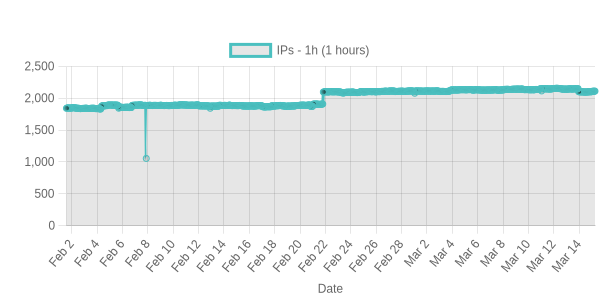
iana supported whoisserver metadata of all active generic/cc/sponsored tlds
This page is also available as structured data, with the same sources and dates.
/api/v1/resources/gh/7c/aptbaseTake My Repo has not tested this on your machine. Requirements come from the project's own documentation.
