
Agentic-RAG-using-LangGraph
A LangGraph-based conversational RAG system: Multi-turn retrieval and adaptive query optimization
- 18
- MIT
- 13 mo ago
Repo AIAnytime/Agentic-RAG-using-LangGraph, read from GitHub 20 h ago. AIAnytime has not joined Take My Repo.
In short
AIAnytime/Agentic-RAG-using-LangGraph is a public repo on GitHub by AIAnytime. A LangGraph-based conversational RAG system: Multi-turn retrieval and adaptive query optimization. It declares the MIT license on GitHub. It is written mainly in Python, has 18 stars and last changed on 2025-11-13. Nobody has reviewed it on Take My Repo yet, which says nothing about its quality. Read from GitHub on 2026-11-24.
LangGraph-based Conversational RAG System
Overview
This guide teaches you how to build a sophisticated Retrieval-Augmented Generation (RAG) system using LangGraph. Unlike basic RAG implementations, this system handles:
- ✅ Multi-turn conversations with context preservation
- ✅ Intelligent filtering of irrelevant questions
- ✅ Automatic evaluation and improvement of search results
- ✅ Adaptive query optimization with retry logic
- ✅ Complete dialogue memory management
Table of Contents
- What is RAG?
- System Architecture
- Prerequisites
- Project Setup
- Core Components
- Implementation Details
- Running the System
- Test Scenarios
- Advanced Topics
- Troubleshooting
What is RAG?
The Basics
RAG (Retrieval-Augmented Generation) combines information retrieval with language generation:
- Retrieve: Search relevant documents from a knowledge base
- Augment: Add found documents as context to the AI
- Generate: AI produces informed, accurate answers
Why Use RAG?
| Problem | RAG Solution |
|---|---|
| AI hallucinations | Grounds answers in real documents |
| Outdated information | Access to current knowledge base |
| No source verification | Can cite specific documents |
| Generic responses | Domain-specific accuracy |
Key Concepts
Embeddings: Convert text to numerical vectors for semantic search
"restaurant hours" → [0.23, 0.45, -0.12, ...]
"opening times"    → [0.24, 0.43, -0.11, ...] (similar!)
Vector Database: Stores and searches document embeddings efficiently
LLM: Generates human-like responses using retrieved context
System Architecture
Flow Diagram
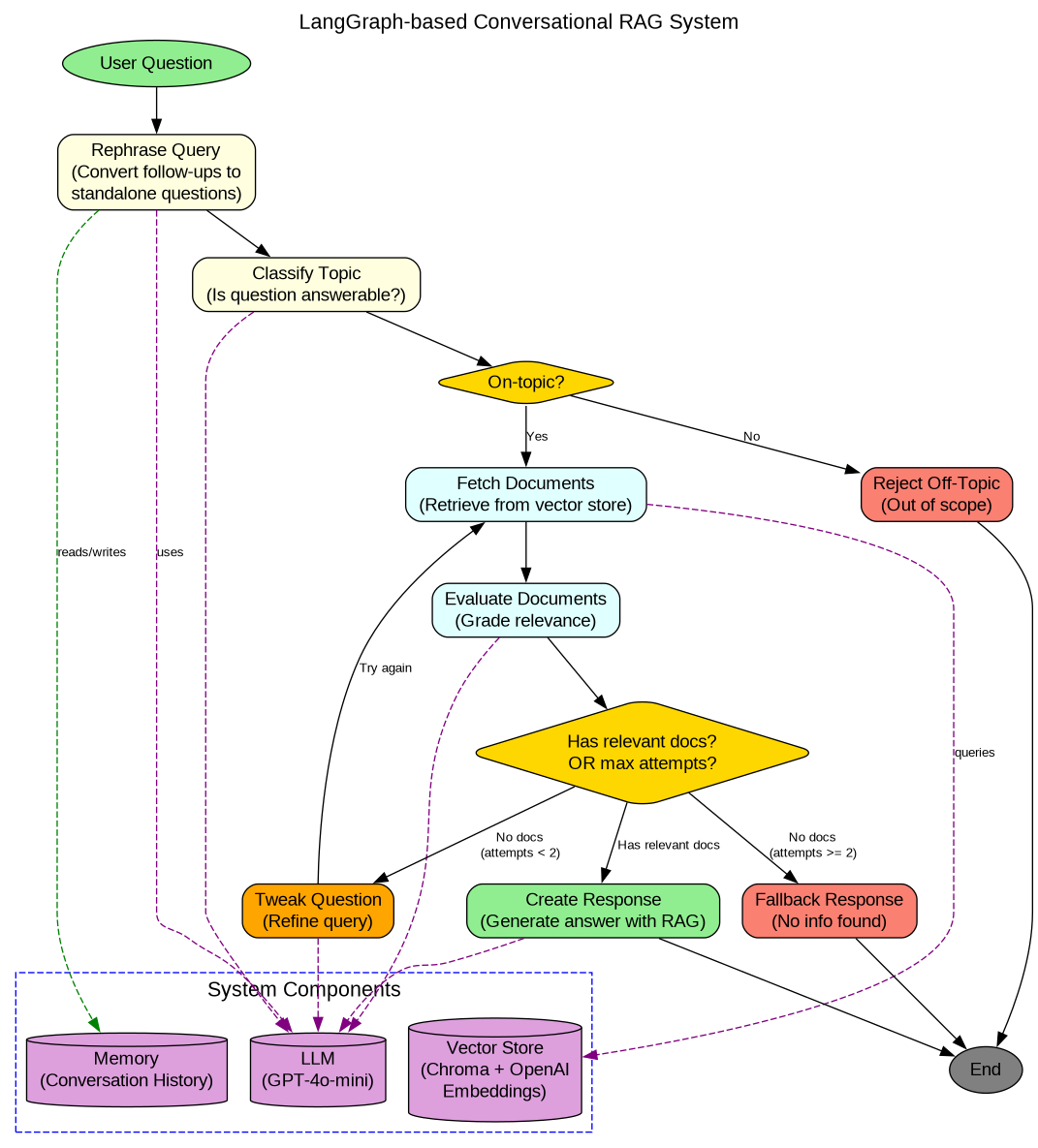
User Question
    ↓
[Rephrase Query] ─→ Convert follow-ups to standalone
    ↓
[Classify Topic] ─→ Is it answerable?
    ├─→ No ─→ [Reject Off-Topic] ─→ END
    └─→ Yes
        ↓
[Fetch Documents] ─→ Search vector database
    ↓
[Evaluate Docs] ─→ Grade relevance
    ├─→ Found good docs? ─→ [Create Response] ─→ END
    ├─→ No docs & attempts < 2? ─→ [Tweak Question] ─→ Retry
    └─→ Max attempts? ─→ [Fallback Response] ─→ END
Graph Nodes
| Node | Purpose | Example |
|---|---|---|
| Rephrase Query | Convert context-dependent questions | "Also Sunday?" → "Is Bella Vista open on Sundays?" |
| Classify Topic | Filter out-of-scope questions | "Weather?" → Rejected |
| Fetch Docs | Retrieve from vector store | Find restaurant info |
| Evaluate Docs | Grade relevance with LLM | Is doc helpful? Yes/No |
| Tweak Question | Refine for better results | "owner age" → "age of owner" |
| Create Response | Generate final answer | Use docs + LLM |
Prerequisites
Requirements
- Python >= 3.11
- OpenAI API Key (Get one here)
- Basic Python knowledge
- Understanding of APIs (helpful)
Install Dependencies
# Using uv (recommended)
uv add langchain langchain-openai langchain-community langgraph chromadb python-dotenv

# Or using pip
pip install langchain langchain-openai langchain-community langgraph chromadb python-dotenv
Setup Environment
Create .env file:
OPENAI_API_KEY="your-api-key-here"
Project Setup
Quick Start
# 1. Create project directory
mkdir langgraph-rag && cd langgraph-rag

# 2. Initialize
uv init

# 3. Install dependencies
uv add langchain langchain-openai langchain-community langgraph chromadb python-dotenv

# 4. Create .env with your OpenAI key
echo 'OPENAI_API_KEY="your-key"' > .env

# 5. Copy the implementation code
# (langgraph_rag_system.py)

# 6. Run
uv run langgraph_rag_system.py
Core Components
1. Document Management
from langchain_core.documents import Document
from langchain_openai import OpenAIEmbeddings
from langchain_community.vectorstores import Chroma

# Create documents
docs = [
    Document(
        page_content="Bella Vista opens at 11:00 AM daily.",
        metadata={"source": "info.txt"}
    )
]

# Setup vector store
embeddings = OpenAIEmbeddings(model="text-embedding-3-small")
vectorstore = Chroma.from_documents(docs, embeddings)
retriever = vectorstore.as_retriever(search_kwargs={"k": 2})
2. State Definition
from typing import List, TypedDict
from langchain_core.messages import BaseMessage, HumanMessage
from langchain_core.documents import Document

class DialogState(TypedDict):
    turns: List[BaseMessage]           # Conversation history
    retrieved_docs: List[Document]     # Retrieved documents
    topic_flag: str                    # 'Yes' or 'No'
    refined_query: str                 # Rewritten query
    ready_for_response: bool           # Has relevant docs?
    refinement_attempts: int           # Retry counter
    question: HumanMessage             # Current question
3. LLM Setup
from langchain_openai import ChatOpenAI

llm = ChatOpenAI(
    model="gpt-4o-mini",
    temperature=0  # Deterministic responses
)
Implementation Details
Node 1: Rephrase Query
Converts follow-up questions using conversation history:
def rephrase_query(state: DialogState) -> DialogState:
    if len(state["turns"]) > 1:
        # Use chat history to rephrase
        response = llm.invoke([
            SystemMessage("Rephrase to standalone question"),
            *state["turns"][:-1],
            HumanMessage(state["question"].content)
        ])
        state["refined_query"] = response.content.strip()
    else:
        # First question - use as-is
        state["refined_query"] = state["question"].content
    return state
Node 2: Classify Topic
Uses structured output for reliable classification:
from pydantic import BaseModel, Field

class TopicGrade(BaseModel):
    score: str = Field(description="'Yes' if on-topic, 'No' otherwise")

def classify_topic(state: DialogState) -> DialogState:
    structured_llm = llm.with_structured_output(TopicGrade)
    result = structured_llm.invoke([
        SystemMessage("Classify if question is about Bella Vista"),
        HumanMessage(f"Question: {state['refined_query']}")
    ])
    state["topic_flag"] = result.score
    return state
Node 3: Evaluate Documents
Grades each retrieved document:
class RelevanceGrade(BaseModel):
    score: str = Field(description="'Yes' if relevant")

def evaluate_docs(state: DialogState) -> DialogState:
    structured_llm = llm.with_structured_output(RelevanceGrade)
    relevant = []

    for doc in state["retrieved_docs"]:
        result = structured_llm.invoke([
            SystemMessage("Grade document relevance"),
            HumanMessage(f"Q: {state['refined_query']}\nDoc: {doc.page_content}")
        ])
        if result.score.lower() == "yes":
            relevant.append(doc)

    state["retrieved_docs"] = relevant
    state["ready_for_response"] = len(relevant) > 0
    return state
Building the Graph
from langgraph.graph import StateGraph, END
from langgraph.checkpoint.memory import MemorySaver

# Create graph with memory
checkpointer = MemorySaver()
workflow = StateGraph(DialogState)

# Add nodes
workflow.add_node("rephrase_query", rephrase_query)
workflow.add_node("classify_topic", classify_topic)
workflow.add_node("fetch_docs", fetch_docs)
workflow.add_node("evaluate_docs", evaluate_docs)
# ... add other nodes

# Define edges
workflow.add_edge("rephrase_query", "classify_topic")
workflow.add_conditional_edges("classify_topic", topic_router, {...})
workflow.add_conditional_edges("evaluate_docs", decision_router, {...})

# Compile
workflow.set_entry_point("rephrase_query")
graph = workflow.compile(checkpointer=checkpointer)
Running the System
Basic Usage
system = RAGSystem()

# Single question
result = system.process_question(
    "When does Bella Vista open?",
    thread_id=1
)

# Access response
print(result["turns"][-1].content)
Multi-Turn Conversation
# Same thread_id maintains context
system.process_question("What are the prices?", thread_id=1)
system.process_question("Any cheaper options?", thread_id=1)  # Uses context
Test Scenarios
Scenario 1: Off-Topic Question
Input: "How is the weather?"
Result: "I can't respond to that!" ✅
Scenario 2: Unanswerable Question
Input: "How old is the owner?"
Process:
1. Classifies as on-topic (about owner)
2. Retrieves documents
3. No relevant info found
4. Refines query twice
5. Still no relevant info
6. Returns: "I'm sorry, but I couldn't find the information" ✅
Scenario 3: Follow-Up Question
Q1: "When does Bella Vista open?"
A1: "11:00 AM to 10:00 PM weekdays, 11:00 AM to 11:00 PM weekends"

Q2: "Also on Sunday?"
Process:
1. Rephrases to: "What are the opening hours for Bella Vista on Sundays?"
2. Retrieves and validates documents
3. Returns: "Bella Vista is open on Sundays from 11:00 AM to 11:00 PM" ✅
Advanced Topics
Custom Documents
from langchain_community.document_loaders import TextLoader, PyPDFLoader

# Load from files
loader = TextLoader("data/info.txt")
docs = loader.load()

# Load PDFs
pdf_loader = PyPDFLoader("manual.pdf")
pdf_docs = pdf_loader.load()
Adjust Retrieval
# More documents
retriever = db.as_retriever(search_kwargs={"k": 5})

# Score threshold
retriever = db.as_retriever(
    search_kwargs={"k": 3, "score_threshold": 0.7}
)
Customize LLM
# More creative
llm = ChatOpenAI(model="gpt-4o-mini", temperature=0.7)

# Better quality
llm = ChatOpenAI(model="gpt-4o")
Persistent Storage
from langgraph.checkpoint.sqlite import SqliteSaver

checkpointer = SqliteSaver.from_conn_string("conversations.db")
graph = workflow.compile(checkpointer=checkpointer)
Troubleshooting
Common Issues
API Key Errors
Error: "OpenAI API key not found"
Solution: Check .env file, verify OPENAI_API_KEY name, restart session
Import Errors
Error: "ModuleNotFoundError"
Solution: uv add [package-name] or pip install [package-name]
Quota Exceeded
Error: "429 quota exceeded"
Solution: Check platform.openai.com/usage, add credits, or wait
Slow Performance
Solution: Reduce k parameter, cache embeddings, use faster models
Best Practices
Document Preparation
- ✅ Keep documents focused and concise
- ✅ Include relevant metadata
- ✅ Split long documents into chunks
- ❌ Don't mix unrelated topics
Prompt Engineering
- ✅ Be specific in instructions
- ✅ Use structured outputs
- ✅ Test with edge cases
- ❌ Don't assume implicit understanding
Error Handling
try:
    result = system.process_question(question, thread_id)
except Exception as e:
    logging.error(f"Error: {e}")
    return {"error": str(e)}
Future Enhancements
- Multi-Source RAG: Combine multiple knowledge bases
- Advanced Memory: Long-term user preferences
- UI Development: Web interface with Streamlit
- Production Features: Rate limiting, auth, analytics
- Enhanced Evaluation: Confidence scores, citations
Resources
- LangChain Docs: python.langchain.com
- LangGraph Guide: langchain-ai.github.io/langgraph
- OpenAI Docs: platform.openai.com/docs
Summary
You've built a production-ready conversational RAG system with:
✨ Intelligent routing for different question types
✨ Context awareness for multi-turn conversations
✨ Self-correction when initial retrieval fails
✨ Quality control through document evaluation
✨ Graceful degradation for edge cases
Key Takeaways
- RAG improves LLM accuracy by grounding in real documents
- LangGraph enables complex workflows through graphs
- State management maintains conversation context
- Evaluation prevents poor quality responses
- Structured outputs ensure reliability
Questions? Issues? Improvements?
Experiment with your own documents and customize for your domain!
Questions
What is Agentic-RAG-using-LangGraph?
AIAnytime/Agentic-RAG-using-LangGraph is a public repo on GitHub by AIAnytime. A LangGraph-based conversational RAG system: Multi-turn retrieval and adaptive query optimization.
Is Agentic-RAG-using-LangGraph open source?
It declares the MIT license on GitHub.
Does Agentic-RAG-using-LangGraph run on macOS, Windows or Linux?
Its maker has not tagged a system, so it is unknown here. Its README says what it needs.