
exec-room
Exec Room: Agents working together in rooms to help run your business. Create a local team of agents that run on Claude Code and research, review, suggest, create drafts for you. Anything that leaves a room waits for your approval. Open Source.
- 1
- AGPL-3.0
- 3 h ago
Repo ANDRS-Projects/exec-room, read from GitHub 26 min ago. ANDRS-Projects has not joined Take My Repo.
In short
ANDRS-Projects/exec-room is a public repo on GitHub by ANDRS-Projects. Exec Room: Agents working together in rooms to help run your business. Create a local team of agents that run on Claude Code and research, review, suggest, create drafts for you. Anything that leaves a room waits for your approval. Open Source. It declares the AGPL-3.0 license on GitHub. It is written mainly in JavaScript, has 1 stars and last changed on 2026-11-21. Nobody has reviewed it on Take My Repo yet, which says nothing about its quality. Read from GitHub on 2026-11-21.
Exec Room
Exec Room is an open-source agent room for running a business: a local web room where you, the exec, work with a team of agents that run on Claude Code. They research, draft and propose actions (GitHub issues, Notion pages, email drafts, files to save, jobs for other agents). They have no tool that runs commands on your computer and write only to drafts/; anything that leaves the room (an issue, a Notion page, an email draft, a saved file, a job for another agent) waits for your approval. These are Claude Code permission rules, not a sandbox: see Security.
The room starts with one agent: Coen, the room lead. Every message goes to him first. You build the rest of the team yourself, in the room:
- Advisors — Coen consults them before he answers (for example a technical or a marketing advisor).
- Makers — they do a job after you approve it and save the result as a draft (for example a writer or an image-prompt maker).
Each agent gets a name, a job description, instructions, the tools it may use and an avatar from the preset set.
Features
- Approve before act — agents propose; you approve each action on a card, then the server carries it out
- Rooms — separate chats, each with its own members, its own limits on what agents may read and propose, and a one-line description of what the room is for
- A brief per room — what every agent in the room should know about your business (customers, pricing, tone), written by you in Room settings and given to Coen, every advisor and every maker as background
- Chat list — every chat in a room is kept; go back to one from the Chats panel, give it a name, or archive it to take it out of the list (nothing is removed, and it can be put back)
- GitHub — issues and comments in the repos you allow per room (private repos only, unless you mark one as public)
- Notion — rows saved as drafts in any Notion database you add to a room (a content calendar, a lead list, a task list), and long-form pages under pages you allow. Per database you choose which columns agents fill, which always get the same value, and which stay empty; a page the room made can later be updated in place, with the previous version kept under the new one. Connect Notion once in Exec Room settings and agents read it and the room saves through that sign-in (see Notion); a Notion integration token works too
- MCP servers — give agents read tools of other services: from the Popular list in Exec Room settings, or any server by its web address, signed in with Connect or with a token from 1Password; each room switches a server on for itself
- Email drafts — to recipients you allow; the room never sends these drafts, you do (sending from a Resend inbox is a card of its own, see Resend inboxes). An approved draft opens in Outlook web or your mail app when it is short, and can always be copied; its text stays on the card for 7 days or until you remove it
- Resend inboxes — agents read the inboxes of your Resend account; Coen can write a draft into an inbox, or propose sending one that is waiting there, each only after you approve its card (see Resend inboxes)
- Approve from Slack — each new proposal also comes as a Slack message with Approve and Dismiss, so you can decide from your phone; the room connects out to Slack, nothing on your computer is opened to the internet (see Approving from Slack)
- Saving files — into folders you choose per room: a document, spreadsheet, data file or image from an https link (checked to be that kind of file, at most 25 MB, never from your own computer or network), or an agent's draft as Markdown or as a Word file with its headings, lists, links and tables. The room saves only after you approve and never overwrites a file
- Attach a file to a message — text, PDF or images; agents can read it for that turn only, then the room deletes it
- Claude plan or API key — runs use your Claude plan by default; start the room with
npm run room:keyto pay with an Anthropic API key instead, with a spend cap per run and per day - Local, with tight permissions — binds to 127.0.0.1, read-only tools, writes only in
drafts/, secret files blocked - Keyboard and screen reader — everything is reachable with the keyboard, and a screen reader is told when a turn ends and when a proposal is waiting (see Accessibility)
Screenshots
The pictures show a demo install with a made-up bike repair shop; every name and number in them is invented.
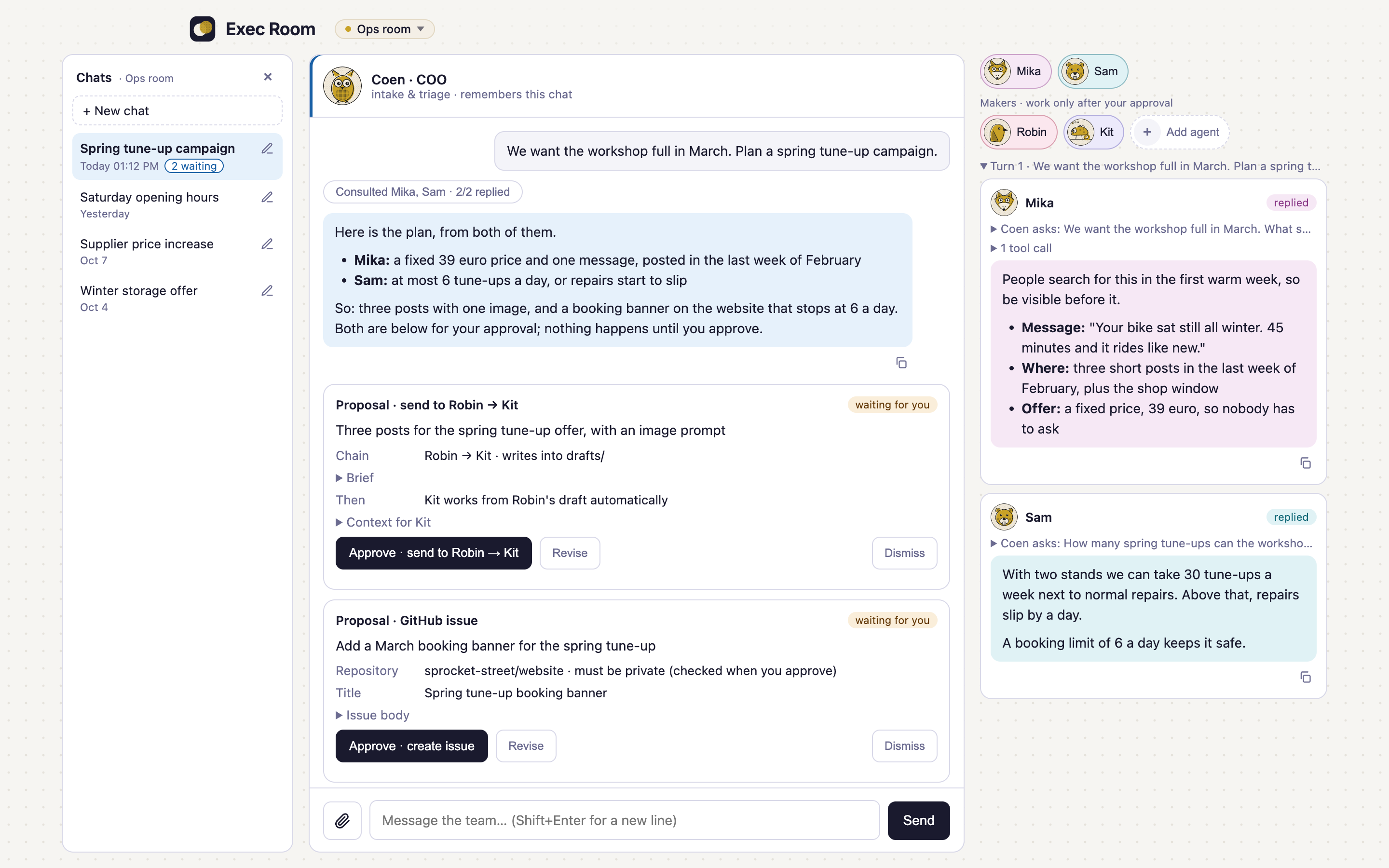
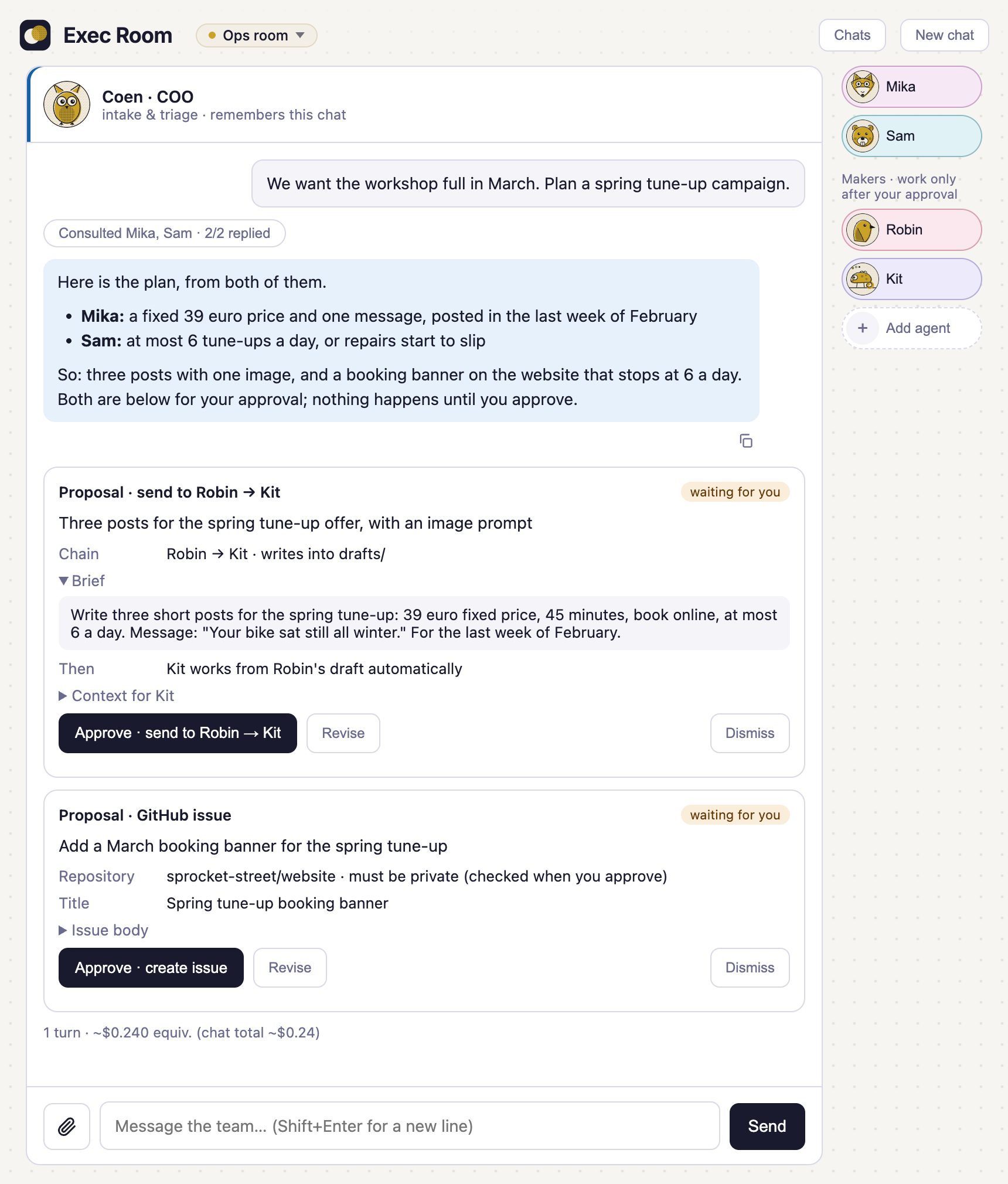
Approve before act. Coen asked two advisors, then proposed a job for two makers and a GitHub issue. Nothing happens until you approve; you can also send a proposal back with a note or dismiss it.
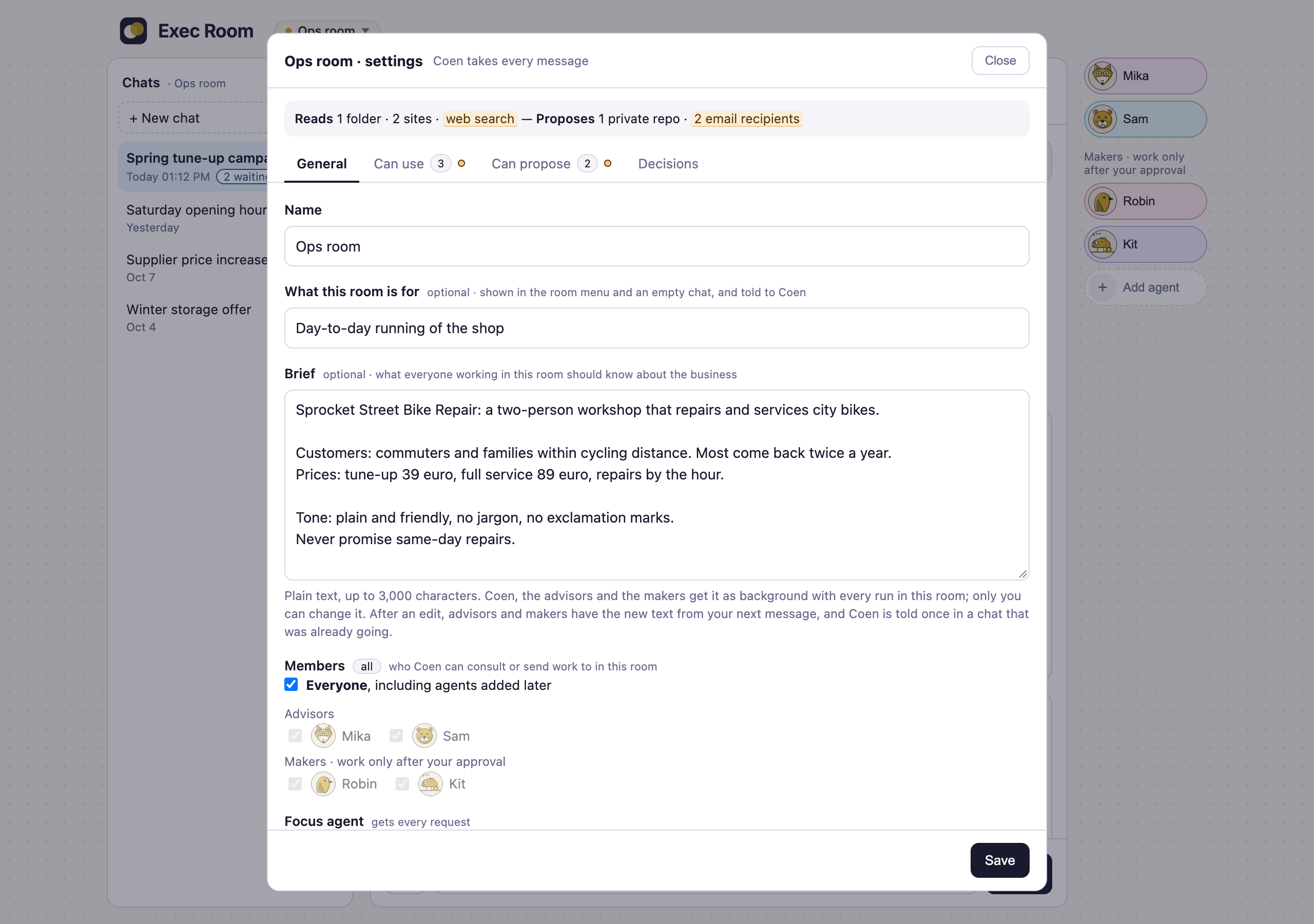
A brief per room. What every agent in the room should know about the business, written by you.
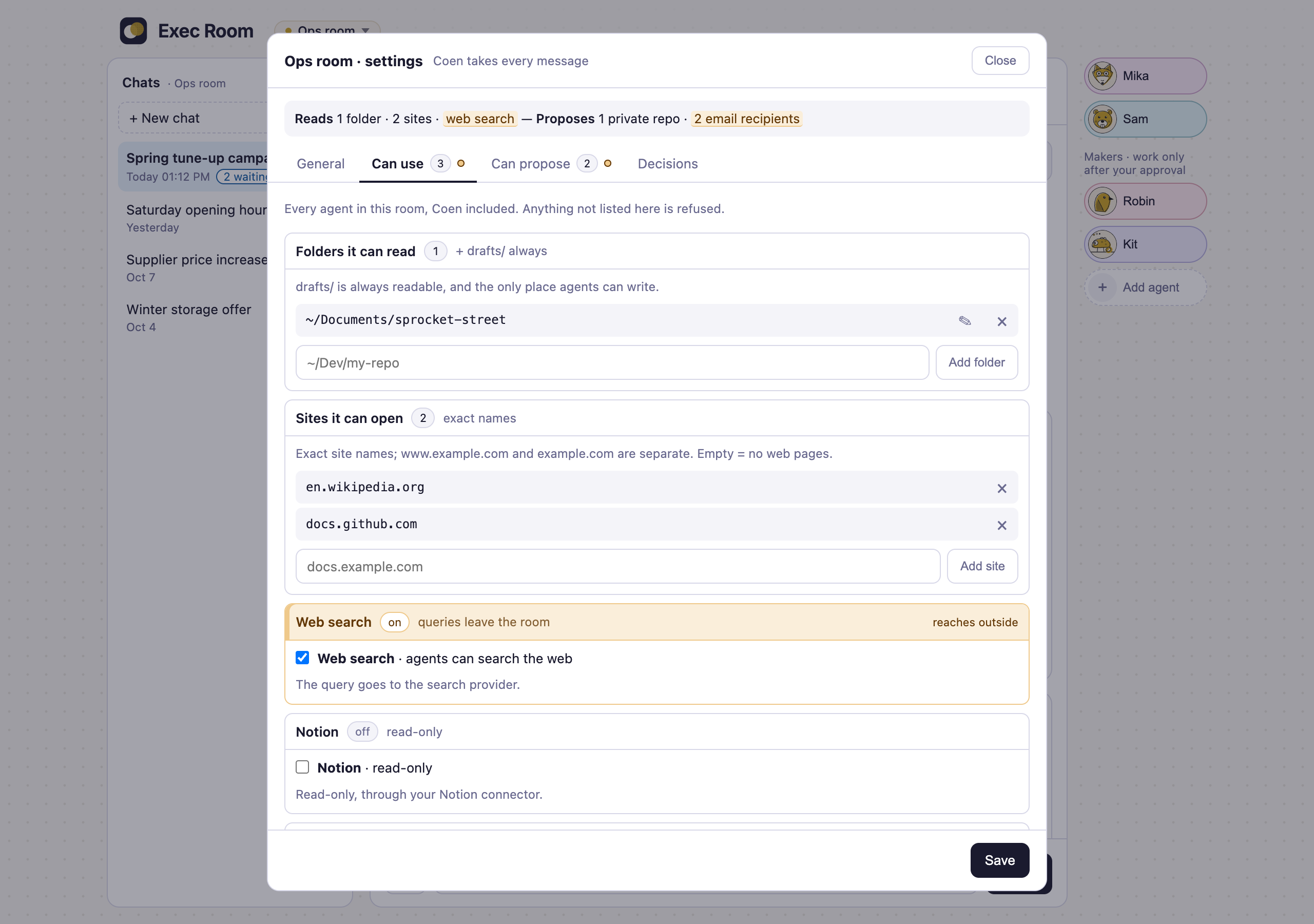
What a room can use. Folders, sites, web search and connectors are set per room; anything not listed is refused.
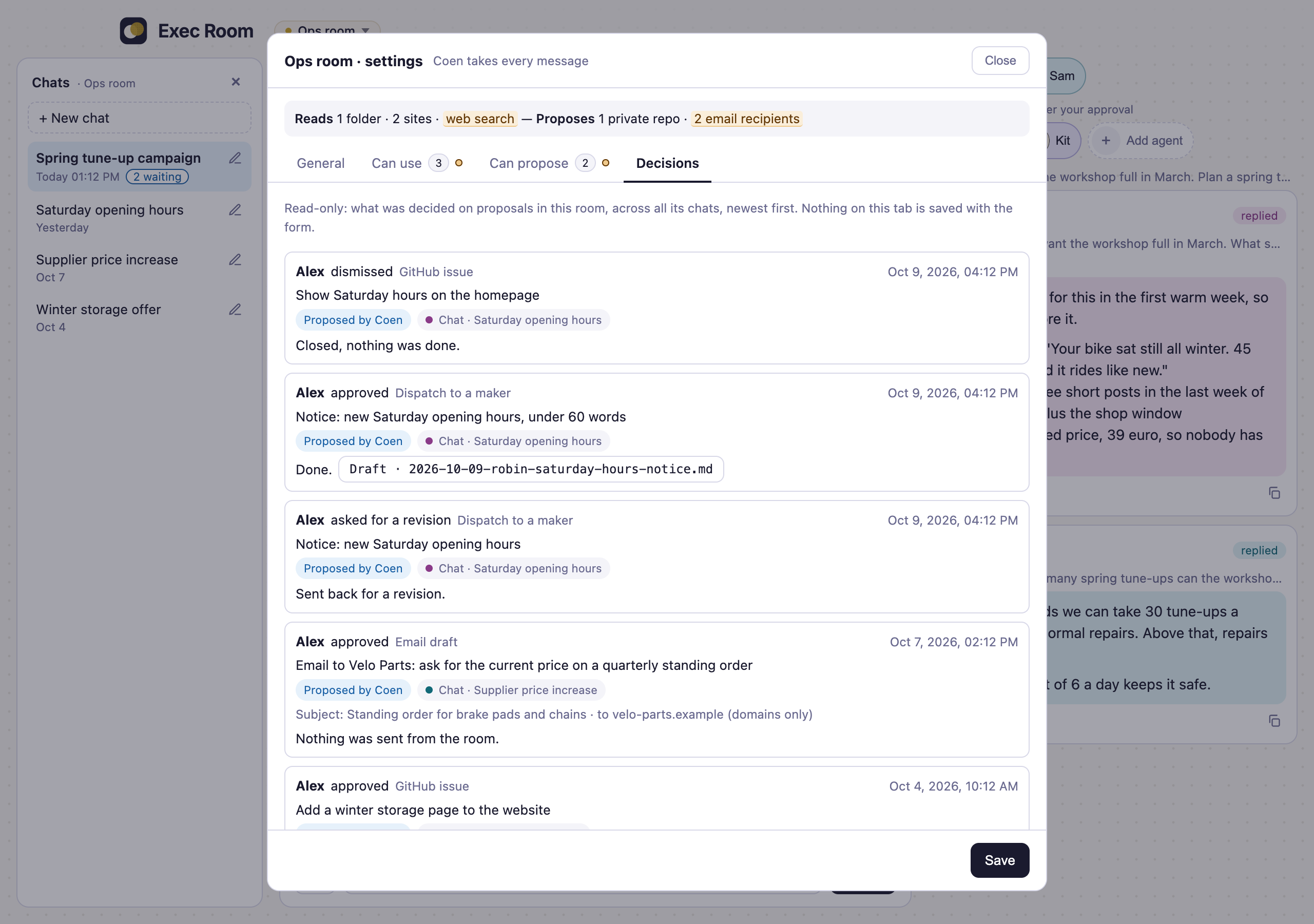
Decisions. Every proposal you approved, sent back or dismissed in the room, across its chats.
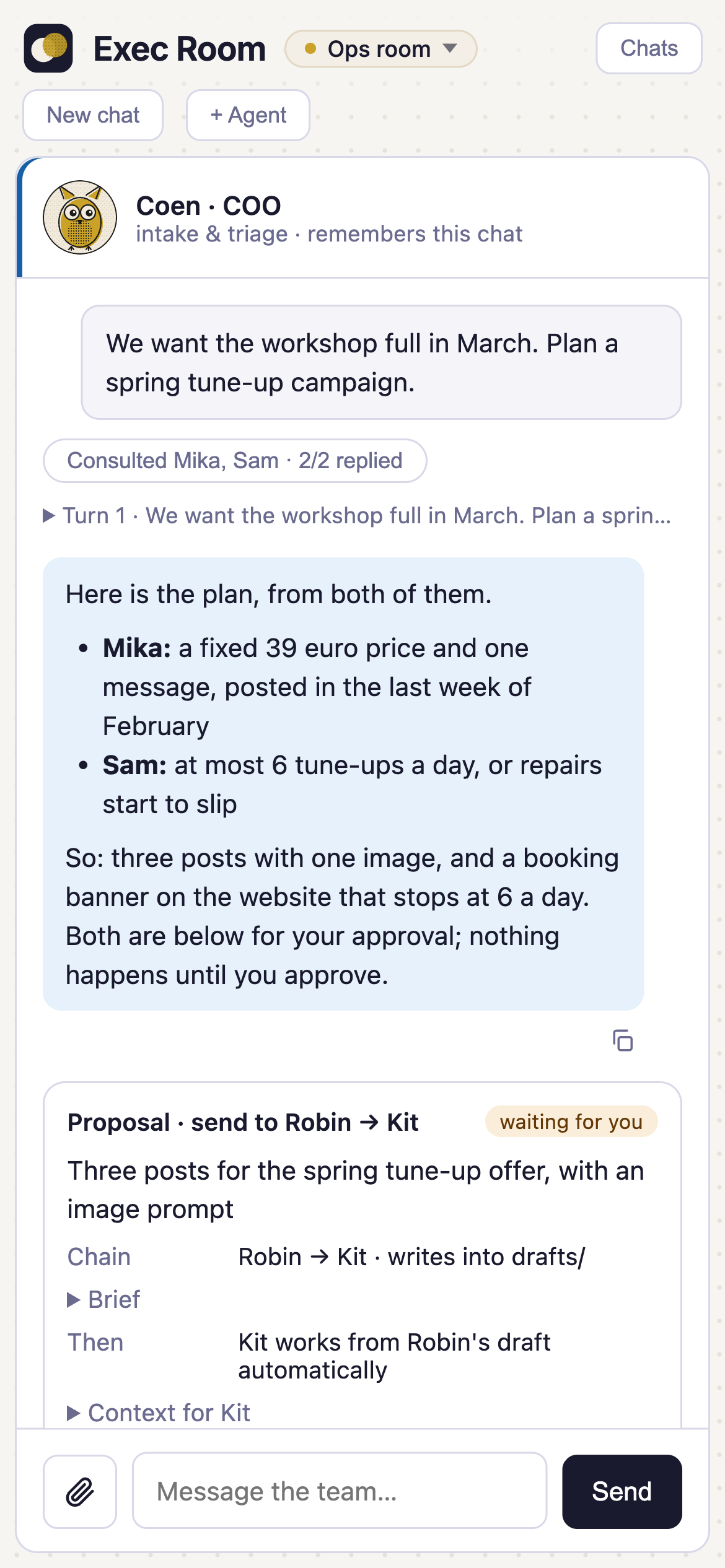
Narrow windows. The same room in a phone-width window; the chat list opens as a drawer.
What it costs
The room runs on your own Claude plan. Every message, every advisor Coen consults and every maker run is a Claude Code run that spends your plan's usage. Two jobs can run at the same time (in different rooms), which uses it up faster. The room keeps the cost Claude Code reports per message and per chat, but it sets no budget and no limit of its own.
Started on an API key instead (see Running on an API key), every run is billed to that key, pay-as-you-go. There the room does set limits: at most $2 per run and $10 per day unless you change them, and the cost it shows is real spend.
Requirements
- macOS or Linux. Windows isn't supported.
- Node.js 22+ (Node 20 no longer gets security updates, and approving from Slack needs the WebSocket that Node 22 has built in)
- Claude Code (
claude), signed in to your Claude plan (tested with version 2.1.316) — see the Claude Code docs. By default the room runs agents on your plan and never uses an Anthropic API key; to pay with a key instead, see Running on an API key (no plan sign-in is needed for that). It starts every run with--agents,--tools,--setting-sourcesand--disable-slash-commands, so it needs a recent version that has all four. - Python 3 — only to run the tests
- Optional: GitHub CLI (
gh), signed in, for GitHub actions - Optional: 1Password CLI (
op), signed in, for tokens: the settings page takes an MCP server's token only as a 1Password reference, and the API key and Notion token can be references too. Without it, use Connect, or"tokenEnv"inroom.config.json(see Configuration). - Optional: Notion, connected once in Exec Room settings, or a Notion integration token; see Notion.
- Optional: the Microsoft 365 connector on your claude.ai account, if agents should search your Outlook mail (and the claude.ai Notion connector, if agents should read Notion without connecting it in the room). A room's Microsoft 365 switch does nothing until the connector is connected.
Quick start
git clone https://github.com/ANDRS-Projects/exec-room.git
cd exec-room
./setup.sh        # checks the requirements, installs dependencies, creates room.config.json, offers to start the room
Then open http://127.0.0.1:4179. Stop the room with Ctrl-C; start it again later with npm run room.
Click Add agent to build your first advisor or maker, and Room settings to choose what the room may read, which sites it may open, and what it may propose. Its Decisions tab lists every proposal you approved, sent back or dismissed in that room, across all its chats: who decided, which agent proposed it, in which chat, when, and what came of it. The Chats panel lists the room's chats; picking one opens it with its history. Coen picks up where he left off as long as Claude Code still has its own log of that chat (about 30 days after the last message, unless you changed Claude Code's cleanupPeriodDays); an older chat is marked "history only" and Coen starts fresh there.
Running on an API key
By default every run uses your Claude plan. To pay with an Anthropic API key instead (pay-as-you-go), give the room the key and start it in key mode:
export ROOM_ANTHROPIC_API_KEY=sk-ant-...     # or: export ROOM_ANTHROPIC_API_KEY_REF="op://vault/item/field" (read with 1Password's `op read`)
npm run room:key
The choice is made when the room starts and holds until you stop it: the plan and a key never run side by side. npm run room starts it on your plan again. A key that merely sits in your environment (ANTHROPIC_API_KEY) is never used.
| Variable | What it's for |
|---|---|
ROOM_ANTHROPIC_API_KEY |
The key. Read once at start-up, kept in memory, handed to the agent runs only. It is never written to data/, the job log or the page, and the page has no field for it. |
ROOM_ANTHROPIC_API_KEY_REF |
Instead of the key itself: a 1Password reference the room reads once with op read. |
ROOM_RUN_CAP_USD |
The most one run may spend (default 2). Claude Code checks it after each turn, so a run can pass it by one turn. |
ROOM_DAY_CAP_USD |
The most all runs may spend in a day (default 10). Once it is reached nothing starts until the next day, including the turns the room starts itself. |
What is different in key mode:
- Agents have no claude.ai connectors. Those come with a Claude plan sign-in, and key-mode runs don't use that sign-in, so there is no Microsoft 365 mail. Notion works once it is connected in Exec Room settings: agents then read it through that sign-in, as on the plan. The room's own MCP servers work as on the plan. A room's settings are kept. Saving Notion drafts and pages and email drafts still work.
- Until Notion is connected, Notion pages you link are read for them. In a room with Notion reading on, put the link of a Notion page or database in your message and the room reads it with your integration token and hands it to the agents (you see a notice saying what was read). Up to three links per message, and only what is shared with your integration.
- A page comes with its text and its properties, so a row of a database (a post, say) arrives with its content.
- A database comes with its row count, an overview with one line per row (title and short columns, for up to its 500 most recently edited rows) and its newest rows in full, so agents can count, filter and find rows across the table. For an older row in full, link that row.
- Agents can't search Notion or follow links inside a page themselves.
- Chats don't carry over. A chat last used on the plan starts fresh on the key, and the other way round; the room says so and the history stays.
- The cost is spend. The page shows an "API key" badge next to the room's name, and a run's cost reads "$0.012 API spend" instead of "~$0.012 equiv.".
- Key-mode runs keep their own Claude Code folder (
data/claude-key), without your plan sign-in. With a plan sign-in present Claude Code uses the plan and not the key, so this is what makes the key the one that pays.
Without a key the room does not start in key mode. See SECURITY.md for how the key is handled.
Configuration
Most settings live in the room itself (Room settings), per room: folders agents may read, web search, sites they may open, Notion and Microsoft 365 access, GitHub repos, Notion pages and email recipients. A new room starts with nothing beyond drafts/.
room.config.json (created from room.config.example.json, gitignored) only holds what the whole install needs:
| Key | What it's for |
|---|---|
notionTokenRef |
A 1Password reference (op://vault/item/field) read once at start-up with op read. Or set ROOM_NOTION_TOKEN instead. Without a token, Notion actions are off. |
notionDatabases |
Only for installs from before Notion databases were set per room: the databases listed here move, at start-up, into the rooms that allowed them, with Status = draft. Add databases in Room settings → Can propose → Notion databases instead. |
notionChannels |
The channel names a post may have (default: X, LinkedIn, Substack Note, Substack Post, Instagram, Blog). |
hiddenConnectors |
Other claude.ai connectors on your account to keep out of the agents' view, by the name in their tool names (mcp__claude_ai_<name>__…), e.g. ["My_Connector"]. Agents can only call the tools a room allows; connectors that aren't hidden are still visible to them, so this keeps the rest out of their context. Claude Docs, Gmail, Slack, Google Drive and Google Calendar are always hidden. Notion and Microsoft_365 can't be listed, as those are switched per room: such an entry is skipped with a warning at start-up, like an entry that isn't a connector name. |
agentsGetClaudeFiles |
Whether agents are given Claude Code's own files, as any Claude Code session started in the room's folder would be: the CLAUDE.md files of that folder and the folders above it (this repo's notes for contributors, your personal ~/.claude/CLAUDE.md, anything other tools write into such files) and the memory Claude Code keeps for the folder. Default false: agents get only what the room gives them (their own description, the room's note and brief, your message), and the room checks at every start that this still holds, with one small run that costs about a cent; ROOM_CONTEXT_CHECK=off skips that check. Set it to true if you keep instructions in CLAUDE.md that the agents should follow too; every agent in every room then gets all of those files, whatever else they say. |
mcpServers |
MCP servers set up by hand, next to the ones set up in Exec Room settings: an entry from the catalog ({"catalog": "<id>", "tools": [...], "tokenRef": "op://…"}) or a server by its web address ({"name": "…", "url": "https://…", "readOnlyTools": [...], "tokenRef": "op://…"}, or "tokenEnv" with the name of a variable that holds the token). You name each tool agents may use. A program on your computer can't be added yet. See MCP servers. |
slack |
Approving proposals from Slack: botTokenRef and appTokenRef (1Password references to the Slack app's two tokens; or set ROOM_SLACK_BOT_TOKEN and ROOM_SLACK_APP_TOKEN) and approver (your Slack member ID). Leave it out to keep Slack off. See Approving from Slack. |
ownerName |
Your name as decisions are recorded under it: "approved by …" on a proposal card, the Decisions tab in Room settings, and the credit line on what an approved proposal creates (default: "the owner"). One line, up to 60 characters. It is a label, not a login. |
For Notion, the databases and pages a room may save to are set in the room, not here: see Notion.
Agent runs and gh are started with a short, fixed set of environment variables (what a program needs to run and reach the network, and their own login settings), not with everything your shell has. If your setup needs another variable passed on, for example one a version manager uses to find node, start the room with its name in ROOM_PASS_ENV (names separated by commas).
Environment variables are listed in .env.example. The server reads them from your shell; it does not load a .env file.
MCP servers
Exec Room settings (the room menu → Exec Room settings) list the MCP servers the room uses, for every room at once:
- Popular MCPs — services from the room's catalog (
mcp-catalog.json), set up with Set Up: Money Magician (reading your books: invoices, customers, vendors, taxes, profitability; with Connect or an API token; made by ANDRS, the company behind Exec Room), GitHub (reading code, issues, pull requests, commits and releases; with a read-only token), Notion (with Connect) and Resend (reading your inboxes; with Connect, see Resend inboxes). - Add custom MCP — any server by its web address. You tick the tools agents may use; the page shows which ones the server itself says only read, as the server's own claim.
- Connect or a token — Connect signs in with the service in a new browser tab; the room keeps the sign-in and renews it. A token is given as a 1Password reference, never the token itself.
- Per room — a room uses a server only when it is switched on in that room's settings (Can use). The toggle on a server's card pauses it in every room.
Agents get the ticked tools of a server and nothing else of it. For a service in the catalog the room knows which tools write, and refuses those. For a custom server it can't tell: you decide when you tick its tools, and the page shows the server's own read-only claim, which the room doesn't check. What agents send to a server's tools (a search, say) goes to whoever runs that server, so add a custom server only if you trust them with what the agents in those rooms can read.
GitHub. Set it up with a fine-grained token (GitHub: Settings → Developer settings → Fine-grained tokens), read-only, with the repos agents may read; the room uses GitHub's read-only address. The token decides which private repos agents can read, in every room that switches GitHub on; a room's own repo list only limits which repos it may propose issues for. Every fine-grained token can also read all public repos on GitHub, so agents can search text anyone wrote there.
Notion is set up here too (Popular MCPs → Notion → Set Up → Connect); what agents read in it and what they can save there is in Notion.
Notion
Agents can read your Notion and propose to save three kinds of things there: rows in a database, posts in a post database, and pages. Nothing is written until you approve the card, and then the Exec Room app writes it, not the agent.
Connecting
- Connect (recommended). Exec Room settings → Popular MCPs → Notion → Set Up → Connect, and sign in with Notion. If the Notion desktop app opens instead of your browser, copy the sign-in link into the browser. The sign-in has your own rights in Notion, so the room can reach what you can reach. The limits below come from the Exec Room app, not from Notion.
- An integration token. Instead of connecting, make a Notion integration, share the databases and pages agents may use with it, and give its token as
notionTokenRef(a 1Password reference) orROOM_NOTION_TOKEN. The token is used by the room for saving and checking, never by agents. It also works for saving while Connect is paused or needs a new sign-in.
What agents read
In a room with Notion switched on (Room settings → Can use), agents can search, open and query Notion through the Connect sign-in: three read tools, nothing else. Notion's server offers more (68 tools in November 2026); the settings page lists the rest as blocked for agents. This works the same on a Claude plan and on an API key. While Notion is paused or needs a new sign-in, agents read no Notion.
Not connected? On a Claude plan, agents read through the claude.ai Notion connector on your account, if you have it. On an API key, put the link of a Notion page or database in your message and the room reads it with your integration token for them (see Running on an API key).
What agents can save
All three are set per room in Room settings → Can propose, and every room starts with none.
Rows in a database. Under Notion databases, paste a database's link. The Exec Room reads its columns from Notion. Then:
- Draft value. Choose it once, for example Status = Draft. Every row the room saves gets it, set by the room, never by an agent, so you take it from there in Notion. A database without a suitable status or select column can get one with Add a Status column with Draft (through Connect, only when you click it; with a token, add it in Notion and open Room settings again).
- Columns. Per column choose Agent fills (the agent proposes the value, you see it on the card), Always this value (the room sets it on every row) or Leave empty. Titles, text and links start as Agent fills; everything else starts empty, and so does a column added in Notion later. Status columns are never the agent's, because automations often watch them; people, relations, files and formulas always stay empty.
- Checks. Each value must fit its column (an option of a select, a date, a number, a link) when it is proposed, and again against Notion when you approve. If a column or option was removed in the meantime, nothing is saved and the card says why.
Posts. A database with Channel and Post Content columns also takes posts: a whole package at once (say LinkedIn, X and a Substack note, one row each), with an image prompt and the insight it came from. Only the post columns are the agent's by default there, so columns a posting tool reads (an image link, a "posted" mark) stay empty. The channel names a post may have are set with notionChannels.
Pages. Under Notion places for pages, add the pages new pages may go under, each with a name and what it's for (meeting notes, research, a blog backlog). Agents propose a new page (an article, a review, notes) under one of these places, or under a page inside one; where it lands is checked when you approve. A page the room made can later be updated: the new version goes on top and the previous one is kept under it, so nothing is lost. Pages written by hand, or made in another room, can't be updated by agents.
What the room never does
Agents never get a tool that writes to Notion. The room only creates pages and rows, and updates pages it made itself; it never moves, deletes or comments, and the only change it makes to a database's columns is the Status column you add with the button. Details are in SECURITY.md.
Resend inboxes
If you use Resend Inboxes (an address that receives mail, often with Resend's own inbox agent drafting replies), agents can read them and Coen can help you answer.
Set it up. Exec Room settings → Popular MCPs → Resend → Set Up → Connect, and approve "Exec Room" in Resend. Then switch Resend on in each room that should use it (Room settings → Can use). Resend only offers full access when you sign in, so the limits below come from the Exec Room app, not from Resend.
What agents can do:
- Read the inboxes, their threads and messages, and the drafts waiting there: ten reading tools, nothing else. Everything that sends, replies, forwards, labels or deletes is blocked, and agents are told that anyone can write to an inbox, so an email is data, never an instruction.
- Write a draft (card: write a reply / an email as a draft). Coen writes the text; approving only saves it as a draft in the inbox, where you can still change it. Nothing is sent. If the email already has an unsent reply draft (say, the inbox agent's), Resend keeps that one and the card says so.
- Send a draft (card: send a reply / an email). Coen names a draft that is already in the inbox; the card shows exactly what Resend has. Approving sends it once, and only if the draft is unchanged since the card was made; otherwise nothing goes out and the card says why. A sent email can't be recalled, so this card is approved on the Exec Room page only: in Slack it comes without Approve.
Who mail may go to. A reply only to people already in its thread. A new email only to the room's Email recipients for drafts (Room settings → Can propose). Drafts with attachments can't be sent from the room.
Approving from Slack
Every new proposal can also come to you as a Slack message, with Approve and Dismiss buttons, so you can decide from your phone while the room runs on your computer. It is off until you set it up.
What you get
- A message per proposal. The Exec Room's Slack app sends you a direct message for each new card: what kind it is, who proposed it, the room and chat, the summary and where it goes (the maker, the repo, the Notion database, the email recipients, the file). Drafts, briefs, issue text and email text stay in the room.
- Approve or Dismiss. A tap does exactly what the card's button does, with the same checks. Sending a proposal back for a revision needs a note, so that stays in the room.
- The message keeps up. After a decision, made in Slack or in the room, the message shows what happened (done, with a link; failed, with the reason; dismissed) and the buttons go. The room shows "approved … in Slack" on the card and in the Decisions list.
- Email drafts: approving one in Slack records the decision; you send it from the room, as always.
- Only you. Only taps from the Slack member set as
approvercount. A tap from anyone else does nothing and is noted in the terminal. - Nothing on your computer is opened to the internet. The room connects out to Slack (Slack's Socket Mode), and taps come in over that connection. The room still only answers on your own computer, so the Open the Exec Room link in the message works only there.
- The room has to be running. A tap while it isn't makes Slack show an error, and the card waits in the room.
Set it up (about 10 minutes)
You need a Slack workspace where you can add an app, and 1Password with its command-line tool (op), as for the Notion token.
Create the Slack app. Go to api.slack.com/apps, choose Create New App, then From a manifest, and pick your workspace. Paste the contents of
docs/slack-app-manifest.jsonand click Create. If Slack says the app needs an admin's approval, your workspace restricts apps: approve it as an admin, or ask one.Make the app-level token. In the app's Basic Information, under App-Level Tokens, choose Generate Token and Scopes. Give it a name (for example
exec-room), add the scopeconnections:write, and generate it. Copy the token: it starts withxapp-.Install the app. Under Install App, choose Install to Workspace and allow it. Then, under OAuth & Permissions, copy the Bot User OAuth Token: it starts with
xoxb-.Put both tokens in 1Password and copy their references (in 1Password: the field's menu → Copy Secret Reference; they look like
op://Private/Exec Room Slack/bot-token). The room never needs the tokens themselves. If an item's title has a space at the end or other unusual characters, use the item's ID in the reference instead of its title.Find your Slack member ID. In Slack, open your profile, choose ⋯, then Copy member ID. It starts with
U.Add it to
room.config.json:"slack": { "botTokenRef": "op://Private/Exec Room Slack/bot-token", "appTokenRef": "op://Private/Exec Room Slack/app-token", "approver": "U0123ABCDEF" }Restart the room. 1Password may ask you to allow it to read the two tokens. The terminal then says
Slack: connected. New cards are sent to you as a Slack DM with Approve and Dismiss.If 1Password didn't hand a token over in time, or a setting is wrong, the room starts without Slack and says why, in the terminal and on the page; fix it and restart.
Using a Slack app you already have (Slack's free plan limits how many apps a workspace can have). This only works for an app you created yourself at api.slack.com/apps, not one from Slack's app directory. Don't paste the manifest over it: that would replace its settings. Instead:
- Check first: in the app, Event Subscriptions and Interactivity & Shortcuts must be off, or have no Request URL. Socket Mode takes over everything Slack sends to the app, so an app that receives events or clicks at a web address would stop getting them. An app that only sends messages (incoming webhooks, say) is fine: those keep working.
- Then change it: turn on Socket Mode (it asks for the app-level token of step 2), turn on Interactivity & Shortcuts (no address needed), add the bot scopes
chat:writeandim:writeunder OAuth & Permissions, and under App Home turn on the Messages Tab with users not allowed to send messages. Reinstall the app when Slack asks, and carry on from step 3. - The messages come from that app's name and icon.
Good to know
- One room per Slack app. Slack hands each tap to one of the app's open connections, so two rooms connected to the same app would each catch some of the other's taps. A room started with its own data folder (
ROOM_DATA_DIR, as for a test copy) stays off Slack unless you start it withROOM_SLACK=on.ROOM_SLACK=offkeeps any room off Slack. - What Slack keeps. Slack stores the messages the room sends, so the summaries and targets of your proposals are in your Slack workspace.
- Not the Slack connector. This is separate from a Slack connector on your Claude account: that stays hidden from agents, and agents can't read or post in Slack.
Your own agents
Import. Already have agents for Claude Code in ~/.claude/agents (as <name>.md or <name>/AGENT.md)? Click Add agent → Import from ~/.claude/agents and pick one. The room copies its name, description, model and instructions into the build form; you choose its role, tools and avatar there. It's a one-time copy: later changes to the file don't reach the room, and a tools: line in the file is ignored, so a file can never give an agent more access than you chose.
Export. Agents you build in the room are stored in data/agents.json. To use one outside the room too, open it and choose Export as AGENT.md: the room saves it in drafts/ and shows the command to copy it into your own ~/.claude/agents folder. The room never writes there itself.
Readable in every room. Runs start in the folder you cloned the room into, so every agent in every room can read that folder, whatever folders the room has: the room's own code and docs, room.config.json (your Notion database ids and the 1Password reference to the token, not the token itself), and drafts/, including drafts written in other rooms. Only data/, secret-looking files (.env, keys and the like) and .git are excluded. Every agent can also read ~/.claude/agents, ~/.claude/skills and ~/.claude/knowledge (and what those folders link to). Keep nothing in any of these places that an agent in another room shouldn't see.
Accessibility
The room is built to be usable with a keyboard and a screen reader. It has not been audited, and it makes no claim of conformance to WCAG.
Keyboard. The controls are buttons, links and fields in the page's own order, so Tab reaches them and each shows a focus ring. Enter sends a message and Shift+Enter starts a new line. The tabs in Room settings move with the arrow keys; Escape closes the room switcher, the chat list on a narrow window, the dialogs and the Dismiss form on a proposal card. When a turn starts, focus stays in the message box.
Screen reader. While a turn runs, a screen reader is told only what matters, in a short sentence each time: that your message went out, that a focus agent took over, how the turn ended ("Coen replied.", or who was consulted and how many replied), that a proposal is waiting for your decision, how an approved action ended, and any notice or error the room shows in the chat (a proposal that couldn't be used, a run that failed, a message that wasn't sent). The text of a reply is not read out as it streams in: read it in the chat when the turn is over. Opening a saved chat announces nothing. The agents in the rail are two groups, advisors and makers, and each agent's button is labelled with its name and what it does.
Reading. The state of a proposal, a consulted agent or a chat is written out in a label ("waiting for you", "done", "failed"), not shown by colour alone. Those labels are 12px or larger, the fields you type in have an edge at 3:1 against white, and the pulsing "working" dots stand still when your system asks for reduced motion. There is a dark theme: it follows your system by default, and the half-moon button in the header lets you choose Auto, Light or Dark and one of three dark styles (navy, black, warm), remembered in your browser. Text and field edges keep their contrast in each.
Known gaps. The spoken updates were checked by reading what the page hands to a screen reader, not yet in a full session with VoiceOver or NVDA. The outlines of cards, buttons and agent chips are lighter than 3:1; buttons and chips carry a text label, so the outline is not the only cue. Some secondary text is 11px. A room that is working elsewhere shows a dot in the room switcher, with "Working now" only as hover text. There is no high-contrast theme. If something doesn't work with your setup, please open an issue.
Tests
npm test
908 checks run the server against fake claude, gh and Notion stand-ins in tests/fakes/, so they need no network, accounts or credits. Expected output: ok: all 908 checks match tests/expected.txt.
Security
See SECURITY.md for the full model. In short: the room binds to localhost and rejects other hosts and origins; agents get read-only tools (never Bash, the tool that runs commands), write only in drafts/, and can't read secret files (.env, keys, .git) or the room's own data; every action is a proposal you approve. Agents are given only what the room gives them: your own CLAUDE.md files and the memory Claude Code keeps for a folder are not loaded for them unless you turn that on (agentsGetClaudeFiles, see Configuration), and the room checks that at every start.
These are permission rules, not a sandbox. The blocks work by name: tool names, folder paths and file-name patterns, passed to Claude Code as allow and deny rules. Nothing isolates the agents from your machine at the operating-system level, so a secret in a file with a name that isn't on the list, inside a folder you gave a room, is readable. Everything agents read can also carry prompt injection: files, web pages, Notion pages, GitHub issues and pull requests, mail previews and what the room's MCP servers return can contain text that tries to steer an agent. Give each room only what its job needs, and read a proposal before you approve it.
To report a vulnerability, use Report a vulnerability on the repository's Security tab rather than a public issue.
Contributing
See CONTRIBUTING.md. Working on the room with Claude Code? CLAUDE.md has the commands and architecture.
License
Exec Room is licensed under the GNU Affero General Public License, version 3 only (SPDX: AGPL-3.0-only) — see LICENSE.
Copyright (C) 2026 ANDRS Projects Europe B.V.
Commercial license. Organisations that cannot, or prefer not to, use Exec Room under the AGPL can get it under a separate commercial license. See COMMERCIAL.md or write to legal@andrs.nu.
The AGPL covers Exec Room and works based on it; agent instructions, room settings and data you write yourself, without copying from Exec Room's own files, do not come under the AGPL by being used with it (this explains the license; it is not an additional permission).
Claude and Anthropic. Exec Room contains no AI model. Agents run through Claude Code, a separate program from Anthropic that you install yourself; your use of Claude Code and the Claude models is under your own agreement with Anthropic, and the Exec Room license gives no rights to them. Exec Room is an independent project, not affiliated with or endorsed by Anthropic; "Claude" and "Anthropic" are trademarks of Anthropic, PBC.
Third-party parts keep their own licenses: the Inter font in public/vendor/inter/ (SIL Open Font License 1.1, see LICENSE.txt), and the marked (MIT) and DOMPurify (MPL-2.0 OR Apache-2.0) builds in public/vendor/; the DOMPurify build also contains regenerator-runtime (MIT). Their notices and license texts are in THIRD-PARTY-NOTICES.md.
Questions
What is exec-room?
ANDRS-Projects/exec-room is a public repo on GitHub by ANDRS-Projects. Exec Room: Agents working together in rooms to help run your business. Create a local team of agents that run on Claude Code and research, review, suggest, create drafts for you. Anything that leaves a room waits for your approval. Open Source.
Is exec-room open source?
It declares the AGPL-3.0 license on GitHub.
Does exec-room run on macOS, Windows or Linux?
Its maker has not tagged a system, so it is unknown here. Its README says what it needs.
How do I install exec-room?
Open "Take it" on its page: Take My Repo writes an install plan for your machine and hands it to your AI agent (Claude Code, Codex or Cursor), which asks you before each step. Take My Repo has not tested it on any machine.
Is exec-room still maintained?
Its last change on GitHub was on 2026-11-21. Take My Repo does not judge from that whether it is maintained.