
AngouriMath
Open-source cross-platform symbolic algebra library for C# and F#. Can be used for both production and research purposes.
- 834
- MIT
- 4 h ago
Repo ASC-Community/AngouriMath, read from GitHub 1 h ago. ASC-Community has not joined Take My Repo.
In short
ASC-Community/AngouriMath is a public repo on GitHub by ASC-Community. Open-source cross-platform symbolic algebra library for C# and F#. Can be used for both production and research purposes. It declares the MIT license on GitHub. It is written mainly in C#, has 834 stars and last changed on 2026-11-18. Nobody has reviewed it on Take My Repo yet, which says nothing about its quality. Read from GitHub on 2026-11-18.
AngouriMath
Open-source cross-platform symbolic algebra library for C# · F# · Jupyter · C++ (WIP)
Get started
·
Examples
·
Contributions
·
What's new
·
Website
Status board
Builds and tests
| Kernel/C# | F# | Interactive | C++ | |
|---|---|---|---|---|
| Build | ||||
| Test |
Note, that all tests and builds are tested for the following three operating systems: Windows, Ubuntu, Mac OS.
Coverage
| Kernel/C# | F# | C++ |
|---|---|---|
| ??? | ??? |
Versions
| Prerelease | Stable | Downloads | |
|---|---|---|---|
| Kernel/C# | |||
| F# | |||
| Interactive | |||
| Experimental | |||
| Terminal | |||
| C++ | 0.0.0-poc (2021, proof of concept) | WIP | WIP |
Other info
| Website | Stars | License |
|---|---|---|
If you want, you can add a badge to your repo:
[](https://am.angouri.org)
What is it about?
AngouriMath is an open source symbolic algebra library. That is, via AngouriMath, you can automatically solve equations, systems of equations, differentiate, parse from string, compile expressions, work with matrices, find limits, convert an expression to LaTeX, and many other things.
How does it compare?
Measured rather than asserted: Docs/Usage/Comparison.md puts the library beside Math.NET Symbolics, Symbolism, SymPy 1.14.0 and Rubi's integration test-suite, and reproduces the rows it loses as well as the ones it wins — 1,706 of 1,774 Rubi integrals answered with no wrong answer, and Math.NET faster on all four operations both libraries can do.
Where can be used?
The two areas of use:
🧪 Research / Data Science [click 🖱️]
AngouriMath for research
As F#, great first-functional language, skyrocketing in the area of data analysis and interactive research, AngouriMath offers a few ways to conveniently work with symbolic expressions.
Notebooks

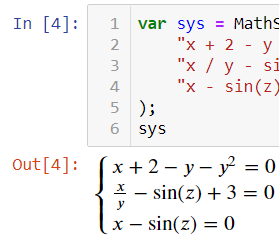
Notebooks provide amazing experience working with function visualization, for functions over one and two variables. With dotnet/interactive, it can be used in Visual Studio Code notebooks as well as Jupyter notebooks. To install the package, simply run this in the notebook:
#r "nuget:AngouriMath.Interactive,*-*"
Terminal
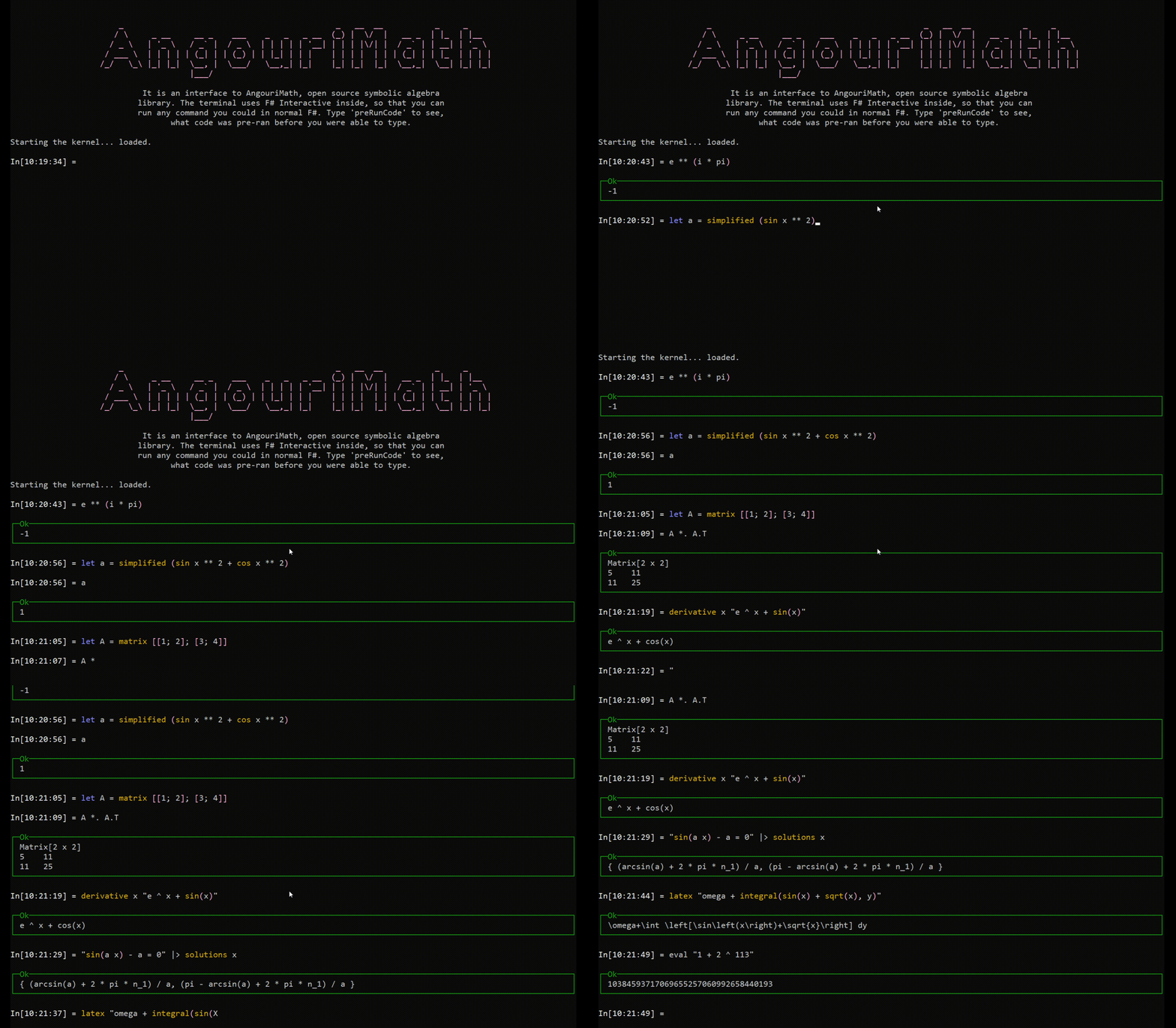
As both a demonstration sample and a convenient tool, this repository includes tool called AngouriMath.Terminal. It is a CLI-based program to interact with AngouriMath (as opposed to API-based interaction, that is, consuming it as a lib).
Or build from sources:
git clone https://github.com/asc-community/AngouriMath
cd AngouriMath/Sources/Terminal/AngouriMath.Terminal
dotnet run -c Release
See the Jupyter notebook on
how to use the F# API of AngouriMath. Note, that the C# API is still available
via open AngouriMath command, then you can call the main library's methods.
See its source folder.
More
Read more about using AngouriMath for research on the website, and in the maintainers' articles.
💻 Software Development [click 🖱️]
It is installed from nuget for both C# and F# and can be used by Web/Desktop/Mobile development.
Installing the library
- Install AngouriMath from NuGet.
- Write the following code:
using AngouriMath; using System;
Entity expr = "x + sin(y)";
Console.WriteLine(expr);
- Run.
If you are new to AM, we suggest you checking out some samples instead of reading boring documentation. If you want to contribute, we would be happy to welcome you in our community.
For any questions, feel free to contact us via Discord.
Official website: am.angouri.org.
Examples
Expand any section to see. Examples with live shell are on the website.
Computations
Use as a simple calculator:
Entity expr = "1 + 2 * log(3, 9)";
Console.WriteLine(expr.EvalNumerical());
Console.WriteLine("2 / 3 + sqrt(-16)".EvalNumerical());
>>> 2/3 + 4i
Console.WriteLine("(-2) ^ 3".EvalNumerical());
Build expressions with variables and substitute them:
Entity expr = "2x + sin(x) / sin(2 ^ x)";
var subs = expr.Substitute("x", 0.3m);
Console.WriteLine(subs);
Simplify complicated expressions:
Console.WriteLine("2x + x + 3 + (4 a * a^6) / a^3 / 5".Simplify());
var expr = "1/2 + sin(pi / 4) + (sin(3x)2 + cos(3x)2)";
Console.WriteLine(expr.Simplify());
Compiled functions work 15x+ faster
var x = MathS.Var("x");
var expr = MathS.Sin(x) + MathS.Sqrt(x) / (MathS.Sqrt(x) + MathS.Cos(x)) + MathS.Pow(x, 3);
var func = expr.Compile(x);
Console.WriteLine(func.Substitute(3));
var expr = "sin(x) + sqrt(x) / (sqrt(x) + cos(x)) + x3";
var compiled = expr.Compile("x");
Console.WriteLine(compiled.Substitute(4));
Algebra
Start with boolean algebra:
Entity expr1 = "a and b or c";

// Those are the same
Entity expr3 = "a -> b";
Entity expr3 = "a implies b";
Entity expr = "a -> true";
Console.WriteLine(MathS.SolveBooleanTable(expr, "a"));
>>> Matrix[2 x 1]
>>> False
>>> True
Next, solve some equations:
Console.WriteLine("x^2 + x + a".SolveEquation("x"));
Under developing now and forever (always available)
Entity expr = "(sin(x)^2 - sin(x) + a)(b - x)((-3) * x + 2 + 3 * x ^ 2 + (x + (-3)) * x ^ 3)";
Console.WriteLine(expr.SolveEquation("x").Latexize());
Try some inequalities:
Console.WriteLine("(x - 6)(x + 9) >= 0".Solve("x"));
Systems of equations:
var system = MathS.Equations(
    "x^2 + y + a",
    "y - 0.1x + b"
);
Console.WriteLine(system);
var solutions = system.Solve("x", "y");
Console.WriteLine(solutions);
System:
$$\begin{cases}{x}^{2}+y+a = 0\\y-\frac{1}{10} \cdot x+b = 0\end{cases}$$Result:
$$\begin{bmatrix}\frac{\frac{1}{10}-\sqrt{\frac{1}{100}+4 \left(-a+b\right)}}{-2} & -\left({\left(\frac{\frac{1}{10}-\sqrt{\frac{1}{100}+4 \left(-a+b\right)}}{-2}\right)}^{2}+a\right) \\ \frac{\frac{1}{10}+\sqrt{\frac{1}{100}+4 \left(-a+b\right)}}{-2} & -\left({\left(\frac{\frac{1}{10}+\sqrt{\frac{1}{100}+4 \left(-a+b\right)}}{-2}\right)}^{2}+a\right)\end{bmatrix}$$var system = MathS.Equations( "cos(x2 + 1)^2 + 3y", "y * (-1) + 4cos(x2 + 1)" ); Console.WriteLine(system.Latexize()); var solutions = system.Solve("x", "y"); Console.WriteLine(solutions);
(solution matrix is too complicated to show)
Calculus
Find derivatives:
Entity func = "x^2 + ln(cos(x) + 3) + 4x";
Entity derivative = func.Differentiate("x");
Console.WriteLine(derivative.Simplify());
Find limits:
WriteLine("(a x^2 + b x) / (e x - h x^2 - 3)".Limit("x", "+oo").InnerSimplified);
Find integrals:
WriteLine("x^2 + a x".Integrate("x").InnerSimplified);
Sets
There are four types of sets:
WriteLine("{ 1, 2 }".Latexize());
WriteLine("[3; +oo)".Latexize());
WriteLine("RR".Latexize());
WriteLine("{ x : x^8 + a x < 0 }".Latexize());
>>> \left\{ 1, 2 \right\}
>>> \left[3, \infty \right)
>>> \mathbb{R}
>>> \left\{ x : {x}^{8}+a x < 0 \right\}
And there operators:
WriteLine(@"A \/ B".Latexize());
WriteLine(@"A /\ B".Latexize());
WriteLine(@"A \ B".Latexize());
>>> A \cup B
>>> A \cap B
>>> A \setminus B
Syntax
You can build LaTeX with AngouriMath:
var expr = "x ^ y + sqrt(x) + integral(sqrt(x) / a, x) + derivative(sqrt(x) / a, x) + limit(sqrt(x) / a, x, +oo)";
Console.WriteLine(expr.Latexize());
>>> {x}^{y}+\sqrt{x}+\int \frac{\sqrt{x}}{a}\,\mathrm{d}x+\frac{\mathrm{d}}{\mathrm{d}x}\frac{\sqrt{x}}{a}+\lim_{x\to \infty } \frac{\sqrt{x}}{a}
You can parse Entity from string with
var expr = MathS.FromString("x + 2 + sqrt(x)");
Entity expr = "x + 2 + sqrt(x)";
A few convenient features: x2 => x^2, a x => a * x, (...)2 => (...)^2, 2(...) => 2 * (...)
Compilation
Now you can compile expressions with pritimives into native lambdas. They will be at least as fast as if you wrote them in line in code, or faster if you have same subexpressions in your expression.
Entity expr = "a and x > 3";
var func = expr.Compile<bool, double, bool>("a", "x");
WriteLine(func(true, 6));
WriteLine(func(false, 6));
WriteLine(func(true, 2));
WriteLine(func(false, 2));
Output:
True
False
False
False
The same expressions can be printed as HLSL or GLSL for a shader, an exact gradient for a signed distance field for instance: see Docs/Usage/Shaders.md.
Multithreading
You are guaranteed that all functions in AM run in one thread. It is also guaranteed that you can safely run multiple functions from AM in different threads, that is, all static variables and lazy properties are thread-safe.
There is also support of cancellation a task. However, to avoid injecting the cancellation token argument into all methods,
we use AsyncLocal<T> instead. That is why instead of passing your token to all methods what you need is to pass it once
to the MathS.Multithreading.SetLocalCancellationToken(CancellationToken) method.
There is a sample code demonstrating cancellation:
var cancellationTokenSource = new CancellationTokenSource();

// That goes instead of passing your token to methods
MathS.Multithreading.SetLocalCancellationToken(cancellationTokenSource.Token);

// Then you normally run your task
var currTask = Task.Run(() => InputText.Text.Solve("x"), cancellationTokenSource.Token);

try
{
    await currTask;
    LabelState.Text = currTask.Result.ToString();
}
catch (OperationCanceledException)
{
    LabelState.Text = "Operation canceled";
}
F#
Not everything is supported directly from F#, so if something missing, you will need to call the necessary methods from AngouriMath.
open Functions
open Operators
open Shortcuts

printfn "%O" (solutions "x" "x + 2 = 0")

printfn "%O" (simplified (solutions "x" "x^2 + 2 a x + a^2 = 0"))

printfn "%O" (``dy/dx`` "x^2 + a x")

printfn "%O" (integral "x" "x2 + e")

printfn "%O" (``lim x->0`` "sin(a x) / x")

printfn "%O" (latex "x / e + alpha + sqrt(x) + integral(y + 3, y, 1)")
C++ (Experimental)
At the moment, AngouriMath.CPP is in the experimental phase. See how to get AngouriMath for C++.
#include <AngouriMath.h>

int main()
{
    AngouriMath::Entity expr = "x y + 2";
    std::cout << expr.Differentiate("x");
}
Contribution
AngouriMath is a free open-source project, there is no big company backing us. That is why we warmly welcome any contributors to the project. Aside from volunteer donations, you can help developing the project: check the guide for developers.
License & citation
The project is open source, but can be used in closed commercial projects. There is no restriction on it with the only requirement to keep the MIT license with all distributives of AngouriMath.
The projects AngouriMath is built with are thanked in Acknowledgements.
Questions
What is AngouriMath?
ASC-Community/AngouriMath is a public repo on GitHub by ASC-Community. Open-source cross-platform symbolic algebra library for C# and F#. Can be used for both production and research purposes.
Is AngouriMath open source?
It declares the MIT license on GitHub.
Does AngouriMath run on macOS, Windows or Linux?
Its maker has not tagged a system, so it is unknown here. Its README says what it needs.
How do I install AngouriMath?
Open "Take it" on its page: Take My Repo writes an install plan for your machine and hands it to your AI agent (Claude Code, Codex or Cursor), which asks you before each step. Take My Repo has not tested it on any machine.
Is AngouriMath still maintained?
Its last change on GitHub was on 2026-11-18. Take My Repo does not judge from that whether it is maintained.
What do people who ran AngouriMath say?
Nobody has reviewed it on Take My Repo yet, which says nothing about its quality.