ECC
The agent harness performance optimization system. Skills, instincts, memory, security, and research-first development for Claude Code, Codex, Opencode, Cursor and beyond.
- 308k
- JavaScript
- MIT
- 2 d ago
ClaudeAPI mirror
Repo AceDataCloud/ClaudeAPI, read from GitHub 1 min ago. AceDataCloud has not joined Take My Repo.
AceDataCloud/ClaudeAPI is a public repo on GitHub by AceDataCloud. ClaudeAPI mirror. It declares no license on GitHub. Public does not mean open source: without a license, nobody is granted the right to reuse it. It has 0 stars and last changed on 2026-11-18. Nobody has reviewed it on Take My Repo yet, which says nothing about its quality. Read from GitHub on 2026-11-21.
Anthropic Claude generative services, including chat completions and native messages API.
API home page: Ace Data Cloud - Claude
Keywords: claude-api, anthropic, claude-opus-5-5, claude-fable-5-2, claude-fable-5-1, claude-fable-5, claude-opus-5, claude-opus-4-8, claude-sonnet-5, claude-chat-completions, claude-messages, rest-api, ai-api, developer-tools, AI API, REST API, Developer API, Ace Data Cloud
Select gpt-6.2-astra or gpt-6.2-sol on /v1/messages while keeping the Messages request and response format. Send messages and max_tokens, and read the returned content and usage fields. Check the selected model's current pricing and account availability; model-specific Claude features depend on the selected model. See the Messages guide.
Use the exact model ID claude-fable-5-2 on Messages or Chat Completions. Prefer Messages for native thinking blocks and tool interaction. Adaptive thinking remains on; omit temperature, top_p, and top_k, use automatic tool choice, and provide enough max_tokens for both thinking and final text. This model currently does not support the Count Tokens or Responses endpoints on Ace Data Cloud.
At the current maximum package (142,800 Credits for $13,584), standard input costs $3.20 and output costs $16 per million tokens. Cache reads cost $0.08, five-minute cache writes $4, and one-hour cache writes $6.40 per million tokens. These are 40% of Anthropic's standard API rates (60% lower) at that package rate; other packages and account discounts must be checked on the live pricing page.
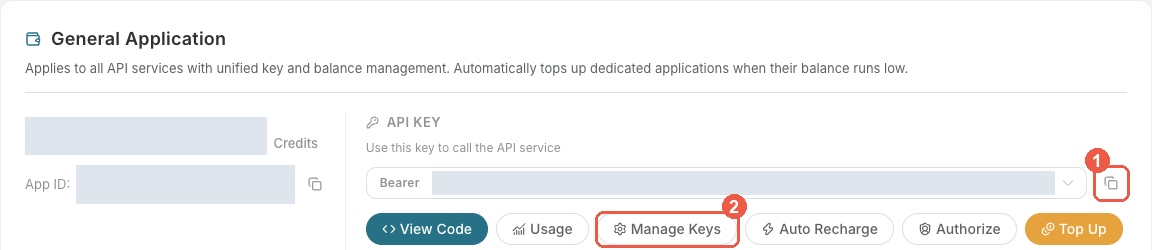
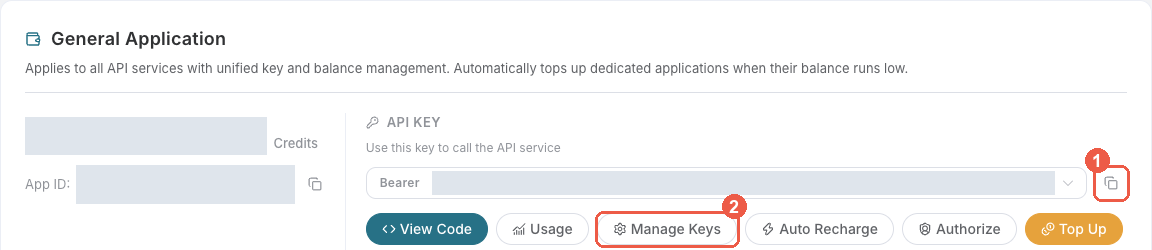
Bearer . An API Key / API Token field expects this raw value; only a manually configured HTTP Authorization header needs the Bearer prefix. A platform-... account-management token cannot replace a generation API key.
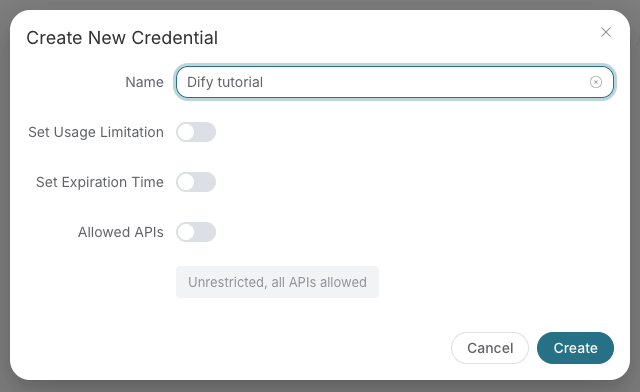
Save the key in the client's credential store or the environment variable shown below. Never put it in a prompt, shared workflow, screenshot, or Git commit. If authentication fails, check the full copied value, application/service access, expiration, usage limit, and balance before creating another key.
Accounts with neither a successful paid top-up nor an administrator's manual credit addition may run one billable request at a time across the entire account, shared by all API keys and services. Rewards, redemption cards and transferred credits do not count as paid top-ups. A successful paid top-up or manual credit addition removes this trial restriction; balance and key usage-limit checks still apply.
A new billable request returns 429 too_many_requests while another is running. Wait for the active request's final result before submitting the next one. Free task polling remains available.
For async APIs, acceptance or a task ID is not completion: keep querying the same task until its final result. A disconnect or proxy timeout does not mean execution stopped. If a task has no terminal result for a long time, contact support with trace_id.
This restriction changes neither trial API availability nor pricing; fees are settled after execution based on actual usage.
Claude is Anthropic's AI assistant, offering powerful language understanding and generation. claude-opus-5-5 is available through Chat Completions and Messages; use Messages when you need complete native thinking blocks and tool semantics. The current flagship claude-fable-5-2 provides a 1M-token context window and up to 128K output tokens. The earlier claude-fable-5-1 and claude-fable-5 remain available alongside claude-opus-5, claude-opus-4-8, claude-opus-4-7, claude-sonnet-5, and claude-haiku-4-5-20251001. It supports OpenAI-compatible chat completions format as well as Anthropic's native messages API, with features including multi-turn dialogue, streaming responses, vision models, and extended thinking.
Compatible model requests accepted by the platform are billed for the selected model's input, output, and cache usage, not a fixed fee for switching API formats. Chat Completions usage.prompt_tokens includes cached tokens, with reported cache usage charged at the corresponding cache rates. Messages usage.input_tokens excludes separately reported cache-read and cache-creation tokens, which are settled separately. Check the console's current model prices and the response's usage.cost when present; Messages streaming responses may omit cost or return it as null. See the Messages guide for the usage fields.
To use the Claude API, apply for the corresponding service on the Claude Chat Completion API page. After entering the page, click the "Acquire" button.
There is a free quota available for first-time applicants, allowing you to use this API for free.
curl --request POST "https://api.acedata.cloud/v1/chat/completions" \
  --header "Authorization: Bearer YOUR_API_KEY" \
  --header "Content-Type: application/json" \
  --data '{
    "model": "claude-fable-5-1",
    "messages": [{"role": "user", "content": "Hello, Claude!"}]
  }'
Explore the supported endpoints and integration guides for Claude.
| API | Path | Integration Guidance |
|---|---|---|
| Claude Chat Completion API | /v1/chat/completions |
Claude Chat Completion API Integration Guide |
| Claude Messages API | /v1/messages |
Claude Messages API Integration Guide |
| Claude Messages Count Tokens API | /v1/messages/count_tokens |
Claude Messages Count Tokens API Integration Guide |
AceDataCloud/ClaudeAPI is a public repo on GitHub by AceDataCloud. ClaudeAPI mirror.
It declares no license on GitHub. Public does not mean open source: without a license, nobody is granted the right to reuse it.
Its maker has not tagged a system, so it is unknown here. Its README says what it needs.
Open "Take it" on its page: Take My Repo writes an install plan for your machine and hands it to your AI agent (Claude Code, Codex or Cursor), which asks you before each step. Take My Repo has not tested it on any machine.
Its last change on GitHub was on 2026-11-18. Take My Repo does not judge from that whether it is maintained.
Nobody has reviewed it on Take My Repo yet, which says nothing about its quality.
The agent harness performance optimization system. Skills, instincts, memory, security, and research-first development for Claude Code, Codex, Opencode, Cursor and beyond.
Consumer AI app for chat, image generation, video generation, and music creation powered by Ace Data Cloud APIs.
MCP server for Suno AI music generation, lyrics, and cover workflows via Ace Data Cloud.
Seedance by Ace Data Cloud: text-to-video, image-to-video and task results via MCP.
Agent Skills for AceDataCloud AI services — music, image, video generation, web search, and more. Compatible with Claude Code, GitHub Copilot, Gemini CLI, and all agentskills.io-compatible agents.
MCP server for Nano Banana AI image generation and editing via Ace Data Cloud.