hypit
Clone any viral video with AI agents. Not just a script, the whole workflow: swap the face, the words, the B-roll, ship 100 variants in one command, and get your 100M views.
- 31k
- TypeScript
- 2 d ago
AceDataCloud KlingAPI documentation mirror
Repo AceDataCloud/KlingAPI, read from GitHub 3 d ago. AceDataCloud has not joined Take My Repo.
AceDataCloud/KlingAPI is a public repo on GitHub by AceDataCloud. AceDataCloud KlingAPI documentation mirror. It declares no license on GitHub. Public does not mean open source: without a license, nobody is granted the right to reuse it. It has 0 stars and last changed on 2026-11-12. Nobody has reviewed it on Take My Repo yet, which says nothing about its quality. Read from GitHub on 2026-11-19.
Kling AI video generation service with text-to-video, image-to-video, motion control, and video extension.
API home page: Ace Data Cloud - Kling Video Generation
Keywords: kling-ai, ai-video, video-generation, text-to-video, image-to-video, motion-control, rest-api, ai-api, aivideo, AI API, REST API, Developer API, Ace Data Cloud
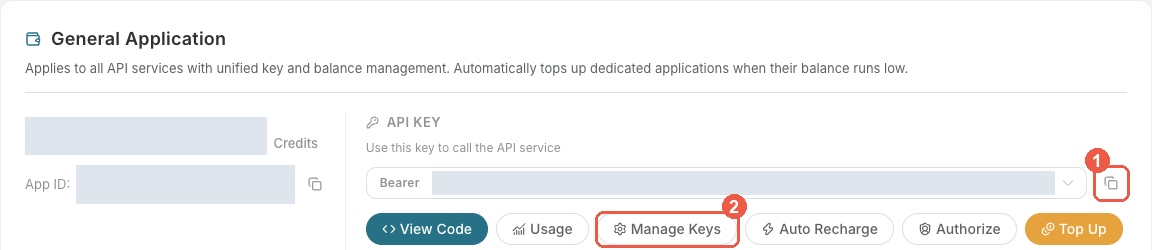
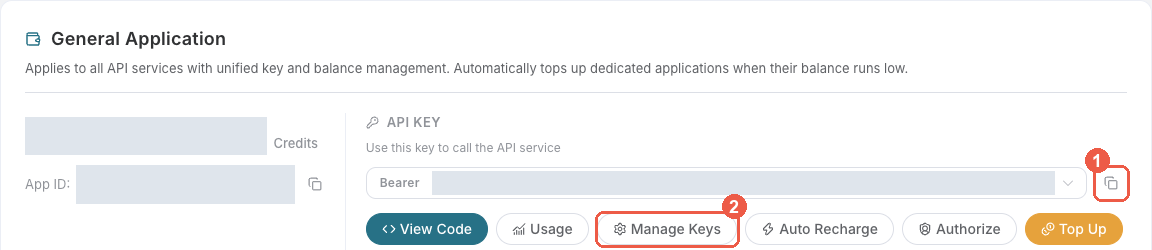
Bearer . An API Key / API Token field expects this raw value; only a manually configured HTTP Authorization header needs the Bearer prefix. A platform-... account-management token cannot replace a generation API key.
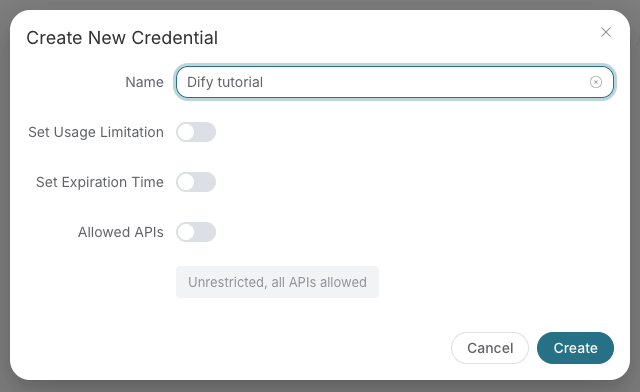
Save the key in the client's credential store or the environment variable shown below. Never put it in a prompt, shared workflow, screenshot, or Git commit. If authentication fails, check the full copied value, application/service access, expiration, usage limit, and balance before creating another key.
Accounts with neither a successful paid top-up nor an administrator's manual credit addition may run one billable request at a time across the entire account, shared by all API keys and services. Rewards, redemption cards and transferred credits do not count as paid top-ups. A successful paid top-up or manual credit addition removes this trial restriction; balance and key usage-limit checks still apply.
A new billable request returns 429 too_many_requests while another is running. Wait for the active request's final result before submitting the next one. Free task polling remains available.
For async APIs, acceptance or a task ID is not completion: keep querying the same task until its final result. A disconnect or proxy timeout does not mean execution stopped. If a task has no terminal result for a long time, contact support with trace_id.
This restriction changes neither trial API availability nor pricing; fees are settled after execution based on actual usage.
The Kling Videos Generation API generates official Kling AI videos by inputting custom parameters such as prompt, action, model, and optional reference images. It supports text-to-video (text2video), image-to-video (image2video), and video extension (extend) actions across a range of Kling models.
The Kling Tasks API queries the execution status of tasks generated by the Kling Videos Generation API or the Kling Motion Generation API using a task ID.
The Kling Motion Generation API generates videos with character motion driven by a reference image and a reference video, keeping character movements consistent with the reference video.
To use the Kling Videos Generation API, apply for the corresponding service on the Kling Videos Generation API page. After entering the page, click the "Acquire" button.
There is a free quota available for first-time applicants, allowing you to use this API for free.
curl --request POST "https://api.acedata.cloud/kling/videos" \
  --header "Authorization: Bearer YOUR_API_KEY" \
  --header "Content-Type: application/json" \
  --data '{
    "action": "text2video",
    "model": "kling-v1",
    "prompt": "White ceramic coffee mug on glossy marble countertop with morning window light. Camera slowly rotates 360 degrees around the mug, pausing briefly at the handle."
  }'
Explore the supported endpoints and integration guides for Kling Video Generation.
| API | Path | Integration Guidance |
|---|---|---|
| Kling Videos Generation API | /kling/videos |
Kling Videos Generation API Integration Guide |
| Kling Tasks API | /kling/tasks |
Kling Tasks API Integration Guide |
| Kling Motion Generation API | /kling/motion |
Kling Motion Generation API Integration Guide |
If you meet any issue, please check support info or browse the latest documentation on docs.acedata.cloud.
AceDataCloud/KlingAPI is a public repo on GitHub by AceDataCloud. AceDataCloud KlingAPI documentation mirror.
It declares no license on GitHub. Public does not mean open source: without a license, nobody is granted the right to reuse it.
Its maker has not tagged a system, so it is unknown here. Its README says what it needs.
Open "Take it" on its page: Take My Repo writes an install plan for your machine and hands it to your AI agent (Claude Code, Codex or Cursor), which asks you before each step. Take My Repo has not tested it on any machine.
Its last change on GitHub was on 2026-11-12. Take My Repo does not judge from that whether it is maintained.
Nobody has reviewed it on Take My Repo yet, which says nothing about its quality.
Clone any viral video with AI agents. Not just a script, the whole workflow: swap the face, the words, the B-roll, ship 100 variants in one command, and get your 100M views.
A collective list of free APIs
The agent harness performance optimization system. Skills, instincts, memory, security, and research-first development for Claude Code, Codex, Opencode, Cursor and beyond.
Reverse engineer anything with agents, from app behavior down to native binaries.
Consumer AI app for chat, image generation, video generation, and music creation powered by Ace Data Cloud APIs.
MCP server for Suno AI music generation, lyrics, and cover workflows via Ace Data Cloud.
Seedance by Ace Data Cloud: text-to-video, image-to-video and task results via MCP.
Agent Skills for AceDataCloud AI services — music, image, video generation, web search, and more. Compatible with Claude Code, GitHub Copilot, Gemini CLI, and all agentskills.io-compatible agents.
MCP server for Nano Banana AI image generation and editing via Ace Data Cloud.