LumaAPI
Luma AI video generation service with text and image input.
- 1
- 16 h ago
Repo AceDataCloud/LumaAPI, read from GitHub 1 min ago. AceDataCloud has not joined Take My Repo.
In short
AceDataCloud/LumaAPI is a public repo on GitHub by AceDataCloud. Luma AI video generation service with text and image input. It declares no license on GitHub. Public does not mean open source: without a license, nobody is granted the right to reuse it. It has 1 stars and last changed on 2026-11-22. Nobody has reviewed it on Take My Repo yet, which says nothing about its quality. Read from GitHub on 2026-11-22.
Luma Video Generation API
Luma AI video generation service with text and image input.
API home page: Ace Data Cloud - Luma Video Generation
Keywords: luma-ai, ai-video, video-generation, text-to-video, rest-api, ai-api, aivideo, AI API, REST API, Developer API, Ace Data Cloud
Get your Ace Data Cloud API key
- Open Ace Data Cloud → Applications. Sign in, or register an account first.
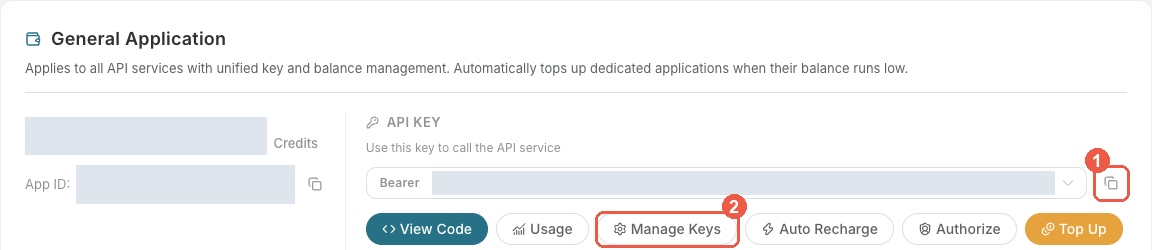
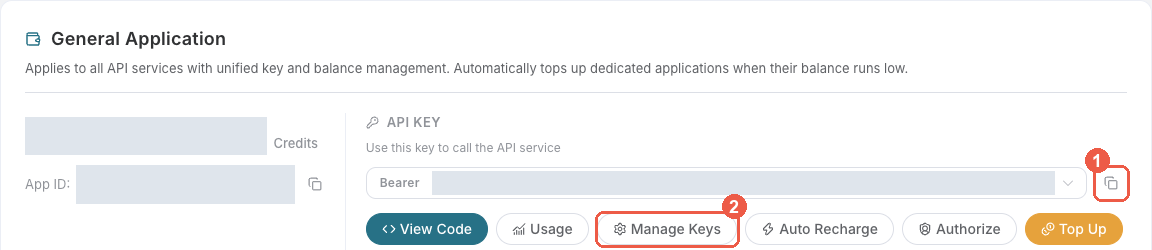
- Find General application. If it has not been created, choose Initialize General Application. A general key can use the services available to your account; a dedicated application's key is limited to its service. Check the required service/model access and current pricing.
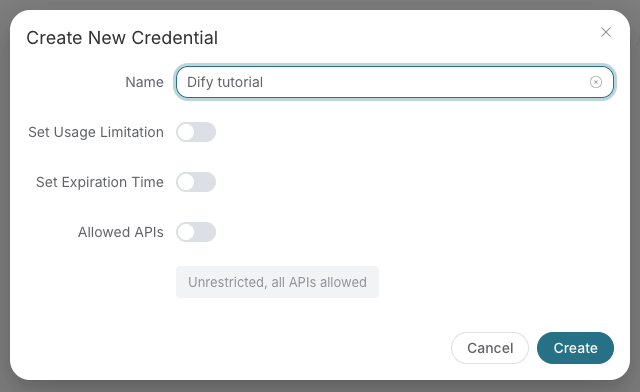
- Copy the API Key from the application card, or open Keys / Manage Keys → Create to create a separate key for this integration. Give it a recognizable name so you can revoke or rotate it independently.
- When creating a key, review Expiration Time, Set Usage Limitation, and Allowed APIs. Enable only the restrictions you need, allow the operations you will call, then click Create and copy the token from the key list. Task lookup does not grant permission to submit a generation. Confirm the application's balance can cover your first request; any trial allowance is whatever your account currently displays.
- Copy only the token value, without quotation marks, spaces, or
Bearer. An API Key / API Token field expects this raw value; only a manually configured HTTPAuthorizationheader needs theBearerprefix. Aplatform-...account-management token cannot replace a generation API key.
Save the key in the client's credential store or the environment variable shown below. Never put it in a prompt, shared workflow, screenshot, or Git commit. If authentication fails, check the full copied value, application/service access, expiration, usage limit, and balance before creating another key.
Trial account concurrency
Accounts with neither a successful paid top-up nor an administrator's manual credit addition may run one billable request at a time across the entire account, shared by all API keys and services. Rewards, redemption cards and transferred credits do not count as paid top-ups. A successful paid top-up or manual credit addition removes this trial restriction; balance and key usage-limit checks still apply.
A new billable request returns 429 too_many_requests while another is running. Wait for the active request's final result before submitting the next one. Free task polling remains available.
For async APIs, acceptance or a task ID is not completion: keep querying the same task until its final result. A disconnect or proxy timeout does not mean execution stopped. If a task has no terminal result for a long time, contact support with trace_id.
This restriction changes neither trial API availability nor pricing; fees are settled after execution based on actual usage.
Why Use Luma Video Generation on Ace Data Cloud
- Unified developer platform with one API key, billing system, and usage tracking
- Production-ready AI API endpoints served from https://api.acedata.cloud
- English integration guides, API references, and service documentation
- Global-ready workflow for developers building chat, image, video, music, and search products
Overview
The main function of the Luma Tasks API is to query the execution status of tasks by inputting the task ID generated by the Luma Videos Generation API.
This document will provide detailed integration instructions for the Luma Tasks API, helping you easily integrate and fully utilize the powerful features of this API. With the Luma Tasks API, you can easily query the execution status of tasks from the Luma Videos Generation API.
Application Process
To use the Luma Tasks API, you first need to apply for the corresponding service on the application page Luma Videos Generation API, and then copy the task ID from the Luma Videos Generation API, as shown in the image:
Finally, go to the Tasks API page Luma Tasks API to apply for the corresponding service. After entering the page, click the "Acquire" button, as shown in the image:
If you have not logged in or registered, you will be automatically redirected to the login page inviting you to register and log in. After logging in or registering, you will be automatically returned to the current page.
There is a free quota available for first-time applicants, allowing you to use this API for free.
Request Example
The Luma Tasks API can be used to query the results of the Luma Videos Generation API. For information on how to use the Luma Videos Generation API, please refer to the documentation Luma Videos Generation API.
We will take one task ID returned by the Luma Videos Generation API as an example to demonstrate how to use this API. Suppose we have a task ID: 50fc6182-fa86-4c7d-ac12-2fa27ec2f151, and we will demonstrate how to pass in a task ID.
Task Example Image
Setting Request Headers and Request Body
Request Headers include:
accept: Specifies that the response should be in JSON format, set toapplication/json.authorization: The key to call the API, which can be selected directly after application.
Request Body includes:
id: The uploaded task ID.action: The operation method for the task.
Set as shown in the image below:
Code Example
You can see that various language codes have been automatically generated on the right side of the page, as shown in the image:
Some code examples are as follows:
CURL
curl -X POST 'https://api.acedata.cloud/luma/tasks' \
-H 'accept: application/json' \
-H 'authorization: Bearer {token}' \
-H 'content-type: application/json' \
-d '{
  "id": "50fc6182-fa86-4c7d-ac12-2fa27ec2f151",
  "action": "retrieve"
}'
Python
import requests

url = "https://api.acedata.cloud/luma/tasks"

headers = {
    "accept": "application/json",
    "authorization": "Bearer {token}",
    "content-type": "application/json"
}

payload = {
    "id": "50fc6182-fa86-4c7d-ac12-2fa27ec2f151",
    "action": "retrieve"
}

response = requests.post(url, json=payload, headers=headers)
print(response.text)
Response Example
Upon successful request, the API will return the detailed information of the video task here. For example:
{
  "_id": "66d297a3550a4144a5a5db42",
  "id": "50fc6182-fa86-4c7d-ac12-2fa27ec2f151",
  "api_id": "94fc9028-5a9f-4875-aae4-38463bd30ac5",
  "application_id": "06484a45-9d04-498a-98a7-67086dee8166",
  "created_at": 1725077411.961,
  "credential_id": "e6a879e5-a7c0-4f7b-9d6f-f9a837421a50",
  "request": {
    "action": "generate",
    "prompt": "Astronauts shuttle from space to volcano"
  },
  "trace_id": "0b7c1c1a-045c-4145-a434-609cba88f0a9",
  "user_id": "ad7afe47-cea9-4cda-980f-2ad8810e51cf",
  "response": {
    "success": true,
    "task_id": "50fc6182-fa86-4c7d-ac12-2fa27ec2f151",
    "video_id": "4b088fc8-2bbc-4706-80a6-a0fb118adc1a",
    "prompt": "Astronauts shuttle from space to volcano",
    "video_url": "https://platform.cdn.acedata.cloud/luma/50fc6182-fa86-4c7d-ac12-2fa27ec2f151.mp4",
    "video_height": 752,
    "video_width": 1360,
    "state": "completed",
    "thumbnail_url": "https://platform.cdn.acedata.cloud/luma/50fc6182-fa86-4c7d-ac12-2fa27ec2f151.jpg",
    "thumbnail_width": 1360,
    "thumbnail_height": 752
  },
  "finished_at": 1725077566.241
}
The returned result contains multiple fields, with the request field being the request body when the task was initiated, and the response field being the response body returned after the task is completed, consistent with the requests and responses of the Luma Videos Generation API. The field descriptions are as follows.
id: The ID of the video task generated, used to uniquely identify this video generation task.video_id: The unique identifier of the video in this queried video task, which needs to be passed when performing extension operations on the video next time.request: The request information in the queried video task.response: The return information in the queried video task.
Batch Query Operation
This is for querying the details of multiple task IDs, and unlike the above, the action needs to be selected as retrieve_batch.
Request Body includes:
ids: An array of uploaded task IDs.action: The operation method for the task.
Set as shown in the image below:
Code Example
You can see that various language codes have been automatically generated on the right side of the page, as shown in the image:
Some code examples are as follows:
Response Example
Upon successful request, the API will return the specific details of all batch video tasks this time. For example:
{
  "items": [
    {
      "_id": "66d297a3550a4144a5a5db42",
      "id": "50fc6182-fa86-4c7d-ac12-2fa27ec2f151",
      "api_id": "94fc9028-5a9f-4875-aae4-38463bd30ac5",
      "application_id": "06484a45-9d04-498a-98a7-67086dee8166",
      "created_at": 1725077411.961,
      "credential_id": "e6a879e5-a7c0-4f7b-9d6f-f9a837421a50",
      "request": {
        "action": "generate",
        "prompt": "Astronauts shuttle from space to volcano"
      },
      "trace_id": "0b7c1c1a-045c-4145-a434-609cba88f0a9",
      "user_id": "ad7afe47-cea9-4cda-980f-2ad8810e51cf",
      "response": {
        "success": true,
        "task_id": "50fc6182-fa86-4c7d-ac12-2fa27ec2f151",
        "video_id": "4b088fc8-2bbc-4706-80a6-a0fb118adc1a",
        "prompt": "Astronauts shuttle from space to volcano",
        "video_url": "https://platform.cdn.acedata.cloud/luma/50fc6182-fa86-4c7d-ac12-2fa27ec2f151.mp4",
        "video_height": 752,
        "video_width": 1360,
        "state": "completed",
        "thumbnail_url": "https://platform.cdn.acedata.cloud/luma/50fc6182-fa86-4c7d-ac12-2fa27ec2f151.jpg",
        "thumbnail_width": 1360,
        "thumbnail_height": 752
      },
      "finished_at": 1725077566.241
    },
    {
      "_id": "66d29ed3550a4144a5a6c089",
      "id": "76a05f61-68ad-4c1a-838f-a00cd08cf65b",
      "api_id": "94fc9028-5a9f-4875-aae4-38463bd30ac5",
      "application_id": "06484a45-9d04-498a-98a7-67086dee8166",
      "created_at": 1725079250.921,
      "credential_id": "e6a879e5-a7c0-4f7b-9d6f-f9a837421a50",
      "request": {
        "action": "generate",
        "prompt": "la la la"
      },
      "trace_id": "338f1616-741d-40b6-8d62-c025434024c6",
      "user_id": "ad7afe47-cea9-4cda-980f-2ad8810e51cf",
      "response": {
        "success": true,
        "task_id": "76a05f61-68ad-4c1a-838f-a00cd08cf65b",
        "video_id": "5a638d6a-7481-4c5e-8843-36c9d1b5bcd5",
        "prompt": "la la la",
        "video_url": "https://platform.cdn.acedata.cloud/luma/76a05f61-68ad-4c1a-838f-a00cd08cf65b.mp4",
        "video_height": 752,
        "video_width": 1360,
        "state": "completed",
        "thumbnail_url": "https://platform.cdn.acedata.cloud/luma/76a05f61-68ad-4c1a-838f-a00cd08cf65b.jpg",
        "thumbnail_width": 1360,
        "thumbnail_height": 752
      },
      "finished_at": 1725079406.71
    }
  ],
  "count": 2
}
CURL
curl -X POST 'https://api.acedata.cloud/luma/tasks' \
-H 'accept: application/json' \
-H 'authorization: Bearer {token}' \
-H 'content-type: application/json' \
-d '{
  "ids": ["50fc6182-fa86-4c7d-ac12-2fa27ec2f151","76a05f61-68ad-4c1a-838f-a00cd08cf65b"],
  "action": "retrieve_batch"
}'
Python
import requests

url = "https://api.acedata.cloud/luma/tasks"

headers = {
    "accept": "application/json",
    "authorization": "Bearer {token}",
    "content-type": "application/json"
}

payload = {
    "ids": ["50fc6182-fa86-4c7d-ac12-2fa27ec2f151","76a05f61-68ad-4c1a-838f-a00cd08cf65b"],
    "action": "retrieve_batch"
}

response = requests.post(url, json=payload, headers=headers)
print(response.text)
Error Handling
When calling the API, if an error occurs, the API will return the corresponding error code and message. For example:
400 token_mismatched: Bad request, possibly due to missing or invalid parameters.400 api_not_implemented: Bad request, possibly due to missing or invalid parameters.401 invalid_token: Unauthorized, invalid or missing authorization token.429 too_many_requests: Too many requests, you have exceeded the rate limit.500 api_error: Internal server error, something went wrong on the server.
Error Response Example
{
  "success": false,
  "error": {
    "code": "api_error",
    "message": "fetch failed"
  },
  "trace_id": "2cf86e86-22a4-46e1-ac2f-032c0f2a4e89"
}
Quick Start
- Base URL: https://api.acedata.cloud
- Service page: Luma Video Generation on Ace Data Cloud
- Docs: Developer documentation
curl --request POST "https://api.acedata.cloud/luma/tasks" \
  --header "Authorization: Bearer YOUR_API_KEY" \
  --header "Content-Type: application/json" \
  --data '{}'
APIs and Guides
Explore the supported endpoints and integration guides for Luma Video Generation.
| API | Path | Integration Guidance |
|---|---|---|
| Luma Tasks API | /luma/tasks |
Luma Tasks API Integration Guide |
| Luma Videos Generation API | /luma/videos |
Luma Videos Generation API Integration Guide |
Related Resources
- Ace Data Cloud Developer Platform
- Ace Data Cloud Docs
- Status Page
- Ace Data Cloud GitHub Organization
Support
If you meet any issue, please check support info or browse the latest documentation on docs.acedata.cloud.
Questions
What is LumaAPI?
AceDataCloud/LumaAPI is a public repo on GitHub by AceDataCloud. Luma AI video generation service with text and image input.
Is LumaAPI open source?
It declares no license on GitHub. Public does not mean open source: without a license, nobody is granted the right to reuse it.
Does LumaAPI run on macOS, Windows or Linux?
Its maker has not tagged a system, so it is unknown here. Its README says what it needs.
How do I install LumaAPI?
Open "Take it" on its page: Take My Repo writes an install plan for your machine and hands it to your AI agent (Claude Code, Codex or Cursor), which asks you before each step. Take My Repo has not tested it on any machine.
Is LumaAPI still maintained?
Its last change on GitHub was on 2026-11-22. GitHub counts 0 open issues and pull requests. Take My Repo does not judge from that whether it is maintained.
What do people who ran LumaAPI say?
Nobody has reviewed it on Take My Repo yet, which says nothing about its quality.