hyperframes
Open-source AI video editor: edit your own footage, or create and remake any video with Claude Code, Codex or the free Studio app. Write HTML, render MP4. By HeyGen.
- 89k
- TypeScript
- Apache-2.0
- 8 min ago
Maestro end-to-end AI video production API documentation (Ace Data Cloud).
Repo AceDataCloud/MaestroAPI, read from GitHub 4 d ago. AceDataCloud has not joined Take My Repo.
AceDataCloud/MaestroAPI is a public repo on GitHub by AceDataCloud. Maestro end-to-end AI video production API documentation (Ace Data Cloud). It declares no license on GitHub. Public does not mean open source: without a license, nobody is granted the right to reuse it. It has 0 stars and last changed on 2026-11-12. Nobody has reviewed it on Take My Repo yet, which says nothing about its quality. Read from GitHub on 2026-11-19.
Maestro turns a natural-language brief and optional reference media into a finished video. Its AI director handles planning, scripting, visual assets, voiceover, music, editing, captions, quality checks, and rendering. Each task delivers one video in one selected language.
API home page: Ace Data Cloud - Maestro
Keywords: maestro-api, ai-video, video-production, prompt-to-video, article-to-video, multilingual-video, video-editing, rest-api, ai-api, developer-api, Ace Data Cloud
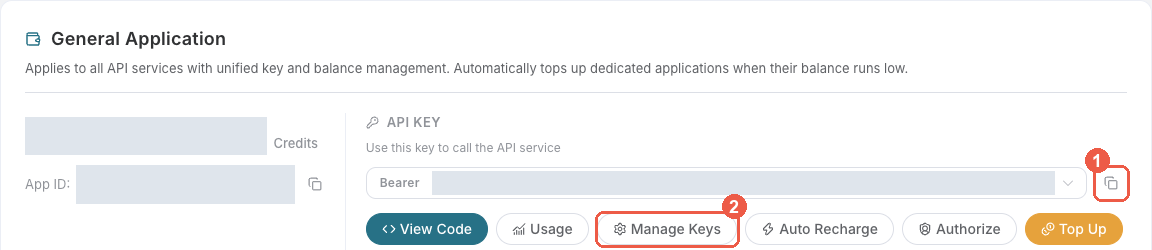
Bearer . An API Key / API Token field expects this raw value; only a manually configured HTTP Authorization header needs the Bearer prefix. A platform-... account-management token cannot replace a generation API key.
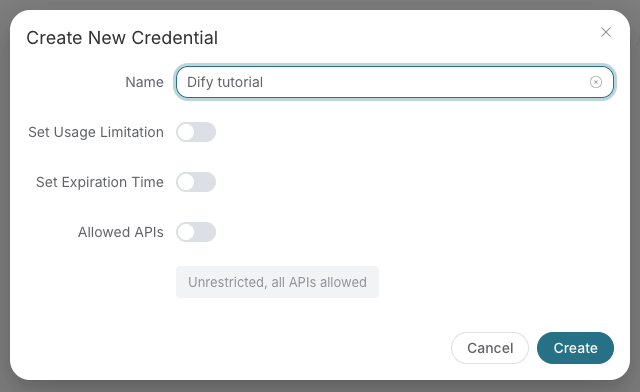
Save the key in the client's credential store or the environment variable shown below. Never put it in a prompt, shared workflow, screenshot, or Git commit. If authentication fails, check the full copied value, application/service access, expiration, usage limit, and balance before creating another key.
Accounts with neither a successful paid top-up nor an administrator's manual credit addition may run one billable request at a time across the entire account, shared by all API keys and services. Rewards, redemption cards and transferred credits do not count as paid top-ups. A successful paid top-up or manual credit addition removes this trial restriction; balance and key usage-limit checks still apply.
A new billable request returns 429 too_many_requests while another is running. Wait for the active request's final result before submitting the next one. Free task polling remains available.
For async APIs, acceptance or a task ID is not completion: keep querying the same task until its final result. A disconnect or proxy timeout does not mean execution stopped. If a task has no terminal result for a long time, contact support with trace_id.
This restriction changes neither trial API availability nor pricing; fees are settled after execution based on actual usage.
Create an API token in the Ace Data Cloud console, then submit a video brief:
curl --request POST 'https://api.acedata.cloud/maestro/videos' \
  --header 'Authorization: Bearer YOUR_API_TOKEN' \
  --header 'Content-Type: application/json' \
  --data '{
    "prompt": "Create a 30-second beginner-friendly video explaining vector databases. End with one memorable takeaway.",
    "langs": ["en"],
    "aspect": "16:9",
    "duration": 30,
    "scenario": "narrated"
  }'
The API accepts the job immediately:
{
  "success": true,
  "task_id": "f57e99c4-f60f-4373-a155-17742ce2357d",
  "trace_id": "70e1cb12-c619-4292-a416-90191205996b"
}
Query the task until its top-level status becomes succeeded or failed:
curl --request POST 'https://api.acedata.cloud/maestro/tasks' \
  --header 'Authorization: Bearer YOUR_API_TOKEN' \
  --header 'Content-Type: application/json' \
  --data '{"id": "f57e99c4-f60f-4373-a155-17742ce2357d", "action": "retrieve"}'
| API | Path | Integration Guide |
|---|---|---|
| Maestro Videos API | POST /maestro/videos |
Video production guide |
| Maestro Tasks API | POST /maestro/tasks |
Task retrieval guide |
POST /maestro/videos
        |
        v
  task_id returned
        |
        v
POST /maestro/tasks  ->  pending/planning/producing  ->  succeeded or failed
        |                                                   |
        +---------------- progress -------------------------+
                                                            |
                                                            v
                                             response.data.variants
Task polling and history retrieval do not consume credits. Successful video jobs cost 0.7 Credits per actual delivered second for every action, scenario, and language, with no multipliers or language surcharges; failed jobs are not charged. Billed duration is measured in integer seconds, never exceeds the requested duration, and falls back to the requested duration if the output duration cannot be read. A 30-second billed video costs 21 Credits. See live Maestro pricing for current rates.
For integration help, use the support page and include the response trace_id when available.
AceDataCloud/MaestroAPI is a public repo on GitHub by AceDataCloud. Maestro end-to-end AI video production API documentation (Ace Data Cloud).
It declares no license on GitHub. Public does not mean open source: without a license, nobody is granted the right to reuse it.
Its maker has not tagged a system, so it is unknown here. Its README says what it needs.
Open "Take it" on its page: Take My Repo writes an install plan for your machine and hands it to your AI agent (Claude Code, Codex or Cursor), which asks you before each step. Take My Repo has not tested it on any machine.
Its last change on GitHub was on 2026-11-12. Take My Repo does not judge from that whether it is maintained.
Nobody has reviewed it on Take My Repo yet, which says nothing about its quality.
Open-source AI video editor: edit your own footage, or create and remake any video with Claude Code, Codex or the free Studio app. Write HTML, render MP4. By HeyGen.
The agent harness performance optimization system. Skills, instincts, memory, security, and research-first development for Claude Code, Codex, Opencode, Cursor and beyond.
Reverse engineer anything with agents, from app behavior down to native binaries.
Consumer AI app for chat, image generation, video generation, and music creation powered by Ace Data Cloud APIs.
MCP server for Suno AI music generation, lyrics, and cover workflows via Ace Data Cloud.
Seedance by Ace Data Cloud: text-to-video, image-to-video and task results via MCP.
Agent Skills for AceDataCloud AI services — music, image, video generation, web search, and more. Compatible with Claude Code, GitHub Copilot, Gemini CLI, and all agentskills.io-compatible agents.
MCP server for Nano Banana AI image generation and editing via Ace Data Cloud.