
SerpAPI
Search Engine Results Page (SERP) related API.
- 2
- 11 d ago
Repo AceDataCloud/SerpAPI, read from GitHub 5 d ago. AceDataCloud has not joined Take My Repo.
In short
AceDataCloud/SerpAPI is a public repo on GitHub by AceDataCloud. Search Engine Results Page (SERP) related API. It declares no license on GitHub. Public does not mean open source: without a license, nobody is granted the right to reuse it. It has 2 stars and last changed on 2026-11-12. Nobody has reviewed it on Take My Repo yet, which says nothing about its quality. Read from GitHub on 2026-11-19.

Search Engine API
Search Engine Results Page (SERP) related API.
API home page: Ace Data Cloud - Search Engine
Keywords: serp-api, web-search, google-search, search-api, rest-api, ai-api, AI API, REST API, Developer API, Ace Data Cloud
Get your Ace Data Cloud API key
- Open Ace Data Cloud → Applications. Sign in, or register an account first.
- Find General application. If it has not been created, choose Initialize General Application. A general key can use the services available to your account; a dedicated application's key is limited to its service. Check the required service/model access and current pricing.
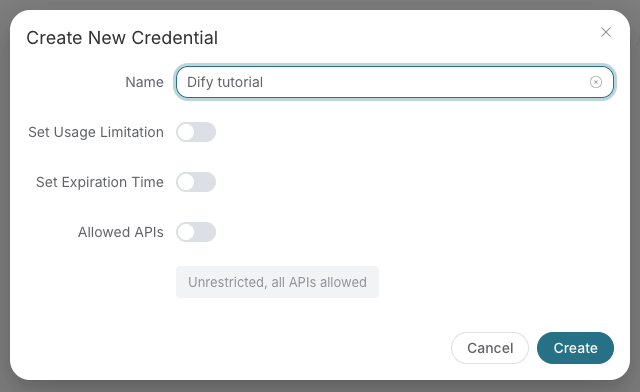
- Copy the API Key from the application card, or open Keys / Manage Keys → Create to create a separate key for this integration. Give it a recognizable name so you can revoke or rotate it independently.
- When creating a key, review Expiration Time, Set Usage Limitation, and Allowed APIs. Enable only the restrictions you need, allow the operations you will call, then click Create and copy the token from the key list. Task lookup does not grant permission to submit a generation. Confirm the application's balance can cover your first request; any trial allowance is whatever your account currently displays.
- Copy only the token value, without quotation marks, spaces, or
Bearer. An API Key / API Token field expects this raw value; only a manually configured HTTPAuthorizationheader needs theBearerprefix. Aplatform-...account-management token cannot replace a generation API key.
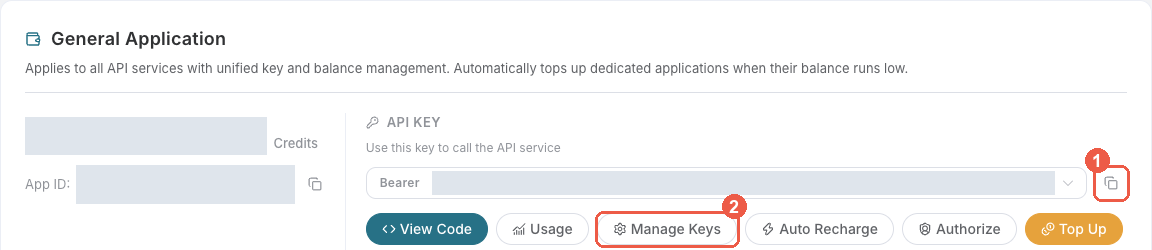
Save the key in the client's credential store or the environment variable shown below. Never put it in a prompt, shared workflow, screenshot, or Git commit. If authentication fails, check the full copied value, application/service access, expiration, usage limit, and balance before creating another key.
Trial account concurrency
Accounts with neither a successful paid top-up nor an administrator's manual credit addition may run one billable request at a time across the entire account, shared by all API keys and services. Rewards, redemption cards and transferred credits do not count as paid top-ups. A successful paid top-up or manual credit addition removes this trial restriction; balance and key usage-limit checks still apply.
A new billable request returns 429 too_many_requests while another is running. Wait for the active request's final result before submitting the next one. Free task polling remains available.
For async APIs, acceptance or a task ID is not completion: keep querying the same task until its final result. A disconnect or proxy timeout does not mean execution stopped. If a task has no terminal result for a long time, contact support with trace_id.
This restriction changes neither trial API availability nor pricing; fees are settled after execution based on actual usage.
Why Use Search Engine on Ace Data Cloud
- Unified developer platform with one API key, billing system, and usage tracking
- Production-ready AI API endpoints served from https://api.acedata.cloud
- English integration guides, API references, and service documentation
- Global-ready workflow for developers building chat, image, video, music, and search products
Overview
Search Engine · Results Page
SERP Search Engine API
Get Google search results through a simple RESTful API. Supports web search, image search, news search—charged by the number of requests, starting at $0.00095.
🌐 Google Search
🖼️ Image Search
📰 News Search
💰 $0.00095 / request starting
$0.00095
Starting price per search
100+
Supported countries/regions
Real-time
Result data
JSON
Structured response
Core Features
One API to get all search results from Google Search Engine
🌐
Web Search
Get Google web search results, including complete information such as title, summary, link, etc., supporting pagination and custom result counts.
🖼️
Image Search
Search Google images, returning structured data such as image URLs, thumbnails, and sources for image collection and analysis.
📰
News Search
Get Google news results, tracking hot events in real-time, suitable for news aggregation applications.
🌍
Multilingual and Multiregional
Specify the country and language for search using gl and hl parameters to get localized search results.
Get search results in one line of code
Concise RESTful API design, structured Google search data can be obtained with a GET request.
Python
import requestsresponse = requests.get( "https://api.acedata.cloud/serp/google", headers={ "Authorization": "Bearer YOUR_API_KEY" }, params={ "q": "artificial intelligence", "number": 10, "gl": "us", "hl": "en" } )
data = response.json() for result in data["results"]: print(result["title"], result["link"])
3 Steps to Get Started Quickly
It only takes a few minutes from registration to getting your first search result.
1
Get API Key
Register and generate an API key from the console.
2
Build Search Request
Set parameters such as keywords, language, number of results, etc.
3
Get Results
Send a GET request to obtain search results in JSON format.
What is SERP API Suitable For?
Covers various application scenarios for search engine data
📊
SEO Monitoring
Track keyword ranking changes and analyze competitors' search performance.
🤖
AI Agent Tools
Provide real-time search capabilities for LLM Agents to obtain the latest internet information.
📰
Public Opinion Monitoring
Monitor brand-related news and changes in search results in real-time.
📈
Market Research
Bulk obtain industry-related search data to assist in market analysis decisions.
🔬
Academic Research
Large-scale search data collection for academic research and paper writing.
🛍️
Price Comparison
Search and compare product prices across platforms to build a price comparison tool.
Core Parameters
Flexibly customize search requests and precisely control output
q
Search Keywords
The keywords or query statements to search for, supporting Google search syntax.
number
Number of Results
The number of search results to return, affecting billing tiers (≤10 or >10).
gl
Country/Region
Specify the target country for the search (e.g., us, cn, jp) to get localized results.
hl
Language
Specify the language of the search results (e.g., en, zh-CN, ja).
type
Search Type
Search types: web (search), images (images), news (news), etc.
start
Starting Position
The offset of search results, used for pagination to get more results.
SERP API Pricing
Charged by the number of requests, simple and transparent.
| Request Type | Number of Results | Price per Request |
|---|---|---|
| Google Search | ≤ 10 results | $0.00095 |
| Google Search | > 10 results | $0.0019 |
💡 Charged per request, no monthly fees, no hidden charges. Bulk purchases can enjoy additional discounts.
Frequently Asked Questions
Common questions about using the SERP API
Is the data returned by the SERP API real-time?›
Yes, each request queries the Google search engine in real-time and returns the latest results, not cached data.
What search types are supported?›
Supports various types such as web search (search), image search (images), news search (news), etc., switched via the type parameter.
How to get more search results?›
Use the number parameter to control the number of results returned each time, combined with the start parameter for pagination to obtain a large number of search results.
Can I search for results from specific countries/languages?›
Yes. Specify the country for the search using the gl parameter (e.g., us), and the result language using the hl parameter (e.g., en) to accurately locate the results you need.
Is it suitable for use with AI Agents?›
Very suitable. The SERP API returns structured JSON data, which can be directly used as a tool for LLM Agents. Ace Data Cloud also provides an MCP Server wrapper that can be directly called in AI like Claude, ChatGPT, etc.
Explore More AI Services
Ace Data Cloud offers various AI service APIs
Start Using SERP API Now
Efficiently obtain Google search results to empower your applications.
Quick Start
- Base URL: https://api.acedata.cloud
- Service page: Search Engine on Ace Data Cloud
- Docs: Developer documentation
curl --request POST "https://api.acedata.cloud/serp/google" \
  --header "Authorization: Bearer YOUR_API_KEY" \
  --header "Content-Type: application/json" \
  --data '{}'
APIs and Guides
Explore the supported endpoints and integration guides for Search Engine.
| API | Path | Integration Guidance |
|---|---|---|
| Google SERP API | /serp/google |
Google SERP API Integration Guide |
Related Resources
- Ace Data Cloud Developer Platform
- Ace Data Cloud Docs
- Status Page
- Ace Data Cloud GitHub Organization
Support
If you meet any issue, please check support info
Questions
What is SerpAPI?
AceDataCloud/SerpAPI is a public repo on GitHub by AceDataCloud. Search Engine Results Page (SERP) related API.
Is SerpAPI open source?
It declares no license on GitHub. Public does not mean open source: without a license, nobody is granted the right to reuse it.
Does SerpAPI run on macOS, Windows or Linux?
Its maker has not tagged a system, so it is unknown here. Its README says what it needs.
How do I install SerpAPI?
Open "Take it" on its page: Take My Repo writes an install plan for your machine and hands it to your AI agent (Claude Code, Codex or Cursor), which asks you before each step. Take My Repo has not tested it on any machine.