
VeoAPI
Veo AI video generation service with text and image input.
- 2
- 12 d ago
Repo AceDataCloud/VeoAPI, read from GitHub 2 h ago. AceDataCloud has not joined Take My Repo.
In short
AceDataCloud/VeoAPI is a public repo on GitHub by AceDataCloud. Veo AI video generation service with text and image input. It declares no license on GitHub. Public does not mean open source: without a license, nobody is granted the right to reuse it. It has 2 stars and last changed on 2026-11-12. Nobody has reviewed it on Take My Repo yet, which says nothing about its quality. Read from GitHub on 2026-11-24.

Veo Video Generation API
Veo AI video generation service with text and image input.
API home page: Ace Data Cloud - Veo Video Generation
Keywords: veo-api, ai-video, video-generation, google-veo, rest-api, ai-api, aivideo, AI API, REST API, Developer API, Ace Data Cloud
Get your Ace Data Cloud API key
- Open Ace Data Cloud → Applications. Sign in, or register an account first.
- Find General application. If it has not been created, choose Initialize General Application. A general key can use the services available to your account; a dedicated application's key is limited to its service. Check the required service/model access and current pricing.
- Copy the API Key from the application card, or open Keys / Manage Keys → Create to create a separate key for this integration. Give it a recognizable name so you can revoke or rotate it independently.
- When creating a key, review Expiration Time, Set Usage Limitation, and Allowed APIs. Enable only the restrictions you need, allow the operations you will call, then click Create and copy the token from the key list. Task lookup does not grant permission to submit a generation. Confirm the application's balance can cover your first request; any trial allowance is whatever your account currently displays.
- Copy only the token value, without quotation marks, spaces, or
Bearer. An API Key / API Token field expects this raw value; only a manually configured HTTPAuthorizationheader needs theBearerprefix. Aplatform-...account-management token cannot replace a generation API key.
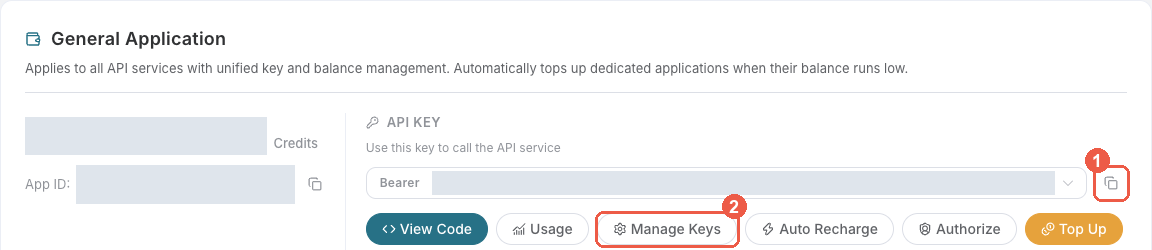
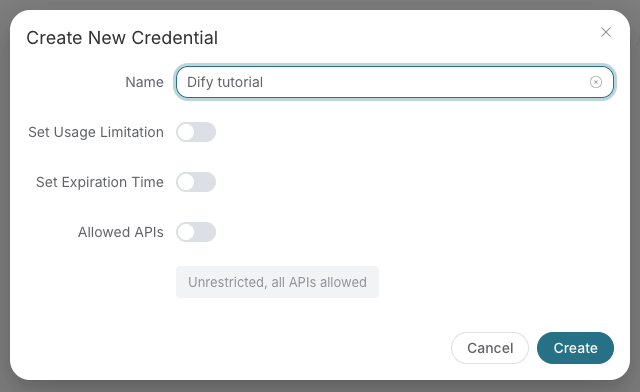
Save the key in the client's credential store or the environment variable shown below. Never put it in a prompt, shared workflow, screenshot, or Git commit. If authentication fails, check the full copied value, application/service access, expiration, usage limit, and balance before creating another key.
Trial account concurrency
Accounts with neither a successful paid top-up nor an administrator's manual credit addition may run one billable request at a time across the entire account, shared by all API keys and services. Rewards, redemption cards and transferred credits do not count as paid top-ups. A successful paid top-up or manual credit addition removes this trial restriction; balance and key usage-limit checks still apply.
A new billable request returns 429 too_many_requests while another is running. Wait for the active request's final result before submitting the next one. Free task polling remains available.
For async APIs, acceptance or a task ID is not completion: keep querying the same task until its final result. A disconnect or proxy timeout does not mean execution stopped. If a task has no terminal result for a long time, contact support with trace_id.
This restriction changes neither trial API availability nor pricing; fees are settled after execution based on actual usage.
Why Use Veo Video Generation on Ace Data Cloud
- Unified developer platform with one API key, billing system, and usage tracking
- Production-ready AI API endpoints served from https://api.acedata.cloud
- English integration guides, API references, and service documentation
- Global-ready workflow for developers building chat, image, video, music, and search products
Overview
Veo API · Ace Data Cloud
Google Veo API:
Generate AI Videos
Make stable REST API calls to Google DeepMind's Veo video generation model. Supports Text-to-Video and Image-to-Video, covering the entire series of Veo 2, Veo 3, and Veo 3.1 models, outputting up to 4K resolution. ```
🎬 5 Model Versions
📹 3 Types of Actions
📄 OpenAPI 3.0 Specification
🔑 Bearer Token Authentication
🎬
5
Model Versions
📹
3
Available Actions
📡
2
API Interfaces
🎞️
4K
Highest Resolution
Does Google Veo have an official API?
Google's Veo video generation model is currently only available through the Vertex AI platform, requiring complex GCP project configuration and regional restrictions.
Ace Data Cloud offers a simple REST API, allowing you to directly call the full range of Veo models— including the latest Veo 3.1—without a GCP account, completing Text-to-Video, Image-to-Video, and 4K upgrades through a unified interface, equipped with OpenAPI specifications, Webhook support, and pay-as-you-go pricing.
Core Features of the Veo API
Top video generation technology from Google DeepMind, available instantly through a simple API
🎬
Text-to-Video
Generate high-quality videos from text prompts. Supports natural language descriptions of scenes, objects, actions, and styles, converting text into realistic dynamic visuals.
🖼️
Image-to-Video
Upload reference images, and Veo will transform them into smooth dynamic videos. Perfectly retains the composition, lighting, and style of the original image, supporting custom aspect ratios.
📐
4K Ultra HD
Upgrade videos to 1080p/4K resolution using get1080p and resolution: 4k. Rich in detail, with realistic lighting, meeting professional film production needs.
⚡
Fast Models
Veo 2 Fast, Veo 3 Fast, and other fast versions significantly reduce latency and costs, suitable for rapid iteration and bulk scene generation.
🌐
Multiple Aspect Ratios
Supports various aspect ratios such as 16:9, 9:16, 1:1, 4:3, 3:4, easily adapting to different platform formats like landscape, portrait, and square.
🔗
Webhook Asynchronous Callback
Set callback_url to automatically receive result pushes after video generation is complete. No polling required, and you can also check progress through the free Tasks API.
cURL
curl -X POST https://api.acedata.cloud/veo/videos \
-H "Authorization: Bearer YOUR_API_KEY" \
-H "Content-Type: application/json" \
-d '{
"action": "text2video",
"model": "veo2-fast",
"prompt": "A cinematic drone shot flying over a futuristic Tokyo at sunset, neon lights reflecting on wet streets, 4k",
"aspect_ratio": "16:9",
"callback_url": "https://your-app.com/webhook"
}'
Python
import requests
response = requests.post(
"https://api.acedata.cloud/veo/videos",
headers={
"Authorization": "Bearer YOUR_API_KEY",
"Content-Type": "application/json"
},
json={
"action": "text2video",
"model": "veo3",
"prompt": "A golden retriever running on a beach at golden hour, slow motion, cinematic"
}
)
print(response.json())
Response
{
"success": true,
"task_id": "289e96d8-9643-4025-b122-2d4c0627ebbe",
"trace_id": "243b7b30-ad1a-4885-837f-38e06b7431fa",
"data": [{
"id": "cae2edd7d2614f6c88bdb5d914c18994",
"video_url": "https://cdn.acedata.cloud/43a57990c0.mp4",
"created_at": "2026-02-15 20:38:48",
"complete_at": "2026-02-15 20:39:56",
"state": "succeeded"
}]
}
Quick Start - Get Started in 5 Minutes
A simple REST API using Bearer Token authentication. One request is all it takes to generate your first AI video.
1
Get API Key
Register at Ace Data Cloud and obtain your Bearer Token from the console
2
Send POST Request
Send a request to /veo/videos with the prompt, model, and aspect ratio
3
Get Your Video
Retrieve the generated video URL via Webhook or Tasks API—available immediately
What can you build with the Veo API?
From creative content to enterprise applications—developers are building these projects
🎬
Short Videos and Ads
Bulk generate product showcase videos, social media shorts, and advertising materials
🎮
Games and Animation
Generate video assets for game trailers, cutscenes, and concept visualizations
🤖
AI Agents and MCP
Integrate with AI agents like Claude and ChatGPT through MCP Server to generate videos using natural language
🏢
Enterprise Content Production
Automatically generate professional video content for training videos, product demonstrations, and marketing campaigns
3 Steps to Get Started Quickly
From registration to generating your first AI video, it takes less than 5 minutes
01
Register and Get API Key
Create a free account at Ace Data Cloud. Generate your Bearer Token from the API management console.
02
Initiate Your First API Call
Send a POST request with a text prompt to /veo/videos. You can use SDK, cURL, or any HTTP client.
03
Integrate and Expand
Embed the API into your application. Use Webhook for asynchronous processing and confidently scale to production.
Why Choose Ace Data Cloud's Veo API?
See our comparative advantages on the features that matter most to developers
| Feature | Ace Data Cloud | Other Platforms |
|---|---|---|
| Veo 3.1 Model | ✓ | Partial Support |
| Text-to-Video + Image-to-Video | ✓ | Partial Support |
| 4K Resolution Output | ✓ | Partial Support |
| Fast Models | ✓ | Partial Support |
| OpenAPI 3.0 Specification | ✓ | Partial Support |
| Webhook Callback | ✓ | Partial Support |
| No GCP Account Required | ✓ | ✗ |
| Pay-as-you-go | ✓ | Partial Support |
Which Model is Right for You?
Choose from 5 Veo model versions based on your needs for quality, speed, and cost
Veo 2 Fast
FastestThe fastest and lowest cost option. Suitable for rapid prototyping, bulk generation, and latency-sensitive scenarios.
- ✓ Extremely low latency, second-level response
- ✓ Lowest cost (as low as $0.066 / call)
- ✓ Suitable for batch processing and A/B testing
- ✓ Text-to-Video + Image-to-Video
Recommended
Veo 3 / 3 Fast
Production ReadyAn enhanced version with significantly improved quality. The Fast version strikes the best balance between high quality and low cost.
- ✓ Higher visual consistency and motion smoothness
- ✓ Fast version as low as $0.114 / call
- ✓ Standard version $0.727 / call (highest quality)
- ✓ Suitable for production-level applications
Veo 3.1
Latest FlagshipGoogle's latest flagship video model, supporting native 4K resolution output, with the highest fidelity and scene understanding.
- ✓ Native 4K Ultra HD output
- ✓ Highest visual fidelity
- ✓ Strongest scene understanding and physical simulation
- ✓ Fast version available ($0.114 / call)
Veo API Pricing
Transparent pay-as-you-go pricing. No subscription fees. No hidden costs. Pay only for what you use.
Bulk packages up to 27% discount
Questions
What is VeoAPI?
AceDataCloud/VeoAPI is a public repo on GitHub by AceDataCloud. Veo AI video generation service with text and image input.
Is VeoAPI open source?
It declares no license on GitHub. Public does not mean open source: without a license, nobody is granted the right to reuse it.
Does VeoAPI run on macOS, Windows or Linux?
Its maker has not tagged a system, so it is unknown here. Its README says what it needs.
How do I install VeoAPI?
Open "Take it" on its page: Take My Repo writes an install plan for your machine and hands it to your AI agent (Claude Code, Codex or Cursor), which asks you before each step. Take My Repo has not tested it on any machine.