
cloudsecurity-af
AI-native cloud infrastructure security scanner — shift-left attack path analysis from IaC alone. Built on AgentField.
- 14
- 3 wk ago
Repo Agent-Field/cloudsecurity-af, read from GitHub 1 min ago. Agent-Field has not joined Take My Repo.
In short
Agent-Field/cloudsecurity-af is a public repo on GitHub by Agent-Field. AI-native cloud infrastructure security scanner — shift-left attack path analysis from IaC alone. Built on AgentField. It declares no license on GitHub. Public does not mean open source: without a license, nobody is granted the right to reuse it. It is written mainly in Go, has 14 stars and last changed on 2026-11-02. Nobody has reviewed it on Take My Repo yet, which says nothing about its quality. Read from GitHub on 2026-11-21.
CloudSecurity AF
AI-Native Cloud Infrastructure Security Scanner Built on AgentField
Output • Why CloudSecurity • Architecture • Quick Start • Full Spec
Most IaC tools tell you everything that is wrong. CloudSecurity tells you what is most dangerous first.
It connects individual misconfigurations into realistic risk chains, validates which ones matter most, and gives teams a clear fix-first path before deployment. Open source, API-first, and designed for fast CI workflows.

One-Call DX
Trigger it with the af CLI (requires af ≥ 0.1.87) — it streams live progress and prints the result:
af call cloudsecurity.scan --in '{"repo_url": "https://github.com/org/infra-repo"}'Prefer raw HTTP? Hit the API directly with curl:
curl -X POST http://localhost:8080/api/v1/execute/async/cloudsecurity.scan \
  -H "Content-Type: application/json" \
  -d '{"input": {"repo_url": "https://github.com/org/infra-repo"}}'
Returns risk-prioritized attack paths — not individual findings, but chains showing how misconfigurations combine into real exploits:
{
  "attack_paths": [
    {
      "severity": "critical",
      "title": "Public S3 → IAM Escalation → RDS Exfiltration",
      "chain": [
        {"step": 1, "resource": "aws_s3_bucket.uploads", "issue": "Public read access enabled"},
        {"step": 2, "resource": "aws_iam_role.lambda_exec", "issue": "Wildcard S3 permissions + RDS access"},
        {"step": 3, "resource": "aws_db_instance.production", "issue": "No VPC restriction, accessible from Lambda"}
      ],
      "impact": "Attacker reads S3 bucket → discovers Lambda credentials → pivots to production database",
      "verdict": "confirmed",
      "remediation": "Restrict S3 ACL, scope IAM policy to specific bucket ARN, add VPC security group to RDS"
    }
  ],
  "summary": {"total_findings": 23, "attack_paths": 4, "critical": 1, "high": 2, "confirmed": 3}
}
Why CloudSecurity?
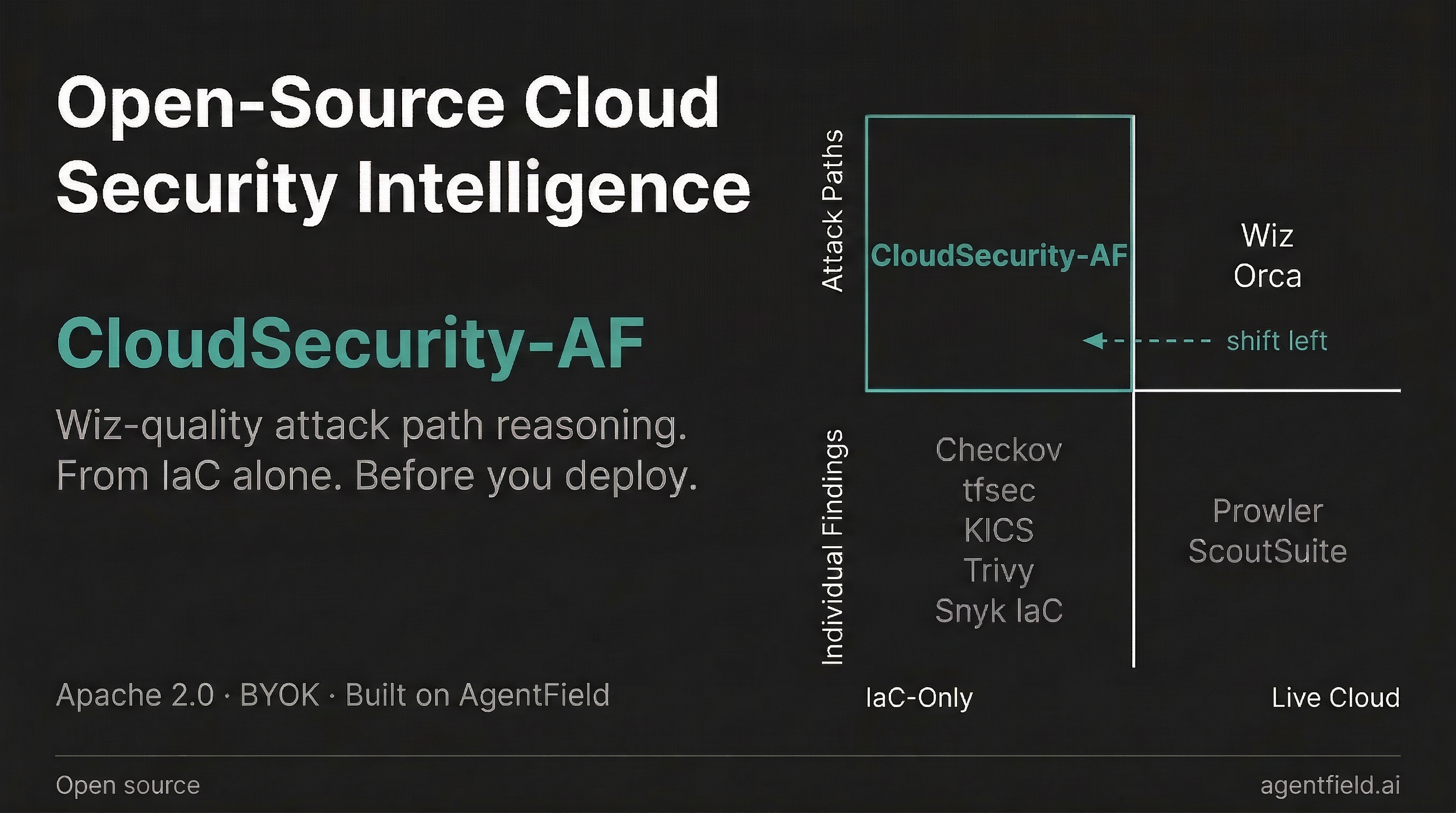
Checkov, tfsec, and KICS are strong at broad control checks. Wiz, Orca, and Prisma Cloud are strong once infrastructure is live. CloudSecurity fills the shift-left gap in between: priority-grade attack path analysis directly from IaC, before deployment.
| Capability | CloudSecurity AF | Checkov / tfsec / KICS | Wiz / Orca / Prisma Cloud |
|---|---|---|---|
| Core value | Risk-prioritized attack-path triage pre-deploy | Broad policy/rule coverage | Runtime posture and exposure monitoring |
| Attack path chains | Yes (CHAIN phase) | No (individual findings) | Yes |
| Requires deployment | No — IaC only | No — IaC only | Yes — live cloud |
| Decision quality | Fix-first, exploitability-oriented output | Large findings list, less chain context | Strong runtime context after deploy |
| Remediation context | IaC fix path + impact framing | Basic fix hints | Mostly runtime-centric workflows |
| Cost profile | Free / open source (BYOK model cost) | Free / open source | Enterprise platform contracts ($$$) |
Where CloudSecurity Sits in the Stack
CloudSecurity is not a replace-all scanner. It is the decision layer in a modern cloud security stack:
- Rule scanners (Checkov/tfsec/KICS): broad deterministic control coverage.
- CloudSecurity: pre-deploy risk prioritization and multi-resource attack-path context.
- Runtime CNAPP (Wiz/Orca/Prisma Cloud): deployed-cloud visibility and runtime monitoring.
Recommended operating model:
- Run rule scanner + CloudSecurity in PR for breadth + fix-first prioritization.
- Use runtime CNAPP after deploy for drift and production-state risk.
Architecture

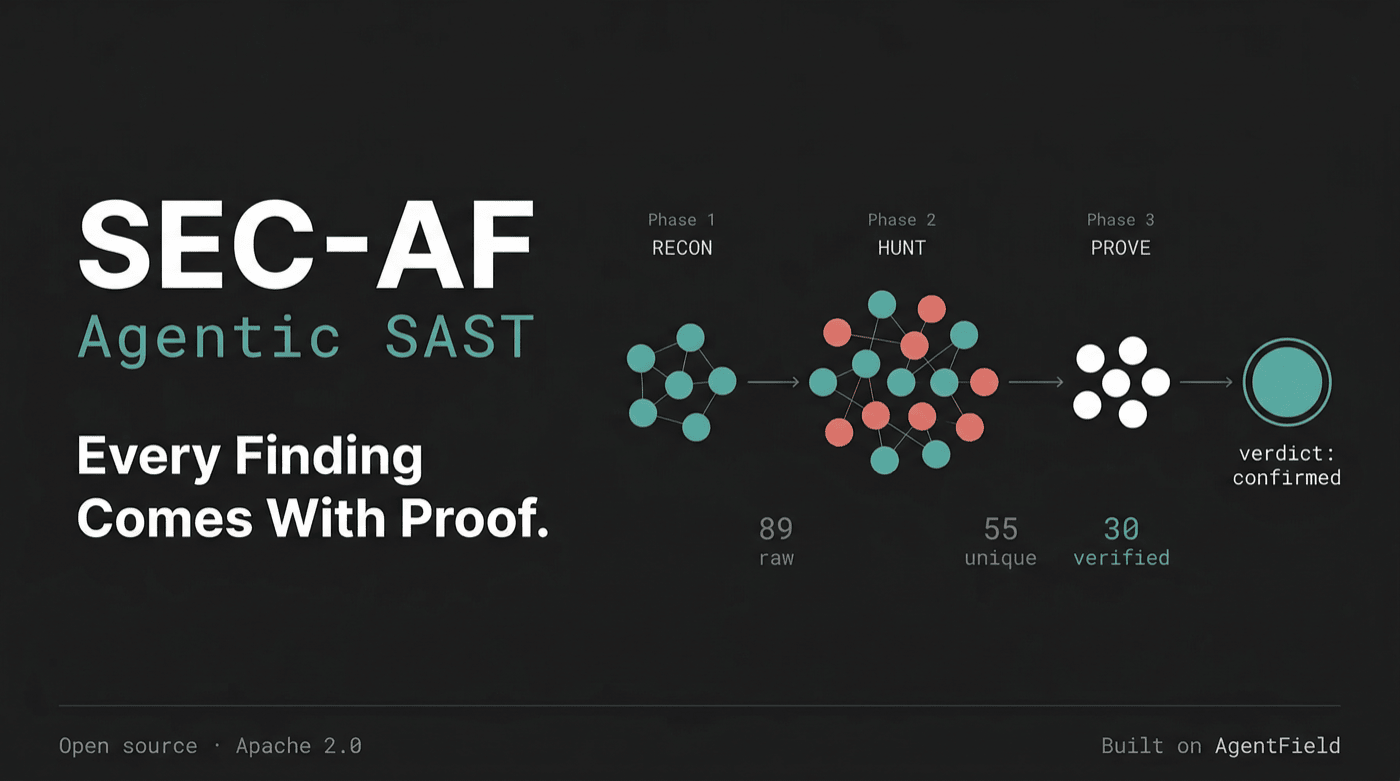
- RECON: Reads IaC, builds a resource graph, and optionally pulls live cloud state and drift.
- HUNT: Runs 7 parallel domain hunters (IAM, network, data, secrets, compute, logging, compliance).
- CHAIN: Combines individual findings into multi-step attack paths across resources.
- PROVE: Adversarial verification — tries to disprove each path. Near-zero false positives.
- REMEDIATE: Generates IaC fix diffs and evaluates breaking change / downtime impact.
Full architecture deep-dive:
docs/ARCHITECTURE.md
Quick Start
Install into AgentField (af install)
Already running an AgentField control plane? Install CloudSecurity straight from GitHub — no clone, no local setup:
af install https://github.com/Agent-Field/cloudsecurity-af
af run cloudsecurity-af
af install follows the repository manifest to the maintained Go package and registers it as the cloudsecurity node with your control plane — one static binary, no per-node virtualenv to build. (af run takes the PACKAGE name, cloudsecurity-af; af call takes the node id, cloudsecurity.) If an older Python cloudsecurity is installed, it is replaced in place, retaining the same node id, triggers, and node-scoped secrets. On first af run you're prompted for the required OPENROUTER_API_KEY — stored encrypted and reused across every node, so you enter it only once. Then scan some IaC:
af call cloudsecurity.scan --in '{"repo_url": "https://github.com/org/infra-repo"}'New to AgentField? Install the control plane first with curl -fsSL https://agentfield.ai/install.sh | bash, or use the Docker option below.
To install the Python node deliberately, clone this repository and install the
checkout as a local path. Local-path installs do not follow superseded_by:
git clone https://github.com/Agent-Field/cloudsecurity-af
af install ./cloudsecurity-af
Local (Docker Compose)
git clone https://github.com/Agent-Field/cloudsecurity-af.git && cd cloudsecurity-af
cp .env.example .env          # Add OPENROUTER_API_KEY
docker compose up --build
Starts AgentField control plane (http://localhost:8080) + CloudSecurity agent.
Trigger a scan:
curl -X POST http://localhost:8080/api/v1/execute/async/cloudsecurity.scan \
  -H "Content-Type: application/json" \
  -d '{"input": {"repo_url": "https://github.com/org/infra-repo"}}'
Poll for results:
curl http://localhost:8080/api/v1/executions/<execution_id>
REST API
CloudSecurity exposes two reasoners through the AgentField control plane. All requests go to the control plane (default http://localhost:8080), which routes execution to the agent.
Trigger a Scan
curl -X POST http://localhost:8080/api/v1/execute/async/cloudsecurity.scan \
  -H "Content-Type: application/json" \
  -d '{
    "input": {
      "repo_url": "https://github.com/org/infra-repo",
      "branch": "main",
      "depth": "quick",
      "severity_threshold": "low",
      "output_formats": ["sarif", "json"]
    }
  }'
Response:
{
  "execution_id": "exec_20260312_063521_ik2ghzst",
  "run_id": "run_20260312_063521_f6zfmc7q",
  "status": "queued",
  "target": "cloudsecurity.scan",
  "created_at": "2026-03-12T06:35:21Z"
}
Check Execution Status
curl http://localhost:8080/api/v1/executions/{execution_id}Returns queued → running → completed (or failed).
Retrieve Results
curl http://localhost:8080/api/v1/executions/{execution_id}/resultTier 2 — Live Verification (with cloud credentials)
curl -X POST http://localhost:8080/api/v1/execute/async/cloudsecurity.prove \
  -H "Content-Type: application/json" \
  -d '{
    "input": {
      "repo_url": "https://github.com/org/infra-repo",
      "cloud_provider": "aws",
      "cloud_regions": ["us-east-1"],
      "assume_role_arn": "arn:aws:iam::123456789012:role/SecurityAuditRole",
      "depth": "standard",
      "severity_threshold": "medium",
      "output_formats": ["sarif", "json"]
    }
  }'
Tier 2 runs the full HUNT → CHAIN → PROVE pipeline with read-only cloud credentials for live verification and drift detection.
Full input reference (CloudSecurityInput)
{
  "input": {
    "repo_url": "https://github.com/org/infra-repo",
    "branch": "main",
    "commit_sha": null,
    "base_commit_sha": null,
    "depth": "quick | standard | thorough",
    "severity_threshold": "critical | high | medium | low | info",
    "output_formats": ["sarif", "json", "markdown"],
    "compliance_frameworks": ["cis_aws", "soc2", "hipaa", "pci_dss"],
    "include_paths": ["modules/networking/"],
    "exclude_paths": ["tests/", ".git/"],
    "is_pr": false,
    "pr_id": null,
    "fail_on_findings": false,
    "max_cost_usd": 5.0,
    "max_duration_seconds": 3600,
    "max_concurrent_hunters": 7,
    "max_concurrent_provers": 3
  }
}
For Tier 2+ add cloud config:
{
  "input": {
    "repo_url": "...",
    "cloud_provider": "aws",
    "cloud_regions": ["us-east-1", "eu-west-1"],
    "assume_role_arn": "arn:aws:iam::123456789012:role/SecurityAuditRole"
  }
}
API endpoints summary
| Method | Endpoint | Description |
|---|---|---|
POST |
/api/v1/execute/async/cloudsecurity.scan |
Trigger Tier 1 IaC scan (async) |
POST |
/api/v1/execute/async/cloudsecurity.prove |
Trigger Tier 2+ live verification (async) |
GET |
/api/v1/executions/{execution_id} |
Check execution status |
GET |
/api/v1/executions/{execution_id}/result |
Retrieve completed results |
GET |
/api/v1/nodes |
List registered agent nodes |
GET |
/api/v1/health |
Control plane health check |
All endpoints are part of the AgentField control plane API. See the AgentField documentation for the full API reference.
Three Tiers
| Tier | Input | Capability |
|---|---|---|
| Tier 1 (No Credentials) | repo_url |
Static IaC analysis, resource graph construction, attack path discovery, and IaC remediation generation |
| Tier 2 (Read-Only Credentials) | repo_url + cloud config |
Tier 1 plus live verification and drift detection |
| Tier 3 (Deep Mode) | Cloud credentials (repo optional) | Tier 2 plus full graph traversal, cross-account analysis, and deeper IAM simulation workflows |
CI/CD Integration
CloudSecurity is designed for PR-time scanning with SARIF upload:
name: cloudsecurity-scan
on:
  pull_request:
    paths:
      - '**/*.tf'
      - '**/*.yaml'
      - '**/*.yml'

jobs:
  infrastructure-scan:
    runs-on: ubuntu-latest
    permissions:
      contents: read
      security-events: write
    steps:
      - uses: actions/checkout@v4
      - name: Trigger CloudSecurity
        run: |
          curl -sS -X POST "$AGENTFIELD_SERVER/api/v1/execute/async/cloudsecurity.scan" \
            -H "Content-Type: application/json" \
            -d '{"input":{"repo_url":".","depth":"quick","output_formats":["sarif","json"]}}'
See docs/GITHUB_ACTIONS.md for full Tier 1 and Tier 2 workflows.
Output Formats
sarif: SARIF 2.1.0 for GitHub code scanning and security platformsjson: Full structured output for pipelines and APIsmarkdown: Human-readable report for platform/security reviews
Configuration
Key Environment Variables
| Variable | Required | Default | Purpose |
|---|---|---|---|
AGENTFIELD_SERVER |
No | http://localhost:8080 |
AgentField control plane URL |
NODE_ID |
No | cloudsecurity |
Agent node identifier |
OPENROUTER_API_KEY |
Yes | - | Model provider credential |
CLOUDSECURITY_PROVIDER |
No | aforge |
Harness provider override; use opencode for rollback |
AGENTFIELD_AFORGE_COMMAND |
No | exec |
AForge headless command the SDK runs: exec (default) or do. Read by agentfield>=0.1.130 |
CLOUDSECURITY_AFORGE_BIN |
No | aforge |
Path to the AForge executable (falls back to AFORGE_BIN) |
CLOUDSECURITY_MODEL |
No | openrouter/minimax/minimax-m2.5 |
Harness model |
CLOUDSECURITY_AI_MODEL |
No | CLOUDSECURITY_MODEL/AI_MODEL fallback |
.ai() gate model |
CLOUDSECURITY_MAX_TURNS |
No | 50 |
Max turns per harness call |
CLOUDSECURITY_REPO_PATH |
No | cwd | Local repository path fallback |
AGENT_CALLBACK_URL |
No | http://127.0.0.1:8004 |
Agent callback endpoint |
AForge CLI in the Docker image
The image downloads the released AForge CLI at build time, decompresses it, and
verifies its SHA-256 against the release checksums.txt before installing it to
/usr/local/bin/aforge. Two build args control where it comes from:
| Build arg | Default | Purpose |
|---|---|---|
AFORGE_BASE_URL |
https://agentfield.ai/downloads/aforge |
Download host serving <version>/aforge-linux-<arch>.gz and <version>/checksums.txt |
AFORGE_VERSION |
v0.1.0 |
Released AForge version to install |
docker build --build-arg AFORGE_VERSION=v0.1.0 -t cloudsecurity-af .docker compose build reads the same two values from the environment (or .env),
so a mirror can be selected without editing the Dockerfile.
Core CloudSecurityInput Fields
repo_url,branch,commit_sha,base_commit_shadepth(quick|standard|thorough)severity_threshold(critical|high|medium|low|info)output_formats(sarif|json|markdown)compliance_frameworks(for example:cis_aws,soc2,hipaa,pci_dss)cloud(provider,regions,account_id,assume_role_arn) for Tier 2+- Budget controls:
max_cost_usd,max_duration_seconds,max_concurrent_hunters,max_concurrent_provers - Scope filters:
include_paths,exclude_paths - CI fields:
is_pr,pr_id,fail_on_findings
Development
python -m venv .venv
source .venv/bin/activate
pip install -e .[dev]

pytest
ruff check src tests
mypy src

# Build and run via Docker
docker compose build
docker compose up -d
Package metadata:
- Python:
>=3.11 - License: Apache-2.0
- Core deps:
agentfield,pydantic>=2.0,pyhcl2>=2.0
Go implementation
The maintained node lives under go/, and installing the bare
repository URL gives you this implementation as the cloudsecurity node.
(af run assigns a free port from 8001 and exports it as PORT; 8015 is the
binary's own default, which is what a bare go run, make run or
docker-compose.go.yml gives you — pass af run cloudsecurity-af --port 8015
to pin it.) It registers the same reasoners under the same names,
drives the same control-plane DAG, and reads the same environment variables —
one static binary, no per-node virtualenv to build. The Python implementation
remains available through python -m cloudsecurity_af.app, the root Docker
Compose stack, or a local-path install (af install ./cloudsecurity-af), which
does not follow the redirect.
docker compose up -d                          # Python stack (control plane + cloudsecurity-af :8005)
docker compose -f docker-compose.go.yml up -d # adds the Go node as cloudsecurity-go :8015
The Go add-on Compose file uses the distinct node id cloudsecurity-go only so
both implementations can run against one control plane during a changeover.
Build, run, Docker/compose and environment docs live in
go/README.md.
Open Core Model
CloudSecurity uses an open-core model: scan and prove remain open source (Apache 2.0), while enterprise adds org-scale controls such as multi-account management, scheduled monitoring, and RBAC/audit features. See docs/OPEN_CORE.md for the full tier breakdown.
License
CloudSecurity AF is licensed under Apache 2.0. See LICENSE.
Questions
What is cloudsecurity-af?
Agent-Field/cloudsecurity-af is a public repo on GitHub by Agent-Field. AI-native cloud infrastructure security scanner — shift-left attack path analysis from IaC alone. Built on AgentField.
Is cloudsecurity-af open source?
It declares no license on GitHub. Public does not mean open source: without a license, nobody is granted the right to reuse it.
Does cloudsecurity-af run on macOS, Windows or Linux?
Its maker has not tagged a system, so it is unknown here. Its README says what it needs.
How do I install cloudsecurity-af?
Open "Take it" on its page: Take My Repo writes an install plan for your machine and hands it to your AI agent (Claude Code, Codex or Cursor), which asks you before each step. Take My Repo has not tested it on any machine.
Is cloudsecurity-af still maintained?
Its last change on GitHub was on 2026-11-02. Take My Repo does not judge from that whether it is maintained.