
WinampNowPlayingToFile
⚡ When Winamp plays a track, this plugin will save the track metadata and album art to files.
- 39
- Apache-2.0
- 8 wk ago
Repo Aldaviva/WinampNowPlayingToFile, read from GitHub 1 min ago. Aldaviva has not joined Take My Repo.
In short
Aldaviva/WinampNowPlayingToFile is a public repo on GitHub by Aldaviva. ⚡ When Winamp plays a track, this plugin will save the track metadata and album art to files. It declares the Apache-2.0 license on GitHub. It is written mainly in C#, has 39 stars and last changed on 2026-09-25. Nobody has reviewed it on Take My Repo yet, which says nothing about its quality. Read from GitHub on 2026-11-23.
Similar repos
mediamtx
Ready-to-use Media-over-QUIC / SRT / WebRTC / RTSP / RTMP / LL-HLS / MPEG-TS / RTP live media server and media proxy that allows to read, publish, proxy, record and playback real-time video and audio streams.


 Winamp Now Playing to File
This is a plugin for Winamp that saves text information and album art for the currently playing song to files on your computer. You can customize where the files are saved, as well as the format of the text.
Problem
I was broadcasting video game streams on my Twitch.tv channel, in which I also play music in the background. I wanted viewers to be able to tell which song I was playing at any given time in case they liked it and wanted to find it for themselves. I started using the Advanced mIRC Integration Plug-In (AMIP), which is generally used for showing your Now Playing status in IRC using mIRC. It also lets you save the status to a text file, which I added as a Text Source in OBS.
Unfortunately, AMIP only supports encoding the text using ANSI, OEM (DOS), FIDO, or KOI8 character encodings, none of which are UTF-8, which OBS requires. For example, Jävla Sladdar was being shown in the video stream as J�vla Sladdar, because even though AMIP was saving ä using ANSI (0xe4), OBS was decoding the file with UTF-8, so the character was not properly decoded. In UTF-8, ä is supposed to be encoded as 0xc3 0xa4 because 0xe4 is greater than 0x7f (i.e. 0xe4 requires more than 7 bits to represent), so it spills over into a second code unit (it's a multibyte character).
Solution
I wrote my own Winamp plugin to save information about the currently playing song to a UTF-8 text file, and the song's album art to an image file.
Installation
- Ensure you have Microsoft .NET Framework 4.7.2 Runtime or later installed.
- This is included in Windows 10 version 1803, Server 2019, and later versions.
- If you are not sure which .NET version you have, you can check using ASoft .NET Version Detector.
- Ensure you have Microsoft Visual C++ 2015–2022 Redistributable x86 installed.
- Exit Winamp if it's already running.
- Download
WinampNowPlayingToFile.zipfrom the latest release (not the source code ZIP file). - Extract the archive to your Winamp installation directory, preserving the relative directory structure. Note that not all of the files go in the same directory.
📁 C:\Program Files (x86)\Winamp
├── 📁 plugins
│   └── 📄 gen_WinampNowPlayingToFile.dll
├── 📄 Daniel15.Sharpamp.dll
├── 📄 mustache-sharp.dll
├── 📄 Plugins.dll
├── 📄 taglib-sharp.dll
├── 📄 WinampNowPlayingToFile.dll
└── 📄 WinampNowPlayingToFile.Abstractions.dll
Configuration
Configuration of this plugin is performed in Winamp.
- Start Winamp.
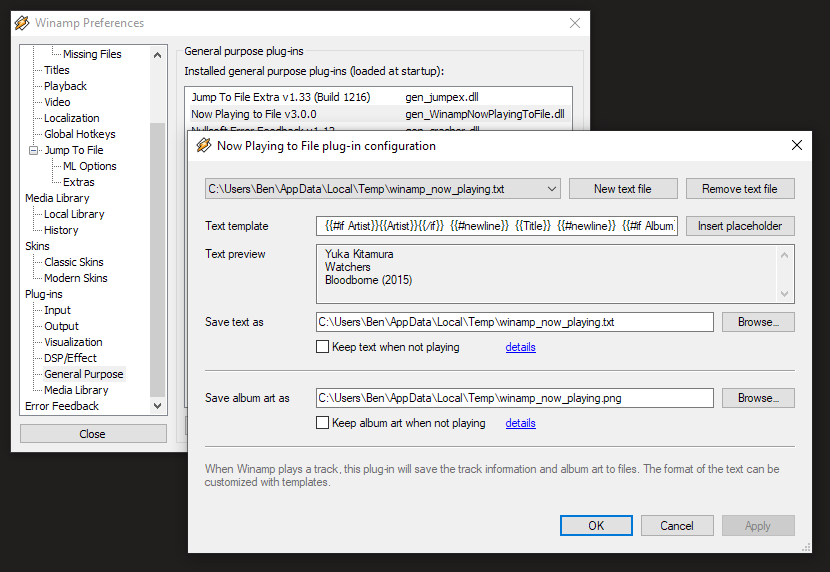
- Go to Options › Preferences › Plug-ins › General Purpose.
- Configure the Now Playing to File plugin.

Changes are saved to the registry in HKCU\Software\WinampNowPlayingToFile.
Text
By default, this plugin saves textual information about the currently playing song to winamp_now_playing.txt in your user's temporary directory (%TEMP%). The file contains the track's Artist, Title, and Album (if applicable), for example
U2 – Exit – The Joshua Tree
To customize the text file location and contents, go to the plugin preferences in Winamp.
- You can change the file contents by editing the Text template and inserting placeholders inside
{{}}, either with the Insert placeholder button or by typing them manually. See Placeholder fields below for all the fields you can use in a placeholder. For example, a simple template that could render the above example text is{{Artist}} – {{Title}} – {{Album}}
- As you fill in the template, the Text preview will be updated to show how the currently playing song would be rendered, or an example song if no song is available.
- You can change where the file is written in your filesystem by selecting a different path for Save text as.
When Winamp is not playing a song — for example, when it is paused, stopped, or you exit Winamp — this text file will be truncated to 0 bytes. To override this behavior and preserve the text from the most recently played track, check the "Keep text when not playing" checkbox in the configuration dialog box. This will make the text file remain unchanged when, for example, you press the Stop button.
Placeholder fields
Placeholder values that are missing, null, or empty will be rendered as the empty string. Field names are case-insensitive.
| Field name | Type | Examples | Notes |
|---|---|---|---|
Album |
string | The Joshua Tree |
|
AlbumArtist |
string | U2 |
|
Artist |
string | U2 |
|
Bitrate |
int | 320 |
Kilobits per second (kbps) |
BPM |
int | 123 |
Beats per minute |
Category |
string | Rock |
|
Comment |
string | ||
Composer |
string | U2 |
|
Conductor |
string | ||
Director |
string | Most commonly used for video files | |
Directory |
string | C:\Users\Ben\Music |
Folder name |
Disc |
int | 1 |
Fractions like 1/2 will be converted to just the numerator (1) |
Elapsed |
TimeSpan | 00:00:28.5080000 |
Updated 1hz, millisecond resolution. See formatting for m:ss and other formats. |
Family |
string | MPEG Layer 3 Audio File |
Codec or container format |
FileBasename |
string | Exit.mp3 |
Filename without path |
FileBasenameWithoutExtension |
string | Exit |
Filename without path or extension |
Filename |
string | C:\Users\Ben\Music\Exit.mp3 |
Absolute path to file, or a stream URL |
Gain |
double | 0.92 |
Decibels (dB) |
Genre |
string | Rock |
|
ISRC |
string | GBUM70709782 |
12-character International Standard Recording Code for the track |
Key |
string | E minor |
|
Length |
TimeSpan | 00:04:11.4220000 |
See formatting for m:ss and other formats |
Lossless |
bool | false |
true for lossless compression, false for lossy |
Lyricist |
string | Bono |
|
Media |
string | LP |
|
PlaybackState |
string | playing |
playing, paused, or stopped |
Producer |
string | Brian Eno, Daniel Lanois |
|
Publisher |
string | Island Records |
|
Rating |
int | 2 |
In the range [1, 5]. From file metadata. To show Media Library ratings, enable Preferences › Media Library › Options › Save ratings to file for compatible formats. |
Rating_Stars |
string | ★★ |
1 to 5 repeated star characters, or null for unrated. See Rating note and helpers. |
ReplayGain_Album_Gain |
double | -3.03 |
Decibels (dB) |
ReplayGain_Album_Peak |
double | 1.022630334 |
|
ReplayGain_Track_Gain |
double | -0.77 |
Decibels (dB) |
ReplayGain_Track_Peak |
double | 1.006227493 |
|
Stereo |
bool | true |
true for stereo, false for mono |
Subtitle |
string | ||
Title |
string | Exit |
|
Tool |
string | iTunes 10.5.1 |
From the ENCODEDBY ID3v2 tag |
Track |
int | 1 |
Fractions like 1/5 will be converted to just the numerator (1) |
Type |
string | audio |
audio or video |
VBR |
bool | false |
true for variable bitrate, false for constant bitrate |
Year |
int | 1987 |
Dates like 1987-01-01 and 1987-01 will be converted to the year only (1987), otherwise it will be null |
Any other values you use in a placeholder will be requested directly from Winamp as file metadata, and the response will be output as-is. If you can find other fields that Winamp handles for audio files, please file an enhancement issue so it can be added to this program and documentation.
Helpers
Template logic can be added using Handlebars expressions, including the built-in helpers like {{#if expr}}, {{#elif expr}}, {{#else}}, and {{/if}}. To output a line break (CRLF), use {{#newline}}.
For example, you can conditionally include artist and album only if those fields exist on your song and are nonempty.
{{#if Artist}}{{Artist}} – {{/if}}{{Title}}{{#if Album}} – {{Album}}{{/if}}
You can also render strings depending on a boolean value.
{{#if Lossless}}lossless{{#else}}lossy{{/if}}
To replace the ★ character in Rating_Stars with a custom or multiple characters, use the built-in {{#each}} helper. For example, you can use the ⭐ emoji, or a 10-star scale.
Questions
What is WinampNowPlayingToFile?
Aldaviva/WinampNowPlayingToFile is a public repo on GitHub by Aldaviva. ⚡ When Winamp plays a track, this plugin will save the track metadata and album art to files.
Is WinampNowPlayingToFile open source?
It declares the Apache-2.0 license on GitHub.
Does WinampNowPlayingToFile run on macOS, Windows or Linux?
Its maker tagged it for Windows. That is declared by the maker; Take My Repo has not tested it.