
electricitymaps-contrib
The open source repository for Electricity Maps data parsers that powers the world's most comprehensive electricity data platform
- 4.1k
- Python
- AGPL-3.0
- 1 d ago
A professional Python-based tool for analyzing and visualizing historical global temperature trends and climate anomalies.
Repo Ali-Marandi/ClimateDataAnalyzer, read from GitHub 1 h ago. Ali-Marandi has not joined Take My Repo.
Ali-Marandi/ClimateDataAnalyzer is a public repo on GitHub by Ali-Marandi. A professional Python-based tool for analyzing and visualizing historical global temperature trends and climate anomalies. It declares the MIT license on GitHub. It is written mainly in Python, has 107 stars and last changed on 2026-08-27. Nobody has reviewed it on Take My Repo yet, which says nothing about its quality. Read from GitHub on 2026-11-25.
The open source repository for Electricity Maps data parsers that powers the world's most comprehensive electricity data platform
A polished, privacy-respecting Windows application for exploring historical global temperature anomalies with clear provenance and report-ready charts.
ClimateDataAnalyzer Desktop replaces the original script-only workflow with a modern interface for analysts, educators, students, and anyone who needs to inspect annual global temperature anomalies without building a notebook or writing code. It ships with a bundled snapshot of NASA GISTEMP annual global land–ocean data, remains useful offline, and can refresh from the official NASA source when the user chooses.
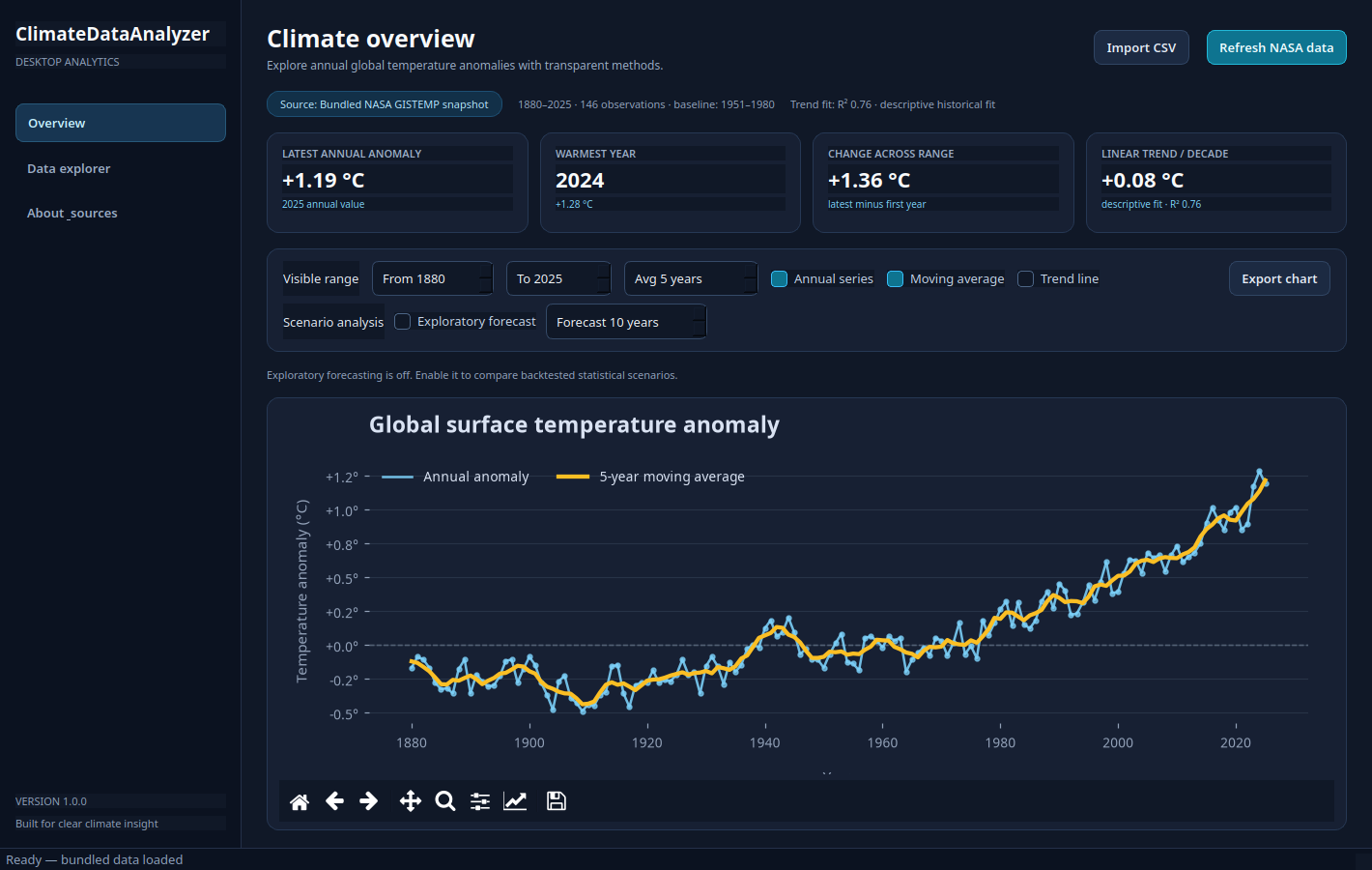
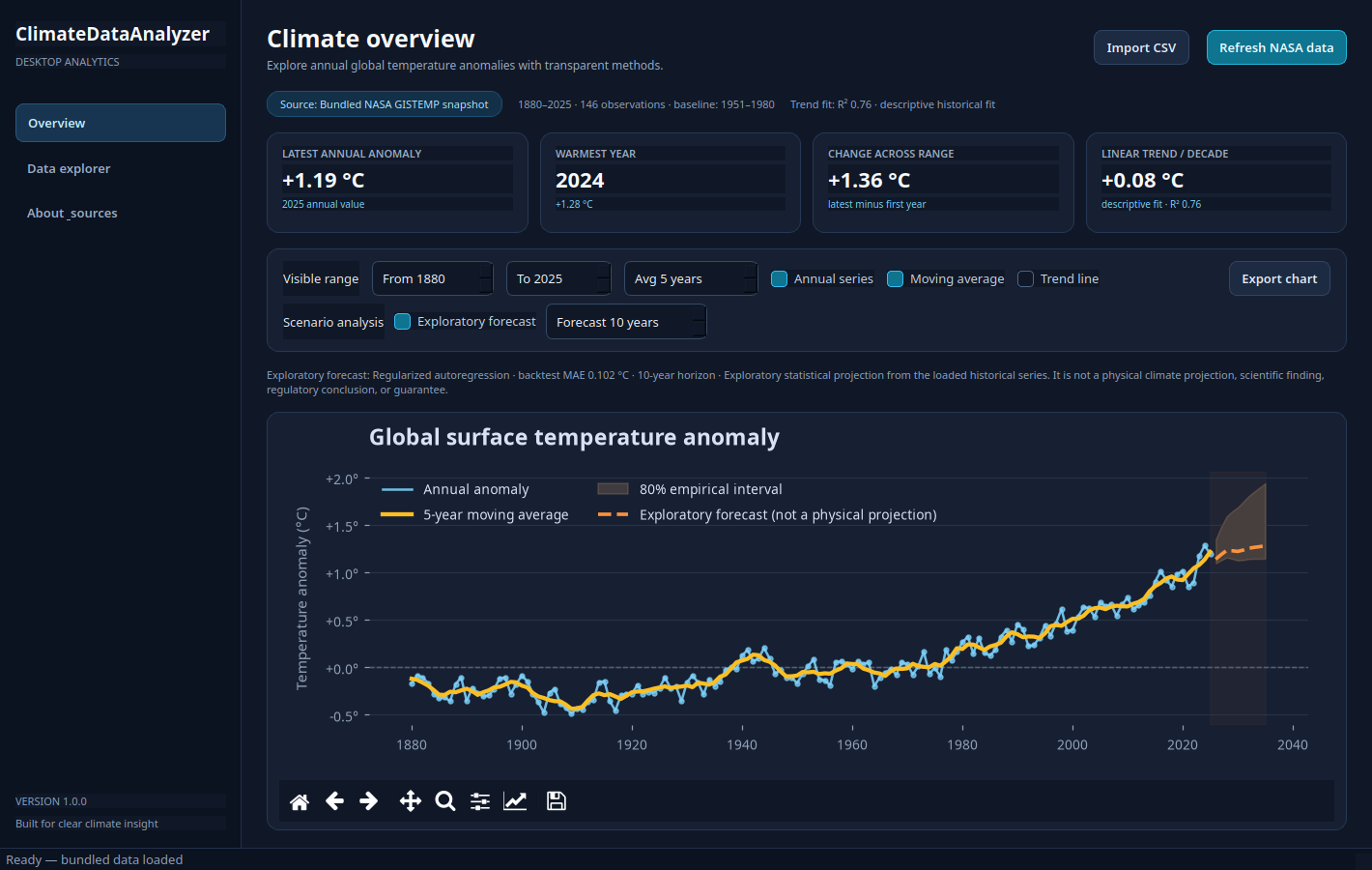
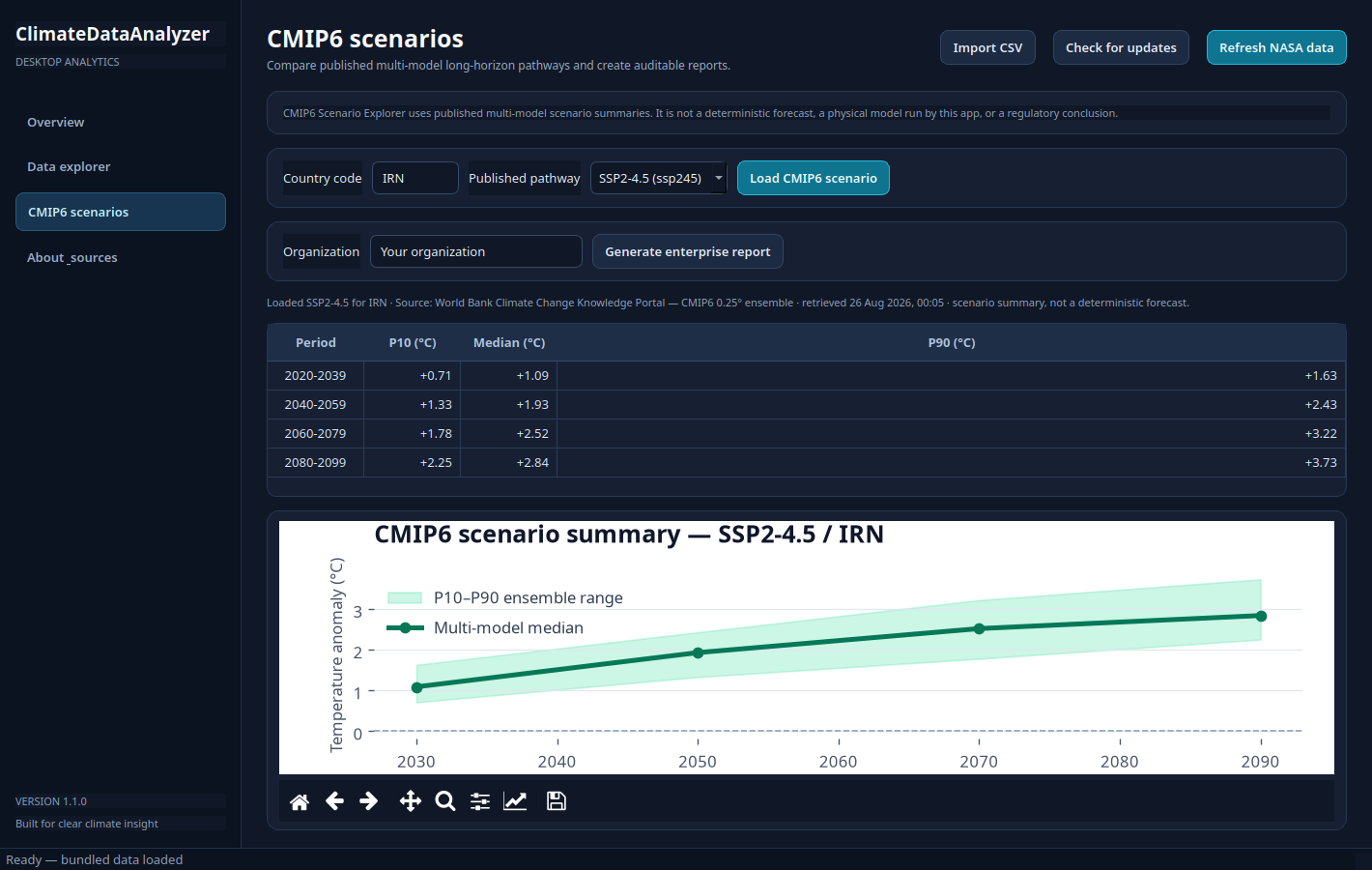
| Capability | What it provides |
|---|---|
| Insight dashboard | Latest anomaly, warmest year, range change, and descriptive linear trend per decade. |
| Interactive visual analysis | High-contrast annual series, centered moving average, optional trend line, zero reference, pan, zoom, and reset controls. |
| Transparent data workflows | Import compatible local CSVs, inspect active observations, and export a filtered dataset or high-resolution PNG. |
| Authoritative refresh | A deliberate Refresh NASA data action downloads the NASA GISTEMP v4 Land–Ocean global-means table over HTTPS. |
| Offline first launch | Bundled annual observations allow immediate analysis without a network connection. |
| Exploratory forecasting | Backtested comparison of linear trend and regularized autoregression, with empirical uncertainty intervals and an explicit non-scientific-projection warning. |
| CMIP6 Scenario Explorer | An explicit, user-triggered country/pathway view of published CMIP6 multi-model p10, median and p90 scenario summaries for 2020–2099. |
| Enterprise evidence reports | Local Markdown, HTML, PNG and JSON-manifest artifacts that retain historical inputs, scenario settings, source and audit metadata. |
| Windows release automation | GitHub Actions runs tests on Windows, builds ClimateDataAnalyzer.exe, creates a per-user ClimateDataAnalyzer-Setup.exe installer, and publishes both installer and portable ZIP for v* tags. |
| Safe update workflow | A user-triggered check reads only the latest stable GitHub Release, verifies the release asset SHA-256 digest after download, and requires confirmation before launching the installer. |
After a release is published, download ClimateDataAnalyzer-Setup.exe from the repository’s Releases page. It installs a per-user copy under your local application programs directory and supports the in-application update flow. ClimateDataAnalyzer-Windows-x64.zip remains available as a portable alternative.
Windows may display a SmartScreen notice until the executable and installer are digitally signed and establish reputation. Verify the file originates from this repository before running it. A public stable release should not be published until both the executable and installer have been code-signed.
The Overview page opens with the current local dataset. Use the From and To controls to focus on a time range, choose the moving-average window, and toggle annual values, the smoothing line, or the descriptive trend line. The embedded chart tools allow zooming and panning, and Export chart saves a high-resolution PNG.
Enable Exploratory forecast only when you want a statistical scenario based on the active, continuous annual series. The application backtests a linear trend and regularized autoregression, selects the lower-MAE model, and shows an empirical interval. It labels the result as an exploratory statistical projection; it is not a physical climate projection, scientific finding, regulatory conclusion, or guarantee.
Choose Check for updates to read the latest stable GitHub Release. When a newer installer is available, the application verifies the release SHA-256 digest after download, then asks for a separate confirmation before it launches the installer.
Use CMIP6 scenarios only when you need a long-horizon, published multi-model scenario summary. Enter a supported three-letter CCKP country code such as IRN, choose a Shared Socioeconomic Pathway, and select Load CMIP6 scenario. The application retrieves p10, median and p90 ensemble values for four fixed 20-year periods. These values are published scenario summaries, not a climate model run by this application or a deterministic forecast. Generate enterprise report writes a local Markdown brief, HTML view, PNG chart and JSON audit manifest for the active historical analysis and loaded scenario.3
Use Import CSV to analyze a local file. The required schema is deliberately simple:
Year,Anomaly
1990,0.45
1991,0.40
1992,0.23
Year must be a unique whole calendar year; Anomaly must be a finite numeric value in degrees Celsius. The application explains validation problems in plain language and never overwrites an imported file.
Choose Refresh NASA data only when you want to update the active dataset. The application downloads the official GISTEMP v4 global land–ocean table, uses its J-D annual column, and labels the resulting data source and 1951–1980 baseline in the interface. NASA describes GISTEMP v4 as an estimate of global surface temperature change assembled from NOAA GHCN v4 station data and ERSST v5 ocean data.1
A temperature anomaly is a difference from a reference climatological average. It is not an absolute temperature, and the fitted linear trend shown in this application is a descriptive summary of the selected history—not a forecast. The optional exploratory forecast is a statistical extrapolation of the loaded series, not a validated physical climate model. CMIP6 Scenario Explorer separately displays published multi-model scenario summaries and their p10–p90 ensemble spread; neither feature is a deterministic prediction, a regulatory conclusion or a guarantee. Please retain the data-source, baseline, forecast-method and scenario labels when exporting charts for publications, coursework or public communication.
For scientific work, cite the current GISTEMP dataset page and the accompanying GISTEMP v4 scholarly paper specified by NASA GISS.1
The project targets Python 3.10 or later.
git clone https://github.com/Ali-Marandi/ClimateDataAnalyzer.git
cd ClimateDataAnalyzer
python -m venv .venv
Activate the virtual environment, then install and run:
python -m pip install -r requirements.txt
python src/main.py
The original command-line paths remain available:
python src/data_loader.py
python src/analysis.py
The data loader explicitly downloads current NASA GISTEMP values instead of generating synthetic observations. The analysis command renders a chart to results/temp_anomaly_plot.png.
Run the automated data-model and analytics tests with:
python -m pytest
The test suite covers CSV validation, GISTEMP parsing, date filtering, moving averages, and summary metrics. The GitHub workflow repeats these tests in a clean Windows environment before packaging.
On a Windows host, install the requirements and run:
python -m PyInstaller --noconfirm --clean --onefile --windowed `
  --name ClimateDataAnalyzer --paths src --add-data "data;data" `
  --collect-all rasterio --exclude-module pytest --exclude-module _pytest src/main.py
The executable is written to dist/ClimateDataAnalyzer.exe. To create the recommended installer on Windows, install Inno Setup and run:
iscc /DMyAppVersion=1.3.0 installer/ClimateDataAnalyzer.iss
The resulting installer is dist/ClimateDataAnalyzer-Setup.exe.
The included workflow .github/workflows/windows-release.yml tests and packages unsigned CI artifacts on windows-latest for branches and pull requests. A semantic release tag enters the protected production signing job, which requires real PFX secrets, signs both the executable and ClimateDataAnalyzer-Setup.exe, verifies both with signtool verify /pa /all, silently installs the signed installer, and only then creates a GitHub Release. GitHub Releases exposes a SHA-256 digest for each uploaded asset; the updater requires that digest before it offers installation.2
git tag -a v1.3.0 -m "ClimateDataAnalyzer Desktop v1.3.0"
git push origin v1.3.0
Publishing should occur only after the maintainer reviews the commit, confirms release notes, configures the protected production environment, verifies the Windows CI job, and confirms code-signing of the executable and installer. The workflow does not contain a certificate; CODESIGN_PFX_BASE64 and CODESIGN_PFX_PASSWORD must be stored as protected GitHub Environment secrets, outside the repository.
| Path | Purpose |
|---|---|
src/climate_data_analyzer/app.py |
PySide6 desktop shell and user workflows. |
src/climate_data_analyzer/data.py |
Typed dataset validation, import/export, and NASA GISTEMP retrieval. |
src/climate_data_analyzer/analysis_engine.py |
Cached, reproducible calculations for metrics, filtering, smoothing and trend quality. |
src/climate_data_analyzer/forecasting.py |
Backtested exploratory linear/regularized-autoregression scenarios and empirical intervals. |
src/climate_data_analyzer/scenarios.py |
Read-only CMIP6/SSP ensemble scenario retrieval, percentile validation and request cache. |
src/climate_data_analyzer/reporting.py |
Deterministic enterprise report generator for Markdown, HTML, PNG and JSON audit manifests. |
src/climate_data_analyzer/updater.py |
Stable-release discovery and SHA-256-verified installer download; never executes an installer itself. |
src/climate_data_analyzer/charts.py |
Accessible Matplotlib visualization, forecast intervals and PNG export. |
installer/ClimateDataAnalyzer.iss |
Per-user Inno Setup Windows installer specification. |
data/ |
Offline NASA GISTEMP annual snapshot bundled into the executable. |
tests/ |
Automated tests for core behavior. |
.github/workflows/ |
Windows testing, packaging, artifact, and tag-release automation. |
All imported CSV files and exported files remain on the user’s computer. Network activity occurs only when the user explicitly chooses Refresh NASA data, Check for updates, or Load CMIP6 scenario. The scenario request reads source-attributed CMIP6 ensemble values from the public CCKP API for the selected country and pathway; it does not upload local CSV data. The update check reads the public latest stable GitHub Release; an installer is downloaded only after confirmation and must pass SHA-256 verification before it can be launched. The application does not require accounts, cloud storage, or telemetry.
This project is released under the MIT License.
Ali-Marandi/ClimateDataAnalyzer is a public repo on GitHub by Ali-Marandi. A professional Python-based tool for analyzing and visualizing historical global temperature trends and climate anomalies.
It declares the MIT license on GitHub.
Its maker has not tagged a system, so it is unknown here. Its README says what it needs.
Open "Take it" on its page: Take My Repo writes an install plan for your machine and hands it to your AI agent (Claude Code, Codex or Cursor), which asks you before each step. Take My Repo has not tested it on any machine.
Apache Superset is a Data Visualization and Data Exploration Platform
12 weeks, 26 lessons, 52 quizzes, classic Machine Learning for all
Bring data to life with SVG, Canvas and HTML. :bar_chart::chart_with_upwards_trend::tada:
A directory and analysis of the open source ecosystem in the areas of climate change, sustainable energy, biodiversity and natural resources. https://docs.getgrist.com/doc/gSscJkc5Rb1Rw45gh1o1Yc
Its last change on GitHub was on 2026-08-27. Take My Repo does not judge from that whether it is maintained.
Nobody has reviewed it on Take My Repo yet, which says nothing about its quality.
Take My Repo cannot say: it does not audit code and has not run ClimateDataAnalyzer. What is known comes from GitHub. It declares the MIT license on GitHub. Its last change was on 2026-08-27. It has 107 stars, which measure popularity, not safety. Nobody has reviewed it on Take My Repo yet, which says nothing about its quality. Read the source before you run it. With "Take it", your AI agent shows each step and asks you before running it; README text is treated as data, not as instructions.


