
SnapRef
SnapRef: one-image reference adapter for Anima (asymmetric attention + reference K/V cache). Training, data generation and evaluation code.
- 184
- Apache-2.0
- 20 h ago
Repo ArcAnima/SnapRef, read from GitHub 10 min ago. ArcAnima has not joined Take My Repo.
In short
ArcAnima/SnapRef is a public repo on GitHub by ArcAnima. SnapRef: one-image reference adapter for Anima (asymmetric attention + reference K/V cache). Training, data generation and evaluation code. It declares the Apache-2.0 license on GitHub. It is written mainly in Python, has 184 stars and last changed on 2026-11-24. Nobody has reviewed it on Take My Repo yet, which says nothing about its quality. Read from GitHub on 2026-11-25.
AI models this project points to
- circlestone-labs/AnimaLinked in the README
- 0ppxnhximxr/snapref-v2sLinked in the README
- 0ppxnhximxr/snapref-v1aLinked in the README
- 0ppxnhximxr/snapref-v1bLinked in the README
- 0ppxnhximxr/snapref-v2a-pre1Linked in the README
- 0ppxnhximxr/snapref-v2a-pre2Linked in the README
- 0ppxnhximxr/snapref-v2aLinked in the README
[!NOTE] SnapRef v2s PRE1 = SnapRef v2a stable + a new Style mode. Character & Style and Character give bit-identical results to v2a, so updating changes nothing you already make. Style is new and is a preview. See Style mode, the character stays out and the evaluation.
[!IMPORTANT] Please support SnapRef! Developing these models has taken 1,000+ H100 GPU-hours and 800,000 training images so far. If SnapRef is useful to you, a ⭐ on GitHub, sharing your results or reporting issues helps a lot, and GPU sponsorship is very welcome.
Give Anima one picture. Take its character, or only its style.
Hair, eyes and outfit come from the reference and follow the new pose. The art style comes from the reference too,
or, with mode char, from the base model and your prompt.
New in v2s: Style takes only the art style of the picture; you write the character in the prompt.
Quick start · v2s Style mode · v2a stable · Evaluation · How it works · Training · Roadmap · Changelog
This repository contains the training, data generation and evaluation code for SnapRef, a reference
adapter for Anima base v1.0.
v2s PRE1 is the newest release: v2a stable plus a new
Style mode (preview). Its Character & Style and Character modes give bit-identical results to v2a.
v2a stable remains the stable release;
v1a,
v1b and the earlier
pre1 /
pre2 builds remain available for comparison.
The node in comfyui_nodes/snapref/ supports these adapter versions.
Download v2s PRE1 from Hugging Face or try it in the Space. SnapRef is also on Civitai, where v2a stable comes together with the node and workflows ZIP.
Highlights
| 🖌️ Style mode new in v2s | Any character, written in the prompt, in the art style of a picture. The picture's character stays out. |
| 🖼️ Several style pictures new in v2s | Several pictures by the same artist, each with its own Strength, for a steadier style. |
| ⚡ Fast | The reference is encoded once and its keys/values are cached. Generation is about 15 % slower than plain Anima, and faster than the other Anima reference adapters. |
| 🎯 Scene-only prompts | No character name, appearance or artist tags. The reference carries them. |
| 🔌 Drop-in node | One ComfyUI node patches the model. Works with the bf16 and the FP8 Anima base. |
| 🎨 Character reference | mode char takes the character and leaves the reference's art style behind (much stronger in v2a). |
| 👥 Two characters | Stitch two references side by side and prompt 2girls. |
| 🧩 Several references, one character | image_2, image_3: e.g. an upper-body shot for the face and a full-body shot for the outfit. |
| ⚖️ Reference weights | weight_1 … weight_3: how much each reference counts, without slowing generation down. |
Quick start
Install Anima base v1.0 with its text encoder and VAE in ComfyUI.
Copy
comfyui_nodes/snapref/from this repository toComfyUI/custom_nodes/snapref/and restart ComfyUI. This is the newest node; it works with every SnapRef version, and Style mode needs it. If SnapRef is already installed, update that copy in place (replace its files, orgit pullif you cloned this repository intocustom_nodes) and keep only one SnapRef incustom_nodes: when two copies are installed, the one that loads second is skipped, so an older copy can hide Style mode.Put the weights in
ComfyUI/models/loras/:weights snapref_v2s_pre1.safetensorsnewest: v2a stable + Style mode (preview), 543 MB snapref_v2s_pre1_fp8.safetensorsoptional FP8 storage variant of v2s PRE1, about 278 MB (about 49% smaller); the node restores it to BF16 for inference. Character & Style and Character results are identical to the v2a FP8 file; Style results can differ slightly from the BF16 file snapref_v2a.safetensorsstable; public download on Civitai snapref_v1a.safetensorsprevious stable release; public download snapref_v2a_pre2.safetensorsearlier preview snapref_v2a_pre1.safetensorsearlier preview snapref_v1b.safetensorstwice the LoRA rank of v1a v1a, v1b, v2a stable (on Hugging Face) and the preview builds also have FP8 variants; the v2a file linked above is bf16. FP8 files store the LoRA matrices as E4M3FN with per-row scales; results can differ slightly from the bf16 file.
Open one of the eight v2s workflows:
snapref_v2s_style.jsonfor Style mode,snapref_v2s_simple.jsonfor the character modes. Choose your picture in the SnapRef node and queue. The v2a node and workflows ZIP includes six workflows configured forsnapref_v2a.safetensors; for Style mode, use the node from this repository.
In Character & Style and Character, write only the scene:
masterpiece, best quality, score_7, safe, 1girl, solo, full body, sitting, crossed legs, bench, street, night
In Style mode, write the character and the scene, as you would without a reference:
masterpiece, best quality, score_7, safe, 1girl, solo, short silver hair, blue eyes, maid, apron,
holding tray, cafe interior, smile, cowboy shot
[!NOTE] SnapRef is not a regular LoRA. Load it with a SnapRef node, not with LoraLoader.
Two nodes.
| node | for | inputs |
|---|---|---|
| SnapRef | everyone | up to eight pictures picked inside the node (click or drop), Mode (Character & Style / Character / Style), Strength per picture, Fidelity |
| SnapRef (Advanced) | full control | every setting (below and in the v1a model card); saved workflows open on it unchanged |
Three modes.
| SnapRef | SnapRef (Advanced) | from the pictures | in the prompt |
|---|---|---|---|
| Character & Style | cs |
the character and its art style | only the scene |
| Character | char |
only the character | the scene; add artist or style tags for the style |
| Style v2s | style |
only the art style; the character stays out | the character and the scene |
Style needs an adapter with a style branch, such as snapref_v2s_pre1.safetensors. With v2a or older files the Style
button is dimmed; a workflow saved in Style mode keeps that setting and shows a warning until you select a v2s
file. One node uses one mode: a character reference and a style reference in the same generation are not supported.
After filling two pictures, click the square + button to the right of Character to add another reference slot (up to eight pictures of the same character, or in Style mode by the same artist). Each picture has its own Strength; Fidelity applies to all references. Existing one- and two-picture workflows remain compatible.
On the simple node, Strength is how much a picture counts (1 = as trained, 0 = off, 2 = twice) and
Fidelity trades detail for prompt freedom (1 = every detail of the picture; lower also lets the negative
prompt branch read the picture, so the prompt is followed more freely, about 12 % slower). In Style mode,
Strength above 1.0 starts to bring in the pictures' character.
Fidelity is also available on the advanced node (0–1, default 1). It is ignored when
ref_in_uncond or ref_guidance_on is on. It is appended after the existing inputs to preserve saved workflows.
Inputs of SnapRef (Advanced) added for v2a:
| new node input | default | |
|---|---|---|
image_2, image_3 |
more references of the same character (e.g. full body when image is an upper-body shot) |
|
use_batch |
off | use every image of an IMAGE batch as a reference |
multi_layout |
separate |
separate: each reference on its own. stitch: side by side in one reference (same speed as one image) |
weight_1 … weight_3 |
1.0 | how much each reference counts (0–2, 0 = skipped); separate layout only |
The new inputs sit at the end of the node, so saved v1 workflows open unchanged.
For v2s, mode gains style. In style, keep strength at 0.0 and ref_caption empty; image_2 and
image_3 can be more pictures by the same artist.
Anima-2.9B block routing
Both SnapRef nodes automatically recognize a 28-block adapter on Anima-2.9B's known
40-block depth expansion. Adapter hooks follow the original layers at
0, 1, 3, 4, 6, 7, 9, 10, 12, 13, 15, 16, 18, 19, 20, 22, 23, 25, 26, 28, 29, 31, 32, 34, 35, 37, 38, 39.
The inserted layers keep their own weights, and reference K/V caches retain all 40
actual layer positions. Native layouts keep their original routing. Other block-count
mismatches raise an error before generation rather than silently using the wrong layers.
No extra node or setting is needed.
This corrects weight routing; it does not establish reference quality on 2.9B or its
finetunes, since the adapters were trained on Anima base v1.0. CPU hook, reference-cache,
and model-reload regressions can be run with python -m unittest discover -s tests -v
(PyTorch and safetensors required, no ComfyUI or checkpoints).
v2s PRE1: Style mode
Style takes only the art style of the pictures: line weight, color palette, lighting and shading. The character comes from your prompt. The figures use CFG 4.5 · Euler / simple · 28 steps · Fidelity 1.0 on Anima base v1.0.
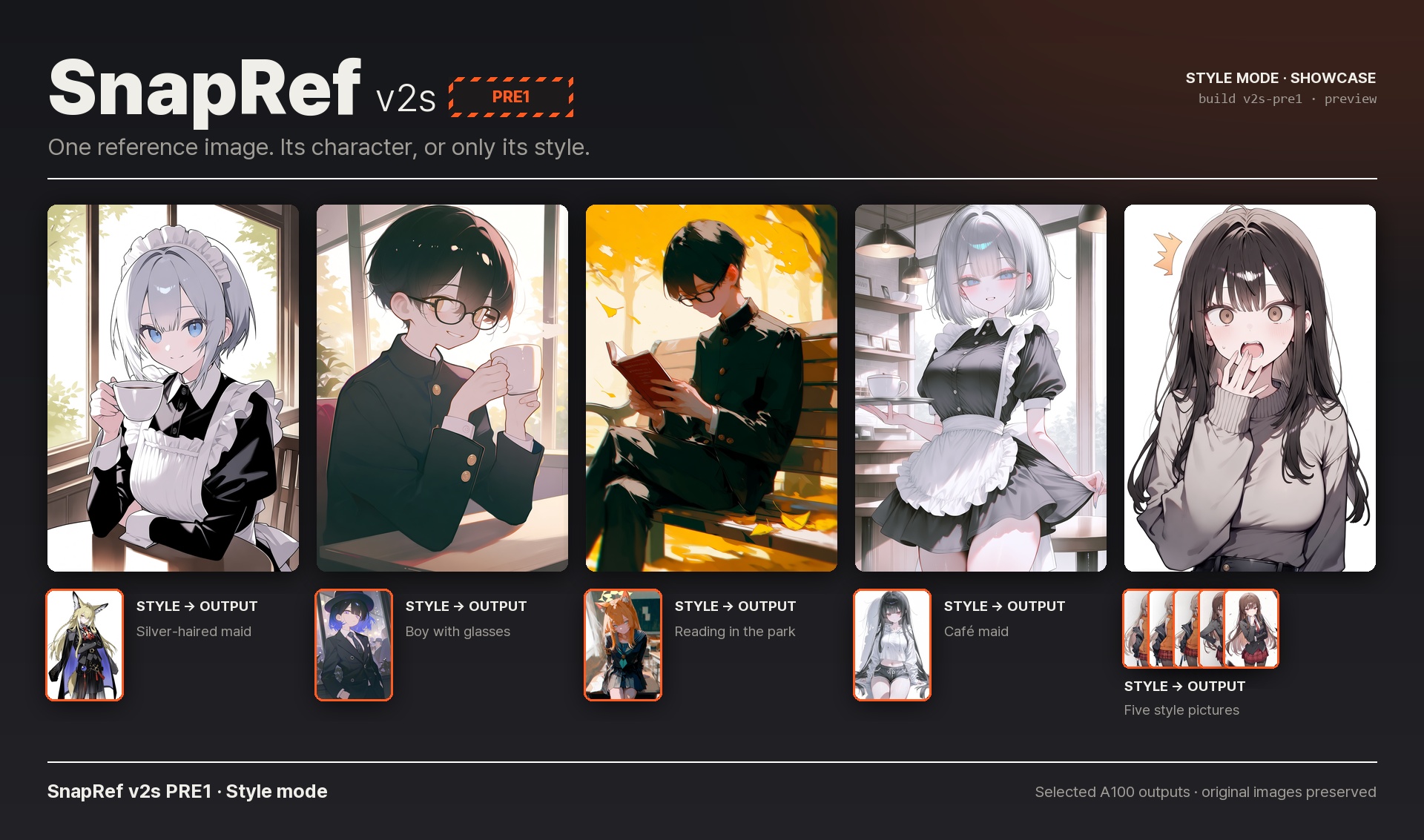
Each output is a different character written in the prompt (a maid, a boy with glasses, a reader in the park) drawn in the art style of the picture under it. The last one uses five pictures by the same artist.
One prompt, different style pictures
Keep the prompt and the seed, change only the style picture.
Questions
What is SnapRef?
ArcAnima/SnapRef is a public repo on GitHub by ArcAnima. SnapRef: one-image reference adapter for Anima (asymmetric attention + reference K/V cache). Training, data generation and evaluation code.
Is SnapRef open source?
It declares the Apache-2.0 license on GitHub.
Does SnapRef run on macOS, Windows or Linux?
Its maker has not tagged a system, so it is unknown here. Its README says what it needs.
How do I install SnapRef?
Open "Take it" on its page: Take My Repo writes an install plan for your machine and hands it to your AI agent (Claude Code, Codex or Cursor), which asks you before each step. Take My Repo has not tested it on any machine.