b2-action
Backblaze-maintained B2 Cloud Storage GitHub Action, currently incubating in Backblaze-Labs
- 9
- TypeScript
- MIT
- 2 d ago
Run a file sharing site in minutes.
Repo AutisticShark/ObjectShare, read from GitHub 4 h ago. AutisticShark has not joined Take My Repo.
AutisticShark/ObjectShare is a public repo on GitHub by AutisticShark. Run a file sharing site in minutes. It declares the GPL-3.0 license on GitHub. It is written mainly in Go, has 2 stars and last changed on 2026-11-21. Nobody has reviewed it on Take My Repo yet, which says nothing about its quality. Read from GitHub on 2026-11-22.
ObjectShare is a small self-hosted file sharing service written in Go. Files use UUID share links with per-file access controls; the uploading browser receives an HTTP-only owner token that permits sharing changes, rename, and deletion.
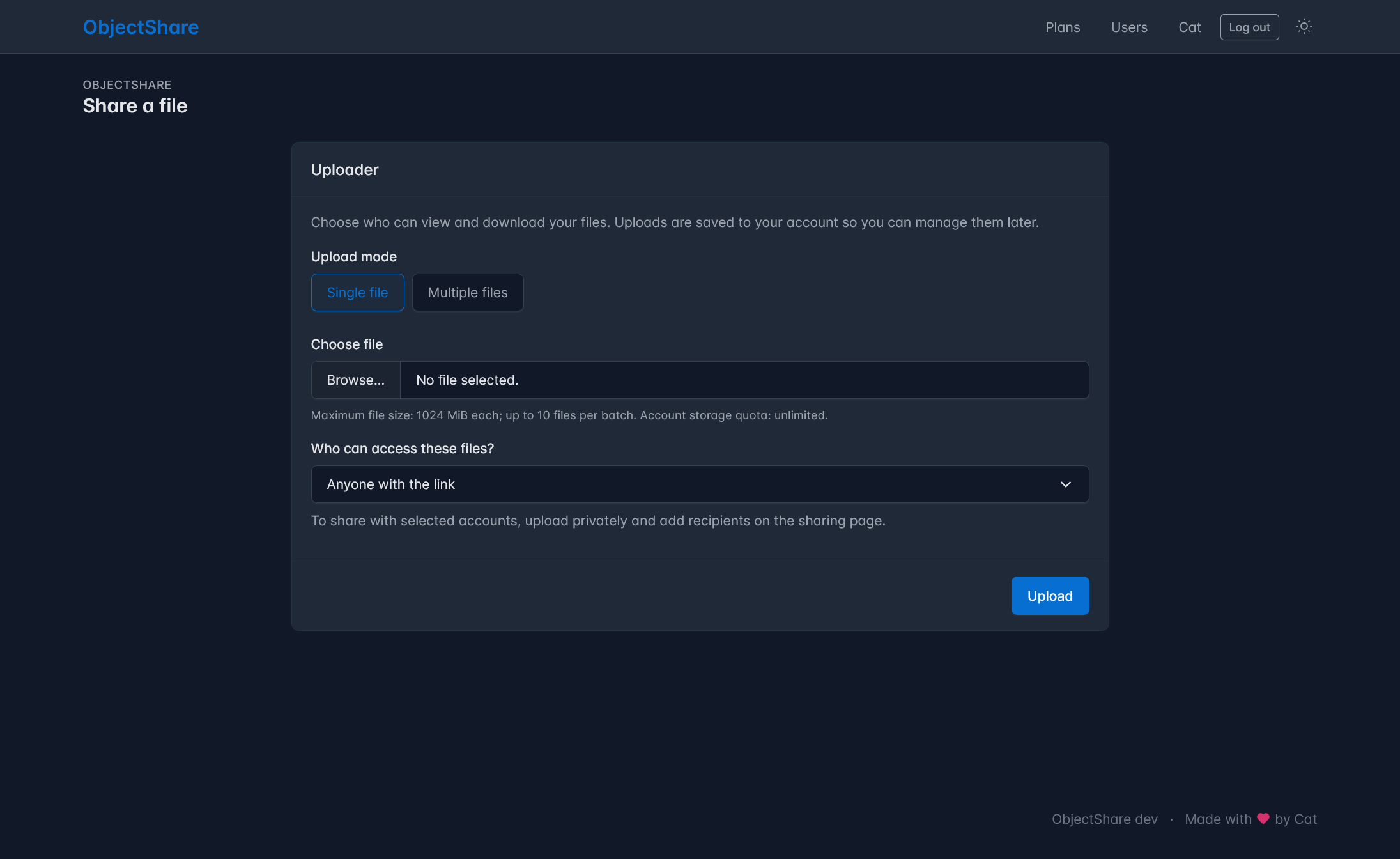
File links are unlisted by default; owners can restrict details and downloads to signed-in users, selected accounts, or themselves. Guest and standard-account downloads must start on that details page; a stable direct download URL works only while the owning account has an active plan that includes direct links. Put ObjectShare behind an authentication-aware reverse proxy if every file view must require authentication.
Svelte renders the workspace, account, billing, and administration interfaces. The Go server keeps authorization and validation authoritative and supplies explicitly projected page data; database credentials, password hashes, JWTs, and stored MFA secrets never enter that payload. Tabler is bundled locally rather than loaded from a CDN. Cloudflare Turnstile, when enabled, still loads its required provider script.
Login, account, user-management, and sharing forms submit with fetch and render the returned page in place, so a validation error keeps open dialogs and entered values; payment, download, and plan forms post natively. Links are ordinary page loads that switch through a short view transition. The server sends each page as a minimal shell with its data, so the web interface requires JavaScript; the JSON and bearer-token APIs do not. Browser encryption and direct-upload recovery reuse the existing tested controllers and wire formats.
The signed-in navigation separates the common tasks:
/): choose single or multiple files, browse or drag files onto the
selector, review filenames and sizes, and choose access before uploading. Local
validation includes encryption overhead; the server still enforces all limits.
File and display names may not contain control characters or invisible
formatting characters such as bidirectional overrides, which can disguise a
name (zero-width joiners remain allowed). Empty files are rejected with 400.
If a direct-upload batch is interrupted, keep the page open and choose Retry
unfinished uploads. Completed files have links and are skipped on retry.
The retry reuses the original uploads and encrypted bytes; it does not create
another copy or require unlocking the encryption key again. Uploads whose
authorization has expired must be selected for a new batch. Recovery state
stays in page memory and is lost when you leave or reload the page. For proxied
uploads, check My files before retrying an uncertain response./files): search your completed uploads by filename and filter by
access level. Results are ordered newest first in pages of 25. Share opens
permissions; Manage opens details, decryption, rename, and deletion. Encrypted
recipients also need the file key, which owners can include in a link directly
from Share or generate from the file page./billing): see your current plan, credit balance, recent credit
activity, and available top-up methods. Plans shows the currency price and
credit equivalent for each fixed-duration purchase. Review invoice creates
the invoice before you choose how to pay. Invoices & receipts keeps your
purchase history and PDF downloads together. New prepaid plans do not renew
automatically; existing gateway subscription controls remain available. If a
browser payment fails, the error page keeps a route back to the invoice and
billing overview. Check invoice status before retrying an uncertain payment./account): manage profile, email verification, login methods,
appearance, and encryption keys. Existing billing and upload sections remain
available here for compatibility.Administrators also see Administration (/admin). Its overview links to user
management, the plan catalog, invoice monitoring, and configuration, with shared
navigation across those pages. Counts include registered users and moderation
states, completed files and their stored bytes, pending uploads, unexpired active
or trialing plan periods, paid/pending invoices, and paid invoices whose receipt
has not yet been accepted by the email provider. Counts are a database snapshot;
file bytes exclude pending uploads and provider overhead, and invoice counts are
not revenue totals.
Administration → Users (/admin/users) shows 25 accounts per page. Search by
name or email (case-insensitive literal text), or an exact account ID. Filters
include administrators, disabled accounts, bans, shadowbans, and email
verification. The account and storage totals cover all accounts even when the
list is filtered; storage includes pending uploads and deletion retries until
their records are removed. Enhanced management forms preserve the search and
page after updates or validation errors. Actions affecting your own administrator
account return through authentication; native forms return to the default user
directory. Existing account creation, moderation, roles, quota, retention
exemptions, credit adjustments, password resets, and deletion remain available.
A password reset asks for the acting administrator's own password, so a stolen
administrator JWT alone cannot set one; wrong attempts share the account
password lockout. An administrator without a password must have signed in within
the last five minutes instead.
Administration → Invoices (/admin/invoices) provides a read-only, paginated
monitor. Search by customer email, purchase name, exact invoice ID, or exact
payment reference; filter by pending payment, paid, or unsent receipt. An unsent
receipt can be queued or waiting for email configuration. A pending invoice can
have an expired payment window. Reconcile ambiguous payments with the provider
before making existing audited credit adjustments. This monitor does not grant
access to customers' file contents or change their invoice payment state.
The overview's launch indicators describe active configuration, not end-to-end health checks. Before launch, verify HTTPS, a real email delivery, gateway sandbox payments and signed webhooks, direct-upload CORS, and backup restoration. See the production checklist. Browser checks should cover desktop and narrow screens, light/dark themes, keyboard navigation, file selection, drag-and-drop, and encrypted upload/download/sharing with a second account.
In My account → Client-side encryption, choose a separate encryption passphrase of at least 16 characters, confirm it, and select Generate account key. The browser generates a random 256-bit account key and downloads an encrypted key backup. Save that backup and the passphrase safely, preferably in separate places. The account key is independent of login credentials, including OAuth: login password changes, email edits, and administrator password resets leave it unchanged.
Client-side encryption is optional for every signed-in upload. On Upload, select Encrypt files in my browser to encrypt the selected file or every file in a batch, then enter your encryption passphrase to unlock the key for that page. The option is unchecked by default. Leave it unchecked to upload without client-side encryption; no key setup or passphrase is needed, even when the account already has a key. Creating a key does not require encryption on future uploads. Bearer API and plain multipart uploads may also omit encryption metadata. Supplied metadata still requires a valid account key and matching ciphertext length. Server-side encryption, if enabled, applies independently. Existing files, keys, backups, and guest uploads retain their current behavior; there is no automatic re-encryption or decryption of existing files. Encrypted browser uploads require HTTPS (or localhost for development). Encryption failure never falls back to an unencrypted upload.
On the file page, use Decrypt & download. Owners enter their encryption passphrase; the browser retrieves the wrapped account key, decrypts it locally, and derives the file key. Alternatively, choose Encrypted key backup and enter its passphrase to recover the key locally. Neither the passphrase nor the unwrapped account/file keys are sent to the server or saved to browser storage. They are used in page memory; enter the passphrase again on another page/device. The server stores only the wrapped account key, public encryption metadata, and file ciphertext. Keep database and object backups together: file metadata is necessary for decryption as well as the key. There is deliberately no key replacement/reset operation; losing both the passphrase and any usable unwrapped key makes the encrypted contents unrecoverable. The encrypted backup alone cannot bypass a lost passphrase.
To share, set the existing access permissions and use Create sharing link with file
key on the file page. Copy the generated link to the recipient. The URL's #key=
fragment contains only that file's derived key; browsers do not send the fragment in
HTTP requests, and the file page removes it from the address bar after loading it.
The ordinary file link does not include a decryption key. Never share your account
key, backup, or passphrase with recipients. Signed-in/selected recipients must log in
and reopen the complete sharing link. Private files remain owner-only. Permission
revocation blocks subsequent downloads but cannot revoke keys, ciphertext, or plaintext
already received. A forwarded key link also permits decryption wherever its recipient
can obtain the ciphertext and metadata.
File contents are encrypted; filenames, owners, sharing policies, approximate sizes,
timestamps, and encryption metadata remain visible to the application. Displayed quota
usage, size limits, and proxied-upload checksums describe ciphertext (before any optional
server encryption layer). Ciphertext adds a 16-byte authentication tag per chunk, so a
plaintext file exactly at the configured limit needs to be slightly smaller to fit.
Native/API downloads return ciphertext with a .objectshare suffix. Client-encrypted
files use the file page for browser decryption; existing plan-controlled direct download
URLs can deliver ciphertext but do not provide a plaintext browser download.
Encryption processes 1 MiB plaintext chunks. The browser assembles ciphertext and the verified download as Blobs, so available browser memory/storage still limits very large files; plaintext downloads are only offered after every chunk authenticates. Direct object-storage upload continues to avoid Cloudflare/proxy request-body limits. Optional server encryption can wrap client ciphertext on proxied uploads and retains its existing 128 MiB limit and single-operation capacity. HTTPS and trusted application/browser code are part of the security boundary: a compromised server serving altered JavaScript or an extension with page access can capture keys while the page is unlocked. This is not protection against such active compromise.
Version 1 wire format: GET /account/encryption returns the authenticated user's
user_id and vault (null before setup). CSRF-protected POST /account/encryption
creates the vault once; a duplicate returns 409. The vault fields are version: 1,
user_id, key_id, salt, iv, and wrapped_key. Binary fields use canonical,
unpadded base64url. key_id is SHA-256 of the random 32-byte account key. A wrapping
key uses PBKDF2-HMAC-SHA-256 with 600,000 iterations and a random 16-byte salt. The
account key is wrapped using AES-256-GCM with a random 12-byte IV and a 128-bit tag;
AAD is UTF-8 objectshare-vault-v1:<user_id>:<key_id>.
Each client-encrypted upload supplies client_encryption as a JSON string containing
{"version":1,"key_id":"...","salt":"...","size":123}. salt is a new random 32-byte
value for each file and size is the plaintext byte count. Multipart requests repeat
that field once per file, in file order; direct single/batch JSON includes it in each
file descriptor and uses ciphertext size and application/octet-stream content type.
HKDF-SHA-256 derives a 32-byte AES file key from the account key, file salt, and UTF-8
info objectshare-file-v1. Encrypt chunks independently with AES-256-GCM: the 12-byte
IV is four zero bytes followed by the unsigned 64-bit big-endian chunk index (starting
at zero); AAD is the exact metadata string followed by : and the decimal index.
Store the concatenation of chunk ciphertexts, each followed by its 16-byte tag. Empty
files still contain one authenticated empty chunk. Authenticated metadata and indices
bind the file size, order, and final chunk. Preserve the exact metadata string in
backups and clients; do not reserialize it before decryption. The server validates
metadata structure, account key ownership, and ciphertext length, but cannot prove
that a malicious client actually encrypted the submitted bytes.
The implementation uses the browser's Web Cryptography API.
Its PBKDF2 work factor follows OWASP's PBKDF2 guidance.
Run node --test tests/client-encryption.test.cjs tests/upload-selection.test.cjs
for cryptographic round-trip, adversarial, and upload selection checks; go test -mod=mod ./... also runs them when Node is installed.
PostgreSQL migration/concurrency tests use an isolated schema when
OBJECTSHARE_TEST_POSTGRES_DSN is set to a disposable PostgreSQL instance.
Outgoing email is optional and disabled by default. Administrators select SMTP, Alibaba Cloud Direct Mail, or AWS SES under Configuration → Email delivery. Credentials use the existing encrypted PostgreSQL runtime document. Blank secret fields preserve their values; the adjacent clear checkboxes remove them. Save the configuration, which the saving replica activates immediately, then use Send test email to send a fixed message to your signed-in administrator account address using that replica's active settings. The action requires administrator access, same-origin checks, and JWT CSRF; when shared rate limiting is enabled, it permits three tests per administrator per configured rate-limit window. Provider acceptance does not prove inbox delivery.
The JSON options below belong inside the top-level email object in
config.json; nested paths such as smtp.host belong inside its smtp object.
All environment names have the prefix OBJECTSHARE_EMAIL_. JSON and environment
values seed PostgreSQL only on first initialization. Existing installations use
the dashboard; changing environment variables does not overwrite saved settings.
JSON path within email |
Environment suffix | Default | Purpose |
|---|---|---|---|
provider |
PROVIDER |
none |
none, smtp, alibaba, or ses |
from_address |
FROM_ADDRESS |
empty | Single sender mailbox; required when enabled |
from_name |
FROM_NAME |
empty | Optional sender name; at most 15 characters for Alibaba, 100 otherwise |
reply_to |
REPLY_TO |
empty | Optional single reply-to mailbox |
timeout |
TIMEOUT |
15s |
Total send timeout, 1s to 1m; includes credentials, connection, and delivery |
smtp.host |
SMTP_HOST |
empty | SMTP hostname or IP without a port |
smtp.port |
SMTP_PORT |
587 |
SMTP port; explicitly use 465 for implicit TLS |
smtp.tls_mode |
SMTP_TLS_MODE |
starttls |
starttls (required upgrade) or tls (implicit TLS); verified certificates |
smtp.username |
SMTP_USERNAME |
empty | AUTH PLAIN username; leave both credentials empty for a relay |
smtp.password |
SMTP_PASSWORD |
empty | Write-only SMTP password |
alibaba.region |
ALIBABA_REGION |
cn-hangzhou |
cn-hangzhou, ap-southeast-1, ap-southeast-2, us-east-1, or eu-central-1 |
alibaba.access_key_id |
ALIBABA_ACCESS_KEY_ID |
empty | Write-only RAM access key ID |
alibaba.access_key_secret |
ALIBABA_ACCESS_KEY_SECRET |
empty | Write-only RAM access key secret |
ses.region |
SES_REGION |
us-east-1 |
AWS SES region; standard AWS, GovCloud, and China endpoint domains |
ses.access_key_id |
SES_ACCESS_KEY_ID |
empty | Write-only AWS access key ID; optional with the AWS credential chain |
ses.secret_access_key |
SES_SECRET_ACCESS_KEY |
empty | Write-only AWS secret access key; must accompany the access key ID |
ses.session_token |
SES_SESSION_TOKEN |
empty | Optional write-only token for temporary explicit AWS credentials |
ses.configuration_set |
SES_CONFIGURATION_SET |
empty | Optional existing SES configuration set |
starttls requires STARTTLS before authentication or delivery; tls starts
TLS immediately. AUTH PLAIN is supported over TLS. Set both username/password
or leave both empty for a relay authorized by network policy. There is no
plaintext fallback or certificate-verification bypass. Port defaults to 587;
if omitted or zero in JSON, tls selects 465. Compose explicitly defaults to
587, so set port 465 when selecting implicit TLS there.dm:SingleSendMail permission. The provider uses
SingleSendMail
with address type 1, the configured sender, optional reply-to, and tracking
disabled. Regional HTTPS hosts follow Alibaba's
endpoint table;
requests use its documented
RPC signature.ses:SendEmail. Sandbox accounts also need verified recipient identities
(or SES mailbox simulator recipients); see
SES sandbox requirements.
The provider calls
SES v2 SendEmail
with SigV4 signing from the existing AWS SDK. Supply an independent email
access-key pair, plus a session token for temporary credentials, or leave all
three blank to use the
AWS credential chain,
including workload IAM roles. Role/SDK environment and shared credentials are
deployment inputs, separate from the saved email settings; make them available
inside the application container if using that chain. Storage credentials are
never reused implicitly. Configuration sets must already exist in that region.The Go email.Sender interface exposes Send(context.Context, email.Message) error;
email.New(ctx, cfg.Email) selects the configured transport. Messages support one
ASCII recipient, a UTF-8 subject (up to 100 characters), and text and/or HTML
bodies (up to 80 KiB each). SMTP creates MIME multipart alternatives when both
bodies are supplied. A disabled sender returns email.ErrDisabled. Calls have a
bounded total timeout and are not automatically retried or failed over because a
timeout may happen after acceptance. Messages can include up to five PDF attachments
(totaling at most 4 MiB). SMTP uses multipart/mixed with base64 attachments; SES
uses its MIME/raw message API for attachments. Alibaba attachment delivery uses
its official upload-capable Direct Mail SDK with the existing configured credentials;
the SDK authorizes a temporary provider-hosted file upload before sending. Allow
outbound HTTPS to Alibaba Open Platform and its returned OSS upload endpoint in
addition to Direct Mail. Ordinary Alibaba messages retain the existing signed API
transport. The SDK bounds each attachment delivery stage; cancellation is checked
before starting and the remaining deadline is divided across stages.
Paid invoices use a separate persistent delivery queue with a five-minute retry and lease interval. Normal message sends do not retry automatically. Bulk mailing and bounce processing remain outside this integration. Signup and email changes can send verification emails as described below; account login still uses JWTs.
cp .env.example .env
# Edit .env and replace the PostgreSQL, JWT, and settings encryption secrets.
docker compose config --quiet
docker compose up --build -d
Open http://localhost:8080 on the Docker host. The copied example sets
OBJECTSHARE_HOST_PORT=127.0.0.1:8080, keeping first-time setup on the host's loopback
interface. (Earlier releases used OBJECTSHARE_PORT for this; that still works in
Compose as a fallback, but outside Compose the application reads
OBJECTSHARE_PORT as its integer listen port, so an IP:port value there would
be rejected.) For a remote server, reach that address through an SSH tunnel while
creating the first administrator. Existing .env files keep their current port
binding; a bare value such as 8080 publishes on all host interfaces. Complete
administrator setup before intentionally exposing the application.
Compose uses PostgreSQL 19, Redis, and persistent local object, database, and
Redis volumes. Set OBJECTSHARE_REDIS_PASSWORD to a long random secret in .env;
old .env files still start with the development default objectshare-dev.
Redis is private to the Compose network and has no published host port. Stop it with
docker compose down; add --volumes only when you intentionally want to delete
all stored data. .dockerignore excludes .env and .env.* files at every
directory depth from the build context, while retaining the root .env.example.
Custom configuration files with other names must also be excluded if they contain
secrets. Build-context exclusion does not replace runtime secret storage.
Proxied (multipart) uploads larger than 32 MiB are spooled to the temporary
directory while they arrive. The image sets TMPDIR=/var/lib/objectshare/tmp on
the object-data volume (created at start-up if an older volume lacks it) instead
of the container's small in-memory /tmp, so keep free space there for the largest
proxied uploads you accept concurrently: up to max_file_size times
max_files_per_batch per request. A spooling failure, such as a full disk, is
logged and answered with 500 rather than reported as an invalid upload. When
running the binary outside this image, point TMPDIR at a disk with similar room.
The first visit redirects to the one-time setup page. Create the initial administrator there; after that, /setup is locked. Administrators configure the application from Configuration (/admin/settings) and manage accounts from Users. Public signup is enabled by default and creates normal users.
For HTTPS deployments, terminate TLS at a reverse proxy, enable secure cookies in the configuration dashboard, and save. The saving replica activates the change immediately and other replicas activate it at their next configuration reload. Back up both named volumes together so metadata, encrypted configuration, and objects remain consistent.
The host-side proxy can connect to 127.0.0.1:8080. A containerized proxy should
join the application's Docker network and connect to app:8080; its own loopback
address does not refer to the host or the application container. Set the public
HTTPS URLs in the dashboard before enabling OAuth, billing, and verification email.
The proxy must forward the browser's Host header and scheme. ObjectShare rejects
state-changing requests whose Origin names a different host than Host, so a
proxy that rewrites Host (nginx's default proxy_pass sends the upstream
address) makes every form submission fail with 403 Cross-site request rejected.;
the application logs a warning naming the mismatched hosts when this happens.
Caddy and Traefik preserve Host by default. For nginx:
location / {
    proxy_pass http://127.0.0.1:8080;
    proxy_set_header Host $host;
    proxy_set_header X-Forwarded-For $proxy_add_x_forwarded_for;
    proxy_set_header X-Forwarded-Proto $scheme;
}
When the proxy's address is one of the trusted proxy CIDRs (see
CAPTCHA and request rate limiting),
ObjectShare also requires the Origin scheme to match a single
X-Forwarded-Proto value. That value must be the scheme the browser used: a proxy
behind another TLS terminator, such as nginx behind Cloudflare, must pass on the
outer scheme rather than its own $scheme. When the scheme cannot be determined
(no trusted proxy, no header, or several values), only the host is compared.
Requirements: Go 1.27, Node.js 26 LTS with npm for frontend builds, and PostgreSQL 19 (PostgreSQL 17 and 18 are also supported). Node.js is not needed to run the built binary. The Docker build compiles and embeds the frontend automatically.
Startup schema migrations run in a transaction under a PostgreSQL advisory lock.
Statement caching is disabled during migration and enabled for application queries
after commit, so repeated schema inspection can safely see added or changed columns.
If an older build stops with cached plan must not change result type (SQLSTATE
0A000) during migration, deploy a build containing this fix and restart ObjectShare
against the existing database; no manual table or data deletion is needed.
cp config.json.example config.json
# Edit the bootstrap database and secret settings.
npm --prefix frontend ci --ignore-scripts
npm --prefix frontend run check
npm --prefix frontend run build
go run . -config config.json
Frontend source and development/test commands are documented in frontend/README.md. Generated assets in frontend/dist/ are embedded into the Go binary; rebuild the frontend and then rebuild Go after frontend changes. A binary built without the frontend refuses to start the server and says how to build it.
ObjectShare now keeps operational configuration in PostgreSQL. On the first start after this upgrade, it imports the existing JSON/environment values into one encrypted application_settings revision. Later starts load that database revision, so changing a legacy operational environment variable does not overwrite an administrator's dashboard changes. This one-time import preserves existing deployments; after it succeeds, manage application policy, OAuth, CAPTCHA, rate limits, storage providers, and object encryption at /admin/settings.
Precedence for every setting is: a non-empty OBJECTSHARE_* environment variable, then config.json, then the container image default, then the built-in default. An environment variable that is set but empty counts as not provided, so it never erases a value from config.json or replaces a default; the only exception is OBJECTSHARE_REDIS_URL=, which deliberately disables Redis. Compose forwards every documented variable but leaves it empty unless you set it in .env or the shell, so a mounted config.json keeps its values at the first import. Compose still sets its own topology (OBJECTSHARE_ADDRESS, the OBJECTSHARE_DB_* connection to its db service, and the Redis URL and password for its redis service).
The container image sets OBJECTSHARE_DEFAULT_STORAGE_PATH=/var/lib/objectshare/objects, the writable volume path. It is only the default for storage_path: a storage_path in a mounted config.json or an explicit OBJECTSHARE_STORAGE_PATH wins. Earlier images set OBJECTSHARE_STORAGE_PATH itself, which silently replaced the config.json value at the first import; mount a persistent volume at whichever path you use.
Bootstrap infrastructure and secrets remain file/environment-owned:
| Variable | Default | Purpose |
|---|---|---|
OBJECTSHARE_ADDRESS (address) |
:8080 |
HTTP listen address. A legacy port in config.json (or OBJECTSHARE_PORT) replaces it with :<port> on every interface, except that an explicit OBJECTSHARE_ADDRESS such as 127.0.0.1:9000 always wins over a port from config.json |
OBJECTSHARE_HEALTH_URL |
derived from the listen address | URL probed by object-share -healthcheck, which the container image's HEALTHCHECK runs. By default it requests /health/live on the configured listen address (OBJECTSHARE_ADDRESS, address, or port, from the environment and from the -config file, or ./config.json or /etc/object-share/config.json when the flag is absent, as the image's HEALTHCHECK is), using 127.0.0.1 for an IPv4 wildcard bind such as :9000 or 0.0.0.0:9000 and ::1 for [::]:9000. Set it only when the server cannot be reached that way. Read by the health check command alone; it has no config.json key |
OBJECTSHARE_READ_TIMEOUT (read_timeout), OBJECTSHARE_WRITE_TIMEOUT (write_timeout), OBJECTSHARE_IDLE_TIMEOUT (idle_timeout), OBJECTSHARE_SHUTDOWN_TIMEOUT (shutdown_timeout) |
varies | HTTP server lifecycle timeouts. For proxied uploads and downloads, READ_TIMEOUT and WRITE_TIMEOUT restart on every read or write, so a slow transfer survives while data keeps moving and only a stalled one is cut off. While an upload is received or written to storage both restart, so its response always gets a full WRITE_TIMEOUT once the file is stored |
OBJECTSHARE_DB_* |
varies | PostgreSQL connection and pool settings, in the top-level db object of config.json: OBJECTSHARE_DB_HOST (host), OBJECTSHARE_DB_PORT (port), OBJECTSHARE_DB_USER (user), OBJECTSHARE_DB_PASSWORD (password), OBJECTSHARE_DB_DATABASE (database), OBJECTSHARE_DB_SSLMODE (ssl_mode, default require), OBJECTSHARE_DB_MAX_OPEN_CONNS (max_open_conns, default 25), OBJECTSHARE_DB_MAX_IDLE_CONNS (max_idle_conns, default 5), and OBJECTSHARE_DB_CONN_MAX_LIFETIME (conn_max_lifetime, default 30m). OBJECTSHARE_DB_TIMEZONE (db.timezone, default UTC) is the PostgreSQL session time zone and must be an IANA name such as UTC or Asia/Taipei; Local is rejected because PostgreSQL does not accept it. OBJECTSHARE_DB_MIGRATION_TIMEOUT (db.migration_timeout in config.json, default 5m, allowed 1s-1h) bounds connecting and running the start-up schema migrations, which run in one transaction; raise it for large databases. Compose fixes the connection to its own db service and forwards the time zone, pool, and migration settings from .env. |
OBJECTSHARE_REDIS_* |
see below | Optional Redis connection, namespace, timeouts, and public plan cache; bootstrap settings requiring a restart |
OBJECTSHARE_JWT_SECRET (auth.jwt_secret) |
none (required) | JWT HMAC signing secret, at least 32 random bytes |
OBJECTSHARE_SETUP_TOKEN (auth.setup_token in config.json) |
empty (setup stays open) | Optional secret, at least 16 characters, that /setup requires before it creates the first administrator, so nobody who reaches a fresh instance first can claim it. Bootstrap setting: never stored in the database configuration. Unset it, or create the administrator with -create-admin, when you prefer. |
OBJECTSHARE_SETTINGS_KEY (settings_key) |
JWT secret (deprecated fallback) | Independent key protecting encrypted settings and MFA secrets. When unset, the JWT secret is used and ObjectShare logs a warning at start-up, because rotating the JWT secret would then make those values unreadable. Change it only with OBJECTSHARE_SETTINGS_KEY_PREVIOUS as described below |
OBJECTSHARE_SETTINGS_KEY_PREVIOUS (settings_key_previous) |
empty | Set only while rotating the settings key: the key being replaced, or the JWT secret when settings_key was never set. Start-up then re-seals the stored configuration document and every authenticator secret with OBJECTSHARE_SETTINGS_KEY. Requires an explicit OBJECTSHARE_SETTINGS_KEY, at least 32 bytes, and a different value. Bootstrap setting: never stored in the database |
OBJECTSHARE_JWT_LIFETIME (auth.token_lifetime) |
12h |
JWT lifetime (5m to 24h) |
OBJECTSHARE_CONFIG_RELOAD_INTERVAL (config_reload_interval) |
30s |
How often a replica checks PostgreSQL for a newer configuration revision and activates it without a restart; 0 disables polling and 1s to 24h are accepted |
Generate separate JWT and settings secrets with openssl rand -base64 48, provide the same values to every replica, and keep the settings key with database backups. The fallback to the JWT secret exists only so an older deployment can upgrade without a new mandatory variable; a new deployment should always set an independent OBJECTSHARE_SETTINGS_KEY. Losing or changing that key makes the database configuration unreadable and startup fails closed. Rotating the JWT secret invalidates every issued JWT but does not affect database configuration when the independent settings key is configured.
To rotate the settings key, or to move a deployment that relies on the JWT-secret fallback to an independent key, back up the database and then, on every replica at the same restart:
OBJECTSHARE_SETTINGS_KEY_PREVIOUS (settings_key_previous) to the current key: the old OBJECTSHARE_SETTINGS_KEY, or the current OBJECTSHARE_JWT_SECRET if no settings key was set.OBJECTSHARE_SETTINGS_KEY (settings_key) to a new random key, for example from openssl rand -base64 48.OBJECTSHARE_DB_MIGRATION_TIMEOUT, and logs settings key rotated. Replicas starting together serialize on the configuration row, and a repeated start does nothing more because the document already opens with the new key. If neither key opens the document, start-up fails without changing anything.Email and recovery codes are stored only as keyed hashes, which cannot be re-keyed. A pending email code simply expires; request a new one. Existing recovery codes are marked as previous-key codes and keep working while OBJECTSHARE_SETTINGS_KEY_PREVIOUS stays set. Each start logs how many accounts still hold such codes; ask those users to generate new recovery codes on their MFA page. When the log reports that nothing depends on the previous key, remove OBJECTSHARE_SETTINGS_KEY_PREVIOUS and restart; any previous-key recovery codes left then stop working. Replicas still running the old key cannot read the re-sealed configuration, so do not keep them serving after the restart. When the old key was the JWT secret, you can rotate OBJECTSHARE_JWT_SECRET independently afterwards.
The dashboard stores the entire operational document as authenticated AES-GCM ciphertext. Secret inputs are write-only: an empty field preserves its stored value, while an explicit checkbox clears it. A save validates the complete candidate before one optimistic, revision-checked database update; a stale admin page cannot overwrite a newer revision. Saving also activates the revision without a restart. The replica builds a complete new snapshot — storage clients, encryption, OAuth, CAPTCHA CSP, cookies, and proxy trust together — and swaps it in atomically, so no subsystem changes on its own and a request already in progress finishes against the configuration it started with. If the snapshot cannot be built, the stored revision stays saved, the replica keeps serving the previous snapshot, and the dashboard reports that this replica did not activate it; the reason is in the application log. Other replicas activate the stored revision at their next configuration reload (config_reload_interval / OBJECTSHARE_CONFIG_RELOAD_INTERVAL, default 30 seconds), or immediately when sent SIGHUP (docker compose kill -s HUP app). Bootstrap settings — listen address, database connection, JWT secret, settings key, server timeouts, and the reload interval itself — are not part of the document and still require a restart. Changing a storage provider, bucket, or filesystem path does not migrate existing objects, and changing the object-encryption key does not re-encrypt them; complete those data migrations separately before activating such changes. Downgrading is not supported: once a newer release has saved the document, an older release may refuse to open it because it does not know the newer fields. Restore the database backup taken before the upgrade if you must return to an older release.
The operational OBJECTSHARE_* variables retained in .env.example, Compose, and the full parser are compatibility seed inputs only. They are consulted when no database configuration row exists; the dashboard becomes authoritative once the row has been created. Existing config.json files remain valid and are not rewritten. After verifying the imported dashboard revision and restarting successfully, remove legacy provider, CAPTCHA, OAuth, and object-encryption secrets from the JSON/environment deployment inputs so those extra plaintext copies no longer remain available to the process.
Generate an object-encryption key separately with openssl rand -base64 32 and enter it through the write-only dashboard field. The first import seeds these settings from the encryption object in config.json or from OBJECTSHARE_ENCRYPTION_ENABLED (enabled, default false), OBJECTSHARE_ENCRYPTION_METHOD (method, default aes-256-gcm), and OBJECTSHARE_ENCRYPTION_KEY (key). Losing or changing that key makes existing encrypted files unrecoverable, so the dashboard refuses to change or clear a stored key while server-side encrypted files exist. Turning encryption off only stops encrypting new uploads (which may then use direct upload); files encrypted earlier remain downloadable while the key stays stored, including after max_file_size is lowered. Encrypted objects are authenticated before download and are held in memory during encryption/decryption. To bound memory use, encrypted mode limits files to 128 MiB and permits one cryptographic operation per application replica at a time. Another encrypted upload or download waits up to 15 seconds for that operation to finish before it is refused as busy.
Normal users find uploads at /files, plan and payment controls at /billing, and profile, password, appearance, and encryption settings at /account. Existing account-page controls remain available. The light/dark theme choice is stored with the account, so it follows the user across browsers and is applied to every authenticated page. The navigation theme toggle saves and applies that choice without navigating or replacing the page, preserving selected uploads and unsaved forms. If saving fails, the current theme stays in place and the toggle shows a retry message. Administrators have a /admin overview, a read-only /admin/invoices monitor, and dedicated /admin/settings, /admin/plans, and /admin/users interfaces for configuration, the purchasable plan catalog, and account management. These routes enforce the administrator role server-side and cookie-authenticated changes require the signed JWT CSRF value. The final active administrator cannot be disabled, demoted, or deleted. Disabling an account, changing its role, or resetting its password increments the account token version so every earlier JWT is rejected. Manual retention-exemption and quota changes do not invalidate JWTs because request authorization reloads current account entitlements from PostgreSQL. Deleting an account keeps its existing shared files available and converts them to anonymous uploads without an owner credential; those files then follow the guest retention policy if it is enabled.
Under Configuration → Email verification, set Public site URL to the
browser-visible origin (for example, https://files.example.com) and configure
Outgoing email. Save; the saving replica activates it at once. Password signup then signs the
user in and sends a verification link; My account shows verification status and
lets the user resend it. Changing the account email requires the current
password, or a sign-in within the last five minutes for an account without one;
the change clears verification and sends a new link.
Delivery failures leave the account usable and unverified, with a retry message.
No email credentials or actual configuration values are changed by upgrading.
Administrators can independently enable Require verified email to purchase plans and Require verified email for account uploads. Both default to off. Enabling either requires a public site URL and an enabled email provider. These settings follow the existing encrypted database configuration and activation lifecycle.
users.email_ever_verified, which
records this, from existing verification timestamps.For first-import JSON, these options belong under auth.email_verification:
public_url, require_for_purchases, and require_for_uploads. The URL must be an
HTTP(S) origin without credentials, path, query, or fragment; secure cookies require
HTTPS. First-import environment equivalents are
OBJECTSHARE_EMAIL_VERIFICATION_PUBLIC_URL,
OBJECTSHARE_EMAIL_VERIFICATION_REQUIRE_FOR_PURCHASES, and
OBJECTSHARE_EMAIL_VERIFICATION_REQUIRE_FOR_UPLOADS. Once database configuration
exists, use /admin/settings; environment or seed JSON changes do not overwrite it.
Public signup is changed from the configuration dashboard; its first-import seed is auth.signup_enabled in config.json or OBJECTSHARE_SIGNUP_ENABLED (default true). auth.jwt_secret and auth.token_lifetime remain bootstrap JSON settings and are intentionally not editable from the browser.
Open My account → Manage multi-factor authentication (/account/mfa) to
enable an optional second step for password and Google/GitHub/Discord OAuth
sign-ins. Choose one method per account:
email
configuration). Enable signup email verification under
auth.email_verification when users need a way to verify their address.
Email MFA uses that existing mail provider without additional configuration.
An authenticator app avoids dependence on email delivery and mailbox security.Initial enrollment requires the current password. OAuth-only accounts must sign in again and begin enrollment within five minutes. MFA becomes active only after the new factor is confirmed. Ten random, single-use recovery codes appear once; store them separately from the login password and authenticator. A recovery code can replace the second factor after the password or OAuth step. If both the factor and every recovery code are lost, the account cannot sign in; resetting its password does not disable MFA.
Disabling MFA or generating new recovery codes requires a sign-in within the last five minutes to start, and a current second-factor code or an unused recovery code to complete. Each of these changes, including enrollment, increments the account token version and invalidates earlier JWTs. The current browser receives a replacement JWT. To switch methods, disable the current method and enroll again. Email MFA must be disabled before changing the account email, then re-enabled after the new address is verified; profile-only edits continue to work.
Challenges expire after five minutes. Each account has one active sign-in challenge and, separately, one active account-management challenge (enrollment, disabling, or recovery-code replacement), each with its own failed-attempt budget, so managing MFA never cancels or locks out a sign-in. Starting another email-code challenge or sending another email has a one-minute cooldown; authenticator-app challenges send nothing and can restart at once. Resending replaces the email code without extending the challenge or resetting failed attempts. Five failed codes lock that kind of verification for 15 minutes, including across new challenges and application replicas. These database limits remain active when configurable request rate limiting is disabled. When request rate limiting is enabled, MFA verification and management additionally allow 10 requests, and resend allows 5 requests, per configured rate-limit window. Email delivery errors preserve the cooldown because provider acceptance can be ambiguous. Existing MFA accounts can use recovery codes during an email outage.
Pending verification uses a purpose-restricted, signed JWT with a separate
audience and derived signing key that cannot authorize account or API requests.
Full access JWTs are issued only after the second step. Upgrade every replica
before offering MFA enrollment; older application versions do not enforce MFA.
Browser challenges use HttpOnly, SameSite=Strict cookies, with Secure and
__Host- naming when secure cookies are configured, plus CSRF and same-origin
checks on mutations. PostgreSQL row locks serialize code consumption and attempt
accounting; account status, email, and token version are rechecked at completion.
Authenticator codes permit one 30-second step of clock drift in either direction;
an accepted time step cannot be reused. Keep the server and authenticator clocks
synchronized.
Authenticator seeds are stored as AES-GCM ciphertext bound to the account.
Email and recovery codes are stored as context-bound HMAC hashes. This uses the
existing OBJECTSHARE_SETTINGS_KEY (top-level settings_key in bootstrap
config.json), with domain separation from runtime configuration encryption.
Keep this key stable, identical on every replica, and with database backups.
Losing it, or changing it without OBJECTSHARE_SETTINGS_KEY_PREVIOUS (see the
settings-key rotation steps above), also makes existing authenticator secrets and
recovery-code hashes unusable. The normal startup migration adds private MFA state without
enabling MFA or changing existing account data. No new configuration options or
dependencies are required.
For API clients, POST /api/v1/auth/login retains its existing response for
accounts without MFA. With MFA enabled, successful credentials return HTTP 202:
{"mfa_required":true,"challenge_token":"<signed challenge JWT>","method":"totp","expires_in":300,"message":""}
Complete the second step using a code from the chosen method or a recovery code:
POST /api/v1/auth/mfa
Content-Type: application/json

{"challenge_token":"<signed challenge JWT>","code":"123456"}
Success returns the usual access_token, token_type, and expires_in JSON.
Do not use challenge_token as an access token. Email clients may request a new
code with POST /api/v1/auth/mfa/resend and
{"challenge_token":"<signed challenge JWT>"}. These API flows do not set login
cookies. Invalid, expired, replayed, or locked verification returns HTTP 401;
cooldown and request-rate-limit rejections return HTTP 429. MFA enrollment and
management are available through the account web interface.
Administrators can set No ban, Banned, or Shadowbanned for each account
at /admin/users. Moderation is separate from the existing Active/Disabled control.
It is stored in PostgreSQL and applied to existing and future account-owned files.
Existing accounts migrate to No ban automatically; no configuration changes are needed.
404 to all readers.404, regardless of sharing mode.
Ordinary user JWTs remain valid when a shadowban is applied or removed. The account
and login API do not disclose the moderation status to the user.The admin form uses POST /admin/users/{id}/moderation with moderation_status
(banned, shadowbanned, or an empty string). It supports the web interface's in-place
submission and native form posts, requires administrator authorization, and enforces browser CSRF checks;
JWT bearer clients use the same endpoint. Administrators cannot moderate themselves
or remove the final available administrator. Shadowbanned administrators cannot use
administration routes. Access changes, moderation, and deletion serialize their
last-administrator checks in PostgreSQL.
Old owner cookies and direct-upload completion tokens cannot bypass moderation. Shadowbanned owners download through ObjectShare, without receiving new reusable storage download URLs. Storage URLs issued before moderation may continue to work until their existing expiry; already downloaded content cannot be recalled. An upload already authorized at object storage may still transfer bytes until its PUT URL expires, but a banned account cannot finalize it through ObjectShare. Guest uploads and newly registered accounts are independent of an account ban; disable guest uploads or public signup in runtime settings if needed for your policy.
Remove a ban or shadowban before deleting the account: account deletion intentionally makes retained uploads anonymous, so deletion is blocked while moderation is active. Moderation does not delete files, stop normal retention cleanup, cancel subscriptions, or alter invoices or billing records.
Administrators can configure Configuration → Custom branding at /admin/settings.
Set the site name, tagline, navigation logo, upload-page header banner, browser tab
icon (favicon), multiline footer message, and an optional footer link. The site
name appears in page titles and navigation on public, login, setup, account, and
administrator pages. The tagline also supplies the HTML page description. The
existing ObjectShare version and “Made with” heart / “by Cat” credit remain visible.
Saving the configuration activates the branding and its image Content Security
Policy together in the saving replica, and in every other replica at its next
configuration reload. These settings use the
same encrypted PostgreSQL runtime document, administrator authorization, CSRF
protection, and revision checks as other dashboard settings. No schema migration
is needed. Existing installations keep the ObjectShare name and no custom images
or messages until configured. An empty site name restores ObjectShare; empty
optional fields remove that customization. Clear both footer-link fields together.
Images must have stable, public HTTPS URLs, or root-relative paths such as
/branding/logo.png that your reverse proxy already serves. ObjectShare does not
upload, host, or fetch branding images. Use a transparent logo for both themes, a
wide banner, and a square PNG or ICO favicon. Browsers load these assets directly;
private share-page URLs and expiring presigned download URLs are unsuitable.
Only configured image origins are added to img-src; branding does not grant
permission to load scripts or styles from those origins. Footer links accept HTTPS URLs or root-relative paths. URLs
with credentials, fragments, or executable schemes are rejected. All text is
escaped plain text, not custom HTML, CSS, or JavaScript.
For first-import seeding only, the JSON keys belong in a top-level branding
object in config.json. Environment equivalents are shown below and passed
through by compose.yaml. After the database configuration row exists, edit the
dashboard; changing seed values does not replace database settings.
JSON key within branding |
Environment variable | Default / limit |
|---|---|---|
site_name |
OBJECTSHARE_BRANDING_SITE_NAME |
ObjectShare; 80 characters |
tagline |
OBJECTSHARE_BRANDING_TAGLINE |
Empty; 240 characters |
logo_url |
OBJECTSHARE_BRANDING_LOGO_URL |
Empty; 2048 bytes |
header_image_url |
OBJECTSHARE_BRANDING_HEADER_IMAGE_URL |
Empty; 2048 bytes |
favicon_url |
OBJECTSHARE_BRANDING_FAVICON_URL |
Empty; 2048 bytes |
footer_message |
OBJECTSHARE_BRANDING_FOOTER_MESSAGE |
Empty; 2000 characters; newlines preserved |
footer_link_text |
OBJECTSHARE_BRANDING_FOOTER_LINK_TEXT |
Empty; 80 characters; requires a URL |
footer_link_url |
OBJECTSHARE_BRANDING_FOOTER_LINK_URL |
Empty; 2048 bytes; requires link text |
Email sender identity remains independently configured under Outgoing email; branding does not change JWT identifiers, API paths, or payment-provider settings.
Guest uploads are enabled by default. A guest receives a random per-file owner token in an HTTP-only cookie, allowing that browser to rename or delete the file without creating an account. Disable Allow guest uploads in the configuration dashboard and save to require login for new uploads; existing unlisted download links and guest owner tokens continue to work. The first-import seed is upload.guest_enabled in config.json or OBJECTSHARE_GUEST_UPLOAD_ENABLED (default true).
Storage quota is an entitlement of an individual account. Its standard limit is stored in PostgreSQL as users.upload_quota_bytes; it is not selected by role and there is no guest-wide or server-wide quota setting. New accounts default to 0 (unlimited). Administrators can choose an initial quota when creating an account and change it later from /admin/users; the web form uses MiB while the database stores bytes. While a subscription is active, ObjectShare uses the larger of the standard account quota and the plan quota. The historical 0 value remains unlimited, so a finite paid plan never reduces a legacy unlimited account.
Remove the obsolete guest_quota_mib, user_quota_mib, admin_quota_mib, and panel_quota_mib JSON keys and the matching OBJECTSHARE_*_UPLOAD_QUOTA_MB environment variables when upgrading from an earlier quota implementation. ObjectShare rejects them instead of silently starting with different quota behavior.
Complete files and pending direct-upload reservations both consume that account's quota, preventing concurrent requests or multiple application replicas from overcommitting it. Reservations for the same account are serialized with a database row lock; unrelated accounts do not share a quota lock. A reservation that is never completed is canceled five minutes after it expires: from then on it no longer counts against the account quota or the guest pending cap, even before cleanup removes it, so an abandoned or failed batch does not block new uploads. Deleting a file, aborting a direct upload, or cleaning up an expired reservation releases its bytes. Lowering a quota below current usage blocks new reservations but does not delete existing files. Anonymous uploads are not charged to an account, so disable guest uploads when every stored object must be quota-controlled. Quotas limit stored capacity; use ingress rate limiting and, where appropriate, CAPTCHA separately to control request abuse.
The uploader offers explicit single-file and multiple-file modes. A batch accepts at most upload.max_files_per_batch files (default 10, range 1–100), with the configured per-file size limit applied independently. That limit is max_file_size in MiB (default 100); its first-import seed is OBJECTSHARE_MAX_FILE_SIZE_MB. The legacy first-import environment setting is OBJECTSHARE_MAX_FILES_PER_BATCH. upload.max_pending_guest_mb (dashboard field "Guest pending direct uploads"; default 10240, range 1-1048576; first-import variable OBJECTSHARE_MAX_PENDING_GUEST_UPLOAD_MB) caps the total size of guest direct uploads that were authorized but not finalized, checked atomically in PostgreSQL when the authorization is issued. When it is full, new guest direct uploads receive 429 until earlier ones finish or expire, so unauthenticated clients cannot reserve unbounded storage space. Signed-in accounts are governed by their own upload quotas instead. Keep API rate limiting enabled when guest uploads are on; ObjectShare logs a warning at start-up if it is not. Proxied batches reserve and store each file and roll back earlier files if a later reservation or storage operation fails. Direct-to-storage batches obtain all short-lived, size/type-scoped authorizations with one server request and one CAPTCHA challenge, renew each file's upload URL just before that file is sent, then verify each object before publishing it.
Plans are managed entirely in ObjectShare and work without an enabled payment gateway. Each plan has one price, quoted on an invoice and paid with account credit or an enabled gateway. Stripe and PayPal also support account-credit top-ups and are disabled by default. To accept top-ups, enable either or both in /admin/settings with one browser-visible public origin and the selected gateway credentials. Secrets are write-only in the administrator UI: blank preserves the encrypted database value, and the explicit clear control removes it. Gateway configuration is nested so additional providers can be added without changing the shared redirect and account-credit configuration:
"billing": {
  "public_url": "https://share.example.com",
  "credit_currency": "USD",
  "min_top_up_credits": 5,
  "max_top_up_credits": 1000,
  "stripe": {
    "enabled": true,
    "secret_key": "sk_live_...",
    "webhook_secret": "whsec_..."
  },
  "paypal": {
    "enabled": false,
    "environment": "sandbox",
    "client_id": "",
    "client_secret": "",
    "webhook_id": ""
  }
}
Earlier Stripe-only documents with enabled, secret_key, and webhook_secret directly under billing are migrated in memory and remain valid. The legacy first-import environment variables are:
OBJECTSHARE_STRIPE_ENABLED=true
OBJECTSHARE_BILLING_PUBLIC_URL=https://share.example.com
OBJECTSHARE_BILLING_CREDIT_CURRENCY=USD
OBJECTSHARE_BILLING_MIN_TOP_UP_CREDITS=5
OBJECTSHARE_BILLING_MAX_TOP_UP_CREDITS=1000
OBJECTSHARE_STRIPE_SECRET_KEY=sk_live_...
OBJECTSHARE_STRIPE_WEBHOOK_SECRET=whsec_...

OBJECTSHARE_PAYPAL_ENABLED=false
OBJECTSHARE_PAYPAL_ENVIRONMENT=sandbox
OBJECTSHARE_PAYPAL_CLIENT_ID=
OBJECTSHARE_PAYPAL_CLIENT_SECRET=
OBJECTSHARE_PAYPAL_WEBHOOK_ID=
Create plans directly at /admin/plans. Each plan defines its name, description, Price (1–1000000000 whole credits), Access duration (1–36500 days), storage quota, retention days, direct-link entitlement, availability, and sort order. The public price and the amount deducted from the account balance come from the same numeric value in PostgreSQL. No provider, external product/price/plan ID, display-only price, or separate credit price is configured for a plan. For example, a price of 10 and a duration of 30 days costs 10 credits and grants 30 days of access.
Existing numeric plan prices and durations retain their values using the original database columns. Historical display labels and provider mappings remain stored solely for compatibility with subscriptions created before this change. An older plan without a positive numeric price and duration stays in the administrator catalog but is unavailable for new purchases until those fields are set; ObjectShare does not guess an amount or duration from a text label.
Account credit is a PostgreSQL-backed prepaid wallet. One credit equals one whole unit of credit_currency; ObjectShare intentionally supports the common two-decimal currencies AUD, BRL, CAD, CHF, CNY, CZK, DKK, EUR, GBP, HKD, ILS, MXN, MYR, NOK, NZD, PHP, PLN, SEK, SGD, THB, and USD. Configure the permitted whole-credit top-up range in /admin/settings. Changing the currency affects future invoices only: existing credits and plan prices are not converted. A user chooses an amount and gateway from /billing (also available in /account); the server records the expected account, currency, and amount before redirecting to Stripe Checkout or PayPal Checkout. The balance changes only when a signed Stripe payment event or an authenticated PayPal capture response matches all of those stored values. Gateway payment identifiers and persistent, account-scoped purchase/adjustment request IDs prevent replays from changing the balance twice across replicas. The account ledger is append-only during the account lifetime and is removed if an administrator deletes that account. Administrators can make a signed positive or negative correction from /admin/users, and every correction requires a reason.
A plan purchase first creates an unpaid invoice. Paying that invoice atomically records payment and creates or extends access for its snapshotted duration. Account-credit payment also deducts the invoice price from the wallet; direct gateway payment leaves the wallet balance unchanged. Buying the same active local plan extends access from its current expiry, and the renewal invoice's snapshotted benefits apply only from that expiry; a different active plan cannot overlap it. The browser submits the plan ID and an account-scoped purchase request ID, never an authoritative amount. Insufficient balances and repeated requests cannot cause an extra debit. Access does not automatically renew; after it expires, the account returns to its standard entitlements and the user can buy a plan again. Administrator balance adjustments allow local plan purchases even when both top-up gateways are disabled.
Register https://your-origin.example/api/v1/billing/stripe/webhook in Stripe for checkout.session.completed and checkout.session.async_payment_succeeded. ObjectShare verifies the Stripe-Signature against the raw body with a five-minute tolerance. Checkout events settle a plan or top-up invoice only when mode=payment, payment_status=paid, and their metadata, currency, and total match a pending server-side top-up. Each Checkout Session expires when its invoice's payment window ends, so it cannot be paid afterward; because Stripe sessions must last at least 30 minutes, Stripe checkout cannot start in an invoice's final 35 minutes. Browser success pages never grant access or credit. Checkout offers card payments only, including Apple Pay and Google Pay, because delayed methods such as ACH or SEPA debit can settle after the checkout window, when the invoice already offers a new checkout. Every replica activates an enabled gateway or a rotated secret at its next configuration reload.
For PayPal, create REST API credentials, first test with environment set to sandbox, then switch the credentials and environment to live for production. Register https://your-origin.example/api/v1/billing/paypal/webhook for PAYMENT.CAPTURE.COMPLETED and copy the webhook ID into ObjectShare. ObjectShare authenticates webhook signatures through PayPal's verification endpoint. It accepts a webhook whose PayPal-Transmission-Time is at most 30 minutes old (or 5 minutes in the future), leaving room for prompt retries and delivery delays; events are deduplicated, so a repeated delivery is not applied twice. PayPal returns an order token to a narrowly scoped endpoint; ObjectShare matches it to a pending top-up, confirms that the invoice's payment window is still open and, for a plan, that no other purchase has made it inapplicable (otherwise the approved order is left uncaptured, so the customer is not charged), captures the approved order over PayPal's authenticated API, and verifies the capture ID, custom ID, amount, and currency before settling the invoice. A top-up adds credit; a direct plan payment activates the plan without minting wallet credit. A later authenticated webhook is idempotent.
New external subscription checkouts are disabled. Existing subscriptions retain webhook updates and billing-management access so already purchased access and cancellation continue to work. For legacy renewals, also register Stripe invoice.paid (webhook API version 2024-06-20) or PayPal PAYMENT.SALE.COMPLETED before upgrading. Verified recurring receipts create paid local invoices, enqueue PDF confirmation emails, and extend access; subscription lifecycle events alone no longer extend a paid period. Stripe renewal invoices must have one recurring subscription line; prorated/multi-line adjustments require operator reconciliation. PayPal uses authenticated subscription details to associate the latest sale with its next billing time; older delayed sale receipts are recorded without extending access to an unrelated later period. If PayPal has not yet updated the subscription for a new sale, the webhook answers 503 with Retry-After so PayPal retries it instead of ObjectShare recording a paid invoice that does not extend access; receipts that can never match an active subscription answer 422, are logged, and are stored in payment_reconciliations. For those legacy subscriptions only, retain the previously configured Stripe customer.subscription.created, customer.subscription.updated, and customer.subscription.deleted events, or PayPal BILLING.SUBSCRIPTION.ACTIVATED, BILLING.SUBSCRIPTION.UPDATED, BILLING.SUBSCRIPTION.SUSPENDED, BILLING.SUBSCRIPTION.CANCELLED, BILLING.SUBSCRIPTION.EXPIRED, and BILLING.SUBSCRIPTION.PAYMENT.FAILED events. PayPal sends its cancellation and expiry events when they happen, so a canceled or expired PayPal subscription keeps access until the end of the period its last verified receipt paid for; suspensions and payment failures end access immediately. An active legacy subscription must end before the account can purchase a local plan.
At /plans, Review invoice creates a 24-hour quotation without deducting
credit or granting access. The invoice snapshots the plan name, description,
price, currency, access duration, quota, retention, direct-link benefits, and
recipient email. Form retries return the same invoice. /invoices lists the
signed-in user's invoices in pages of 25; /invoices/{id} shows the details and
payment actions, and /invoices/{id}/pdf downloads a server-generated PDF. All
three routes require account authentication; invoice reads and payments are
owner-scoped, and responses use private, no-store. Cookie mutations require
JWT CSRF protection. The existing /billing/credit/{id} form endpoint now
creates an invoice, so older open plan pages cannot bypass the review step.
An unpaid plan invoice can be paid in full from account credit or through any enabled payment gateway. Its gateway amount uses the existing conversion of one credit to one currency unit. A credit top-up also creates an invoice before checkout. Once gateway checkout starts, the invoice stays bound to that gateway and other overlapping plan payments are blocked while that provider checkout can still be paid. Reopening the invoice reuses the saved checkout URL until the checkout expires. PayPal allows an order to be captured for only three hours, so after three hours an unpaid PayPal checkout stops blocking other plan purchases, and paying the invoice again within its payment window creates a new PayPal order; the invoice page then reports that the earlier checkout expired instead of asking the user to complete it. If the first gateway response is lost, creating the same checkout may be retried only within five minutes, within both providers' idempotency windows. The payment window does not invalidate a genuine delayed receipt. Canceled, failed, or ambiguous gateway attempts must be reconciled by an operator before releasing a reservation; do not clear a reservation while it can still be charged. ObjectShare does not automatically void or refund these attempts.
When a gateway confirms a captured top-up payment that ObjectShare cannot apply (an unknown, mismatched or already-settled top-up), it logs an ERROR entry, "captured payment could not be applied; manual reconciliation required", with the gateway, payment ID, top-up ID, amount and currency. It also stores one row per gateway payment in the payment_reconciliations table, so the payment survives log rotation and webhook retries do not duplicate it. The customer sees the payment reference and is told not to pay again. Resolve each row at the provider (apply, refund or void) and then delete it.
Payments, wallet ledger entries, invoice status, and plan activation commit in one PostgreSQL transaction. Repeated or concurrent receipts cannot charge the wallet or activate the plan twice. Later catalog edits do not alter an already issued invoice's price or the benefits granted by its settlement. Local access continues to be prepaid with no automatic wallet renewal. Administrator credit corrections remain audited ledger adjustments, rather than purchases.
Every newly paid invoice queues a confirmation email to its snapshotted recipient,
with the paid PDF attached. The background worker checks the database every ten
seconds, claims at most 20 messages per pass, and retries failures after five
minutes. Row leases with SKIP LOCKED support multiple replicas and crash recovery.
Email failure never reverses payment. Configure an outgoing provider under
/admin/settings and save to enable delivery; while email is
disabled, confirmations remain queued. Provider acceptance is displayed on the
invoice page. A crash after provider acceptance but before recording it can cause
a duplicate confirmation email; the purchase itself remains idempotent.
No invoice configuration keys are added: gateway/public-URL/currency settings stay
inside billing, and delivery settings stay inside email in the encrypted runtime
configuration (or first-import config.json/environment). Database tables and
columns migrate automatically. Historical completed purchases are not fabricated
into invoices because their original terms were not stored. Previously issued
pending top-ups gain an invoice when they settle after the upgrade. Invoices and
their queue state are removed with the account, matching the existing ledger policy.
PDFs embed the Go font and an openly licensed Noto Sans TC fallback for Chinese
and Japanese glyphs, and require no browser, external renderer, or runtime font
installation. Font sources and licensing are recorded in invoice/fonts/.
Characters outside the embedded fonts (including emoji) are represented explicitly
as [U+XXXX] code points in the PDF. The web invoice retains the original Unicode
text. PDFs are
purchase records with a unique invoice identifier and payment reference; tax,
VAT registration, postal billing addresses, and jurisdiction-specific fiscal
numbering are not configured by this feature.
ObjectShare does not automatically process provider-side refunds, disputes, or chargebacks. Resolve them at the provider and record the corresponding negative administrator adjustment so the local ledger remains auditable; balances may be negative, and a negative or insufficient balance cannot buy a prepaid plan.
When upgrading from an earlier release, finish or abandon outstanding gateway subscription checkouts before purchasing local access. If an old provider checkout settles after prepaid access was purchased, ObjectShare rejects the conflicting subscription update instead of overwriting the prepaid period. Reconcile that overlapping subscription at the provider; it is not automatically canceled or refunded.
An active plan raises a finite account quota to at least the plan quota. It applies its own retention window while active; 0 plan-retention days means no age-based deletion during the active subscription. Upload quota checks and the retention sweep read these benefits from the paid invoice for the current period, so editing the plan afterwards does not change an already paid period; legacy gateway subscriptions without a recorded receipt use the plan's current values. When access ends, the account immediately returns to its standard quota and unpaid retention window, so old files can become eligible during the next sweep. Existing objects are not synchronously deleted merely because the plan ends. Direct-link plans enable GET /api/v1/download/{id} only while active; otherwise that URL redirects to
AutisticShark/ObjectShare is a public repo on GitHub by AutisticShark. Run a file sharing site in minutes.
It declares the GPL-3.0 license on GitHub.
Its maker has not tagged a system, so it is unknown here. Its README says what it needs.
Open "Take it" on its page: Take My Repo writes an install plan for your machine and hands it to your AI agent (Claude Code, Codex or Cursor), which asks you before each step. Take My Repo has not tested it on any machine.
Its last change on GitHub was on 2026-11-21. Take My Repo does not judge from that whether it is maintained.
Nobody has reviewed it on Take My Repo yet, which says nothing about its quality.
Backblaze-maintained B2 Cloud Storage GitHub Action, currently incubating in Backblaze-Labs
编程导航的新项目,基于 Vue 3 + Spring Boot + COS + WebSocket 的企业级智能协同云图库平台。项目应用场景广泛,可作为表情包网站、设计素材网站、壁纸网站、个人云盘、企业活动相册等。用户可以在平台公开上传和检索图片素材;管理员可以上传、审核和管理分析图片;个人用户可将图片上传至私有空间进行批量管理、检索、编辑和分析;企业可开通团队空间并邀请成员,共享图片并实时协同编辑图片。技术栈包括 MySQL 分库分表、Redis + Caffeine 多级缓存、COS 对象存储、Sa-Token 权限控制、DDD 领域驱动设计、WebSocket 实时通讯、JUC、Disruptor、AI 绘图大模型、设计模式等。从 0 到 1 的真实企业级项目设计开发,绝对让你收获满满
"rsync for cloud storage" - Google Drive, S3, Dropbox, Backblaze B2, One Drive, Swift, Hubic, Wasabi, Google Cloud Storage, Azure Blob, Azure Files, Yandex Files
Backblaze B2 reference architectures for AI data providers: collection, dataset versioning, quality validation, publishing and customer delivery on S3-compatible object storage.