tpot
A Python Automated Machine Learning tool that optimizes machine learning pipelines using genetic programming.
- 10k
- Jupyter Notebook
- LGPL-3.0
- 15 mo ago
Use advanced feature engineering strategies and select best features from your data set with a single line of code. Created by Ram Seshadri. Collaborators welcome.
Repo AutoViML/featurewiz, read from GitHub 11 h ago. AutoViML has not joined Take My Repo.
AutoViML/featurewiz is a public repo on GitHub by AutoViML. Use advanced feature engineering strategies and select best features from your data set with a single line of code. Created by Ram Seshadri. Collaborators welcome. It declares the Apache-2.0 license on GitHub. It is written mainly in Python, has 684 stars and last changed on 2025-02-19. Nobody has reviewed it on Take My Repo yet, which says nothing about its quality. Read from GitHub on 2026-11-24.
A Python Automated Machine Learning tool that optimizes machine learning pipelines using genetic programming.
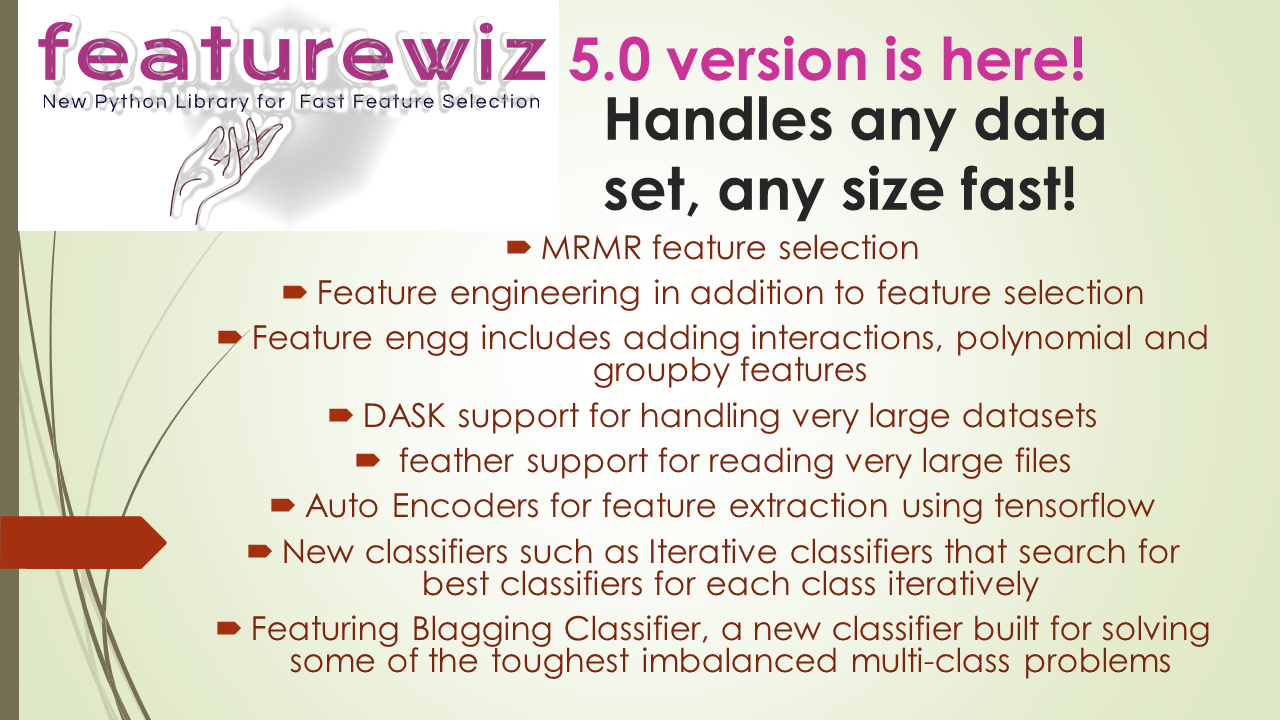
🔥 FeatureWiz, the ultimate feature selection library is powered by the renowned Minimum Redundancy Maximum Relevance (MRMR) algorithm. Learn more about it below.
If you use featurewiz in your research project or paper, please use the following format for citations:
"Seshadri, Ram (2020). GitHub - AutoViML/featurewiz: Use advanced feature engineering strategies and select the best features from your data set fast with a single line of code. source code: https://github.com/AutoViML/featurewiz"
Current citations for featurewizGoogle Scholar citations for featurewiz
featurewiz is the best feature selection library for boosting your machine learning performance with minimal effort and maximum relevance using the famous MRMR algorithm.
✔️ Automatically select the most relevant features without specifying a number 🚀 Provides the fastest and best implementation of the MRMR algorithm 🎯 Provides a built-in transformer (lazytransform library) that converts all features to numeric 📚 Includes deep learning models such as Variational Auto Encoders to capture complex interactions in your data 📝 Provides feature engineering in addition to feature selection - all with one single API call!
📈 First create additional features using the feature engg module 🌐 Compare featurewiz against other feature selection methods for best performance ⚖️ Avoid overfitting by cross-validating your results as shown here 🎯 Try adding auto-encoders for additional features that may help boost performance
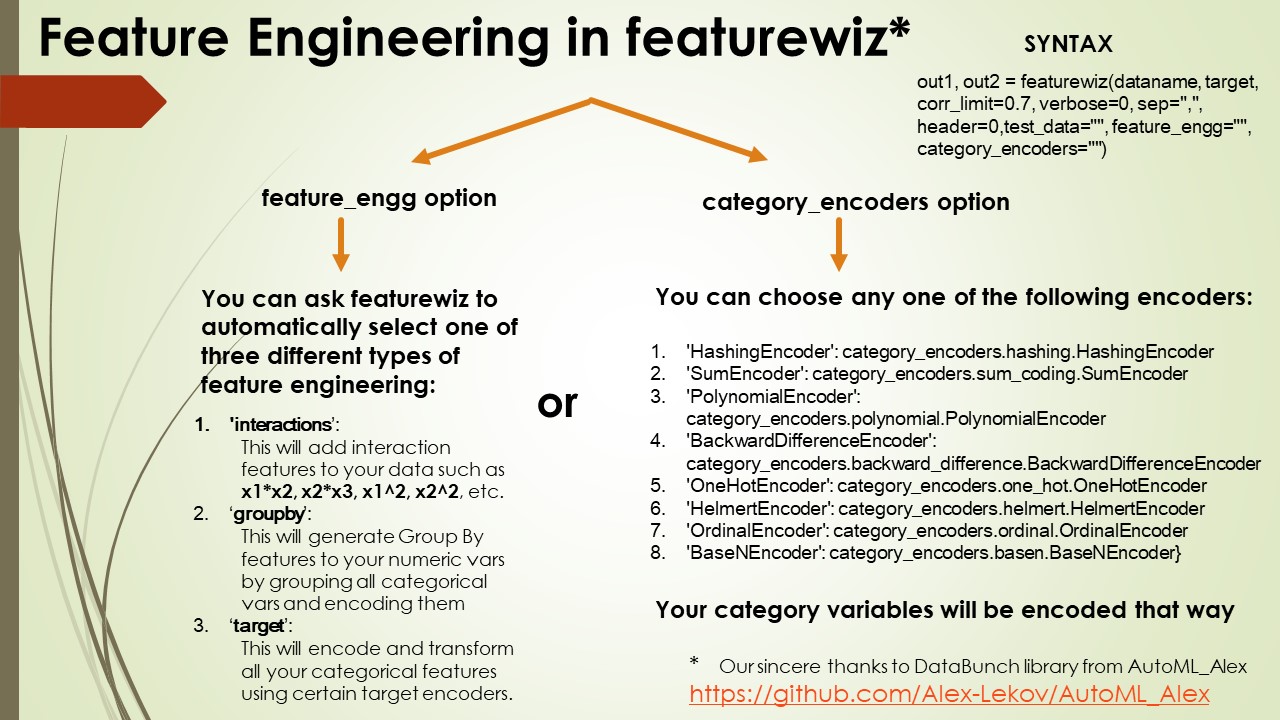
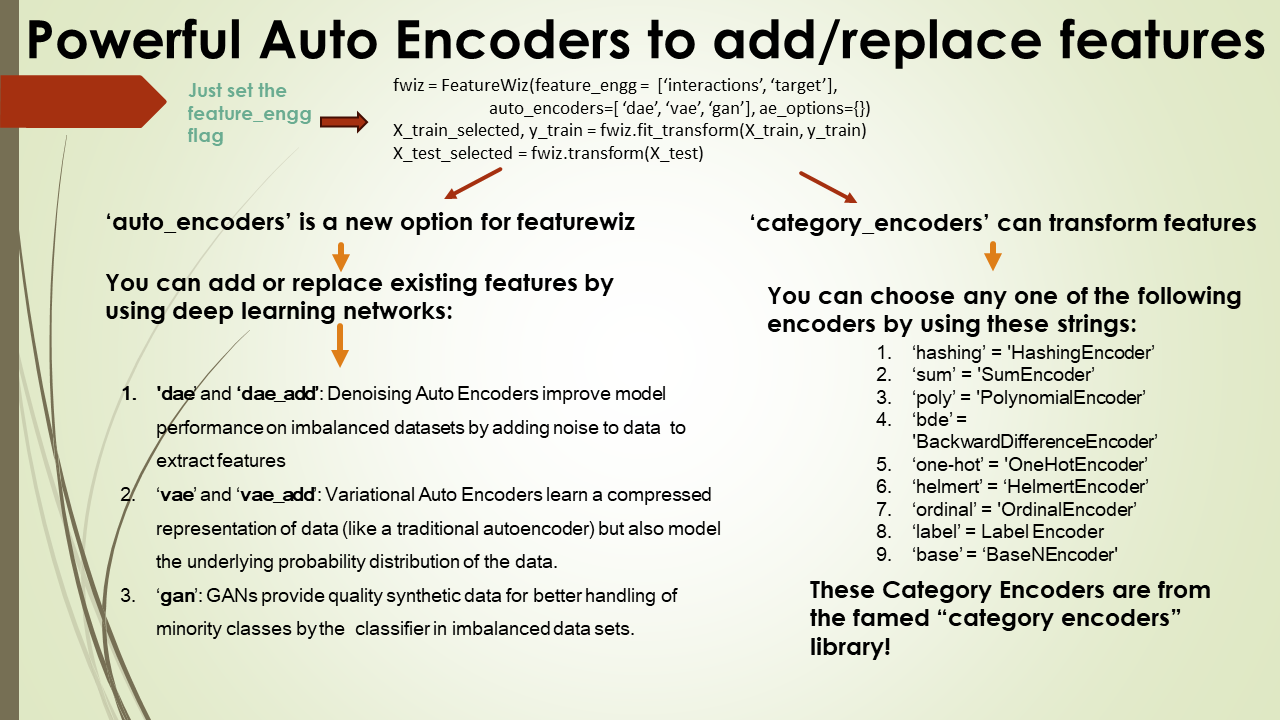
Create new features effortlessly with a single line of code! featurewiz enables you to generate hundreds of interaction, group-by, target-encoded features and higher order features, eliminating the need for expert-level knowledge to create your own features. Now you can create even deep learning based features such as Variational Auto Encoders to capture complex interactions hidden among your features. See the latest page for more information on this amazing feature.
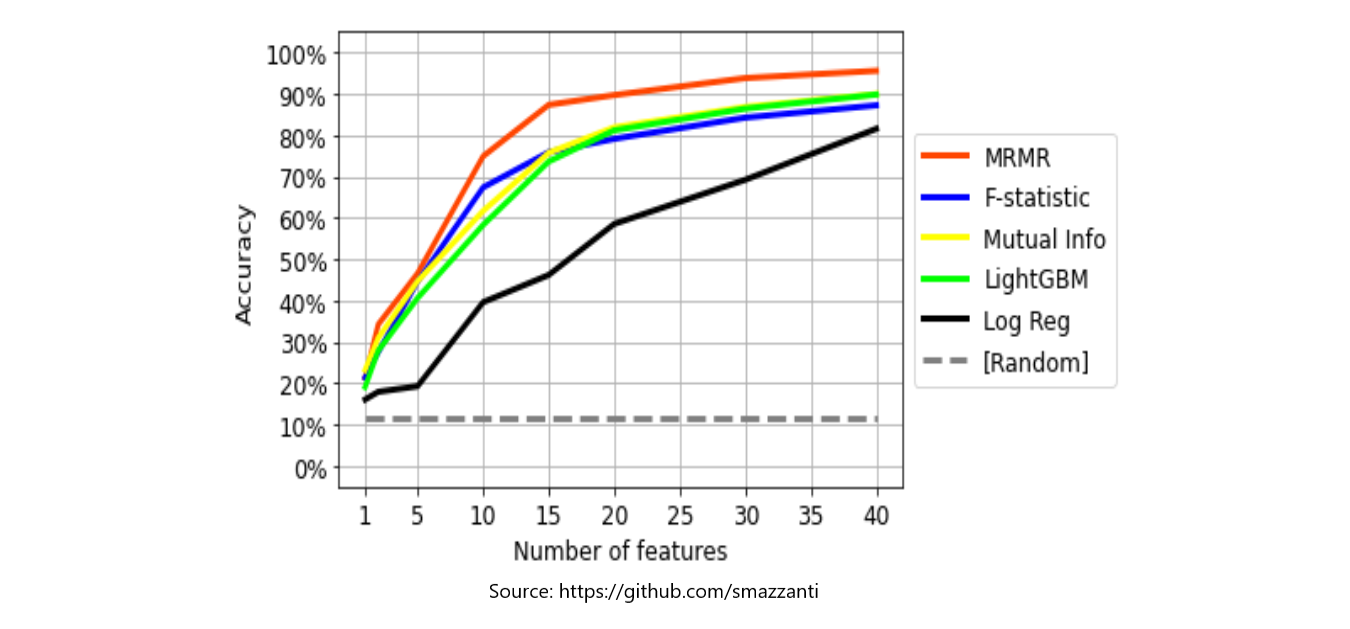
featurewiz provides one of the best automatic feature selection algorithms, MRMR, as described by wikipedia in this page as follows: "The MRMR feature selection algorithm has been found to be more powerful than other feature selection algorithms such as Boruta".
In addition, other researchers have compared MRMR against multiple feature selection algorithms and found MRMR to be the best.
After creating new features, featurewiz uses the MRMR algorithm to answer crucial questions: Which features are important? Are they redundant or mutually-correlated? Will your model suffer from or benefit from adding all features? To answer these questions, featurewiz uses two crucial steps in MRMR:
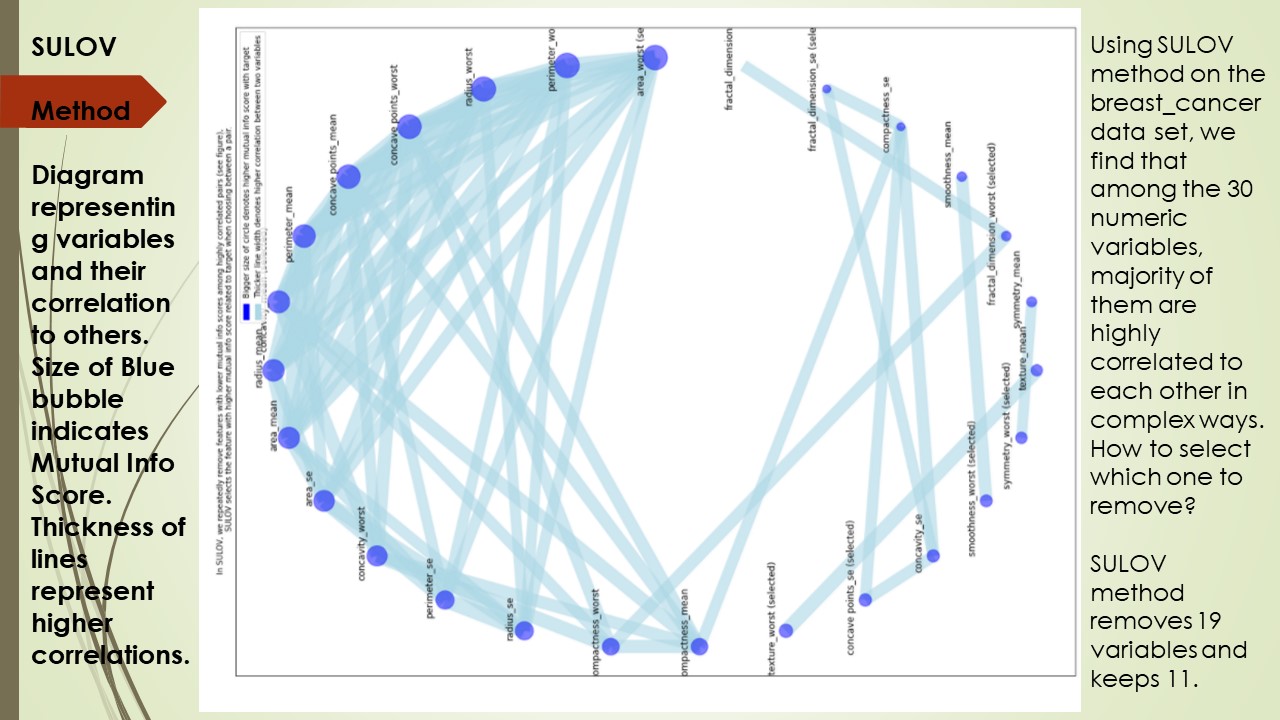
⚙️ The SULOV Algorithm: SULOV means "Searching for Uncorrelated List of Variables". It is a fast algorithm that removes mutually correlated features so that you're left with only the most non-redundant (un-correlated) features. It uses the Mutual Information Score to accomplish this feat.
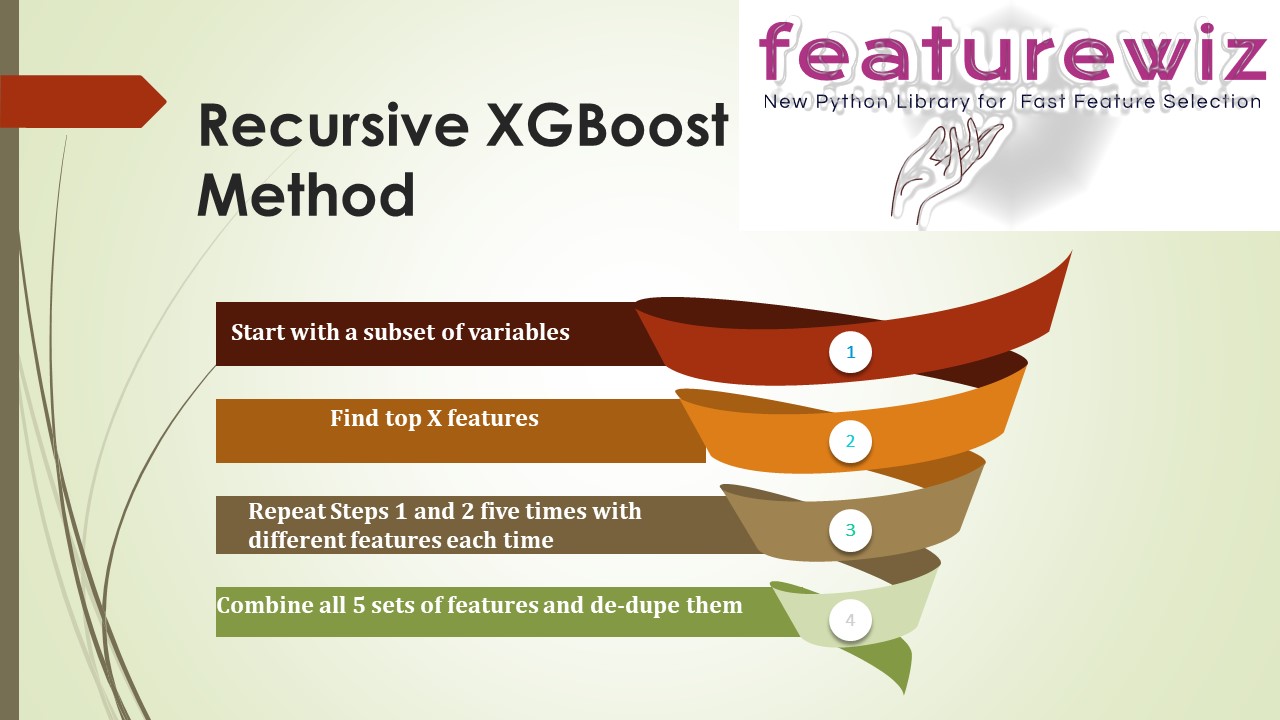
⚙️ Recursive XGBoost: Second, featurewiz uses XGBoost's feature importance scores by selecting smaller and smaller feature sets repeatedly to identify the most relevant features for your task among all the variables remaining after SULOV algorithm.
featurewiz extends traditional feature selection to the realm of deep learning using Auto Encoders, including Denoising Auto Encoders (DAEs), Variational Auto Encoders (VAEs), CNN's (Convolutional Neural Networks) and GAN's (Generative Adversarial Networks) for additional feature extraction, especially on imbalanced datasets. Just set the 'feature_engg' flag to 'VAE_add' or 'DAE_add' to create these additional features.

In addition, we include:
featurewiz has two major modules to transform your Data Science workflow:
1. Feature Engineering Module
2. Feature Selection Module
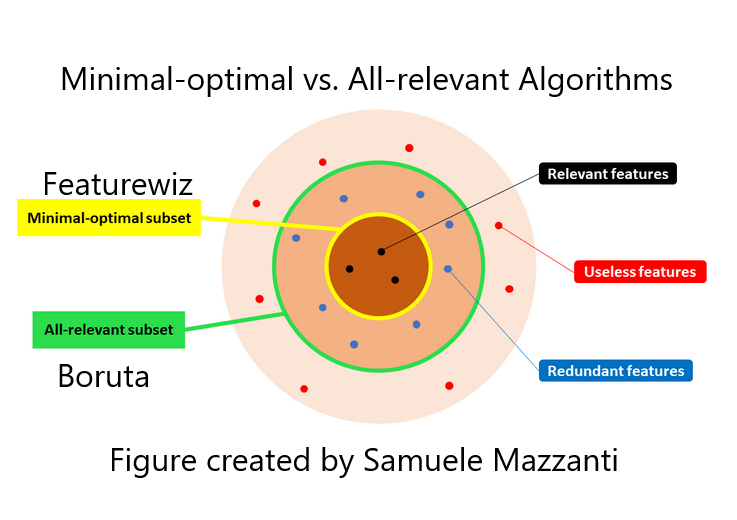
Featurewiz uses what is known as a Minimal Optimal algorithm such as MRMR while Boruta uses an All-Relevant approach. To understand how featurewiz's MRMR approach differs Boruta's 'All-Relevant' approach for best feature selection you need to study the chart below. It shows how the SULOV algorithm performs MRMR feature selection which provides a smaller feature set compared to Boruta which uses a bigger feature set.
One of the weaknesses of Boruta is that it contains redundant features (highly correlated features) which will hamper model performance while featurewiz doesn't.
Transform your feature engineering and selection process with featurewiz - the tool that brings expert-level capabilities to your fingertips!
featurewiz performs feature selection in 2 steps. Each step is explained below.
The working of the SULOV algorithm is as follows:
The working of the Recursive XGBoost is as follows: Once SULOV has selected variables that have high mutual information scores with the least correlation among them, featurewiz uses XGBoost to repeatedly find the best features among the remaining variables after SULOV.
Here are some additional tips for ML engineers and data scientists when using featurewiz:
Prerequisites:
In Kaggle notebooks, you need to install featurewiz like this (otherwise there will be errors):
!pip install featurewiz
!pip install Pillow==9.0.0
!pip install xlrd — ignore-installed — no-deps
!pip install executing>0.10.0
To install from source:
cd <featurewiz_Destination>
git clone git@github.com:AutoViML/featurewiz.git
# or download and unzip https://github.com/AutoViML/featurewiz/archive/master.zip
conda create -n <your_env_name> python=3.7 anaconda
conda activate <your_env_name> # ON WINDOWS: `source activate <your_env_name>`
cd featurewiz
pip install -r requirements.txt
As of June 2022, thanks to arturdaraujo, featurewiz is now available on conda-forge. You can try:
conda install -c conda-forge featurewiz
!pip install git+https://github.com/AutoViML/featurewiz.git
There are two ways to use featurewiz.
AutoViML/featurewiz is a public repo on GitHub by AutoViML. Use advanced feature engineering strategies and select best features from your data set with a single line of code. Created by Ram Seshadri. Collaborators welcome.
It declares the Apache-2.0 license on GitHub.
Its maker has not tagged a system, so it is unknown here. Its README says what it needs.
Open "Take it" on its page: Take My Repo writes an install plan for your machine and hands it to your AI agent (Claude Code, Codex or Cursor), which asks you before each step. Take My Repo has not tested it on any machine.
An open source python library for automated feature engineering
This Repo Contains Machine Learning Projects covering Supervised and Unsupervised ML algorithms. Contains solutions of various hackathon solutions (kaggle, AV , ineuron)
Alink is the Machine Learning algorithm platform based on Flink, developed by the PAI team of Alibaba computing platform.
Python package for AutoML on Tabular Data with Feature Engineering, Hyper-Parameters Tuning, Explanations and Automatic Documentation
Its last change on GitHub was on 2025-02-19. Take My Repo does not judge from that whether it is maintained.
Nobody has reviewed it on Take My Repo yet, which says nothing about its quality.
Take My Repo cannot say: it does not audit code and has not run featurewiz. What is known comes from GitHub. It declares the Apache-2.0 license on GitHub. Its last change was on 2025-02-19. It has 684 stars, which measure popularity, not safety. Nobody has reviewed it on Take My Repo yet, which says nothing about its quality. Read the source before you run it. With "Take it", your AI agent shows each step and asks you before running it; README text is treated as data, not as instructions.