
canvasync
High-performance real-time collaborative vector canvas with Yjs CRDTs, PartyKit WebSockets, and 60 FPS rendering
- 1
- 3 mo ago
Repo BAKUGOS1/canvasync, read from GitHub 2 d ago. BAKUGOS1 has not joined Take My Repo.
In short
BAKUGOS1/canvasync is a public repo on GitHub by BAKUGOS1. High-performance real-time collaborative vector canvas with Yjs CRDTs, PartyKit WebSockets, and 60 FPS rendering. It declares no license on GitHub. Public does not mean open source: without a license, nobody is granted the right to reuse it. It is written mainly in TypeScript, has 1 stars and last changed on 2026-08-27. Nobody has reviewed it on Take My Repo yet, which says nothing about its quality. Read from GitHub on 2026-11-22.
CanvaSync
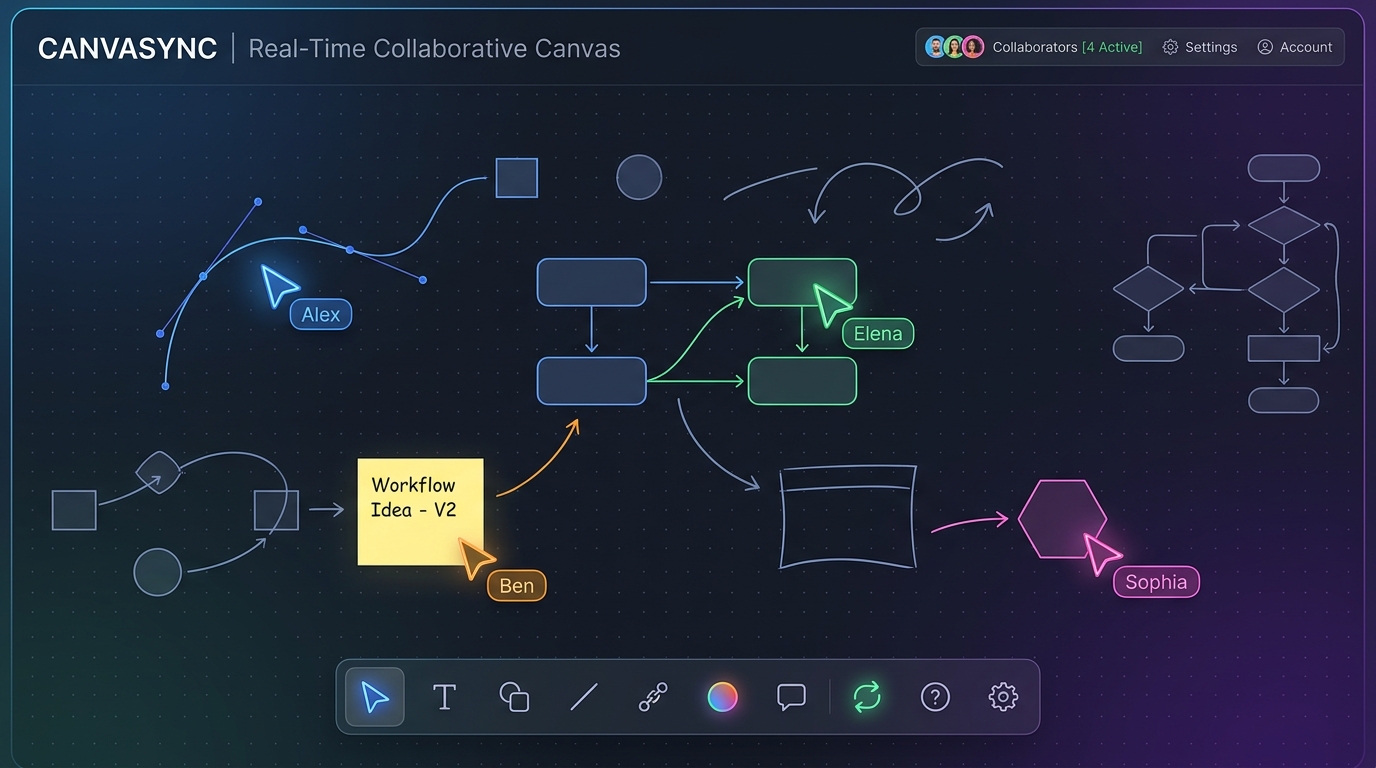
A high-performance, real-time collaborative vector canvas application built with Next.js 14, TypeScript, Yjs CRDTs, and PartyKit WebSockets.
Overview
CanvaSync provides an infinite whiteboard canvas supporting concurrent multi-user editing, vector shape manipulation, dynamic connectors, pressure-sensitive drawing, and localized comment threads. Document state is synchronized across clients using Conflict-Free Replicated Data Types (CRDTs) over WebSockets, ensuring deterministic conflict resolution and offline-first persistence.
Key Capabilities
- Conflict-Free Synchronization: State synchronization powered by Yjs data structures (
Y.Map,Y.Array) relayed over WebSocket rooms. - Isolated Undo/Redo: User-scoped undo/redo stacks (
Y.UndoManager) that track only local mutations without reverting concurrent peer changes. - Presence and Awareness: Real-time cursor tracking with coordinate interpolation, user selection bounding boxes, and active collaborator badges.
- Rendering Engine: 60 FPS 2D canvas pipeline featuring QuadTree spatial indexing, viewport culling, screen-to-world coordinate transformations, and matrix-based zoom/pan.
- Vector Tools:
- Primitives: Rectangle, Circle, Line, Text, Sticky Note, and Image placement.
- Connectors: Dynamic arrows with orthogonal and straight routing, supporting magnetic anchor binding to shapes.
- Freehand Drawing: Pressure-sensitive vector strokes rendered via
perfect-freehand.
- Transform & Alignment: 8-handle transformation box (multi-selection, resizing, and rotation) and axis-aligned distribution utilities.
- In-Canvas Commenting: Threaded discussions anchored to world coordinates with status resolution workflows.
- Offline Persistence: Local IndexedDB caching (
y-indexeddb) for instant rehydration and offline editing support. - Export Options: Vector SVG, high-resolution PNG, and raw JSON export.
Architecture
Browser Client A                     Browser Client B
 [Next.js UI]                         [Next.js UI]
 [Canvas Engine (QuadTree)]           [Canvas Engine (QuadTree)]
 [Yjs Document & UndoManager]         [Yjs Document & UndoManager]
         │                                    ▲
         │ Binary CRDT Deltas (WebSocket)     │
         ▼                                    │
 ┌────────────────────────────────────────────┴─────────────┐
 │                PartyKit WebSocket Server                 │
 │                                                          │
 │ • Room routing by document ID                            │
 │ • Awareness broadcast (cursors & selection)              │
 │ • Document snapshot persistence                          │
 └──────────────────────────────────────────────────────────┘
Tech Stack
- Frontend: Next.js 14 (App Router), React 18, TypeScript, Tailwind CSS, Lucide Icons
- Real-Time & Sync: Yjs, PartyKit,
y-partykit,y-indexeddb - Graphics & Math: HTML5 2D Canvas API, Custom QuadTree,
perfect-freehand - Testing & Verification: Node.js test runners bundled via
esbuild
Getting Started
Prerequisites
- Node.js 18.17.0 or higher
- npm 9.0 or higher
1. Installation
git clone https://github.com/BAKUGOS1/canvasync.git
cd canvasync
npm install
2. Environment Configuration
Copy the example environment file:
cp .env.example .env.local
Configure NEXT_PUBLIC_PARTYKIT_HOST in .env.local:
# Local development default
NEXT_PUBLIC_PARTYKIT_HOST=127.0.0.1:1999

# Production example:
# NEXT_PUBLIC_PARTYKIT_HOST=canvasync.<your-username>.partykit.dev
3. Development Server
Start both the Next.js frontend and the PartyKit WebSocket server concurrently:
npm run dev
- Web Application:
http://localhost:3000 - PartyKit Server:
http://127.0.0.1:1999
Available Scripts
| Script | Description |
|---|---|
npm run dev |
Runs Next.js and PartyKit concurrently |
npm run dev:next |
Runs only the Next.js development server |
npm run dev:party |
Runs only the PartyKit WebSocket server |
npm run build |
Compiles the production Next.js application |
npm run start |
Starts the Next.js production server |
npm run lint |
Executes ESLint analysis |
npm run typecheck |
Validates TypeScript types across the project |
npm run verify:engine |
Runs unit verification for camera, quadtree, geometry, alignment, and export pipelines |
npm run verify:crdt |
Runs integration tests for Yjs sync, awareness, undo isolation, and room state |
npm run deploy:party |
Deploys the PartyKit WebSocket server to PartyKit Cloud |
Deployment
1. Deploy WebSocket Server (PartyKit)
npx partykit deploy
Note the deployed PartyKit domain (e.g., canvasync.<username>.partykit.dev).
2. Deploy Web Client (Vercel or Container)
Set the environment variable on your hosting provider:
NEXT_PUBLIC_PARTYKIT_HOST=canvasync.<username>.partykit.dev
Deploy the Next.js repository using standard Next.js deployment pipelines.
License
This project is licensed under the MIT License.
Questions
What is canvasync?
BAKUGOS1/canvasync is a public repo on GitHub by BAKUGOS1. High-performance real-time collaborative vector canvas with Yjs CRDTs, PartyKit WebSockets, and 60 FPS rendering.
Is canvasync open source?
It declares no license on GitHub. Public does not mean open source: without a license, nobody is granted the right to reuse it.
Does canvasync run on macOS, Windows or Linux?
Its maker has not tagged a system, so it is unknown here. Its README says what it needs.