
beforecode
BeforeCode — Spec-first software planning toolkit for humans and AI coding agents.
- 2
- JavaScript
- MIT
- 5 wk ago
CaseSheet - Django front end for SIH26047, Patient Case-Taking Software (AIIA, Ministry of Ayush)
Repo BAKUGOS1/casesheet, read from GitHub 1 min ago. BAKUGOS1 has not joined Take My Repo.
BAKUGOS1/casesheet is a public repo on GitHub by BAKUGOS1. CaseSheet - Django front end for SIH26047, Patient Case-Taking Software (AIIA, Ministry of Ayush). It declares no license on GitHub. Public does not mean open source: without a license, nobody is granted the right to reuse it. It is written mainly in HTML, has 1 stars and last changed on 2026-09-10. Nobody has reviewed it on Take My Repo yet, which says nothing about its quality. Read from GitHub on 2026-11-22.
A UI-only Django project for the problem statement Patient Case-Taking Software (All India Institute of Ayurveda, Ministry of Ayush). A "case sheet" is what the patient record is called in an Indian hospital, and case-taking is what this software does.
Django and nothing else. Django templates, Django static files, hand-written CSS
and a little plain browser JavaScript. No React, no Tailwind, no Bootstrap, no CDN,
no build step, no Node. No models, no database, no external services — every screen
renders from fixed demo content in frontend/demo_data.py. English only.
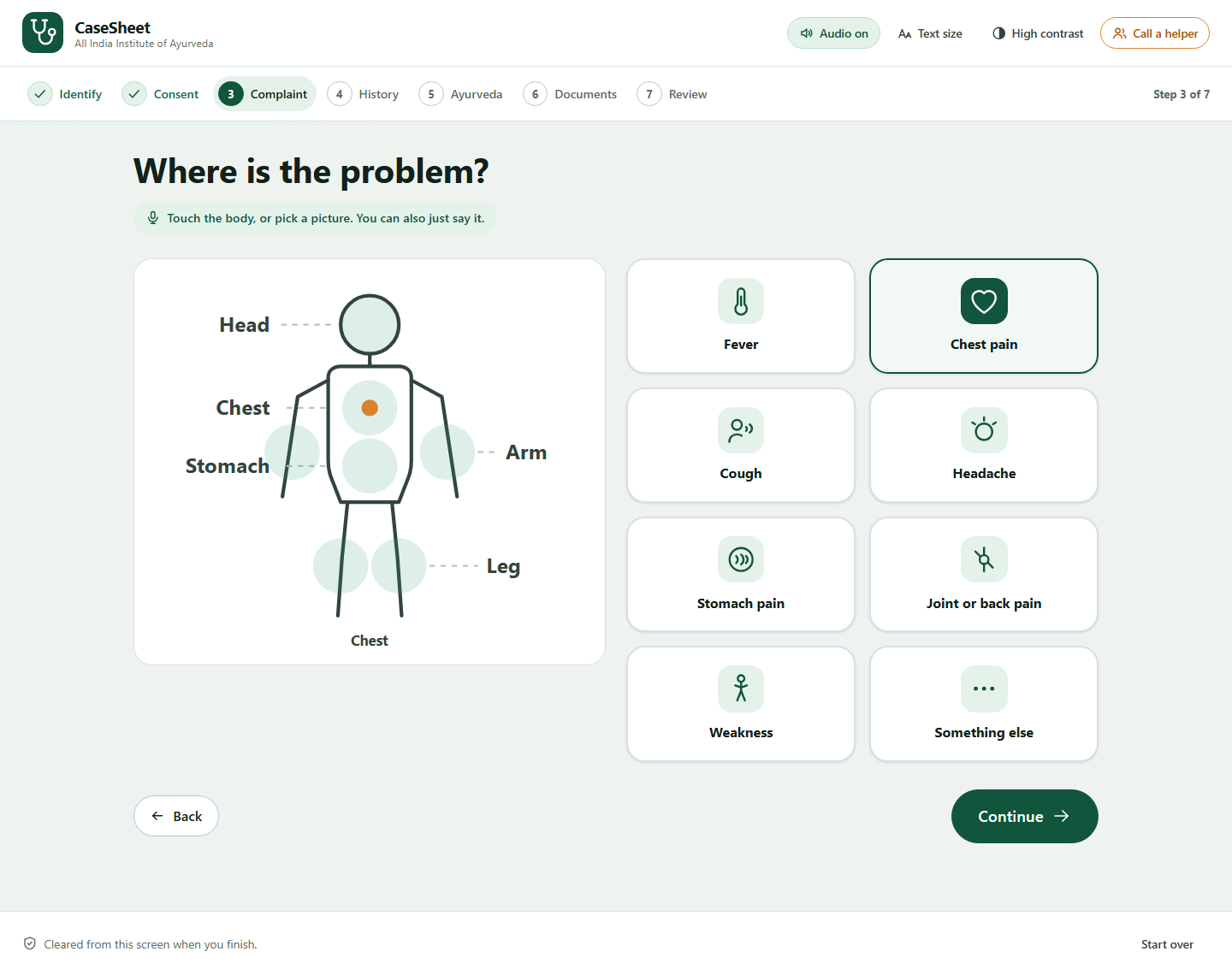
The patient says where it hurts — a labelled body map beside a picture grid, for a patient who may not read well.

The interview listens, and escalates — every question can be spoken or tapped, and a red-flag answer pages triage before the patient has left the kiosk.

The physician gets a draft, not a diagnosis — structured history, scanned documents and out-of-range values, to accept, amend or reject.

Accessibility is not a settings page — high contrast and three text sizes are in the header of every kiosk screen.

All 19 screenshots are in docs/screenshots/, numbered in the order a
patient walks through them.
python -m venv .venv
.venv\Scripts\activate
pip install -r requirements.txt
python manage.py runserver
Then open http://127.0.0.1:8000/screens/ for an index of every screen.
There is no database, so migrate is neither needed nor possible: DATABASES is empty
and INSTALLED_APPS holds only django.contrib.staticfiles and this project's frontend app.
| URL | Screen |
|---|---|
/ |
Welcome |
/identify/ |
ABHA scan, ABHA number, Aadhaar fingerprint, or new registration |
/consent/ |
Four consent choices, each revocable |
/complaint/ |
Body map with labelled regions, plus a picture grid |
/interview/?step=1..6 |
The interview, in speak or tap mode |
/ayush/ |
Dashavidha Pariksha |
/documents/ |
Scanning, extraction and the medical timeline |
/summary/ |
The structured history the patient confirms |
/done/ |
Token, room and priority |
/clinician/ |
OPD queue with red-flag escalation |
/clinician/patient/ |
The history summary a physician accepts or amends |
/portal/login/ |
Patient portal login |
/portal/ |
Patient dashboard |
/portal/records/ |
Patient documents |
/screens/ |
Index of every screen |
/interview/. Every question can be
spoken or tapped (Speak / Tap). Each carries the SOCRATES probe it belongs to.
Step 4 fires the red-flag path./documents/. Scanner view, per-document extraction
with a confidence figure, out-of-range lab values highlighted, auto-ordered timeline./summary/ for the patient, /clinician/patient/ for
the physician, in the standard clinical order. The physician view is an editable draft
with accept / amend / reject, never a diagnosis./consent/, plus the ABHA identity and consent
panels that recur across the flow./ayush/: all ten Dashavidha Pariksha parameters.localStorage.One idea per screen, one line per idea. Headings are questions the patient would ask themselves. No paragraph of explanation where a label will do, and nothing repeated on two screens. If a screen has to teach the patient something, it is doing too much.
casesheet/
  manage.py
  casesheet/            project settings, urls, wsgi, asgi
  frontend/             app: urls, views, demo_data, context_processors
  templates/
    base.html           document shell
    screens.html        reviewer index
    partials/           icon sprite, accessibility bar, progress rail
    kiosk/              patient-facing screens
    clinician/          clinician workspace
    patient/            patient portal
  static/
    css/base.css        design tokens, reset, shared components
    css/kiosk.css       kiosk surface
    css/clinician.css   clinician workspace and patient portal
    js/a11y.js          text size, contrast, audio
    js/kiosk.js         selection states, consent switches, microphone
frontend/demo_data.py; swapping it for real querysets
should not require template changes beyond field names.?step=, so server-driven adaptive branching drops in
without touching the front end.{% trans %} and Django's i18n machinery can be
layered on when the other languages are added.BAKUGOS1/casesheet is a public repo on GitHub by BAKUGOS1. CaseSheet - Django front end for SIH26047, Patient Case-Taking Software (AIIA, Ministry of Ayush).
It declares no license on GitHub. Public does not mean open source: without a license, nobody is granted the right to reuse it.
Its maker has not tagged a system, so it is unknown here. Its README says what it needs.
Open "Take it" on its page: Take My Repo writes an install plan for your machine and hands it to your AI agent (Claude Code, Codex or Cursor), which asks you before each step. Take My Repo has not tested it on any machine.
Its last change on GitHub was on 2026-09-10. GitHub counts 0 open issues and pull requests. Take My Repo does not judge from that whether it is maintained.
Nobody has reviewed it on Take My Repo yet, which says nothing about its quality.
BeforeCode — Spec-first software planning toolkit for humans and AI coding agents.
Local-first TypeScript + Playwright QA agent for browser automation, evidence capture, safety checks, and Excel-first website QA reports.
Human-style deterministic TypeScript + Playwright QA agent for CRM testing with Excel evidence reports
Modern, production-grade cloud operations and intelligence platform workspace built with TanStack Start, React 19, and Tailwind CSS.