Edit-Banana
Edit Banana: A framework for converting statistical formats into editable.
- 5.5k
- Python
- AGPL-3.0
- 3 d ago
End-to-end pipeline to analyze how influential citations (Fellow authors) refer to a target paper.
Repo BIT-DataLab/PaperCitedRemarkAnalysis, read from GitHub 3 d ago. BIT-DataLab has not joined Take My Repo.
BIT-DataLab/PaperCitedRemarkAnalysis is a public repo on GitHub by BIT-DataLab. End-to-end pipeline to analyze how influential citations (Fellow authors) refer to a target paper. It declares the MIT license on GitHub. It is written mainly in Python, has 3 stars and last changed on 2026-02-26. Nobody has reviewed it on Take My Repo yet, which says nothing about its quality. Read from GitHub on 2026-11-20.
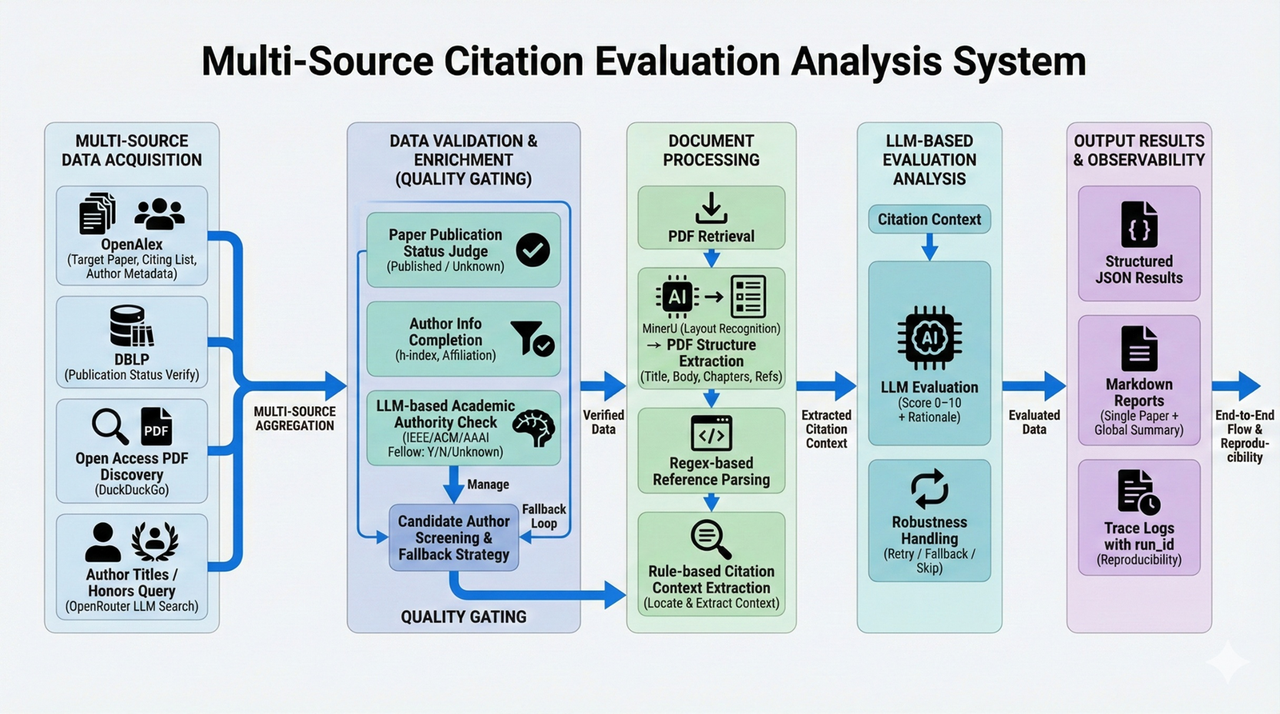
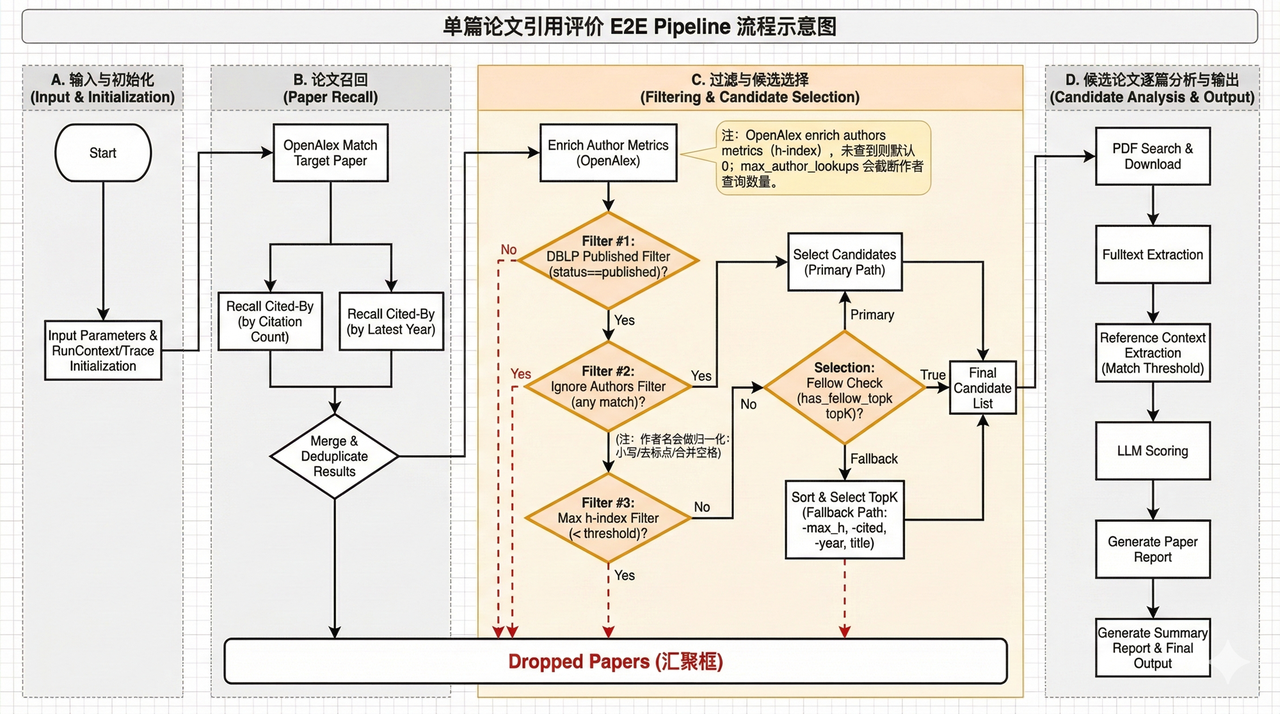
End-to-end pipeline to analyze how influential citations (Fellow authors) refer to a target paper. Given a target paper title, the system pulls citing papers, filters for published works, checks Fellow status for top authors, extracts citation contexts from PDFs, scores each context with an LLM, and outputs reports plus trace logs for reproducibility.
This project analyzes citations to a specified target paper, focusing on how influential authors (e.g., IEEE/ACM/AAAI Fellows) refer to it and the semantic stance of their remarks. The system automatically collects citing papers, filters for published works, identifies influential authors, extracts citation contexts from PDFs, scores each context with an LLM, and generates reproducible reports and trace logs.
pcra.get_pdf)conda create -n pcraPaper python=3.10
conda activate pcraPaper
pip install -r requirements.txt
pcra.get_pdf requires Chrome and chromedriver binaries at fixed paths under the repo root:
chrome_bin/chrome-linux64/chromechrome_bin/chromedriver-linux64/chromedriverThese files come from the official Chrome for Testing release. Download the matching
versions of chrome-linux64.zip and chromedriver-linux64.zip, then extract them into
chrome_bin/.
Example (version number can be replaced):
VER=143.0.7499.40
mkdir -p chrome_bin
wget -O /tmp/chrome-linux64.zip "https://storage.googleapis.com/chrome-for-testing-public/${VER}/linux64/chrome-linux64.zip"
wget -O /tmp/chromedriver-linux64.zip "https://storage.googleapis.com/chrome-for-testing-public/${VER}/linux64/chromedriver-linux64.zip"
unzip -q /tmp/chrome-linux64.zip -d chrome_bin
unzip -q /tmp/chromedriver-linux64.zip -d chrome_bin
Verify versions:
chrome_bin/chrome-linux64/chrome --version
chrome_bin/chromedriver-linux64/chromedriver --version
conda create -n MinerUService python=3.12
conda activate MinerUService

export UV_DEFAULT_INDEX=https://mirrors.aliyun.com/pypi/simple/

pip install uv -i https://pypi.org/simple/
uv pip install "mineru[core]"

# On first run, use a mirror to download required model files,
# then convert a file to trigger downloading all models
export MINERU_MODEL_SOURCE=modelscope
mineru -p <input_path> -o <output_path>

# Choose a directory for temporary files, then start minerU there
cd <minerUtemp>
export MINERU_MODEL_SOURCE=modelscope
mineru-api --host 0.0.0.0 --port 18543
Service port: 18543.
Find the config template config/llm_model_template.yaml:
cp config/llm_model_template.yaml config/llm_model.yaml
Fill in the text model settings first (can be local Ollama or any OpenAI-compatible API).
Fellow lookup mode is configured by fellow_lookup.mode:
local_only (default): DuckDuckGo + Selenium + local text model, no OpenRouter required.local_with_fallback: local flow first, fallback to OpenRouter when all results are Unknown or local errors occur.openrouter_only: legacy OpenRouter web-search flow only.openrouter_web_search is only required when mode is local_with_fallback or openrouter_only.
conda activate pcraPaper
bash e2e_scripts/run_one_paper/run_one_paper.sh
Before running, set the following variables in e2e_scripts/run_one_paper/run_one_paper.sh:
# Target paper (cited) title
PAPER_TO_ANALYZE="Efficient Personalized PageRank Computation: The Power of Variance-Reduced Monte Carlo Approaches"
# Target paper author
TARGET_AUTHOR="Rong-Hua Li"
# Authors to ignore (citing papers that include these authors will be skipped)
IGNORE_AUTHORS='["Guoren Wang","Rong-Hua Li"]'
# Custom ID for later aggregation
RUN_ID="102"
Default output location: trace_log/.
It is recommended to run with tmux in the background. A single paper takes about 5 minutes.
Aggregate results under trace_log/ into Excel:
conda activate pcraPaper
python e2e_scripts/export_result/export_summary_to_excel.py
Results and logs for a single paper are located at trace_log/<target_paper_name>/:
res/paper_ref_contexts/{paper_id}.json (PDF, full text, citation contexts)res/paper_ref_contexts_scored/{paper_id}.json (LLM scores)res/fulltext/{paper_id}.mdres/pdf/{paper_id}.pdfres/reports/paper/{paper_id}.mdres/reports/summary.mdres/summary.jsonlog/{run_id}.ndjson (stage trace logs)Aggregated results for multiple papers are in: e2e_scripts/export_result.
chrome_bin/.18543 is running and that the runtime has GPU access.BIT-DataLab/PaperCitedRemarkAnalysis is a public repo on GitHub by BIT-DataLab. End-to-end pipeline to analyze how influential citations (Fellow authors) refer to a target paper.
It declares the MIT license on GitHub.
Its maker has not tagged a system, so it is unknown here. Its README says what it needs.
Open "Take it" on its page: Take My Repo writes an install plan for your machine and hands it to your AI agent (Claude Code, Codex or Cursor), which asks you before each step. Take My Repo has not tested it on any machine.
Its last change on GitHub was on 2026-02-26. Take My Repo does not judge from that whether it is maintained.
Edit Banana: A framework for converting statistical formats into editable.
Nobody has reviewed it on Take My Repo yet, which says nothing about its quality.
Bench-U : Unstructured Data Analysis using LLMs: A Comprehensive Benchmark [Experiments & Analysis]
Official GitHub organization profile for BIT DataLab, School of Computer Science, Beijing Institute of Technology.