
biobloom
Create Bloom filters for a given reference and then use it to categorize sequences
- 78
- GPL-3.0
- 2 y ago
Repo BirolLab/biobloom, read from GitHub 4 h ago. BirolLab has not joined Take My Repo.
In short
BirolLab/biobloom is a public repo on GitHub by BirolLab. Create Bloom filters for a given reference and then use it to categorize sequences. It declares the GPL-3.0 license on GitHub. It is written mainly in C++, has 78 stars and last changed on 2024-11-26. Nobody has reviewed it on Take My Repo yet, which says nothing about its quality. Read from GitHub on 2026-11-25.
BioBloom Tools User Manual
BioBloom Tools (BBT) provides the means to create filters for a given reference and then to categorize sequences. This methodology is faster than alignment but does not provide mapping locations. BBT was initially intended to be used for pre-processing and QC applications like contamination detection, but is flexible to accommodate other purposes. This tool is intended to be a pipeline component to replace costly alignment steps.
Multi-index Bloom filters Manual - See here if classifying to many (>100 targets) different references at the same time
Relevant paper:
BioBloom tools: fast, accurate and memory-efficient host species sequence screening using bloom filters.
Justin Chu, Sara Sadeghi, Anthony Raymond, Shaun D. Jackman, Ka Ming Nip, Richard Mar, Hamid Mohamadi, Yaron S. Butterfield, A. Gordon Robertson, Inanç Birol
Bioinformatics 2014; 30 (23): 3402-3404.
doi: 10.1093/bioinformatics/btu558
PMID: 25143290
This tool is free for academic use (GPL3 licence).
We have a commercial licence also, please contact us (prebstein at bccancer dot bc dot ca) if you wish to use the tools for commercial uses.
Any questions, comments and suggestions can be directed to @JustinChu or emailed to cjustin@bcgsc.ca.
Affiliations:
Canada’s Michael Smith Genome Sciences Centre, BC Cancer Agency, Vancouver BC Canada V5Z 4S6
Department of Bioinformatics, University of British Columbia, Vancouver BC V6T 1Z4
Table of Contents
- Compiling and Installing BioBloomTools
- Dependencies
- How to Install
- Generating Bloom Filters from Reference Sequence with Biobloommaker
- Classifying and Analyzing Sequences with Biobloomcategorizer
- Program Outputs
- Biobloommaker
- Bloom Filter File (filterID.bf)
- Bloom Filter Info File (filterID.txt)
- Biobloomcategorizer
- Summary File (summary.tsv)
- Categorized Sequence FastA/FastQ Files
- Biobloommaker
- Understanding BioBloomTools
- About Bloom Filters
- How false positive rates correlates to memory usage
- How many hash functions should be used?
- K-mer Tiling and Reduction of the effect of false positive k-mers
- What is inside the Bloom Filter Info File?
- Obtaining the number of unique k-mers in the reference
- Obtaining the number of redundant k-mers in the reference
- Specifications on memory, cpu and storage requirements
- Advanced options and Best Practices
1. Compiling and Installing BioBloomTools
Dependencies:
- GCC
- Boost
- zlibdev
- Autotools (if directly cloning from repo)
- Google Sparsehash
- sdsl-lite
Compilation:
If cloning directly from the repository make sure you get the required submodules:
git submodule update --init
If cloning directly from the repository run:
./autogen.sh
Compiling BioBloomTools should be as easy as:
./configure && make
To install BBT in a specified directory:
./configure --prefix=/BBT/PATH && make install
If your boost library headers are not in your PATH you can specify their location:
./configure --with-boost=/boost/path --prefix=/BBT/PATH && make install
BioBloomTools can be installed on linux using conda:
conda install -c bioconda -c conda-forge biobloomtools
Alternatively, if you have linuxbrew/homebrew you can run:
brew install biobloomtools
2. Generating Bloom Filters from Reference Sequences with Biobloommaker
After you have your FastA file a .bf file with corresponding information text file can be created by running the command:
./biobloommaker -p input input1.fasta input2.fasta
-p is the prefix for the files being created, it also acts as an ID for the filter.
The options above are the bare minimum options you must use to run the program, but it is possible to customize many aspects of your filter that can drastically change performance depending on your needs. See section 5 for advanced options. You can also use the -h command for a listing of the options.
The optimal size of the filter will be calculated based on the maximum false positive rate (default is 0.075) and the number of hash functions (can be set but is optimized based on FPR).
Two files will be generated binary Bloom filter file (.bf) and an information file in INI format (.txt). The information file must be kept with the .bf file to provide all the needed information to run the categorization.
3. Classifying and Analyzing Sequences with Biobloomcategorizer
Important Note: Bloom filters in versions of bbt where the second number of the version is incremented, will not be compatible, and will result in undefined/meaningless behavior. For example a filter created in 2.0.12 will work with 2.0.13 but not 2.1.X or 2.2.X etc. We do not produce an error message at present regarding this prior to 2.3.0.
Once you have filters created, you can use them with Biobloomcategorizer to categorize sequences. The file formats that can be used are the following: FastQ, FastA. If the input is compressed it is recommended to pipe the input in using process subsititution.
Before starting make sure the listed .bf file is in the same directory as its corresponding information .txt file.
A summary.tsv file, readStatus.tsv summary file, and FastA files containing categorized reads can be generated with the following command:
./biobloomcategorizer --fa -p /output/prefix -f "filter1.bf filter2.bf filter3.bf" inputReads1.bam.bz2 inputreads2_qseq.txt
-p is the output directory for the output files.
-f is the filter(s) you used to categorize the sequences. You can specify as many as
you need.
There are some advanced options open can use outlined in section 5. Notable option
one can use is the paired end mode -e:
./biobloomcategorizer -e -p /output/prefix -f "filter1.bf filter2.bf filter3.bf" inputReads1_1.fq inputreads1_2.fq
-e will require that both reads match when making the call about what reference they belong in.
By default -e will only count a read if both reads match a filter. If you want only it to count situations where only one read matches the filter then the -i (--inclusive) option can also be used.
These are general use cases you can use to run the program, but it is possible to customize many aspects of your filter that can drastically change performance depending on your needs. See section 6 for advanced options. You can also using the -h command for a listing on the options.
4. Program Output
A. Biobloommaker
i. Bloom Filter File (filterID.bf)
- Simply a bit array representing the bloom filter dumped as a file. It is simple, so that it can be used in almost any system format. It is useless without its paired info file however.
ii. Bloom Filter Info File (filterID.txt)
- This is the information file of the bloom filter, containing the information like false positive rate and hash functions used. It is in human readable INI format. It is intended to be read by Biobloomcategorizer in tandem with its paired
.bffile to perform categorization.
B. Biobloomcategorizer
i. Summary File (summary.tsv)
- Tab separated file. Contains proportion information about reads mapping to each filter. Gives a overview of your results.
- The
hitscolumn is the number of hits to this filter, regardless if unique. - The
sharedcolumn a subset of hits that also hit other filter. - The
multiMatchentry refers to any hits are shared at least 2 genomes. - The
noMatchentry is a subset of reads that do not match any of the filters used.
- The
ii. Categorized Sequence FastA/FastQ Files
- In the output directory there will be files for every filter used in addition to
multiMatchandnoMatchfiles. The reads will be categorized in these locations based on the threshold-svalues used. - Reads outputted will have a value (e.g.
/1) appended to the end of each ID to denote pair information about the read.
5. Understanding BioBloomTools
A. About Bloom Filters
The whole idea of using bloom filter centers on getting the time complexity of a hash (i.e. a O(1) time complexity for look-ups) with a lower space requirement. This is resolved in a bloom filter by not storing the entry, but rather storing the entry’s bit signature (determined via hashing) in a bit array. However, this means there is no collision detection and all bloom filters will have some sort of false positive rate associated with them. The false positive rate must be carefully considered as it determines the expected size of the filter used. Too small of a false positive rate can mean a large bloom filter, but too large of a false positive rate could introduce too much error for the filter to be practical.
B. How false positive rates correlates to memory usage
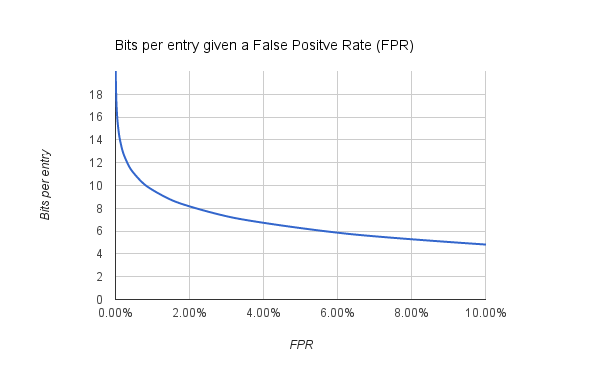
This figure shows the relationship (assuming optimal number of hash functions have been used) between false positive rate and the space cost per entry. To use this chart divide your amount of space in bits you have to work with to the number base pairs you have in your reference.
For example, say I want the human genome (~ 3.4×10^9) filter to fit into~3GB of memory. (8×3×230)/4×10^9 = ~8bits per entry, meaning a filter with 2% FPR at maximum should be used.
C. How many hash functions should be used?
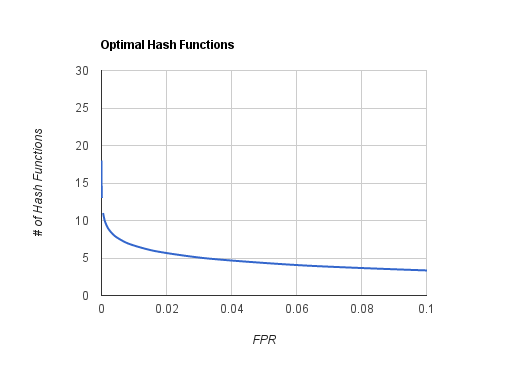
The number of hash functions refers to the number of hash functions used by a single filter per element. In practice the approximate optimal number of hash functions will be calculated automatically by our program.
We give users the ability to change the number of hash functions because very low false positive rates will have an optimal number of associated hash functions that may be very large and may slow down classification. Also it is recommended that if running multiple filters at the same time that they all use the same number of hash functions.
D. K-mer Tiling
We use a sliding window across each read of size k to categorize sequences. Single base overlaps that both hit a filter are unlikely to be false positives. This information is used to reduce the effect of any false positives. This concept is also used to further improve speed, we also employ a jumping k-mer (rather than sliding) heuristic that skips k k-mers when a miss is detected after a long series of adjacent hits.
E. What is inside the Bloom Filter Info File?
i. Obtaining the number of unique k-mers in the reference:
Within the information txt file for each bloom filter there is a "num_entries" entry that lets you know how many unique k-mers have been added to the filter. It is a lower bound estimate due to possible false positives.
ii. Obtaining the number of redundant k-mers in the reference:
Within the information txt file for each bloom filter there is a redundant_sequences entry that lets you know how many redundant k-mers have been added to the filter. It is an upper bound estimate due to possible false positives. The redundant_fpr represents the probability a unique entry could be mis-classified as redundant. Thus, to get the approximate number of unique k-mers take the redundant_fpr value and multiply it with the redundant_sequences + num_entries and add that to the num_entries.
Expected total number of k-mers = (redundant_sequences + num_entries) * redundant_fpr + num_entries
F. Specifications on memory, cpu and storage requirements
Memory:
Memory usage is determined by the size of the database given so there is no "optimal" memory requirements. There is a bit of overhead but the formula roughly matches this: m=(-ln(p)/((ln(2))^2)) * n where m is size of the filter in bits, p is the FPR and n is the number of elements (number of bases in reference fasta file).
If used in an job based automated cluster environment either the user can specify memory of you can infer memory usage based on the input bloom filter sizes (e.g. size of the input bf files + 100mb overhead).
Storage:
When creating filters: Again, as alluded to above, storage is dependant of the input reference fasta file, following the same formula. Here is a nice sanity check: memory usage is roughly equal the sum of sizes of the raw bloom filter file used and vice versa.
When filtering reads:
The size of the output is proportional to the input since the results need to be stored. The contents of the output fastq files can be compressed directly as needed with the --gz option however (which is what zlib was needed in the installation).
BBT does not create temporary files so scratch space is not needed.
Questions
What is biobloom?
BirolLab/biobloom is a public repo on GitHub by BirolLab. Create Bloom filters for a given reference and then use it to categorize sequences.
Is biobloom open source?
It declares the GPL-3.0 license on GitHub.
Does biobloom run on macOS, Windows or Linux?
Its maker has not tagged a system, so it is unknown here. Its README says what it needs.
How do I install biobloom?
Open "Take it" on its page: Take My Repo writes an install plan for your machine and hands it to your AI agent (Claude Code, Codex or Cursor), which asks you before each step. Take My Repo has not tested it on any machine.