

tinysearch
🔍 Tiny, full-text search engine for static websites built with Rust and Wasm
- 3k
- Rust
- Apache-2.0
- 2 mo ago
✏️ Genome assembly polishing & SNV detection
Repo BirolLab/ntEdit, read from GitHub 4 h ago. BirolLab has not joined Take My Repo.
BirolLab/ntEdit is a public repo on GitHub by BirolLab. ✏️ Genome assembly polishing & SNV detection. It declares the GPL-3.0 license on GitHub. It is written mainly in C++, has 74 stars and last changed on 2026-09-10. Nobody has reviewed it on Take My Repo yet, which says nothing about its quality. Read from GitHub on 2026-11-25.
🔍 Tiny, full-text search engine for static websites built with Rust and Wasm
:electron: Build cross-platform desktop apps with JavaScript, HTML, and CSS
Thank you for your

ntEdit is a fast and scalable genomics application for polishing genome sequence assembly drafts. It simplifies polishing, variant detection and "haploidization" of gene and genome sequences with its re-usable Bloom filter design. Although it was originally designed as a general-purpose polishing tool, initally aimed at improving genome sequences by fixing base mismatches and frame shift errors with the help of more base-accurate short sequencing reads, ntEdit can also be used for polishing with long reads and to "finish" genome sequence assembly projects (refer to GoldPolish and the ntedit+sealer genome assembly finishing protocol, respectively).
We anticipate that ntEdit will find further applications in the rapid mapping of single nucleotide variants, as demonstrated below with the genome of SARS-CoV-2, the highly transmissible pathogenic coronavirus, and etiological agent of COVID-19. Additionally, for researchers delving into the intricate roots of genetic lineages within large cohort data, we encourage the utilization of ntRoot, an ancestry prediction framework built upon the ntEdit engine. It offers a comprehensive analysis of genetic heritage, employing sequence alignment-free algorithms to unveil ancestral connections and provide insights into genetic ancestry within diverse populations.
! NOTE: In v1.3.1 onwards, the parameter k is automatically detected from supplied Bloom filters
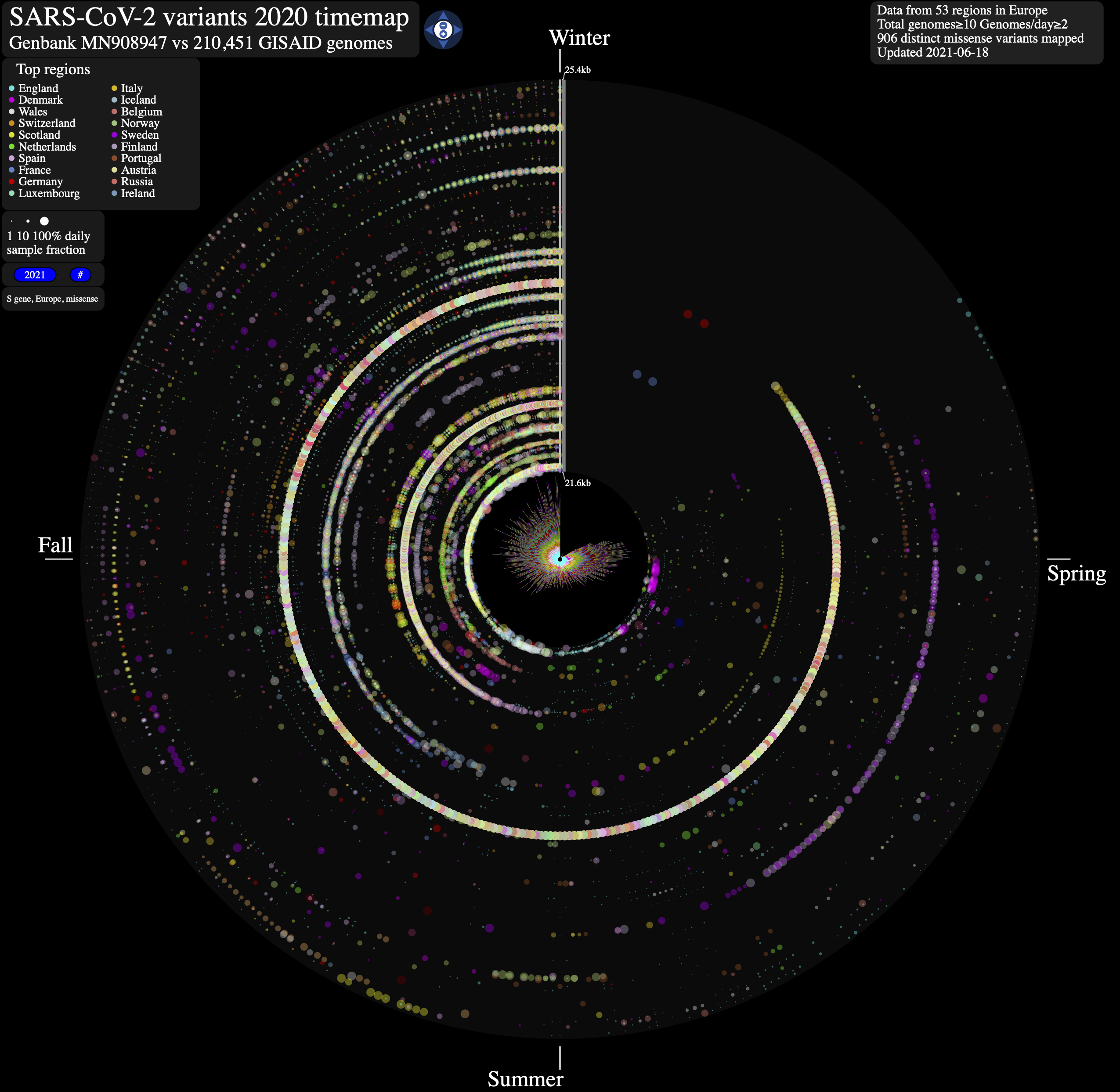
SARS-CoV-2 evolution in human hosts. ntEdit v1.3.4 was used to map nucleotide variation between the first published coronavirus isolate from Wuhan in early January 2020 and over 1,500,000 SARS-CoV-2 genomes sampled from around the globe during the COVID-19 pandemic. Additional (& interactive) timemaps are available.
ntEdit v1.2.0 and subsequent versions are written in C++.
(We compiled with gcc 5.5.0)
Clone and enter the ntEdit directory.
git clone https://github.com/birollab/ntEdit.git
cd ntEdit
Compile ntEdit.
meson setup build --prefix=/path/to/ntedit/install/dir
cd build
ninja install
! NOTE: ntEdit v2.1.0+ IS ONLY compatible with ntStat release v1.0.0+
We recommend installing ntEdit and its dependencies, using conda:
conda install -c bioconda ntedit
Refer to the README.md file on how to install and run ntEdit.
Our manuscript contains information about the software and its performance.
 This ISMB2019 poster contains additional information, benchmarks and results.
Thank you for your and for using, developing and promoting this free software!
If you use ntEdit in your research, please cite:
ntEdit: scalable genome sequence polishing
ntEdit: scalable genome sequence polishing.
Warren RL, Coombe L, Mohamadi H, Zhang J, Jaquish B, Isabel N, Jones SJM, Bousquet J, Bohlmann J, Birol I.
Bioinformatics. 2019 Nov 1;35(21):4430-4432. doi: 10.1093/bioinformatics/btz400.
The experimental data described in our paper can be downloaded from: http://www.bcgsc.ca/downloads/btl/ntedit/
ntedit (concept, algorithm design and prototype): Rene Warren
nthash: Hamid Mohamadi, Parham Kazemi
ntstat: Parham Kazemi
C++ implementation: Jessica Zhang, Rene Warren, Johnathan Wong
Integration tests: Murathan T Goktas
ntEdit workflow: Johnathan Wong and Lauren Coombe
General ntEdit usage:
run-ntedit --help
usage: run-ntedit [-h] {polish,snv} ...

ntEdit: Fast, lightweight, scalable genome sequence polishing and SNV detection & annotation

positional arguments:
  {polish,snv}  ntEdit can be run in polishing or SNV modes.
    polish      Run ntEdit polishing
    snv         Run ntEdit SNV mode (Experimental)

optional arguments:
  -h, --help    show this help message and exit
run-ntedit polish --help
usage: run-ntedit polish [-h] --draft DRAFT --reads READS [-i {0,1,2,3,4,5}] [-d {0,1,2,3,4,5,6,7,8,9,10}] [-x X] [--cap CAP] [-m {0,1,2}] [-a {0,1}] -k K
                         [-l L] [--cutoff CUTOFF] [--solid] [-t T] [-z Z] [-y Y] [-j J] [-X X] [-Y Y] [-v] [-V] [-n] [-f]

optional arguments:
  -h, --help            show this help message and exit
  --draft DRAFT         Draft genome assembly. Must be specified with exact FILE NAME. Ex: --draft myDraft.fa (FASTA, Multi-FASTA, and/or gzipped compatible),
                        REQUIRED
  --reads READS         Prefix of reads file(s). All files in the working directory with the specified prefix will be used for polishing (fastq, fasta, gz),
                        REQUIRED
  -i {0,1,2,3,4,5}      Maximum number of insertion bases to try, range 0-5, [default=5]
  -d {0,1,2,3,4,5,6,7,8,9,10}
                        Maximum number of deletions bases to try, range 0-10, [default=5]
  -x X                  k/x ratio for the number of k-mers that should be missing, [default=5.000]
  --cap CAP             Cap for the number of base insertions that can be made at one position[default=k*1.5]
  -m {0,1,2}            Mode of editing, range 0-2, [default=0] 0: best substitution, or first good indel 1: best substitution, or best indel 2: best edit
                        overall (suggestion that you reduce i and d for performance)
  -a {0,1}              Soft masks missing k-mer positions having no fix (1 = yes, default = 0, no)
  -k K                  k-mer size, REQUIRED
  -l L                  input VCF file with annotated variants (e.g., clinvar.vcf)
  --cutoff CUTOFF       The minimum coverage of k-mers in output Bloom filter [default=2, ignored if solid=True]
  --solid               Output the solid k-mers (non-erroneous k-mers), [default=False]
  -t T                  Number of threads [default=4]
  -z Z                  Minimum contig length [default=100]
  -y Y                  k/y ratio for the number of edited k-mers that should be present, [default=9.000]
  -j J                  controls size of k-mer subset. When checking subset of k-mers, check every jth k-mer [default=3]
  -X X                  Ratio of number of k-mers in the k subset that should be missing in orderto attempt fix (higher=stringent) [default=0.5, if -Y is
                        specified]
  -Y Y                  Ratio of number of k-mers in the k subset that should be present to accept an edit (higher=stringent) [default=0.5, if -X is specified]
  -v                    Verbose mode, [default=False]
  -V, --version         show program's version number and exit
  -n, --dry-run         Print out the commands that will be executed
  -f, --force           Run all ntEdit steps, regardless of existing output files
run-ntedit snv --help
usage: run-ntedit snv [-h] [--reference REFERENCE] [--reads READS] [--genome GENOME [GENOME ...]] -k K [-l L] [--cutoff CUTOFF] [--solid] [-t T] [-z Z] [-y Y]
                      [-j J] [-X X] [-Y Y] [-v] [-V] [-n] [-f]

optional arguments:
  -h, --help            show this help message and exit
  --reference REFERENCE
                        Reference genome assembly for SNV calling (FASTA, Multi-FASTA, and/or gzipped compatible), REQUIRED
  --reads READS         Prefix of input reads file(s) for variant calling. All files in the working directory with the specified prefix will be used for
                        polishing (fastq, fasta, gz)
  --genome GENOME [GENOME ...]
                        Genome assembly file(s) for detecting SNV on --reference
  -k K                  k-mer size, REQUIRED
  -l L                  input VCF file with annotated variants (e.g., clinvar.vcf)
  --cutoff CUTOFF       The minimum coverage of k-mers in output Bloom filter [default=2, ignored if solid=True]
  --solid               Output the solid k-mers (non-erroneous k-mers), [default=False]
  -t T                  Number of threads [default=4]
  -z Z                  Minimum contig length [default=100]
  -y Y                  k/y ratio for the number of edited k-mers that should be present, [default=9.000]
  -j J                  controls size of k-mer subset. When checking subset of k-mers, check every jth k-mer [default=3]
  -X X                  Ratio of number of k-mers in the k subset that should be missing in orderto attempt fix (higher=stringent) [default=0.5, if -Y is specified]
  -Y Y                  Ratio of number of k-mers in the k subset that should be present to accept an edit (higher=stringent) [default=0.5, if -X is specified]
  -v                    Verbose mode, [default=False]
  -V, --version         show program's version number and exit
  -n, --dry-run         Print out the commands that will be executed
  -f, --force           Run all ntEdit steps, regardless of existing output files
ecoliWithMismatches001Indels0001.fa in solid mode using input reads my_reads_1.fq.gz and my_reads_2.fq.gz using a k-mer size of 55 and 48 threadsrun-ntedit polish --draft ecoliWithMismatches001Indels0001.fa --reads my_reads -k 55 -t 48 --solid
run-ntedit polish --draft ecoliWithMismatches001Indels0001.fa --reads my_reads -k 55 -t 48 --cutoff 2
ntedit executable, which has information about additional options--solid mode will work well ONLY if you have sufficient read coverage (>30X). Otherwise, set the kmer coverage threshold to --cutoff 2 (>=20X) or --cutoff 1 (<20X)The ntEdit polishing option (or editing mode) is only used in polishing mode, and is controlled by -m
Mode 0: (default)
	ntEdit will try to substitute the last base of an incorrect k-mer with a different ATGC base. If that k-mer is found in the bloom filter and has enough subset support, ntEdit will then try the other substitution bases and then choose the best substitution fix. However, if the substituion was not found, then ntEdit will try all indels of max length (-i) and (-d) starting with that substitution base and make edit based on the first accepted indel.

Mode 1:
	ntEdit will try to substitute the last base of an incorrect k-mer with a different ATGC base. If that k-mer is found in the bloom filter and has enough subset support, ntEdit will then try the other substitution bases and then choose the best substitution fix. However, if the substitution was nto found,t hen ntEdit will try all indels of max length (-i) and (-d) starting witht hat substitution base and make edit based on the best accepted indel.

Mode 2:
	ntEdit will choose the best substitution or indel for each incorrect k-mer. Since this can be very computationally expensive because ntEdit tries every combination possible, it is recommended that you reduce (-i) and (-d).
*We recommend running ntEdit polishing in Mode 1 (or 0)
See https://github.com/birollab/ntedit_sealer_protocol and https://github.com/BirolLab/goldpolish for genome polishing pipelines that make use of this mode
Version 1.3.5 implements a new option (-a), which controls soft-masking (lower case) nucleotides in the supplied input [draft genome] sequence when its kmers are not found in the primary Bloom filter, and with no possible fix found in that filter (and optionally within a coverage slice provided by the secondary Bloom filter).

This option is useful for flagging unpolished/unresolved genomic regions, those with no equivalent in the supplied Bloom filter(s).

The nucleotide soft-masking effectively "paints a target" for other polishers/genome analysis software.

This strategy is used in the ntedit_sealer_protocol and GoldPolish [a.k.a. goldrush-edit] (URLs above)
BirolLab/ntEdit is a public repo on GitHub by BirolLab. ✏️ Genome assembly polishing & SNV detection.
It declares the GPL-3.0 license on GitHub.
Its maker has not tagged a system, so it is unknown here. Its README says what it needs.
Open "Take it" on its page: Take My Repo writes an install plan for your machine and hands it to your AI agent (Claude Code, Codex or Cursor), which asks you before each step. Take My Repo has not tested it on any machine.
Its last change on GitHub was on 2026-09-10. Take My Repo does not judge from that whether it is maintained.
Probabilistic data structures for processing continuous, unbounded streams.
Nobody has reviewed it on Take My Repo yet, which says nothing about its quality.
Take My Repo cannot say: it does not audit code and has not run ntEdit. What is known comes from GitHub. It declares the GPL-3.0 license on GitHub. Its last change was on 2026-09-10. It has 74 stars, which measure popularity, not safety. Nobody has reviewed it on Take My Repo yet, which says nothing about its quality. Read the source before you run it. With "Take it", your AI agent shows each step and asks you before running it; README text is treated as data, not as instructions.


