shields
Concise, consistent, and legible badges in SVG and raster format
- 27k
- JavaScript
- Apache-2.0
- 2 d ago
Firmware of the Open Source Badge (Proof of Peer), the badge of Bitcoin Amsterdam 2026. ESP32-S3 / LilyGO T-Display-S3.
Repo BitMaker-hub/OpenSourceBadge, read from GitHub 15 h ago. BitMaker-hub has not joined Take My Repo.
BitMaker-hub/OpenSourceBadge is a public repo on GitHub by BitMaker-hub. Firmware of the Open Source Badge (Proof of Peer), the badge of Bitcoin Amsterdam 2026. ESP32-S3 / LilyGO T-Display-S3. It declares the MIT license on GitHub. It is written mainly in C, has 4 stars and last changed on 2026-11-17. Nobody has reviewed it on Take My Repo yet, which says nothing about its quality. Read from GitHub on 2026-11-22.
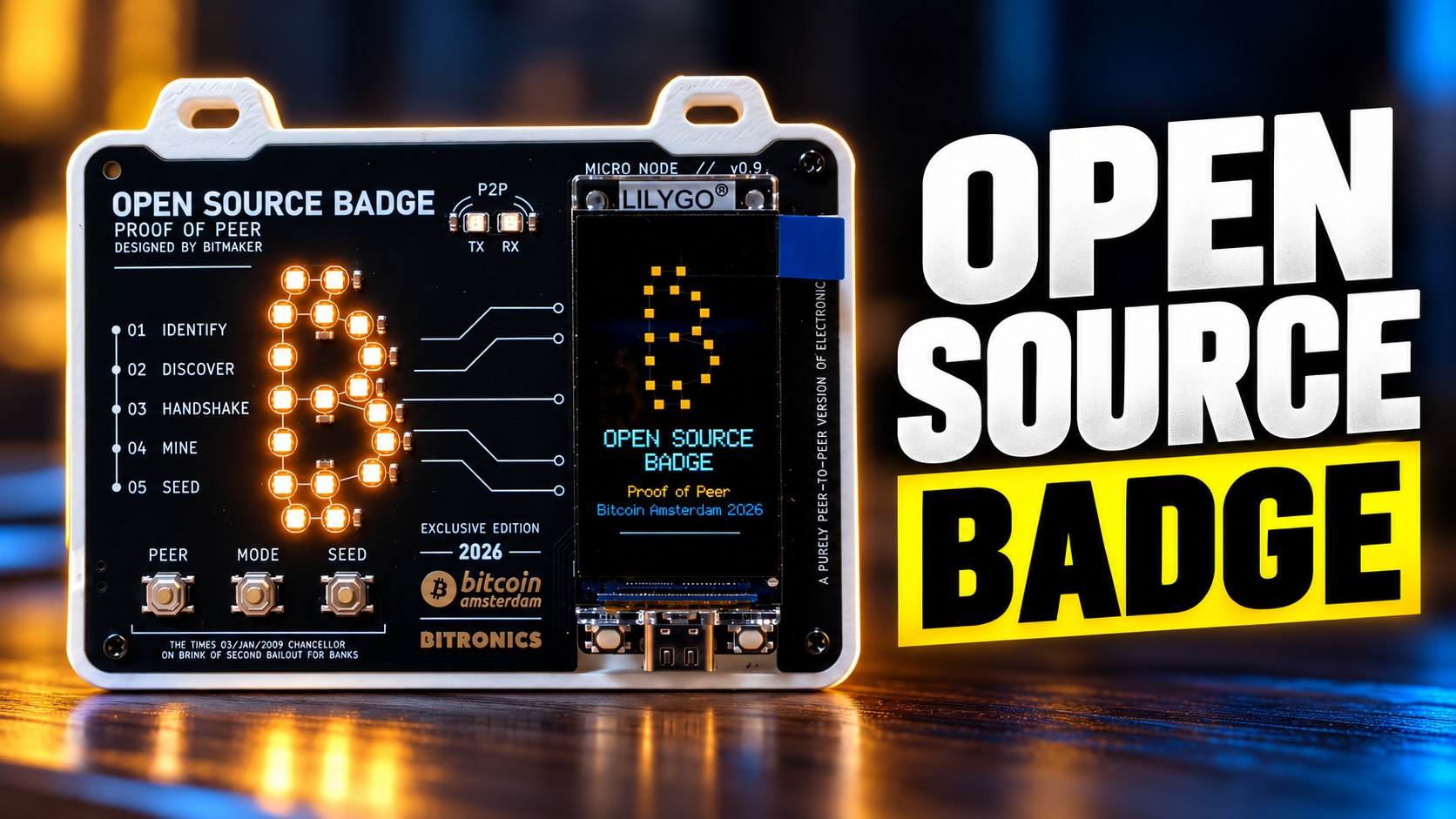
The badge of Bitcoin Amsterdam 2026: a HAT with an 18 LED ₿, two TX/RX LEDs and three buttons (PEER, MODE, SEED) on top of a LilyGO T-Display-S3 (ESP32-S3, 170x320 screen).
Designed by Bitmaker · built by Bitronics
pool.bitronics.store:3334; put your own address in badge.local
and the block is yours. If it restarts while mining (a power cut, an empty battery), it goes back to
mining on its own; leave with SEED and it starts on your profile again.BADGE-xxx and a setup page (profile,
WiFi, npub, miner) with the list of people you met, downloadable as vCard or CSV.| Button | Short | Long |
|---|---|---|
| MODE | Next page: profile, QR, peers, stats | Setup: WiFi BADGE-xxx and badge.local |
| PEER | Handshake with another badge | QR full screen (on STATS: withdraw) |
| SEED | LAB: Seed Lab or NerdMiner (SEED is always back) | Board test |
Holding SEED at power on also starts the board test: every LED in red, green and blue, the buttons, USB and battery voltage, LED current and whatever is on the Qwiic port.
From the browser: flasher.bitronics.store, device Open Source Badge (Chrome or Edge). Tick Keep configuration to update without losing your profile, wallet and peers.
With esptool, from the latest release:
esptool.py --chip esp32s3 write_flash 0x0 opensourcebadge-factory.bin
To update and keep the configuration, write only the application:
esptool.py --chip esp32s3 write_flash 0x10000 opensourcebadge-firmware.bin
| File | What it is |
|---|---|
opensourcebadge-factory.bin |
Bootloader, partitions and firmware in one image, at 0x0 |
opensourcebadge-firmware.bin |
Firmware only, at 0x10000 (keeps settings) |
opensourcebadge-firmware.elf |
Symbols, to read a crash dump |
SHA256SUMS.txt |
Hashes of the files above |
If the LEDs light up white at full power while flashing (old or broken firmware), hold BOOT while plugging in USB, then press RST.
pio run -t upload
pio device monitor
The version lives only in platformio.ini (custom_version) and is printed at boot and by the serial
command i, together with the commit.
Release: bump custom_version, commit, then tag and push:
git tag v1.0.0
git push origin v1.0.0
The build workflow compiles it, checks that the tag matches
custom_version and attaches the files to the release. The web flasher picks up new releases every day.
src/
  main.cpp               the loop: buttons, state, LEDs and screen; serial commands
  config.h               pins and limits of the board (rev0.9)
  app/state_machine      what the badge does at each moment: start reading here
  app/badge, storage     profile, peers, sats; NVS and LittleFS
  app/seed_lab           BIP39 from dice or coin
  hardware/              buttons, LEDs (own RMT driver), power and battery, backlight, Qwiic
  effects/led_effects    LED effects for any group (the ₿, its outline, TX, RX)
  net/radio              who owns the radio: normal (WiFi + nearby) or exclusive
  net/peer_link, nearby  handshake and nearby badges over ESP-NOW
  net/nostr_zaps, lnbits zaps and wallet
  net/miner              wrapper of lib/nerdminer
  net/setup_portal       badge.local
  ui/                    display helpers, one function per screen, pixel art
lib/                     nerdminer (MIT), uBitcoin (MIT), qrcoded (MIT)
tools/                   screenshots over serial, logo and sprite export, event provisioning
Each state has one function that, on every loop, reads the buttons and decides the next state (go()),
lights its LEDs and draws its screen. Whatever a state does not light stays off.
The LEDs feed from the 3V3 regulator of the T-Display (600 mA, shared with the ESP32), so leds::show()
caps them at 200 mA.
BitMaker-hub/OpenSourceBadge is a public repo on GitHub by BitMaker-hub. Firmware of the Open Source Badge (Proof of Peer), the badge of Bitcoin Amsterdam 2026. ESP32-S3 / LilyGO T-Display-S3.
It declares the MIT license on GitHub.
Its maker has not tagged a system, so it is unknown here. Its README says what it needs.
Open "Take it" on its page: Take My Repo writes an install plan for your machine and hands it to your AI agent (Claude Code, Codex or Cursor), which asks you before each step. Take My Repo has not tested it on any machine.
Its last change on GitHub was on 2026-11-17. Take My Repo does not judge from that whether it is maintained.
Nobody has reviewed it on Take My Repo yet, which says nothing about its quality.
Concise, consistent, and legible badges in SVG and raster format
Bitcoin Core integration/staging tree
An elegant home server OS. Run AI agents, store your files, backup your photos, and do more with over 300 apps in the Umbrel App Store.
:house_with_garden: Open source home automation that puts local control and privacy first.
π RuView turns commodity WiFi signals into real-time spatial intelligence, vital sign monitoring, and presence detection — all without a single pixel of video.
A new social mechanism to onboard, gift, transfer or sell bitcoin in a physical, safe and reusable way.