pyRepoStats
Simple repository contribution statistics
- 15
- MIT
- 2 wk ago
Repo Borda/pyRepoStats, read from GitHub 19 h ago. Borda has not joined Take My Repo.
In short
Borda/pyRepoStats is a public repo on GitHub by Borda. Simple repository contribution statistics. It declares the MIT license on GitHub. It is written mainly in Python, has 15 stars and last changed on 2026-11-09. Nobody has reviewed it on Take My Repo yet, which says nothing about its quality. Read from GitHub on 2026-11-25.

Repository Stats
This simple tool aims on open-source projects providing simple repository stats which are a bit out of scope of base Git and need some more information about issues and PRs.
Highlighted features
- cumulative caching (no need to full download, just incremental/needed update)
- collection of overall user contributions to issues/PRs
- visualization of aggregated timeline of past contributions
Installation
Simple install with setuptools/pip as
pip install https://github.com/Borda/pyRepoStats/archive/main.zip
or after cloning the repository
python setup.py install
Sample usage
The CLI provides two commands: scrape (fetch data from GitHub) and analyze (analyze cached data).
Basic command structure
# General format
repostat <command> <repository> [options]

# Or using python -m
python -m repo_stats <command> <repository> [options]
Available commands
scrape- Fetch repository data from GitHub (always requires internet connection)analyze- Analyze previously fetched data (works offline by default)
Examples
If you just clone this repo without installation, you need to install dependencies and call script:
pip install -r requirements.txt
python src/repo_stats/__main__.py scrape PyTorchLightning/pytorch-lightning-bolts
If you have already installed the package with
pipor withsetup.pyyou can call the executable:# Scrape (fetch) data from GitHub repostat scrape PyTorchLightning/pytorch-lightning-bolts --auth_token <your-personal-token> # Analyze the scraped data repostat analyze PyTorchLightning/pytorch-lightning-bolts --users_summary+ "all"Or use package with a pythonic way:
# Scrape data
python -m repo_stats scrape PyTorchLightning/pytorch-lightning-bolts

# Analyze data
python -m repo_stats analyze PyTorchLightning/pytorch-lightning-bolts --min_contribution 5
Note: When using python -m repo_stats, consider passing --output_path argument for output path, otherwise all caches and results will be saved in installation folder, most likely site-packages
To simplify the token passing in each call, you can export the token to environment variables export GH_API_TOKEN=<your-personal-token> for Github.
Github use-case
For GitHub users we recommend using your personal GitHub token which significantly increases request limit per hour.
Command-specific options
Use --help to see all available options for each command:
# See all commands
python -m repo_stats --help

# See options for scrape command
python -m repo_stats scrape --help

# See options for analyze command
python -m repo_stats analyze --help
Analyze command options
The analyze command provides various options for visualizing and summarizing repository data:
User summary table: Use
--users_summary+ "merged PRs" --users_summary+ "commented PRs" --users_summary+ "opened issues" --users_summary+ "commented issues"where the first column is used for sorting rows with users:Example command:
repostat analyze Borda/pyRepoStats --users_summary+ "merged PRs" --users_summary+ "opened issues"user merged PRs commented PRs opened issues commented issues williamFalcon 74 21 14 8 Borda 42 35 4 18 akihironitta 17 1 5 5 ananyahjha93 14 2 6 21 annikabrundyn 12 0 0 2 djbyrne 11 2 4 4 nateraw 9 1 6 8 teddykoker 3 2 0 0 Contribution filter: Use
--min_contribution Nto filter users by minimum number of contributions:repostat analyze Borda/pyRepoStats --min_contribution 10 --users_summary+ "all"Time frame filtering: Define a time frame with
--date_fromand--date_tofor filtering events - created issues, merged PRs and comments/reviews:repostat analyze Borda/pyRepoStats --date_from "2023-01-01" --date_to "2023-12-31"Contribution aggregation over time: Use
--user_comments+with time granularity (D=Day, W=Week, M=Month, Y=Year) to visualize contribution patterns:# Weekly aggregation repostat analyze Borda/pyRepoStats --user_comments+ W # Weekly aggregation for issues and PRs separately repostat analyze Borda/pyRepoStats --user_comments+ W --user_comments+ issue --user_comments+ pr # Multiple time sampling (weekly and monthly) repostat analyze Borda/pyRepoStats --user_comments+ W --user_comments+ MThis draws double charts: (a) cumulative aggregation over all users and (b) heatmap-like image with time on Y-axis and users on X-axis.
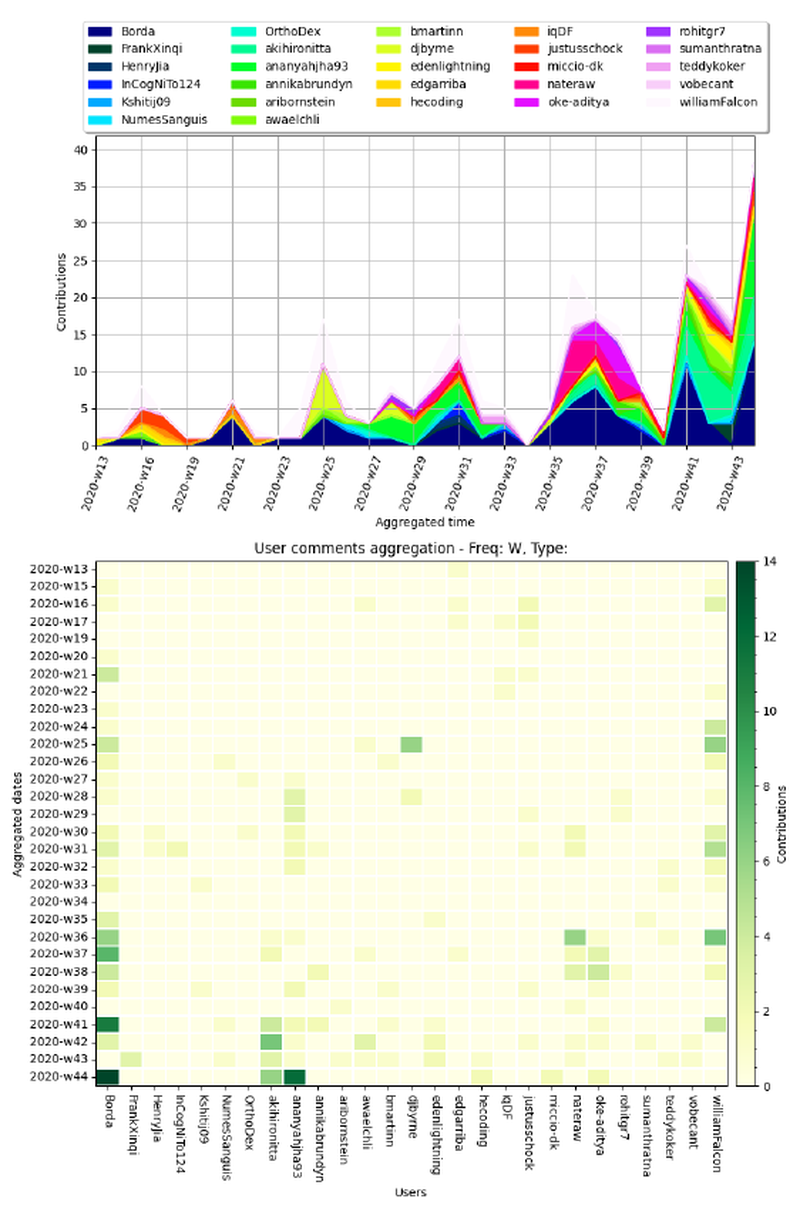
To deny showing figures set environment variable export SHOW_FIGURES=0.
Contribution
Any help or suggestions are welcome, pls use Issues :]
Questions
What is pyRepoStats?
Borda/pyRepoStats is a public repo on GitHub by Borda. Simple repository contribution statistics.
Is pyRepoStats open source?
It declares the MIT license on GitHub.
Does pyRepoStats run on macOS, Windows or Linux?
Its maker has not tagged a system, so it is unknown here. Its README says what it needs.
How do I install pyRepoStats?
Open "Take it" on its page: Take My Repo writes an install plan for your machine and hands it to your AI agent (Claude Code, Codex or Cursor), which asks you before each step. Take My Repo has not tested it on any machine.
Is pyRepoStats still maintained?
Its last change on GitHub was on 2026-11-09. Take My Repo does not judge from that whether it is maintained.