intl-tel-input
For entering, formatting, and validating international telephone numbers. Available in vanilla JavaScript, or as React, Vue, Angular, and Svelte components.
- 8.3k
- TypeScript
- MIT
- 3 wk ago
JavaScript port of Google's libphonenumber library for parsing, formatting, and validating international phone numbers in Node.js.
Repo Bunlong/libphonenumbers, read from GitHub 16 h ago. Bunlong has not joined Take My Repo.
Bunlong/libphonenumbers is a public repo on GitHub by Bunlong. JavaScript port of Google's libphonenumber library for parsing, formatting, and validating international phone numbers in Node.js. It declares no license on GitHub. Public does not mean open source: without a license, nobody is granted the right to reuse it. It is written mainly in JavaScript, has 12 stars and last changed on 2020-10-30. Nobody has reviewed it on Take My Repo yet, which says nothing about its quality. Read from GitHub on 2026-11-24.
For entering, formatting, and validating international telephone numbers. Available in vanilla JavaScript, or as React, Vue, Angular, and Svelte components.

libphonenumbers is JS port of Google's libphonenumber.
libphonenumbers – JavaScript port of Google's libphonenumber library for parsing, formatting, and validating international phone numbers in Node.js.
libphonenumbers is compatible with both JavaScript and TypeScript.
PhoneNumberUtil
AsYouTypeFormatter
PhoneNumberFormat ( The following enums is used to pass to format(number, numberFormat) )
PhoneNumberType ( The following enums is used to compare with the output of getNumberType(number) )
PhoneNumber
CountryCodeSource ( The following enums is used to compare with the output of getCountryCodeSource() )
ShortNumberInfo
JS port of Google's libphonenumber does not support the following functions and classes:
libphonenumbers is available on npm. It can be installed with the following command:
npm install libphonenumbers --save
libphonenumbers is available on yarn as well. It can be installed with the following command:
yarn add libphonenumbers
Using Standard JavaScript:
const PNF = require('libphonenumbers').PhoneNumberFormat;
// Create an instance of PhoneNumberUtil
const phoneUtil = require('libphonenumbers').PhoneNumberUtil.getInstance();

// Parse number with US country code and keep raw input
const number = phoneUtil.parseAndKeepRawInput('202-456-2121', 'US');

// Format number in the RFC3966 format
console.log(phoneUtil.format(number, PNF.RFC3966));
// tel:+1-202-456-2121

// Format number in the national format
console.log(phoneUtil.format(number, PNF.NATIONAL));
// (202) 456-2121

// Format number in the international format
console.log(phoneUtil.format(number, PNF.INTERNATIONAL));
// +1 202-456-2121
Using ECMAScript (ES):
import libphonenumbers from 'libphonenumbers';

const PNF = libphonenumbers.PhoneNumberFormat;

// Create an instance of PhoneNumberUtil
const phoneUtil = libphonenumbers.PhoneNumberUtil.getInstance();

// Parse number with US country code and keep raw input
const number = phoneUtil.parseAndKeepRawInput('202-456-2121', 'US');

// Format number in the RFC3966 format
console.log(phoneUtil.format(number, PNF.RFC3966));
// tel:+1-202-456-2121

// Format number in the national format
console.log(phoneUtil.format(number, PNF.NATIONAL));
// (202) 456-2121

// Format number in the international format
console.log(phoneUtil.format(number, PNF.INTERNATIONAL));
// +1 202-456-2121
Using Standard JavaScript:
// Create an instance of PhoneNumberUtil
const phoneUtil = require('libphonenumbers').PhoneNumberUtil.getInstance();

// Parse number with US country code and keep raw input
const number = phoneUtil.parseAndKeepRawInput('202-456-2121', 'US');

// Format number in the original format
console.log(phoneUtil.formatInOriginalFormat(number, 'US'));
// => (202) 456-2121
Using ECMAScript (ES):
import libphonenumbers from 'libphonenumbers';

// Create an instance of PhoneNumberUtil
const phoneUtil = libphonenumbers.PhoneNumberUtil.getInstance();

// Parse number with US country code and keep raw input
const number = phoneUtil.parseAndKeepRawInput('202-456-2121', 'US');

// Format number in the original format
console.log(phoneUtil.formatInOriginalFormat(number, 'US'));
// (202) 456-2121
Using Standard JavaScript:
// Create an instance of PhoneNumberUtil
const phoneUtil = require('libphonenumbers').PhoneNumberUtil.getInstance();

// Parse number with US country code and keep raw input
const number = phoneUtil.parseAndKeepRawInput('202-456-2121', 'US');

// Format number in the out-of-country format from US
console.log(phoneUtil.formatOutOfCountryCallingNumber(number, 'US'));
// 1 (202) 456-2121

// Format number in the out-of-country format from JP
console.log(phoneUtil.formatOutOfCountryCallingNumber(number, 'JP'));
// 010 1 202-456-2121
Using ECMAScript (ES):
import libphonenumbers from 'libphonenumbers';

// Create an instance of PhoneNumberUtil
const phoneUtil = libphonenumbers.PhoneNumberUtil.getInstance();

// Parse number with US country code and keep raw input
const number = phoneUtil.parseAndKeepRawInput('202-456-2121', 'US');

// Format number in the out-of-country format from US
console.log(phoneUtil.formatOutOfCountryCallingNumber(number, 'US'));
// 1 (202) 456-2121

// Format number in the out-of-country format from JP
console.log(phoneUtil.formatOutOfCountryCallingNumber(number, 'JP'));
// 010 1 202-456-2121
Using Standard JavaScript:
// Create an instance of PhoneNumberUtil
const phoneUtil = require('libphonenumbers').PhoneNumberUtil.getInstance();

// Parse number with US country code and keep raw input
const number = phoneUtil.parseAndKeepRawInput('202-456-2121', 'US');

// Get type of phone number
console.log(phoneUtil.getNumberType(number));
// 2 // FIXED_LINE_OR_MOBILE
Using ECMAScript (ES):
import libphonenumbers from 'libphonenumbers';

// Create an instance of PhoneNumberUtil
const phoneUtil = libphonenumbers.PhoneNumberUtil.getInstance();

// Parse number with US country code and keep raw input
const number = phoneUtil.parseAndKeepRawInput('202-456-2121', 'US');

// Get type of phone number
console.log(phoneUtil.getNumberType(number));
// 2 // FIXED_LINE_OR_MOBILE
Using Standard JavaScript:
// Create an instance of PhoneNumberUtil
const phoneUtil = require('libphonenumbers').PhoneNumberUtil.getInstance();

// Parse number with US country code and keep raw input
const number = phoneUtil.parseAndKeepRawInput('202-456-2121', 'US');

// Get region code of number
console.log(phoneUtil.getRegionCodeForNumber(number));
// US
Using ECMAScript (ES):
import libphonenumbers from 'libphonenumbers';

// Create an instance of PhoneNumberUtil
const phoneUtil = libphonenumbers.PhoneNumberUtil.getInstance();

// Parse number with US country code and keep raw input
const number = phoneUtil.parseAndKeepRawInput('202-456-2121', 'US');

// Get region code of number
console.log(phoneUtil.getRegionCodeForNumber(number));
// US
Using Standard JavaScript:
// Create an instance of PhoneNumberUtil
const phoneUtil = require('libphonenumbers').PhoneNumberUtil.getInstance();

// Parse number with US country code and keep raw input
const number = phoneUtil.parseAndKeepRawInput('202-456-2121', 'US');

// Check is possible number
console.log(phoneUtil.isPossibleNumber(number));
// true
Using ECMAScript (ES):
import libphonenumbers from 'libphonenumbers';

// Create an instance of PhoneNumberUtil
const phoneUtil = libphonenumbers.PhoneNumberUtil.getInstance();

// Parse number with US country code and keep raw input
const number = phoneUtil.parseAndKeepRawInput('202-456-2121', 'US');

// Check is possible number
console.log(phoneUtil.isPossibleNumber(number));
// true
Using Standard JavaScript:
// Create an instance of PhoneNumberUtil
const phoneUtil = require('libphonenumbers').PhoneNumberUtil.getInstance();

// Parse number with US country code and keep raw input
const number = phoneUtil.parseAndKeepRawInput('202-456-2121', 'US');

// Get is valid number
console.log(phoneUtil.isValidNumber(number));
// true
Using ECMAScript (ES):
import libphonenumbers from 'libphonenumbers';

// Create an instance of PhoneNumberUtil
const phoneUtil = libphonenumbers.PhoneNumberUtil.getInstance();

// Parse number with US country code and keep raw input
const number = phoneUtil.parseAndKeepRawInput('202-456-2121', 'US');

// Get is valid number
console.log(phoneUtil.isValidNumber(number));
// true
Using Standard JavaScript:
// Create an instance of PhoneNumberUtil
const phoneUtil = require('libphonenumbers').PhoneNumberUtil.getInstance();

// Parse number with US country code and keep raw input
const number = phoneUtil.parseAndKeepRawInput('202-456-2121', 'US');

// Check number of a region is valid
console.log(phoneUtil.isValidNumberForRegion(number, 'US'));
// true
Using ECMAScript (ES):
import libphonenumbers from 'libphonenumbers';

// Create an instance of PhoneNumberUtil
const phoneUtil = libphonenumbers.PhoneNumberUtil.getInstance();

// Parse number with US country code and keep raw input
const number = phoneUtil.parseAndKeepRawInput('202-456-2121', 'US');

// Check number of a region is valid
console.log(phoneUtil.isValidNumberForRegion(number, 'US'));
// true
Using Standard JavaScript:
// Create an instance of PhoneNumberUtil
const phoneUtil = require('libphonenumbers').PhoneNumberUtil.getInstance();

// Parse number with US country code and keep raw input
const number = phoneUtil.parseAndKeepRawInput('202-456-2121', 'US');
Using ECMAScript (ES):
import libphonenumbers from 'libphonenumbers';

// Create an instance of PhoneNumberUtil
const phoneUtil = libphonenumbers.PhoneNumberUtil.getInstance();

// Parse number with US country code and keep raw input
const number = phoneUtil.parseAndKeepRawInput('202-456-2121', 'US');
Using Standard JavaScript:
// Create an instance of PhoneNumberUtil
const phoneUtil = require('libphonenumbers').PhoneNumberUtil.getInstance();

// Get prototype buffer format
console.log(phoneUtil.parse('123456', 'US'));
Using ECMAScript (ES):
import libphonenumbers from 'libphonenumbers';

// Create an instance of PhoneNumberUtil
const phoneUtil = libphonenumbers.PhoneNumberUtil.getInstance();

// Get proto buffer format
console.log(phoneUtil.parse('123456', 'US'));
Using Standard JavaScript:
Bunlong/libphonenumbers is a public repo on GitHub by Bunlong. JavaScript port of Google's libphonenumber library for parsing, formatting, and validating international phone numbers in Node.js.
It declares no license on GitHub. Public does not mean open source: without a license, nobody is granted the right to reuse it.
Its maker has not tagged a system, so it is unknown here. Its README says what it needs.
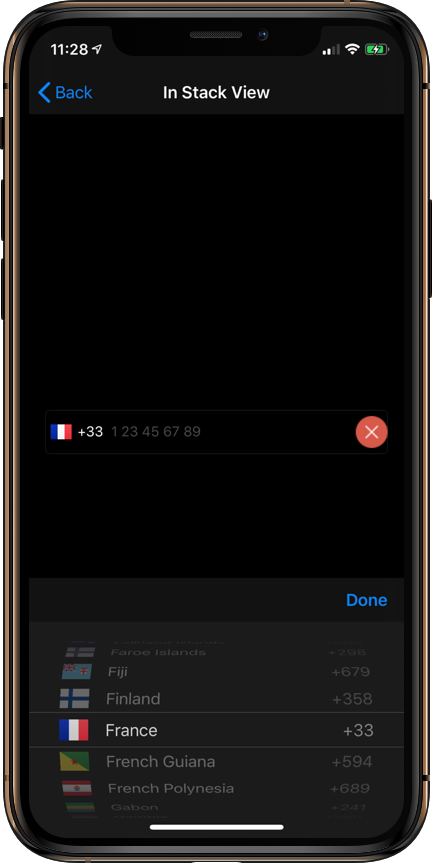
A formatted phone number UITextField with country flag picker.
[PH0MBER]: An open source infomation grathering & reconnaissance framework!
Python Project - Track a phone number in google map Using Python
Open "Take it" on its page: Take My Repo writes an install plan for your machine and hands it to your AI agent (Claude Code, Codex or Cursor), which asks you before each step. Take My Repo has not tested it on any machine.
Its last change on GitHub was on 2020-10-30. Take My Repo does not judge from that whether it is maintained.
Nobody has reviewed it on Take My Repo yet, which says nothing about its quality.
Take My Repo cannot say: it does not audit code and has not run libphonenumbers. What is known comes from GitHub. It declares no license on GitHub. Public does not mean open source: without a license, nobody is granted the right to reuse it. Its last change was on 2020-10-30. It has 12 stars, which measure popularity, not safety. Nobody has reviewed it on Take My Repo yet, which says nothing about its quality. Read the source before you run it. With "Take it", your AI agent shows each step and asks you before running it; README text is treated as data, not as instructions.