camel_tools
A suite of Arabic natural language processing tools developed by the CAMeL Lab at New York University Abu Dhabi.
- 594
- Python
- MIT
- 6 wk ago
Camel Morph’s goal is to build large open-source morphological models for Arabic and its dialects across many genres and domains.
Repo CAMeL-Lab/camel_morph, read from GitHub 2 d ago. CAMeL-Lab has not joined Take My Repo.
CAMeL-Lab/camel_morph is a public repo on GitHub by CAMeL-Lab. Camel Morph’s goal is to build large open-source morphological models for Arabic and its dialects across many genres and domains. It declares the MIT license on GitHub. It is written mainly in Python, has 20 stars and last changed on 2026-11-12. Nobody has reviewed it on Take My Repo yet, which says nothing about its quality. Read from GitHub on 2026-11-21.
The work presented in this repository is part of a large effort on Arabic morphology under the name of the Camel Morph Project [^1] developed by the CAMeL Lab at New York University Abu Dhabi.
Please use GitHub Issues to report a bug or if you need help using Camel Morph.
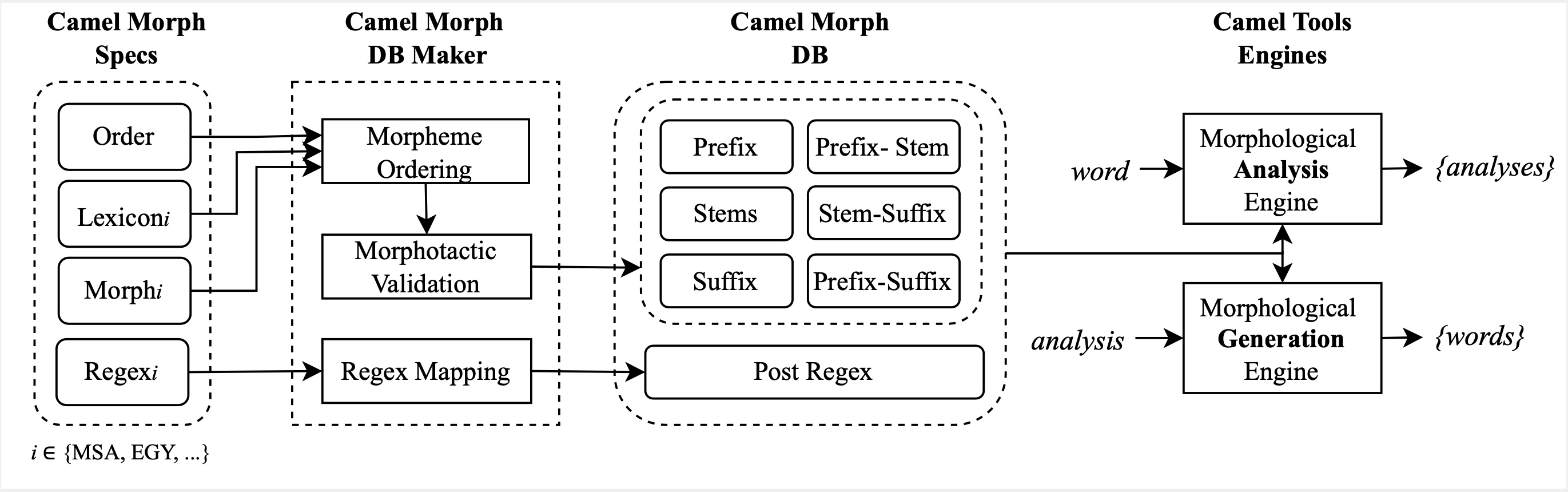
Camel Morph’s goal is to build large open-source morphological models for Arabic and its dialects across many genres and domains. This repository contains code meant to build an ALMOR-style database (DB) from a set of morphological specification and lexicon spreadsheets, which can then be used by Camel Tools for morphological analysis, generation, and reinflection.
The following sections provide useful usage information about the repository.
camel_morph_msa_v1.0.db file (LREC-COLING 2024 release). To cite this release use Khairallah et al. (2024).[^1]
If you use this database in an application please provide the following notice or similar to include the linked webpages:
Camel Morph MSA v1.0 © 2024 by New York University Abu Dhabi is licensed under CC BY 4.0.
The work has been reported on in three papers (see below), but is continuously updtaed.
For instructions related to inspecting, making use of, replicating the results obtained for the LREC-COLING 2024 Camel Morph MSA full database paper,[^1] and the data, see the official_releases/lrec-coling2024_release/ folder.
For instructions related to inspecting, making use of, replicating the results obtained for the EACL 2024 Camel Morph Nominals paper,[^2] and the data, see the official_releases/eacl2024_release/ folder.
For instructions related to inspecting, making use of, replicating the results obtained for the SIGMORPHON 2022 Camel Morph paper,[^3] and the data, see the official_releases/sigmorphon2022_release/ folder.

The data throughout this project is being maintained through the Google Sheets interface which can be used to add, delete, or edit morphological specification entries. The following are links to the data and morphological specifications used for this project, and are only accessible upon demand.
The data files accessed through the below links are licensed under a Creative Commons Attribution 4.0 International License. For code license, see License.
The data is accessible from the following folder.
The following data is not accessile publicly from the Google Sheets interface but is available in csv format (the way it was at submission time) in the following folder.
The following data is not accessile publicly from the Google Sheets interface but is available in csv format (the way it was at submission time) in the following folder.
The following table describes the function of each directory contained in the repository.
| Directory | Description |
|---|---|
./camel_morph |
Directory (in package format) containing all the necessary files to build, debug, test, and evaluate the Camel Morph DB Maker. |
./camel_morph/configs |
Contains configuration files which make running the scripts in the above directory easier. |
./data |
Contains, for each different configuration, the set of morphological specification files necessary to run the different scripts. This directory is mandatorily (as per the data reader code) organized into project directories as described in Configuration File Structure section. |
./databases |
Contains the output DB files resulting from the DB Making process. |
./misc_files |
Contains miscellaneous files used by scripts inside ./camel_morph. |
./official_releases/sigmorphon2022_release |
Standalone environment[^4] allowing users to run the DB Maker and Camel Tools engines without installing Camel Tools, in the same version used for the SIGMORPHON 2022 paper. Also contains the data that was used to get the results described in the paper[^3]. |
To compile databases, paradigm-specific inflection (conjugation/declension) tables, or evaluation tables, follow the below instructions. A default configuration file is included in the ./camel_morph/configs directory for direct usage.
To start working with the Camel Morph environment and compiling Mordern Standard Arabic (MSA) databases:
pip install -r requirements.txt.camel_morph directory.To debug and evaluate databases (MSA or Dialectal Arabic), and for other utilities:
$CAMEL_TOOLS_PATH value to the path of the Camel Tools fork repository in the configuration file that you will be using (default configuration file ./camel_morph/configs/config_default.json provided; see Configuration File Structure section).For instructions on how to run the different scripts, see the below sections.
The below command compiles an ALMOR-style database starting from a set of morphological specification files referenced in the specific configuration mentioned as an argument. Before starting compilation, the specifications should be downloaded from the links provided in the data section.
usage: db_maker.py [-h] [-config_file CONFIG_FILE]
                   [-config_name CONFIG_NAME]
                   [-output_dir OUTPUT_DIR]
                   [-run_profiling]
                   [-camel_tools {local,official}]
| short | default | help |
|---|---|---|
-h |
Show this help message and exit. | |
-config_file |
config_default.json |
Name of the configuration file which contains different configurations to run the DB on, and which should be contained in the ./camel_morph/configs/ directory. Some pre-compiled configurations already exist in ./camel_morph/configs/config_default.json, but new ones could be easily added. See here for an overview of the configuration file format. Defaults to config_default.json. |
-config_name |
default_config |
Configuration name of one of the configurations contained in CONFIG_FILE. It contains script parameters, sheet paths, etc. |
-output_dir |
Overrides path of the directory to output the DBs to (specified in the global section of CONFIG_FILE). |
|
-run_profiling |
To generate an execution time profile of the specific configuration. | |
-camel_tools |
local |
Path of directory containing the CAMeL Tools modules (should be cloned as described here). |
There are various scripts in the suite which are meant to make the debugging/evaluation experience more efficient. To be able to make use of those, many require a (free) service account to be created using Google Cloud, to get an API key (service account) to add to our internal configuration files for use. Google Cloud will generate a JSON file which should be stored locally, and the path of which should be specified in the global section of the configuration as follows: "service_account": $SERVICE_ACCOUNT_PATH.
Follow the instructions until minute 2:00 of this video to first create a service account and API key to use with the Google Sheets API, and then this video to generate the JSON object referred to in the previous paragraph.
In its most basic format, the configuration file should look like the example below in order to successfully run the scripts described in this guide. Unless otherwise stated, variables (beginning with $) are double quoted strings. See here for a list of configuration files used. Also, note that the configuration file can include many other keys/values that are useful for debugging purposes, as specified by the Config reader class.
{
    "global": {
        "data_dir": $DATA_DIR_PATH,
        "specs": {
            "about": {
                $SPREADSHEET_X: $ABOUT_SHEET,
            },
            "header": {
                $SPREADSHEET_X: $HEADER_SHEET,
            }
        },
        "db_dir": $DB_OUTPUT_DIR,
        "camel_tools": $CAMEL_TOOLS_PATH
    },
    "local": {
        $CONFIG_NAME: {
            "dialect": $DIALECT,
            "cat2id": $CAT2ID,
            "reindex": $REINDEX,
            "pruning": $PRUNING,
            "specs": {
                "order": {
                    $SPREADSHEET_X: $ORDER_SHEET_1,
                    $SPREADSHEET_X: $ORDER_SHEET_2,
                    ...
                },
                "morph": {
                    $SPREADSHEET_X: $MORPH_SHEET_1,
                    $SPREADSHEET_X: $MORPH_SHEET_2,
                    ...
                },
                "lexicon": {
                    $SPREADSHEET_X: $LEXICON_SHEET_1,
                    $SPREADSHEET_X: $LEXICON_SHEET_2,
                    ...
                }
            },
            "db": $DB_NAME,
            "pos_type": $POS_TYPE,
            "class_map": $CLASS_MAP
        }
    }
}
where:
$DATA_DIR_PATH: path of the outermost data directory where all sheets are kept (e.g., data; referenced from the main repository directory). Sheets for this configuration should be kept inside a folder which has the name as the configuration ($CONFIG_NAME) which is itself contained in a directory called camel-morph-$DIALECT (where $DIALECT is specified below). So for example, if $DATA_DIR_PATH=data, $DIALECT=msa, and $CONFIG_NAME=pv_msa, then sheets for this configuration should be in a directory with the path ./data/camel-morph-msa/pv_msa.$SPREADSHEET_X: name of the the spreadsheet on Google Sheets containing the sheet which is assigned to it as a value. If no spreadsheet is associated with the sheet, just keep blank.$ABOUT_SHEET: name of the sheet containing the About section which will go in the DB (e.g., About). Either downloaded automatically as specified in the Utilities section or manually.$HEADER_SHEET: same as $ABOUT_SHEET (e.g., Header)$DB_OUTPUT_DIR: name of the directory to which the compiled DBs will be output.$CAMEL_TOOLS_PATH: path of the Camel Tools repository fork that should be cloned/downloaded as described in Installation section.$CONFIG_NAME: name of the configuration in the local section of the config file, to choose between a number of different configurations (e.g., default_config). This is also the name of the folder which contains the sheets that are specified for that configuration and the global section.$DIALECT: dialect being worked with (i.e., msa or egy). This is specified to further organize the configuration-specific data into high-level projects (i.e., ./data/camel-morph-msa or ./data/camel-morph-egy).$CAT2ID: boolean (true or false). Specifies the format in which to output the ALMOR morpheme category names. If set to true, then category names are IDs, otherwise, they contain condition information.$PRUNING: boolean (true or false). Used in the DB making process to speed up DB compilation. For this to be set to true, the Morph sheet must contain condition definitions (organization of conditions into categories).$REINDEX: boolean (true or false). Used in the DB making process to collapse categories after the entries are compiled. This heavily reduces the size of the compatibility tables, and turns category names into compact unique IDs (basically, doing what cat2id does and more).$ORDER_SHEET: same as $ABOUT_SHEET (e.g., MSA-Verb-ORDER).$MORPH_SHEET: same as $ABOUT_SHEET (e.g., MSA-Verb-MORPH).$LEX_SHEET_1: same as $ABOUT_SHEET (e.g., MSA-Verb-LEX-PV). At least one lexicon sheet can be specified; the latter will be concatenated in pre-processing.$DB_NAME: name of the output DB.$POS_TYPE: type of the POS for which we are building the DB. Can either be verbal, nominal or any. As far as the DB Maker is concerned this controls what MADA features are output to the DB file in each line.$CLASS_MAP: dictionary containing the morpheme classes and which complex morpheme type they map to.All the code contained in this repository is available under the MIT license. See the LICENSE file for more info.
[^1]: Khairallah, Christian, Salam Khalifa, Reham Marzouk, Mayar Mohamadein Nassar and Nizar Habash. Camel Morph MSA: A Large-Scale Open-Source Morphological Analyzer for Modern Standard Arabic. In Proceedings of the LREC-COLING 2024 - The Joint International Conference on Computational Linguistics, Language Resources and Evaluation, Turin, Italy. 2024.
[^2]: Khairallah, Christian, Reham Marzouk, Salam Khalifa, Mayar Nassar, and Nizar Habash. Computational Morphology and Lexicography Modeling of Modern Standard Arabic Nominals. In Proceedings of the 18th Conference of the European Chapter of the Association for Computational Linguistics, Malta, 2024.
[^3]: Nizar Habash, Reham Marzouk, Christian Khairallah, and Salam Khalifa. 2022. Morphotactic Modeling in an Open-source Multi-dialectal Arabic Morphological Analyzer and Generator. In Proceedings of the 19th SIGMORPHON Workshop on Computational Research in Phonetics, Phonology, and Morphology, pages 92–102, Seattle, Washington. Association for Computational Linguistics.
[^4]: Note that for the release directory, only the morphological components from Camel Tools were sourced from the actual library and were added to be imported locally.
CAMeL-Lab/camel_morph is a public repo on GitHub by CAMeL-Lab. Camel Morph’s goal is to build large open-source morphological models for Arabic and its dialects across many genres and domains.
It declares the MIT license on GitHub.
Its maker has not tagged a system, so it is unknown here. Its README says what it needs.
Open "Take it" on its page: Take My Repo writes an install plan for your machine and hands it to your AI agent (Claude Code, Codex or Cursor), which asks you before each step. Take My Repo has not tested it on any machine.
Its last change on GitHub was on 2026-11-12. Take My Repo does not judge from that whether it is maintained.
Nobody has reviewed it on Take My Repo yet, which says nothing about its quality.
A suite of Arabic natural language processing tools developed by the CAMeL Lab at New York University Abu Dhabi.
Code and models for "The Interplay of Variant, Size, and Task Type in Arabic Pre-trained Language Models". EACL 2021, WANLP.
Code, models, and data for "Advancements in Arabic Grammatical Error Detection and Correction: An Empirical Investigation". EMNLP 2023.
Romanizing Arabic bibliographic records in the ALA-LC standard.
Material for the Text Analysis of Arabic course taught at the NYU Abu Dhabi Winter Institute in Digital Humanities 2020.