
dpp
DPP - Diagram preprocessor for Pandoc (obsolete, please consider using pp instead)
- 2
- GPL-3.0
- 9 y ago
Repo CDSoft/dpp, read from GitHub 13 min ago. CDSoft has not joined Take My Repo.
In short
CDSoft/dpp is a public repo on GitHub by CDSoft. DPP - Diagram preprocessor for Pandoc (obsolete, please consider using pp instead). It declares the GPL-3.0 license on GitHub. It is written mainly in C, has 2 stars and last changed on 2017-09-12. It is archived: its maker no longer maintains it. Nobody has reviewed it on Take My Repo yet, which says nothing about its quality. Read from GitHub on 2026-11-25.
DPP - Diagram preprocessor (with pandoc in mind)
Initially, the PP package contained three preprocessors for Pandoc.
I started using Markdown and Pandoc with GPP. Then I wrote DPP to embed diagrams in Markdown documents. And finally PP which merges the functionalities of GPP and DPP.
GPP and DPP are not included anymore in PP as pp can be used standalone.
DPP just contains dpp itself as well as GPP.
dpp is obsolete, please consider using PP instead.
Open source
DPP is an Open source software. Any body can contribute on GitHub to:
- suggest or add new functionalities
- report or fix bugs
- improve the documentation
- add some nicer examples
- find new usages
- ...
Installation
- Download and extract dpp.tgz.
- Run
make. - Copy
dppandgpp(.exefiles on Windows) where you want.
dpp require Graphviz and Java (PlantUML and ditaa are embedded in dpp).
Usage
dpp is a filter and has no options. It takes some text with embedded diagrams on stdin and generates a text with image links on stdout. Some error messages may be written to stderr.
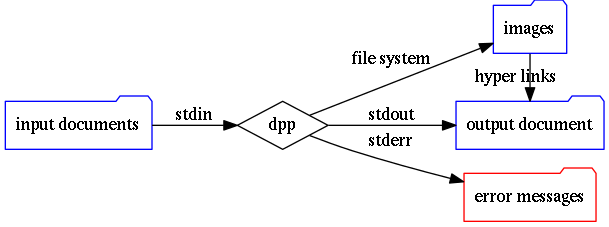
Being a filter, dpp can be chained with other preprocessors. Another good generic purpose preprocessor is pp or gpp.
A classical usage of dpp along with gpp and Pandoc is:
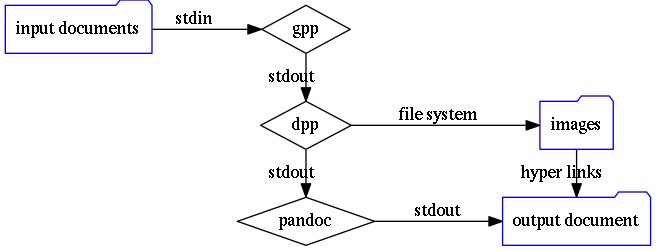
For instance, on any good Unix like system, you can use this command:
$ gpp documents... | dpp | pandoc -f markdown -t html5 -o document.html
Design
dpp was initially a preprocessor for GraphViz diagrams. It now also comes with PlantUML, ditaa and scripting capabilities. dpp requires GraphViz and Java to be installed, PlantUML and ditaa are embedded in dpp.
Optionally, dpp can call Bash, Bat, Python or Haskell to execute general scripts.
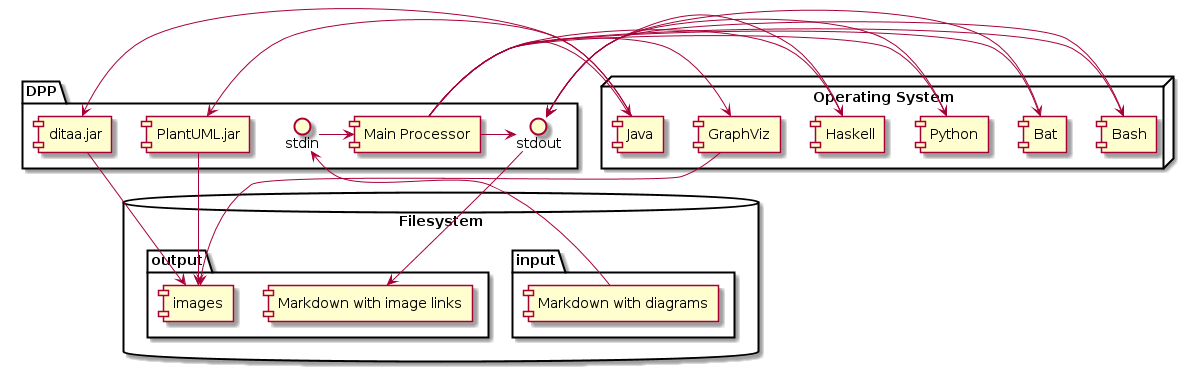
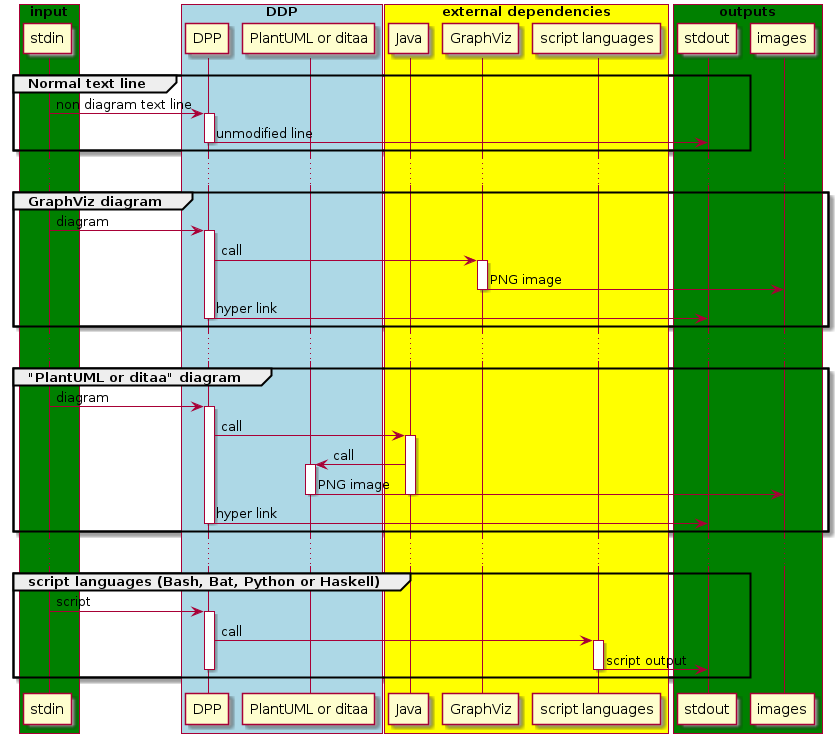
Syntax
Diagrams
Diagrams are written in code blocks. The first line contains:
- the diagram generator
- the image name (without the extension)
- the legend (optional)
Block delimiters are made of three or more tilda or back quotes, at the beginning of the line (no space and no tab). Both lines must have the same number of tilda or back quotes.
~~~~~ dot path/imagename optional legend
graph {
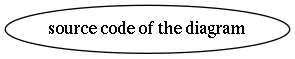
    "source code of the diagram"
}
~~~~~
This extremely meaningful diagram is rendered as path/imagename.png and looks like:
The image link in the output markdown document may have to be different than the actual path in the file system. This happens when then .md or .html files are not generated in the same path than the source document. Brackets can be used to specify the part of the path that belongs to the generated image but not to the link in the output document. For instance a diagram declared as:
~~~~~ dot [mybuildpath/]img/diag42
...
~~~~~
will be actually generated in:
mybuildpath/img/diag42.png
and the link in the output document will be:
img/diag42.png
For instance, if you use Pandoc to generate HTML documents with diagrams in a different directory, there are two possibilities:
the document is a self contained HTML file (option
--self-contained), i.e. the CSS and images are stored inside the document:- the CSS path shall be the actual path where the CSS file is stored
- the image path in diagrams shall be the actual path where the images are stored (otherwise Pandoc won't find them)
- e.g.:
outputpath/img/diag42
the document is not self contained, i.e. the CSS and images are stored apart from the document:
- the CSS path shall be relative to the output document
- the image path in diagrams shall be relative to output document in HTML links and shall also describe the actual path where the images are stored.
- e.g.:
[outputpath/]img/diag42
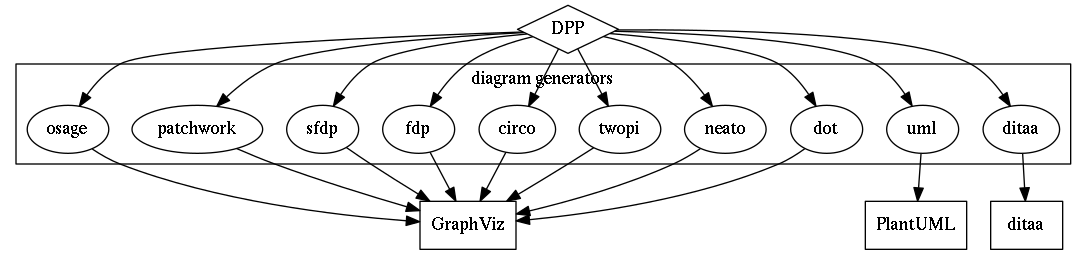
The diagram generator can be:
- dot
- neato
- twopi
- circo
- fdp
- sfdp
- patchwork
- osage
- uml
- ditaa
dpp will not create any directory, the path where the image is written must already exist.
Scripts
Scripts are also written in code blocks. The first line contains only the kind of script.
~~~~~ bash
echo Hello World!
~~~~~
With no surprise, this script generates:
Hello World!
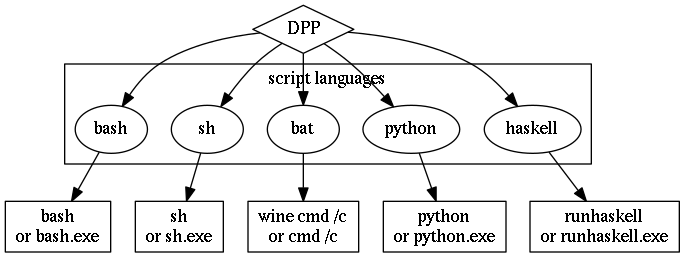
The script language can be:
- bash (or sh)
- bat (DOS/Windows batch language)
- python
- haskell
dpp will create a temporary script before calling the associated interpretor.
Verbatim copy
Blocks can also contain verbatim text that is preserved in the output.
`````````` quote
~~~ bash
# this bash script example won't be executed!
# but only colorized by Pandoc.
~~~
``````````
becomes
# this bash script example won't be executed!
# but only colorized by Pandoc.
Examples
The source code of this document contains some diagrams.
Here are some simple examples. For further details about diagrams' syntax, please read the documentation of GraphViz, PlantUML and ditaa.
Graphviz
GraphViz is executed when one of these keywords is used: dot, neato, twopi, circo, fdp, sfdp, patchwork, osage
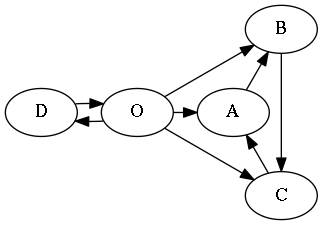
~~~~~ twopi doc/img/dpp-graphviz-example This is just a GraphViz diagram example
digraph {
    O -> A
    O -> B
    O -> C
    O -> D
    D -> O
    A -> B
    B -> C
    C -> A
}
~~~~~
twopiis the kind of graph (possible graph types:dot,neato,twopi,circo,fdp,sfdp,patchwork).doc/img/dpp-graphviz-exampleis the name of the image.dppwill generatedoc/img/dpp-graphviz-example.dotanddoc/img/dpp-graphviz-example.png.- the rest of the first line is the legend of the graph.
- other lines are written to
doc/img/dpp-graphviz-example.dotbefore running Graphviz.
You can use dpp in a pipe before Pandoc (as well as pp or gpp) for instance):
pp file.md | dpp | pandoc -s -S --self-contained -f markdown -t html5 -o file.html

or

cat file.md | gpp -T -x | dpp | pandoc -s -S --self-contained -f markdown -t html5 -o file.html
Once generated the graph looks like:
GraphViz must be installed.
PlantUML
PlantUML is executed when the keyword uml is used. The lines startuml and enduml required by PlantUML are added by dpp.
~~~~~ uml doc/img/dpp-plantuml-example This is just a PlantUML diagram example
Alice -> Bob: Authentication Request
Bob --> Alice: Authentication Response
Alice -> Bob: Another authentication Request
Alice <-- Bob: another authentication Response
~~~~~
Once generated the graph looks like:
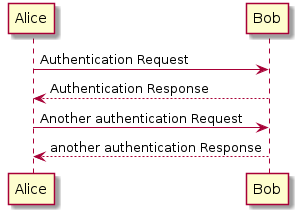
PlantUML is written in Java and is embedded in dpp. Java must be installed.
Ditaa
ditaa is executed when the keyword ditaa is used.
~~~~~ ditaa doc/img/dpp-ditaa-example This is just a Ditaa diagram example
    +--------+   +-------+    +-------+
    |        | --+ ditaa +--> |       |
    |  Text  |   +-------+    |diagram|
    |Document|   |!magic!|    |       |
    |     {d}|   |       |    |       |
    +---+----+   +-------+    +-------+
        :                         ^
        |       Lots of work      |
        +-------------------------+
~~~~~
Once generated the graph looks like:
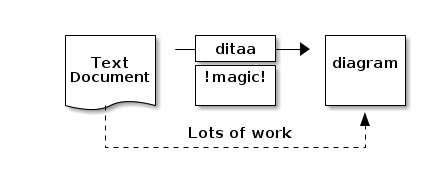
ditaa is written in Java and is embedded in dpp. Java must be installed.
Bash
Bash is executed when the keyword bash is used.
~~~~~ bash
echo "Hi, I'm $SHELL $BASH_VERSION"
RANDOM=42 # seed
echo "Here are a few random numbers: $RANDOM, $RANDOM, $RANDOM"
~~~~~
This script outputs:
Hi, I'm /bin/bash 4.3.30(1)-release
Here are a few random numbers: 17766, 11151, 23481
Note: the keyword sh executes sh which is generally a link to bash.
Bat
Bat is executed when the keyword bat is used.
~~~~~ bat
echo Hi, I'm %COMSPEC%
ver
if not "%WINELOADER%" == "" (
    echo This script is run from wine under Linux
) else (
    echo This script is run from a real Windows
)
~~~~~
This script outputs:
Hi, I'm C:\windows\system32\cmd.exe

Wine CMD version 5.1.2600 (1.6.2)
This script is run from wine under Linux
Python
Questions
What is dpp?
CDSoft/dpp is a public repo on GitHub by CDSoft. DPP - Diagram preprocessor for Pandoc (obsolete, please consider using pp instead).
Is dpp open source?
It declares the GPL-3.0 license on GitHub.
Does dpp run on macOS, Windows or Linux?
Its maker has not tagged a system, so it is unknown here. Its README says what it needs.
How do I install dpp?
Open "Take it" on its page: Take My Repo writes an install plan for your machine and hands it to your AI agent (Claude Code, Codex or Cursor), which asks you before each step. Take My Repo has not tested it on any machine.
Is dpp still maintained?
No. It is archived on GitHub: its maker no longer maintains it.