diff-aug
Augmentation method based on diffusion models for object detection and segmentation 🖼️
- 2
- 23 mo ago
Repo CTLab-ITMO/diff-aug, read from GitHub 1 min ago. CTLab-ITMO has not joined Take My Repo.
In short
CTLab-ITMO/diff-aug is a public repo on GitHub by CTLab-ITMO. Augmentation method based on diffusion models for object detection and segmentation 🖼️. It declares no license on GitHub. Public does not mean open source: without a license, nobody is granted the right to reuse it. It is written mainly in Python, has 2 stars and last changed on 2024-12-24. Nobody has reviewed it on Take My Repo yet, which says nothing about its quality. Read from GitHub on 2026-11-22.
Diff-Aug: Augmentation method based on diffusion models for object detection and segmentation
Requirements:
- Install pip.
- Install Cuda Toolkit 12.1
Installation (Windows):
setup.bat
Installation (Linux):
To be done.
Usage:
On Windows, you can run the following command to start the augmentation process:
run.bat
Before running the script, you need to modify the run.bat file to specify the augmentation parameters:
data_images_path- path to the folder with images.data_masks_path- path to the folder with masks (masks are one channel images with 255-pixels for objects and 0-pixels for background).output_path- path to the output folder.number_of_inpainted_images_per_image_required- number of augmented images per image required.main_canny_weight- weight of the canny ControlNet for the main model.main_depth_weight- weight of the depth ControlNet for the main model.main_soft_edge_weight- weight of the soft edge ControlNet for the main model.main_usual_ipadapter_weight- weight of the IPAdapter for general features of neighboring images for the main model.main_plus_ipadapter_weight- weight of the IPAdapter (Plus) for input image features for the main model.main_neg_plus_ipadapter_weight- weight of the IPAdapter (Plus) for negative object features of neighboring images for the main model.dataset_name- name of the dataset for CLIP features storage.positive_prompt- positive generation prompt.negative_prompt- negative generation prompt.seed- random generation seed.
Alternatively, you can run the augmentation process via Python script:
from src.aug_loop import run_augmentation

run_augmentation(
    ...
)
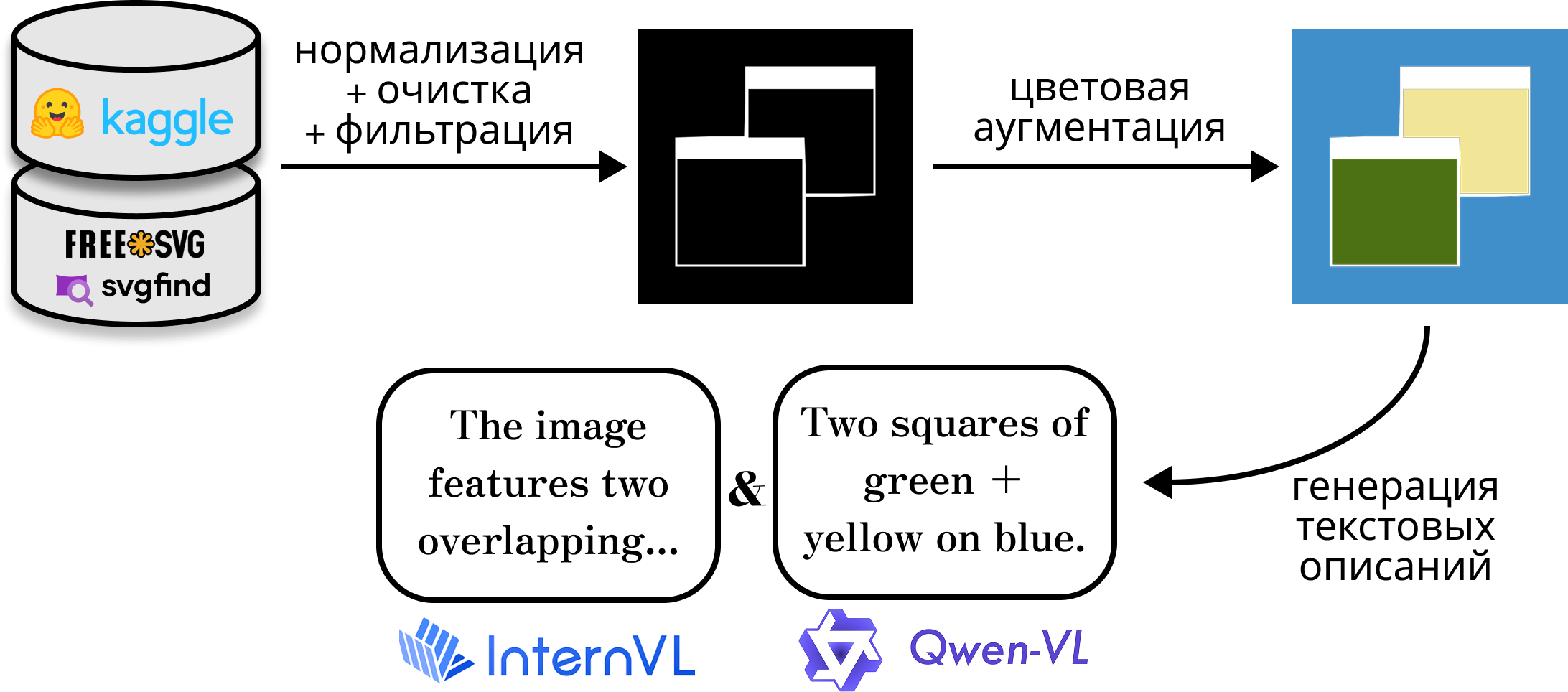
Method schema:


Examples:
Generation examples on the Potholes dataset:

Generation examples on the Rooftops dataset:

Detection and Segmentation Results:
For all experiments, we used the pretrained YOLOv8n with the default standard augmentations.
Detection results for the Potholes dataset:
| Data | Precision | Recall | mAP50-95 |
|---|---|---|---|
| without our augmentation | 0.647 ± 0.020 | 0.572 ± 0.010 | 0.304 ± 0.004 |
| Diff-Aug (prev) | 0.666 ± 0.019 | 0.552 ± 0.015 | 0.330 ± 0.003 |
| Diff-Aug | 0.665 ± 0.012 | 0.565 ± 0.018 | 0.330 ± 0.004 |
Segmentation results for the Potholes dataset:
| Data | Precision | Recall | mAP50-95 |
|---|---|---|---|
| without our augmentation | 0.674 ± 0.012 | 0.556 ± 0.014 | 0.282 ± 0.004 |
| Diff-Aug (prev) | 0.666 ± 0.023 | 0.548 ± 0.013 | 0.294 ± 0.003 |
| Diff-Aug | 0.660 ± 0.017 | 0.571 ± 0.021 | 0.297 ± 0.004 |
Acknowledgements
This research is financially supported by the Foundation for National Technology Initiative's Projects Support as a part of the roadmap implementation for the development of the high-tech field of Artificial Intelligence for the period up to 2030 (agreement 70-2021-00187).
Diff-Aug: Аугментация изображений для задач детекции и сегментации на основе диффузионных нейронных сетей
Требования
- Установите pip.
- Установите Cuda Toolkit 12.1
Установка (Windows):
setup.bat
Установка (Linux):
В процессе.
Использование:
На Windows вы можете запустить следующую команду, чтобы начать процесс аугментации:
run.bat
Перед запуском скрипта вам необходимо изменить файл run.bat, чтобы указать параметры аугментации:
data_images_path- путь к папке с изображениями.data_masks_path- путь к папке с масками (маски - это одноканальные изображения, где значения пикселей равны 255 для объектов и 0 для фона).output_path- путь к папке вывода.number_of_inpainted_images_per_image_required- количество аугментированных изображений на одно изображение.main_canny_weight- вес Canny ControlNet для основной модели.main_depth_weight- вес Depth ControlNet для основной модели.main_soft_edge_weight- вес Soft Edge ControlNet для основной модели.main_usual_ipadapter_weight- вес IPAdapter для общих признаков соседних изображений для основной модели.main_plus_ipadapter_weight- вес IPAdapter (Plus) для признаков входного изображения для основной модели.main_neg_plus_ipadapter_weight- вес IPAdapter (Plus) для отрицательных признаков объектов соседних изображений для основной модели.dataset_name- имя набора данных для хранения признаков CLIP.positive_prompt- положительный промпт генерации.negative_prompt- отрицательный промпт генерации.seed- случайное зерно генерации.
Кроме того, вы можете запустить процесс аугментации через скрипт Python:
from src.aug_loop import run_augmentation

run_augmentation(
    ...
)
Схема метода:


Примеры:
Примеры генерации на датасете Potholes:

Примеры генерации на датасете Rooftops:

Результаты детекции и сегментации:
Для всех экспериментов мы использовали предобученную YOLOv8n с стандартными аугментациями.
Результаты детекции на датасете Potholes:
| Данные | Точность | Полнота | mAP50-95 |
|---|---|---|---|
| без нашей аугментации | 0.647 ± 0.020 | 0.572 ± 0.010 | 0.304 ± 0.004 |
| Diff-Aug (пред) | 0.666 ± 0.019 | 0.552 ± 0.015 | 0.330 ± 0.003 |
| Diff-Aug | 0.665 ± 0.012 | 0.565 ± 0.018 | 0.330 ± 0.004 |
Результаты сегментации на датасете Potholes:
| Данные | Точность | Полнота | mAP50-95 |
|---|---|---|---|
| без нашей аугментации | 0.674 ± 0.012 | 0.556 ± 0.014 | 0.282 ± 0.004 |
| Diff-Aug (пред) | 0.666 ± 0.023 | 0.548 ± 0.013 | 0.294 ± 0.003 |
| Diff-Aug | 0.660 ± 0.017 | 0.571 ± 0.021 | 0.297 ± 0.004 |
Благодарности
Реализовано при финансовой поддержке Фонда поддержки проектов Национальной технологической инициативы в рамках реализации "дорожной карты" развития высокотехнологичного направления "Искусственный интеллект" на период до 2030 года (Договор № 70-2021-00187).
Questions
What is diff-aug?
CTLab-ITMO/diff-aug is a public repo on GitHub by CTLab-ITMO. Augmentation method based on diffusion models for object detection and segmentation 🖼️.
Is diff-aug open source?
It declares no license on GitHub. Public does not mean open source: without a license, nobody is granted the right to reuse it.
Does diff-aug run on macOS, Windows or Linux?
Its maker has not tagged a system, so it is unknown here. Its README says what it needs.
How do I install diff-aug?
Open "Take it" on its page: Take My Repo writes an install plan for your machine and hands it to your AI agent (Claude Code, Codex or Cursor), which asks you before each step. Take My Repo has not tested it on any machine.
Is diff-aug still maintained?
Its last change on GitHub was on 2024-12-24. Take My Repo does not judge from that whether it is maintained.
What do people who ran diff-aug say?
Nobody has reviewed it on Take My Repo yet, which says nothing about its quality.