
ClickUi
The best way to use AI is on your own computer. Use local or paid API models, and ctrl+k to show/hide the chat UI. Experience the future of AI, and help build it too!
- 428
- Python
- AGPL-3.0
- 3 mo ago
Readstein: a local-first ebook reader with unlimited personal libraries, free bring-your-own cloud sync, Home Library, and expanded on-device TTS. Readest, unlimited!
Repo CodeUpdaterBot/Readstein, read from GitHub 1 min ago. CodeUpdaterBot has not joined Take My Repo.
CodeUpdaterBot/Readstein is a public repo on GitHub by CodeUpdaterBot. Readstein: a local-first ebook reader with unlimited personal libraries, free bring-your-own cloud sync, Home Library, and expanded on-device TTS. Readest, unlimited! It declares the AGPL-3.0 license on GitHub. It is written mainly in TypeScript, has 0 stars and last changed on 2026-11-19. Nobody has reviewed it on Take My Repo yet, which says nothing about its quality. Read from GitHub on 2026-11-21.
Readstein is an open-source ebook reader designed for immersive and deep reading experiences. Built as a modern rewrite of Foliate, it leverages Next.js 16 and Tauri v2 to deliver a smooth, cross-platform experience across macOS, Windows, Linux, Android, iOS, and the Web.
Readstein is a local-first fork of Readest, built for people who want to use a nice modern reader app with unlimited storage without any paid subscriptions.
Features • Screenshots • Downloads • Documentation • Building from Source • Troubleshooting • Support • License


| Feature | What it adds |
|---|---|
| No app-imposed local library quota | Keep large personal collections of EPUBs, PDFs, comics, and documents on your own device. |
| Home Library | Run Readstein on a PC as a local library host and pair devices on the same Wi-Fi, without moving the collection to a hosted storage quota. |
| Bring your own cloud storage | Connect Google Drive, WebDAV, S3, OneDrive, and other supported providers for personal-library workflows without a Readstein subscription requirement. |
| Expanded on-device TTS | Choose from on-device speech models including Kokoro, Piper, and Supertonic, with model sizes, resource requirements, acceleration status, and playback controls. |
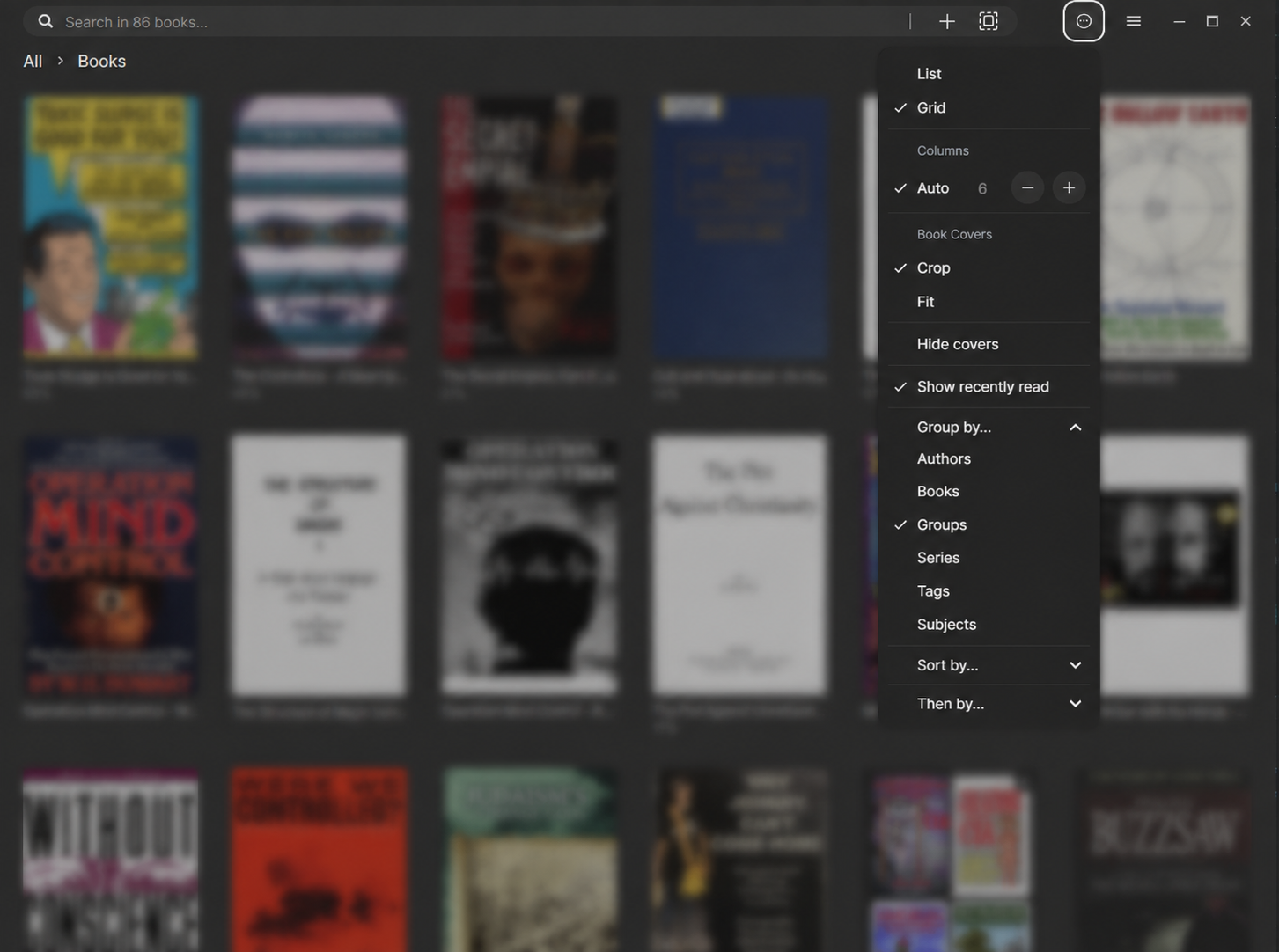
| Better folder workflows | Create, select, rename, remove, and reorganize library folders; move books quickly between folders while keeping control of the underlying library. |
| Metadata and cover tools | Edit book metadata and cover images to make a large mixed-format collection easier to browse and maintain. |
| Improved AI chat | Use configurable local or OpenAI-compatible providers for book-aware chat, with provider checks and clear setup guidance instead of raw runtime errors. |
| Readest foundations | Keep the features readers expect: EPUB/PDF/MOBI/KF8/AZW3/FB2/CBZ/TXT/Markdown support, annotations, search, dictionaries, translation, OPDS/Calibre support, themes, accessibility, and cross-device reading workflows. |
Personal books, reading progress, annotations, local database data, and library backups are runtime data and are not part of this repository. Keep that data in the app's local storage or another private location; do not add it to Git. The repository only includes deliberately published source, product screenshots, and test fixtures used to validate document handling.
The root .gitignore excludes common local library and backup folders. It intentionally does not broadly ignore document extensions because the app maintains open test fixtures for supported formats.
You don't need a subscription to use this app, especially with the local computer-hosting and cloud services opened up. Although for maximum compatibility, the official Readest subscription & account system remains in place. So if you want to use the original Readest-hosted services or subscription, those flows remain available in this app as well.


For current Windows installers and Android builds, visit readstein.com or the Readstein releases page.
Prebuilt distribution is not currently provided for these platforms. Clone this repository and build from source using the instructions below.
The repository is the primary documentation source for Readstein:
Run commands from the repository root, not from apps/.
On Windows, confirm that Cargo is available:
set PATH=%USERPROFILE%\.cargo\bin;%PATH%
git clone https://github.com/CodeUpdaterBot/Readstein.git
cd Readstein
git submodule update --init --recursive
pnpm install
pnpm --filter @readest/readest-app setup-vendors
pnpm tauri infopnpm tauri dev
pnpm tauri build --bundles nsis
The generated installer is written under target/release/bundle/nsis/.
After installing the Android SDK/NDK and initializing Tauri Android support:
pnpm tauri android build -t aarch64 --debug
The APK is written under:
apps/readest-app/src-tauri/gen/android/app/build/outputs/apk/universal/debug/
Readstein uses Microsoft Edge WebView2 to render its interface.
Some Wayland systems can hit EGL compatibility issues. Try launching with the system Wayland client library preloaded:
LD_PRELOAD=/usr/lib/libwayland-client.so /path/to/Readstein.AppImage
If that does not help, build from source for your current environment.
Readstein is maintained in the open. The best way to help is to:
Readstein is free software, released under the GNU Affero General Public License v3.0, or (at your option) any later version.
It is a derivative work of Readest, which is also licensed under AGPL-3.0. See LICENSE for the full terms.
Note
Readstein is independently maintained and is not affiliated with, endorsed by, or distributed by Readest or Bilingify LLC. It preserves the app's existing subscription and hosted-service paths for people who choose to use them (to help support & credit the original project), while adding local-first and bring-your-own-storage workflows for personal libraries.
CodeUpdaterBot/Readstein is a public repo on GitHub by CodeUpdaterBot. Readstein: a local-first ebook reader with unlimited personal libraries, free bring-your-own cloud sync, Home Library, and expanded on-device TTS. Readest, unlimited!
It declares the AGPL-3.0 license on GitHub.
Its maker has not tagged a system, so it is unknown here. Its README says what it needs.
Open "Take it" on its page: Take My Repo writes an install plan for your machine and hands it to your AI agent (Claude Code, Codex or Cursor), which asks you before each step. Take My Repo has not tested it on any machine.
Its last change on GitHub was on 2026-11-19. Take My Repo does not judge from that whether it is maintained.
Nobody has reviewed it on Take My Repo yet, which says nothing about its quality.
The best way to use AI is on your own computer. Use local or paid API models, and ctrl+k to show/hide the chat UI. Experience the future of AI, and help build it too!
A mobile app for Hermes, built around Bots! Similar to Grok Bot but completely Open Source and runs on your own computer, Hermes Mobile is a beautiful and first-of-its-kind cross-platform app (thanks to Tauri) featuring everything you need to control your Bots running on your computer from anywhere in the world. 🌎 Open-Source Grok Bot 🌍
A Python program that uses only the text from the the 2024 STEP-Practice Exams 1-3 and runs it through OpenAI, Claude, Groq, OpenRouter, and open-source Ollama models to see how each scores and which is the best overall.
Locally-Hosted Youtube Video Downloader, plus Cross-platform Electron Desktop App to stream and download any Movie, TV Series or Anime in the World. Zero Ads and Tracking.
Streamstein for Android - video-first mobile app (Tauri 2 + React). A shrunk-down port of the StreamStein desktop app: streaming sources, local library, settings.