
rigforge-plugin
The maintainer has not written a description at the source.
- 5
- MIT
- 2 wk ago
Repo DECRUX9812/rigforge-plugin, read from GitHub 12 min ago. DECRUX9812 has not joined Take My Repo.
In short
DECRUX9812/rigforge-plugin is a public repo on GitHub by DECRUX9812. It declares the MIT license on GitHub. It is written mainly in JavaScript, has 5 stars and last changed on 2026-11-08. Nobody has reviewed it on Take My Repo yet, which says nothing about its quality. Read from GitHub on 2026-11-25.
Rigforge
A build studio for robots and printed machines, inside Hermes Desktop.
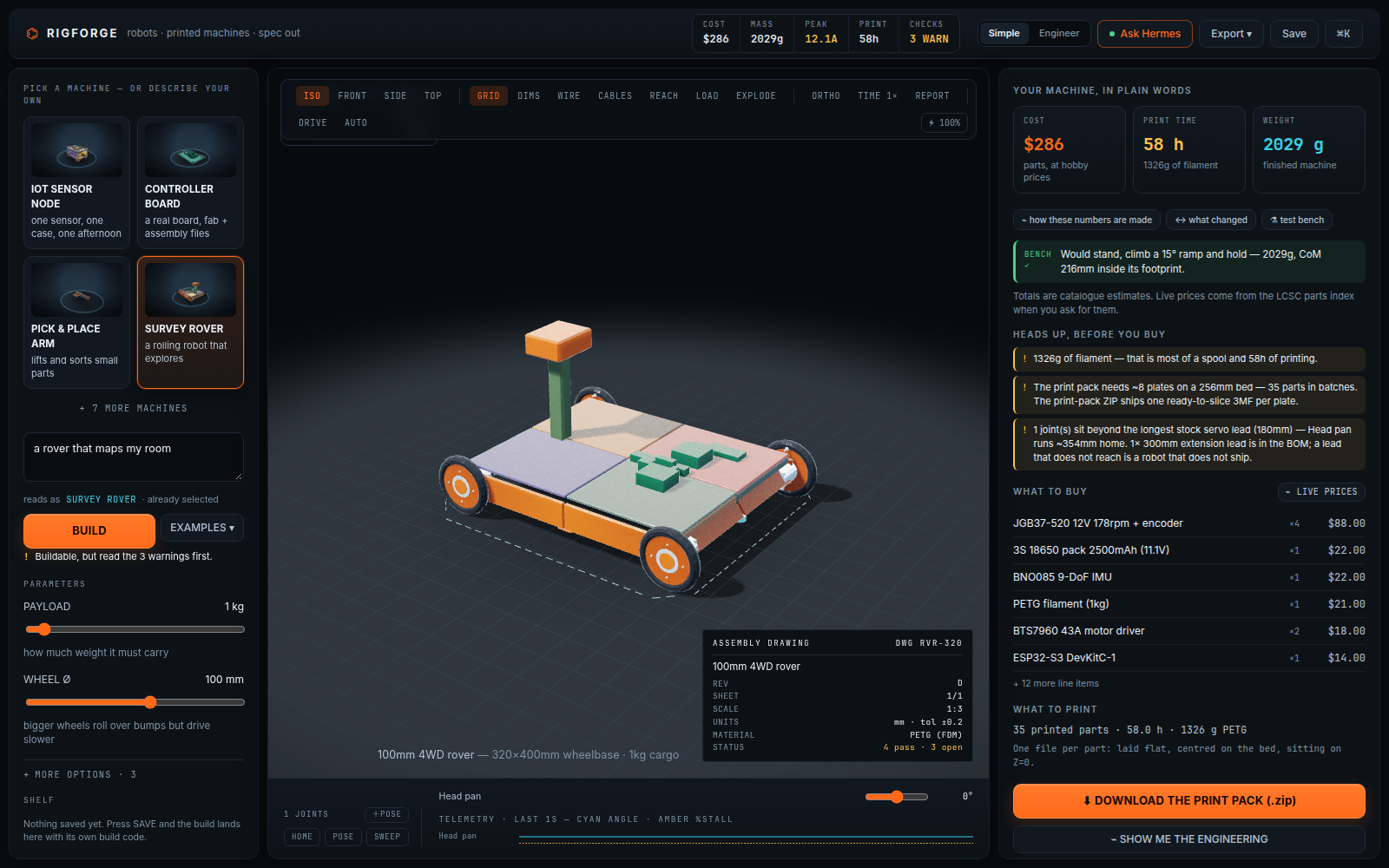
Schematik answers "what circuits do I wire". Rigforge answers "what do I build" — a complete machine from one brief:
| geometry | posed 3D assembly, orbit/zoom, joint sliders, real forward kinematics, exploded view, click any part to inspect it, studio-lit renderer with environment reflections and baked contact occlusion |
| mechanics | joint torque cascade → servo/belt-stage selection, wheel torque → motor choice, link bending + deflection |
| power | per-rail typical and stall current → pack → runtime, wire gauge, fuse and connector sizing |
| electronics | pin map that refuses strapping pins and the flash bus, PCA9685 channels, UART bus reservation |
| firmware | Arduino skeleton generated from the same pin map — homing, encoders, gait loops |
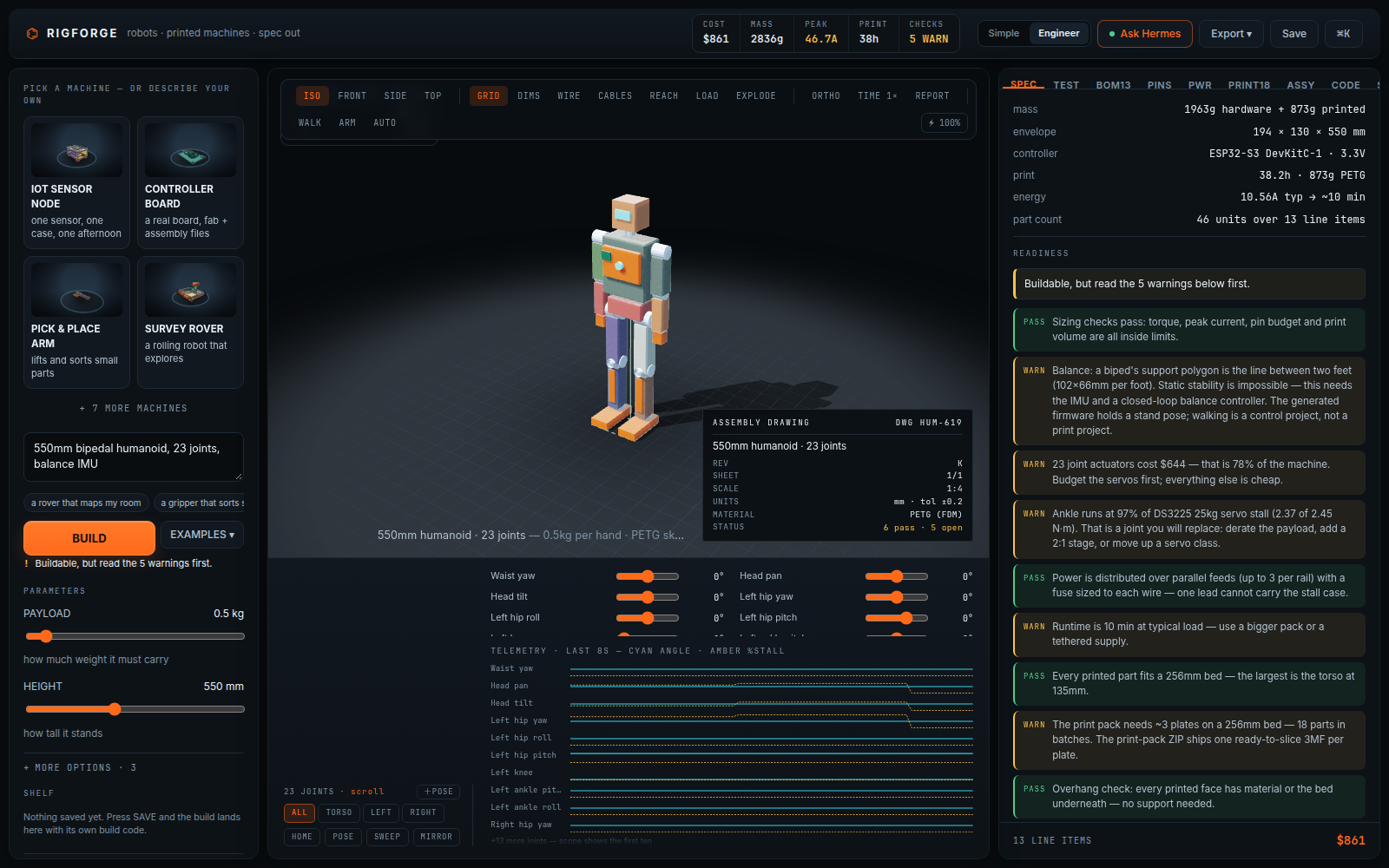
| manufacturing | BOM with prices + SKUs, mass, print grams/hours per part, bed-aware part splitting, per-part STL pack (zip), plate-aware 3MF pack (one ready-to-slice file per plate when the job needs more than one), glTF (.glb) for viewers/engines, STEP solids for CAD (Fusion/SolidWorks, faceted AP214), OpenSCAD, assembly order |
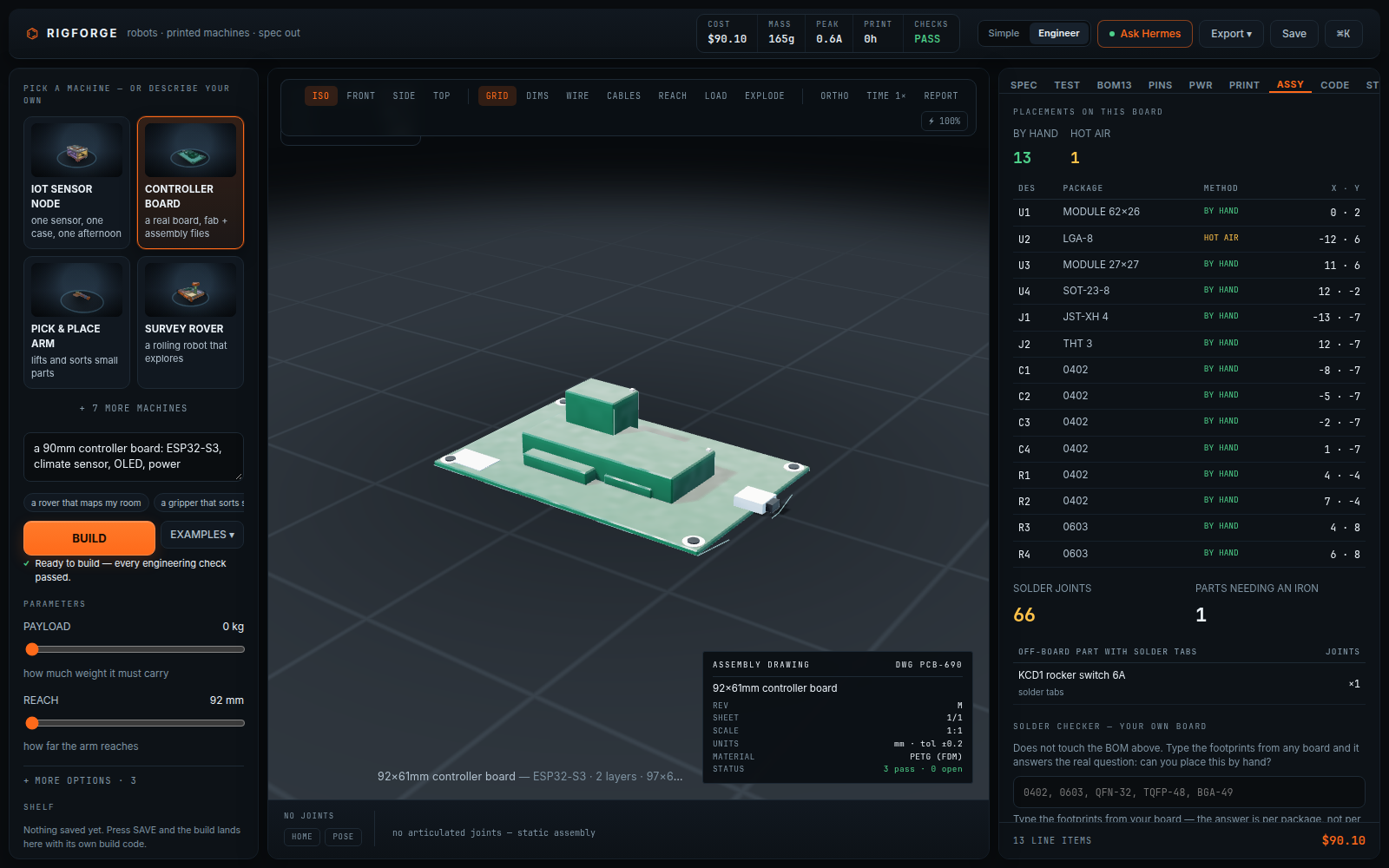
| boards | a controller board you can design: placements, per-part solder verdicts, and a board pack (BOM + centroid/CPL + spec) for a fab or assembly house |
| test bench | field-test before you print: drive dynamics (traction, grade, payload, shove), legged gait on real courses, IK reach with weighted props, grip hold tests, sensor stimulus, gantry traverse on three chained slide axes, endurance power — plus a statics bench (CoM, support polygon, tip-over, torque vs stall), a touch joystick, and a SWEEP that exercises every joint limit at real servo speed |
| servo harness | per-joint wire runs measured pivot→electrical home vs the BOM's stock leads — extensions auto-added to cost/BOM, stall-current voltage drop, and a live CABLES overlay coloured by verdict |
| certification | one-click AUTO runs a measured maneuver suite per machine — sprint, turn, climb, load, shove, stand, jaw hold, slide-axis traverse/drop/return on gantries, and a reach tour for every arm it has (dual-arm humanoids certify R and L separately) — scored pass/fail with real numbers, kept as per-machine history with a score trend; failed legs feed Break→Fix prescriptions (cert lift margins → sized payloads, reach bounds → longer arms) |
| poses | named pose presets per archetype — EXTEND/STOW/UP, WAVE, OPEN/CLOSE, scan presets — plus IK-replanted stance poses (WIDE, PROWL) whose feet stay on the ground at any machine size |
| DFM | overhang analysis on the exact bed-oriented triangles the STL pack ships, brim/contact ratios, bed + plate-fit packing, wall-thickness raycasts, and rest-pose interference — ray-parity narrowphase flags printed parts that would occupy the same volume at assembly (jointed links that legitimately nest are skipped) — parts that would print on edge, need support, won't fit the plate, have sub-nozzle walls, or can't be assembled as modeled say so |
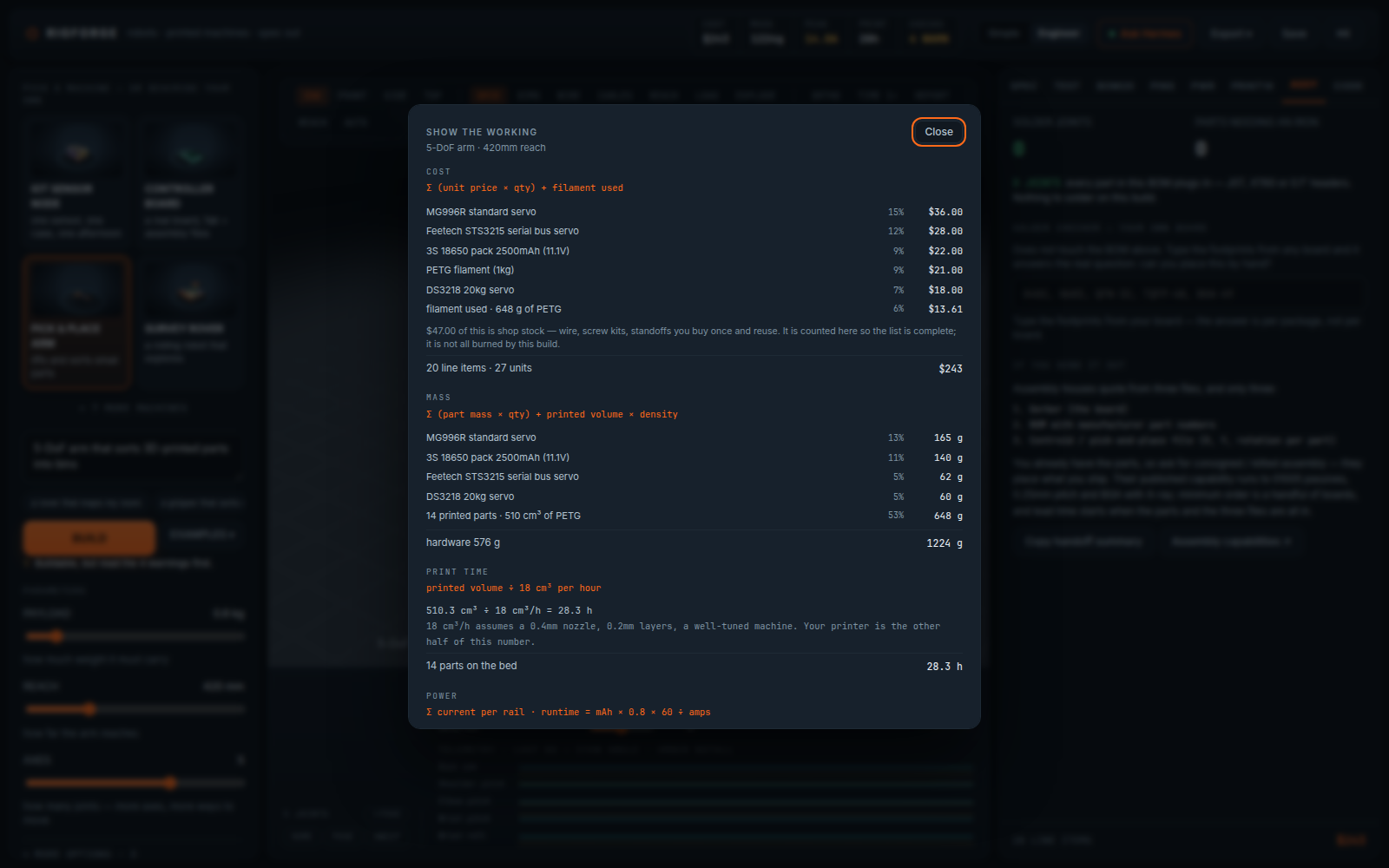
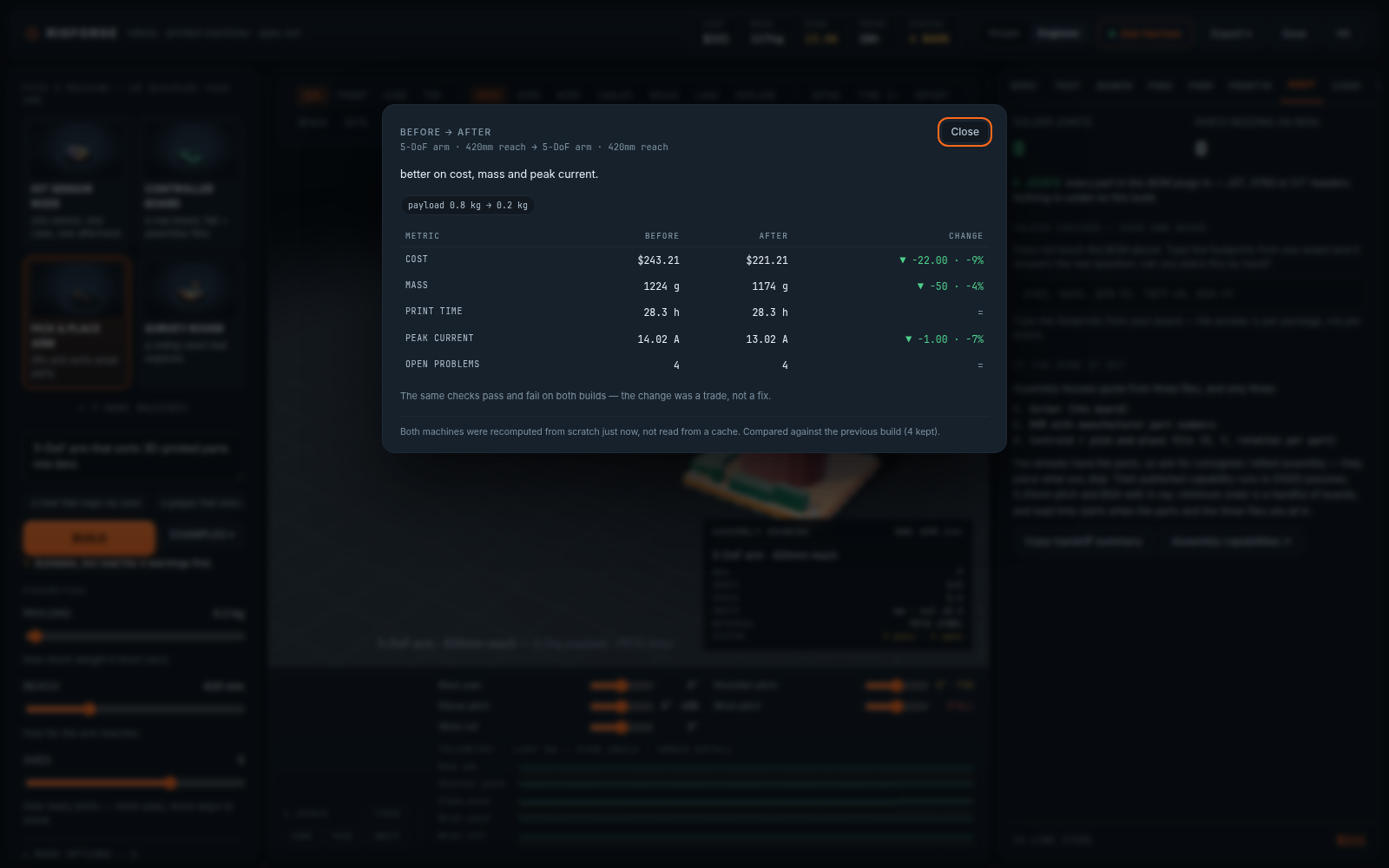
| trust | show the working on every headline number, and before/after on every change — recomputed, never remembered |
| sharing | a design is a build code: RF1-…, ~200 characters for parametric machines (a custom spec carries its nodes/joints, so longer), rebuilds exactly on someone else's machine; the field-test REPORT download carries the bench log + engineering summary |
The engine is deterministic and offline: the same brief always produces the same machine, and every number is computed (not narrated). The agent designs; the maths is the studio's.
Anybody can build
- Click a machine card — pick a robot dog, a gripper, a humanoid; the whole spec appears instantly. No typing required.
- Or type one sentence and press Enter — "a robot car that maps my room" is a complete brief.
- Every control says what it does in plain words, and the readiness block leads with a sentence — "Ready to build — every engineering check passed." — before the engineering tables a grown-up might want.
Archetypes
Eleven machines across three orders of magnitude, all from the same engine:
iot (sensor node in a printed case) · pcb (a real controller board, fab-ready) ·
arm (5-DoF) · gripper (parallel jaws on MGN12) · rover · quadruped (12 servos,
independent leg chains) · humanoid (23-joint biped, two servo buses) · robot
(mobile manipulator: 4WD base + arm + pan head) · gadget (ESP32 desk device) ·
gantry (metre-scale, belts + rails) · custom (spec-driven: the brief's
nodes[]/joints[] ARE the machine — any primitive shape on any joint chain,
with servos sized from measured gravity torque and IK/gantry teleop self-selected
when the spec qualifies)
What it refuses to fake
Every claim in the studio is checkable, and where it cannot be true the product says so instead of hiding it. Things it caught in its own output:
- Unprintable parts. A 410mm rover rail used to ship as one piece with a vague warning. Parts now split themselves to your bed (180/220/256/300/350mm) with joiner plates, and the notes say which seams to glue.
- STLs that were not slice-ready. Per-part exports used to arrive in world space, floating mid-machine. They are now laid flat by measured bed contact (not bounding box), centred and sitting on Z=0 — and the same triangles feed the overhang check, so what the DFM report says is what the slicer gets.
- Certification that measured nothing. The autopilot suite scores real simulated outcomes — distance covered, stall percentage, climb height, carried mass — and a quadruped whose legs can't reach a stair riser fails OBSTACLE honestly while the humanoid passes. Wet ice fails CLIMB. A 40kg payload fails loudly.
- Payload it could not carry. Asking for 40kg used to be silently clamped to 8kg
with every check passing. Over-weight requests now fail loudly, and a joint beyond
any servo + 4:1 belt reads
out of scoperather than inventing a 7:1 stage. - Numbers you had to trust. Show the working prints the formula, the inputs and the parts that dominate the total — cost, mass, print time, amps per rail.
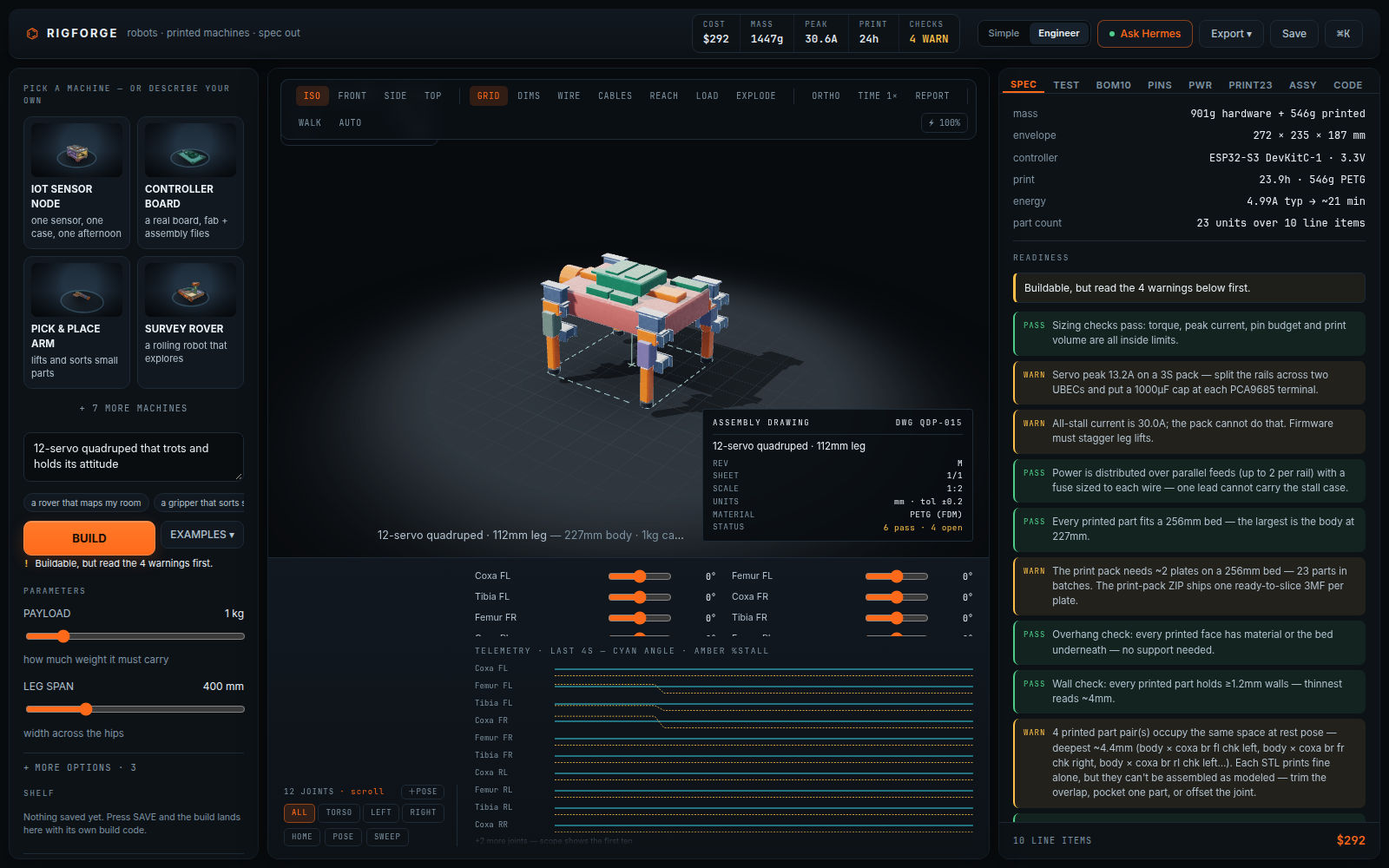 |
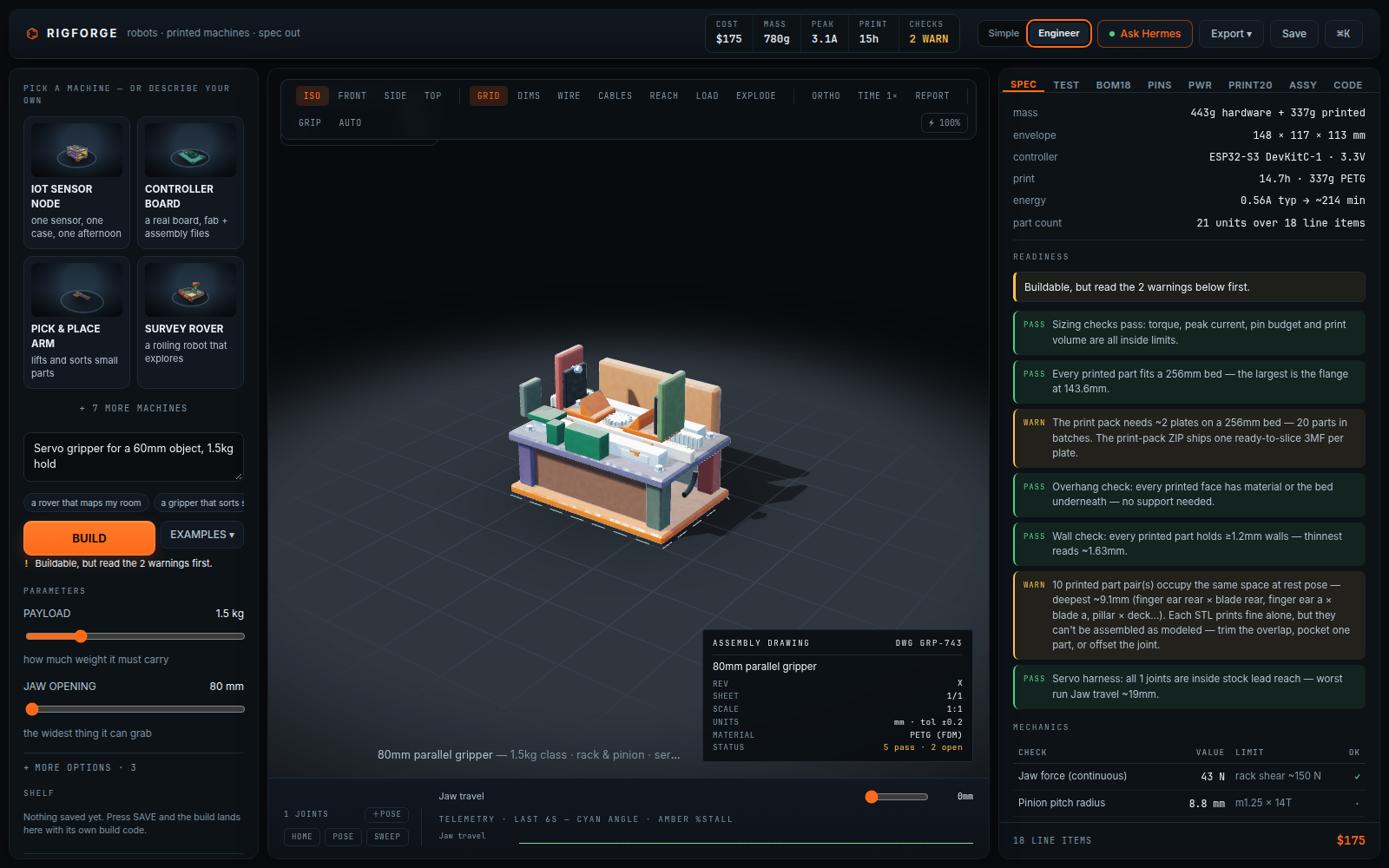 |
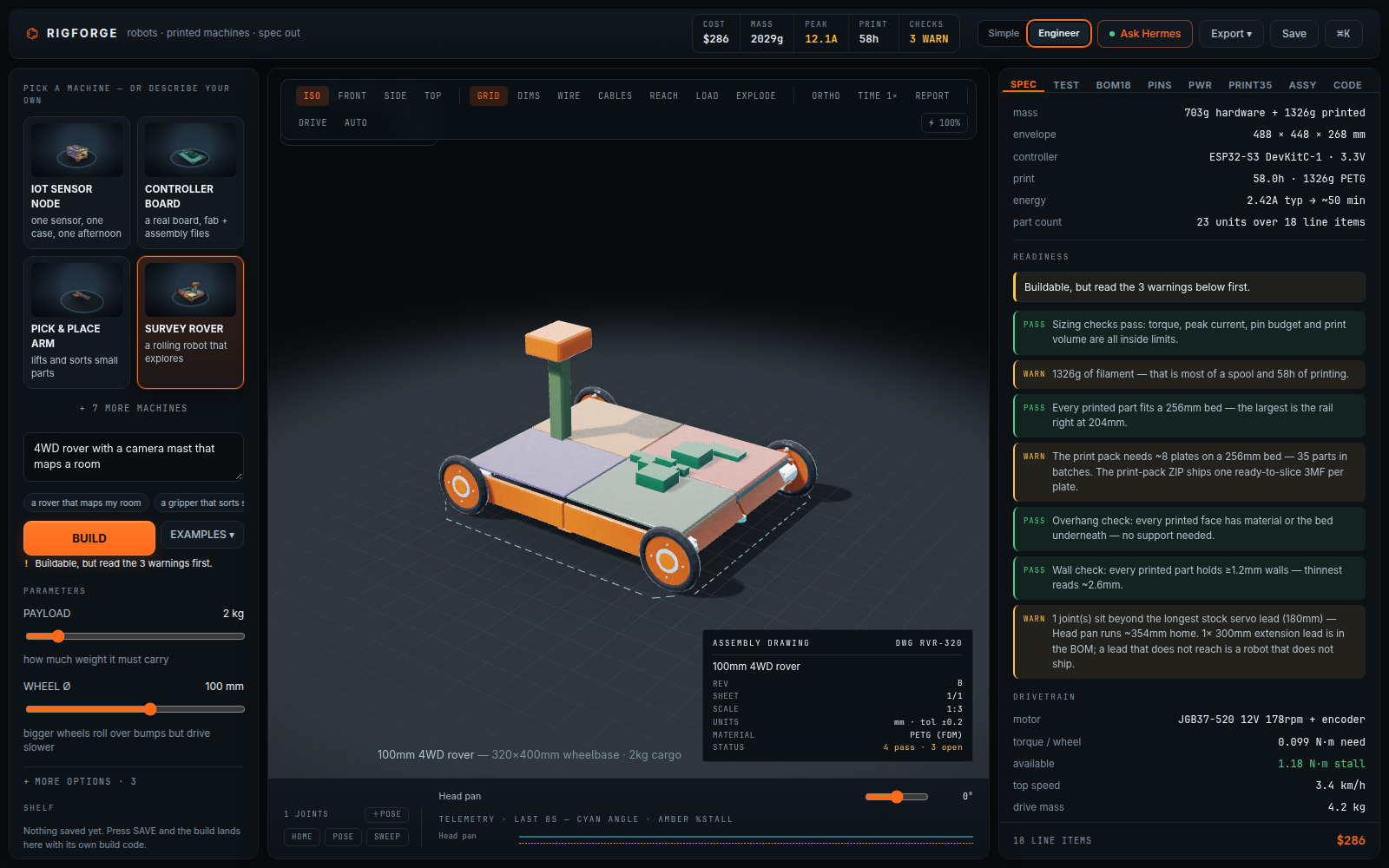 |
 |
 |
 |
 |
|
Proof, not adjectives
Every claim above is backed by a gate that can fail. These run by hand
(node tests/<name>.mjs; the browser ones need tests/make-preview.mjs served on
127.0.0.1:18734):
| gate | what it asserts | current |
|---|---|---|
tests/truth.mjs |
72 engine claims: cost/mass/print arithmetic recomputed from the parts table, STL + 3MF + GLB + STEP structure, plate-aware packing, DFM overhang/brim/wall-thickness/interference, kinematics, autopilot certification (including gantry slide-axis legs), spec-driven custom machines, baked-AO determinism, honest refusals | 72/72 |
tests/render-ssr.mjs |
every spec tab mounts through real React 19 SSR | clean |
tests/layout-widths.mjs |
no sideways scroll at laptop/tablet/phone widths | clean |
tests/export-sweep.mjs |
every Export-menu entry downloads the right type | clean |
tests/functional.mjs |
pose a joint, export an STL, verify header + triangle math | clean |
tests/bundle-load.mjs |
the shipped bundle registers page/nav/palette/directives via the real host API | clean |
Bugs these gates caught in this product's own output
- Two masses for one machine. The stability verdict read ~1.9× the mass the card above it printed, because the bench summed solid geometry and the header summed the BOM. Printed parts now use the same shell volume the print estimate uses, metals get real densities, and the bench headline is the BOM mass.
- A prescription that could not be followed. The bench said fit bigger wheels while the builder clamped wheels to 130 mm — no wheel size could ever help. The clamp is 220 mm now.
- A green tick on nonsense. A brief naming no machine used to build the smallest enclosure and report every check passed. Unmatched briefs now warn, in the checks and in plain words.
- STL parts floating in space. Per-part exports arrived in world coordinates; they are now bed-oriented by measured contact area — and the same triangles feed the overhang check, so DFM and the slicer can't disagree.
- Certification that measured commands, not motion. The autopilot suite now scores real simulated outcomes — a quadruped whose legs can't reach a stair riser fails OBSTACLE while the humanoid passes; wet ice fails CLIMB.
Sharing a design
Export ▸ Build code copies one line — RF1-eyJhcm…, about 200 characters.
Because a design is deterministic from its brief, that line is the machine: paste it
into ⌘K ▸ Open a build code on any install and it rebuilds exactly, priced against
whoever opened it. No account, no cloud, nothing to sync. A bad paste is explained,
not silently ignored.
The agent half
Two tools, one small state dir ($HERMES_HOME/rigforge/*.json):
| tool | does |
|---|---|
rigforge_build |
parses a sentence or a params object, queues the build, returns the brief + a ::rigforge{…} directive |
rigforge_state |
reads back what the studio computed last: cost, mass, print hours, peak amps, readiness checks |
The loop is two files and no polling from Python:
agent --rigforge_build--> queue.json --GET /api/plugins/rigforge/queue--> studio page
agent <--rigforge_state-- state.json <--POST /api/plugins/rigforge/state-- studio page
Backend routes (dashboard/plugin_api.py, mounted at /api/plugins/rigforge/):
GET  /health
GET  /queue?peek=1&limit=5     read-only
GET  /queue?limit=5            drain (the page's poller — each request applied once)
POST /queue                    {"brief": …, "note": …}
GET  /state
POST /state                    the studio's computed summary
Payloads are bounded on the way in (text lengths, check count, clamped numbers), so neither side can grow the store without limit.
Where it lives
- UI page
/rigforge+ a sidebar row + five command-palette rows ::rigforge{brief={…}}transcript directive — the agent → plugin door: the model writes one line in chat and a "load into studio" card appears- ASK HERMES on the page stages a structured prompt with the live spec in the composer (plugin → agent), and tells the agent to reply with the same directive
rigforge_build/rigforge_statetools + the queue/state routes above — the agent can start a build without a chat round-trip, and read the result back- the topbar's AGENT chip is the honest liveness read: LINKED only when the plugin backend actually answered
Install
node build.mjs                       # src/*.js → plugin.js (single file, no deps)
cp plugin.js ~/.hermes-webapp/desktop-plugins/rigforge/plugin.js   # webapp
cp plugin.js ~/.hermes/desktop-plugins/rigforge/plugin.js          # native desktop
Then reload the app (Cmd/Ctrl-R). Enabled by default; toggle in Capabilities ▸ Plugins.
Develop
Questions
What is rigforge-plugin?
DECRUX9812/rigforge-plugin is a public repo on GitHub by DECRUX9812. Its maker has not written a description.
Is rigforge-plugin open source?
It declares the MIT license on GitHub.
Does rigforge-plugin run on macOS, Windows or Linux?
Its maker has not tagged a system, so it is unknown here. Its README says what it needs.
How do I install rigforge-plugin?
Open "Take it" on its page: Take My Repo writes an install plan for your machine and hands it to your AI agent (Claude Code, Codex or Cursor), which asks you before each step. Take My Repo has not tested it on any machine.