DataVisool
A browser-based designer for dashboards and data visualizations.
- 878
- 3 d ago
Repo DaguPyz/DataVisool, read from GitHub 7 h ago. DaguPyz has not joined Take My Repo.
In short
DaguPyz/DataVisool is a public repo on GitHub by DaguPyz. A browser-based designer for dashboards and data visualizations. It declares no license on GitHub. Public does not mean open source: without a license, nobody is granted the right to reuse it. It is written mainly in TypeScript, has 878 stars and last changed on 2026-11-19. Nobody has reviewed it on Take My Repo yet, which says nothing about its quality. Read from GitHub on 2026-11-21.

DataVisool Web
Bring data, visuals, and interactions together.
A browser-based designer for dashboards and data visualizations.
React · TypeScript · Spring Boot · MySQL
简体中文 | English
Features · Getting Started · Migrate from LCP · Run from Source · Documentation · License
DataVisool Web brings canvas editing, data configuration, and visual interaction design into the browser. Combine charts and other components to build, preview, and publish visualizations.
Product Demo
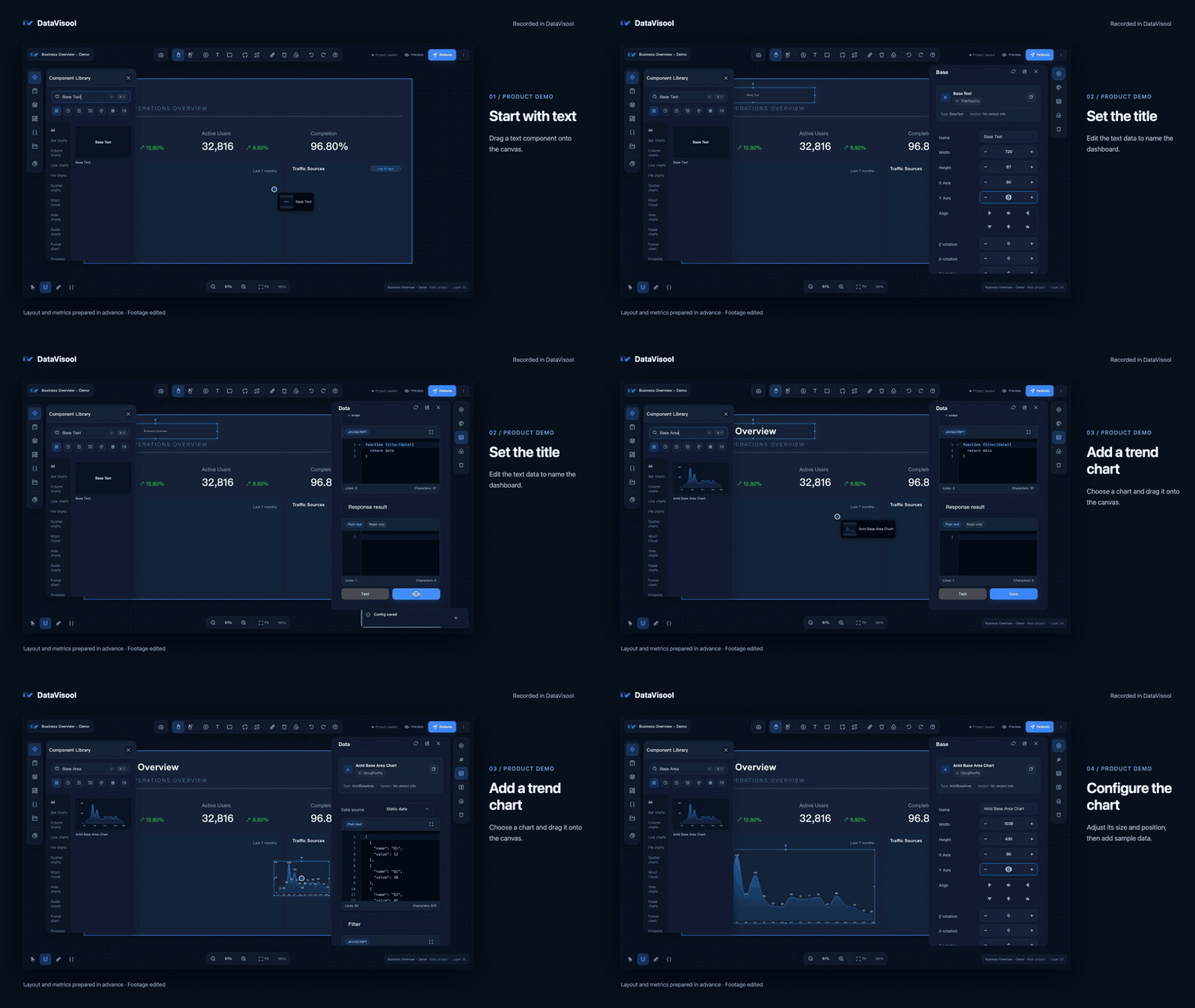
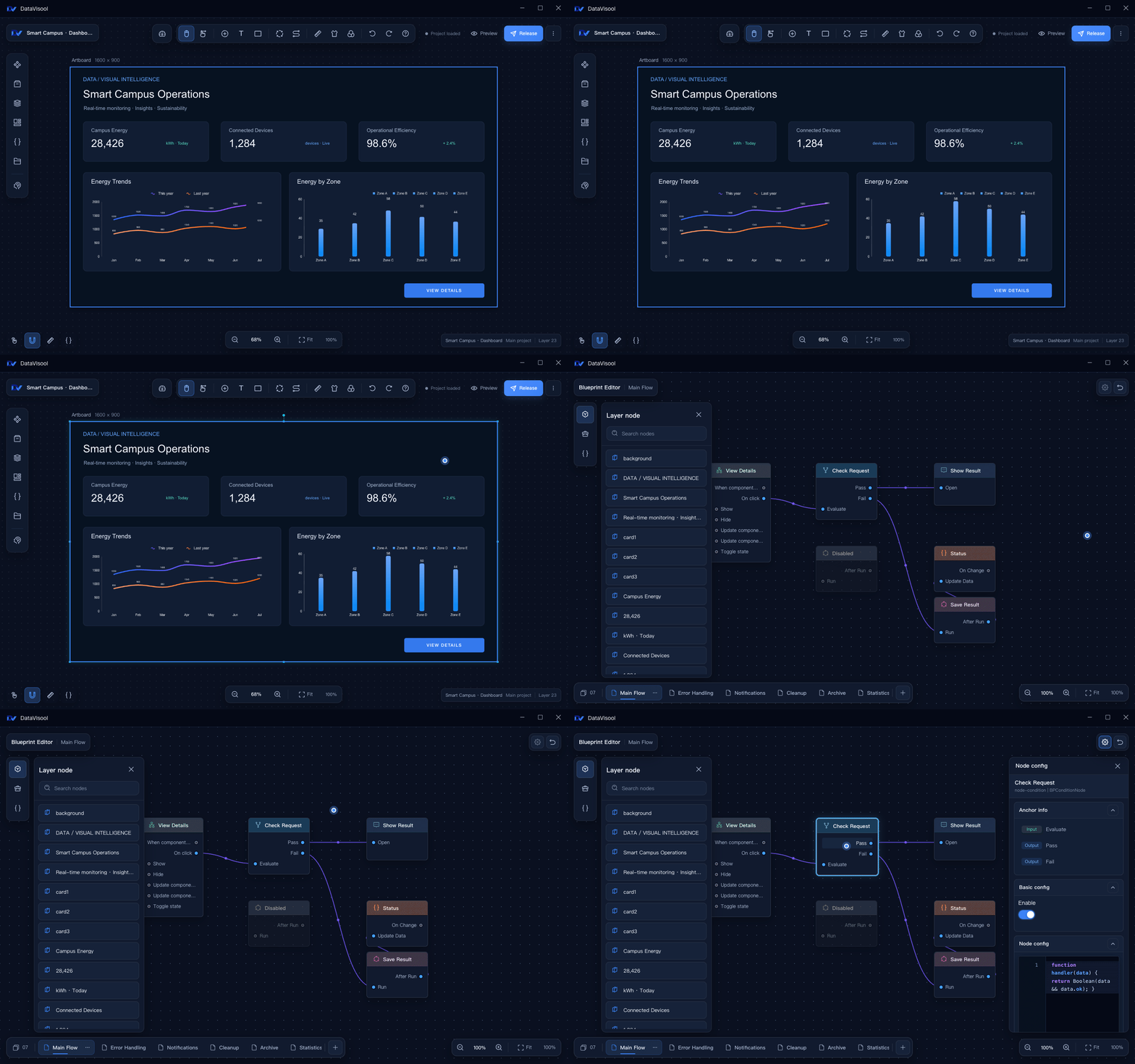
Building a dashboard in DataVisool with sample data. Open the full video.
Play the full video in supported Markdown viewers
Open the English demo videoFeatures
| Visual canvas Add charts, text, images, video, maps, and 3D models; adjust their layout and appearance. |
Data connections Configure static data, APIs, databases, WebSocket, and MQTT sources. |
| Blueprint interactions Connect component events and actions to build interactive behavior. |
AI assistance Configure a model and use AI-driven features in the designer. |
| Custom components Build server components with the component development tools and upload them for use in the designer. |
Project management Preview and publish projects, manage access settings, and import or export project packages. |
Getting Started
Access DataVisool
Open a deployed DataVisool Web instance in your browser and sign in with an account provided by its administrator. To deploy a service, see the Web deployment guide (in Chinese).
Create Your First Project
- Create a project from the console or project list.
- Drag components onto the canvas and adjust their layout.
- Configure static data or connect a data source.
- Optionally, use the blueprint editor to connect events and actions.
- Save, preview, and publish your project.
The quick start includes screenshots and detailed steps (in Chinese).
Migrate from LCP
The current Web importer can attempt supported LCP project ZIPs with a legacy manifest, as well as no-manifest ZIPs containing exactly one valid .lc project data file. Real samples of manifest version 1 and no-manifest packages have not been verified; compatibility cannot be determined from the LCP application version alone.
Old application directories, databases, and standalone .lc files cannot be imported as project ZIPs; unknown formats, unsupported encryption, and damaged packages also fail. Even supported packages can contain components that cannot be converted, missing assets, or data sources that need reconfiguration. Import success does not guarantee identical visuals or interactions.
Back up the original, import into an empty DataVisool Web project, and check the visuals, assets, data, and interactions. For package identification, unsupported cases, and remedies, see the LCP migration guide.
Run from Source
Install Node.js, pnpm, JDK 17, Maven, and MySQL. Set up a local or isolated database and configure its connection in datavisool-server/datavisool-service/src/main/resources/application-dev.yml before starting the server. Set DB_PASSWORD in the environment; for a new database also set DATAVISOOL_ADMIN_PASSWORD to the initial admin password (at least 8 characters and at most 72 UTF-8 bytes). Remove the latter after initialization. Existing databases retain their administrator password. The default development profile enables database checks and migrations.
From the repository root:
# Install frontend dependencies
pnpm install

# Install the shared backend module and start the service
cd datavisool-server
mvn -pl datavisool-common -am install -DskipTests
mvn -f datavisool-service/pom.xml spring-boot:run
In a second terminal at the repository root:
pnpm -F datavisool-app dev
Open the address printed by Vite. The frontend development server proxies /api/** and /static/** to http://127.0.0.1:8080 by default; login and project storage require the backend and database. For configuration, builds, and tests, see source development (in Chinese).
Project Structure
| Directory | Contents |
|---|---|
datavisool-app |
React application, dashboard designer, and frontend tests |
datavisool-cli |
Custom component scaffolding, preview, and ZIP builds |
datavisool-interaction-engine |
Canvas drag, resize, selection, and snapping |
datavisool-sdk |
Component contracts, types, and utilities |
datavisool-ui |
Shared React UI components |
datavisool-server |
Spring Boot service, APIs, and resource handling |
docs/zh-cn |
Chinese user guide, deployment, and development documentation |
script/build |
Scripts for building Web deployment packages |
Documentation
- User Guide — product features and common tasks (Chinese)
- Quick Start — create and publish a dashboard (Chinese)
- Migrating from LCP — package support, boundaries, and remedies
- Legacy Package Compatibility — supported conversions and limitations (Chinese)
- Web Deployment — Java and Docker deployment options (Chinese)
- Source Development — local setup and builds (Chinese)
- Custom Component Development — component development and upload (Chinese)
Feedback and Contributions
Use the repository hosting platform's issue tracker to report problems or suggest improvements. Before submitting changes, read the project license and run the checks relevant to your changes.
License
This project uses the DataVisool License. Personal use, teaching and research, nonprofit activities, and an organization's own internal business use are permitted free of charge. Providing or distributing the software to third parties, client projects, and other specified commercial uses require prior written authorization. Organizations must retain the DataVisool branding during internal use.
The current license is not an open-source license as defined by the OSI. Please read the full license and applicable third-party licenses before using, modifying, or sharing the software.
Questions
What is DataVisool?
DaguPyz/DataVisool is a public repo on GitHub by DaguPyz. A browser-based designer for dashboards and data visualizations.
Is DataVisool open source?
It declares no license on GitHub. Public does not mean open source: without a license, nobody is granted the right to reuse it.
Does DataVisool run on macOS, Windows or Linux?
Its maker tagged it for macOS, Windows and Linux, or as Docker or cross-platform. That is declared by the maker; Take My Repo has not tested it.
How do I install DataVisool?
Open "Take it" on its page: Take My Repo writes an install plan for your machine and hands it to your AI agent (Claude Code, Codex or Cursor), which asks you before each step. Take My Repo has not tested it on any machine.
Is DataVisool still maintained?
Its last change on GitHub was on 2026-11-19. GitHub counts 1 open issue and pull requests. Take My Repo does not judge from that whether it is maintained.