

ECC
The agent harness performance optimization system. Skills, instincts, memory, security, and research-first development for Claude Code, Codex, Opencode, Cursor and beyond.
- 310k
- JavaScript
- MIT
- 2 d ago
Preview React, browser-renderable Next.js and Vue components from source. UI edit evidence for coding agents and VS Code, without starting the app.
Repo DarkWorldCoder/arguseye, read from GitHub 17 min ago. DarkWorldCoder has not joined Take My Repo.
DarkWorldCoder/arguseye is a public repo on GitHub by DarkWorldCoder. Preview React, browser-renderable Next.js and Vue components from source. UI edit evidence for coding agents and VS Code, without starting the app. It declares the MIT license on GitHub. It is written mainly in TypeScript, has 7 stars and last changed on 2026-11-23. Nobody has reviewed it on Take My Repo yet, which says nothing about its quality. Read from GitHub on 2026-11-24.
The agent harness performance optimization system. Skills, instincts, memory, security, and research-first development for Claude Code, Codex, Opencode, Cursor and beyond.
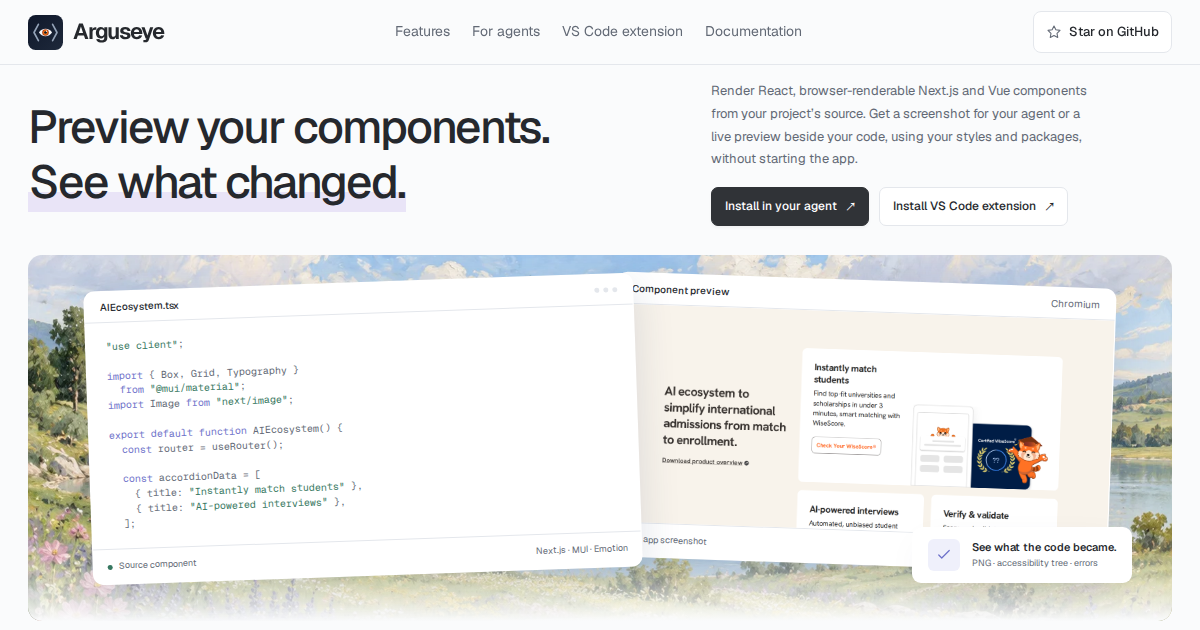
See your component. Change it. Inspect the consequences.
Watch the 58-second film · Claude Code setup guide · Agent setup and downloadable skill · VS Code extension
Arguseye gives coding agents eyes on real React (React Router and Remix included), Next.js, Vue 3 and Nuxt, Svelte 5 and SvelteKit, Preact and Solid components, without starting your app or writing stories. It uses your source, installed packages, discovered usage props, and supported layout context. Each render returns a cropped PNG, accessibility text, and structured evidence—including unresolved inputs, warnings, and errors.
npx @ayushniroula/arguseye install claude
Requires Node.js 22+, installed project dependencies, and Chromium or Google Chrome. Run this in your project, then restart your agent. Replace claude with codex, cursor, gemini, windsurf, vscode, antigravity, or copilot.
If Arguseye saves you a dev-server restart, a star helps other developers find it.
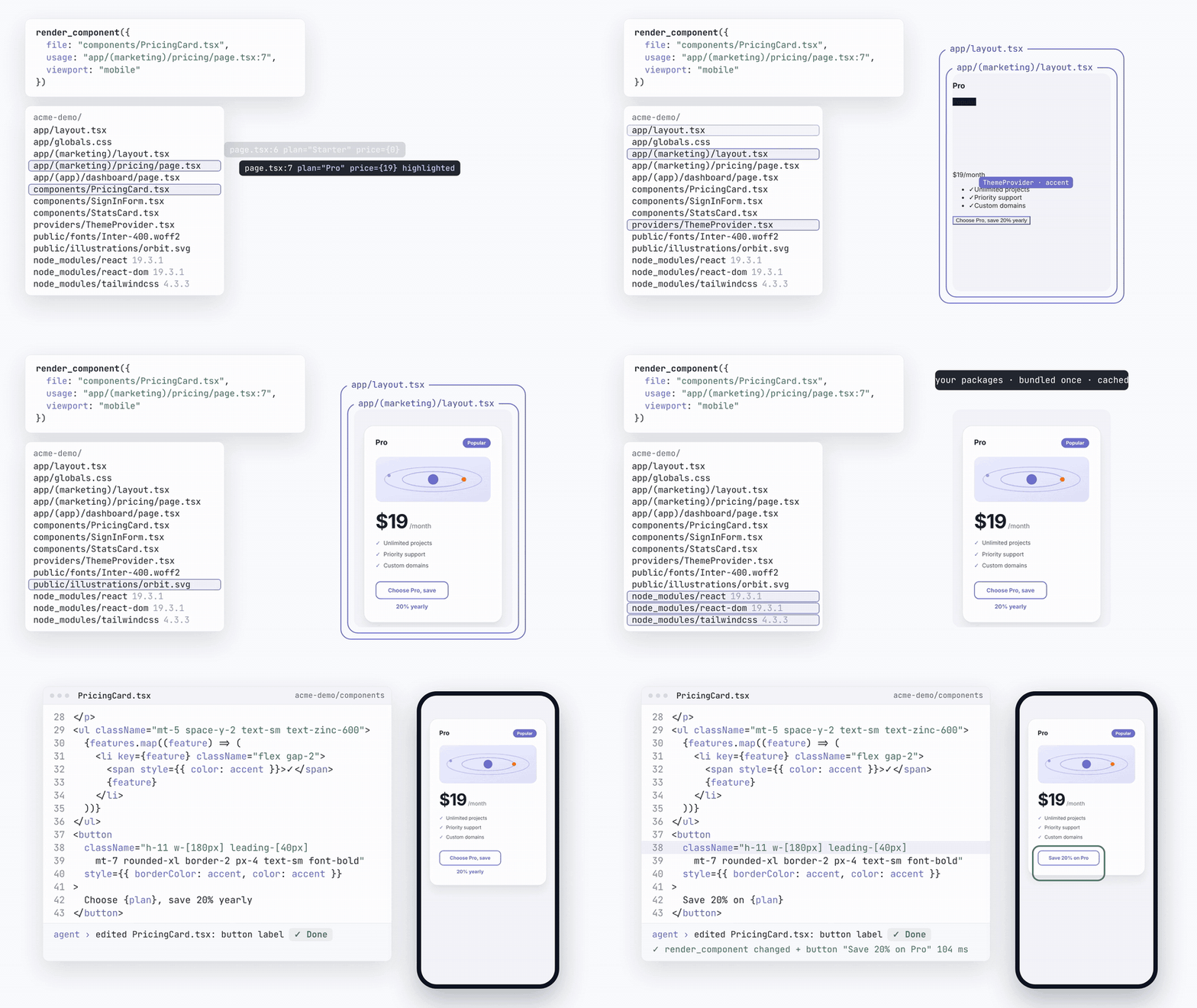
Explore the interactive demo ↗ · Choose your setup · Verify an edit · Tool reference · Performance & boundaries
Version 0.0.21 fixes Smarty compilation across clock boundaries and supports project-owned Smarty configuration, including unsaved helper and partial edits. See the native template setup contract.
Version 0.0.20 adds focused DOM/source/font inspection, portal-root font fixes, capture-environment compatibility checks and faster byte-identical image comparisons. It retains 0.0.19’s real progress, recovery diagnostics, audit completeness and opt-in scroll capture. See the rendering contracts and limits.
Inspect a specific heading or button with inspection: {selector: "h2", fonts: true, sources: true} in MCP, or shot app/page.tsx --inspect-selector 'h2' --fonts --sources --json in the CLI. Results cover up to 100 matching nodes inside the captured component, including targets after the first 100 page nodes. Missing targets keep the PNG and report incomplete inspection. Shadow trees and iframe documents remain excluded; accessibility checks retain the full captured scope.
Saved captures record the browser version, platform/architecture, OS release, pixel ratio and Arguseye version. Comparisons expose environmentChanges and stay incomplete across changed identities or legacy baselines without this metadata. Capture a fresh baseline in the current environment. Font, GPU and external-resource differences are not fully fingerprinted.
Preview Django, Jinja2, Handlebars, Mustache, EJS, Pug, Nunjucks, LiquidJS and other native Node/Python/PHP/Ruby templates with explicit JSON context and your own installed engines. Right-click a template in VS Code, select Preview Component, choose its engine/data profile and compare unsaved edits against a baseline. No app server or stories are needed.
Native template previews require 0.0.16 or later. See the engine matrix, configuration and native-adapter protocol for exact scopes and limits. “All engines” means an extensible native bridge, not a claim that every framework runs automatically.
Expand your client for a copyable recipe. These controls work directly on GitHub; the website has the live demo and installation tabs.
npx @ayushniroula/arguseye install claude
Writes the project's .mcp.json and the skill in ~/.claude/skills/arguseye. Restart Claude Code, then ask it to preview the component you are editing.
npx @ayushniroula/arguseye install codex --project /path/to/app
Adds the MCP entry to ~/.codex/config.toml and the skill to ~/.agents/skills/arguseye. Restart Codex to load them.
Choose one command:
npx @ayushniroula/arguseye install cursor
npx @ayushniroula/arguseye install windsurf
npx @ayushniroula/arguseye install gemini
npx @ayushniroula/arguseye install antigravity
The installer merges into the chosen client's existing configuration. See the installation guide for the exact file locations and verification status of each client.
For the visual editor panel, install Arguseye from the VS Code Marketplace and run Preview Component on a .tsx, .jsx, .vue, or .svelte file.
For Copilot's MCP tools:
npx @ayushniroula/arguseye install vscode
This writes .vscode/mcp.json. The visual extension and MCP server are two views of the same rendering engine.
# Inspect a component without MCP.
npx @ayushniroula/arguseye shot src/Card.tsx --export Card --out card.png --json

# Print MCP configuration without changing files.
npx @ayushniroula/arguseye install print

# Preview exactly what an installer would change.
npx @ayushniroula/arguseye install codex --project /path/to/app --dry-run
Requirements: Node.js 22+, installed project dependencies, and a Playwright-compatible Chromium browser or Google Chrome. If no browser is available, install one with npx playwright install chromium. Vue projects also need their own vue/compiler-sfc.
The bundled skill teaches agents when to render, how to interpret evidence, and how to fall back to the CLI. All installation options →
Capture the component, edit its source, then compare against the saved baseline. The export, resolved props, and viewport stay fixed for the comparison.
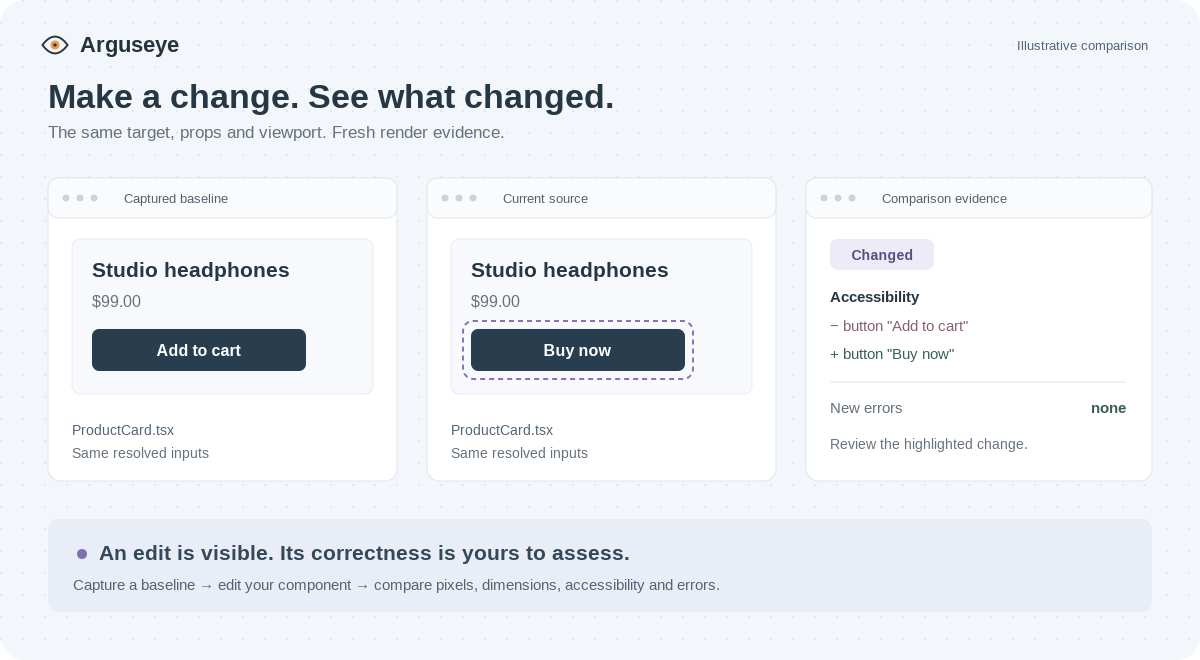
Render
src/Card.tsxusing its real usage props and save the capture ID. After my edit, compare against that baseline. Show the before, after, and pixel diff; report accessibility changes, new errors, and any incomplete context.
The agent uses render_component followed by render_diff({ baselineId }). MCP sessions retain the latest 64 captures; expired IDs require a new baseline.
npx @ayushniroula/arguseye shot src/Card.tsx --export Card \
  --capture-dir .arguseye/baseline --out .arguseye/before.png --json

# Edit src/Card.tsx, then compare its current source.
npx @ayushniroula/arguseye diff --baseline .arguseye/baseline \
  --out .arguseye/comparison --json
The comparison directory contains before, after, and highlighted diff images plus JSON evidence. CLI captures persist in the directory you choose.
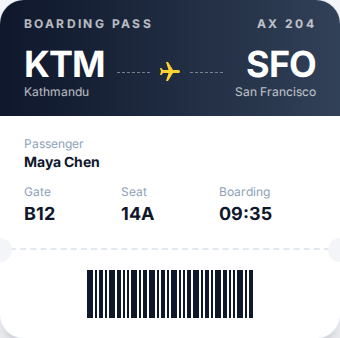
A real result. On the demo app in this repository, the edit made a boarding pass's gate, seat and boarding values bigger (text-lg to text-3xl). The diff reported changed: 3.83% changed pixels and marked two areas: the bigger values, which were asked for, and the tear line and barcode, which moved down 8 px because the card grew from 338 to 346 px.
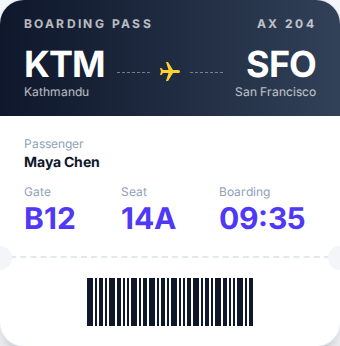
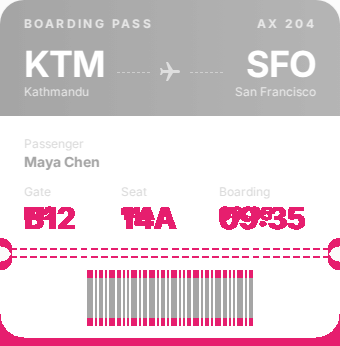
Results are unchanged, changed, or incomplete. A visual difference is evidence for review; it does not establish correctness. Runtime props, missing providers, unsupported framework behavior, and assets that did not settle remain visible in warnings and unresolved inputs.
A source diff cannot show clipped text, missing padding, or a theme that failed to apply. Arguseye lets the agent inspect rendered output close to the component it changed.
| Task | Arguseye returns |
|---|---|
| Inspect a component | Cropped PNG, accessibility tree, errors, warnings, and timings |
| Reuse real inputs | Discovered literal props, with runtime expressions reported as unresolved |
| Inspect an edit | Pixel differences, dimension changes, accessibility changes, and new/resolved errors |
| Check other usages | Paginated isolated renders, up to 12 per batch, with individual capture IDs |
| Reproduce a state | Component actions, storage inputs, usage ancestors, or a stand-in parent frame |
| Work in the editor | Unsaved-buffer previews, viewport presets, a light/dark toggle, props controls, and baseline comparison |
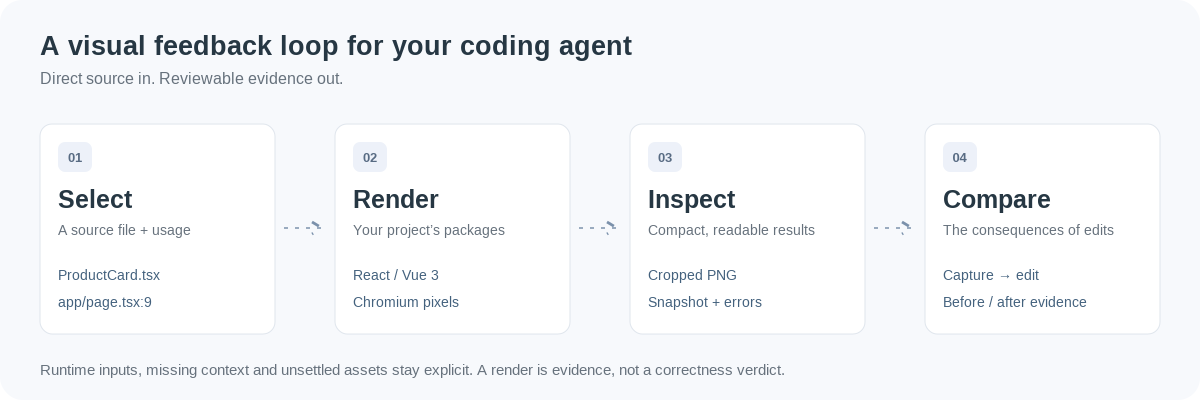
These are isolated component renders using discovered props, not full-page integration tests. Browser automation and stories remain useful for complete application journeys and explicitly curated states.
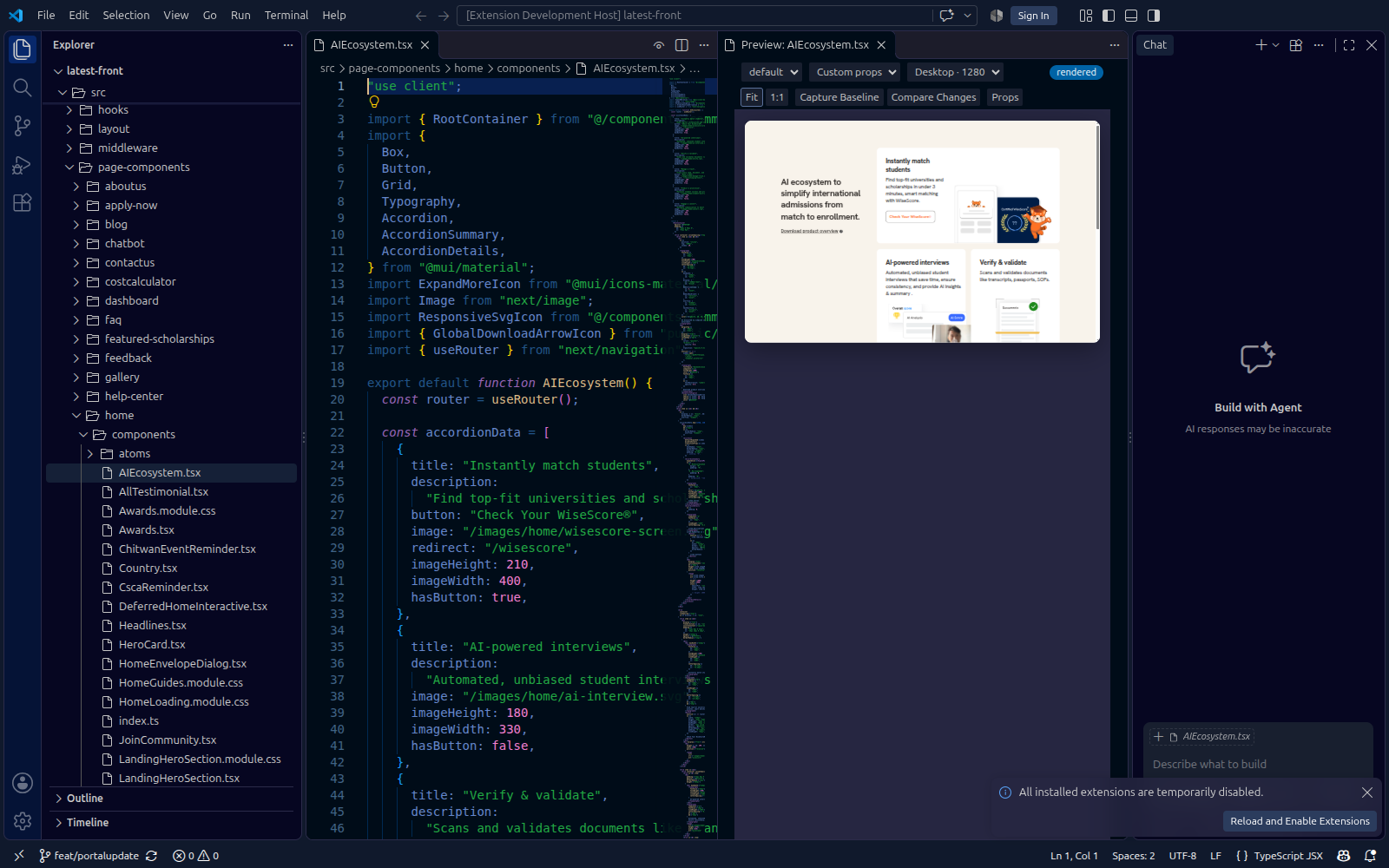
A real Next.js 14 app (MUI, Emotion, Redux, next-auth, 1,197 files), rendered from source with no server running, inside the app's own theme and nested layouts:
arguseye)If a preview cannot start, call inspect_project {} or run npx @ayushniroula/arguseye doctor --root . --json. It reports the selected application directory, installed framework versions and recovery steps without starting Chromium or executing project configuration. The native compiler reads supported Vite settings statically; it does not run arbitrary Vite plugins. A successful isolated render still requires reviewing warnings and unresolved inputs.
Project inspection and explicit setup require 0.0.14 or later; older 0.0.12 installations do not expose them.
Version 0.0.14 also adds opt-in project Vite plugins, replayable browser/network fixtures, cancellation and bounded sessions, resumable audits, optional accessibility/source inspection, Svelte context setup, and an independent HTML/Web Components adapter. See the rendering contracts
DarkWorldCoder/arguseye is a public repo on GitHub by DarkWorldCoder. Preview React, browser-renderable Next.js and Vue components from source. UI edit evidence for coding agents and VS Code, without starting the app.
It declares the MIT license on GitHub.
Its maker has not tagged a system, so it is unknown here. Its README says what it needs.
Open "Take it" on its page: Take My Repo writes an install plan for your machine and hands it to your AI agent (Claude Code, Codex or Cursor), which asks you before each step. Take My Repo has not tested it on any machine.
Reverse engineer anything with agents, from app behavior down to native binaries.
Flutter makes it easy and fast to build beautiful apps for mobile and beyond
f.k.a. Awesome ChatGPT Prompts. Share, discover, and collect prompts from the community. Free and open source — self-host for your organization with complete privacy.
Its last change on GitHub was on 2026-11-23. Take My Repo does not judge from that whether it is maintained.
Nobody has reviewed it on Take My Repo yet, which says nothing about its quality.
Take My Repo cannot say: it does not audit code and has not run arguseye. What is known comes from GitHub. It declares the MIT license on GitHub. Its last change was on 2026-11-23. It has 7 stars, which measure popularity, not safety. Nobody has reviewed it on Take My Repo yet, which says nothing about its quality. Read the source before you run it. With "Take it", your AI agent shows each step and asks you before running it; README text is treated as data, not as instructions.





