

ECC
The agent harness performance optimization system. Skills, instincts, memory, security, and research-first development for Claude Code, Codex, Opencode, Cursor and beyond.
- 309k
- JavaScript
- MIT
- 13 h ago
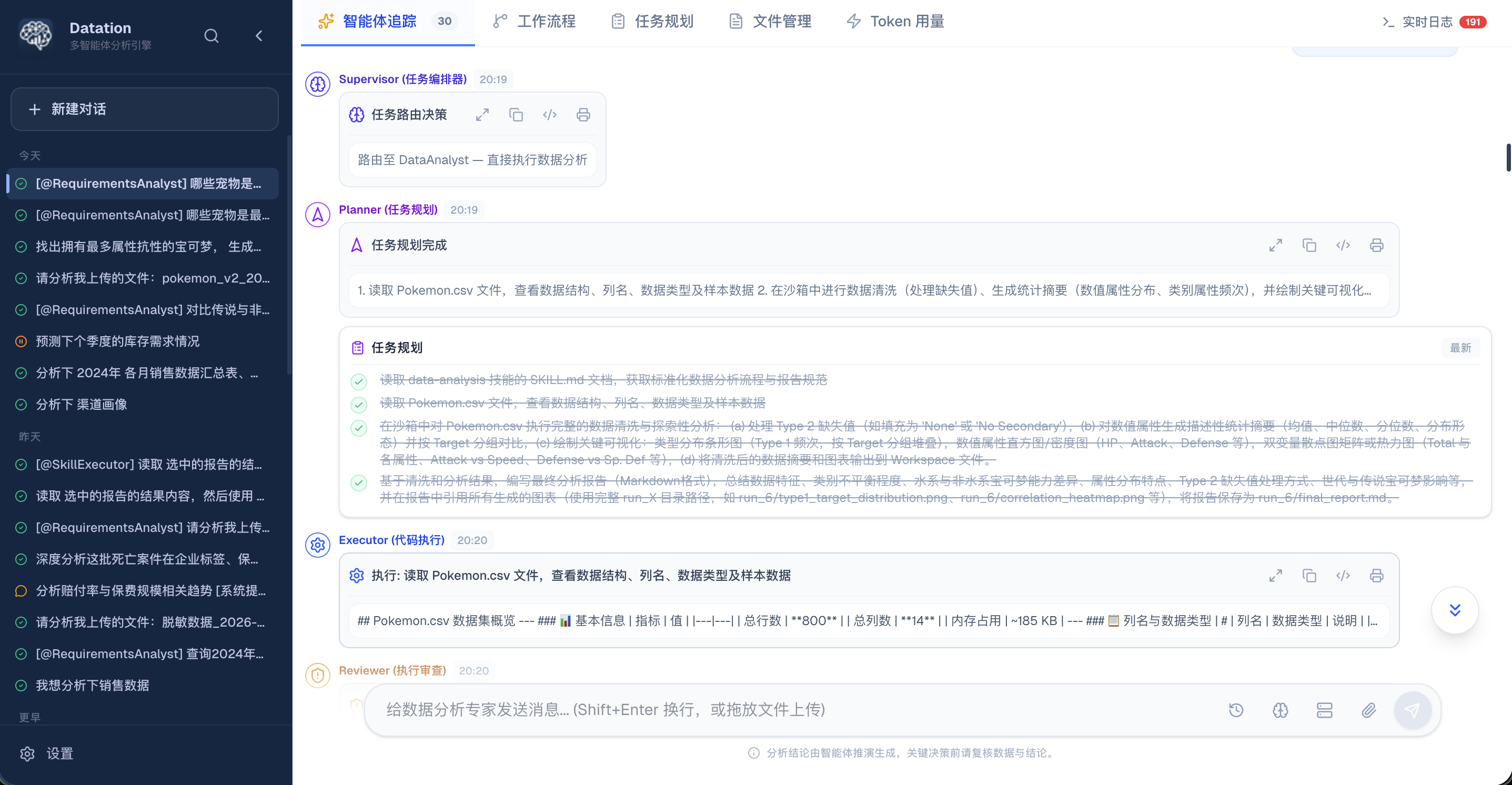
Datation 是一个基于 Multi-Agent Orchestration (多智能体编排) 架构的深度数据分析系统。它利用 LangGraph 作为核心调度引擎,集成了 MCP (Model Context Protocol)、Agent Skills (智能体技能库)、以及 Docling 高级文档解析能力,能够处理从需求模糊调研到输出专业可视化分析报告的全流程任务。
Repo DevYangJC/datation, read from GitHub 1 d ago. DevYangJC has not joined Take My Repo.
DevYangJC/datation is a public repo on GitHub by DevYangJC. Datation 是一个基于 Multi-Agent Orchestration (多智能体编排) 架构的深度数据分析系统。它利用 LangGraph 作为核心调度引擎,集成了 MCP (Model Context Protocol)、Agent Skills (智能体技能库)、以及 Docling 高级文档解析能力,能够处理从需求模糊调研到输出专业可视化分析报告的全流程任务。. It declares the MIT license on GitHub. It is written mainly in Python, has 0 stars and last changed on 2026-06-28. Nobody has reviewed it on Take My Repo yet, which says nothing about its quality. Read from GitHub on 2026-11-22.
Datation is a state-of-the-art autonomous data analysis system powered by Multi-Agent Orchestration. Utilizing LangGraph as the core scheduling orchestrator, it seamlessly integrates MCP (Model Context Protocol), custom Agent Skills, and Docling high-fidelity document parsing. It manages the entire lifecycle of data tasks—from vague, open-ended requirements to sophisticated, interactive HTML analytical reports.
Datation provides a highly responsive, feature-rich Web workspace with seamless trace logging, state snapshots, and detailed logs, offering an unparalleled agent developer and user experience.
📸 Visual Walkthrough: Check out our complete UI & Features Screenshots Gallery to explore the workspace visually!
🎬 Demo Video: Click the image below to watch the full demo on Douyin (抖音)!
SKILL.md) dynamically.enable_thinking toggle to switch LLM pipelines dynamically.pandas, numpy, matplotlib, openpyxl, etc../outputs archive without escaping the sandbox.user_preferences.json (administered via the QA Agent) and short-term mid-session ReAct experiences in session_memory.jsonl to avoid repeating computational errors.~/.datation/demo_data.db) pre-loaded with comprehensive synthetic sales history (20 customers, 12 categories, 24 products, 200 orders, ~381 items) on first startup, mapped instantly to an auto-generated MCP SQLite server via uvx.SKILL.md) in Markdown./ for slash commands or @ for context mentions directly in the chat input, with an inline hint strip to guide new users.uv and Python from the system PATH (including Homebrew, Miniconda, Anaconda, Cargo, etc.).[Browse/选择本地] button.datation-env.json and reused across sessions automatically.graph TD;
__start__([Start]) --> Supervisor;
Supervisor --> |Route| RequirementsAnalyst[Requirements Analyst: Elicitation & Plan Alignment];
Supervisor --> |Route| DataAnalyst[Data Analyst: Plan-and-Execute Computation];
Supervisor --> |Route| ReportGenerator[Report Generator: Parallel Writing & HTML Export];
Supervisor --> |Route| QAAgent[QA Agent: Document Q&A & Follow-ups];
Supervisor --> |Route| SkillExecutor[Skill Executor: Execute Expert SOPs];
RequirementsAnalyst --> Supervisor;
DataAnalyst --> Supervisor;
ReportGenerator --> Supervisor;
QAAgent --> Supervisor;
SkillExecutor --> Supervisor;
Supervisor --> |Finish| __end__([End]);
subgraph DataAnalyst_Sub ["Data Analyst Loop"]
planner(Planner: Make Subtasks) --> executor(Executor: Run Python Sandbox Code)
executor --> reviewer(Reviewer: Verify Conclusions)
reviewer --> |Failed| executor
reviewer --> |Passed| data_end(Finish Loop)
end
datation/
├── datation/                # Python backend codebase
│   ├── agents/              # Multi-agent graph definitions (Supervisor, Workers, Prompts)
│   ├── api/                 # FastAPI routes, SSE streams, suggestions, and rollback
│   ├── core/                # Configuration, state, & reasoning model wrappers
│   ├── locales/             # Backend i18n translation bundles (zh.json, en.json)
│   ├── utils/               # Common utilities and document loaders (Docling)
│   ├── main.py              # Server entry point
│   ├── mcp_client.py        # MCP client server communication managers
│   └── skill_loader.py      # Dynamic Agent Skills card loader
├── frontend/                # React 19 + Vite + Tailwind v4 frontend client
│   ├── src/components/      # UI Dashboard tabs (Chat, Plan, Files, Settings, Logs, Workflow, Search, Token)
│   ├── src/i18n/            # Frontend translations
│   ├── package.json         # Frontend manifest
│   └── vite.config.ts       # Vite build configurations
├── scripts/                 # Automation & helper scripts
│   ├── seed_data.sql        # Standard PostgreSQL seed SQL
│   ├── seed_demo_db.py      # SQLite e-commerce demo database generator
│   ├── setup_cn.sh          # Chinese-friendly environment one-click installer (macOS/Linux)
│   └── setup_cn.bat         # Chinese-friendly environment one-click installer (Windows)
├── skills/                  # Expert SOP directories (Agent Skills)
├── tools/                   # Isolated tools
│   ├── data_computation/    # Isolated Python sandbox environment
│   ├── knowledge_search/    # Local knowledge base search index
│   ├── local_file_reader/   # Safe document reading tool
│   ├── local_file_writer/   # Safe local report writing tool
│   ├── memory/              # Dual memory system (Preferences & Session Experience)
│   ├── shell_executor/      # Controlled command line runner
│   └── web_search/          # Search provider integrations
├── desktop/                 # Electron desktop application
│   ├── main.js              # Main process (env detection, backend lifecycle, IPC)
│   ├── preload.js           # Secure context bridge for splash & main window
│   ├── splash.html          # Multi-phase setup wizard (detect → setup → install → ready)
│   └── resources/           # App icons (icns, ico, png)
├── tests/                   # Automated unit & integration tests
├── start.sh                 # One-click startup script (macOS/Linux)
├── start.bat                # One-click startup script (Windows)
├── start.py                 # Cross-platform startup script (Python)
├── pyproject.toml           # Python uv dependencies configuration
└── uv.lock                  # Lockfile
For the best out-of-the-box experience, we recommend downloading the pre-compiled Datation Desktop App (Windows .exe, macOS .dmg, Linux .AppImage).
👉 Download the latest release here
The desktop app will automatically bootstrap the Python sandbox environment and install all necessary dependencies for you.
Ensure you have Python 3.12+ and Node.js 20+ installed.
We strongly recommend uv to manage Python packages:
curl -LsSf https://astral-sh/uv/install.sh | sh
cp .env.example .env
~/.datation/config/app.json or inside the Web UI Settings panel.LLM_API_KEY and LLM_API_BASE. For instance, using DeepSeek:{
"llm_model": "deepseek-v4-pro",
"llm_api_base": "https://api.deepseek.com",
"llm_api_key": "your_api_key_here"
}
[!TIP] Zero-Config Demo Setup: You do not need to configure any external database on your first startup. Datation automatically seeds a beautiful SQLite database (
demo_data.dbunder your user directory) and mounts it via the SQLite MCP server. You only need to provide an LLM API Key to start asking questions like "Analyze the e-commerce sales trends for 2024" immediately!
Launch both the FastAPI backend server and the React frontend workspace:
# macOS / Linux
chmod +x start.sh
./start.sh

# Windows
start.bat

# Or cross-platform via Python
python start.py
Access the application:
If you are running in a Chinese network environment with PyPI or NPM download speed constraints, you can bootstrap the environment with our specialized one-click installer using fast domestic mirrors:
# macOS / Linux
chmod +x scripts/setup_cn.sh
./scripts/setup_cn.sh

# Windows (Command Prompt)
scripts\setup_cn.bat
This automatically installs the required runtimes (if missing) and configures Tsinghua PyPI mirrors for uv/pip, and Taobao npm mirrors for React frontend packages!
DevYangJC/datation is a public repo on GitHub by DevYangJC. Datation 是一个基于 Multi-Agent Orchestration (多智能体编排) 架构的深度数据分析系统。它利用 LangGraph 作为核心调度引擎,集成了 MCP (Model Context Protocol)、Agent Skills (智能体技能库)、以及 Docling 高级文档解析能力,能够处理从需求模糊调研到输出专业可视化分析报告的全流程任务。.
It declares the MIT license on GitHub.
Its maker has not tagged a system, so it is unknown here. Its README says what it needs.
Open "Take it" on its page: Take My Repo writes an install plan for your machine and hands it to your AI agent (Claude Code, Codex or Cursor), which asks you before each step. Take My Repo has not tested it on any machine.
Its last change on GitHub was on 2026-06-28. Take My Repo does not judge from that whether it is maintained.
Nobody has reviewed it on Take My Repo yet, which says nothing about its quality.
The agent harness performance optimization system. Skills, instincts, memory, security, and research-first development for Claude Code, Codex, Opencode, Cursor and beyond.
Reverse engineer anything with agents, from app behavior down to native binaries.
Fair-code workflow automation platform with native AI capabilities. Combine visual building with custom code, self-host or cloud, 400+ integrations.
Knowledge infrastructure to make your agents smarter. Search, scrape and access 550+ data providers through one API.
🌱 Argus 是一个基于 RAG 架构的开源知识库平台,后端采用 Java 21 + Spring Boot + MyBatis-Plus + PostgreSQL/pgvector,前端采用 Vue 3 + TypeScript + Element Plus,AI 层基于 Spring AI Alibaba(通义千问)+ ReactAgent 图引擎,以 MinIO + Elasticsearch 为存储与检索引擎。
IntelliHub 是一个企业级 API 开放平台,提供 API 全生命周期管理、多租户鉴权、流量治理、应用中心及开发者服务。平台基于 Spring Cloud 微服务架构,集成网关、IAM、日志审计、搜索、AIGC 等核心能力,支持高可用、可扩展的开放生态体系建设,助力企业安全高效地对外开放服务能力。
🧵 DataLoom — 把在线表格在线excel像零件一样装进你的项目。 前端是独立 SPA(Vue 3 + Luckysheet),后端是独立微服务(Spring Boot),之间只有 REST API。你后端是 Java、Go、Node 还是 Python 都无所谓——把这两个目录扔进去,配个代理,在线表格能力就有了。 分块存储支持十万行级的 Excel 实时编辑,前端 ExcelJS 导出样式零丢失,H2 数据库零配置启动。从 clone 到跑通"上传→编辑→导出"闭环,两分钟。 适合:管理后台缺数据看板的、SaaS 产品需要内嵌表格编辑能力的、内网环境不想采购私有化方案的。
基于 React 19 + Vite + Express + SQLite 的交互式知识图谱可视化应用,支持节点拖拽编辑、关系连线、自动布局、多画板管理与高清导出。
基于 Spring Boot 3 与 Vue 的现代化文献管理后端,集成 Kimi AI 实现智能阅读指南生成、自动标签分类与多格式(PDF/DOCX/MD/EXCEL)解析,支持实时 SSE 推送、多维检索及 Knife4j API 文档。





