ghostlabel
Drag-and-drop PDF label printing for cheap Bluetooth thermal printers on Linux. No proprietary apps.
- 13
- GPL-3.0
- 1 d ago
Repo DoingFedTime/ghostlabel, read from GitHub 20 min ago. DoingFedTime has not joined Take My Repo.
In short
DoingFedTime/ghostlabel is a public repo on GitHub by DoingFedTime. Drag-and-drop PDF label printing for cheap Bluetooth thermal printers on Linux. No proprietary apps. It declares the GPL-3.0 license on GitHub. It is written mainly in Rust, has 13 stars and last changed on 2026-11-23. Nobody has reviewed it on Take My Repo yet, which says nothing about its quality. Read from GitHub on 2026-11-25.
Similar repos
rea
Reverse engineer anything with agents, from app behavior down to native binaries.

GhostLabel
GhostLabel prints shipping label PDFs to a KNAON Y813BT Bluetooth thermal label printer from Linux, without the Android app.
What this is
The KNAON Y813BT is a cheap 4-inch Bluetooth thermal label printer sold under several brand names on Amazon and AliExpress. The manufacturer only provides a proprietary Android app called "Flash Label Pro" -- there's no Linux client, SDK, or protocol documentation of any kind. If you want to print from a desktop you have to email the PDF to your phone, open it, share it to the app, and print. Every single time.
I reverse-engineered the printer from scratch so you can drag a PDF onto a window and it prints. That's it.
How I reversed it
1. Initial hypothesis: ESC/POS
Most cheap thermal printers in this price range speak ESC/POS over Bluetooth SPP (UUID 00001101-0000-1000-8000-00805F9B34FB, RFCOMM channel 1). I tried GS v 0 (raster bit-image, 0x1D 0x76 0x30) first and it printed -- blurry, but it printed. That confirmed the transport and command set.
2. Checking the vendor app
I looked at the vendor's Android app to see whether it used anything beyond standard ESC/POS. Its printing library is aimed at inkjet products, and the Y813BT ignores every command it doesn't understand, so plain ESC/POS is all that's needed.
3. Dialing in image quality
Raw ESC/POS at 203 DPI produced readable but poor-quality prints. There were three issues:
| Problem | Root cause | Fix |
|---|---|---|
| Washed-out / light print | No contrast stretching | autocontrast: stretch histogram 1st to 99th percentile to 0-255 |
| Horizontal banding (white stripes in solid areas) | Rendering above the printer DPI and downsampling with Lanczos can leave ringing that thresholding turns into evenly spaced white lines on some PDFs | Render Scale is a setting. 1 renders directly at the printer DPI (FAST preset), 2 is the default (BALANCED), 3 is HIGH QUALITY. If you see banding, set it to 1. |
| Garbled output after failed jobs | Printer still waiting for bytes from previous command | Flush: 64 x 0x00 + ESC @ before every job |
4. ESC/POS commands confirmed working on Y813BT
| Bytes | Command | Purpose |
|---|---|---|
1B 40 |
ESC @ | Initialize / hard reset |
1B 32 |
ESC 2 | Set default line spacing |
1D 76 30 m xL xH yL yH [data] |
GS v 0 | Raster bit-image (1-bit, MSB = leftmost) |
1B 64 04 |
ESC d 4 | Feed 4 lines |
1D 56 41 03 |
GS V A 3 | Partial cut with feed |
One command that doesn't work: ESC * (column raster, mode 33). The printer ignores the data bytes and jams waiting for more input. If you accidentally send it, you need to power-cycle the printer or flush with 200+ null bytes followed by ESC @.
5. Bluetooth connection (raw RFCOMM)
The Rust implementation connects over a raw libc::socket(31, SOCK_STREAM, 3) with a manually-constructed sockaddr_rc, which means no rfcomm bind and no system-level CUPS involvement. BlueZ stores bdaddr_t in reversed byte order, so AA:BB:CC:DD:EE:FF goes into the struct as [FF, EE, DD, CC, BB, AA].
Install
Download the latest release from the Releases page.
| Package | Format | Distro |
|---|---|---|
GhostLabel_x.x.x_amd64.deb |
Debian package | Ubuntu, Debian, Mint, Pop!_OS |
GhostLabel_x.x.x_amd64.AppImage |
Portable executable | Any Linux distro |
GhostLabel-x.x.x-1.x86_64.rpm |
RPM package | Fedora, RHEL, openSUSE |
You'll also need poppler-utils on your machine -- GhostLabel shells out to pdftoppm to render PDFs:
# Ubuntu / Debian / Mint
sudo apt install poppler-utils

# Fedora
sudo dnf install poppler-utils

# Arch
sudo pacman -S poppler
Debian / Ubuntu:
sudo dpkg -i GhostLabel_*.deb
AppImage (any distro):
chmod +x GhostLabel_*.AppImage
./GhostLabel_*.AppImage
Pair your printer in System Settings -> Bluetooth before first launch.
Build from source
Requires Rust 1.88+, Node.js 18+, and poppler-utils.
npm install
npm run build
Packages are written to src-tauri/target/release/bundle/.
Verifying release binaries
Each release asset has a matching .minisig file made with minisign. The public key is signing/ghostlabel.pub in this repo (key ID 2922EEA6A1D06B0B).
Public key:
RWQLa9Chpu4iKdunJ/qhaiOisIb+tVYsHDb6xKkjdeHXJePY9oMYGeY0
Verify a downloaded file (keep its .minisig next to it):
# With the public key file
minisign -Vm GhostLabel_0.1.0_amd64.deb -p signing/ghostlabel.pub

# Or inline
minisign -Vm GhostLabel_0.1.0_amd64.deb -P RWQLa9Chpu4iKdunJ/qhaiOisIb+tVYsHDb6xKkjdeHXJePY9oMYGeY0
The private key is not in this repository, so only the author can produce valid signatures.
Usage
- Launch GhostLabel
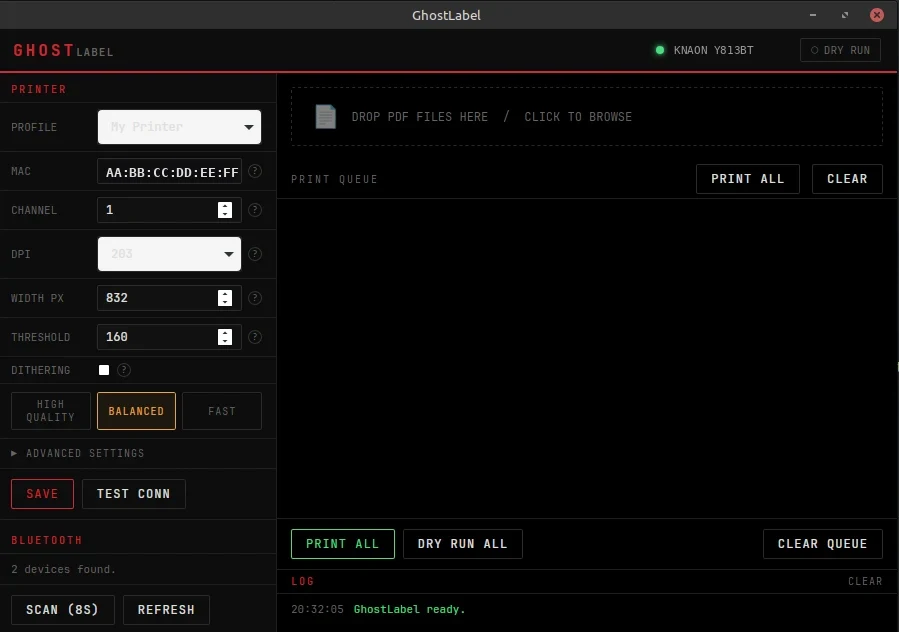
- Drag-and-drop one or more PDF files onto the drop zone (or click to browse)
- Click Print All
First-run: click the gear icon to set your printer's MAC address. Config is saved to ~/.config/ghostlabel/config.json.
Settings
Basic
| Setting | Default | Notes |
|---|---|---|
| Bluetooth MAC | Your printer's MAC. Use SCAN to find it. | |
| RFCOMM Channel | 1 |
Don't change unless connection fails |
| DPI | 203 |
Match your printer's thermal head resolution (203 or 300) |
| Width (px) | 832 |
Max printable pixels at native DPI. KNAON Y813BT = 832 |
| Threshold | 160 |
Darkness cutoff. Higher = more dots printed = darker output |
| Dithering | off | Floyd-Steinberg for photos. Leave off for barcodes/text |
Quick presets: one-click starting points, tunable from there:
| Preset | Use case |
|---|---|
| HIGH QUALITY | Sharpest barcodes, slowest transfer. Best for archival or problem labels. |
| BALANCED | Default. Good for most shipping labels. |
| FAST | Minimal processing, quickest print. Fine for bulk jobs. |
Advanced (expand in sidebar)
| Setting | Default | Notes |
|---|---|---|
| Render Scale | 2 |
PDF rendered at DPI x scale then downsampled. 2 = 2x supersampling |
| Sharpen | 0.7 |
Unsharp mask before threshold. 0 = off. >1.2 causes halos |
| Slice Lines | 48 |
Lines per BT packet. Lower if printer pauses mid-label |
| Slice Delay | 80ms |
Pause between packets. Increase if thermal head overheats |
| Heat Time | 255 |
ESC 7 heating duration. Higher = darker. 0 = skip command |
| Heat Dots | 15 |
ESC 7 heating dots. Typically 7-15 for narrow printers |
Printer compatibility
Tested on the KNAON Y813BT (4-inch thermal, 203 DPI, Bluetooth SPP). Similar printers are reportedly sold under other brand names (HPRT, Xprinter, Munbyn, Polono and others) with the same hardware, but that is unverified and only the KNAON Y813BT has been tested. If your printer accepts ESC/POS GS v 0 over Bluetooth RFCOMM, it may work.
License
GPL-3.0
Questions
What is ghostlabel?
DoingFedTime/ghostlabel is a public repo on GitHub by DoingFedTime. Drag-and-drop PDF label printing for cheap Bluetooth thermal printers on Linux. No proprietary apps.
Is ghostlabel open source?
It declares the GPL-3.0 license on GitHub.
Does ghostlabel run on macOS, Windows or Linux?
Its maker tagged it for Linux. That is declared by the maker; Take My Repo has not tested it.
How do I install ghostlabel?
Open "Take it" on its page: Take My Repo writes an install plan for your machine and hands it to your AI agent (Claude Code, Codex or Cursor), which asks you before each step. Take My Repo has not tested it on any machine.