xcode
Super fast pbxproj parser
- 224
- 6 mo ago
Repo EvanBacon/xcode, read from GitHub 9 h ago. EvanBacon has not joined Take My Repo.
In short
EvanBacon/xcode is a public repo on GitHub by EvanBacon. Super fast pbxproj parser. It declares no license on GitHub. Public does not mean open source: without a license, nobody is granted the right to reuse it. It is written mainly in TypeScript, has 224 stars and last changed on 2026-06-09. Nobody has reviewed it on Take My Repo yet, which says nothing about its quality. Read from GitHub on 2026-11-23.
Similar repos
awesome-cheatsheets
👩💻👨💻 Awesome cheatsheets for popular programming languages, frameworks and development tools. They include everything you should know in one single file.

@bacons/xcode
The fastest and most accurate parser for Xcode project files (.pbxproj). 10-28x faster than alternatives (xcode, XcodeProj, xcodeproj) with better error messages and full spec compliance.
bun add @bacons/xcode
Performance
Run benchmarks with bun run bench or bun run bench:compare for cross-language comparison.
| Parser | Language | Time (29KB) | Time (263KB) | Relative |
|---|---|---|---|---|
| @bacons/xcode | TypeScript | 0.15ms | 0.81ms | 1x |
| xcode (legacy) | JavaScript | 1.54ms | crashes | 10x slower |
| XcodeProj (Tuist) | Swift | 2.00ms | 11.2ms | 13x slower |
| xcodeproj (CocoaPods) | Ruby | 3.63ms | 22.5ms | 24x slower |
Key Performance Features
- 10-28x faster than alternatives (xcode, XcodeProj, xcodeproj)
- Single-pass parsing with no intermediate representation
- Pre-computed lookup tables for character classification
- Handles files that crash the legacy parser
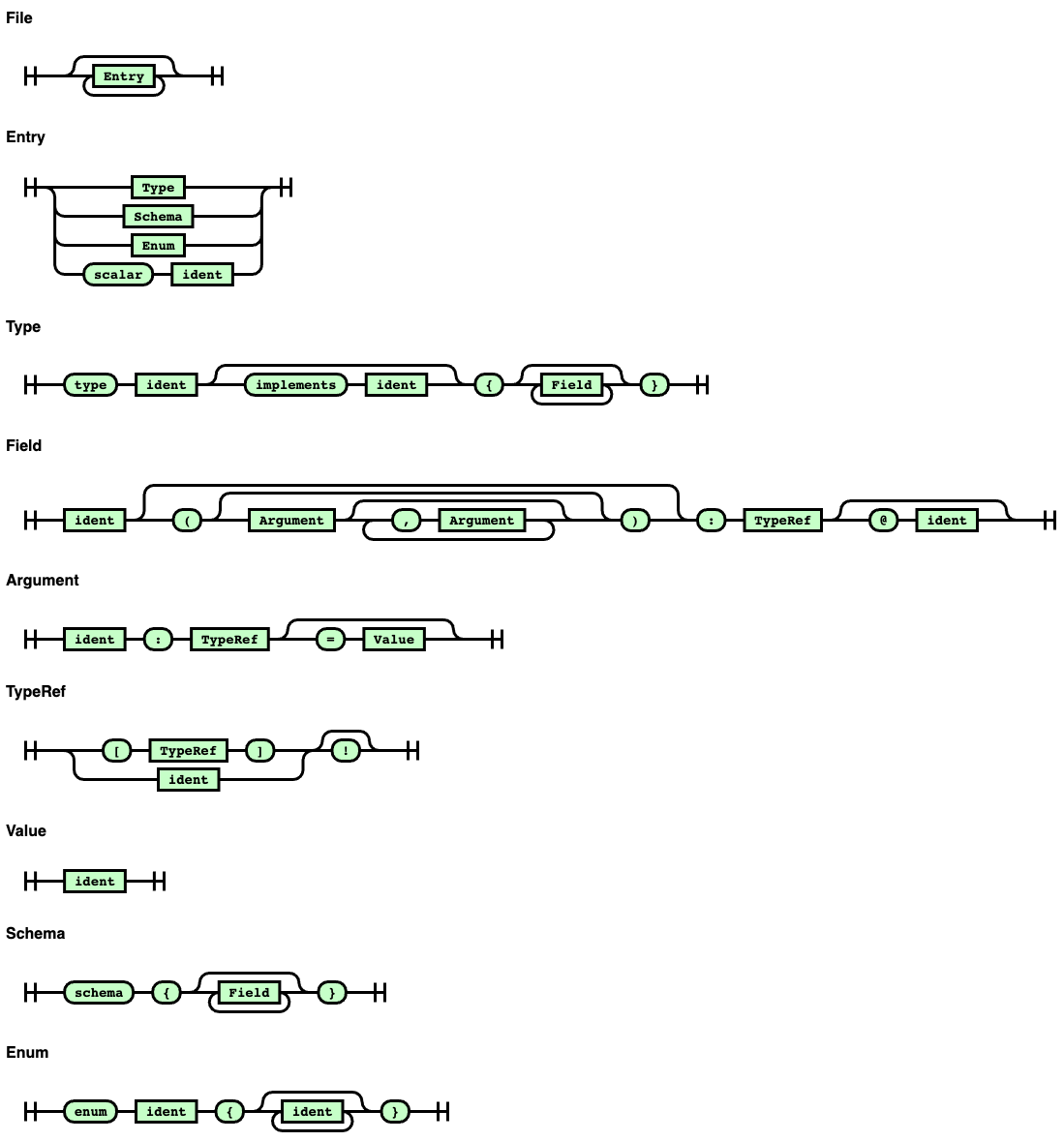
Here is a diagram of the grammar used for parsing:

Why
The most popular solution for parsing pbxproj files is a very old package by Cordova called xcode.
But xcode has some major issues:
- Inaccurate parsing: strings can be quoted incorrectly very often, lists often don't work.
- Outdated: values for App Clips, iMessage Sticker packs, etc are missing.
- Untyped: TypeScript is a crutch I proudly support.
- Slow: PEG.js is not very fast (benchmark).
- Feature Incomplete: Missing the
Datatype (<xx xx xx>).
Format Comparison
Consider the following format comparison.
Input .pbxproj
307D28A1123043350040C0FA /* app-icon.png */ = {
  isa = PBXFileReference;
  lastKnownFileType = image.png;
  path = "app-icon.png";
  sourceTree = "<group>";
};
xcode output (old)
{
  "307D28A1123043350040C0FA_comment": "app-icon.png",
  "308D052E1370CCF300D202BF": {
    "isa": "PBXFileReference",
    "lastKnownFileType": "image.png",
    "path": "\"app-icon.png\"",
    "sourceTree": "\"<group>\""
  }
}
That same object would look like this in @bacons/xcode:
@bacons/xcode output (NEW)
{
  "308D052E1370CCF300D202BF": {
    "isa": "PBXFileReference",
    "lastKnownFileType": "image.png",
    "path": "app-icon.png",
    "sourceTree": "<group>"
  }
}
Notice how you don't need to strip or reapply quotes, you also don't need to filter out comments because the default visitor ignores comments in favor of regenerating them dynamically like Xcode does.
API
There's a mutable-graph layer which makes it much easier to work with pbxproj.
import {
  PBXAggregateTarget,
  PBXFrameworksBuildPhase,
  PBXLegacyTarget,
  PBXNativeTarget,
  XcodeProject,
} from "@bacons/xcode";

const project = XcodeProject.open("/path/to/project.pbxproj");

// Get all targets:
project.rootObject.props.targets;
Create a Swift file:
import { PBXBuildFile, PBXFileReference } from "@bacons/xcode";
import path from "path";

// Get `project` from XcodeProject.

const file = PBXBuildFile.create(project, {
  fileRef: PBXFileReference.create(project, {
    path: "MyFile.swift",
    sourceTree: "<group>",
  }),
});

// The file and fileRef will now be injected in the pbxproj `objects` dict.
XCScheme Support
Parse and manipulate Xcode scheme files (.xcscheme). Schemes define how targets are built, run, tested, profiled, analyzed, and archived.
Low-level API
import * as scheme from "@bacons/xcode/scheme";
import fs from "fs";

// Parse an xcscheme file
const xml = fs.readFileSync(
  "/path/to/Project.xcodeproj/xcshareddata/xcschemes/App.xcscheme",
  "utf-8",
);
const xcscheme = scheme.parse(xml);

// Modify the scheme
xcscheme.buildAction.parallelizeBuildables = true;
xcscheme.launchAction.environmentVariables = [
  { key: "DEBUG", value: "1", isEnabled: true },
];

// Serialize back to XML
const outputXml = scheme.build(xcscheme);
fs.writeFileSync("/path/to/App.xcscheme", outputXml);
High-level API
import { XcodeProject, XCScheme } from "@bacons/xcode";

// Load project and get schemes
const project = XcodeProject.open("/path/to/project.pbxproj");
const schemes = project.getSchemes();
const appScheme = project.getScheme("App");

// Create a new scheme
const newScheme = XCScheme.create("MyNewScheme");
newScheme.addBuildTarget({
  buildableIdentifier: "primary",
  blueprintIdentifier: "ABC123", // Target UUID
  buildableName: "App.app",
  blueprintName: "App",
  referencedContainer: "container:Project.xcodeproj",
});
newScheme.setLaunchEnvironmentVariable("API_URL", "https://api.example.com");
newScheme.addLaunchArgument("-verbose");

// Save to disk
project.saveScheme(newScheme);

// Create scheme for an existing target
const mainTarget = project.rootObject.props.targets[0];
const targetScheme = project.createSchemeForTarget(mainTarget);
project.saveScheme(targetScheme);
Scheme Management
Parse and build xcschememanagement.plist files that control scheme visibility and ordering:
import * as scheme from "@bacons/xcode/scheme";
import fs from "fs";

const plist = fs.readFileSync("/path/to/xcschememanagement.plist", "utf-8");
const management = scheme.parseManagement(plist);

// Check scheme visibility
console.log(management.SchemeUserState?.["App.xcscheme"]?.isShown);

// Rebuild plist
const output = scheme.buildManagement(management);
XCWorkspace Support
Parse and manipulate Xcode workspace files (.xcworkspace). Workspaces group multiple Xcode projects together, commonly used with CocoaPods, monorepos, and multi-project setups.
Low-level API
import * as workspace from "@bacons/xcode/workspace";
import fs from "fs";

// Parse a workspace file
const xml = fs.readFileSync(
  "/path/to/MyApp.xcworkspace/contents.xcworkspacedata",
  "utf-8",
);
const ws = workspace.parse(xml);

// Access project references
console.log(ws.fileRefs); // [{ location: "group:App.xcodeproj" }, ...]

// Modify the workspace
ws.fileRefs?.push({ location: "group:NewProject.xcodeproj" });

// Serialize back to XML
const outputXml = workspace.build(ws);
fs.writeFileSync("/path/to/contents.xcworkspacedata", outputXml);
High-level API
import { XCWorkspace } from "@bacons/xcode";

// Open an existing workspace
const workspace = XCWorkspace.open("/path/to/MyApp.xcworkspace");

// Get all project paths
const projects = workspace.getProjectPaths();
console.log(projects); // ["group:App.xcodeproj", "group:Pods/Pods.xcodeproj"]

// Check if workspace contains a project
if (!workspace.hasProject("NewProject.xcodeproj")) {
  workspace.addProject("NewProject.xcodeproj");
}

// Remove a project
workspace.removeProject("OldProject.xcodeproj");

// Work with groups
const group = workspace.addGroup("Libraries", "group:Libraries");
group.fileRefs?.push({ location: "group:Libraries/MyLib.xcodeproj" });

// Save changes
workspace.save();

// Create a new workspace
const newWorkspace = XCWorkspace.create("MyWorkspace");
newWorkspace.addProject("App.xcodeproj");
newWorkspace.addProject("Pods/Pods.xcodeproj");
newWorkspace.save("/path/to/MyWorkspace.xcworkspace");
Location Types
Workspace file references use location specifiers:
group:path- Relative path from workspace root (most common)self:- Self-reference (embedded workspace inside.xcodeproj)container:path- Absolute container reference (rare)absolute:path- Absolute file path
IDEWorkspaceChecks
Manage IDEWorkspaceChecks.plist files that store workspace check states. Introduced in Xcode 9.3, these files prevent Xcode from recomputing checks each time a workspace is opened.
The primary use is suppressing the macOS 32-bit deprecation warning:
import { XCWorkspace, IDEWorkspaceChecks } from "@bacons/xcode";

// Suppress the 32-bit deprecation warning
const workspace = XCWorkspace.open("/path/to/MyApp.xcworkspace");
workspace.setMac32BitWarningComputed();

// Or work with IDEWorkspaceChecks directly
const checks = IDEWorkspaceChecks.openOrCreate("/path/to/MyApp.xcworkspace");
checks.mac32BitWarningComputed = true;
checks.save();

// Low-level API
import * as workspace from "@bacons/xcode/workspace";

const plist = workspace.parseChecks(plistString);
console.log(plist.IDEDidComputeMac32BitWarning); // true

const output = workspace.buildChecks({ IDEDidComputeMac32BitWarning: true });
XCConfig Support
Parse and manipulate Xcode configuration files (.xcconfig). These files define build settings that can be shared across targets and configurations.
Low-level API
import * as xcconfig from "@bacons/xcode/xcconfig";
import fs from "fs";

// Parse an xcconfig string
const config = xcconfig.parse(`
  #include "Base.xcconfig"
  PRODUCT_NAME = MyApp
  OTHER_LDFLAGS[sdk=iphoneos*] = -framework UIKit
`);

// Parse from file (resolves #include directives)
const config = xcconfig.parseFile("/path/to/Project.xcconfig");

// Flatten build settings (merges includes, applies conditions)
const allSettings = xcconfig.flattenBuildSettings(config);

// Filter by platform conditions
const iosSettings = xcconfig.flattenBuildSettings(config, {
  sdk: "iphoneos",
  arch: "arm64",
  config: "Release",
});

// Serialize back to xcconfig format
const output = xcconfig.build(config);
fs.writeFileSync("/path/to/Project.xcconfig", output);
Conditional Settings
XCConfig supports conditional settings based on SDK, architecture, and configuration:
// SDK-specific settings
OTHER_LDFLAGS[sdk=iphoneos*] = -framework UIKit
OTHER_LDFLAGS[sdk=macosx*] = -framework AppKit

// Architecture-specific settings
ARCHS[arch=arm64] = arm64
ARCHS[arch=x86_64] = x86_64

// Configuration-specific settings
GCC_OPTIMIZATION_LEVEL[config=Debug] = 0
GCC_OPTIMIZATION_LEVEL[config=Release] = s

// Combined conditions
LIBRARY_SEARCH_PATHS[sdk=iphoneos*][arch=arm64] = /usr/lib/arm64
Include Directives
// Required include - throws if file not found
#include "Base.xcconfig"

// Optional include - silently ignored if file not found
#include? "Optional.xcconfig"
Variable Expansion
XCConfig supports variable references and the $(inherited) keyword:
// Reference other settings
PRODUCT_BUNDLE_IDENTIFIER = $(BUNDLE_ID_PREFIX).$(PRODUCT_NAME:lower)

// Inherit from included files
OTHER_LDFLAGS = $(inherited) -framework UIKit
XCSharedData Support
Access and manipulate shared data directories (xcshareddata) which contain schemes, breakpoints, and workspace settings that are intended for version control.
High-level API
import { XcodeProject, XCSharedData } from "@bacons/xcode";

// Get shared data from a project
const project = XcodeProject.open("/path/to/project.pbxproj");
const sharedData = project.getSharedData();

// Access schemes
const schemes = sharedData.getSchemes();
const appScheme = sharedData.getScheme("App");

// Access breakpoints
if (sharedData.breakpoints) {
  console.log(sharedData.breakpoints.breakpoints?.length);
}

// Access workspace settings
if (sharedData.workspaceSettings) {
  console.log(sharedData.workspaceSettings.PreviewsEnabled);
}

// Modify and save
sharedData.workspaceSettings = {
  PreviewsEnabled: true,
  IDEWorkspaceSharedSettings_AutocreateContextsIfNeeded: false,
};
sharedData.save();
Breakpoints API
Parse and build Xcode breakpoint files (Breakpoints_v2.xcbkptlist):
import * as breakpoints from "@bacons/xcode/breakpoints";
import fs from "fs";

// Parse breakpoint file
const xml = fs.readFileSync(
  "/path/to/xcshareddata/xcdebugger/Breakpoints_v2.xcbkptlist",
  "utf-8",
);
const list = breakpoints.parse(xml);

// Access breakpoints
for (const bp of list.breakpoints ?? []) {
  console.log(bp.breakpointExtensionID); // "Xcode.Breakpoint.FileBreakpoint"
  console.log(bp.breakpointContent?.filePath);
  console.log(bp.breakpointContent?.startingLineNumber);
}

// Add a new breakpoint
list.breakpoints?.push({
  breakpointExtensionID: "Xcode.Breakpoint.FileBreakpoint",
  breakpointContent: {
    uuid: "new-uuid",
    shouldBeEnabled: true,
    filePath: "MyApp/ViewController.swift",
    startingLineNumber: "42",
    endingLineNumber: "42",
    actions: [
      {
        actionExtensionID: "Xcode.BreakpointAction.DebuggerCommand",
        actionContent: { consoleCommand: "po self" },
      },
    ],
  },
});

// Serialize back to XML
const outputXml = breakpoints.build(list);
XCUserData Support
Access and manipulate user data directories (xcuserdata) which contain per-user schemes, breakpoints, and scheme management. Unlike shared data, user data is per-developer and typically not checked into version control.
High-level API
import { XcodeProject, XCUserData } from "@bacons/xcode";

// Get user data from a project
const project = XcodeProject.open("/path/to/project.pbxproj");

// Get all users
const allUserData = project.getAllUserData();
for (const userData of allUserData) {
  console.log(`User: ${userData.userName}`);
  console.log(`Schemes: ${userData.getSchemes().length}`);
}

// Get data for a specific user
const myUserData = project.getUserData("johnsmith");

// Access user schemes
const schemes = myUserData.getSchemes();
const debugScheme = myUserData.getScheme("MyApp-Debug");

// Access user breakpoints
if (myUserData.breakpoints) {
  console.log(myUserData.breakpoints.breakpoints?.length);
}

// Access scheme management (order, visibility)
if (myUserData.schemeManagement) {
  console.log(myUserData.schemeManagement.SchemeUserState);
}

// Modify and save
myUserData.breakpoints = {
  uuid: "new-uuid",
  type: "1",
  version: "2.0",
  breakpoints: [],
};
myUserData.save();
Standalone Usage
Questions
What is xcode?
EvanBacon/xcode is a public repo on GitHub by EvanBacon. Super fast pbxproj parser.
Is xcode open source?
It declares no license on GitHub. Public does not mean open source: without a license, nobody is granted the right to reuse it.
Does xcode run on macOS, Windows or Linux?
Its maker tagged it for macOS. That is declared by the maker; Take My Repo has not tested it.
How do I install xcode?
Open "Take it" on its page: Take My Repo writes an install plan for your machine and hands it to your AI agent (Claude Code, Codex or Cursor), which asks you before each step. Take My Repo has not tested it on any machine.