
evermem-claude-code
Persistent memory for Claude Code. Automatically saves and recalls context from past coding sessions.
- 63
- 3 mo ago
Repo EverMind-AI/evermem-claude-code, read from GitHub 17 h ago. EverMind-AI has not joined Take My Repo.
In short
EverMind-AI/evermem-claude-code is a public repo on GitHub by EverMind-AI. Persistent memory for Claude Code. Automatically saves and recalls context from past coding sessions. It declares no license on GitHub. Public does not mean open source: without a license, nobody is granted the right to reuse it. It is written mainly in JavaScript, has 63 stars and last changed on 2026-08-28. It is archived: its maker no longer maintains it. Nobody has reviewed it on Take My Repo yet, which says nothing about its quality. Read from GitHub on 2026-11-24.
EverMem Plugin for Claude Code
Persistent memory for Claude Code. Automatically saves and recalls context from past coding sessions.
Features
- Automatic Memory Save - Conversations are saved when Claude finishes responding
- Automatic Memory Retrieval - Relevant memories are retrieved when you submit a prompt
- Session Context - Recent work summary loaded on session start
- Memory Search - Manually search your memory history
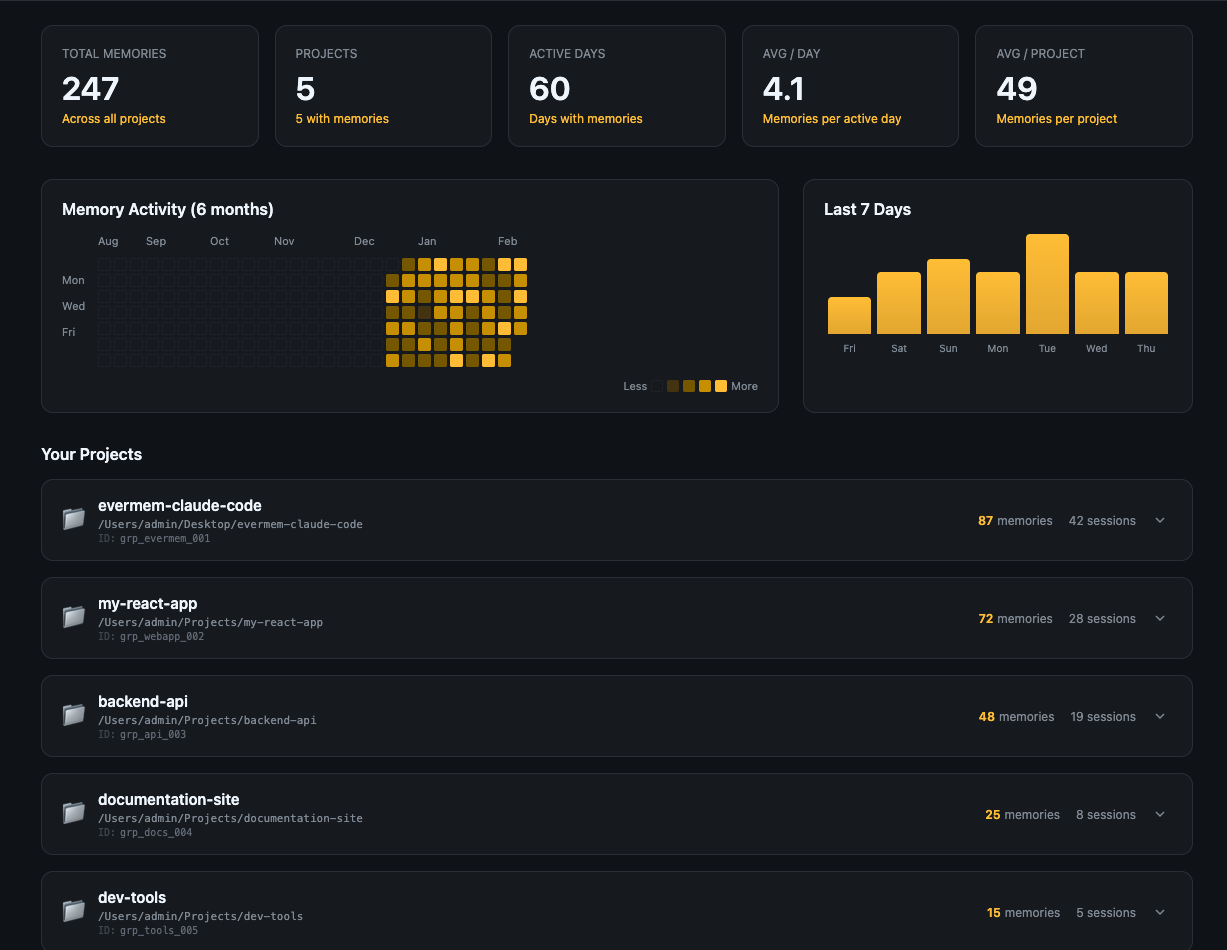
- Memory Hub - Visual dashboard to explore and manage memories
Quick Install
curl -fsSL https://raw.githubusercontent.com/EverMind-AI/evermem-claude-code/main/install.sh | bash
This will:
- Prompt for your EverMem API key
- Save it to your shell profile
- Install the plugin via Claude Code's plugin system
Get your API key: console.evermind.ai
Manual Installation
1. Get Your API Key
Visit console.evermind.ai to create an account and get your API key.
2. Configure Environment Variable
Add to your shell profile (~/.zshrc or ~/.bashrc):
export EVERMEM_API_KEY="your-api-key-here"
Reload your shell:
source ~/.zshrc # or source ~/.bashrc
3. Install the Plugin
# Add marketplace from GitHub (tracks updates automatically)
claude plugin marketplace add https://github.com/EverMind-AI/evermem-claude-code

# Install the plugin
claude plugin install evermem@evermem --scope user
To update the plugin later:
claude plugin marketplace update evermem
claude plugin update evermem@evermem
4. Verify Installation
Run /evermem:help to check if the plugin is configured correctly.
Usage
Commands
| Command | Description |
|---|---|
/evermem:help |
Show setup status and available commands |
/evermem:search <query> |
Search your memories for specific topics |
/evermem:ask <question> |
Ask about past work (combines memory + context) |
/evermem:hub |
Open the Memory Hub dashboard |
/evermem:debug |
View debug logs for troubleshooting |
/evermem:projects |
View your Claude Code projects table |
Automatic Behavior
The plugin works automatically in the background:
On Session Start:
💡 EverMem: Last session (2h ago): "Implementing JWT authentication..." | 3 memories
Recent memories and last session summary are loaded to provide context.
On Prompt Submit:
You: "How should I handle authentication?"
         ↓
📝 Memory Retrieved (2):
  • [0.85] (2 days ago) Discussion about JWT token implementation
  • [0.72] (1 week ago) Auth middleware setup decisions
         ↓
Claude receives the relevant context and responds accordingly
On Response Complete:
💾 EverMem: Memory saved (4 messages)
Memory Hub
The Memory Hub provides a visual interface to explore your memories:
- Activity heatmap (GitHub-style, 6 months)
- Memory statistics (Total, Projects, Active Days, Avg/Day, Avg/Project)
- Last 7 Days growth chart
- Project-based memory grouping with expandable cards
- Timeline view within each project (grouped by date)
- Load more pagination for large projects
To use the hub, run /evermem:hub and follow the instructions.
Configuration
Environment Variables
| Variable | Description | Required |
|---|---|---|
EVERMEM_API_KEY |
Your EverMem API key | Yes |
Project-Specific Settings
Create .claude/evermem.local.md in your project root for per-project configuration:
---
group_id: "my-project"
---

Project-specific notes here.
Troubleshooting
API Key Not Configured
# Check if the key is set
echo $EVERMEM_API_KEY

# If empty, add to your shell profile and reload
export EVERMEM_API_KEY="your-key-here"
source ~/.zshrc
No Memories Found
- Memories are only recalled after you've had previous conversations
- Short prompts (less than 3 words) are skipped
- Check that your API key is valid at console.evermind.ai
API Errors
- 403 Forbidden: Invalid or expired API key
- 502 Bad Gateway: Server temporarily unavailable, try again
Debug Mode
Enable debug logging to troubleshoot issues:
# Set environment variable
export EVERMEM_DEBUG=1

# View logs in real-time
tail -f /tmp/evermem-debug.log

# Clear logs
> /tmp/evermem-debug.log
Run /evermem:debug to view recent debug logs directly.
Links
- Console: console.evermind.ai
- API Documentation: docs.evermind.ai
- Issues: GitHub Issues
License
MIT
Technical Details
The following sections explain how EverMem works internally. This is useful for developers who want to understand the implementation or contribute to the project.
How It Works
┌─────────────────────────────────────────────────────────────┐
│                     Session Start                            │
└─────────────────────────────────────────────────────────────┘
                            │
                            ▼
┌─────────────────────────────────────────────────────────────┐
│  SessionStart Hook                                          │
│  • Fetches recent memories from EverMem Cloud               │
│  • Loads last session summary from local storage            │
│  • Injects session context into Claude's prompt             │
└─────────────────────────────────────────────────────────────┘
                            │
                            ▼
┌─────────────────────────────────────────────────────────────┐
│                     Your Prompt                              │
└─────────────────────────────────────────────────────────────┘
                            │
                            ▼
┌─────────────────────────────────────────────────────────────┐
│  UserPromptSubmit Hook                                      │
│  • Searches EverMem Cloud for relevant memories             │
│  • Displays memory summary to user                          │
│  • Injects context into Claude's prompt                     │
└─────────────────────────────────────────────────────────────┘
                            │
                            ▼
┌─────────────────────────────────────────────────────────────┐
│                   Claude Response                            │
└─────────────────────────────────────────────────────────────┘
                            │
                            ▼
┌─────────────────────────────────────────────────────────────┐
│  Stop Hook                                                  │
│  • Extracts conversation from transcript                    │
│  • Sends to EverMem Cloud for storage                       │
│  • Server generates summary and stores memory               │
└─────────────────────────────────────────────────────────────┘
                            │
                            ▼
┌─────────────────────────────────────────────────────────────┐
│                     Session End                              │
└─────────────────────────────────────────────────────────────┘
                            │
                            ▼
┌─────────────────────────────────────────────────────────────┐
│  SessionEnd Hook                                            │
│  • Parses transcript to extract first user prompt           │
│  • Saves session summary to local storage                   │
│  • No AI calls - pure local data extraction                 │
└─────────────────────────────────────────────────────────────┘
Claude Code Hooks Mechanism
Reference: Claude Code Hooks Documentation
Claude Code provides a hooks system that allows plugins to execute custom scripts at specific lifecycle events. Hooks are event-driven - they don't run continuously but are triggered by Claude Code at specific moments.
How Hooks Work
┌─────────────────────────────────────────────────────────────────┐
│                    Claude Code (Main Process)                   │
│                                                                 │
│  1. Event occurs (e.g., user sends message, Claude responds)    │
│  2. Claude Code reads hooks.json                                │
│  3. Finds matching hooks for the event                          │
│  4. Spawns child process: node <script.js>                      │
│  5. Sends JSON data via stdin pipe ─────────────┐               │
│  6. Reads response from stdout                  │               │
└─────────────────────────────────────────────────│───────────────┘
                                                  │
                                                  ▼
┌─────────────────────────────────────────────────────────────────┐
│                    Hook Script (Child Process)                  │
│                                                                 │
│  // Read JSON from stdin (sent by Claude Code)                  │
│  let input = '';                                                │
│  for await (const chunk of process.stdin) {                     │
│    input += chunk;                                              │
│  }                                                              │
│  const hookInput = JSON.parse(input);                           │
│                                                                 │
│  // Process and return result via stdout                        │
│  console.log(JSON.stringify({ ... }));                          │
└─────────────────────────────────────────────────────────────────┘
Hook Events
| Event | Trigger | Use Case |
|---|---|---|
SessionStart |
Claude Code starts | Load context, setup environment |
UserPromptSubmit |
User sends a message | Validate prompt, inject context |
PreToolUse |
Before tool execution | Approve/deny/modify tool calls |
PostToolUse |
After tool execution | Validate results, run linters |
Stop |
Claude finishes responding | Save conversation, cleanup |
Notification |
System notification | Custom alerts |
Plugin hooks.json Configuration
{
  "hooks": {
    "EventName": [
      {
        "matcher": "*",           // Pattern to match (for tool events)
        "hooks": [
          {
            "type": "command",
            "command": "${CLAUDE_PLUGIN_ROOT}/scripts/my-hook.js",
            "timeout": 30         // Timeout in seconds
          }
        ]
      }
    ]
  }
}
Environment Variables:
${CLAUDE_PLUGIN_ROOT}- Plugin directory path (for plugins)${CLAUDE_PROJECT_DIR}- Project root directory
EverMem Plugin Hooks
{
  "hooks": {
    "SessionStart": [...],        // Load session context + track groups locally
    "UserPromptSubmit": [...],    // Search & inject memories
    "Stop": [...],                // Save conversation to cloud
    "SessionEnd": [...]           // Save session summary locally
  }
}
SessionStart Hook
The SessionStart hook runs when Claude Code starts a new session. It loads recent memories from the cloud and last session summary from local storage.
Architecture
┌─────────────────────────────────────────────────────────────────┐
│                    Claude Code Session Start                     │
│                                                                  │
│  1. Claude Code spawns: session-context-wrapper.sh              │
│  2. Wrapper checks npm dependencies                              │
│  3. Wrapper executes: node session-context.js                   │
└─────────────────────────────────────────────────────────────────┘
                               │
                               ▼
┌─────────────────────────────────────────────────────────────────┐
│                    session-context.js                            │
│                                                                  │
│  1. Read hook input from stdin (contains cwd)                   │
│  2. Save group to local storage (groups.jsonl)                  │
│  3. Fetch recent memories from EverMem API (limit: 100)         │
│  4. Take the 5 most recent memories                             │
│  5. Get last session summary from sessions.jsonl                │
│  6. Output systemMessage + systemPrompt via stdout              │
└─────────────────────────────────────────────────────────────────┘
                               │
                               ▼
┌─────────────────────────────────────────────────────────────────┐
│                    Claude Code Receives                          │
│                                                                  │
│  • systemMessage: "💡 EverMem: Last session (2h ago): \"...\" | 5 memories"│
│  • systemPrompt: <session-context>...</session-context>         │
│                                                                  │
│  The systemPrompt is injected into Claude's context window      │
└─────────────────────────────────────────────────────────────────┘
Hook Input (stdin)
{
  "session_id": "<session-uuid>",
  "cwd": "/path/to/your/project",
  "permission_mode": "default",
  "hook_event_name": "SessionStart"
}
Hook Output (stdout)
Questions
What is evermem-claude-code?
EverMind-AI/evermem-claude-code is a public repo on GitHub by EverMind-AI. Persistent memory for Claude Code. Automatically saves and recalls context from past coding sessions.
Is evermem-claude-code open source?
It declares no license on GitHub. Public does not mean open source: without a license, nobody is granted the right to reuse it.
Does evermem-claude-code run on macOS, Windows or Linux?
Its maker has not tagged a system, so it is unknown here. Its README says what it needs.