
complex-RAG-guide
A step by step implementation of a complex RAG pipeline to solve real world situations
- 518
- Apache-2.0
- 17 mo ago
Repo FareedKhan-dev/complex-RAG-guide, read from GitHub 12 h ago. FareedKhan-dev has not joined Take My Repo.
In short
FareedKhan-dev/complex-RAG-guide is a public repo on GitHub by FareedKhan-dev. A step by step implementation of a complex RAG pipeline to solve real world situations. It declares the Apache-2.0 license on GitHub. It is written mainly in Jupyter Notebook, has 518 stars and last changed on 2025-07-01. Nobody has reviewed it on Take My Repo yet, which says nothing about its quality. Read from GitHub on 2026-11-25.
Building a Complex, Production-Ready RAG System
You can follow me on medium: Fareed Khan
Building a production-ready RAG system involves a series of thoughtful and iterative steps.
- It all starts with cleaning and preparing thse data, followed by testing different chunking strategies both logical and traditional to find what works best for your use case.
- Next comes anonymization, which helps reduce hallucinations by stripping away sensitive or irrelevant details.
- To further improve retriever performance, creating subgraphs can help focus retrieval on the most relevant information while filtering out noise.
- On top of the retrieval layer, we introduce a planning and execution system powered by LLMs. This acts like an agent that learns from previous steps, decides what to do next.
- Finally, once the RAG system generates responses, we evaluate its performance using a range of metrics.
In this blog, we will walk through how to build this full-stack RAG system
Using LangChain, LangGraph, and RAGAS (Evaluation), simulating real-world challenges and showcasing practical solutions that developers face while building RAG bots.
This is created on top of the version of nirDiamant guide. Thanks to him for the foundational work.
Table of Contents
- Understanding our RAG Pipeline
- Setting up the Environment
- Breaking our Data (Traditional / Logical) Forms
- Cleaning Our Data
- Restructuring the Data
- Vectorizing the Data
- Creating a Retriever for Context
- A Filter for Irrelevant Information
- Query Rewriter
- Chain-of-Though (COT) Reasoning
- Relevancy Check and Grounded on Facts
- Testing our RAG Pipeline
- Visualizing our RAG Pipeline using LangGraph
- Sub Graph Approach and Distillation Grounding
- Creating Sub Graph for Retrieval and Distillation
- Creating Sub Graph to solve Hallucinations
- Creating and Testing Plan Executor
- Re-Planner Thinking Logic
- Creating Task Handler
- Anonymize/De-Anonymize the Input Question
- Compiling and Visualizing the RAG Pipeline
- Testing our Finalized Pipeline
- Evaluation using RAGAS
- Summarizing Everything
Understanding our RAG Pipeline
Before we start coding its better to visually see how our rag pipeline looks, when we move further we will visualize each of the components of it.
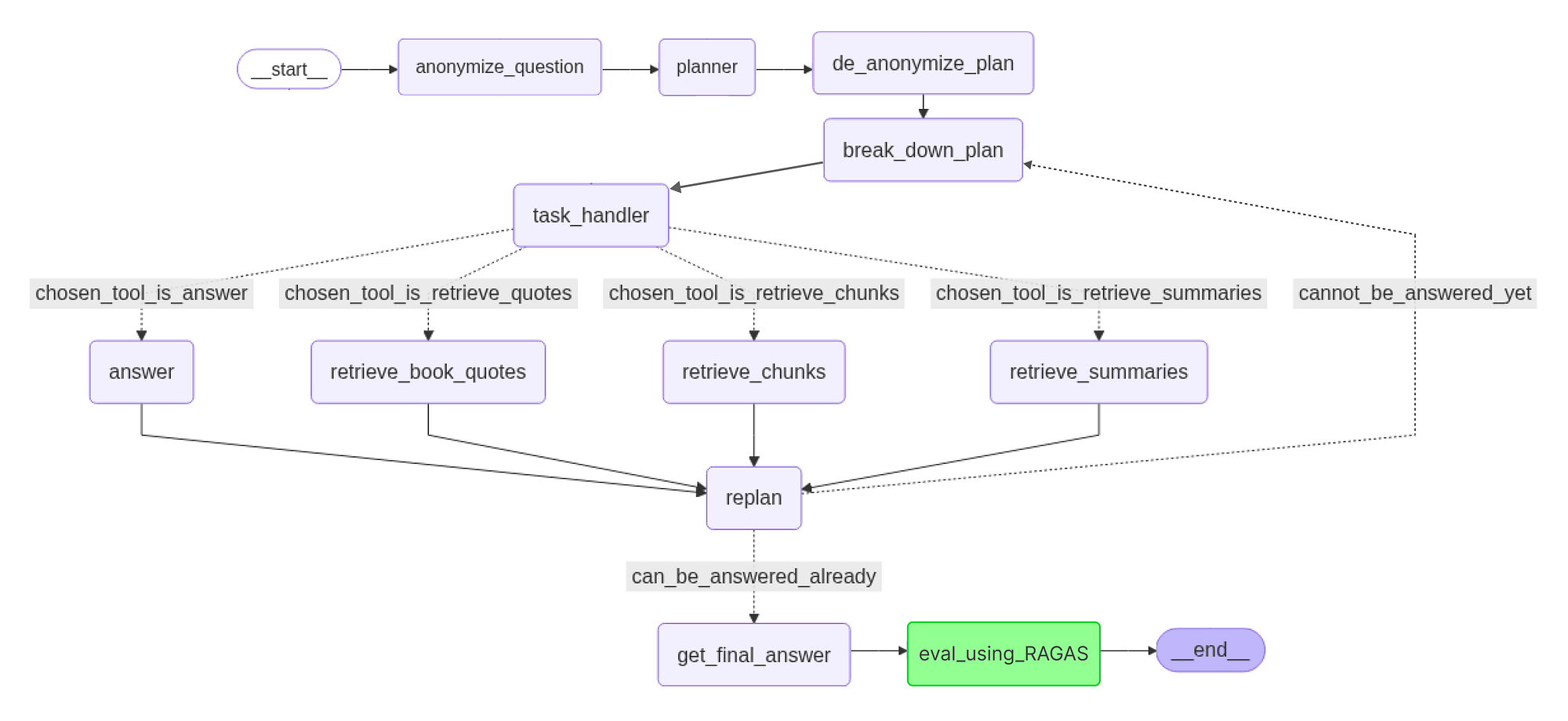
First, we call anonymize_question. This replaces specific names (e.g., "Harry Potter", "Voldemort") with placeholders (Person X, Villain Y) to avoid bias from the LLM pre-trained knowledge.
Next, the planner builds a high-level strategy. For a question like "How did X defeat Y?", it might plan:
- Identify
XandY - Locate their final confrontation
- Analyze
Xactions - Draft an answer
We then run de_anonymize_plan, restoring original names to make the plan specific and usable. The updated plan goes to break_down_plan, which turns each high-level step into concrete tasks.
The task_handler then selects the right tool for each task. Options include:
chosen_tool_is_retrieve_quotes: Finds specific quotes or dialoguechosen_tool_is_retrieve_chunks: Gets general info and contextchosen_tool_is_retrieve_summaries: Summarizes entire chapterschosen_tool_is_answer: Answers directly when enough context exists
After using a retrieval tool (retrieve_book_quotes, retrieve_chunks, or retrieve_summaries), new info is sent to replan.
replan reviews progress, goals, and new input to decide whether to update or extend the plan.
This cycle task_handler -> tool -> replan repeats until the system decides the question can_be_answered_already. Then, get_final_answer synthesizes all the evidence into a complete response.
Finally, eval_using_RAGAS checks the answer for accuracy and source faithfulness. If it passes, the process ends with __end__, delivering a verified, well-reasoned answer.
Setting up the Environment
So, LangChain, LangGraph all these modules for creating a RAG system are an entire architecture.
So we will only import modules when they are needed, as it will help us learn in a proper way.
The very first step is to create environment variables that will hold our sensitive info like API keys and other such things.
# Set the OpenAI API key from environment variable (for use by OpenAI LLMs)
# os.environ["OPENAI_API_KEY"] = os.getenv('OPENAI_API_KEY')

# Set the OpenAI API key from environment variable (for use by OpenAI LLMs)
os.environ["TOGETHER_API_KEY"] = os.getenv('TOGETHER_API_KEY')

# Retrieve the Groq API key from environment variable (for use by Groq LLMs)
groq_api_key = os.getenv('GROQ_API_KEY')
We are using two AI model providers here. Together AI offers open-source models, which are widely used in most RAG setups to make them cost-efficient, as open-source models are generally cheaper.
Both Groq and Together AI provide free credits, which should be sufficient to explore and follow along with this blog and much more.
Groq structures the output very well. However, if you can improve your prompt templates to guide the LLM toward structured outputs, you could potentially skip using Groq altogether. In that case, you can rely solely on Together AI or even Hugging Face local LLMs, especially since LangChain is an ecosystem with extensive feature support.
Breaking our Data (Traditional / Logical) Forms
To start, we need to have a dataset. A RAG pipeline is typically created using large amounts of raw text data, usually in PDF, CSV, or TXT formats. However, the challenge with text data is that they often require extensive cleaning, as each file may need a different approach.
We will use the Harry Potter books, which resemble a real-world scenario due to various string formatting issues they contain. You can download the book from here. Once downloaded, we can begin the initial step, breaking down the document.
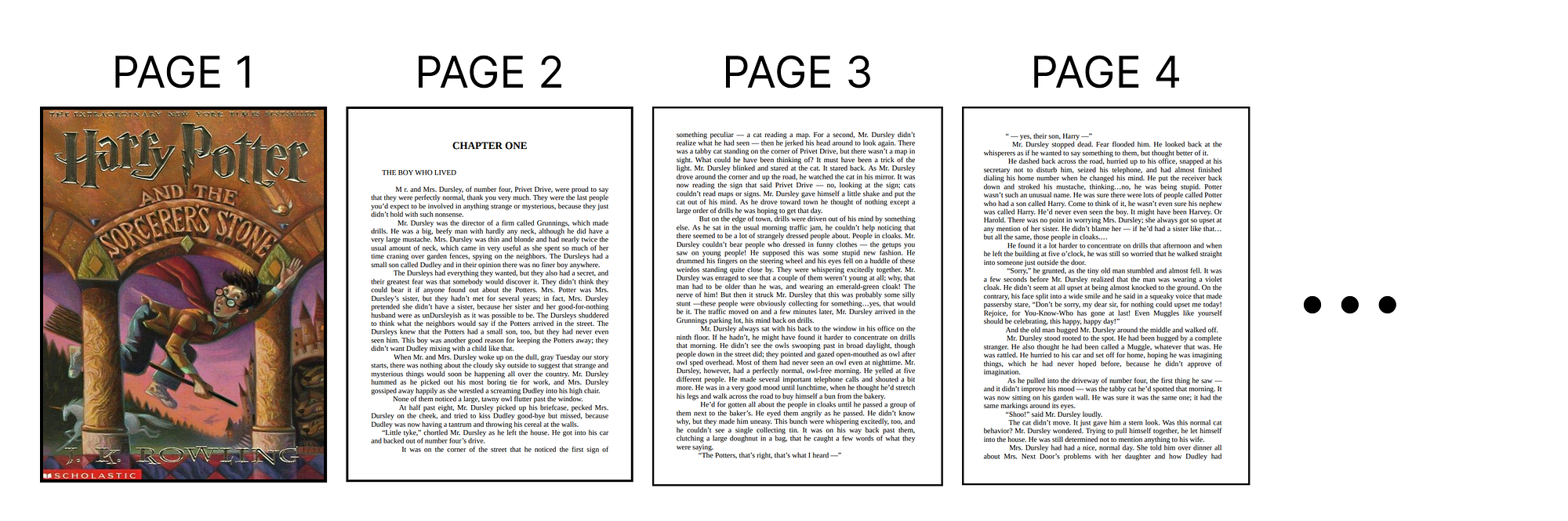
Let’s define the PDF path.
# Our Data Path (Harry Potter Book)
book_path ="Harry Potter - Book 1 - The Sorcerers Stone.pdf"
The most important step before we preprocess or clean our data for RAG is to split the document logically and traditionally.
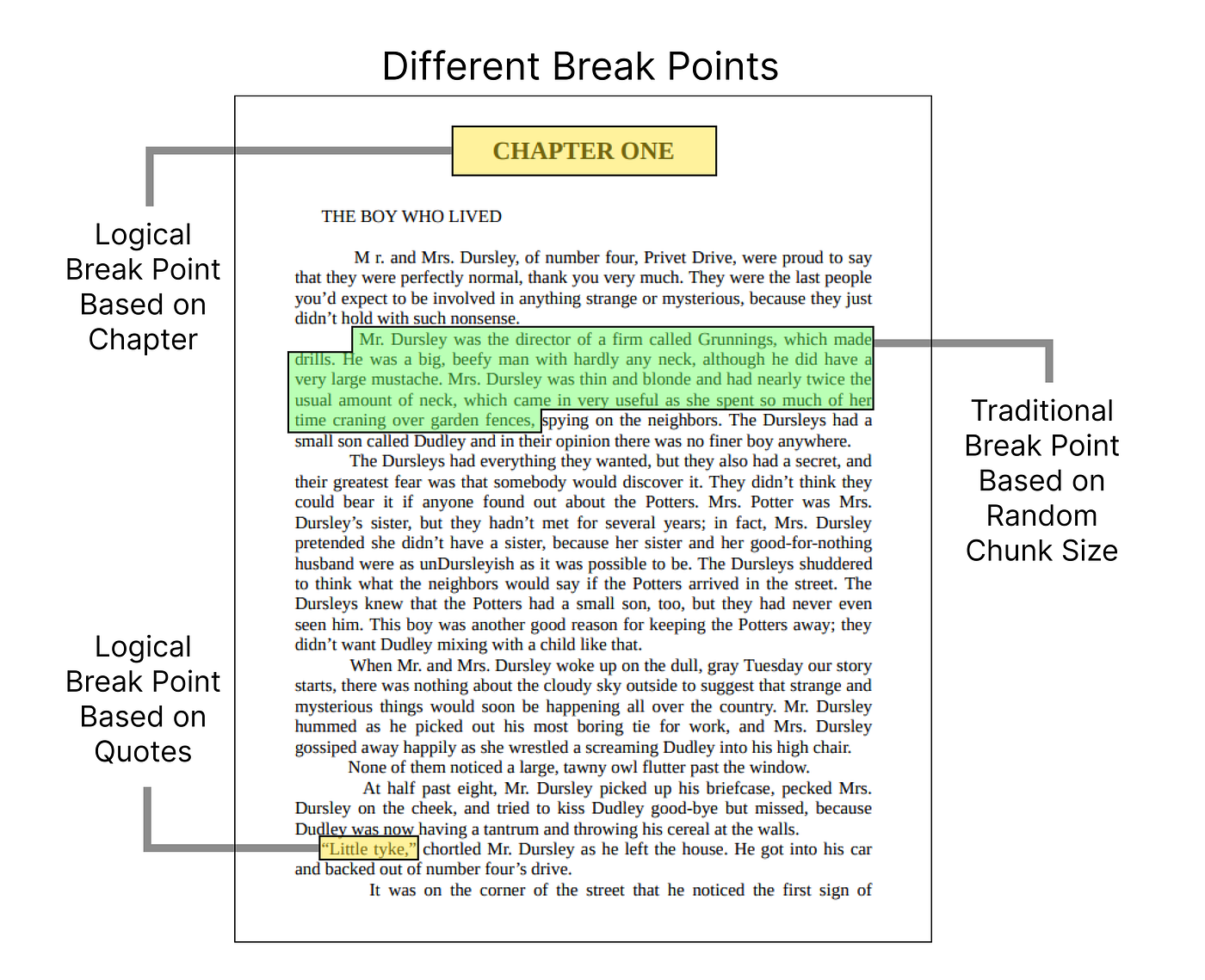
In our case, the PDF consists of different chapters, which is the best way to split our storybook logically, so let’s do that.
First, we need to load our PDF into a single, consolidated text.
import re
import PyPDF2
from langchain.docstore.document import Document

# Open and read the PDF file in binary mode
with open(book_path, 'rb') as pdf_file:
    # Create a PDF reader object
    pdf_reader = PyPDF2.PdfReader(pdf_file)
    # Extract text from all pages and join into a single string
    full_text = " ".join([page.extract_text() for page in pdf_reader.pages])
Now that we have decided to split the PDF based on chapters, we can use a regex pattern to do that. So, let’s define the pattern.
# Split the text into sections using chapter headers as delimiters
# Regex pattern matches "CHAPTER" followed by uppercase words
chapter_sections = re.split(r'(CHAPTER\s[A-Z]+(?:\s[A-Z]+)*)', full_text)
Using this regex pattern, we can easily split our full-text PDF into several chapters.
# Create Document objects for each chapter
chapters = []
# Iterate through sections in pairs (header + content)
for i in range(1, len(chapter_sections), 2):
    # Combine chapter header with its content
    chapter_text = chapter_sections[i] + chapter_sections[i + 1]
    # Create a Document with chapter text and metadata
    doc = Document(page_content=chapter_text, metadata={"chapter": i // 2 + 1})
    chapters.append(doc)
Let’s print the total number of chapters along with a sample of the chapter content.
# Total number of chapters extracted
print(f"Total number of chapters extracted: {len(chapters)}")

#### OUTPUT ####
Total number of chapters extracted: 17
So, we have a total of 17 chapters from our PDF. However, we typically don’t rely on just one breakpoint, it’s better to focus on 3 to 4 or more breakpoints that capture important information within each chunk.
In our book, quotes serve as the second most important breakpoint, as they often summarize key information. In the case of financial documents, important breakpoints might include tables or financial statements, since they contain critical data.
So, let’s break down our document into a new logical chunking based on quotes.
# Define the regex pattern to find quotes longer than min_length characters.
# re.DOTALL allows '.' to match newline characters.
quote_pattern_longer_than_min_length = re.compile(rf'"(.{{{min_length},}}?)"', re.DOTALL)

# Initialize an empty list to store the quote documents
book_quotes_list = []
min_length = 50

# Iterate through each chapter document to find and extract quotes
for doc in tqdm(chapters, desc="Extracting quotes"):
    content = doc.page_content
    # Find all occurrences that match the quote pattern
    found_quotes = quote_pattern_longer_than_min_length.findall(content)
    # For each found quote, create a Document object and add it to the list
    for quote in found_quotes:
        quote_doc = Document(page_content=quote)
        book_quotes_list.append(quote_doc)
Let’s print the total number of quotes along with a sample quote to see how it looks.
# Total number of quotes
print(f"Total number of quotes extracted: {len(book_quotes_list)}")

# Print a random quote's content
print(f"Random quote content: {book_quotes_list[5].page_content[:500]}...")


#### OUTPUT ####
Total number of quotes extracted: 1337
Random quote content: Most mysterious. And now, over to JimMcGuffin ...
We have extracted a total of approximately 1,300 quotes from our book. Now, there’s one more common method to break down our data that is chunking, which is the simplest and most widely used approach by developers. Let’s proceed with that.
from langchain.text_splitter import RecursiveCharacterTextSplitter

chunk_size = 1000 # Size of each chunk in characters
chunk_overlap = 200 # Number of characters to overlap between chunks

# Create a text splitter that splits documents into chunks of specified size with overlap
text_splitter = RecursiveCharacterTextSplitter(
    chunk_size=chunk_size, chunk_overlap=chunk_overlap, length_function=len
)

# Split the cleaned documents into smaller chunks for downstream processing (e.g., embedding, retrieval)
document_splits = text_splitter.split_documents(documents)
We can simply chunk the data, but LangChain offers a TextSplitter for chunking with many additional features.
To enhance the chunking process, we have used the Recursive Character TextSplitter, which creates overlapping chunks. This overlap makes each chunk maintains some contextual relationship with the previous one.
print(f"Number of documents after splitting: {len(document_splits)}")

#### OUTPUT ####
Number of documents after splitting: 612
So, total number of chunks we have is 612 and we have broken our data in logical ways such as chapters and quotes as well as the traditional method of chunking. Now, it’s time to start cleaning it.
Cleaning Our Data
Looking at a sample chapter, we notice extra spaces between letters, which is problematic. So, let’s use regex to remove those and eliminate any special characters from the text.
# Print the first chapter's content and metadata
print(f"First chapter content: {chapters[0].page_content[:500]}...")


#### OUTPUT ####
First chapter content: CHAPTER ONE

THE BOY WHO LIVED

M
r. and M r s. D u r s l e y , o f  n u m b e r ...
These extra spaces between characters are called \t tab spaces. We need to remove them first.
# Pre-compile the regular expression for finding tab characters for efficiency
tab_pattern = re.compile(r'\t')

# Iterate through each chapter document to clean its content
for doc in chapters:
    # Replace tab characters ('\t') with a single space (' ') using the pre-compiled regex.
    # This is a data cleaning step to normalize whitespace for better processing later.
    doc.page_content = tab_pattern.sub(' ', doc.page_content)
Let’s print the updated output and see how it has changed.
# Print the first cleaned chapter's content and metadata
print(f"First cleaned chapter content: {chapters[0].page_content[:500]}...")

#### OUTPUT ####
First cleaned chapter content: CHAPTER ONE

THE BOY WHO LIVED


M
r. and Mrs. Dursley, of number f ....
Questions
What is complex-RAG-guide?
FareedKhan-dev/complex-RAG-guide is a public repo on GitHub by FareedKhan-dev. A step by step implementation of a complex RAG pipeline to solve real world situations.
Is complex-RAG-guide open source?
It declares the Apache-2.0 license on GitHub.
Does complex-RAG-guide run on macOS, Windows or Linux?
Its maker has not tagged a system, so it is unknown here. Its README says what it needs.
How do I install complex-RAG-guide?
Open "Take it" on its page: Take My Repo writes an install plan for your machine and hands it to your AI agent (Claude Code, Codex or Cursor), which asks you before each step. Take My Repo has not tested it on any machine.