

lvgl
LVGL is a free, full-featured embedded UI library for devices from small MCUs to 3D-capable MPUs, enhanced by LVGL Pro, a professional editor and tooling.
- 25k
- C
- MIT
- 12 h ago
A blazing fast build tool for Esp32, Teensy, Avr, Nrf, Raspberry Pi, Stm, Mgm240 and more.
Repo FastLED/fbuild, read from GitHub 1 min ago. FastLED has not joined Take My Repo.
FastLED/fbuild is a public repo on GitHub by FastLED. A blazing fast build tool for Esp32, Teensy, Avr, Nrf, Raspberry Pi, Stm, Mgm240 and more. It declares the AGPL-3.0 license on GitHub. It is written mainly in Rust, has 14 stars and last changed on 2026-11-18. Nobody has reviewed it on Take My Repo yet, which says nothing about its quality. Read from GitHub on 2026-11-18.
fbuild is a fast, multi-platform compiler, deployer, emulator runner, and
serial monitor for embedded development. It reads the same platformio.ini
files already used by PlatformIO sketches, but uses a Rust-native, data-driven
build pipeline.
These board builds are part of the front door. They show the platform breadth that fbuild actively protects in CI.
Board descriptions and family deep-dives live in
docs/BOARD_STATUS.md.
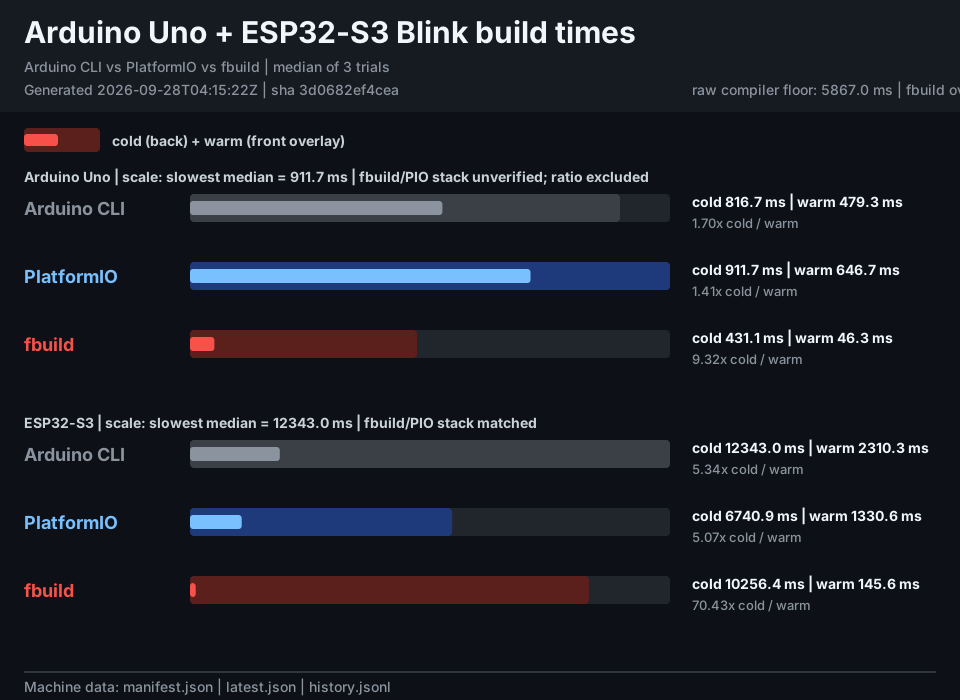
The chart is regenerated nightly from clean-output (cold) and immediate repeat (warm) Arduino Uno and ESP32-S3 Blink builds. Raw measurements are discoverable through the benchmark manifest.
pip install fbuild
For source installs, platform notes, and first-run cache behavior, start with the getting started guide.
On Windows, fbuild --fix-win enables long paths with administrator approval.
Interactive ESP32 commands offer this repair when needed; declining uses a
short cache and prints a yellow warning. See Windows setup.
fbuild reads the same platformio.ini files as PlatformIO. Use these commands
as direct replacements for the most common PlatformIO workflows:
| fbuild | PlatformIO equivalent | Use it to |
|---|---|---|
fbuild build |
pio run |
Compile the project. |
fbuild build --clean |
pio run --target clean, then pio run |
Clean and compile the project. |
fbuild deploy |
pio run --target upload |
Build and upload firmware. |
fbuild deploy --clean |
Clean, then pio run --target upload |
Clean, build, and upload firmware. |
fbuild monitor |
pio device monitor |
Monitor serial output without flashing. |
fbuild ci |
pio ci |
Build one or more sketches for CI. |
Pass --platformio to build, deploy, or monitor to delegate that
workflow to the installed PlatformIO CLI. fbuild ci is a fbuild-native,
PlatformIO-compatible CI command; detailed flags and nested commands are in
the CLI reference.
These commands extend beyond the PlatformIO workflow surface:
| Command | Purpose |
|---|---|
fbuild symbols |
Report per-symbol firmware size and bloat details. |
fbuild bloat |
Inspect symbol back-references and generate bloat graphs. |
fbuild reset |
Reset a device without flashing it. |
fbuild purge |
Purge downloaded packages or run cache garbage collection. |
fbuild sync |
Resolve platformio.ini dependencies into a deterministic lock file. |
fbuild install |
Download an environment's platform, toolchains, framework, tools and lib_deps without compiling (--check exits 2 when something is missing). |
fbuild daemon |
Manage the background build daemon, locks, and cache. |
fbuild show |
Show daemon logs and other runtime information. |
fbuild device |
List devices and manage device leases. |
fbuild mcp |
Start the Model Context Protocol server for AI integrations. |
fbuild clang-tidy |
Run clang-tidy static analysis on project sources. |
fbuild iwyu |
Run include-what-you-use analysis on project sources. |
fbuild clangd-config |
Generate clangd and VS Code configuration for the project. |
fbuild test-emu |
Build and run firmware in an emulator for testing. |
fbuild clang-query |
Run a clang-query matcher against project sources. |
fbuild lnk |
Fetch, verify, and create .lnk resource pointers. |
fbuild lib-select |
Diagnose the LDF-style library selection result. |
fbuild compile-many |
Compile many sketches against one board in parallel stages. |
fbuild serial |
Probe serial ports and read them with board-aware settings. |
fbuild bringup |
Orchestrate build, flash, reset, monitor, and bring-up steps. |
fbuild port |
Scan serial ports with vendor and product identification. |
fbuild cache |
Save, restore, list, and verify portable cache archives. |
See fbuild help <command> or the full CLI reference
for options and nested subcommands.
Create a minimal Arduino project:
mkdir my-project
cd my-project
mkdir src
Add platformio.ini:
[env:uno]
platform = atmelavr
board = uno
framework = arduino
Add src/main.ino:
void setup() {
  pinMode(LED_BUILTIN, OUTPUT);
}

void loop() {
  digitalWrite(LED_BUILTIN, HIGH);
  delay(1000);
  digitalWrite(LED_BUILTIN, LOW);
  delay(1000);
}
Build it:
fbuild build
On the first build, fbuild downloads the toolchain and framework packages it
needs, then caches them for later builds. A successful Uno build writes
.fbuild/build/uno/firmware.hex.
Common workflows:
fbuild build
fbuild deploy --clean
fbuild deploy --monitor
fbuild test-emu . -e uno
fbuild monitor --timeout 60 --halt-on-success "TEST PASSED"
Detailed build, deploy, monitor, and emulator examples live in the CLI reference and emulator testing guide.
The full FAQ-style map is docs/INDEX.md. Common entry
points:
| Goal | Start here |
|---|---|
| Install fbuild and run the first build | docs/getting-started/ |
| Use build, deploy, monitor, or test-emu | docs/reference/cli.md |
Configure platformio.ini |
docs/reference/platformio-ini.md |
| Check board and platform support | docs/platforms/ |
| Understand the project rationale | docs/WHY.md |
| Work on fbuild itself | docs/development/ |
| Read architecture internals | docs/architecture/overview.md |
platformio.ini compatibility for existing Arduino and ESP32 sketcheslib_depsdocs/architecture/See docs/WHY.md for the full rationale, benefits, and
performance notes.
The tools fbuild runs on the host for each platform are moving to FastLED-built Rust executables shipped in a single format: the cosmocc Actually Portable Executable (APE). That covers upload/flash utilities, deployers and image/format helpers that would otherwise come as Python scripts, per-OS vendor binaries, or packages that behave differently on each host. Each tool is built once and runs as a native executable on every host fbuild supports: Linux, macOS and Windows, x86_64 and aarch64. There is one artifact per tool instead of one per OS and CPU, and one behavior to test instead of a matrix.
The goal per platform is to replace its third-party host tools with Rust tools whose bugs FastLED fixes once and then ships as APE, so the fix reaches every host at the same time.
Reference platform: NXP LPC8xx. Its flasher is FastLED's fork of the Rust
probe-rs. The fork carries the fixes that make the
LPC845-BRK's LPC-Link2 CMSIS-DAP firmware work: spec-default fallbacks when
the firmware doesn't answer DAP_Info, an explicit DAP_Connect(Swd) with
retry, and a CMSIS-DAP v1 HID transport over nusb (#935,
#936). The source is on the tools branch of
FastLED/framework-arduino-lpc8xx,
and fastled-release-cross.yml cross-builds it today as six per-host
release assets: Windows, Linux and macOS, each on x86_64 and aarch64. fbuild
pins and checksums all six in crates/fbuild-deploy/src/probe_rs.rs. The APE
target is one asset, built and pinned once, that runs on all of those hosts.
Next: WCH CH32V. Its flashers, wlink
(WCH-LinkE) and wchisp (USB ISP), are
already Rust. fbuild pins them per host in
crates/fbuild-deploy/src/wlink.rs and wchisp.rs, and wlink has assets for
only three hosts. Every other host needs FBUILD_WLINK_PATH. An APE build
removes that gap.
An APE tool launches anywhere fbuild does. Nothing has to be installed on the
host: no ape loader, no binfmt_misc registration, no shell support. That
guarantee is needed because most Unix hosts can't exec an APE file directly.
posix_spawn returns ENOEXEC ("Exec format error") unless an APE handler is
registered, and some distros, NixOS among them, ship none. Every fbuild spawn
detects the APE magic (MZqFpD=', jartsr=', APEDBG=') and runs the tool
through a loader:
| Host | How an APE tool runs |
|---|---|
| Windows | Natively; an APE file is a valid PE. |
| Linux | fbuild extracts the loader embedded in the tool itself, checks it is a 64-bit ELF for the host CPU, and caches it in an owner-only, exec-capable directory. If no such directory exists (read-only HOME, noexec /tmp), it runs the loader from a sealed in-memory file instead. The tool's environment needs no PATH, sh, coreutils, HOME or TMPDIR. |
| macOS | x86_64: fbuild extracts the tool's embedded loader and turns it into a Mach-O (the prologue's header move). Apple Silicon: fbuild compiles the tool's embedded ape-m1.c once with /usr/bin/cc (Xcode Command Line Tools). Both are cached like on Linux. |
Loader precedence is FBUILD_APE_LOADER (explicit override), then the loader
embedded in the tool, then ape on PATH, /usr/bin/ape and
/usr/local/bin/ape, then /bin/sh. Set FBUILD_APE_CACHE_DIR to choose
where extracted loaders are cached. Parallel builds and deploys are safe: fbuild
holds a fork lock while it writes a loader, so a concurrent first spawn can't
fail with ETXTBSY ("Text file busy").
Build the Rust tool with cosmocc so the output is an APE, provision it like any
other package, and spawn it through fbuild_core::subprocess::run_command*, or
build the command with fbuild_core::platform::process::command /
tokio_command instead of Command::new. The tool then works like any other
executable, with no per-host special casing. A hello-world fixture and its build
script live in
crates/fbuild-core/data/ape-hello/.
Implementation notes are in
crates/fbuild-core/src/platform/README.md.
The user-facing command reference is
docs/reference/cli.md. It covers core workflows
(build, deploy, monitor, test-emu) and diagnostics such as symbols,
bloat, lib-select, compile-many, and ci.
fbuild reads platformio.ini project files. The configuration reference,
including default_envs, build_flags, lib_deps, upload and monitor
settings, and compatibility notes, lives in
docs/reference/platformio-ini.md.
fbuild can build firmware and run it without hardware via fbuild test-emu or
fbuild deploy --to emu. Emulator backends, auto-detection rules, QEMU notes,
and known limitations live in
docs/guides/emulator-testing.md.
.eh_frame StripOn supported release builds, fbuild may strip unused GCC .eh_frame unwind
metadata to reduce firmware size. The policy, opt-out controls, and rationale
are documented in
docs/reference/platformio-compatibility.md.
fbuild supports AVR, MegaAVR, Renesas RA, ESP8266, ESP32 variants, CH32 RISC-V, Teensy, STM32, SAM/SAMD, RP2040/RP2350, Nordic NRF52, Apollo3, Silicon Labs EFR32, NXP LPC, and WASM via Emscripten.
For the canonical per-board CI badge matrix, support table, and board-family
notes, see docs/BOARD_STATUS.md or the
platforms docs.
The repository is a Rust workspace with a Python package boundary. The human
development guide is docs/development/, and the
crate dependency map is crates/CLAUDE.md.
Architecture docs are decentralized under
docs/architecture/. Start with
docs/architecture/overview.md, then follow
the subsystem-specific docs.
Testing, troubleshooting, linting, release, and local setup instructions live
in docs/development/. Project-wide rules for
contributors and LLM agents are in CLAUDE.md.
fbuild is free software licensed under the GNU Affero General Public
License v3.0 only (AGPL-3.0-only). See LICENSE.
FastLED/fbuild is a public repo on GitHub by FastLED. A blazing fast build tool for Esp32, Teensy, Avr, Nrf, Raspberry Pi, Stm, Mgm240 and more.
It declares the AGPL-3.0 license on GitHub.
Its maker has not tagged a system, so it is unknown here. Its README says what it needs.
Open "Take it" on its page: Take My Repo writes an install plan for your machine and hands it to your AI agent (Claude Code, Codex or Cursor), which asks you before each step. Take My Repo has not tested it on any machine.
Its last change on GitHub was on 2026-11-18. Take My Repo does not judge from that whether it is maintained.
Nobody has reviewed it on Take My Repo yet, which says nothing about its quality.
LVGL is a free, full-featured embedded UI library for devices from small MCUs to 3D-capable MPUs, enhanced by LVGL Pro, a professional editor and tooling.
Go compiler for small places. Microcontrollers, WebAssembly (WASM/WASI), and command-line tools. Based on LLVM.
:house_with_garden: Open source home automation that puts local control and privacy first.
π RuView turns commodity WiFi signals into real-time spatial intelligence, vital sign monitoring, and presence detection — all without a single pixel of video.
The FastLED library for colored LED animation on Arduino. Please direct questions/requests for help to the FastLED Reddit community: http://fastled.io/r We'd like to use github "issues" just for tracking library bugs / enhancements.
The FastLED web compiler. Lightning fast 3 second compile and 1 second deploy on fast machines.
Vendor datasheets and reference material for the chips FastLED targets. Layout: <vendor>/<product-type>/<part-number>/.
Release-based FastLED Doxygen API documentation, published daily when a new release is available.


