
BartyCrouch
Localization/I18n: Incrementally update/translate your Strings files from .swift, .h, .m(m), .storyboard or .xib files.
- 1.4k
- MIT
- 3 y ago
Repo FlineDev/BartyCrouch, read from GitHub 48 min ago. FlineDev has not joined Take My Repo.
In short
FlineDev/BartyCrouch is a public repo on GitHub by FlineDev. Localization/I18n: Incrementally update/translate your Strings files from .swift, .h, .m(m), .storyboard or .xib files. It declares the MIT license on GitHub. It is written mainly in Swift, has 1,401 stars and last changed on 2024-04-05. Nobody has reviewed it on Take My Repo yet, which says nothing about its quality. Read from GitHub on 2026-11-23.
Similar repos
Stevia
:leaves: Concise Autolayout code



Installation • Configuration • Usage • Build Script • Donation • Migration Guides • Issues • Contributing • License
:sparkles: Important Notice :sparkles:
Apple introduced String Catalogs in Xcode 15 which implements many aspects of BartyCrouch like the incremental auto-extraction, or warning against empty translations. It's also fully backward-compatible with all iOS versions. Migrating is as simple as right-clicking a
.stringsfile and choosing "Migrate to String Catalog...". I wrote a detailed FAQ about String Catalogs if you want to learn more. It's really awesome, everybody should migrate to it!The only feature it's missing is machine translation, but I wrote an app to fill the gap and it supports even more translation services than BartyCrouch. Use TranslateKit in the future by simply drag & dropping the String Catalog file and letting it handle the translation, it's really easy.
Note that TranslateKit is being actively worked on. In comparison, BartyCrouch is kept up-to-date only by volunteers in the community.
BartyCrouch
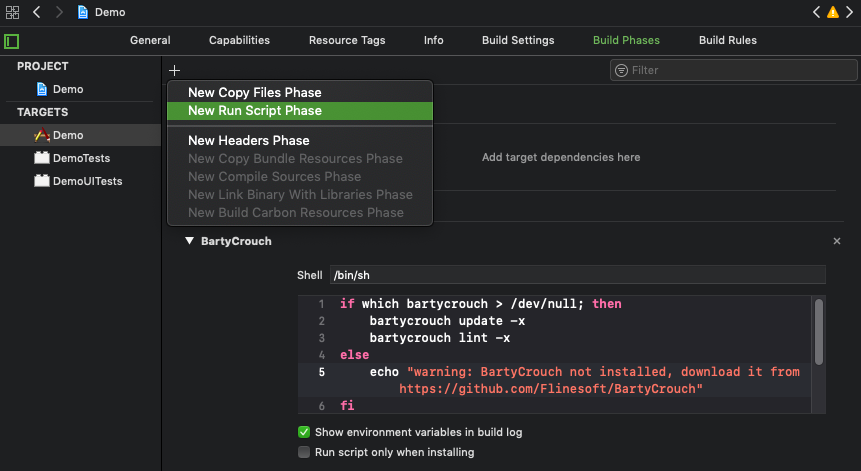
BartyCrouch incrementally updates your Strings files from your Code and from Interface Builder files. "Incrementally" means that BartyCrouch will by default keep both your already translated values and even your altered comments. Additionally you can also use BartyCrouch for machine translating from one language to 60+ other languages. Using BartyCrouch is as easy as running a few simple commands from the command line what can even be automated using a build script within your project.
Checkout this blog post to learn how you can effectively use BartyCrouch in your projects.
Requirements
- Xcode 14+ & Swift 5.7+
- Xcode Command Line Tools (see here for installation instructions)
- In Xcode 15 or later: Set "User Script Sandboxing" to NO in your target's "Build Settings" tab
Getting Started
Installation
Via Homebrew
To install Bartycrouch the first time, simply run the command:
brew install bartycrouch
To update to the newest version of BartyCrouch when you have an old version already installed run:
brew upgrade bartycrouch
Via Mint
To install or update to the latest version of BartyCrouch simply run this command:
mint install FlineDev/BartyCrouch
Configuration
To configure BartyCrouch for your project, first create a configuration file within your projects root directory. BartyCrouch can do this for you:
bartycrouch init
Now you should have a file named .bartycrouch.toml with the following contents:
[update]
tasks = ["interfaces", "code", "transform", "normalize"]

[update.interfaces]
paths = ["."]
subpathsToIgnore = [".git", "carthage", "pods", "build", ".build", "docs"]
defaultToBase = false
ignoreEmptyStrings = false
unstripped = false
ignoreKeys = ["#bartycrouch-ignore!", "#bc-ignore!", "#i!"]

[update.code]
codePaths = ["."]
subpathsToIgnore = [".git", "carthage", "pods", "build", ".build", "docs"]
localizablePaths = ["."]
defaultToKeys = false
additive = true
unstripped = false
ignoreKeys = ["#bartycrouch-ignore!", "#bc-ignore!", "#i!"]

[update.transform]
codePaths = ["."]
subpathsToIgnore = [".git", "carthage", "pods", "build", ".build", "docs"]
localizablePaths = ["."]
transformer = "foundation"
supportedLanguageEnumPath = "."
typeName = "BartyCrouch"
translateMethodName = "translate"

[update.normalize]
paths = ["."]
subpathsToIgnore = [".git", "carthage", "pods", "build", ".build", "docs"]
sourceLocale = "en"
harmonizeWithSource = true
sortByKeys = true

[lint]
paths = ["."]
subpathsToIgnore = [".git", "carthage", "pods", "build", ".build", "docs"]
duplicateKeys = true
emptyValues = true
This is the default configuration of BartyCrouch and should work for most projects as is. In order to use BartyCrouch to its extent, it is recommended though to consider making the following changes:
- To speed it up significantly, provide more specific paths for any key containing
pathif possible (especially in theupdate.transformsection, e.g.["App/Sources"]forcodePathsor["App/Supporting Files"]forsupportedLanguageEnumPaths). - Remove the
codetask if your project is Swift-only and you use the newtransformupdate task. - If you are using SwiftGen with the
structured-swift4template, you will probably want to use thetransformtask and change itstransformeroption toswiftgenStructured. - If you decided to use the
transformtask, create a new file in your project (e.g. underSupportingFiles) namedBartyCrouch.swiftand copy the following code:
//  This file is required in order for the `transform` task of the translation helper tool BartyCrouch to work.
//  See here for more details: https://github.com/FlineDev/BartyCrouch

import Foundation

enum BartyCrouch {
    enum SupportedLanguage: String {
        // TODO: remove unsupported languages from the following cases list & add any missing languages
        case arabic = "ar"
        case chineseSimplified = "zh-Hans"
        case chineseTraditional = "zh-Hant"
        case english = "en"
        case french = "fr"
        case german = "de"
        case hindi = "hi"
        case italian = "it"
        case japanese = "ja"
        case korean = "ko"
        case malay = "ms"
        case portuguese = "pt-BR"
        case russian = "ru"
        case spanish = "es"
        case turkish = "tr"
    }

    static func translate(key: String, translations: [SupportedLanguage: String], comment: String? = nil) -> String {
        let typeName = String(describing: BartyCrouch.self)
        let methodName = #function

        print(
            "Warning: [BartyCrouch]",
            "Untransformed \(typeName).\(methodName) method call found with key '\(key)' and base translations '\(translations)'.",
            "Please ensure that BartyCrouch is installed and configured correctly."
        )

        // fall back in case something goes wrong with BartyCrouch transformation
        return "BC: TRANSFORMATION FAILED!"
    }
}
- If you don't develop in English as the first localized language, you should update the
sourceLocaleof thenormalizetask. - If you want to use the machine translation feature of BartyCrouch, add
translateto the tasks list at the top and copy the following section into the configuration file withsecretreplaced by your Microsoft Translator Text API Subscription Key:
[update.translate]
paths = "."
translator = "microsoftTranslator"
secret = "<#Subscription Key#>"
sourceLocale = "en"
Usage
Before using BartyCrouch please make sure you have committed your code. Also, we highly recommend using the build script method described below.
bartycrouch accepts one of the following sub commands:
update: Updates your.stringsfile contents according to your configuration.lint: Checks your.stringsfile contents for empty values & duplicate keys.
Also the following command line options can be provided:
-v,--verbose: Prints more detailed information about the executed command.-x,--xcode-output: Prints warnings & errors in Xcode compatible format.-w,--fail-on-warnings: Returns a failed status code if any warning is encountered.-p,--path: Specifies a different path than current to run BartyCrouch from there.
update subcommand
The update subcommand can be run with one or multiple of the following tasks:
interfaces: Updates.stringsfiles of Storyboards & XIBs.code: UpdatesLocalizable.stringsfile fromNSLocalizedStringentries in code.transform: A mode where BartyCrouch replaces a specific method call to provide translations in multiple languages in a single line. Only supports Swift files.translate: Updates missing translations in other languages than the source language.normalize: Sorts & cleans up.stringsfiles.
In order to configure which tasks are executed, edit this section in the config file:
[update]
tasks = ["interfaces", "code", "transform", "normalize"]
Options for interfaces
paths: The directory / directories to search for Storyboards & XIB files.subpathsToIgnore: The subpaths to be ignored inside the directories found via thepathsoption.defaultToBase: Add Base translation as value to new keys.ignoreEmptyStrings: Doesn't add views with empty values.unstripped: Keeps whitespaces at beginning & end of Strings files.ignoreKeys: Keys (e.g. in the comment) indicating that specific translation entries should be ignored when generating String files. Useful to ignore strings that are gonna be translated in code.
Options for code
codePaths: The directory / directories to search for Swift code files.subpathsToIgnore: The subpaths to be ignored inside the directories found via thepathsoption.localizablePaths: The enclosing path(s) containing the localizedLocalizable.stringsfiles.defaultToKeys: Add new keys both as key and value.additive: Prevents cleaning up keys not found in code.customFunction: Use alternative name to search for strings to localize, in addition toNSLocalizedString, andCFCopyLocalizedString. Defaults toLocalizedStringResource.customLocalizableName: Use alternative name forLocalizable.strings.unstripped: Keeps whitespaces at beginning & end of Strings files.plistArguments: Use a plist file to store all the code files for the ExtractLocStrings tool. (Recommended for large projects.)ignoreKeys: Keys (e.g. in the comment) indicating that specific translation entries should be ignored when generating String files.overrideComments: Always overrides the comment with the keys new translation, useful for IB files.
Options for transform
codePaths: The directory / directories to search for Swift code files.subpathsToIgnore: The subpaths to be ignored inside the directories found via thepathsoption.localizablePaths: The enclosing path(s) containing the localizedLocalizable.stringsfiles.transformer: Specifies the replacement code. UsefoundationforNSLocalizedStringorswiftgenStructuredforL10nentries.supportedLanguageEnumPath: The enclosing path containing theSupportedLanguageenum.typeName: The name of the type enclosing theSupportedLanguageenum and translate method.translateMethodName: The name of the translate method to be replaced.customLocalizableName: Use alternative name forLocalizable.strings.separateWithEmptyLine: Set tofalseif you don't want to have empty lines between Strings entries. Defaults to `true.
Options for translate
paths: The directory / directories to search for Strings files.subpathsToIgnore: The subpaths to be ignored inside the directories found via thepathsoption.translator: Specifies the translation API. UsemicrosoftTranslatorordeepL.secret: Your Microsoft Translator Text API Subscription Key or Authentication Key for DeepL API.sourceLocale: The source language to translate from.separateWithEmptyLine: Set tofalseif you don't want to have empty lines between Strings entries. Defaults to `true.
Options for normalize
paths: The directory / directories to search for Strings files.
Questions
What is BartyCrouch?
FlineDev/BartyCrouch is a public repo on GitHub by FlineDev. Localization/I18n: Incrementally update/translate your Strings files from .swift, .h, .m(m), .storyboard or .xib files.
Is BartyCrouch open source?
It declares the MIT license on GitHub.
Does BartyCrouch run on macOS, Windows or Linux?
Its maker tagged it for macOS. That is declared by the maker; Take My Repo has not tested it.
How do I install BartyCrouch?
Open "Take it" on its page: Take My Repo writes an install plan for your machine and hands it to your AI agent (Claude Code, Codex or Cursor), which asks you before each step. Take My Repo has not tested it on any machine.





