
fah-node
Authenticate, monitor and control your swarm of Folding@home clients remotely
- 12
- GPL-3.0
- 8 wk ago
Repo FoldingAtHome/fah-node, read from GitHub 17 h ago. FoldingAtHome has not joined Take My Repo.
In short
FoldingAtHome/fah-node is a public repo on GitHub by FoldingAtHome. Authenticate, monitor and control your swarm of Folding@home clients remotely. It declares the GPL-3.0 license on GitHub. It is written mainly in Pug, has 12 stars and last changed on 2026-10-01. Nobody has reviewed it on Take My Repo yet, which says nothing about its quality. Read from GitHub on 2026-11-24.
fah-node
Authenticate, monitor and control your swarm of Folding@home clients remotely
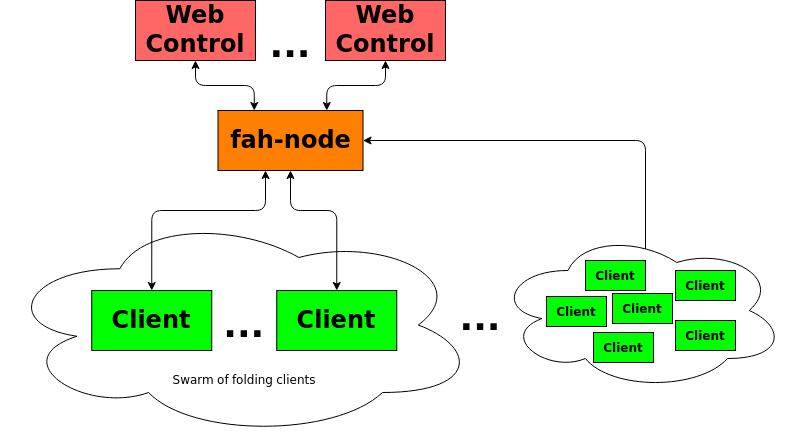
*fah-node architecture diagram*
fah-node makes it possible to securely monitor and control swarms of
Folding@home clients remotely, no matter where they are on the Internet. A node
can be used by more than one user at a time. Multiple nodes are used to
distribute the network load.
F@H clients can be configured to connect to and attempt to register with a node. Authorized users can approve nodes via their Folding@home account. Once approved, nodes will automatically appear on your account screen.
Debian Linux Quick Start
Build
The following commands will build and install fah-node on Debian based Linux systems.
sudo apt-get update
sudo apt-get install -y scons build-essential libssl-dev binutils-dev \
  libleveldb-dev libsnappy-dev git nodejs npm bind9-dnsutils ssl-cert

mkdir build
cd build

git clone https://github.com/cauldrondevelopmentllc/cbang
git clone https://github.com/foldingathome/fah-node

export CBANG_HOME=$PWD/cbang

scons -C cbang
scons -C fah-node
scons -C fah-node package
Install
sudo dpkg -i fah-node/fah-node_$(cat fah-node/version.txt)_amd64.deb
sudo fah-node-ports
sudo apt-get install -y iptables-persistent
Setup
Domain name
Add the node's domain name to /etc/fah-node/config.xml.
<domains>node.example.com</domains>
Setup Google OAuth2
Follow these steps to configure OAuth2 logins for your node:
- Go to https://console.developers.google.com/apis/dashboard
- Login to your Google account
- Create a new project
- Configure the OAuth consent screen
- Click on
CredentialsthenCREATE CREDENTIALS - Select
OAuth client ID - Select
Application type:Web application - Give your OAuth application a name
- Add the
Authorized JavaScript origin:https://node.example.com - Add the
Authorized redirect URI:https://node.example.com/login - Click the
CREATEbutton - Note the
Client IDandClient secret.
Note, Google tends to change the interface fairly often so you may have to adjust the above described process.
Add the following to your config.xml:
  <google-client-id>YOUR_CLIENT_ID</google-client-id>
  <google-client-secret>YOUR_CLIENT_SECRET</google-client-secret>
  <google-redirect-base>https://node.example.com</google-redirect-base>
Add an admin account
Add one or more email addresses which will have admin access to your node:
<admins>admin@gmail.com</admins>
Note, admin email addresses must match the OAuth login.
Complete config.xml
Your /etc/fah-node/config.xml should look something like this:
<config>
  <admins>admin@gmail.com</admins>
  <domains>node.example.com</domains>
  <google-client-id>YOUR_CLIENT_ID</google-client-id>
  <google-client-secret>YOUR_CLIENT_SECRET</google-client-secret>
  <google-redirect-base>https://node.example.com</google-redirect-base>
</config>
Increase system open file limit
As root, edit /etc/security/limits.conf. Add the following:
# For F@H AS
* soft nofile 10240
* hard nofile 10240
root soft nofile 10240
root hard nofile 10240
Log out and back in for new limits to take effect.
Start the node
Start the node with:
sudo systemctl start fah-node
Monitor the log file:
sudo tail -F -n 1000 /var/log/fah-node/log.txt
Login to the node
To log in, visit your node's web page. E.g. https://node.example.com/. Then click on the protein icon to log in. If everything is set up correctly, you should reach the admin web page.
Security
fah-node makes it possible to control many folding clients remotely, so security
is of the utmost importance. To ensure that only authorized persons can access
the clients in your swarm, fah-node has several layers of security.
Limited actions
The first line of defense is to limit what actions can be performed on the
remote clients in your swarm. Authorized users can perform only the following
actions on clients in the swarm via a fah-node:
- Start and stop folding.
- Change the client's user, project or resource usage settings.
- View the client's log or protein snapshots.
Client Authentication
To prevent unauthorized clients from joining your swarm, each client must be configured with a swarm token. A swarm token is a time-limited small file that contains secret information which can only be obtained via your Folding@home login. The token allows one or more clients to request to join your swarm. These clients will appear on your account, at which point you can approve or disapprove their membership in the swarm.
Isolating the swarm from itself
Since the clients in your swarm can exist anywhere on the Internet, it is possible they could be compromised through some other route. For this reason, swarm members are only able to report their status. In the worst case, a compromised client could report false information about itself.
Isolation from the node
Even if the machine a fah-node runs on was compromised or it is run by
someone you do not trust, your swarm is still protected. The token used
to authenticate your clients with the swarm sets up a secure communication
channel that ensures the node itself cannot tamper with or eavesdrop on the
communication between your F@H account and your swarm. The worst a hostile
fah-node could do is deny remote access to your swarm.
Folding@home account login
Your F@H account is secured via the OAuth2 protocol. This is the industry standard security protocol for "federated logins". It allows you to log in to your F@H account using an account with Google or another OAuth2 provider.
However, anyone who gains access to your OAuth2 account will have the ability to control your swarm. If this occurs, they will be able to perform the limited actions described above. If you believe your account has been compromised, you can disassociate all your swarm clients and/or close your Folding@home account.
End-to-end double encrypted communication
Each of the following communication channels in the swarm are encrypted using the HTTPS protocol:
- Browser <-> F@H account
- F@H account <-> fah-node
- F@H client <-> fah-node
HTTPS is the protocol used by banks and shopping sites to secure the Internet.
In addition, communication from your browser to your swarm clients via the
fah-node is double encrypted using RSA and AES. This prevents the
fah-node itself from being able to control or monitor your swarm.
Questions
What is fah-node?
FoldingAtHome/fah-node is a public repo on GitHub by FoldingAtHome. Authenticate, monitor and control your swarm of Folding@home clients remotely.
Is fah-node open source?
It declares the GPL-3.0 license on GitHub.
Does fah-node run on macOS, Windows or Linux?
Its maker has not tagged a system, so it is unknown here. Its README says what it needs.
How do I install fah-node?
Open "Take it" on its page: Take My Repo writes an install plan for your machine and hands it to your AI agent (Claude Code, Codex or Cursor), which asks you before each step. Take My Repo has not tested it on any machine.