ollama
Get up and running with Kimi, GLM, MiniMax, DeepSeek, gpt-oss, Qwen, Gemma and other models.
- 188k
- Go
- MIT
- 19 h ago
[COLM 2026] MegaScience: Pushing the Frontiers of Post-Training Datasets for Science Reasoning
Repo GAIR-NLP/MegaScience, read from GitHub 6 h ago. GAIR-NLP has not joined Take My Repo.
GAIR-NLP/MegaScience is a public repo on GitHub by GAIR-NLP. [COLM 2026] MegaScience: Pushing the Frontiers of Post-Training Datasets for Science Reasoning. It declares the Apache-2.0 license on GitHub. It is written mainly in Python, has 133 stars and last changed on 2026-07-09. Nobody has reviewed it on Take My Repo yet, which says nothing about its quality. Read from GitHub on 2026-11-25.
 MegaScience: Pushing the Frontiers of Post-Training
| Dataset Name | HuggingFace Link | Size | License |
|---|---|---|---|
| TextbookReasoning | 🤗 MegaScience/TextbookReasoning | 0.65 million | CC-BY-NC-SA-4.0 |
| MegaScience | 🤗 MegaScience/MegaScience | 1.25 million | CC-BY-NC-SA-4.0 |
| Model Name | HuggingFace Checkpoint | Size | License |
|---|---|---|---|
| Qwen3-30B-A3B-MegaScience | 🤗 MegaScience/Qwen3-30B-A3B-MegaScience | 30B | apache-2.0 |
| Qwen3-14B-MegaScience | 🤗 MegaScience/Qwen3-14B-MegaScience | 14B | apache-2.0 |
| Qwen3-8B-MegaScience | 🤗 MegaScience/Qwen3-8B-MegaScience | 8B | apache-2.0 |
| Qwen3-4B-MegaScience | 🤗 MegaScience/Qwen3-4B-MegaScience | 4B | apache-2.0 |
| Qwen3-1.7B-MegaScience | 🤗 MegaScience/Qwen3-1.7B-MegaScience | 1.7B | apache-2.0 |
| Qwen2.5-7B-MegaScience | 🤗 MegaScience/Qwen2.5-7B-MegaScience | 7B | apache-2.0 |
| Qwen2.5-3B-MegaScience | 🤗 MegaScience/Qwen2.5-3B-MegaScience | 3B | apache-2.0 |
| Qwen2.5-1.5B-MegaScience | 🤗 MegaScience/Qwen2.5-1.5B-MegaScience | 1.5B | apache-2.0 |
| Llama3.1-8B-MegaScience | 🤗 MegaScience/Llama3.1-8B-MegaScience | 8B | llama3.1 |
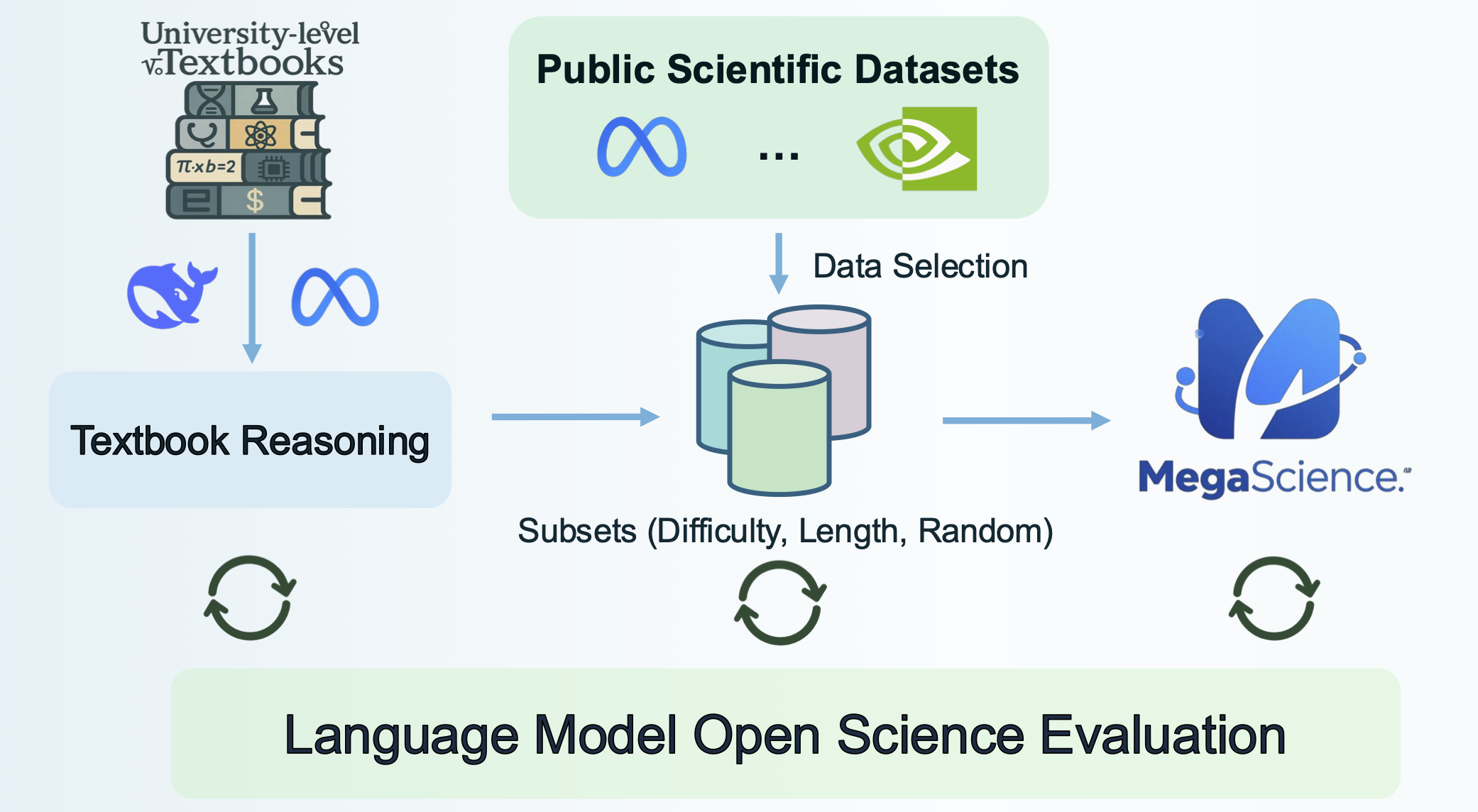
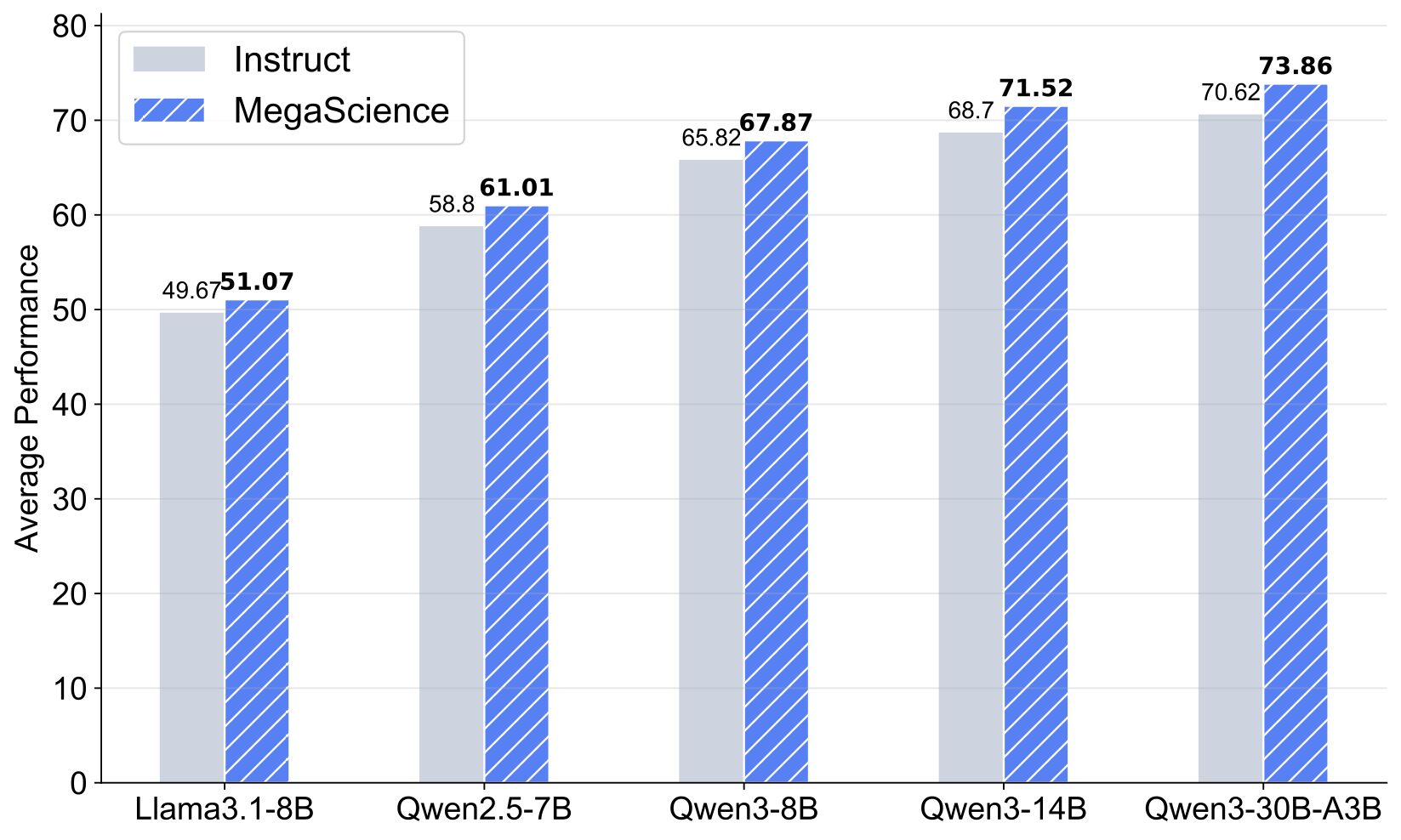
To develop AI scientists and support human researchers in advancing the frontiers of natural science discovery, we first present TextbookReasoning, an open dataset featuring truthful reference answers extracted from 12k university-level scientific textbooks, comprising 650k reasoning questions spanning 7 scientific disciplines. We further introduce MegaScience, a large-scale mixture of high-quality open-source datasets totaling 1.25 million instances, developed through systematic ablation studies that evaluate various data selection methodologies to identify the optimal subset for each publicly available scientific dataset. Meanwhile, we build a comprehensive evaluation system covering diverse subjects and question types across 15 benchmarks, incorporating comprehensive answer extraction strategies to ensure accurate evaluation metrics. Models trained on MegaScience significantly outperform their respective official Instruct counterparts on scientific reasoning tasks. Notably, MegaScience-trained models consistently surpass the strong Qwen3-Instruct baselines, even when fine-tuned on the state-of-the-art Qwen3 models. Furthermore, MegaScience exhibits strong scalability: as the base model size increases, the performance gains from MegaScience become more pronounced.
We have fully open-sourced MegaScience and all its associated components, including the data construction pipeline, scientific reasoning evaluation system, dataset corpus, and models trained on the dataset. We hope this systematic and high-quality resource will support the research community and further accelerate the development and application of general-purpose AI in science.
cd data_process
conda create --name megascience python=3.10
conda activate megascience
pip install -r requirements.txt
pip install flash-attn --no-build-isolation
pip install -U pynvml
Launch the Python interpreter and download the necessary NLTK tokenizer data:
python -c "import nltk; nltk.download('punkt_tab')"
Alternatively, you can run this interactively:
python
>>> import nltk
>>> nltk.download('punkt_tab')
>>> exit()
We utilize olmOCR to convert PDF documents into text format. Please follow the olmOCR documentation to process your PDFs, then segment the resulting documents into 4096-token chunks and store them in the text field.
Configure the QA extraction process by modifying data_process/vllm_inference/task_config/extract_qa.yaml. Set the following parameters:
Execute the extraction script:
bash script/extract_qa.sh
After extraction completes, run the post-processing step to finalize the QA pairs:
python vllm_inference/extract_qa_postprocess.py
    --input data/extract_qa/original_qa \
    --output data/extract_qa/final_qa/extract_qa.jsonl \
    --document_save_path data/extract_qa/final_qa/documents.jsonl
We employ text-dedup to remove duplicate questions from the extracted dataset. This tool provides efficient text deduplication capabilities using various algorithms including MinHash, SimHash, and exact hash matching.
First, create and activate a dedicated conda environment:
conda create --name textdedup python=3.10
conda activate textdedup
pip install text-dedup
Configure the deduplication parameters in the script:
script/question_dedup.sh
Run the deduplication script:
bash script/question_dedup.sh
After processing, merge all deduplicated chunks into a single JSONL file for downstream use.
Configure the QA refinement process by modifying data_process/vllm_inference/task_config/refine_qa.yaml.
Execute the extraction script:
bash script/refine_qa.sh
After refinement completes, run the post-processing step to finalize the refined QA pairs:
python vllm_inference/refine_qa_postprocess.py \
    --input_dir data/refine_qa/original_data \
    --output_file data/refine_qa/final_data/refined_qa.jsonl
Configure the CoT judgement process by modifying data_process/vllm_inference/task_config/judge_cot.yaml.
Execute the extraction script:
bash script/judge_cot.sh
After refinement completes, run the post-processing step to finalize the QA pairs with CoT and no CoT:
python vllm_inference/judge_cot_postprocess.py \
    --input_file data/augment_cot/judge_cot/original_data \
    --output_cot data/augment_cot/judge_cot/final_data/cot_data.jsonl \
    --output_no_cot data/augment_cot/judge_cot/final_data/no_cot_data.jsonl
Configure the CoT distillation process by modifying data_process/vllm_inference/task_config/distill_cot.yaml.
Execute the extraction script:
bash script/distill_cot.sh
After distillation completes, run the post-processing step to finalize the QA pairs:
python vllm_inference/distill_cot_postprocess.py \
    --input_no_cot_dir data/augment_cot/distill_cot/original_data \
    --input_cot_file data/augment_cot/judge_cot/final_data/cot_data.jsonl \
    --output data/augment_cot/distill_cot/final_data/refined_augmented_cot_qa.jsonl
Configure the QA filtering process by modifying data_process/vllm_inference/task_config/filter_qa.yaml.
Execute the extraction script:
bash script/filter_qa.sh
After filtering completes, run the post-processing step to finalize the QA pairs:
python vllm_inference/filter_qa_postprocess.py \
    --input_dir data/filter_qa/original_data \
    --output_file data/filter_qa/final_data/refined_augmented_cot_filtering_qa.jsonl
To ensure data quality and prevent benchmark contamination, we implement a comprehensive decontamination pipeline using embedding-based similarity search followed by LLM-based semantic judgment.
First, generate embeddings for benchmark questions to create a searchable index:
python decontamination/benchmark_index_save.py \
    --model BAAI/bge-large-en-v1.5 \
    --batch_size 1024 \
    --output_path decontamination/index/benchmark_embedding.jsonl
Generate embeddings for your dataset questions:
python decontamination/data_index_save.py \
    --model BAAI/bge-large-en-v1.5 \
    --batch_size 1024 \
    --input_path data/filter_qa/final_data/refined_augmented_cot_filtering_qa.jsonl \
    --output_path decontamination/index/data_embedding.jsonl
Perform vector similarity search to identify potentially similar questions between your dataset and benchmark:
python decontamination/vector_search.py \
    --data_embedding_path decontamination/index/data_embedding.jsonl \
    --benchmark_embedding_path decontamination/index/benchmark_embedding.jsonl \
    --output_path decontamination/results/refined_augmented_cot_filtering_qa_with_top5_similarity_benchmark.jsonl
Configure the decontamination process by modifying the task configuration:g data_process/vllm_inference/task_config/llm_based_decontamination.yaml.
Execute the LLM-based similarity judgment:
bash script/llm_based_decontamination.sh
After the LLM judgment completes, run the post-processing step to generate the final decontaminated dataset:
python vllm_inference/llm_based_decontamination_postprocess.py \
    --input_data_dir data/llm_based_decontamination/original_data \
    --output_path data/llm_based_decontamination/final_data/refined_augmented_cot_filtering_qa_decontamination.jsonl
Note: Our open-source code does not include OlympicArena benchmarks since their test sets are not publicly available. However, we have internally performed decontamination against OlympicArena to ensure there is no data overlap between our dataset and this benchmark.
Configure the reference answer extraction process by modifying data_process/vllm_inference/task_config/extract_reference_answer.yaml.
Execute the extraction script:
bash script/extract_reference_answer.sh
After extraction completes, run the post-processing step to finalize the QA pairs:
python vllm_inference/extract_reference_answer_postprocess.py \
    --input_data_dir data/extract_reference_answer/original_data \
    --output_path data/extract_reference_answer/final_data/refined_augmented_cot_filtering_qa_decontamination_reference_answer.jsonl
GAIR-NLP/MegaScience is a public repo on GitHub by GAIR-NLP. [COLM 2026] MegaScience: Pushing the Frontiers of Post-Training Datasets for Science Reasoning.
It declares the Apache-2.0 license on GitHub.
Its maker has not tagged a system, so it is unknown here. Its README says what it needs.
Open "Take it" on its page: Take My Repo writes an install plan for your machine and hands it to your AI agent (Claude Code, Codex or Cursor), which asks you before each step. Take My Repo has not tested it on any machine.
A unified inference and post-training framework for accelerated video generation.
A high-throughput and memory-efficient inference and serving engine for LLMs
Its last change on GitHub was on 2026-07-09. GitHub counts 0 open issues and pull requests. Take My Repo does not judge from that whether it is maintained.
Nobody has reviewed it on Take My Repo yet, which says nothing about its quality.
Take My Repo cannot say: it does not audit code and has not run MegaScience. What is known comes from GitHub. It declares the Apache-2.0 license on GitHub. Its last change was on 2026-07-09. It has 133 stars, which measure popularity, not safety. Nobody has reviewed it on Take My Repo yet, which says nothing about its quality. Read the source before you run it. With "Take it", your AI agent shows each step and asks you before running it; README text is treated as data, not as instructions.