
DOMINO
[ECCV 2026] Towards Generalizable Robotic Manipulation in Dynamic Environments
- 257
- Apache-2.0
- 3 mo ago
Repo H-EmbodVis/DOMINO, read from GitHub 9 min ago. H-EmbodVis has not joined Take My Repo.
In short
H-EmbodVis/DOMINO is a public repo on GitHub by H-EmbodVis. [ECCV 2026] Towards Generalizable Robotic Manipulation in Dynamic Environments. It declares the Apache-2.0 license on GitHub. It is written mainly in Python, has 257 stars and last changed on 2026-08-18. Nobody has reviewed it on Take My Repo yet, which says nothing about its quality. Read from GitHub on 2026-11-25.
AI models this project points to
Towards Generalizable Robotic Manipulation in Dynamic Environments
Heng Fang1, Shangru Li1, Shuhan Wang1, Xuanyang Xi2, Dingkang Liang1,†, Xiang Bai1
1 Huazhong University of Science and Technology, 2 Huawei Technologies Co. Ltd, † Corresponding Author🔍 Overview
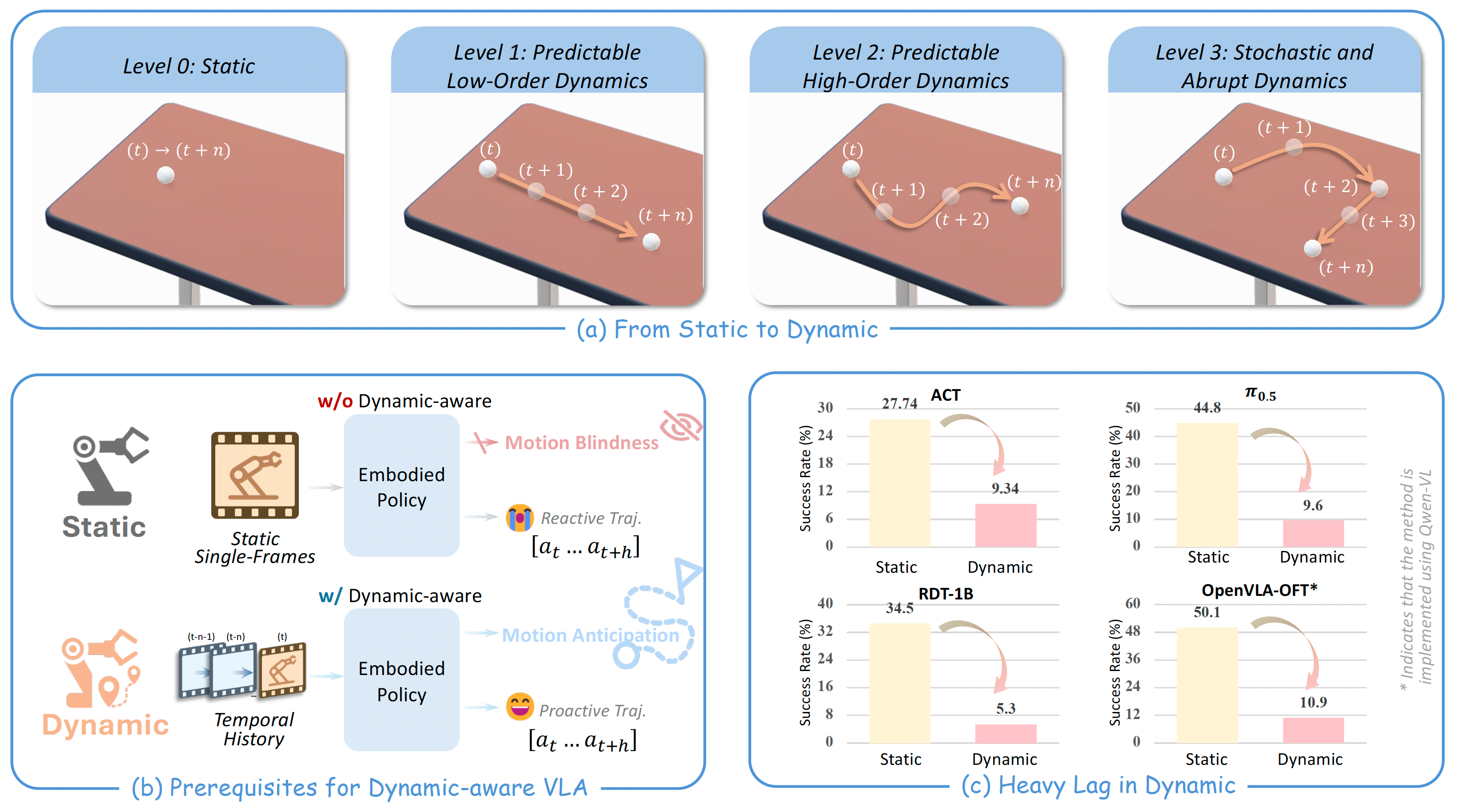
Dynamic manipulation requires robots to continuously adapt to moving objects and unpredictable environmental changes. Existing Vision-Language-Action (VLA) models rely on static single-frame observations, failing to capture essential spatiotemporal dynamics. We introduce DOMINO, a comprehensive benchmark for this underexplored frontier, and PUMA, a predictive architecture that couples historical motion cues with future state anticipation to achieve highly reactive embodied intelligence.
Abstract
Vision-Language-Action (VLA) models excel in static manipulation but struggle in dynamic environments with moving targets. This performance gap primarily stems from a scarcity of dynamic manipulation datasets and the reliance of mainstream VLAs on single-frame observations, restricting their spatiotemporal reasoning capabilities. To address this, we introduce DOMINO, a large-scale dataset and benchmark for generalizable dynamic manipulation, featuring 35 tasks with hierarchical complexities, over 110K expert trajectories, and a multi-dimensional evaluation suite. Through comprehensive experiments, we systematically evaluate existing VLAs on dynamic tasks, explore effective training strategies for dynamic awareness, and validate the generalizability of dynamic data. Furthermore, we propose PUMA, a dynamics-aware VLA architecture. By integrating scene-centric historical optical flow and specialized world queries to implicitly forecast object-centric future states, PUMA couples history-aware perception with short-horizon prediction. Results demonstrate that PUMA achieves state-of-the-art performance, yielding a 6.3% absolute improvement in success rate over baselines. Moreover, we show that training on dynamic data fosters robust spatiotemporal representations that transfer to static tasks.
📰 News
[2026/08/18] 🚀 PUMA now supports training on Huawei Ascend NPUs: NVIDIA weights train as-is with DeepSpeed ZeRO-2, and the CUDA path stays untouched — see the Ascend training guide.
[2026/07/31] 🚀 PUMA now runs inference on Huawei Ascend NPUs: NVIDIA-trained checkpoints work directly on Atlas 910 with no weight conversion — see the Ascend inference guide.
[2026/06/18] 🎉 DOMINO has been accepted to ECCV 2026!
[2026/05/29] 🙏 Special thanks to the Qwen team for using DOMINO in Qwen-VLA as a dynamic manipulation OOD benchmark! We welcome everyone to try DOMINO for evaluating VLA robustness.
[2026/04/22] 🔥 DOMINO now supports the StarVLA codebase! Evaluation code is available here.
[2026/03/30] 🚀 We now release the PUMA training/evaluation code and the PUMA checkpoint.
[2026/03/28] 🔥 The DOMINO dataset is now available on Hugging Face and ModelScope.
[2026/03/24] 🚀 We release the DOMINO benchmark code, including setup, data collection, and policy evaluation instructions.
[2026/03/17] 🎉 We release the paper, project homepage, and visual demos.
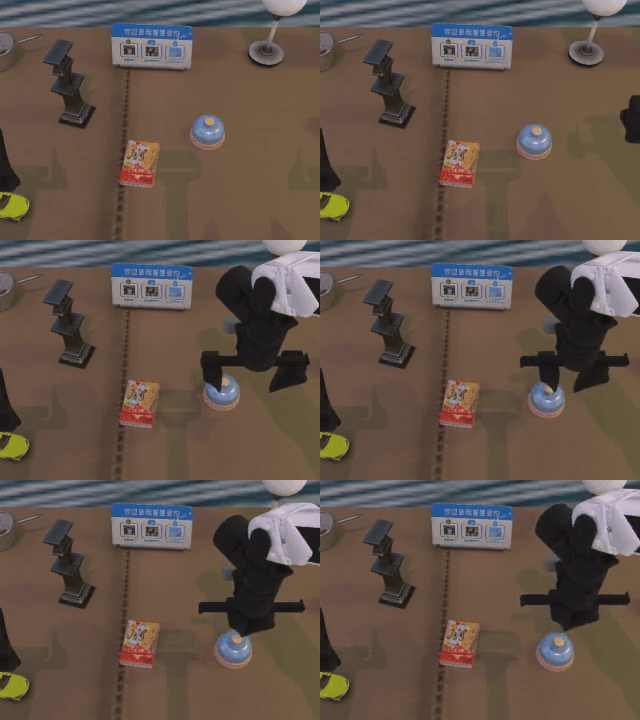
🎥 Visual Demos
More visual demos can be found on our project homepage.





✨ Key Idea
- Current VLA models struggle with dynamic manipulation tasks due to a scarcity of dynamic datasets and a reliance on single-frame observations.
- We introduce DOMINO, a large-scale benchmark for dynamic manipulation comprising 35 tasks and over 110K expert trajectories.
- We propose PUMA, a dynamics-aware VLA architecture that integrates historical optical flow and world queries to forecast future object states.
- Training on dynamic data fosters robust spatiotemporal representations, demonstrating enhanced generalization capabilities.
📅 TODO
- Release the paper
- Release DOMINO benchmark code
- Release DOMINO dataset on HuggingFace and ModelScope
- Release PUMA training code and evaluation code
- Release PUMA checkpoint on HuggingFace
- Support StarVLA codebase (evaluation code available here)
- Add real-world evaluation results
- Support Huawei Ascend NPUs — PUMA inference (guide)
- Support Huawei Ascend NPUs — PUMA training (guide)
🛠️ Getting Started
This project is divided into two main components that operate in separate environments and communicate via WebSockets:
- DOMINO: The simulation environment and data generation pipeline.
- PUMA: The Vision-Language-Action policy framework.
You will need to set up both environments to run the full pipeline.
1. DOMINO (Simulation & Data Pipeline)
1.0. System Requirements
- OS: Linux (Windows/MacOS have limited or no support)
- Hardware: NVIDIA GPU (RTX recommended for ray tracing)
- Software: Python 3.10, CUDA 12.1 (Recommended), NVIDIA Driver >= 520
Note: If running inside a Docker container, you must include the graphics capability to avoid Vulkan-related segmentation faults:
docker run ... -e NVIDIA_DRIVER_CAPABILITIES=compute,utility,graphics
1.1. Installation Steps
Step 1: Install System Dependencies Ensure Vulkan and FFmpeg are installed on your system:
sudo apt update
sudo apt install libvulkan1 mesa-vulkan-drivers vulkan-tools ffmpeg
(Verify installations by running vulkaninfo and ffmpeg -version)
Step 2: Create Conda Environment
conda create -n domino python=3.10 -y
conda activate domino
Step 3: Clone and Install
git clone https://github.com/h-embodvis/DOMINO.git
cd DOMINO

# Install basic environments and CuRobo
bash script/_install.sh
Troubleshooting: If you encounter a CuRobo config path issue, run python script/update_embodiment_config_path.py. A failed PyTorch3D installation won't affect core functionality unless you are using 3D data.
Step 4: Download Assets
Download the required assets (RoboTwin-OD, Texture Library, and Embodiments). If you hit rate limits, log in to Hugging Face first (huggingface-cli login).
bash script/_download_assets.sh
1.2. Data Collection
We provide an automated pipeline for data collection. You can collect data by running:
bash collect_data.sh ${task_name} ${task_config} ${gpu_id}
# Example: bash collect_data.sh adjust_bottle demo_clean_dynamic 0
After collection, the data will be stored under data/${task_name}/${task_config} in HDF5 format. For the full data collection process and common issues, please refer to the RoboTwin Data Collection Tutorial.
Dynamic Task Configurations
To enable dynamic environments, we introduce four specific configurations in the task config files (e.g., task_config/demo_clean_dynamic.yml and task_config/demo_random_dynamic.yml):
Click to view Dynamic Configurations
use_dynamic(bool): Whether to enable dynamic motion in the environment (e.g., moving objects).dynamic_level(int): The complexity level of the dynamic motion (1, 2, or 3). Higher levels introduce more challenging dynamic behaviors.dynamic_coefficient(float): A scaling factor (default: 0.1) that controls the speed of the dynamic movements.check_render_success(bool): Whether to verify rendering success during data collection, ensuring that dynamic interactions do not cause visual or physical glitches.
For all other detailed configurations (like domain randomization, cameras, and data types), we maintain the original RoboTwin 2.0 settings. You can find more information in the RoboTwin Configurations Tutorial.
1.3. Policy Evaluation
To evaluate a trained policy, use the following command. The task_config field refers to the evaluation environment configuration, while the ckpt_setting field refers to the training data configuration used during policy learning.
bash eval.sh ${task_name} ${task_config} ${ckpt_setting} ${expert_data_num} ${seed} ${gpu_id}

# Example: Evaluate a policy trained on `demo_clean_dynamic` and tested on `demo_clean_dynamic`
# bash eval.sh adjust_bottle demo_clean_dynamic demo_clean_dynamic 50 0 0
Click to view Dynamic Adaptations in Evaluation
To better evaluate dynamic manipulation, we have introduced several modifications in script/eval_policy.py and script/eval_metrics.py:
- Enhanced Evaluation Metrics: Alongside the standard Success Rate (SR), we introduce the Manipulation Score (MS), a comprehensive metric that evaluates route completion while applying penalties for undesirable behaviors (e.g., collisions or out-of-bounds).
- Strict Success Conditions: We added rigorous success criteria for dynamic objects, including out-of-bounds detection (failing if the object leaves the workspace before grasping) and lifting verification (ensuring the object is lifted beyond a specific height threshold to prevent false positives from accidental touches).
Note: The policy evaluation framework is fully compatible with RoboTwin 2.0. You can seamlessly migrate and evaluate any policies between the two repositories by simply loading a new task configuration within our codebase.
Click to view Fixed-Episode Evaluation (optional)
By default, evaluation follows the RoboTwin 2.0 protocol: candidate seeds are screened online by the expert planner until 100 solvable episodes are found. Since the RRT-based planner is stochastic, two evaluation runs may accept slightly different episode sets. For strict paired comparisons between policies, we provide an opt-in fixed-episode mode:
# Step 1 (one-off): screen episodes and save a canonical manifest
python script/screen_episodes.py --task_name ${task_name} --task_config ${task_config} --seed 0

# Step 2: evaluate with the manifest (skips online expert re-planning)
python script/eval_policy.py --config ${deploy_policy_yml} --overrides ... \
    --episode_manifest eval_manifest/${task_name}/${task_config}/seed0.pkl
The manifest stores the accepted episode seeds together with their dynamic motion info (start position, trajectory parameters, RNG state), so all policies evaluated with the same manifest see identical physical episodes. Rejected candidate seeds and reasons are logged in the accompanying .json
Questions
What is DOMINO?
H-EmbodVis/DOMINO is a public repo on GitHub by H-EmbodVis. [ECCV 2026] Towards Generalizable Robotic Manipulation in Dynamic Environments.
Is DOMINO open source?
It declares the Apache-2.0 license on GitHub.
Does DOMINO run on macOS, Windows or Linux?
Its maker has not tagged a system, so it is unknown here. Its README says what it needs.
How do I install DOMINO?
Open "Take it" on its page: Take My Repo writes an install plan for your machine and hands it to your AI agent (Claude Code, Codex or Cursor), which asks you before each step. Take My Repo has not tested it on any machine.
Is DOMINO still maintained?
Its last change on GitHub was on 2026-08-18. Take My Repo does not judge from that whether it is maintained.