
xjc-documentation-annotation-plugin
XJC plugin to bring <annotation><documentation> tags as Java class annotations
- 15
- Java
- 6 wk ago
Thunderbird 140+ extension: server-stored per-message notes via IMAP headers
Repo Hubbitus/HuNote.thunderbird, read from GitHub 11 min ago. Hubbitus has not joined Take My Repo.
Hubbitus/HuNote.thunderbird is a public repo on GitHub by Hubbitus. Thunderbird 140+ extension: server-stored per-message notes via IMAP headers. It declares the GPL-3.0 license on GitHub. It is written mainly in Python, has 1 stars and last changed on 2026-11-09. Nobody has reviewed it on Take My Repo yet, which says nothing about its quality. Read from GitHub on 2026-11-22.
A Thunderbird 140+ (MV3) extension that stores per-message notes on the IMAP server as message headers (X-Hu-note*).
Notes ride with the message. They sync across every device that opens the same IMAP mailbox — no separate backend, no local-only database, no lock-in.
Inspired by QNote and XNote++, but with one key difference: the server holds the note, not notes.json on one machine.
Status: Cycle A MVP (v0.1.0) — create, view, edit, save, version-history, conflict detection. See Roadmap for what lands in later cycles.
| Storage | Sync across devices | Extra service | Loss risk on reinstall |
|---|---|---|---|
| Local JSON (QNote, XNote) | No | No | High |
| CalDAV / DAV backend | Yes | Yes | Medium |
| IMAP message headers | Yes | No | None (server-side) |
The note travels with the message. Move it to a folder, archive it, forward the mailbox to a new server — the note goes with it. Uninstall HuNote and the notes are still there, readable in raw source.
Trade-off: writing a note performs an IMAP APPEND + EXPUNGE (the message UID changes). Reads are free.
IMAP itself has no "modify headers on an existing message" operation. Neither the raw IMAP protocol nor Gmail's flavor of it (X-GM-LABELS, X-GM-MSGID) expose a way to mutate the RFC 5322 headers of a stored message. Custom flags (\Flag keywords) exist but hold at most a short label per flag, not free-text notes.
To store a note in headers HuNote therefore does the only thing IMAP allows:
This is not a HuNote quirk — every Thunderbird extension that mutates message headers must do the same thing. Prior art using the identical APPEND+DELETE pattern: headerTools-lite-NG (the reference implementation HuNote's Experiment API is directly modeled on — see its MailHeader.jsm).
The message you saw is the same message — same body, same subject, same From/To — but the server sees a new message. Consequences:
+1s to defeat this (Gmail Date-hack). Toggling ±1s by parity does not help: Gmail keeps every message forever in [Gmail]/All Mail even after IMAP DELETE + EXPUNGE from a user label (EXPUNGE on a label only removes the label, not the message); so a save that reused a prior second would still collide with the still-live copy in All Mail. Non-Gmail servers (Dovecot, Cyrus, Courier, greenmail) have no such dedup and the original date is preserved — the hack is applied only when the folder is detected as Gmail.RFC 5322) is preserved — that's what HuNote uses to find the message again after save, and how the reader auto-refreshes to the new copy. If your mail flow rewrites Message-ID, HuNote will lose the note on the next save.If any of the above is unacceptable for your workflow — heavy sync tooling, quota-constrained mailbox, filters that must not re-fire — do not use HuNote on that account.
Ctrl+Shift+N (rebindable in Thunderbird → Add-ons → HuNote → Options).X-Hu-note-versions (JSON array, oldest-drop cap default 50).X-Hu-note-version — refuses to overwrite a newer server version, shows a conflict banner.±1s) to defeat Gmail's APPEND deduplication for identical bodies.X-Hu-note: <base64 UTF-8 of the current note text>
X-Hu-note-timestamp: 2026-08-15T18:42:00Z
X-Hu-note-source: <optional hostname, off/on in settings>
X-Hu-note-version: 3
X-Hu-note-versions: <base64 UTF-8 of JSON [{text, timestamp, source, version}, ...]>
Long values fold per RFC 5322 (75 chars + \r\n ). Base64 keeps binary/UTF-8 content safe through mail-relay munging.
moz-extension://...). Upstream regression unrelated to HuNote, fixed in TB 157 (Mozilla Bug 2069369). No workaround on our side.Pre-built XPI is not published yet. Build from source:
git clone https://github.com/Hubbitus/HuNote.thunderbird.git
cd HuNote.thunderbird
make pack     # → dist/hunote.xpi
Then in Thunderbird: Tools → Add-ons → gear icon → Install Add-on From File → pick dist/hunote.xpi.
Requires Thunderbird 140.0 or newer. Tested live on Thunderbird 153.
To read the note without HuNote: look at the raw source of the message, find X-Hu-note:, decode base64.
pnpm install
make test      # 32 unit tests (vitest)
make coverage  # coverage report
make pack      # build XPI
make run       # launch Thunderbird w/ disposable dev profile
Project layout:
src/
  manifest.json                    # MV3 manifest, strict_min_version 140.0
  background/
    background.js                  # coordinator, hotkey, event wiring
    note-codec.js                  # base64, header folding, version merge (pure)
    note-service.js                # read → conflict-check → write, retry
  experiment/imapNote/
    schema.json                    # Experiment API surface
    implementation.js              # XPCOM APPEND+EXPUNGE, Gmail Date-hack
  ui/
    editor/                        # popup editor
    reader/                        # message_display_scripts inline view
    options/                       # settings page
  locale/{en,ru}/messages.json
  icons/hunote-{48,96}.png
Design document: docs/superpowers/specs/2026-08-14-hunote-cycle-a-design.md
Smoke checklist: docs/smoke/2026-08-14-cycle-a-smoke.md
| Cycle | Feature | Status |
|---|---|---|
| A | MVP: editor, reader, save, versions, conflict guard | ✅ v0.1.0 |
| B | Version viewer + diff | planned |
| C | Message-list column, filter, full-text search | planned |
| D | Import wizard from QNote / XNote | planned |
| E | GitHub Actions CI, signed XPI releases | planned |
| F | Gmail web UI companion | planned |
| G | Gmail X-GM-LABELS fast-path |
planned |
| M | Markdown rendering | planned |
| AS | Autosave with debounce | planned |
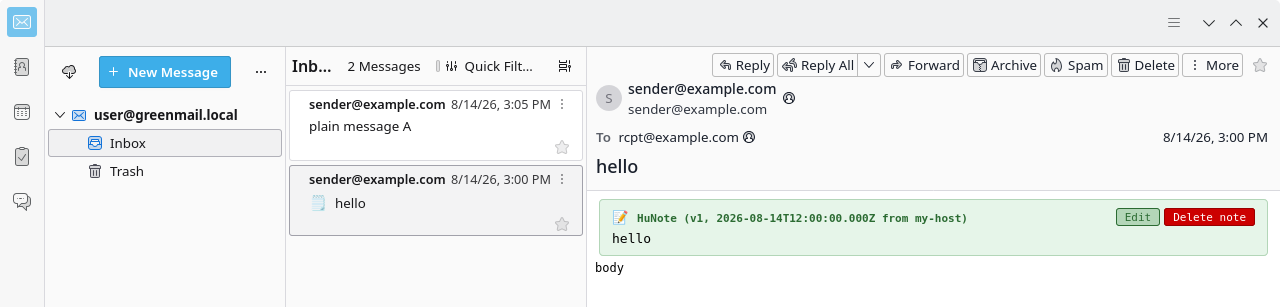
Light-green box appears under the header of any message that has an X-Hu-note. Edit and Delete note buttons on the right.
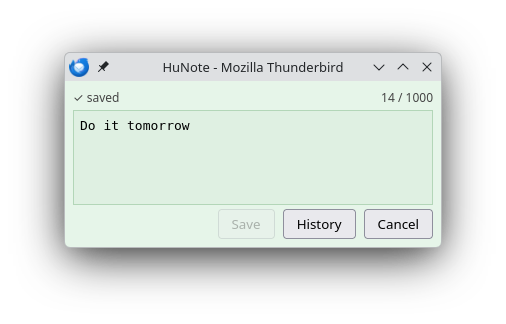
Character counter, dirty indicator, explicit Save / History / Cancel. Textarea grows with the note.
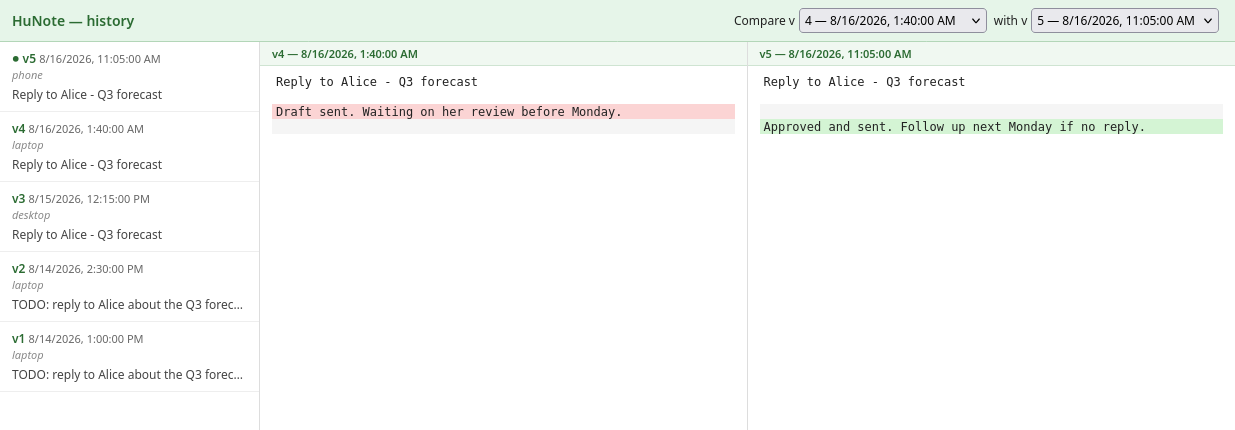
Every save appends to X-Hu-note-versions. The viewer lists all versions and shows a side-by-side line diff between any two.
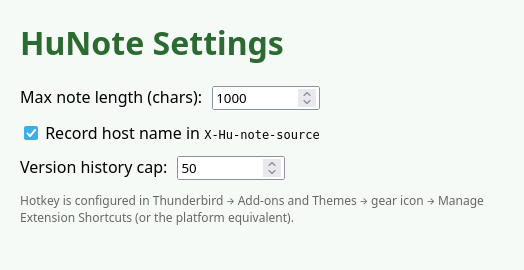
Max note length, host-name recording toggle, version history cap. Hotkey is rebound in Thunderbird → Add-ons → HuNote → Options (managed by TB, not by the extension).
GPL-3.0-or-later — see LICENSE.
Pavel Alexeev — Pahan@hubbitus.info
Hubbitus/HuNote.thunderbird is a public repo on GitHub by Hubbitus. Thunderbird 140+ extension: server-stored per-message notes via IMAP headers.
It declares the GPL-3.0 license on GitHub.
Its maker has not tagged a system, so it is unknown here. Its README says what it needs.
Open "Take it" on its page: Take My Repo writes an install plan for your machine and hands it to your AI agent (Claude Code, Codex or Cursor), which asks you before each step. Take My Repo has not tested it on any machine.
Its last change on GitHub was on 2026-11-09. Take My Repo does not judge from that whether it is maintained.
Nobody has reviewed it on Take My Repo yet, which says nothing about its quality.
XJC plugin to bring <annotation><documentation> tags as Java class annotations
Fedora branched kernel with various very useful patches like: pf, uksm, bfs, bfq, gccnative, zram-lz4
CopyQ (https://hluk.github.io/CopyQ/) is a great crossplatform clipboard manager with infinitive scripting capabilities. There I would like to share some my commands and settings
Prometheus alertmanager plugin which creates and manages JIRA issues by alerts. Designed to be flexible
Groovy findings, snippets, examples. Mostly for memorize and sharing.
