igniteui-angular
Ignite UI for Angular is a complete library of Angular UI components with the fastest grids and charts, dock manager, and more.
- 600
- 2 d ago
Repo IgniteUI/igniteui-angular, read from GitHub 11 h ago. IgniteUI has not joined Take My Repo.
In short
IgniteUI/igniteui-angular is a public repo on GitHub by IgniteUI. Ignite UI for Angular is a complete library of Angular UI components with the fastest grids and charts, dock manager, and more. It declares no license on GitHub. Public does not mean open source: without a license, nobody is granted the right to reuse it. It is written mainly in TypeScript, has 600 stars and last changed on 2026-11-18. Nobody has reviewed it on Take My Repo yet, which says nothing about its quality. Read from GitHub on 2026-11-20.

Ignite UI for Angular - from Infragistics
Ignite UI for Angular is a complete library of Angular-native, Material-based Angular UI components designed to enable developers to build enterprise-ready HTML5 & JavaScript apps for modern desktop browsers. It packs full-featured components, including Pivot Grids, Dock Manager, Hierarchical Grid, Bottom Navigation, etc., 60+ high-performance Angular Charts for all business needs and any app scenario, and more.
You can find source files under the src folder, including samples and tests.
Or visit Ignite UI for Angular Discord and join the dev community there.
Contributing
There are many ways in which you can participate in this project, for example:
-
Submit bugs and feature requests, and help us verify them as they are checked in.
-
Review source code changes
-
Review the documentation and make pull requests for anything from typos to additional and new content
-
If you are interested in fixing issues and contributing directly to the code base, please see the document How to Contribute, which covers the following:
-
The development workflow, including debugging and running tests
Feedback
- Ask a question by starting a discussion or submitting an issue
- Request a new feature
- Upvote popular feature requests
- File an issue
- Reach out to us through Discord
AI-Assisted Development
This repository ships with Copilot Skills — structured knowledge files that teach AI coding assistants (GitHub Copilot, Cursor, Windsurf, Claude, JetBrains AI, etc.) how to work with Ignite UI for Angular. The skill files live in the skills/ directory:
| Skill | Path | Description |
|---|---|---|
| Components | skills/igniteui-angular-components/SKILL.md |
UI Components (form controls, layout, data display, feedback/overlays, directives — Input Group, Combo, Select, Date/Time Pickers, Calendar, Tabs, Stepper, Accordion, List, Card, Dialog, Snackbar, Button, Ripple, Tooltip, Drag and Drop, Layout Manager, Dock Manager and Charts (Area Chart, Bar Chart, Column Chart, Stock/Financial Chart, Pie Chart)) |
| Data Grids | skills/igniteui-angular-grids/SKILL.md |
Data Grids (grid type selection, column config, sorting, filtering, selection, editing, grouping, paging, remote data, state persistence, Tree Grid, Hierarchical Grid, Grid Lite, Pivot Grid) |
| Theming & Styling | skills/igniteui-angular-theming/SKILL.md |
Theming & Styling (includes MCP server setup) |
| Generate From Image Design | skills/igniteui-angular-generate-from-image-design/SKILL.md |
Build Angular views from screenshots, mockups, and wireframes using Ignite UI components, theming MCP tools, and image-to-layout/component mapping guidance |
| Figma to App | skills/igniteui-angular-figma-to-app/SKILL.md |
Translate Figma app screens into Angular apps — Indigo.Design UI Kits (Material, Fluent, Bootstrap, Indigo) with 1:1 Figma component to Ignite UI control mapping, plus third-party kits and plain frames via semantic mapping, design token bridging, asset extraction, and visual validation against the original design |
How It Works
- GitHub Copilot — Uses
AGENTS.mdfor repository instructions on supported surfaces. Skills in standard directories are discovered automatically, while skills inskills/can be loaded on demand. - Cursor — Skills are picked up from the
skills/directory. You can also reference them explicitly in.cursorrules.
Manual Setup for Other IDEs
If your editor doesn't auto-discover skill files, you can feed them to your AI assistant manually:
- Copy the skill content — Open the relevant
SKILL.mdfile from theskills/folder and paste its contents into your AI assistant's system prompt or context window. - JetBrains IDEs (WebStorm, IntelliJ) — Go to Settings → Tools → AI Assistant → Project-level prompt and paste the skill content there, or attach the files as context when chatting.
- Claude Desktop / Claude Code — Add the files to your project knowledge or include them as part of your CLAUDE.md project instructions.
- Windsurf — Reference the skill files in your
.windsurfrulesconfiguration or attach them as context in the chat. - Other editors — Attach or paste the
SKILL.mdfile contents into your AI assistant's context before asking questions about Ignite UI for Angular.
Theming MCP Server
The Theming skill includes setup instructions for the igniteui-theming MCP server, which gives AI assistants access to live theming tools (palette generation, component theme scaffolding, etc.). See skills/igniteui-angular-theming/SKILL.md for configuration steps for VS Code, Cursor, Claude Desktop, and JetBrains IDEs.
Browser Support
 |
 |
 |
 |
 |
 |
|---|---|---|---|---|---|
| 131+ | 151+ | 131+ | Latest ✔ | 18+ (macOS and iOS) | 11* |
These are the minimum versions. The component styles rely on CSS container style queries (Firefox 151, Safari 18) and relative colors (Chrome and Edge 131), so older browsers, including Firefox ESR 140, are not supported. Other Chromium-based browsers, such as Opera, are supported from their Chromium 131 release. The same targets are defined in projects/igniteui-angular/.browserslistrc.
* IE 11 is only supported in Ignite UI for Angular < 13.0.0
Overview
Angular Data Grid
The Ignite UI for Angular Data Grid equips you with all the necessary features for manipulating and visualizing tabular data in a series of rows and columns with ease. You can find powerful grid elements for no-lag scrolling while rendering and going through millions of data points.
Built for optimization and speed, our Angular grid component lets you quickly bind data with very little code and allows you to implement a variety of events in order to tailor different behaviors.
Angular Charts & Graphs
Ignite UI for Angular arrives with an extensive library of data visualizations that enable stunning, interactive charts and dashboards for your modern web and mobile apps. All of them are designed to work flawlessly on every modern browser and provide complete touch as well as interactivity. Our comprehensive Angular Charts component supports more than 65 chart types that let you display all sorts of data representations and statistics. And with the rich and easy-to-use API, you can plot various types of charts.
Some of the Angular chart types included are: Polar chart, Pie chart, Donut chart, Bubble chart, Area chart, Treemap chart, and many others. And if you look for Angular financial charts, with Ignite UI you can get the same features as the ones you come across with Google Finance and Yahoo Finance Charts.
Current List of Components Includes:
| Components | Status | Added in | License | Directives | Status | Added in | License | ||||
|---|---|---|---|---|---|---|---|---|---|---|---|
| accordion | ✅ | Readme | Docs | 12.1.0 | MIT | autocomplete | ✅ | Readme | Docs | 7.1.0 | MIT |
| avatar | ✅ | Readme | Docs | 2.0.0 | MIT | button | ✅ | Readme | Docs | 2.0.0 | MIT |
| badge | ✅ | Readme | Docs | 2.0.0 | MIT | date time editor | ✅ | Readme | Docs | 9.1.0 | MIT |
| banner | ✅ | Readme | Docs | 7.0.2 | MIT | divider | ✅ | Readme | Docs | 7.2.5 | MIT |
| bottom navigation | ✅ | Readme | Docs | 2.0.0 | MIT | dragdrop | ✅ | Readme | Docs | 5.2.0 | MIT |
| button group | ✅ | Readme | Docs | 5.1.0 | MIT | filter | ✅ | Readme | Docs | 2.0.0 | MIT |
| calendar | ✅ | Readme | Docs | 5.1.0 | MIT | focus-trap | ✅ | Readme | Docs | 13.0.0 | MIT |
| card | ✅ | Readme | Docs | 5.1.0 | MIT | forOf | ✅ | Readme | Docs | 5.2.0 | MIT |
| carousel | ✅ | Readme | Docs | 2.0.0 | MIT | hint | ✅ | Readme | Docs | 5.3.0 | MIT |
| chat | ✅ | Readme | Docs | 21.0.0 | MIT | checkbox | ✅ | Readme | Docs | 2.0.0 | MIT |
| chips | ✅ | Readme | Docs | 6.1.0 | MIT | label | ✅ | Readme | Docs | 2.0.0 | MIT |
| circular progress | ✅ | Readme | Docs | 5.1.0 | MIT | layout | ✅ | Readme | Docs | 2.0.0 | MIT |
| combo | ✅ | Readme | Docs | 6.1.0 | MIT | mask | ✅ | Readme | Docs | 5.3.0 | MIT |
| date picker | ✅ | Readme | Docs | 5.3.0 | MIT | prefix | ✅ | Readme | Docs | 5.3.0 | MIT |
| date range picker | ✅ | Readme | Docs | 9.1.0 | MIT | radio-group | ✅ | Docs | 6.0.4 | MIT | |
| dialog | ✅ | Readme | Docs | 2.0.0 | MIT | ripple | ✅ | Readme | Docs | 2.0.0 | MIT |
| dock manager | ✅ | Docs | 9.1.0 | Commercial | suffix | ✅ | Readme | Docs | 5.3.0 | MIT | |
| drop down | ✅ | Readme | Docs | 6.1.0 | MIT | text-highlight | ✅ | Readme | Docs | 6.0.0 | MIT |
| expansion panel | ✅ | Readme | Docs | 6.2.0 | MIT | toggle | ✅ | Readme | Docs | 6.2.0 | MIT |
| grid | ✅ | Readme | Docs | 5.1.0 | Commercial | tooltip | ✅ | Readme | Docs | 6.2.0 | MIT |
| hierarchical grid | ✅ | Readme | Docs | 7.2.0 | Commercial | Others | Status | License | |||
| icon | ✅ | Readme | Docs | 2.0.0 | MIT | ||||||
| icon button | ✅ | Readme | Docs | 17.1.0 | MIT | Animations | ✅ | Readme | 2.0.0 | MIT | |
| input group | ✅ | Readme | Docs | 5.3.0 | MIT | dataUtil | ✅ | Readme | 5.1.0 | MIT | |
| linear progress | ✅ | Readme | Docs | 5.1.0 | MIT | dataContainer | ✅ | Readme | 5.1.0 | MIT | |
| list | ✅ | Readme | Docs | 2.0.0 | MIT | IgxGridState | ✅ | Readme | Docs | 9.0.0 | MIT |
| month picker | ✅ | Readme | Docs | 7.2.0 | MIT | ||||||
| navbar | ✅ | Readme | Docs | 2.0.0 | MIT | ||||||
| navigation drawer | ✅ | Readme | Docs | 2.0.0 | MIT | ||||||
| pivot grid | ✅ | Readme | Docs | 13.1.0 | Commercial | ||||||
| query builder | ✅ | Readme | Docs | 14.2.0 | Commercial | ||||||
| radio | ✅ | Readme | Docs | 2.0.0 | MIT | ||||||
| rating | ✅ | Docs | 14.1.0 | MIT | |||||||
| select | ✅ | Readme | Docs | 5.3.0 | MIT | ||||||
| simple-combo | ✅ | Readme | Docs | 13.0.0 | MIT | ||||||
| slider | ✅ | Readme | Docs | 5.1.0 | MIT | ||||||
| snackbar | ✅ | Readme | Docs | 5.1.0 | MIT | ||||||
| splitter | ✅ | Readme | Docs | 9.1.0 | MIT | ||||||
| stepper | ✅ | Readme | Docs | 13.0.0 | MIT | ||||||
| switch | ✅ | Readme | Docs | 2.0.0 | MIT | ||||||
| tabs | ✅ | Readme | Docs | 5.1.0 | MIT | ||||||
| tile manager | ✅ | Docs | 19.2.0 | MIT | |||||||
| time picker | ✅ | Readme | Docs | 5.3.0 | MIT | ||||||
| toast | ✅ | Readme | Docs | 5.1.0 | MIT | ||||||
| tree | ✅ | Readme | Docs | 12.0.0 | MIT | ||||||
| tree grid | ✅ | Readme | Docs | 6.2.0 | Commercial |
Release History
| Ignite UI for Angular | Release date | Milestone |
|---|---|---|
| 4.0.0 | 18-April-17 | |
| 4.1.0 | 12-May-17 | |
| 4.2.0 | 20-Jul-17 | |
| 5.0.0 | 03-Nov-17 | |
| 5.1.0 | 17-Jan-18 | Milestone #1 |
| 5.2.0 | 23-Feb-18 | |
| 5.3.0 | 24-Apr-18 | Milestone #2 |
| 6.0.0 | 21-May-18 | |
| 6.1.0 | 05-Jul-18 | Milestone #3 |
| 6.2.0 | 05-Nov-18 | |
| 7.0.0 | 26-Nov-18 | Milestone #4 |
| 7.1.0 | 13-Dec-18 | Milestone #5 |
| 7.2.0 | 08-Mar-19 | Milestone #6 |
| 7.3.0 | 13-May-19 | Milestone #7 |
| 8.0.0 | 19-Jun-19 | |
| 8.1.0 | 22-Jul-19 | Milestone #8 |
| 8.2.0 | 26-Sep-19 | Milestone #9 |
| 9.0.0 | 11-Feb-20 | Milestone #10 |
| 9.1.0 | 01-Jun-20 | Milestone #11 |
| 10.0.0 | 25-Jun-20 | Milestone #12 |
| 10.1.0 | 12-Aug-20 | Milestone #12 |
| 10.2.0 | 20-Oct-20 | Milestone #13 |
| 11.0.0 | 13-Nov-20 | Milestone #14 |
| 11.1.0 | 17-Feb-21 | Milestone #15 |
| 12.0.0 | 14-May-21 | Milestone #16 |
| 12.1.0 | 02-Aug-21 | Milestone #17 |
| 12.2.0 | 04-Oct-21 | Milestone #18 |
| 13.0.0 | 23-Nov-21 | Milestone #19 |
| 13.1.0 | 02-Mar-22 | Milestone #20 |
| 13.2.0 | 25-May-22 | Milestone #21 |
| 14.0.0 | 09-Jun-22 | Milestone #22 |
| 14.1.0 | 13-Sep-22 | Milestone #23 |
| 14.2.0 | 06-Oct-22 | Milestone #24 |
| 15.0.0 | 23-Nov-22 | Milestone #25 |
| 15.1.0 | 27-Mar-23 | Milestone #26 |
| 16.0.0 | 15-May-23 | Milestone #27 |
| 16.1.0 | 02-Oct-23 | Milestone #28 |
| 17.0.0 | 09-Nov-23 | Milestone #29 |
| 17.1.0 | 26-Feb-24 | Milestone #30 |
| 17.2.0 | 29-Apr-24 | Milestone #31 |
| 18.0.0 | 07-Jun-24 | Milestone #32 |
| 18.1.0 | 22-Jul-24 | Milestone #33 |
| 18.2.0 | 25-Oct-24 | Milestone #34 |
| 19.0.0 | 25-Nov-24 | Milestone #35 |
| 19.1.0 | 27-Feb-25 | Milestone #36 |
| 19.2.0 | 16-Apr-25 | Milestone #37 |
| 20.0.0 | 09-Jun-25 | Milestone #38 |
| 20.1.0 | 25-Sep-25 | Milestone #39 |
| 21.0.0 | 03-Dec-25 | Milestone #40 |
Components available in igniteui-angular-charts
| Components | License | |
|---|---|---|
| Bar Chart | Docs | Commercial |
| Line Chart | Docs | Commercial |
| Financial Chart | Docs | Commercial |
| Doughnut Chart | Docs | Commercial |
| Pie Chart | Docs | Commercial |
Components available in igniteui-angular-gauges
| Components | License | |
|---|---|---|
| Bullet Graph | Docs | Commercial |
| Linear Gauge | Docs | Commercial |
| Radial Gauge | Docs | Commercial |
Components available in igniteui-angular-excel
| Components | License | |
|---|---|---|
| Excel Library | Docs | Commercial |
Components available in igniteui-angular-spreadsheet
| Components | License | |
|---|---|---|
| Spreadsheet | Docs | Commercial |
Setup
From the root folder run:
npm install
Create new Project with Ignite UI CLI
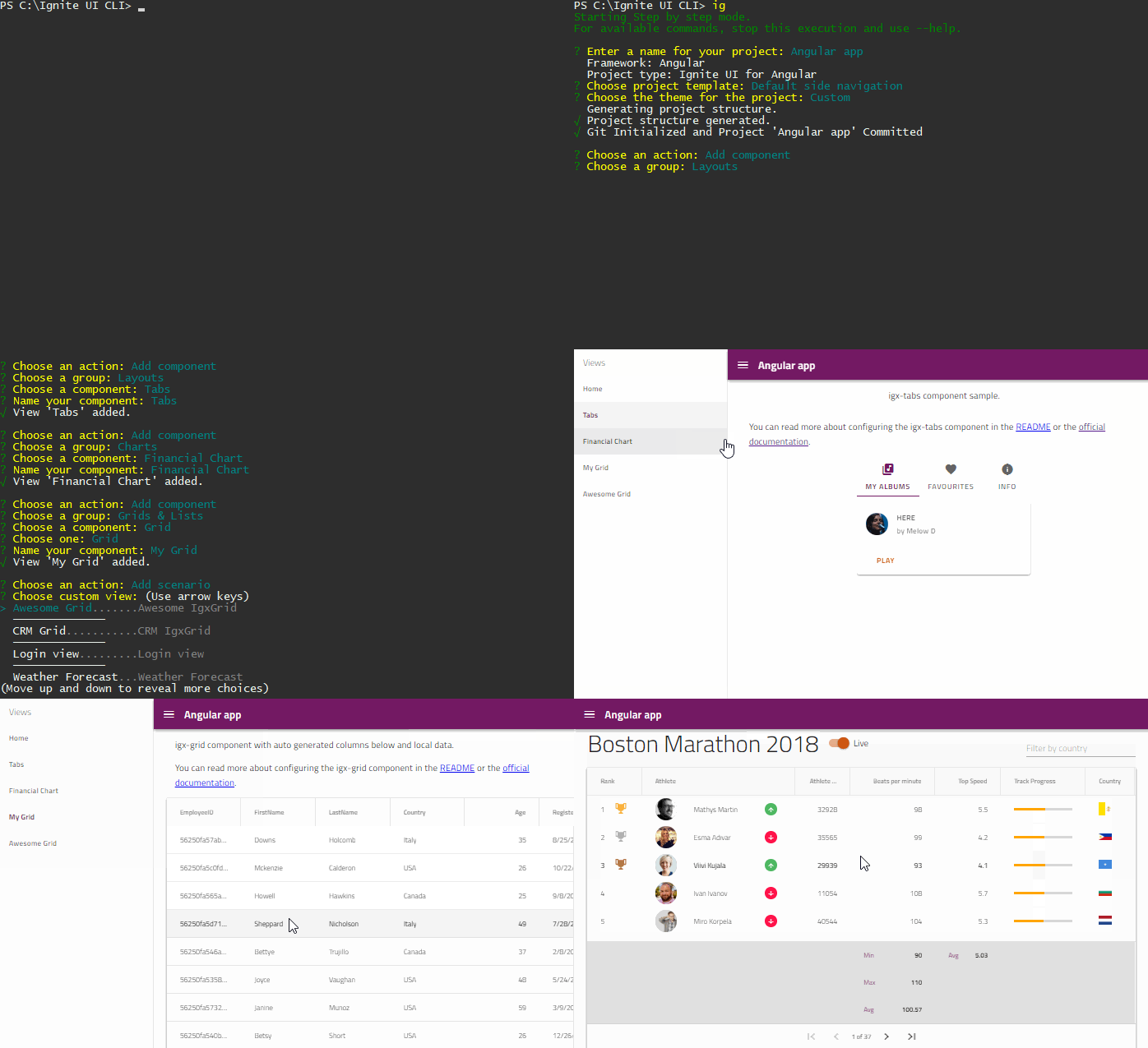
To get started with the Ignite UI CLI and Ignite UI for Angular:
npm i -g igniteui-cli
ig new <project name> --framework=angular
cd <project name>
ig add grid <component name>
ig start
Adding IgniteUI for Angular to Existing Project
Including the igniteui-angular and igniteui-cli packages to your project:
ng add igniteui-angular
After this operation you can use the Ignite UI CLI commands in your project, such as ig and ig add.
Learn more
Updating Existing Project
Analyze your project for possible migrations:
ng update
If there are new versions available, update your packages:
ng update igniteui-angular
...
ng update igniteui-cli
Building the Library
// build the code
ng build igniteui-angular

// build the css
npm run build:styles

// build them both
npm run build:lib
You can find the build output under dist/igniteui-angular.
Running the tests
Running the tests in watch mode:
ng test igniteui-angular // or npm run test:lib:watch
Running the tests once with code coverage enabled:
npm run test:lib
Building the API Docs
The API docs are produced using TypeDoc and SassDoc. In order to build the docs, all you need to do is run:
npm run build:docs
The output of the API docs build is located under dist/igniteui-angular/docs.
Run Demos Application
The repository includes a sample application featuring the showcasing the different components/directives. In order to run the demo samples, build the library first and start the application.
npm start
NOTE: Experimental demos are not always stable.
NPM Package
You can include Ignite UI for Angular in your project as a dependency using the NPM package.
npm install igniteui-angular
Contributing
General Naming and Coding Guidelines for Ignite UI for Angular
Demo Apps & Documentation
List of Angular Demo Apps
-
Warehouse Picklist App - Demonstrates using several Ignite UI for Angular widgets together to build a modern, mobile app.
-
FinTech Grid App - The Ignite UI for Angular Grid component is able to handle thousands of updates per second, while keeping the grid responsive for any interaction that the user may undertake. This sample demonstrates the Angular Grid handling thousands of updates per second.
-
FinTech Tree Grid App - The Ignite UI for Angular Tree Grid component is able to handle thousands of updates per second, while keeping the grid responsive for any interaction that the user may undertake. This sample demonstrates the Tree Grid handling thousands of updates per second.
-
Crypto Portfolio App - This is a web and mobile application, developed with Ignite UI for Angular components and styled with our one of a kind theming engine.
-
Task Planner Application – Task Planner is an Angular web application. It provides an effective means for managing projects and related tasks. Thus, it loads data from the Web API endpoint, enabling the user to start managing - filtering and sorting tasks, editing tasks, adding new tasks. It shows nice UX UI perks like ability to Drag and Drop items from and to the List and Data Grid.
-
Dock Manager with Data Analysis Tool - The Data Analysis sample application provides users with the flexibility to customize the data visualization using one of several chart types. Built with Angular UI components, it showcases the Angular Data Grid integrated with an Angular Data Chart, Angular Pie Chart, and an Angular Category Chart, to provide an interactive and engaging visualization. The Dock Manager web component provides a windowing experience, allowing users to customize the layout and view, and make the data more accessible.
-
COVID-19 Dashboard - This dynamic dashboard was built using Indigo.Design and Ignite UI for Angular leveraging timely reports data from CSSEGISandData/COVID-19 to create an useful and impactful visualization. Built in a matter of hours, it showcases the Ignite UI Category and Data Charts, Map and List components for Angular and the how easy it is to get those quickly configured and populated with data.
-
Inventory Management App - The Inventory Management App consists of 2 pages: The Products Page and the Dashboard Page. The Products Page contains a grid with product information and includes a number of useful features
Angular apps with ASP.NET Core Web Application
If you consider Angular client side application with ASP.NET Core application you can check out our ASP.NET-Core-Samples
Documentation
To get started with the Data Grid, use the steps in the grid walk-through.
All help, related API documents and walk-throughs can be found for each control here.
Roadmap
Support
Developer support is provided as part of the commercial, paid-for license via Infragistics Forums, or via Chat & Phone with a Priority Support license. To acquire a license for paid support or Priority Support, please visit this page.
Community support for open source usage of this product is available at StackOverflow.
License
This software package is offered under a dual-license model, which allows for both commercial and permissive open-source use, depending on the components, modules, directives, and services being used.
It is crucial to understand which license applies to which part of the package.
© Copyright 2025 INFRAGISTICS. All Rights Reserved. The Infragistics Ultimate license & copyright applies to this distribution. For information on that license, please go to LICENSE.
Questions
What is igniteui-angular?
IgniteUI/igniteui-angular is a public repo on GitHub by IgniteUI. Ignite UI for Angular is a complete library of Angular UI components with the fastest grids and charts, dock manager, and more.
Is igniteui-angular open source?
It declares no license on GitHub. Public does not mean open source: without a license, nobody is granted the right to reuse it.
Does igniteui-angular run on macOS, Windows or Linux?
Its maker has not tagged a system, so it is unknown here. Its README says what it needs.
How do I install igniteui-angular?
Open "Take it" on its page: Take My Repo writes an install plan for your machine and hands it to your AI agent (Claude Code, Codex or Cursor), which asks you before each step. Take My Repo has not tested it on any machine.
Is igniteui-angular still maintained?
Its last change on GitHub was on 2026-11-18. Take My Repo does not judge from that whether it is maintained.