defold
Defold is a completely free to use game engine for development of desktop, console, mobile and web games.
- 6.5k
- C++
- 9 h ago
Printer module for rich dialogs in your game
Repo Insality/defold-printer, read from GitHub 13 min ago. Insality has not joined Take My Repo.
Insality/defold-printer is a public repo on GitHub by Insality. Printer module for rich dialogs in your game. It declares the MIT license on GitHub. It is written mainly in Lua, has 58 stars and last changed on 2026-07-01. Nobody has reviewed it on Take My Repo yet, which says nothing about its quality. Read from GitHub on 2026-11-26.
A symbol-by-symbol text writer for Defold Engine. Developed for rich game dialogs. Support UTF-8 symbols (via utf-8.lua). So Russian and other 2+ bytes symbol languages are supported.
Add library to dependency:
https://github.com/Insality/defold-printer/archive/refs/tags/1.2.2.zip
If you use Defold version less than 1.7.0 use this version:
https://github.com/Insality/defold-printer/archive/refs/tags/1.1.0.zip
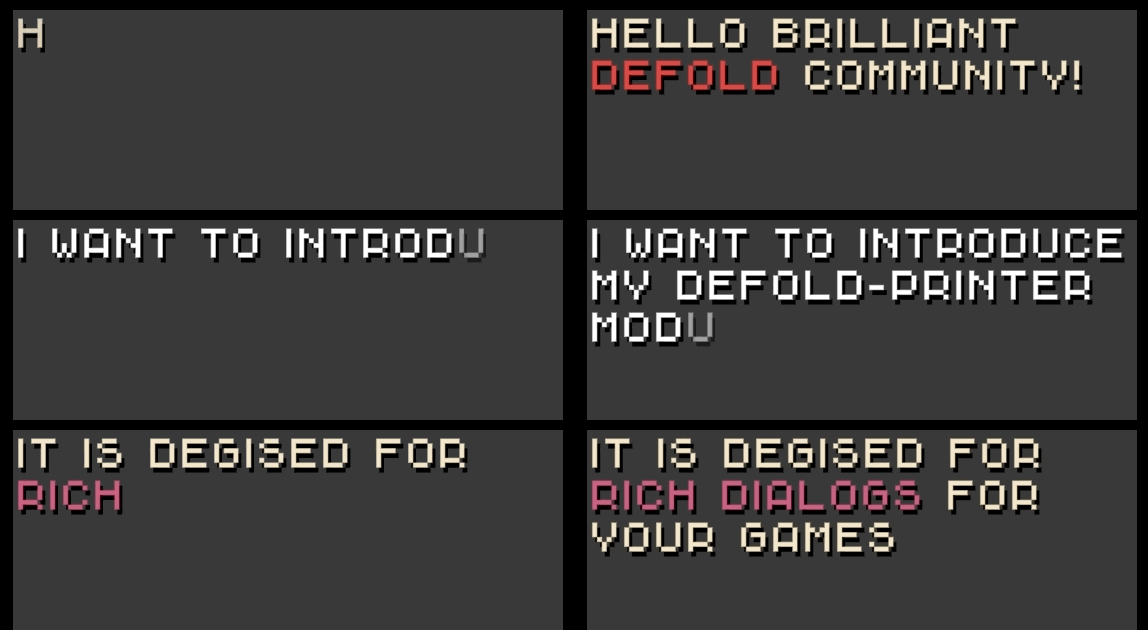
Place printer template on you gui scene. Setup font of text and set size of printer background.
Text will appearing from top-left of this background. You can setup alpha of this node to see text area.
setup in gui module:
local printer = require "printer.printer"
function init(self)
	self.printer = printer.new(self, template_name)
end
function update(self, dt)
	self.printer:update(dt)
end
function final(self)
	self.printer:final()
end
And usage will be like this:
self.printer:print("This is just simple text")
Style is lua table with parameters. The default style is the following:
default = {
	font_height = 28,
	spacing = 1,
	scale = 1,
	waving = false,
	color = "#FFFFFF",
	speed = 0.05,
	appear = 0.01,
	shaking = 0,
	sound = false,
	can_skip = true,
	shake_on_write = 0,
}
These parameters must be present in your default or source style.
font_height in pixels, height of every symbol or image - also used to determine new line positionspacing in pixels, horizontal distance between symbolsscale set scale of every symbol to this valuecolor hex color code for every symbol the style applies to (ex. "#CACACA")speed in seconds, the time between each symbol printingappear in seconds, the speed of a symbol fading in via gui.animate from alpha 0 -> 1shaking in pixels, the amount to shake every symbol the style applies to.can_skip if false, printer.instant_appear is disabled while text with this style appearssound string. Name of the sound played when a symbol appears. TO-DO: Need to rewrite printer.play_sound function.waving set true to enable waving symbol effectshake_on_write when true, shake all text symbols when any symbol begins appearingTo setup your styles, use printer.add_styles( {styles} ). Styles is array of lua tables with style parameters. We will refer to any key of this array as a 'stylename'.
All new printed text uses the default style initially. To change it, enclose a stylename with { and } before the affected text.
{my_style}This is styled text
Use {/} to stop using the previously specified style. Example:
{my_style}This is styled text. {/}But this no
Use {n} to add a line break. Example:
This row on first line.{n}This line on second line
You can mix many styles in one row. Example:
{Illidan_name}Illidan{/}: you are {red}not {waving}prepared{/}!
In the above example, for the word 'prepared' - any styles from {red} that also exist in {waving} will be overwritten by {waving}. However, parameters in {red} that do not exist in {waving} will not be affected. The style exit {/} removes the effects of all styles.
To handle next behavior, like to appear all text if it printing, or go to next text if it already showed, you can use something like this on touch event:
if self.printer.is_print then
	self.printer:instant_appear()
else
	self.index = self.index + 1
	if self.index <= #self.texts then
		self.printer:print(self.texts[self.index])
	end
end
Set up a source style to override the default style with a different style for a specific print call.
For example, set up the source:
printer.add_source_style("bob", "bob_style")
And specify the source in the print call:
printer:print("Any text you want", "bob")
Anytime the default style would be used, bob_style will be used instead.
You can predefine styles for specific strings.
For example, set up a word style:
printer.add_word_style("powerful", "cool_style")
Now, providing the following text to a print call:
The Defold is amazing, powerful engine
will print as if you provided:
The Defold is amazing, {cool_style}powerful{/} engine
Important points about word styles:
{/} at the end.Insert images in your text using {image:name} syntax.
It will place an image node and call gui.play_flipbook(node, name) to it.
Example:
printer:print("Lets trade this for 500 {image:coins}!)
Create multiple printer instances with printer.new(), using different templates.
self.printer:print("This is {red}test with red style")
self.printer:print("This is {amazing}multi-{blue}styled text")
self.printer:print("This is text with{n}new line. And image here {image:coins}")
self.printer:print("This is {red}red text and {/}return to default")
self.printer:print("This is with source to use another default style", "Illidan")
Create new printer instance to use it for print text
self gui self contextprefab_name printer template name of gui sceneStart printing text on selected instance
instance printer instance, created by printer.newtext string, text to start printingsource string, name of source to setup other default style for this textBoolean value to check, if printer now printing text or not
Make all nodes for the current text visible immediately.
instance printer instance, created by printer.newClear all current printed text.
instance printer instance, created by printer.newThis function is called whenever a symbol is printed. To play sound, you should override this function with your sound implementation.
name string, name of played sound --> really just a container for whatever argument you might need here.
For a more complex implementation tied to the printer, create an external function and call it from here.Add custom styles to printer module
styles lua table with style parameters. Elements are: {style_id: {params}}Add a source style to printer module.
source string, source id needed to index added style as source param in printer.print functionstyle string, style idAdd a word style to printer module.
word string, word to wrapped with specified stylestyle string, style idUse in the gui update() function to update the printer instance.
self gui self contextdt dt parameter from update scriptUse in the gui final() function to correct final printer component.
self gui self contextInsality
My code is under MIT license
utf8 module MIT
Insality/defold-printer is a public repo on GitHub by Insality. Printer module for rich dialogs in your game.
It declares the MIT license on GitHub.
Its maker has not tagged a system, so it is unknown here. Its README says what it needs.
Open "Take it" on its page: Take My Repo writes an install plan for your machine and hands it to your AI agent (Claude Code, Codex or Cursor), which asks you before each step. Take My Repo has not tested it on any machine.
Open-source 2D skeletal animation editor for games and film. AutoRig layered PSDs, animate with meshes, IK and physics, lip-sync from audio, render video, export JSON/.skel. JavaScript, Rust, Godot and Unity runtimes. Built-in MCP server for AI assistants. Docs: rigby2d.com/docs
Its last change on GitHub was on 2026-07-01. Take My Repo does not judge from that whether it is maintained.
Nobody has reviewed it on Take My Repo yet, which says nothing about its quality.
Take My Repo cannot say: it does not audit code and has not run defold-printer. What is known comes from GitHub. It declares the MIT license on GitHub. Its last change was on 2026-07-01. It has 58 stars, which measure popularity, not safety. Nobody has reviewed it on Take My Repo yet, which says nothing about its quality. Read the source before you run it. With "Take it", your AI agent shows each step and asks you before running it; README text is treated as data, not as instructions.