
javascript-notes-for-java-developers
Repository that contains my notes about javascript
- 0
- 6 y ago
Repo JavaZakariae/javascript-notes-for-java-developers, read from GitHub 9 min ago. JavaZakariae has not joined Take My Repo.
In short
JavaZakariae/javascript-notes-for-java-developers is a public repo on GitHub by JavaZakariae. Repository that contains my notes about javascript. It declares no license on GitHub. Public does not mean open source: without a license, nobody is granted the right to reuse it. It is written mainly in JavaScript, has 0 stars and last changed on 2020-10-10. Nobody has reviewed it on Take My Repo yet, which says nothing about its quality. Read from GitHub on 2026-11-24.
javascript-notes for Java Developers
This is a repository that contains my notes about javascript, as a Java Developer I omitted many part of the javascript fundamentals for similarities reasons between java and Js.
To learn more about Javascript from wikipedia, visit the following link.
Types
- In Javascript, we don't declare the type of the data, for example we can declare and initialize a number variable like that
var n=1, later in the program we can also change the type of the variablen="nowitisastringvariable". In java for example we need to declare it as follows:int n=1, later in the program we can't change the type ofn. - Javascript is a dynamically typed language, to learn more, check the following links: 1, 2.
There are two categories of javascript data, the primitive data types and the complex data types.
Primitive Values
number: one type for decimals and floats,
var n=3.14.string:
"str1",'str2', `str3`boolean: true or false
undefined: When we create a variable without assigning a value to it, its value will be undefined, its type also will be undefined.
null: means an empty value,
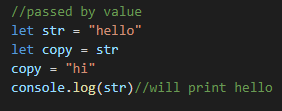
var n=null, the value of n will be null and the type ofnwill be object.Primitives types are passed by value:
Complex Values
There are two types in this category, arrays and objects.
array:
[1,'str1',true], arrays are0indexed, they can contains heterogenous types, objects type included:[1,'str1',true, {key1: 1.5}].object:
{key1:"value1", key2: 1.5, key3: true}Complex types are passed by reference:

NaN
- Returned anytime a method expect a number input, and the caller pass a non number, the following expression will return
NaN:Math.sqrt('Mehdi the special one') typeof NaNwill return number.- To check if a given value is of type NaN, we can use the function
isNaN(Math.sqrt('Mehdi the special one)). - keep in mind that
console.log(NaN == NaN)will result to false.
Comparison Operators
45 == 45will return true, we check if the two are equal.45 === "45"will return false, we check if both are equal and their type is the same, it is called the strict equal.5 != "5"will return false, we check if the two numbers are not equal.5 !== "5"will return true, we check if the two numbers are not equal or they don't have the same type.
Functions
- function declaration:
function functionName(param1, param2){ //body of the function // the possibility to return a value //the returned value can be of any type, even a function } - a return keyword without an expression after it, will cause the function to return undefined, the samething happens when we don't have a return statement.
- If we pass too many parameters to a function, the extra ones are ignored, if we pass too few, the missing parameters get assigned undefined as a value.
Strong, Weak, Dynamic ans Static language
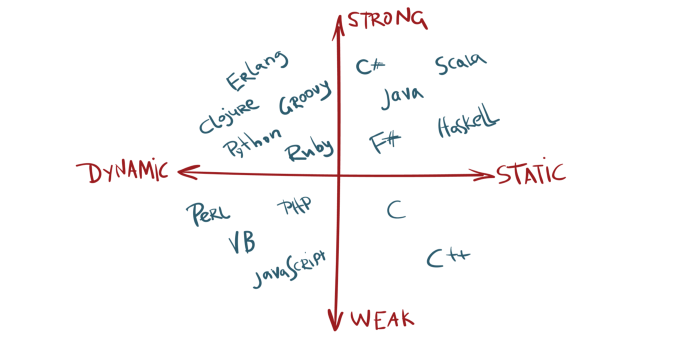
- JavaScript is a weakly dynamic language, to read more about that, check the following links: 1, 2, 3.
Type Coercion
Explicit Coercion:
String(10)will return a string data type.Number("1")will return a number data type.Boolean("string")
Implicit Coercion:
- performed by javascript behind the scene,
"5"/2will return2.5.
Scopes
Global scope, local scope, block scope, function hoising, function scope, nested scopes
Using the
varkeyword, we can create two variables with the same name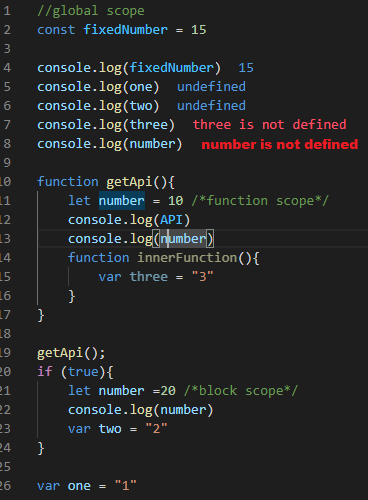
As we can see in the above example, the variable
oneis a global variable and can be accessed from anywhere, thenumbervariable declared withletkeyword is local to its function and can not be accessed globally, the variablethreeeven with thevarkeyword can not be accessed globally because its scope is the same as the functioninnerFunction()and can only be accessed inside the getApi function. For more details about scopes, visit the following links, 1, 2.For those reasons, it is recommended to use the
letor theconstkeywords whenever possible.
Closures
- A closure gives you access to an outer function's scope from an inner function, for more details check 1, 2.
- More on closure, here.
This
ES6
var keyword
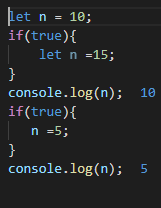
If a variable is declared inside a function, this variable can not be accessed outside the function. We say the variable has a function scope. In case, it is declared inside a block, we say that is block scoped variable and it can be accessed outside of the scope
let keyword
- We can't declare two variable with the same name inside the same scope, the variable declared with let is said to be block scoped, an example to make it more clear. let
Arrow functions
Map this keyword without using the bind method.
Shorter and concise code.
Code hard to read.
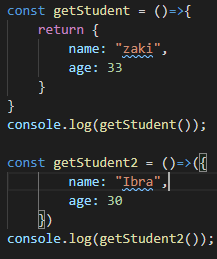
Two ways to write arrow functions
Template literals
destructuring
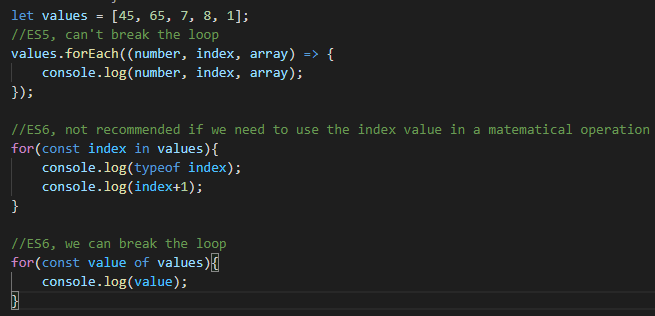
for loop
Arrays utilities methods
Spread operator
Promise
- Articles about Promise: medium,mozilla,about Promise race,4, promise-api.
- Examples
- async and await
- async and await:
Articles
Questions
What is javascript-notes-for-java-developers?
JavaZakariae/javascript-notes-for-java-developers is a public repo on GitHub by JavaZakariae. Repository that contains my notes about javascript.
Is javascript-notes-for-java-developers open source?
It declares no license on GitHub. Public does not mean open source: without a license, nobody is granted the right to reuse it.