
opc-hub
Web front end over OPC UA servers - browse, read, write and subscribe to nodes, with users, roles and access control. C++ back end, Angular site, Windows and Linux installers.
- 2
- Apache-2.0
- 4 d ago
Repo Jde-cpp/opc-hub, read from GitHub 23 h ago. Jde-cpp has not joined Take My Repo.
In short
Jde-cpp/opc-hub is a public repo on GitHub by Jde-cpp. Web front end over OPC UA servers - browse, read, write and subscribe to nodes, with users, roles and access control. C++ back end, Angular site, Windows and Linux installers. It declares the Apache-2.0 license on GitHub. It is written mainly in C++, has 2 stars and last changed on 2026-11-19. Nobody has reviewed it on Take My Repo yet, which says nothing about its quality. Read from GitHub on 2026-11-22.
opc-hub
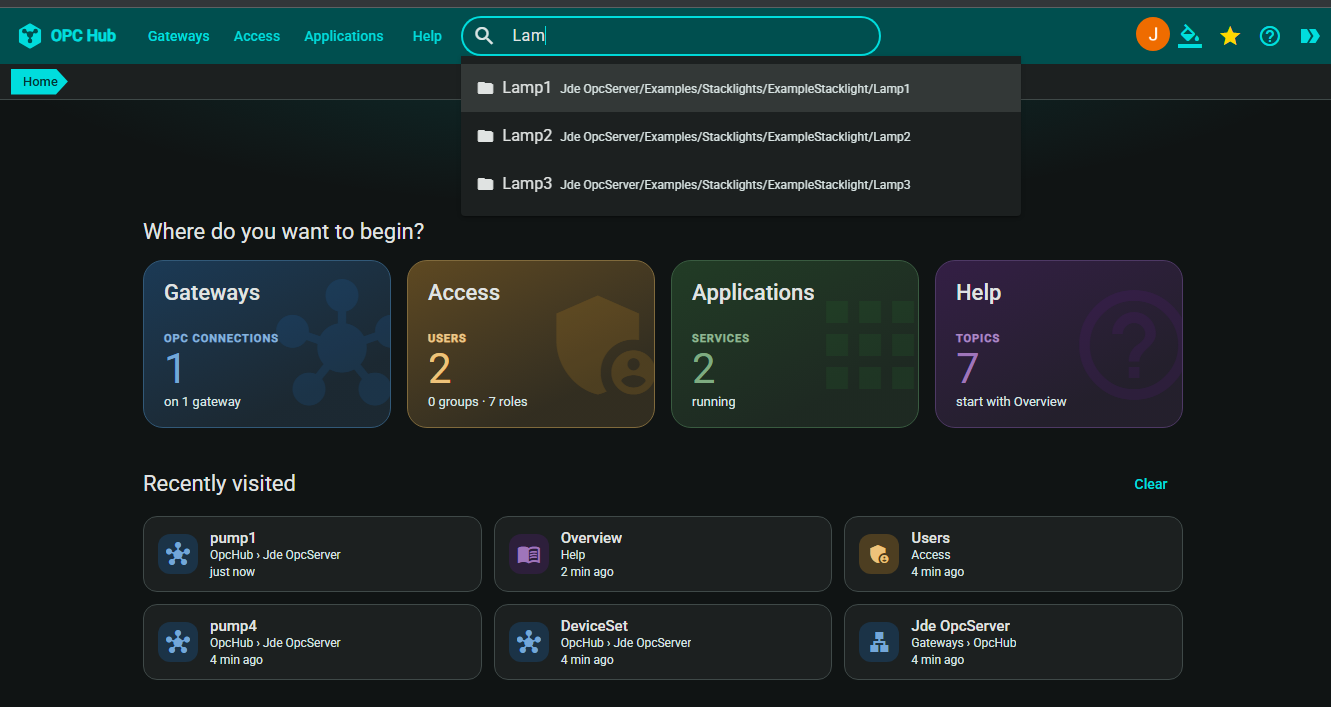
OPC Hub is an Angular web front end over OPC UA servers, with a C++ back end.
It browses a server's address space and reads, writes and subscribes to its nodes.
It also records node values over time, and shows that history as a table and, with the Highcharts add-on, a trend.
Users, groups, roles and resources say who may reach what.
The site talks to the back end over GraphQL and a protobuf websocket.
The database is SQLite by default. MySQL and SQL Server are also supported.
An OPC UA server of our own, Jde.Opc.Server on open62541, ships beside it as a first
connection.

A subscribed node streams its value. Here status is written off and on, and motorRpm winds down and back up. The
values come from the PLC emulator (apps/OpcServer/emulator), which is built from
the repo; the installers do not ship it.

Install
Each release carries three assets:
OpcHubSetup-<version>.exe- Windows. Services for all users, or a per-user install without administrator rights.jde-opchub_<version>_amd64.deb- Ubuntu 24.04 or later, with systemd units.jde-opchub-<version>-linux-amd64.tar.gz- Linux without root, withsystemctl --userunits.
The installers use SQLite, created on the first start. There is no database server to set up.
- Install it: run
OpcHubSetup-<version>.exe, orsudo apt install ./jde-opchub_<version>_amd64.deb. - Browse to http://localhost:1967/ (from another machine,
http://<hub>:1967/, for an all-users or root install). - Log in. With the OPC UA Server component the login is Google, and the bundled server is already a connection.
Without it, add your own server under Applications > OpcHub > Connections while still signed out, have the two sides
trust each other's certificates, then sign in as
<slug>\<user>with that user's password on the server. The site's Overview help walks it as First steps.
The full walk is apps/OpcHub/README.md (Install). It covers the install modes, the firewall
and ports, IIS or nginx in front, what each installer lays down and what an uninstall leaves behind.
Then read apps/OpcHub/setup/README.md for Windows and
apps/OpcHub/setup/linux/README.md for the .deb and the tarball.
The Code signing policy says which Windows files are signed, who signs them, and what the software sends over the network.
What is here
apps/OpcHub |
the product: the AppServer and the OpcGateway linked into one exe, its installers under setup/ |
apps/OpcGateway |
the gateway role: OPC UA client sessions, browse/read/write/subscribe, the server connections and the OPC login |
apps/AppServer |
the application server: sessions, the app registry, log collection |
apps/OpcServer |
our OPC UA server: the DI/IA nodesets plus a pumps demo address space; under emulator/, a PLC stand-in that feeds it moving values |
libs |
fwk (coroutines, io, settings, logging, crypto), db (schema and query layer; sqlite, mysql and odbc drivers), ql (GraphQL over db), access (users, groups, roles, resources), web (HTTP and websocket client and server), app (the app protocol between services), calendar (the shift calendar), opc (the open62541 client wrappers under shared/, the UA server core under server/), historian (node history), oee (OEE over the historian's records and the calendar) |
include/jde |
the libraries' public headers |
web |
the Angular site: four libraries, spa → framework → access → opc, the generated proto package, and the application under web/opc/site |
build |
the third-party superbuild (build/CMakeLists.txt), the cmake helpers and the shell build functions |
extensions/jde |
a VS Code extension with the build-directory commands the workspaces use |
.github |
the workflows and the self-hosted Linux runner's image |
The gateway and the AppServer still build standalone, for split deployments of N gateways per AppServer.
Building
The build is C++26 and CMake 4.2.3 or later. On Linux (Ubuntu 24.04 or later) the compiler is clang 23 with libc++.
On Windows it is LLVM's clang with the VS 2026 toolset's runtime, and openssl and sqlite3 come from vcpkg
(vcpkg.json).
Every configure is a preset in CMakePresets.json, OS-split into CMakePresets.Linux.json and
CMakePresets.Windows.json. The -repos presets build the third-party tree and the -jde presets build this repo.
Both compile with -march=x86-64-v3 -mpclmul -maes (cpuFlags in CMakePresets.common.json).
The -repos and -jde presets read REPO_DIR, the dependency root and not this checkout. They set CXX to
clang++ themselves. The deps install under $REPO_DIR/install/clang++/<Debug|RelWithDebInfo|Release>.
The Linux presets set no build directory, so -B picks it. By convention it is
$JDE_BUILD_DIR/$JDE_COMPILER/<checkout>/<debug|release>.
The Windows presets set it themselves under $JDE_BUILD_DIR, and also read VCPKG_ROOT.
# the third-party tree, once - fmt, spdlog, gtest, absl, protobuf, jsonnet, ryml, open62541 + its nodeset loader,
# quickjs-ng; the build dir is your choice, the install lands under $REPO_DIR/install
cmake -B $REPO_DIR/build/debug -S . --preset linux-clang-debug-repos && cmake --build $REPO_DIR/build/debug -j 8
# Boost and the sqlite amalgamation are built by build/boost-sqlite.sh

# the repo - `-B` is required: the Linux presets set no binaryDir
B=$JDE_BUILD_DIR/$JDE_COMPILER/opc-hub/debug
cmake -B $B -S . --preset linux-clang-debug-jde
cmake --build $B -j 8
cd $B && ctest --output-on-failure   # in-memory sqlite, no db server; -DJDE_TEST_TIMEOUT=<s> sets the per-suite limit
The release build is linux-clang-relWithDebInfo-jde (win-clang-release-jde on Windows), which is what the installers
pack. build/buildFunctions.sh wraps the same commands as reconfig, build and compile for the VS Code tasks.
To run the hub from the build tree, export the two variables the sqlite args expand. ctest sets them itself.
$JDE_DIR is this checkout and $B is the build dir from above. The mkdir covers a raw configure, which does not
make runtime the way reconfig does.
export REPO_SOURCE_DIR=$JDE_DIR REPO_BUILD_DIR=$(dirname $B)
mkdir -p $B/runtime/logs && cd $B/runtime
$B/apps/OpcHub/exe/Jde.Opc.Hub -c -tests -settings=$JDE_DIR/apps/OpcHub/config/Opc.Hub.jsonnet \
  -include=args/sqlite -arg path=<file>
The site
web/opc/my-workspace is generated, not tracked: web/opc/scripts/setup.sh scaffolds it
with ng new, links the four libraries and the site in, and runs ng build. Then, from the workspace, ng serve
(http://localhost:4200, against a hub on 1967) and ng test (Vitest).
CI and releases
| workflow | when | what |
|---|---|---|
| Linux | every push to main, or by hand on any branch |
the self-hosted containerised runner (.github/docker): a Debug build and ctest |
| Win11 | by hand | the self-hosted Windows workstation: a Debug build and ctest |
| Win2025 Deps | by hand on main, before the first Win2025 run and after any dependency or preset bump |
the hosted windows-2025 image: builds the third-party tree and caches it |
| Win2025 | a 20* tag push, or by hand |
the site, then the release build against the cached deps and the installer; fails if the cache is missing |
| Linux Release | a 20* tag push, or by hand |
the site on a hosted runner, then the release build, the .deb and the tarball on the self-hosted one |
| Web Tests | a pull request or a push to main that touches web/, a .proto or CMakePresets.common.json, or by hand |
a hosted runner: the site's build, then ng test over every project |
| Linked Issue | every pull request | fails one that closes no issue and is not Part of #N one, unless it carries the no-issue label |
| Runner Version Check | Mondays 13:00 UTC, or by hand | a hosted runner: fails when the runner version pinned in .github/docker is stale |
A push of a yyyy.MM.dd tag runs Win2025 and Linux Release, which publish all three assets on that tag's GitHub release.
The version is JDE_VERSION in CMakePresets.common.json.
License
Apache-2.0 - LICENSE. The notices of the third-party code inside the shipped binaries are in
THIRD-PARTY-NOTICES.txt, generated by build/third-party-notices.sh; the installers and
the site's About page carry it.
Questions
What is opc-hub?
Jde-cpp/opc-hub is a public repo on GitHub by Jde-cpp. Web front end over OPC UA servers - browse, read, write and subscribe to nodes, with users, roles and access control. C++ back end, Angular site, Windows and Linux installers.
Is opc-hub open source?
It declares the Apache-2.0 license on GitHub.
Does opc-hub run on macOS, Windows or Linux?
Its maker tagged it for macOS, Windows and Linux, or as Docker or cross-platform. That is declared by the maker; Take My Repo has not tested it.
How do I install opc-hub?
Open "Take it" on its page: Take My Repo writes an install plan for your machine and hands it to your AI agent (Claude Code, Codex or Cursor), which asks you before each step. Take My Repo has not tested it on any machine.
Is opc-hub still maintained?
Its last change on GitHub was on 2026-11-19. GitHub counts 63 open issues and pull requests. Take My Repo does not judge from that whether it is maintained.



